EE1 - Digital Camera OLYMPUS - Free user manual and instructions
Find the device manual for free EE1 OLYMPUS in PDF.



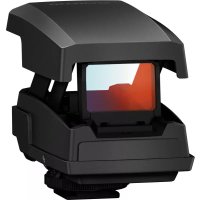
| Product type | Digital camera |
| Brand | Olympus |
| Model | EE1 |
| Target indicator | Red |
| Power supply | 1 CR2032 lithium battery |
| Weight (with battery) | 72.2 g |
| Dimensions (L × H × D) | Approx. 46.2 × 39.3 × 77.1 mm |
| Main functions | Laser aiming, target brightness adjustment, horizontal and vertical aiming positioning |
| Care and cleaning | Avoid moisture, clean with a dry, soft cloth |
| Safety | Do not expose batteries to heat, do not short-circuit, keep out of reach of children |
| Spare parts and repairability | Replaceable CR2032 battery, contact an authorized Olympus distributor or repair center |
| General information | Accessory to attach to the hot shoe, compatible with certain camera bodies and lenses |
Frequently Asked Questions - EE1 OLYMPUS
User questions about EE1 OLYMPUS
0 question about this device. Answer the ones you know or ask your own.
Ask a new question about this device
Download the instructions for your Digital Camera in PDF format for free! Find your manual EE1 - OLYMPUS and take your electronic device back in hand. On this page are published all the documents necessary for the use of your device. EE1 by OLYMPUS.
USER MANUAL EE1 OLYMPUS
date of issue 2015.01.
WC887001
Printed in China
OLYMPUS®
EE-1
CE
04 - JP 取极説明書
06 - EN INSTRUCTIONS
09 - INSTRUCCIONES
42 MODE D'EMPLO
12 - IN MODE D'EMPI
13 - IN KUSTROVISHU
16 - ВС ИНСТРУКЦИЙ
18 - CS NÁVOD K POUŽITI
20 - DE BEDIENUNGSANLEITUNG
22 - BETJENINGSVEJLEDNING
24. JUHISED
24 - J. SÜMBED
26 - J. KÄYTTÖOH IEEF
20 - 31 KATTTOCHSLEY
20 - 41 CAUJEEE
28 - EL OДНПЕЗ
30 - HR UPDATE
32 - HASZNÁLATI ÚTMUTATÓ
34 - ISTRUZIONI
26 UNSTRUKCUA
36 - INSTRUKCIJA
38 - LV NORADIJUMI
40 - NL INSTRUCTIES
42 - INSTRUKSJONER
44 - PL INSTRUKCJA
46 - PT INSTRUCÕES
48 - RO INSTRUCTIUNI
50 - SE UPUTSTVO ZA UPOTREBU
50 - 61 ОРОТЯНО ЗА
52 - 71 ИНСТРУКЦИЯ
52 - КИ ИНСТРУКЦИЯ
54 - РУДИКРАНИЯ
54 - BRUKSANVISNING
56 - SL NAVODILA
58 - SK NÁVOD NA POUŽITIE
60 - IN TALIMATLAR
62 - ЧИЙНСТРУКЦЯ
65 W: such as
65 - AIR إرسées
66-TH ตําแนะนําการใช้งาน
68-Ⅱ회급설명서
70-使用說明書
■
UP 取报説明書
Thank you for purchasing this Olympus product. To ensure your safety, please read this instruction manual before use, and keep it handy for future reference.
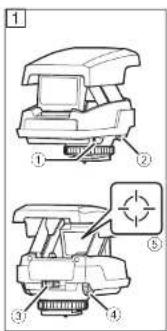
Name of parts (Figure 1)
① Target brightness adjustment dial
② Sight horizontal positioning dial
③ Pop-up switch
④ Sight vertical positioning dial
⑤ Target indicator
Inserting the Battery
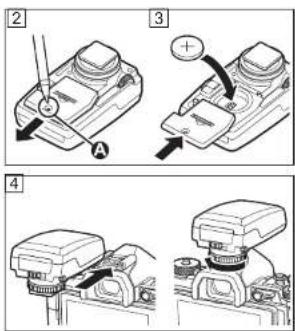
Insert a pen or other object into part (A) and open the battery compartment cover (Figure 2). Insert the battery in the orientation shown and close the cover (Figure 3). The supplied battery is for test purposes only.
Use
Mount the product on the camera hot shoe (Figure 4). Press the pop-up switch to ready the sight and rotate the target brightness adjustment dial to adjust brightness. Rotating the dial to OFF turns the product off, as does returning the sight to the closed position. Use
6 EN
the sight positioning dials to position the target while viewing the subject in the camera monitor.
Precautions for Use
- Do not use excessive force.
- When replacing the battery, be careful that water does not enter the battery compartment.
- Some lenses and cameras may interfere with operation when the device is attached. In addition, some lenses and hoods may obstruct the target.
Main Specifications
Target indicator : Red
Power source : One (1) CR2032 lithium battery Weight : 72.2 g (2.5 oz.)
(including
Dimensions : Approx. 46.2 (W) × 39.3 (H) × 77.1 (D) mm (1.8 × 1.5 × 3.0 in.)
* Specifications are subject to change without any notice or obligation on the part of the manufacturer.
Precautions: Be Sure to Read the Following

Warnings: Safety Precautions
- Do not use the product if the battery compartment cover can not be completely closed.
- Keep the product and battery out of reach of children.
- Observe all necessary precautions when handling batteries. Batteries may leak, overheat, or rupture if improperly handled. When inserting batteries, be sure they are in the correct orientation.
- Under no circumstances should you expose batteries to heat or to open flame or disassemble, short-circuit, or attempt to recharge batteries. These actions are extremely dangerous and could cause the batteries to overheat, catch fire, or rupture.
- Consult a physician immediately should swallow or otherwise ingest a battery.
- Should you notice smoke or an unusual smell coming from the product, cease use immediately and contact an authorized distributor or Olympus service center.
This product uses a Lithium Battery which contains Perchlorate material - special handling may apply.
See www.dtsc.ca.gov/hazardouswaste/perchlorate/.
• Technical Support (U.S.A. / Canada)
24/7 online automated help : http://www.olympusamerica.com/support Phone customer support :
Tel.1-800-260-1625 (Toll-free)
Our phone customer support is available from 9 am to 9 pm (Monday to Friday) ET
E-Mail : distec@olympus.com
For customers in Europe

The “CE” mark indicates that this product complies with the European requirements for safety, health, environment and customer protection. CE-mark products are for sale in Europe.
This symbol [crossed-out wheeled bin WEEE Annex IV] indicates separate collection of waste electrical and electronic equipment in the EU countries.
Please do not throw the equipment into the domestic refuse.
Please use the return and collection systems available in your country for the disposal of this product.

This symbol [crossed-out wheeled bin Directive 2006/66/EC Annex II] indicates separate collection of waste batteries in the EU countries. Please do not throw the batteries into the domestic refuse. Please use the return and collection systems available in your country for the disposal of the waste batteries.
• European Technical Customer Support
Please visit our homepage
http://www.olympus-europa.com
or call: Tel. 00800 - 67 10 83 00 (Toll-free)
+49 40 - 237 73 899 (Charged)
ES INSTRUCCIONES
SR UPUTSTVO ZA UPOTREBU
Hvala vam što ste kupili Olympus proizvod.