
KDC-BT53U - Car stereo KENWOOD - Free user manual and instructions
Find the device manual for free KDC-BT53U KENWOOD in PDF.



User questions about KDC-BT53U KENWOOD
0 question about this device. Answer the ones you know or ask your own.
Ask a new question about this device
Download the instructions for your Car stereo in PDF format for free! Find your manual KDC-BT53U - KENWOOD and take your electronic device back in hand. On this page are published all the documents necessary for the use of your device. KDC-BT53U by KENWOOD.
USER MANUAL KDC-BT53U KENWOOD
KDC-BT73DAB KDC-BT53U KDC-5057SD
CD-RECEIVER
Quick Start Guide
AMPLI-TUNER LECTEUR DE CD
Digital Audio Broadcasting

Bluetooth

aha

Made for

iPod iPhone

Designed for
Windows
MediaTM


Contents
About the Quick Start Guide. 2
Before use 2
Preparations 4
General operations. 5
Playing music (CD/USB/SD/iPod) 6
Listening to the radio/Digital radio. 8
Hands-free phoning 9
Before installation. 10
Connecting wires to terminals. 12
Installing/Removing the unit. 14
Installing the Microphone unit 15
Installing the Digital radio antenna. 15
Appendix. 19
About the Quick Start Guide
This Quick Start Guide describes basic functions of this unit.
For functions not described in this Guide, refer to the Instruction Manual on the following website:
manual2.jvckenwood.comedition/im362/
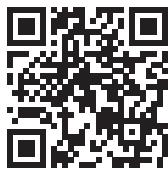
To refer to the Instruction Manual, a browser such as Internet Explorer® 7 or later, Firefox® 3.6 or later, Chrome™ 20 or later, Safari® 5.1 or later, iOS Safari® 4.0 or later, or Android™ 2.2 or later is required.
Before use
WARNING
To prevent injuries or a fire, take the following precautions:
- Stop the car before operating the unit.
- To prevent a short circuit, never put or leave any metallic objects (such as coins or metal tools) inside the unit.
CAUTION
- Adjust the volume so that you can hear sound outside the car. Driving with the volume adjusted to a too high level may cause an accident.
- Wipe off the dirt on the panel with a dry silicon or soft cloth.
Failure to observe this precaution may result in damage to the monitor or unit.
Cleaning the connector
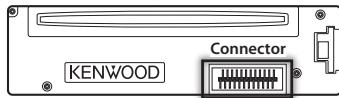
The unit may not function properly if the connector between the unit and faceplate are dirty. Detach the faceplate and clean the connector with a cotton swab gently, being careful not to damage the connector.
Condensation
When the car is air-conditioned, moisture may collect on the laser lens. This may cause disc read errors. In this case, remove the disc and wait for the moisture to evaporate.
Notes
If you experience problems during installation, consult your Kenwood dealer.
- When you purchase optional accessories, check with your Kenwood dealer to make sure that they can work with your model and in your area.
- Characters that conform to ISO 8859-1 can be displayed.
- Characters that conform to ISO 8859-5 or ISO 8859-1 can be displayed. Refer to "Russian" of <12-7 . Initial settings> (Instruction Manual).
The Radio Data System feature won't work where the service is not supported by any broadcasting station.
- USB rating is indicated on the main unit under the detachable faceplate.
About the discs used with this unit
- This unit can only play the CDs with


The following discs cannot be used:
- A disc that is not round
- A disc with coloring on the recording surface or a disc that is dirty
- A recordable/rewritable disc that has not been finalized (For the finalization process, refer to the instruction manual that came with your disc writing software or your disc recorder.)
- An 8 cm (3 inch) disc (An attempt to insert using an adapter can cause malfunction.)
Handling discs
- Do not touch the recording surface of the disc.
- Do not stick tape etc. on the disc, or use a disc with tape stuck on it.
- Do not use any accessories for the disc.
- Do not use any solvents to clean discs. Use a dry silicon or soft cloth.
- Clean the disc by moving the cloth outward from the center of the disc.
- When removing a disc from this unit, pull it out horizontally.
- If the center hole or outside rim of a disc has burrs, remove them before inserting a disc.
How to reset your unit
If the unit fails to operate properly, press the Reset button. The unit returns to the factory settings.
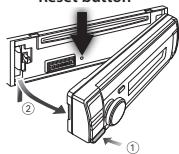
Reset button
The illustrations of the display and panel appearing in this manual are examples used to explain more clearly how the controls are used. Therefore, what appears on the display in the illustrations may differ from what appears on the display on the actual equipment, and some of the images on the display may be inapplicable.
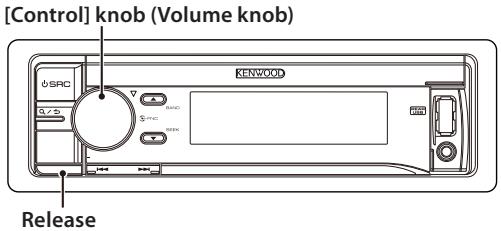
Canceling the Demonstration mode
Cancel the Demonstration mode when you use the unit for the first time after installation.
1 Press [Control] knob to cancel the Demonstration mode when the message "To cancel DEMO Press the volume knob" appears (approx. 15 seconds).
2 Turn [Control] knob to select "YES", and then press [Control] knob. The Demonstration mode can also be canceled in the Function Setting mode. Refer to < 12 - 6 . Demonstration mode setting> in Instruction manual
Detaching/ Attaching the faceplate
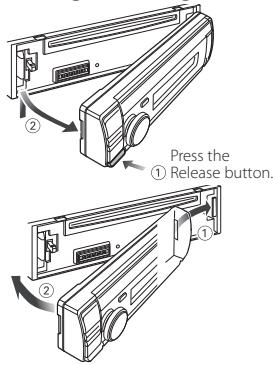

- Remove the faceplate at once after pressing the Release button; otherwise it can fall down due to vibration.
- The faceplate is a precision component of the unit and can be damaged by shocks or jolts.
- Keep the faceplate in its case while detached.
- Do not place the faceplate (and case) in areas exposed to direct sunlight, excessive heat or humidity. Also avoid places with too much dust or the possibility of water splashing.
Power
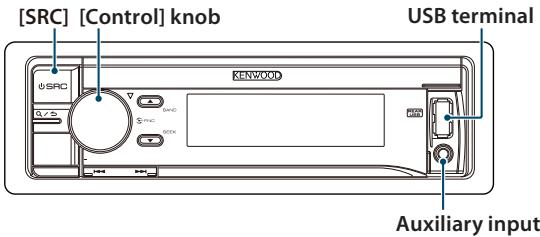
To turn the power ON, press [SRC]. To turn the power OFF, press and hold [SRC].
Source selection
Pressing [SRC] repeatedly switches among sources.
| Source | Display |
| Standby | "STANDBY" |
| Digital radio[2] | "DIGITAL RADIO" |
| Tuner | "TUNER" |
| USB device connected to front USB terminal | "USB (FRONT)" |
| USB device connected to rear USB terminal | "USB (REAR)" |
| iPod connected to front USB terminaI[1] | "iPod (FRONT)" |
| iPod connected to rear USB terminal[1] | "iPod (REAR)" |
| ahatm of iPod connected to front USB terminaI[1][2][3] | "aha (FRONT)" |
| ahatm of iPod connected to rear USB terminaI[1][2][3] | "aha (REAR)" |
| ahatm of device connected via Bluetooth[1][2][3] | "aha" |
| Bluetooth audio[2][3] | "BT AUDIO" |
| SD[1][4] | "SD" |
| CD[1] | "CD" |
| Auxiliary Input | "AUX" |
This source can be selected only when it can be played.
[2] Function of KDC-BT73DAB.
[3] Function of KDC-BT53U.
[4] Function of KDC-5057SD.
Volume
Turn [Control] knob to adjust the sound volume.
USB terminal
A USB device or iPod can be connected. The CA-U1EX (Max. 500mA) or KCA-iP102 (optional accessories) is recommended to connect a USB device or iPod.
Auxiliary input
A portable audio device can be connected with a stereo mini-plug (3.5 mm Ø).
Playing music (CD/USB/SD/iPod)
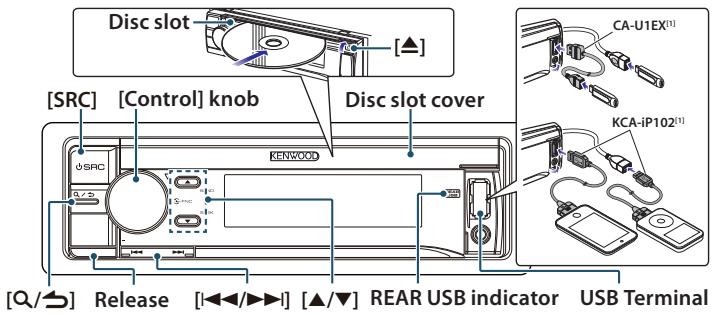
Playing a disc
Open the Disc slot cover upward. Insert a disc in the Disc slot.
When it is inserted, the source is switched automatically and playback starts.
Close the Disc slot cover.
Playing a USB device/ iPod
Connect a USB device or iPod to the USB terminal as shown above.
When it is connected, the source is switched automatically and playback starts.
You can connect the iPod or USB device to either one of the USB terminals provided at the front and rear of this unit. If you connect it to the rear USB terminal, the "REAR USB"indicator stays lit.
[1] optional accessories
Playing SD card (KDC-5057SD only)
1 Press the Release button and detach the Faceplate.
2 Hold the SD card as shown below and insert it into the SD card slot until it clicks.
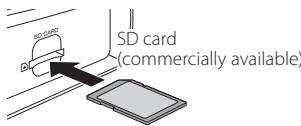
3 Reattaching the Faceplate.
4 Press [SRC] to select "SD" source.
Selecting an audio file folder
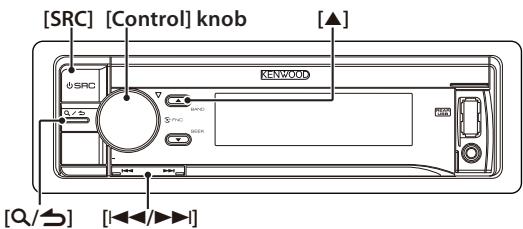
Press [▲] or [▼].
Selecting a song (track or file)
Press [I<or [▶I].
Fast-forwarding or fastbackwarding a song (track or file)
Press and hold [I] or [▶].
Pause and play a song (track or file)
Press and hold [ / ] .
Music search
You can search for the song you want to play.
1 Press [Q/].
2 Search for a song.
| Operation type | Operation |
| Selecting items | Turn [Control] knob. |
| Determining selection | Press [Control] knob. |
| Returning to previous item | Press [Q/]. |
To cancel music search in audio files or iPod, Press and hold [Q/].
Ejecting disc
Open the Disc slot cover upward, and press [▲].
Removing USB device/ iPod
Switch to a source other than USB, iPod, and Aha Radio, and then remove the USB device.
Data contained in the USB device/ iPod may be damaged if you remove it when it is used as the active source.
Removing SD card (KDC-5057SD only)
1 Press the Release button and detach the Faceplate.
2 Push the SD card until it clicks and then remove your finger from the card. The card pops up so that you can pull it out with your fingers.
3 Attaching the Faceplate.
Selecting a tuner source
Press [SRC] to select "TUNER" or "DIGITAL RADIO" (KDC-BT73DAB only). Refer to
Selecting a band (FM or AM) (Tuner only)
Press [▲].
Selecting a station/ service
Press [I▶] or [▶I].
The seek mode can be changed. Refer to <9-5. Tuner setting> or <10-9. Digital Radio setting> in Instruction manual
Station preset memory
1 Press [▲] to select a band. (Tuner only)
2 Press [▶] or [▶] to select the station/ service you want to save in the station preset memory.
3 "TUNER": Press [Q/5].
"DIGITAL RADIO": Press [Q/3] twice. Press [Q/5] again to enter the Mix Station preset mode. In this mode, different bands and tuner sources (FM, AM, Digital Radio etc.) can be saved in the same preset layer, which allows you to recall a desired station without switching between bands and/or tuner sources. Maximum of 6 stations can be preset in the Mix Station preset mode.
4 Turn [Control] knob to select preset number (FM/ Digital Radio: "1" - "18", AM: "1" - "6"), and then press and hold [Control] knob.
Recalling the stations in the memory
1 Press [▲] to select a band. (Tuner only)
2 Press [A/5].
3 Turn [Control] knob to select a preset number (FM/Digital Radio: 1^ - 1^ 18^ AM: "1" -6), and then press [Control] knob. In the Mix Station preset mode, band names of tuner sources are displayed as follows:
FM: FM broadcast station
AM:AM broadcast station
DR: Digital Radio service
Hands-free phoning
Pairing a Bluetooth device
You can pairing your Bluetooth device in this unit.
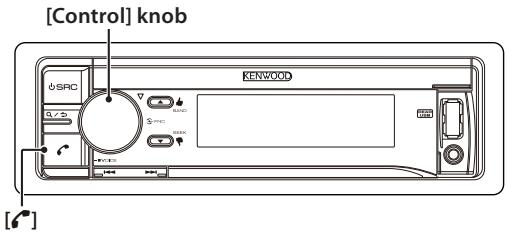
1 Operate the Bluetooth device to request this unit for connection. The name of this unit ("KDC-########") appears on the Bluetooth device. "Press the volume knob" appears.
2 Press [Control] knob. Connection to your Bluetooth device starts, "Pairing Success" appears a while later, and then the previous source is selected.
When registration of your cell phone is completed, the phone book of the cell phone is automatically downloaded to this unit. (If the phone book has not been downloaded to this unit, operate the cell phone to download it.)
Dialing a number in the phone book
Dial the phone number in the phone book of your cell phone.
If the phone book has not been downloaded to this unit, operate the cell phone to download it.
1 Press [c].
2 Turn [Control] knob to select "Phone Book", and then press [Control] knob.
3 Turn [Control] knob to select a name, and then press [Control] knob.
4 Turn [Control] knob to select a phone number.
5 Press [r].
Answering a phone call
Press [C].
Disconnecting a call
Press [C].
WARNING
- The unit can only be installed in a car with a 12V DC power supply, negative ground.
- If you connect the ignition wire (red) and the battery wire (yellow) to the car chassis (ground), you may cause a short circuit, that in turn may start a fire. Always connect those wires to the power source running through the fuse box.
CAUTION
- Use the power harness enclosed with this unit for connecting power. Using a power harness enclosed with other models can cause malfunction.
- Install this unit in the console of your vehicle.
- Do not touch the metal parts of this unit during and shortly after use of the unit. Metal parts such as the heat sink and enclosure become hot.
- Mounting and wiring this product requires skills and experience. For safety's sake, leave the mounting and wiring work to professionals.
If you experience any problem during installation, consult your Kenwood dealer. - Disconnect the battery's negative terminal before installing the unit.
Insulate unconnected wires with vinyl tape or other similar materials. To prevent a short circuit, do not remove the caps on the ends of the unconnected wires and terminals. - Be sure to ground this unit to the car's chassis again after mounting.
- If the fuse blows, first make sure the wires are not touching other parts to cause a short circuit, and then replace the old fuse with one with a new the same rating.
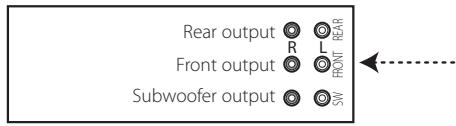
- When connecting only two speakers, connect the connectors either to both of the front output terminals or to both of the rear output terminals (do not mix front and rear terminals). For example, if you connect the connector of the left speaker to a front output terminal, do
not connect the connector to a rear output terminal.
- Connect the speaker wires correctly to the corresponding terminals. The unit may be damaged or fail to work if you share the wires or ground them to any metal part in the car.
- Do not use your own screws. Use only the supplied screws. Using wrong screws, could damage the unit.
- If your car's ignition key switch does not have an ACC position, connect the ignition wires to a power source that can be turned on and off with the ignition key. If you connect the ignition wires to a constant-voltage power source, as with battery wires, the battery may die.
If the console has a lid, make sure to install the unit so that the faceplate will not hit the lid when it is closed or opened. - After the installing the unit, check whether the brake lamps, blinkers, wipers, etc. on the car are working properly.
- Mount the unit so that the mounting angle is 30^ or less.
- Reception may become poor if there are metal objects near the Bluetooth antenna. (KDC-BT73DAB, KDC-BT53U only)
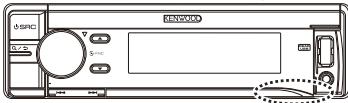
Bluetooth antenna unit
KDC-BT73DAB
- This unit has the cooling fan to decrease the internal temperature. Do not mount the unit in a place where the cooling fan of the unit are blocked. Blocking these openings will inhibit the cooling of the internal temperature and result in malfunction.
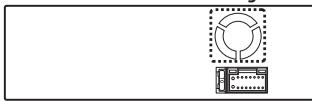
Cooling fan
For Good Reception
To assure good reception, note the following:
- Communicate with the cell phone within the line-of-sight distance of 10m (30 ft). The communication range becomes shorter depending on the surrounding environment. The communication range also becomes shorter when there is an obstacle between this unit and the cell phone. The above maximum communication range (10m) is not always assured.
- A broadcast station or walkie-talkie located nearby can interfere with communication due to a too strong signal.
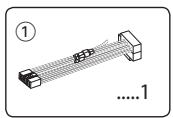
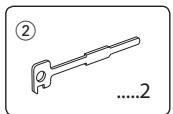
Installation accessories
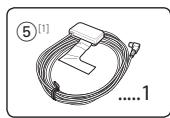
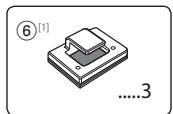
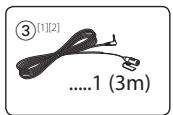
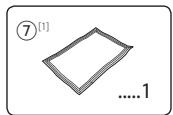
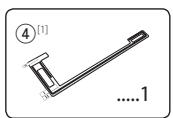
[1] KDC-BT73DAB only
[2] KDC-BT53U only
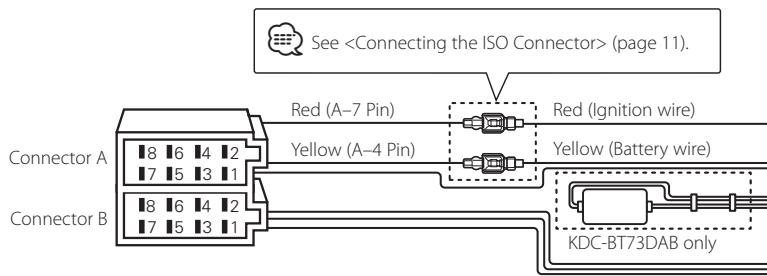
Connecting the ISO Connector
The pin arrangement for the ISO connectors depends on the type of vehicle you drive. Make sure to make the proper connections to prevent damage to the unit.
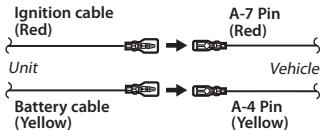
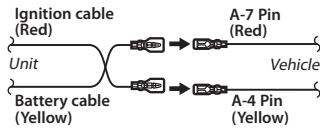
The default connection for the wiring harness is described in 1 below. If the ISO connector pins are set as described in 2, make the connection as illustrated.
Please be sure to reconnect the cable as shown below to install this unit to the Volkswagen vehicles etc.
1 When the A-7 pin (red) is connected with the ignition, and the A-4 pin (yellow) is connected to the constant power supply of the vehicle's ISO connector (default):
2 When the A-7 pin (red) is connected to the constant power supply, and the A-4 pin (yellow) is connected with the ignition of the vehicle's ISO connector:
Connecting wires to terminals
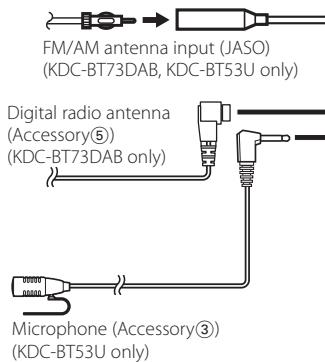
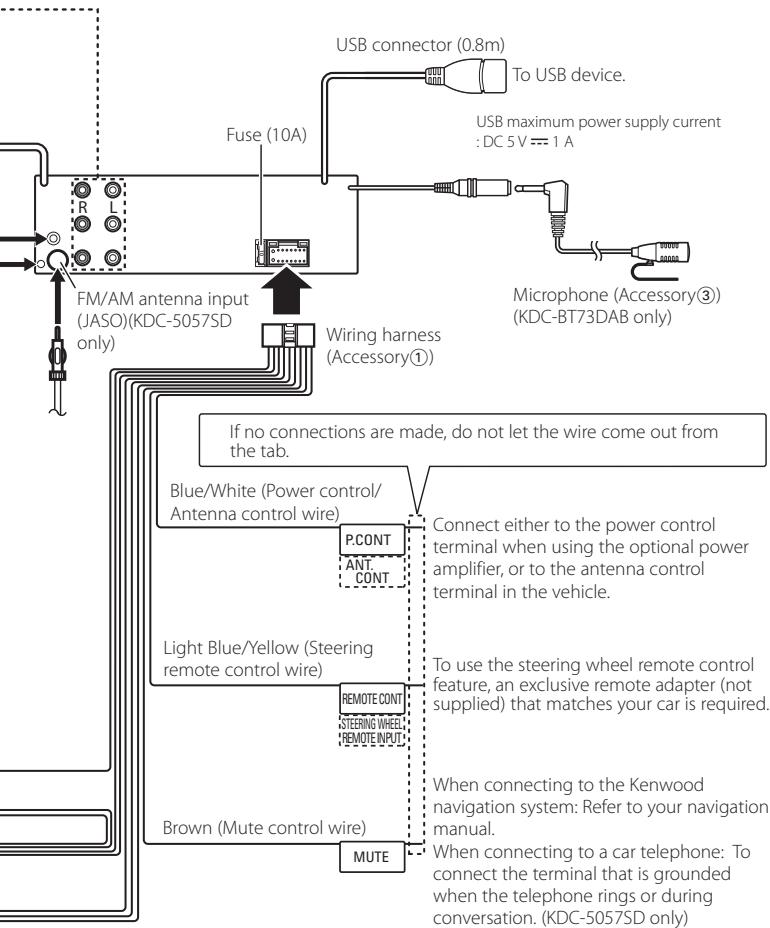
Connector Function Guide
| Pin Numbers for ISO Connectors | Cable Colour | Functions |
| External Power Connector | ||
| A-4 | Yellow | Battery |
| A-5 | Blue/White | Power Control |
| A-6 | Orange/White | Dimmer |
| A-7 | Red | Ignition (ACC) |
| A-8 | Black | Earth (Ground) Connection |
| Speaker Connector | ||
| B-1 | Purple | Rear Right (+) |
| B-2 | Purple/Black | Rear Right (-) |
| B-3 | Gray | Front Right (+) |
| B-4 | Gray/Black | Front Right (-) |
| B-5 | White | Front Left (+) |
| B-6 | White/Black | Front Left (-) |
| B-7 | Green | Rear Left (+) |
| B-8 | Green/Black | Rear Left (-) |
Installing/Removing the unit
Installation
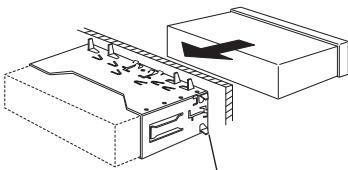
Bend the tabs of the mounting sleeve with a screwdriver or the like and attach it in place.

- Make sure that the unit is installed securely in place. If the unit is unstable, it may malfunction (for example, the sound may skip).
Removing the trim plate
1 Engage the catch pins on the extraction key (Accessory②) and release the two locks on the upper part of frame. Lift up and pull the frame forward as shown in the figure.
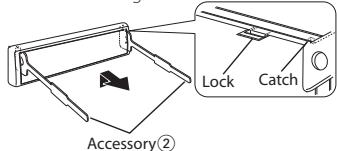
2 When the upper part of frame is removed, remove the lower part of frame.

- The frame can be removed from the bottom side in the same manner.
Removing the unit
1 Remove the trim plate with reference to
2 Remove the faceplate.
3 Insert the two extraction keys (Accessory(2)) deeply into the slots on both sides as shown.
4 Lower the extraction key toward the bottom, and then pull out the unit halfway while pressing the extraction key towards the inside.
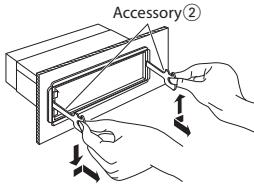

- Be careful to avoid injury from the catch pins on the extraction key.
5 Pull the unit all the way out with your hands, being careful not to drop it.
Installing the Microphone unit
1 Check the installation position of the microphone (Accessory ③).
2 Clean the installation surface.
3 Install the microphone.
4 Lay the cable up to the unit with it secured at several positions using tape or the like.

- Install the microphone as far as possible from the cell phone.
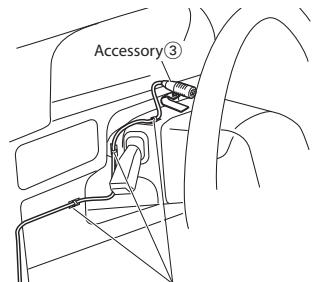
Fix the cable with a commercial item of tape.
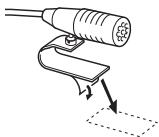
Remove the separator of the microphone, and stick the microphone to the place shown above.
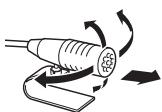
Adjust the direction of the microphone to the driver.
Installing the Digital radio antenna
CAUTION
This film antenna is exclusively for use inside the vehicle.
- Do not install at the following locations:
-Where it may block driver's view
- Where it may obstruct operation of safety devices such as air bags
- On movable glass surface such as rear hatch
-
Signal strength will decrease at the following locations:
-
On IR reflecting glass or where covered with mirror type glass film
- Where it overlaps with genuine radio antenna (pattern)
- Where it overlaps with window heating wires
- At side of vehicle (e.g. door, front quarter window)
- On rear window
- When glass that blocks radio signals (e.g. IR reflecting glass, thermal insulation glass) is used
- Reception may decrease due to noise when windshield wiper, air conditioner, or motor is turned on.
-
Reception may decrease depending on the direction of the broadcast station with respect to the vehicle (antenna).
-
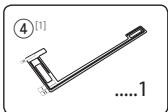
Be sure to check the installation location of film antenna (Accessory 4) before installing. Film antenna cannot be re-pasted.
- Thoroughly wipe oil and dirt from the pasting surface with the included cleaner (Accessory ⑦).
- Do not bend or damage the film antenna (Accessory ④).
Warm the pasting surface by turning on the heater for example, before applying. - It may not be possible to install on some type of vehicle.
- Check the cable routing of the film antenna (Accessory 4) and amplifier (Accessory 5) before pasting.
Installing the Digital radio antenna
Installation overview
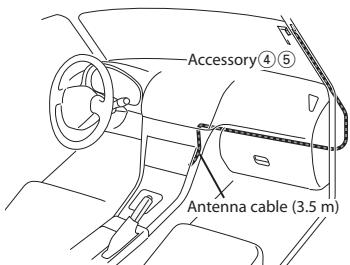
- The antenna should be installed on the passenger side for safety.
- Use cord clampers (Accessory 6) to secure the antenna to the pillar at several locations.
- The direction of the antenna film (Accessory 4) changes depending on whether the film antenna is installed on the right side or left side.
- Separate the antenna film (Accessory 4) from the ceramic line (black part) at the top of the front glass by 150mm . Also, place it about 70mm inside the ceramic line at the side end of the front glass. (where the earth sheet of the amplifier can be pasted on the metal part of the front pillar)
- Separate from other antennas by at least 100mm .
- Do not paste the amplifier (Accessory 5) on the ceramic line (black part) around the front glass. Because there is not enough adhesion.
Determining the antenna installation location
- When installing the antenna on the left side
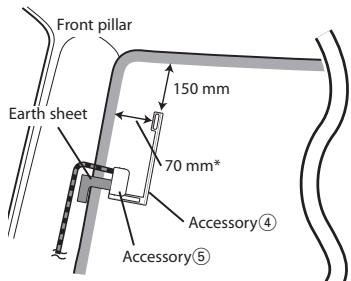
- When installing the antenna on the right side
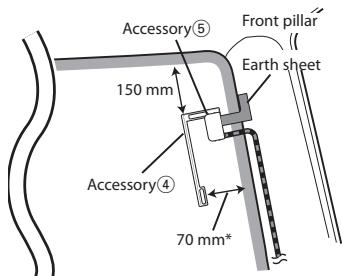
*Where the earth sheet of amplifier unit (Accessory ⑤) can be pasted on the metal part of the front pillar.
Antenna Installation
1 Check the installation location.
2 Clean the area where antenna film (Accessory 4), amplifier unit (Accessory 5), and earth sheet are pasted with the included cleaner (Accessory 7).
The coating on the metal surface need not be removed.
- Wait until the glass surface is completely dry before pasting.
- If the glass surface is cold, such as during winter, warm it with defroster or dryer.
3 Remove the separator (tag I) of antenna film horizontally and paste the antenna on the front glass.
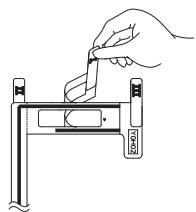
- Remove the separator gently.
- Do not touch the pasting surface (adhesive side) of the antenna film.
4 Remove the separator (tag II) of antenna film vertically and paste the antenna gently while applying pressure.
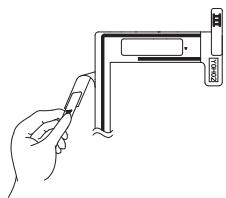
5 After pasting, rub the element in the glass surface in the direction of the arrow shown in the figure to bond it.
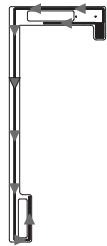
6 Remove the application film (tag III).
- Do not touch the feeder terminal of the element. Also, do not apply any glass cleaner.
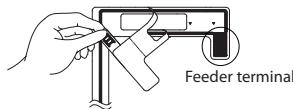
7 Match the protrusion of the amplifier with the on the antenna film and paste.
- Do not touch the feeder terminal or the pasting surface (adhesive side) of the amplifier.
- When installing the antenna on the right side
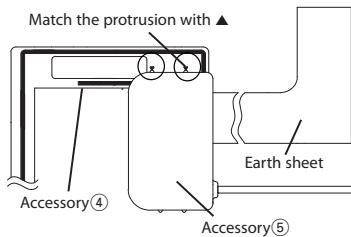
Installing the Digital radio antenna
- When installing the antenna on the left side
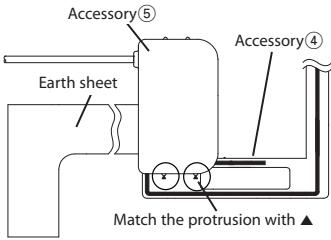
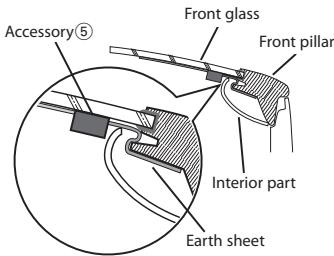
8 Remove the film covering the earth sheet and paste the earth sheet on the metal part of the vehicle.
Provide sufficient leeway for the earth sheet so that it does not interfere with the interior parts (front pillar cover).
Also take care that the interior parts do not interfere with the amplifier.
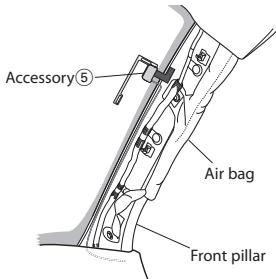
9 Wire the antenna cables.
- Use cord clampers (Accessory 6) to secure the antenna to the pillar at several locations.

Take the following precautions when passing the antenna cable inside the front pillar where the air bag is installed.
Install the amplifier part of the antenna cable in front or above the air bag so that the antenna and the air bag do not interfere.
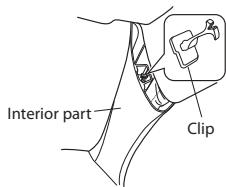
- The front pillar cover is secured with a special clip which may need to be replaced when the front pillar cover is removed.
Contact your vehicle dealer for details on replacing the front pillar cover and availability of replacement parts.
About Audio file
- Playable Audio files AAC-LC (.m4a), MP3 (.mp3), WMA (.wma), WAV (.wav) of USB device/ SD card
- Playable disc media CD-R/RW/ROM
- Playable disc file formats ISO 9660 Level 1/2, Joliet, Long file name.
- Playable USB devices USB mass storage class
- Playable SD cards SD card (≤2 GB), SDHC card (≤32 GB)
- Playable USB device/ SD card file systems
FAT12, FAT16, FAT32
The online manual about audio files is put on the site, www.kenwood.com/cs/ce/audiofile/.
Models of iPods/iPhones that can be connected to this unit
Made for
- iPod touch (4th generation)
- iPod touch (3rd generation)
- iPod touch (2nd generation)
- iPod touch (1st generation)
- iPod classic
- iPod with video
- iPod nano (6th generation)
- iPod nano (5th generation)
- iPod nano (4th generation)
- iPod nano (3rd generation)
- iPod nano (2nd generation)
- iPod nano (1st generation)
iPhone 4S
iPhone 4
iPhone 3GS
iPhone 3G
iPhone
For information on the compatibility with iPod/iPhone software, visit www.kenwood.com/cs/ce/ipod/.
Requirements AhaTM:
Requirements for listening to the AhaTM are as follows:
iPhone or iPod touch
- Use an Apple iPhone or iPod touch running iOS4 or later.
- Search for "aha" in the Apple iTunes App Store to find and install the most current version of the Aha™ application on your device.
- iPhone/iPod touch connected to this unit with a KCA-iP102.
AndroidTM
- Use Android OS 2.2 or later.
Download the Aha™ application to your smartphone from the Google Play. -
Bluetooth must be built in and the following profiles must be supported.
-
SPP (Serial Port Profile)
- A2DP (Advanced Audio Distribution Profile)
NOTE
- In the application on your device, log in and create a free account with Aha.
- Internet connection by LTE, 3G, EDGE, or WiFi.
- Because Aha™ is a third-party service, the specifications are subject to change without prior notice. Accordingly, compatibility may be impaired or some or all of the services may become unavailable.
- Some AhaTM functionality cannot be operated from this unit.
Table des matieres
manual2.jvckenwood.comedition/im362/
- iPod touch (4th generation)
- iPod touch (3rd generation)
- iPod touch (2nd generation)
- iPod touch (1st generation)
- iPod classic
- iPod with video
- iPod nano (6th generation)
- iPod nano (5th generation)
- iPod nano (4th generation)
- iPod nano (3rd generation)
- iPod nano (2nd generation)
- iPod nano (1st generation)
iPhone 4S
iPhone 4
iPhone 3GS
iPhone 3G
iPhone
manual2.jvckenwood.com/edition/im362/
- iPod touch (4th generation)
- iPod touch (3rd generation)
- iPod touch (2nd generation)
- iPod touch (1st generation)
- iPod classic
- iPod with video
- iPod nano (6th generation)
- iPod nano (5th generation)
- iPod nano (4th generation)
- iPod nano (3rd generation)
- iPod nano (2nd generation)
- iPod nano (1st generation)
iPhone 4S
iPhone 4
iPhone 3GS
iPhone 3G
iPhone
manual2.jvckenwood.comedition/im362/

| CD[1] | "CD" |
| Hulpingang | "AUX" |
- iPod touch (4th generation)
- iPod touch (3rd generation)
- iPod touch (2nd generation)
- iPod touch (1st generation)
- iPod classic
- iPod with video
- iPod nano (6th generation)
- iPod nano (5th generation)
- iPod nano (4th generation)
- iPod nano (3rd generation)
- iPod nano (2nd generation)
- iPod nano (1st generation)
iPhone 4S
iPhone 4
iPhone 3GS
iPhone 3G
iPhone
kenwood.com/cs/ce/ipod/.
manual2.jvckenwood.com/edition/im362/

[1] Solo KDC-BT73DAB
[2] Solo KDC-BT53U
- iPod touch (4th generation)
- iPod touch (3rd generation)
- iPod touch (2nd generation)
- iPod touch (1st generation)
- iPod classic
- iPod with video
- iPod nano (6th generation)
- iPod nano (5th generation)
- iPod nano (4th generation)
- iPod nano (3rd generation)
- iPod nano (2nd generation)
- iPod nano (1st generation)
iPhone 4S
iPhone 4
iPhone 3GS
iPhone 3G
iPhone
- SPP (Serial Port Profile)
- A2DP (Advanced Audio Distribution Profile)
NOTA
manual2.jvckenwood.comedition/im362/
Para consultar el manual de instruetiones, se requires un navigador como Internet Explorer 7 o posterior, Firefox 3.6 o posterior, Chrome™ 20 o posterior, Safari 5.1 o posterior, iOS Safari 4.0 o posterior, Android™ 2.2 o posterior.
Antes de usar
ADVERTENCIA
- iPod touch (4th generation)
- iPod touch (3rd generation)
- iPod touch (2nd generation)
- iPod touch (1st generation)
- iPod classic
- iPod with video
- iPod nano (6th generation)
- iPod nano (5th generation)
- iPod nano (4th generation)
- iPod nano (3rd generation)
- iPod nano (2nd generation)
- iPod nano (1st generation)
iPhone 4S
iPhone 4
iPhone 3GS
iPhone 3G
iPhone