
AP1 Compact Pearl - Air purifier ECG - Free user manual and instructions
Find the device manual for free AP1 Compact Pearl ECG in PDF.


| Product Type | Air Purifier |
| Model | AP1 Compact Pearl |
| Brand | ECG |
| Weight | 2.5 kg |
| Rated Voltage | 220–240 V |
| Rated Frequency | 50–60 Hz |
| Power Consumption | 30 W |
| CADR | 120 m³/h |
| Recommended Room Size | 9–14 m² |
| Noise Level | 25–55 dB(A) |
| Filter Type | HEPA filter |
| Filter Life | Approximately 2000 hours |
| Air Quality Sensor | Yes (Color indicator: Blue=Excellent, Green=Good, Purple=Bad, Red=Very bad) |
| Fan Speeds | Low, High, Auto, Sleep (Night mode) |
| Ionizer | On/Off |
| Timer | 1, 2, 4, or 8 hours |
| WiFi Connectivity | 2.4 GHz, supports WEP/WPA/WPA2/WPA3/AES/TKIP, Smart Life app (iOS 9.0+, Android 6.0+) |
| Aroma Sponge | Yes (essential oil compatible) |
| Control Panel | Touch control with LED display |
| Safety Features | Overheat protection, automatic shut-off if tipped over (not explicitly stated but common), child lock not specified |
| Maintenance | Wipe exterior with soft cloth; replace HEPA filter when indicator flashes |
| Accessories Included | HEPA filter, aroma sponges, user manual |
| Repairability | Contact authorized service center for repairs; do not disassemble |
| Certifications | CE, EU RoHS, WEEE |
Frequently Asked Questions - AP1 Compact Pearl ECG
User questions about AP1 Compact Pearl ECG
0 question about this device. Answer the ones you know or ask your own.
Ask a new question about this device
Download the instructions for your Air purifier in PDF format for free! Find your manual AP1 Compact Pearl - ECG and take your electronic device back in hand. On this page are published all the documents necessary for the use of your device. AP1 Compact Pearl by ECG.
USER MANUAL AP1 Compact Pearl ECG
natural_image
Exterior view of a white cylindrical electronic device labeled 'ECO' with visible branding and ventilation grille (no text beyond label)AP1 Compact Pearl
AIR PURIFIER
INSTRUCTION MANUAL
LUFTREINIGER
BEDIENUNGSANLEITUNG
ČISTIČKA VZDUCHU
NÁVOD K OBSLUZE
ÕHUPUHASTI
KASUTUSJUHEND
PROČIŠĆIVAČ ZRAKA
UPUTE ZA UPORABU
GAISA ATTİRİTÄJS
ROKASGRÄMATA
ORO VALYTUVAS
INSTRUKCIJŲ VADOVAS
LÉGTISZTÍTÓ
HASZNÁLATI ÚTMUTATÓ
English
- Air purifier body
- HEPA filter
- Aroma sponges
- Bottom cover
- Touch control panel
- Air quality sensor
Deutsch
Read carefully and save for future use!
Warning: The safety measures and instructions, contained in this manual, do not include all conditions and situations possible. The user must understand that common sense, caution and care are factors that cannot be integrated into any product. Therefore, these factors shall be ensured by the user/s using and operating this appliance. We are not liable for damages caused during shipping, by incorrect use, voltage fluctuation or the modification or adjustment of any part of the appliance. To protect against a risk of fire or electric shock, basic precautions shall be taken while using electrical appliances, including the following:
- Make sure the voltage in your outlet corresponds to the voltage provided on the appliance label and that the socket is properly grounded. The outlet must be installed in accordance with applicable electrical codes according to EN. It must also be freely accessible so that the appliance can be quickly disconnected from electricity if necessary.
- Never use the appliance if the power cable is damaged. If the appliance has fallen on the ground, has been immersed in water or is not working properly.
If the appliance emits an unusual odor, smoke, or abnormal sound, unplug it immediately and visit a service center with the appliance.
All repairs, including cord replacements, must be carried out at a professional service centre! Do not remove the protective covers from the appliance; there is a risk of electric shock! If you interfere with the appliance, it exposes you to the risk of losing the legal right to claim defective performance or a quality warranty.
-
Protect from direct contact with water and other liquids to prevent electric shock.
-
Do not use the appliance outdoors or in a humid environment, nor touch the power cord or the appliance with wet hands. Risk of electric shock.
-
As well, do not use the turned on appliance:
-
close to bathtub, shower or a pool - danger of electric shock,
- close to flammable materials, e.g. drapes - risk of fire,
- very close to the places where heat accumulates (stove, heater), or close to open fire - risk of fire,
- in rooms where are stored flammable or explosive materials – danger of fire,
- in an industrial environment or an environment with fumigation-type pesticides (chemical residues may accumulate inside the device and their subsequent release into the air may be harmful to your health),
-
Directly under an electrical outlet.
-
Do not use the device in places where particles of fat are present. Placing in a kitchen, for example, can reduce the life of the filter. The air purifier should not be used as a ventilation or exhaust device.
- Close supervision is necessary for operating the device near children!
- Do not expose children to the air outlet of the appliance for too long. Keep children away from the air outlet. It could cause them illness or have another adverse effect on their health.
- Place the device away from other objects so that the free air circulation required for its proper operation is ensured.
- Never cover the air intake or outlet openings or insert any objects or fingers into them! It could cause damage to the appliance or injury.
- Do not use this appliance with a programmer, timer, stand-alone remote control system, or any other device that automatically switches the unit on, as there is a risk of fire if the unit is covered or improperly placed.
-
Do not use insecticides or flammable sprays near the appliance. You could damage the appliance.
-
Never place the appliance on soft surfaces such as a bed, sofa, carpet with thick, long fibers, etc. It must be placed on a stable and level surface.
- Do not switch the appliance on or off by plugging in or pulling out the power supply plug. First, always turn off the appliance using the ON/OFF button! Then you can unplug the power cord!
- We recommend that you do not leave the appliance unattended with the plugged-in power cord. Do not remove the power cord from the outlet by yanking the cord. Unplug the power cord from the outlet by grasping the plug.
-
In the following cases, always disconnect from the electrical socket:
-
before refilling the water tank if you are no longer using it
- before moving it,
- before cleaning
- switch does not work,
- circuit breaker or fuses are blown,
- power cable or the plug are unusually hot,
- you smell the odor of burning or if you noted unusual noises or vibration,
-
in case of any other unusual phenomena or malfunctions.
-
Do not allow the power cord to touch hot surfaces or run the cord over sharp edges.
- The appliance is intended exclusively for domestic and indoor use. It is not intended for commercial use. Do not use the product for any other purpose than the one for which it is designed.
- Do not use the appliance without properly installed filters.
- Move, store and transport the appliance in vertical position only.
- It is strictly forbidden to manipulate the air filter during operation.
-
This appliance may be used by children 8 years of age or older and persons with reduced physical, sensory or mental capabilities or lack of experience and knowledge if supervised or instructed to use the appliance in a safe way and understand the potential hazards. Children shall not play with the appliance. User cleaning and maintenance must not be performed by unsupervised children.
-
Install the power cable so that no one trips over it.
Do not immerse in water! – Do not immerse in water!
DANGER TO CHILDREN: Children must not play with the packaging material. Do not let the children play with plastic bags. Risk of suffocation.
CONTROL PANEL OVERVIEW
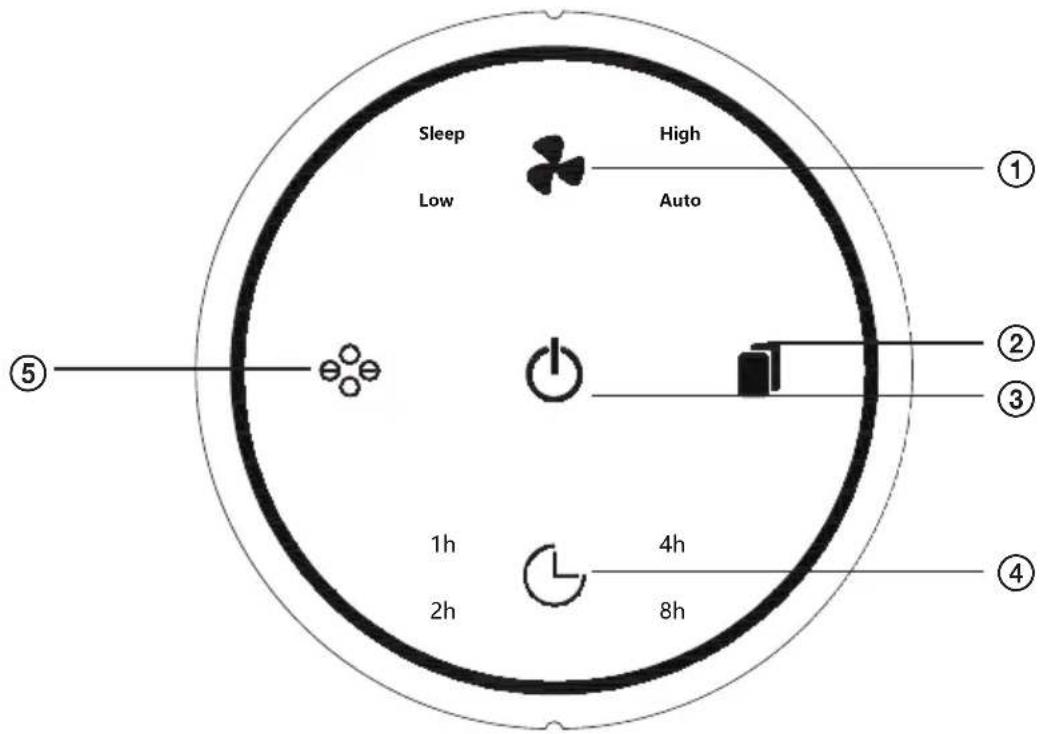
1. Setting the air flow speed
Press the button sequentially to switch between low (LOW) and high (HIGH) airflow speed and between (AUTO) and (SLEEP) mode for the appliance's night mode.
Note: Color backlight turns off in Night mode (Sleep). In (AUTO) mode, the air velocity changes automatically according to the air quality in the room.
2. Resetting the filter life counter
Press and hold the button to reset the counter of the remaining filter life cycle. Use only after you replace the filter.
3. On / Off
Press to turn the appliance on/off. In stanby mode the light is red, when on, the indicator lits white.
4. Timer function
By pressing the button, you can set the timer functions to 1, 2, 4 or 8 hours.
5. lonizer
Press briefly to turn on or off the air ionization. When the unit is switched on, ionization is on; the ionization icon is on the display. After pressing the button again, the icon disappears from the display. To turn it on again, press the place on the display where the icon was before being turned off.
INSTALLATION
WARNING:
Before using the air purifier, remove the filter cover in the appliance according to the instructions below:
Replacement of filter and aroma sponges
Remove all packaging from the appliance before first connecting the appliance, both from outside and from the inside. The filter is packaged. Hold the unplugged so that you can open the lower cover lock. On the bottom of the appliance and the lid are shown locks for easier handling. Aromatic oil sponges are located in the filter cover. Return the filter before use and lock the lid carefully.
Risk of property damage: The appliance may only be used if it is properly and completely assembled.
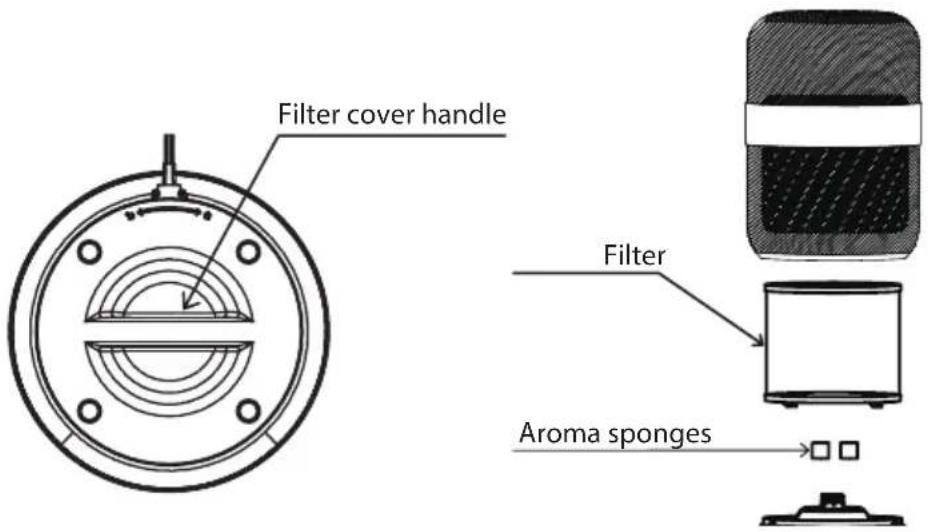
Filter replacement
Take care of your health and change the filter regularly.
The filter life cycle counter is set to approx. 2000 hours. After the device counts these hours of operation, the "Filter Counter" indicator starts flashing and a beep sounds. Change the old filter for a new one and press the "Filter Counter" icon for about 3 seconds. The audio signal is switched off and the light is continuously lit white.
Note: Always remember to remove the packaging before inserting the filter into the appliance.
Preparing the aroma sponges
You can add a few drops of essential oil on the sponges. Then when the appliance will be in operation, it will emit clean air enriched by the aroma of oil.
USE
Turning the device on
After connecting to power, a beep sounds and all the indicators flash 2 x and then go out, only the power indicator light ("Turning on / off") remains red and the appliance enters standby mode.
Press the "On / Off" button to start the appliance automatic mode. The appliance will flash colors after it is turned on. The air quality is checked at that moment. The backlight color remains permanently on after a few seconds. The backlight color indicates the air quality.
Air quality indicator
Blue - Excellent
Green - Good
Purple - Bad
Red - Very bad
Using the application
ATTENTION:
If you change the name of your home WiFi network or password, you will need to restore connection with your appliance.
- The application supports the operating system version of the IOS 9.0 and higher, Android 6.0 and higher; in general, the system version can be checked using setting in a mobile phone or tablet.
- This model supports WiFi network security with WEP, WPA, WPA2, WPA3, AES and TKIP.
- Configuring the appliance to access the network requires a 2.4 GHz WiFi network, the 5 GHz frequency range is not currently supported.
- WiFi configuration is required to access the appliance to the network; if the network is already once successfully configured, the application can be operated on the WiFi / 2G / 3G / 4G networks and can be controlled remotely.
- If the name of your home WiFi network is changed or the router is replaced, the appliance will be displays in the app as offline; just configure network access without any changes to your application account number.
- If others want to use the application to run the same appliance, they must be invited to an application from the "family administrator" to join (provided that the user downloads the application and registration).
- If the application changes, the original users are prompted to delete the device in their mobile application and new users can only configure direct network connection in accordance with the network access instructions (if the original users do not delete their device in the mobile application, it will be automatically Deleted after new users successfully configured network access).
Connection
- Ensure that the mobile phone is connected to your home WiFi network
- Download the Smart Life application and register:
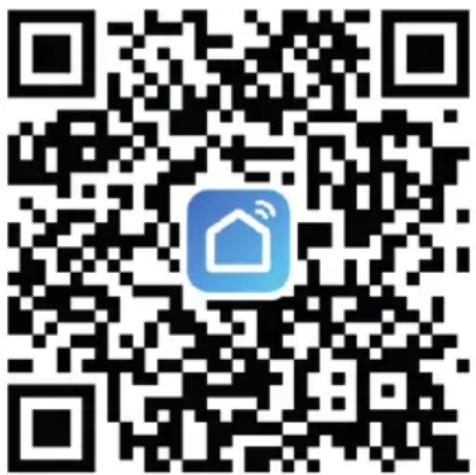
a. Scan the QR code or search for the Smart Life application in the Apple store or Google Play. Download the application.
b. Open the application and create your personal account.
Connect the appliance to your home network with your mobile phone using the WiFi function.
Note: The text displayed in the application is informative. The appearance and text of the application screen can be modified with new updates.
1) Connection via AP mode (AP1)
- Plug the purifier in.
- Briefly press the "on / off" button on the purifier.
- Press the air flow speed setting button on the purifier for 5 seconds.
- You will hear a beep (the icon will flash quickly and after about 2 minutes the icon will start flashing slowly).
- Open the Smart Life application in your mobile phone.
- Use the "+" icon on the top right of the application to locate the appliance (Small Home Appliance -> Air Purifier (WiFi)).
- Set the WiFi and network password in the application according to the application instructions.
- Click on the next step and set the AP mode in the upper right corner of the application screen (change the basic preset mode EZ to AP).
- Wait until the icon on the purifier display flashes slowly, confirm this in the application by checking the "Confirm the indicator is blinking slowly" option *.
- Click on the next step "next" in the application.
- Follow the application instructions.
- Go to the WiFi network settings on your mobile phone and connect to the "SmartLife" air purifier hotspot.
- Once connected, return to Smart Life.
- The purifier should connect automatically; follow the instructions of the application.
* If the icon no longer flashes, you need to start the setting from the beginning.
2) Connection via EZ mode (AP1)
- Plug the purifier in.
- Briefly press the "on / off" button on the purifier and immediately afterwards press the button for setting the air flow rate for approx. 5 seconds. A beep sounds and the WiFi icon flashes quickly on the display.
- Open the Smart Life application on your mobile phone.
-
Use the "+" icon in the application, on the top right find the appliance (Small Home Appliance -> Air purifier (WiFi)).
-
Enter the WiFi and network password in the application according to the application instructions.
- Click on the next step and set the EZ mode in the upper right corner of the application screen (basic preset EZ mode). Check to confirm that the WiFi icon on the display is flashing quickly. *
- Click on the next step "next" in the application.
- The purifier will connect automatically, follow the application instructions.
* If the icon no longer flashes, you need to start the setting from the beginning.
CLEANING AND MAINTENANCE
Switch off and unplug the appliance before cleaning and maintenance. Never immerse the appliance in water.
Wipe the surface of the appliance with a soft cloth. Do not use aggressive abrasive cleaners or scourers.
Store the appliance in a cool, dry and ventilated place. Only turn the appliance up very slowly and carefully to avoid damaging it. Never turn the appliance when in operation!
TROUBLESHOOTING
In the event of a malfunction, follow the table below.
If you are unable to solve the problem according to the possible solutions in the table below, contact the service center. Never try to repair the appliance yourself.
| Problem Possible cause Solution | ||
| The appliance cannot be switched on | The plug is not inserted in the electrical outlet. | Connect the appliance to the power supply and switch it on. |
| The filter cover is fitted incorrectly. | Install the filter cover according to the operating instructions. | |
| The plug or cable is damaged. Contact a service center. | ||
| The power source is not working. | Check that there is power in the outlet. | |
| The fan does not work | The air inlet or outlet is blocked. | Remove all packaging from the filter/s. |
| The appliance is not on. | Connect the appliance to the power supply and switch it on. | |
| The motor is loose or damaged. Contact a service center. | ||
| There are loose or foreign objects inside the appliance. | If the items cannot be removed without tampering with the appliance, contact a service center. | |
| The appliance is placed on an uneven surface. | Place the appliance on a flat surface. | |
| The air is not purified enough. | The filters are clogged or have not been replaced in time. | Clean the washable filters if the appliance contains them and replace the other filters with new ones. Reset the filter life cycle counter. |
| The filter was not replaced. | Replace the filter (s) with new ones and reset the filter life counter. | |
| The air inlet or outlet is blocked. | Remove all packaging from the filter/s. | |
| There is not enough free space around the appliance. | Place the appliance so that there is enough free space around it for air intake and exhaust. | |
| The appliance is located in a larger space than it is intended for. | Place the device in a room where it can work effectively. | |
| The appliance is missing a filter. | Make sure that there are all necessary filters in the appliance. | |
| Make sure that the filter is inserted correctly in the appliance. If the appliance contains more than one filter, make sure that they are inserted in the correct order. | ||
| The appliance beeps. | The filter/s has not been changed. | Replace the filter (s) with new ones and reset the filter life counter. |
| The filter/s was changed, but the counter was not reset. | Reset the filter life cycle counter. | |
| The air quality indicator is red | There is a source of pollution close to the appliance. | Remove the source of pollution. After a certain time, the air is cleaned and the indicator changes color according to the air quality in the room. |
Basic application troubleshooting
| Problem Possible cause | Recommendation Possible solution | ||
| Application shows disconnection. | Broken connection between mobile phone and device. | Check whether the mobile phone is connected to the network. | Reconnect the mobile phone to the network. |
| Check, if the router works correctly. | Restart the router. | ||
| The appliance must be connected to a power supply. | Turn the appliance off and on again. | ||
| Wifi device configurations are erased. | Remove the appliance from the application and perform the installation again. | ||
| The network or WiFi password changed. | Delete all WiFi network configurations and reconnect the appliance to your network. | ||
| Your WiFi does not meet the standard of operation of the appliance. | Check all the parameters of your home WiFi network. | ||
| The app works slowly. | Weak network connection. | Busy network. | Restart the router and reduce the number of users with access. |
| Poor cell phone WiFi signal reception. | Check the settings of the mobile phone itself. | ||
| Network bandwidth is not adequate. | Extend the bandwidth of the WiFi network. | ||
| The application cannot be installed | The application is not compatible with the phone's operating system. | You have to use a mobile phone according to the configuration above. (iOS 9.0 and higher, Android 6.0 and higher) | Install the application in the appropriate store (GooglePlay AppStore) and add the appliance via the application. |
TECHNICAL DATA
Model: AP1 Compact Pearl
Nominal voltage: 220–240 V
Rated frequency: 50–60 Hz
Nominal input power: 30 W
CADR: 120 m
^3/h
Recommended room size: 9–14m
2
Noise level: 25–55 dB(A)
Weight: 2,5 kg
USE AND DISPOSAL OF WASTE
Wrapping paper and corrugated paperboard – deliver to scrapyard. Packing foil, PE bags, plastic elements – throw into plastic recycling containers.
DISPOSAL OF PRODUCTS AT THE END OF LIFETIME
Disposal of electric and electronic equipment (valid in EU member countries and other European countries with an implemented recycling system)
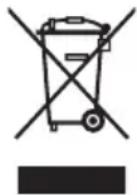
The represented symbol on the product or package means the product shall not be treated as domestic waste. Hand over the product to the specified location for recycling electric and electronic equipment. Prevent negative impacts on human health and the environment by properly recycling your product. Recycling contributes to preserving natural resources. For more information on the recycling of this product, refer to your local authority, domestic waste processing organization or store, where you purchased the product.
This product meets the requirements of the EU directives on electromagnetic compatibility and electrical safety and the issue of heavy metals in electrical and electronic equipment.
The operating manual is available at www.ecg-electro.eu.
Changes of text and technical parameters reserved.
08/05

Hereby, K + B Progres, a.s. declares that the ECG AP1 Compact Pearl radio equipment type complies with Directive 2014/53 / EU. The full text of the EU declaration of conformity is available at the following internet address: www.ecg-electro.eu.
SICHERHEITSHINWEISE
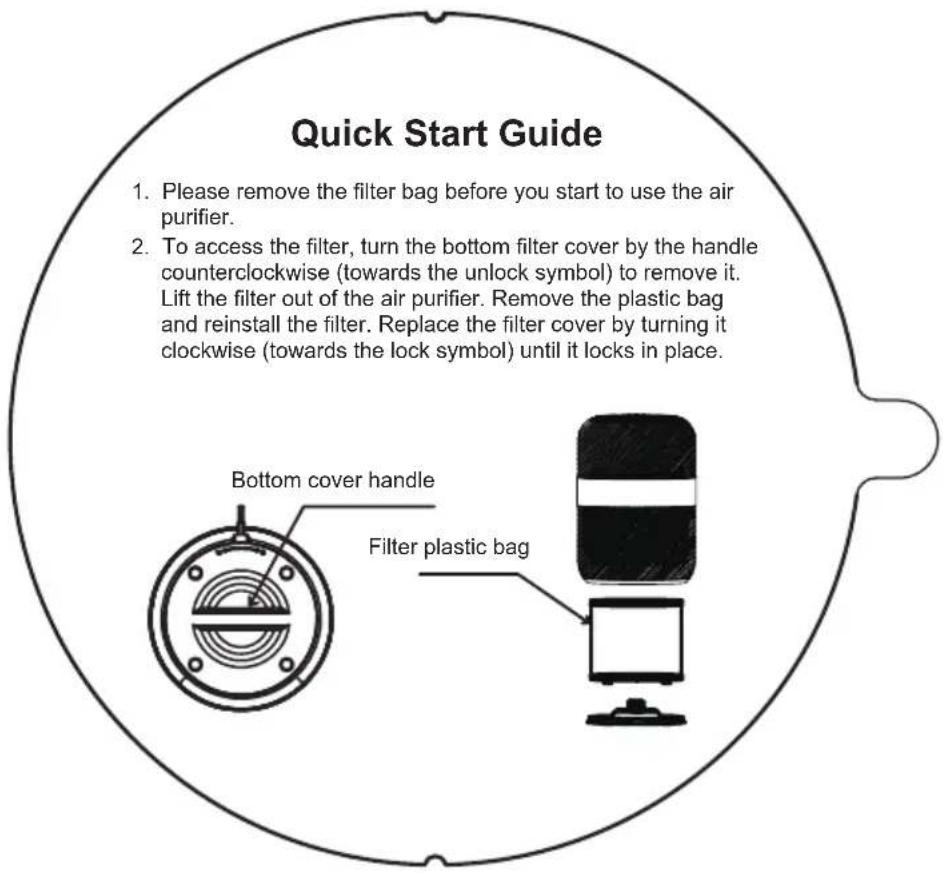
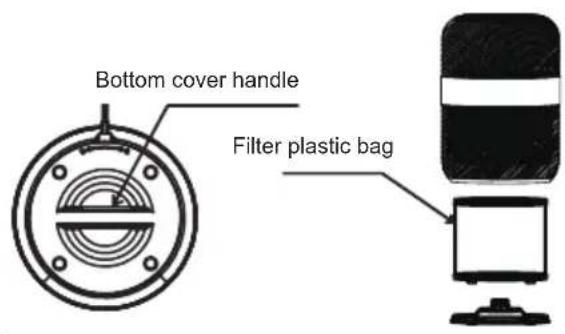
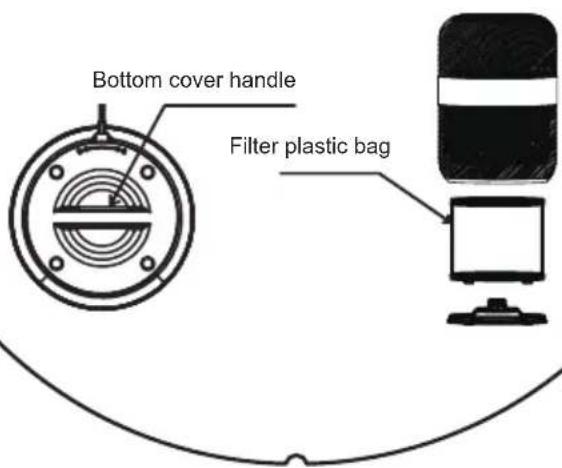
- Please remove the filter bag before you start to use the air purifier.
- To access the filter, turn the bottom filter cover by the handle counterclockwise (towards the unlock symbol) to remove it. Lift the filter out of the air purifier. Remove the plastic bag and reinstall the filter. Replace the filter cover by turning it clockwise (towards the lock symbol) until it locks in place.
Do not immerse in water! – Neponořovat do vody!
Rychlý start
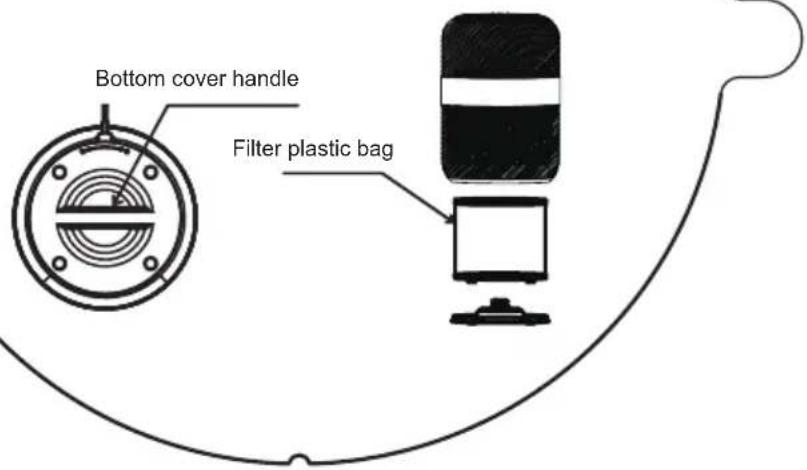
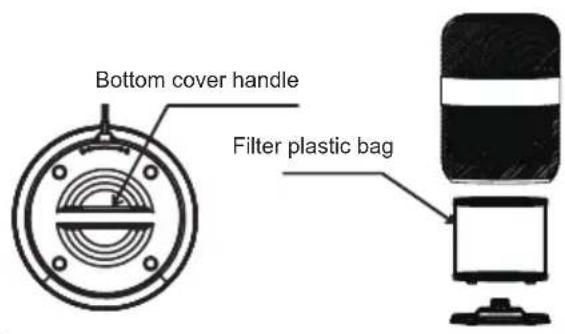
- Please remove the filter bag before you start to use the air purifier.
- To access the filter, turn the bottom filter cover by the handle counterclockwise (towards the unlock symbol) to remove it. Lift the filter out of the air purifier. Remove the plastic bag and reinstall the filter. Replace the filter cover by turning it clockwise (towards the lock symbol) until it locks in place.
Kiirjuhend
1) Ühendamine AP režiimi kaudu (AP1)
1) Veza putem AP načina (AP1)
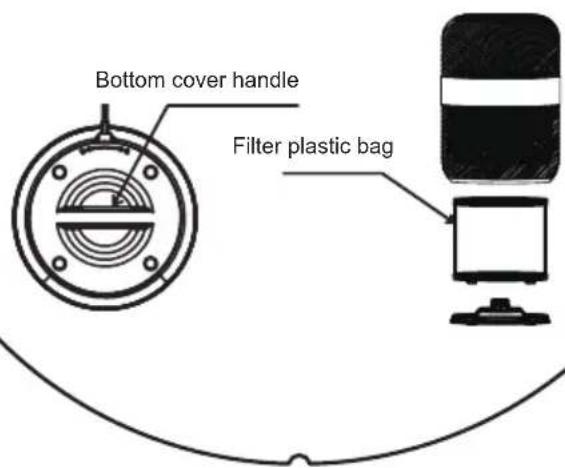
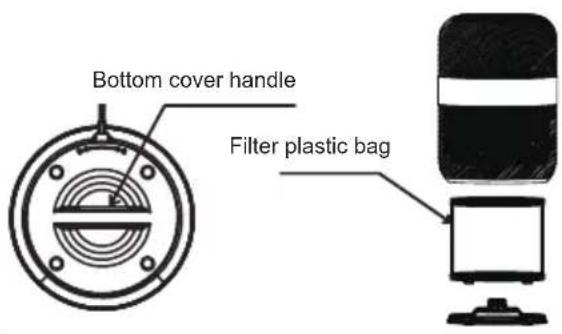
- Please remove the filter bag before you start to use the air purifier.
- To access the filter, turn the bottom filter cover by the handle counterclockwise (towards the unlock symbol) to remove it. Lift the filter out of the air purifier. Remove the plastic bag and reinstall the filter. Replace the filter cover by turning it clockwise (towards the lock symbol) until it locks in place.
1) Pievienošana, izmantojot AP režimu (AP1)
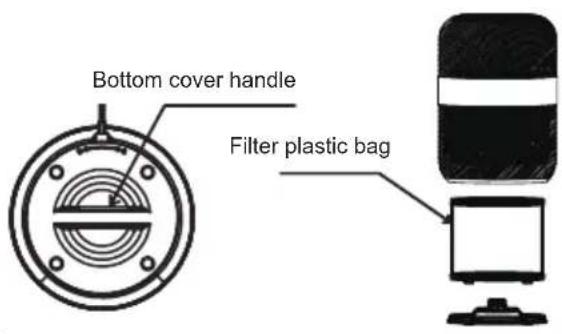
- Please remove the filter bag before you start to use the air purifier.
- To access the filter, turn the bottom filter cover by the handle counterclockwise (towards the unlock symbol) to remove it. Lift the filter out of the air purifier. Remove the plastic bag and reinstall the filter. Replace the filter cover by turning it clockwise (towards the lock symbol) until it locks in place.
Водич за брз почеток
- Please remove the filter bag before you start to use the air purifier.
- To access the filter, turn the bottom filter cover by the handle counterclockwise (towards the unlock symbol) to remove it. Lift the filter out of the air purifier. Remove the plastic bag and reinstall the filter. Replace the filter cover by turning it clockwise (towards the lock symbol) until it locks in place.
Do not immerse in water! – Neponárat do vody!
Stručná príručka
BEZBEDNOSNA UPUTSTVA
1) Veza putem AP režima (AP1)
- Uključite uređaj u struju.
- Kratko pritisnite dugme "uključeno/isključeno" na uređaju.
- Pritisnite dugme za podešavanje brzine strujanja vazduha na Pročišćivaču na 5 sekundi.
- Čuti ćete zvučni signal (ikona će brzo blicati i nakon otprilike 2 minuta ikona će početi polako blicati).
- Otvorite aplikaciju Smart Life na svom mobilnom telefonu.
- Upotrebite ikonu "+" u gornjem desnom uglu aplikacije da biste locirali uređaj (Mali kućanski aparat -> Pročišćivač vazduha (Wi-Fi)).
- Podesite wifi i mrežnu lozinku u aplikaciju prema uputama u aplikaciji.
- Kliknite na sledeći korak i postavite AP režim rada u gornjem desnom uglu ekrana aplikacije (promenite osnovni unapred postavljeni režim rada EZ u AP).
- Pričekajte dok ikona na ekranu pročišćivača ne počne polagano da blica, potvrdite to u aplikaciji tako da potvrdite opciju "Potvrdite da indikator polako blica" *.
- Kliknite na sledeći korak "next" u aplikaciji.
- Sledite upute aplikacije.
- Idite na postavke Wi-Fi mreže na svom mobilnom telefonu i povežite se na pristupnu točku pročišćivača vazduha "SmartLife".
- Nakon povezivanja, vratite se u aplikaciju Smart Life.
- Pročišćivač bi se trebao automatski povezati, sledite upute za primenu.
- Please remove the filter bag before you start to use the air purifier.
- To access the filter, turn the bottom filter cover by the handle counterclockwise (towards the unlock symbol) to remove it. Lift the filter out of the air purifier. Remove the plastic bag and reinstall the filter. Replace the filter cover by turning it clockwise (towards the lock symbol) until it locks in place.
- Please remove the filter bag before you start to use the air purifier.
- To access the filter, turn the bottom filter cover by the handle counterclockwise (towards the unlock symbol) to remove it. Lift the filter out of the air purifier. Remove the plastic bag and reinstall the filter. Replace the filter cover by turning it clockwise (towards the lock symbol) until it locks in place.
Короткий посібник
250 69 Kličany, Czech Rep. e-post: ECG@kbexpert.cz
Hrvatski
K+B Progres, a.s.
U Expertu 91 tel.: +420 272 122 111
250 69 Klíčany, Czech Rep. e-mail: informacije@kbprogres.cz
Bosanski
K+B Progres, a.s.
U Expertu 91 tel.: +420 272 122 111
250 69 Kličany, Czech Rep. e-mail: informacije@kbprogres.cz
Latviešu valoda
K+B Progres, a.s.
U Expertu 91 tel.: +420 272 122 111
250 69 Kličany, Czech Rep. e-pasts: ECG@kbexpert.cz
Lietuvių kalba
K+B Progres, a.s.
U Expertu 91 tel.: +420 272 122 111
250 69 Kličany, Czech Rep. el. paštas: ECG@kbexpert.cz
Magyar
K+B Progres, a.s.
U Expertu 91 tel.: +420 272 122 111
250 69 Klíčany, Czech Rep. e-mail: ECG@kbexpert.cz
Македонски
K+B Progres, a. s.
U Expertu 91 tel.: +420 272 122 111
250 69 Kličany, Czech Rep. e -mail: ECG@kbexpert.cz
Polski
K+B Progres, a.s.
U Expertu 91 tel.: +420 272 122 111
250 69 Klíčany, Czech Rep. e-mail: ECG@kbexpert.cz
Română
K+B Progres, a.s.
U Expertu 91 tel.: +420 272 122 111
250 69 Klíčany, Czech Rep. e-mail: ECG@kbexpert.cz
Slovenčina

- AP1 Compact Pearl
- English
- Deutsch
- Read carefully and save for future use!
- Do not immerse in water! – Do not immerse in water!
- CONTROL PANEL OVERVIEW
- Setting the air flow speed
- Resetting the filter life counter
- On / Off
- Timer function
- lonizer
- INSTALLATION
- WARNING:
- Replacement of filter and aroma sponges
- Filter replacement
- Preparing the aroma sponges
- USE
- Turning the device on
- Air quality indicator
- Using the application
- ATTENTION:
- Connection
- 1) Connection via AP mode (AP1)
- 2) Connection via EZ mode (AP1)
- CLEANING AND MAINTENANCE
- TROUBLESHOOTING
- TECHNICAL DATA
- USE AND DISPOSAL OF WASTE
- DISPOSAL OF PRODUCTS AT THE END OF LIFETIME
- SICHERHEITSHINWEISE
- Do not immerse in water! – Neponořovat do vody!
- Rychlý start
- Kiirjuhend
- 1) Ühendamine AP režiimi kaudu (AP1)
- 1) Veza putem AP načina (AP1)
- 1) Pievienošana, izmantojot AP režimu (AP1)
- Водич за брз почеток
- Do not immerse in water! – Neponárat do vody!
- Stručná príručka
- BEZBEDNOSNA UPUTSTVA
- 1) Veza putem AP režima (AP1)
- Короткий посібник
- Hrvatski
- Bosanski
- Latviešu valoda
- Lietuvių kalba
- Magyar
- Македонски
- Polski
- Română
- Slovenčina
Brand : ECG
Model : AP1 Compact Pearl
Category : Air purifier