
AP3 Pure Comfort - Air purifier ECG - Free user manual and instructions
Find the device manual for free AP3 Pure Comfort ECG in PDF.


| Product Type | Air Purifier |
| Model | AP3 Pure Comfort |
| Brand | ECG |
| Nominal Voltage | 220–240 V |
| Rated Frequency | 50/60 Hz |
| Nominal Input Power | 33 W |
| CADR (Clean Air Delivery Rate) | 360 m³/h |
| Recommended Room Size | 25–43 m² |
| Noise Level | 25–60 dB(A) |
| Weight | 7 kg |
| Dimensions (Approx.) | 30 x 30 x 50 cm (estimated) |
| Filter System | 4-stage: Primary filter, HEPA filter, Carbon filter, UV lamp |
| Primary Filter | Washable, blocks particles >2.5 mm; service life up to 10,000 cleanings |
| HEPA Filter | Removes up to 99.9% of particles 0.3 µm (allergens, bacteria, viruses) |
| Carbon Filter | Absorbs volatile organic compounds, odors, pollutant gases |
| UV Lamp | UVC (wavelength <280 nm) for sterilization; does not produce ozone |
| Ionizer | Negative ion generator (can be disabled via app) |
| Fan Speeds | 4 levels (including Silent mode) |
| Operating Modes | Automatic, Silent (Night mode), Manual speed |
| Timer | 1h, 4h, 8h |
| Air Quality Indicator | Color ring: Blue (excellent), Green (good), Purple (bad), Red (very bad) |
| Display | Shows PM2.5, humidity, temperature, WiFi status; auto-brightness via light sensor |
| Remote Control | Requires 2x AAA batteries (not included); range ~5 m |
| WiFi Connectivity | 2.4 GHz; works with Smart Life app (iOS 9.0+ / Android 6.0+); supports WEP, WPA, WPA2, WPA3, AES, TKIP |
| Filter Life | Approx. 6–12 months (1600 hours); counter flashes when replacement needed |
| Maintenance | Clean primary filter every 2 months; clean air quality sensor every 2 months |
| Safety Features | UV-C safety interlock; filter cover detection; auto shut-off; no hazardous materials |
| Accessories Included | Remote control (batteries not included), filters pre-installed |
Frequently Asked Questions - AP3 Pure Comfort ECG
User questions about AP3 Pure Comfort ECG
0 question about this device. Answer the ones you know or ask your own.
Ask a new question about this device
Download the instructions for your Air purifier in PDF format for free! Find your manual AP3 Pure Comfort - ECG and take your electronic device back in hand. On this page are published all the documents necessary for the use of your device. AP3 Pure Comfort by ECG.
USER MANUAL AP3 Pure Comfort ECG
natural_image
White smart air purifier with digital display showing '888' and 'R100' (no text or symbols on device body)AP3 Pure Comfort
AIR PURIFIER
INSTRUCTION MANUAL
LUFTREINIGER
BEDIENUNGSANLEITUNG
ČISTIČKA VZDUCHU
NÁVOD K OBSLUZE
ÕHUPUHASTI
KASUTUSJUHEND
PROČIŠĆIVAČ ZRAKA
UPUTE ZA UPORABU
GAISA ATTİRİTÄJS
ROKASGRÄMATA
ORO VALYTUVAS
INSTRUKCIJŲ VADOVAS
LÉGTISZTÍTÓ
HASZNÁLATI ÚTMUTATÓ
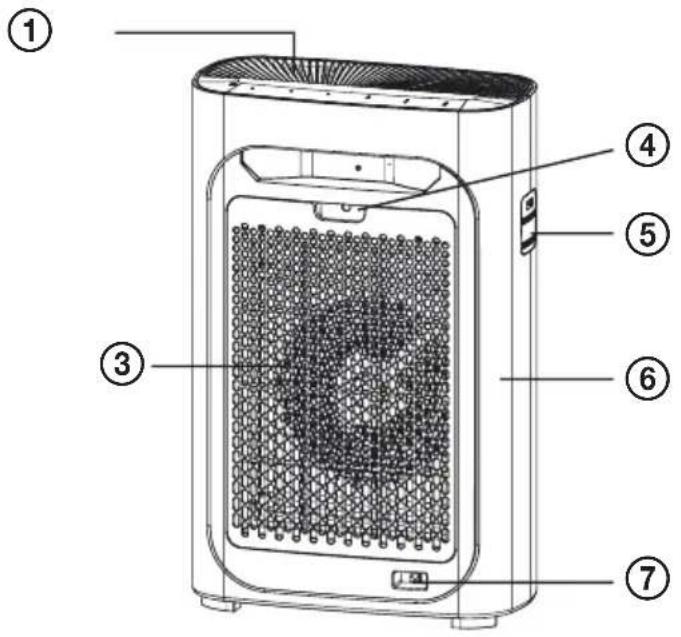
English
-
Air outlet
-
Display with air quality indicator
-
Air inlet
-
Filter lock
-
Air quality sensor
-
Back cover
-
Power cord connector including cable
-
Light sensor (automatically adjusts the brightness of the display according to the ambient light intensity)
-
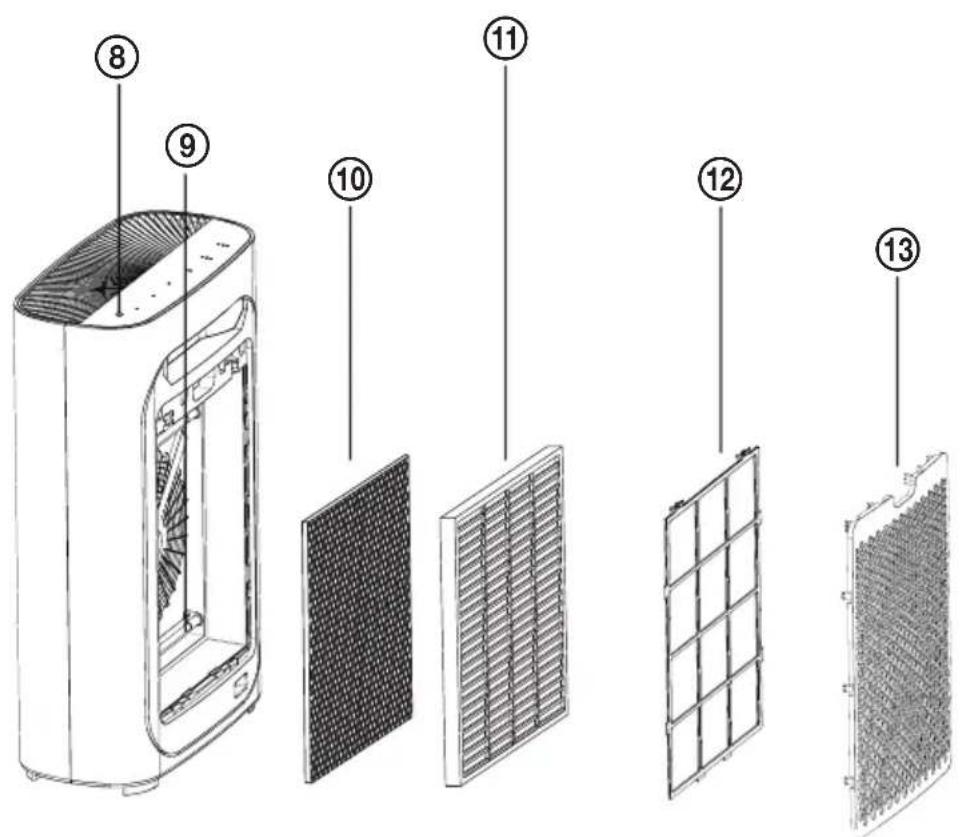
UV lamp
-
Activated carbon filter
-
Effective HEPA filter
-
Primary filter
-
Filters' cover
- Remote control (not shown)
Deutsch
Read carefully and save for future use!
Warning: The safety measures and instructions, contained in this manual, do not include all conditions and situations possible. The user must understand that common sense, caution and care are factors that cannot be integrated into any product. Therefore, these factors shall be ensured by the user/s using and operating this appliance. We are not liable for damages caused during shipping, by incorrect use, voltage fluctuation or the modification or adjustment of any part of the appliance. To protect against a risk of fire or electric shock, basic precautions shall be taken while using electrical appliances, including the following:
- Make sure the voltage in your outlet corresponds to the voltage provided on the appliance label and that the socket is properly grounded. The outlet must be installed in accordance with applicable electrical codes according to EN. It must also be freely accessible so that the appliance can be quickly disconnected from electricity if necessary.
- Never use the appliance if the power cable is damaged. If the appliance has fallen on the ground, has been immersed in water or is not working properly.
If the appliance emits an unusual odor, smoke, or abnormal sound, unplug it immediately and visit a service center with the appliance.
All repairs, including cord replacements, must be carried out at a professional service centre! Do not remove the protective covers from the appliance; there is a risk of electric shock! If you interfere with the appliance, it exposes you to the risk of losing the legal right to claim defective performance or a quality warranty.
-
Protect from direct contact with water and other liquids to prevent electric shock.
-
Do not use the appliance outdoors or in a humid environment, nor touch the power cord or the appliance with wet hands. Risk of electric shock.
-
As well, do not use the turned on appliance:
-
close to bathtub, shower or a pool - danger of electric shock,
- close to flammable materials, e.g. drapes - risk of fire,
- very close to the places where heat accumulates (stove, heater), or close to open fire - risk of fire,
- in rooms where are stored flammable or explosive materials – danger of fire,
- in an industrial environment or an environment with fumigation-type pesticides (chemical residues may accumulate inside the device and their subsequent release into the air may be harmful to health),
-
Directly under an electrical outlet.
-
Do not use the device in places where particles of fat are present. Placing in a kitchen, for example, can reduce the life of the filter. The air purifier should not be used as a ventilation or exhaust device.
- Close supervision is necessary for operating the device near children!
- Keep the appliance and its supply out of the reach of children under 8 years of age.
- Do not expose children to the air outlet of the appliance for too long. Keep children away from the air outlet. It could cause them illness or have another adverse effect on their health.
- Place the device away from other objects so that the free air circulation required for its proper operation is ensured.
- Never cover the air intake or outlet openings or insert any objects or fingers into them! It could cause damage to the appliance or injury.
-
Do not use this appliance with a programmer, timer, stand-alone remote control system, or any other device that automatically switches the unit on, as there is a risk of fire if the unit is covered or improperly placed.
-
Do not use insecticides or flammable sprays near the appliance. You could damage the appliance.
- Never place the appliance on soft surfaces such as a bed, sofa, carpet with thick, long fibers, etc. It must be placed on a stable and level surface.
- Do not switch the appliance on or off by plugging in or pulling out the power supply plug. First, always turn off the appliance using the ON/OFF button! Then you can unplug the power cord!
- We recommend that you do not leave the appliance unattended with the plugged-in power cord. Do not remove the power cord from the outlet by yanking the cord. Unplug the power cord from the outlet by grasping the plug.
-
In the following cases, always disconnect from the electrical socket:
-
before refilling the water tank if you are no longer using it
- before moving it,
- before cleaning
- switch does not work,
- circuit breaker or fuses are blown,
- power cable or the plug are unusually hot,
- you smell the odor of burning or if you noted unusual noises or vibration,
-
in case of any other unusual phenomena or malfunctions.
-
Do not allow the power cord to touch hot surfaces or run the cord over sharp edges.
- The appliance is intended exclusively for domestic and indoor use. It is not intended for commercial use. Do not use the product for any other purpose than the one for which it is designed.
- Do not use the appliance without properly installed filters.
- Move, store and transport the appliance in vertical position only.
- It is strictly forbidden to manipulate the air filter during operation.
- This appliance may be used by children 8 years of age or older and persons with reduced physical, sensory or mental capabilities or lack of experience and knowledge if supervised or instructed to use the appliance in a safe way and understand the potential
hazards. Children shall not play with the appliance. Cleaning and maintenance by the user must not be carried out by children unless they are at least 8 years old and supervised.
- Install the power cable so that no one trips over it.
WARNING: This appliance is equipped with a UV-C emitter. Improper use of the appliance or damage to the housing may result in the release of dangerous UV-C radiation. UV-C radiation can cause damage to the eyes and skin even in small doses. Appliances that are visibly damaged must not be put into operation.
CAUTION: The replacement of the UV-C lamp should only be entrusted to a professional service provider. Replacement of the emitter by the user is prohibited.
CAUTION: Do not operate the UV-C emitter if it is removed from the appliance cover or if the back cover is open.
Do not immerse in water!
DANGER TO CHILDREN: Children must not play with the packaging material. Do not let the children play with plastic bags. Risk of suffocation.
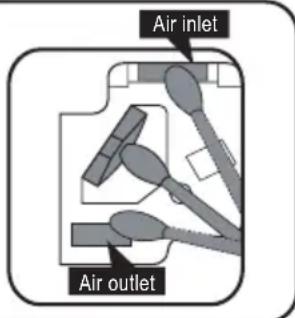
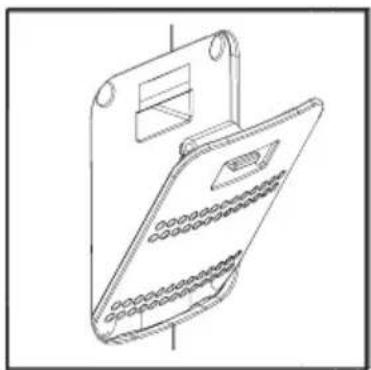
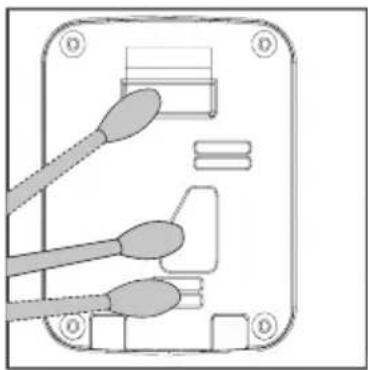
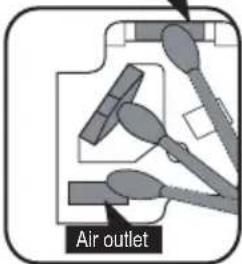
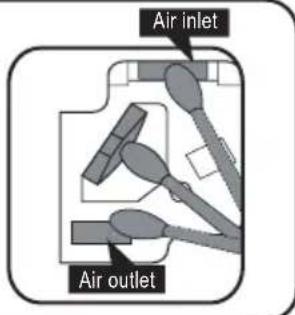
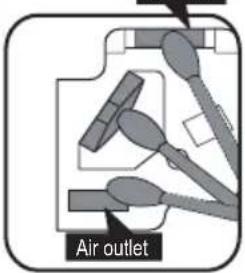
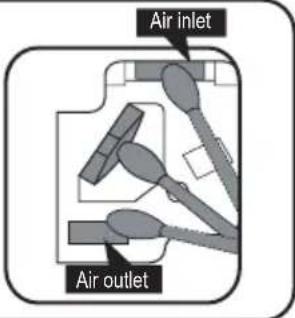
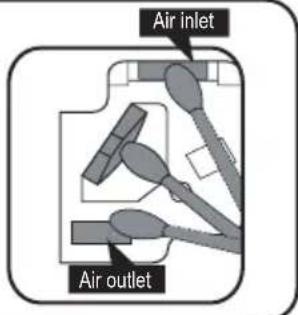
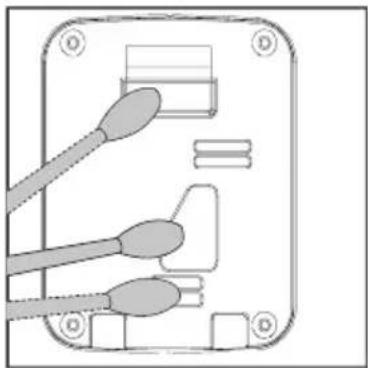
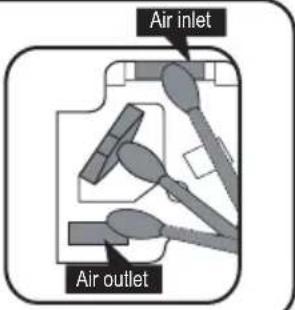
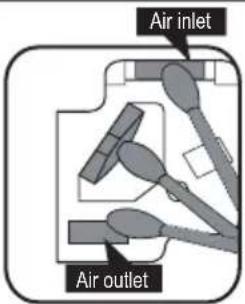
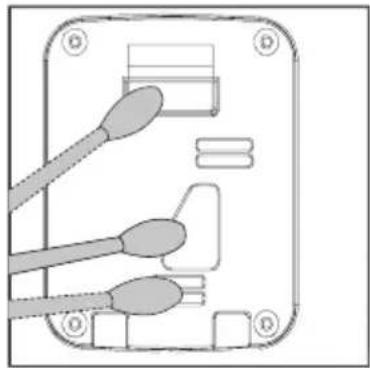
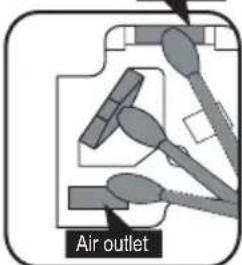
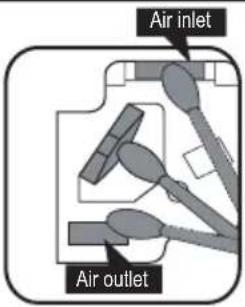
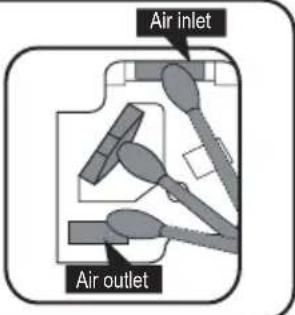
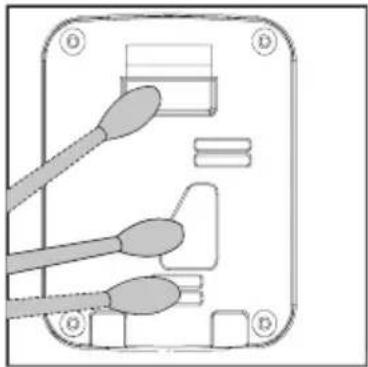
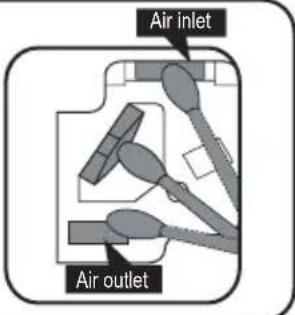
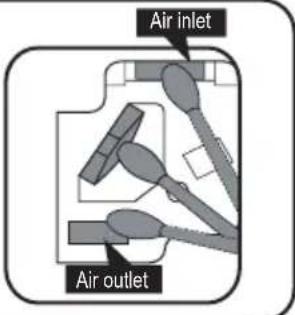
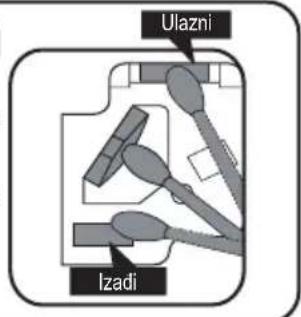
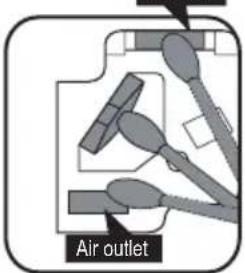
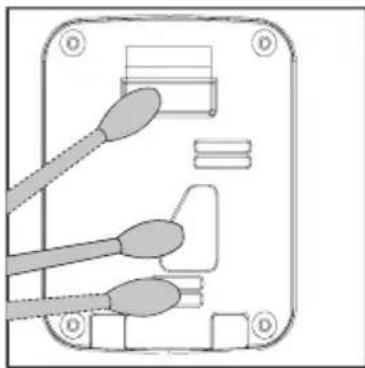
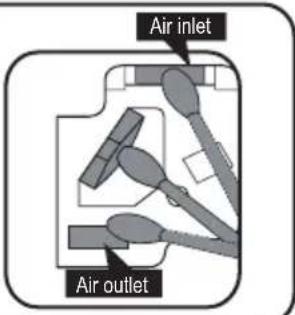
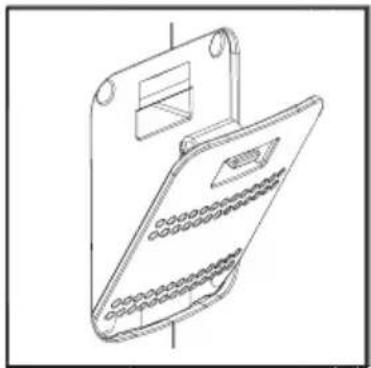
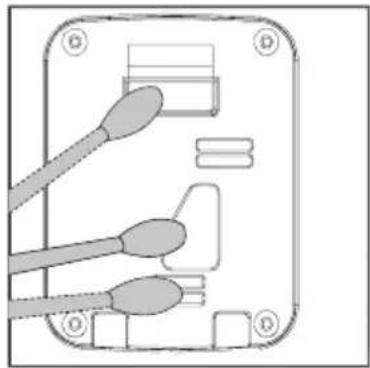
Clean air quality sensor
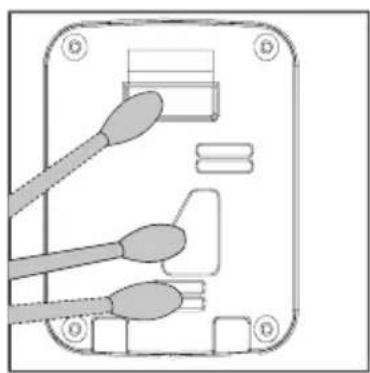
Clean the air inlet and outlet of air quality sensor; Using a dry cotton swab to remove the residual stains from air quality sensor.
Note: To ensure that the filter run at optimal performance please clean every two months.

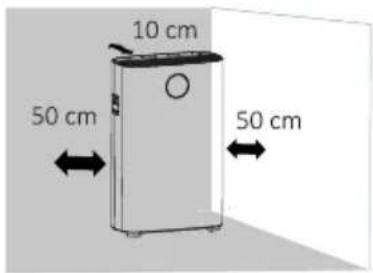
- Please note that the location of purifier need to keep a certain distance with other objects.
- Please keep the distance around purifier, in case of affecting air inlet.
WARNING

ENSURE THE AIR INLET IS NOT OBSTRUCTED

WARNING
UV-C radiation is dangerous to the eyes and skin. Do not operate the UV-C lamp which is out of the appliance. Replacement of the UV-C lamp by the consumer/user is forbidden.
CONTROL PANEL OVERVIEW
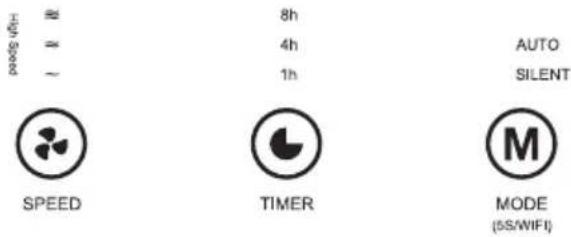
- FAN SPEED: Air flow speed setting.
- TIMER: Timer function.
- MODE (WIFI):
Press briefly to switch between Automatic mode (AUTO) and Night mode (SILENT).
WIFI: A long press resets the WiFi settings and the purifier can be connected to the mobile application (see. Connecting the appliance to WiFi).
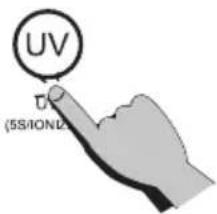
- UV (ION):
Press briefly to turn On/Off the UVC function
ION: lonizer
Press and hold for approx. 5 s to switch off the ionizer function (beep).
You can check whether the ionizer is off or on via the application. The ionizer is always on when the purifier is switched on.
-
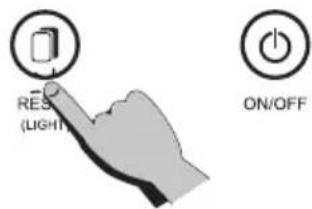
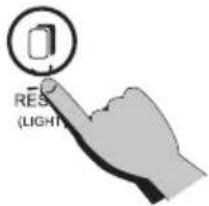
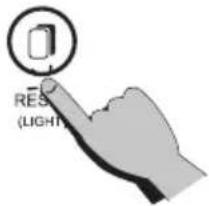
RESET (LIGHT): Press briefly to turn the display on or off. Press and hold the button for approx. 5 s to reset the filter life cycle counter (beep). Use only after you replace the filter.
-
POWER: On/Off button
Remote controller
You have to insert 2 x 1.5V AAA batteries (not included) into the remote control. Open the cover and insert the batteries Observe correct polarity. Remove the batteries from the remote control if you will not be using the appliance for a long time. If the batteries are empty, replace them with new ones of the same type.
Note: The remote control will work if you are within about 5 meters without obstacles in direct view from the appliance.
Placing the air purifier
To achieve the best possible air flow on both sides of the appliance, make sure that there is a gap of at least 50 cm between the air inlet and the wall and at least 10 cm behind the air outlet. Keep the appliance at least 1 m away from other appliances that transmit radio waves (television, radio, weather stations, etc.).
Do not plug the appliance into an outlet together with the plug of the TV, radio, etc., as this may cause blurry picture and noise.
- Placing the appliance in one place for a long time can smudge the walls.
- To ensure adequate ventilation and maximum efficiency, do not adjust the air inlet and outlet.
FILTER INSTALLATION AND REPLACEMENT
The service life of the filters is approximately 6-12 months in normal use. After about 1600 hours, the filter life counter flashes to indicate that the life cycle limit has been reached.
The On / Off icon in standby mode flashes red, when the device is switched on, it flashes blue. The device can continue to operate after the notification about filter replacement. However, the air quality will not be good. Take care of your health and replace the filters in time.
Note
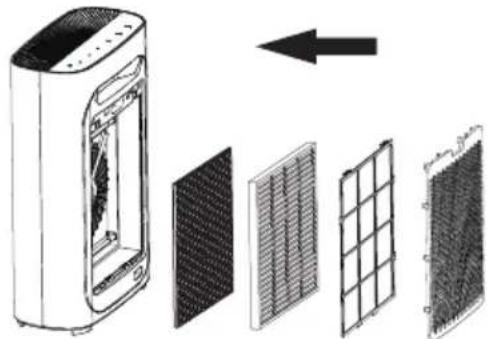
• Always change all the filters in the same time (HEPA filter and carbon filter).
- Reset the filter service life counter after each replacement.
- All parts and filters must be completely dry before connecting the appliance.
- If you will not be using the appliance for a long time, switch it off by pressing the "ON / OFF" button and disconnect it from the power outlet.
- Store the device in a cool, dry and ventilated place.
- Do not place it or turn it upside down, since this could damage the appliance.
CAUTION
- Prior to installation, maintenance and transport, make sure that the appliance is disconnected from the power supply.
- Do not use the ar purifier without filters.
- Remove all packaging before using filters.
- When removing or installing filters, you can lean the air purifier against the wall to increase its stability.
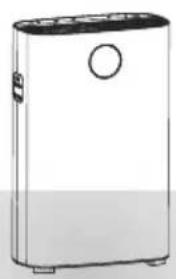
natural_image
Illustration of a rectangular electronic device with a circular top and base, no text or symbols present.- Remove all packing material and place the air purifier on a dry, stable and level surface.
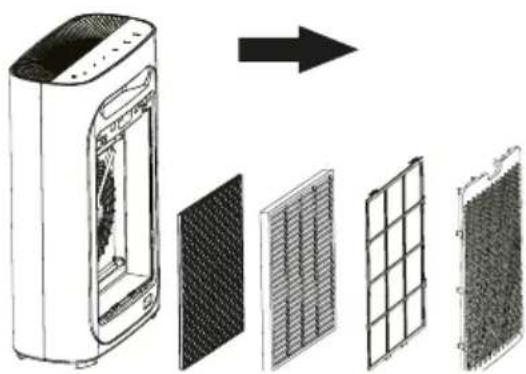
natural_image
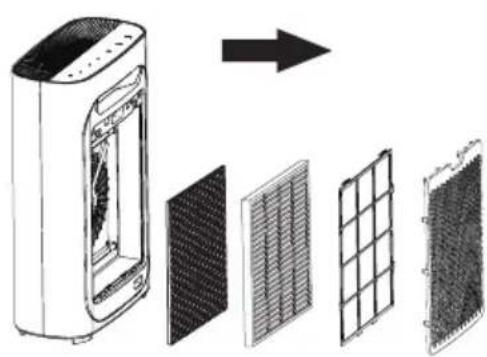
Diagram showing a device with internal components and a grid layout, no text or symbols present- Remove all the filters. 4. Remove all packaging.
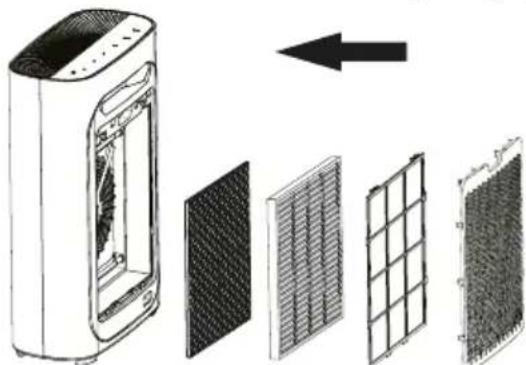
natural_image
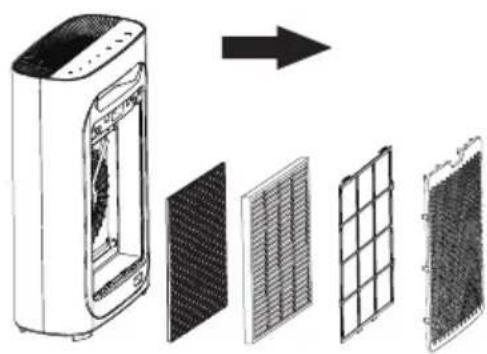
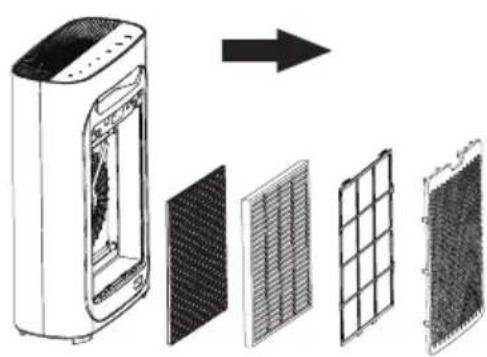
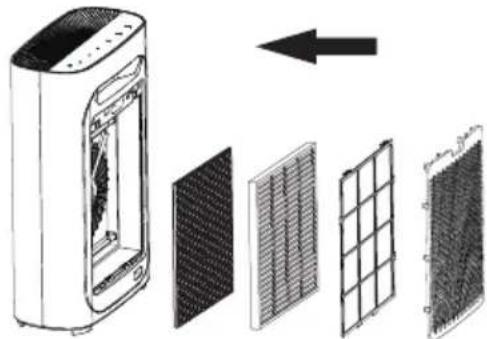
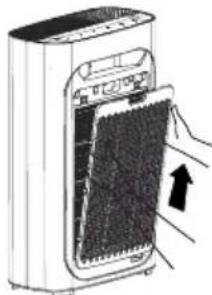
Diagram showing a device with internal components and an arrow indicating direction (no text or symbols present)- Insert the filters into the appliance in the correct order: Carbon filter, HEPA filter, primary filter, filters' cover.
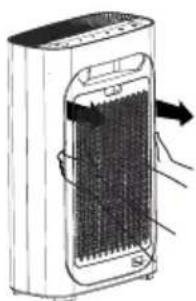
1
natural_image
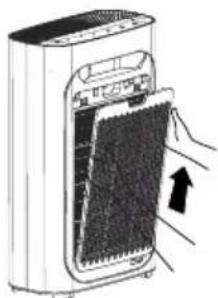
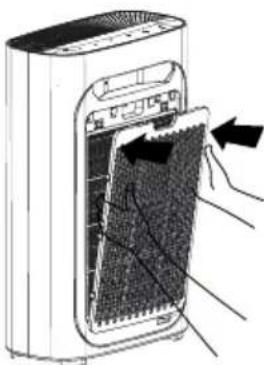
Illustration of a hand inserting a device into a power heater (no text or symbols visible)2
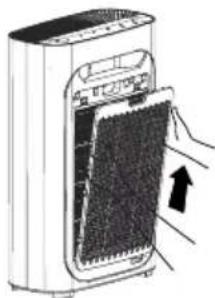
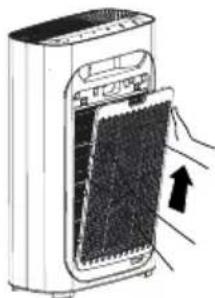
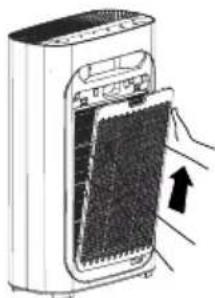
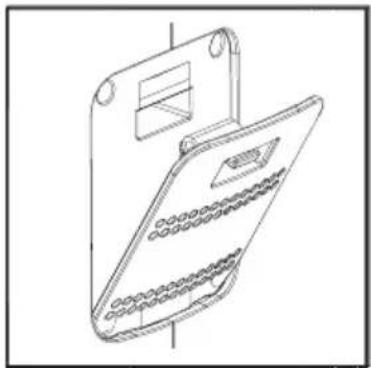
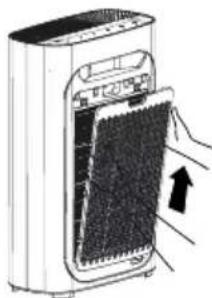
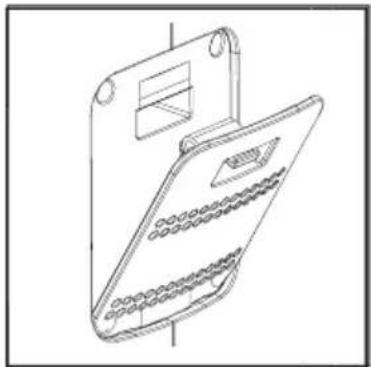
- Open the rear filter cover by grasping the cover in the recess with one hand and release the cover locks by pulling the cover away from the appliance.
natural_image
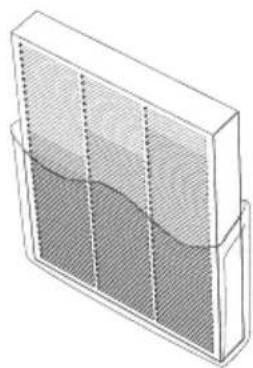
Illustration of a 3D rectangular container with internal mesh structure and side supports (no text or symbols)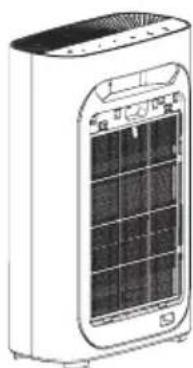
natural_image
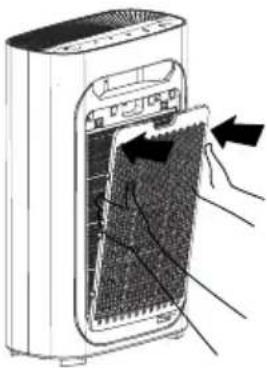
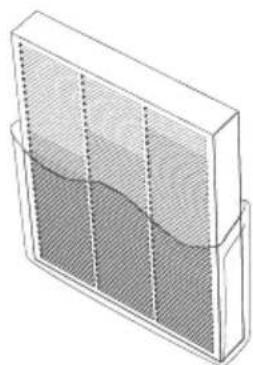
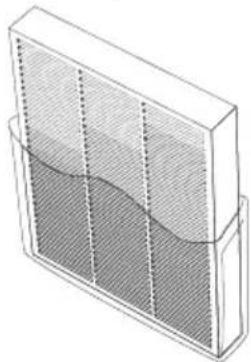
Illustration of a portable air conditioner unit with a grid display and ventilation slots (no text or symbols visible)- Make sure that the labels of the filters with the pull-out tab point outwards.
natural_image
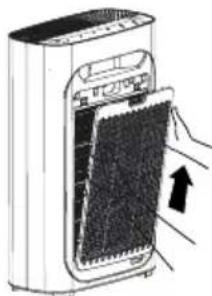
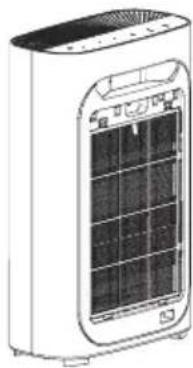
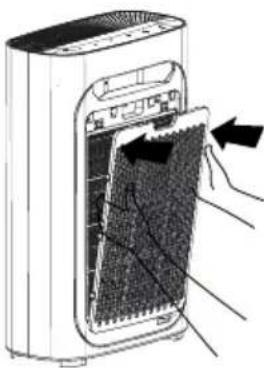
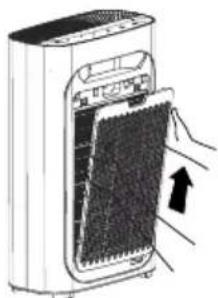
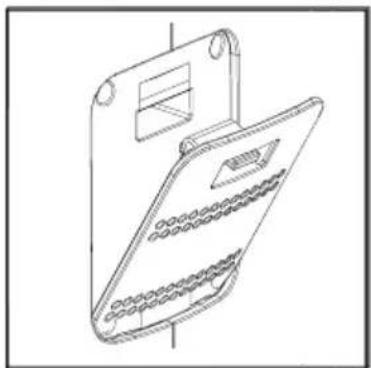
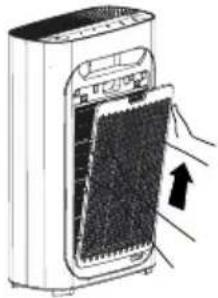
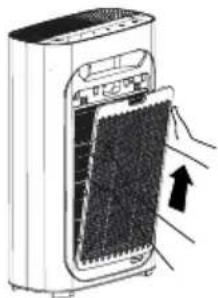
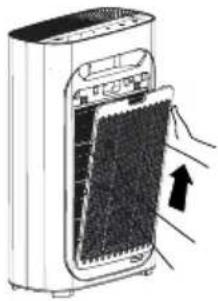
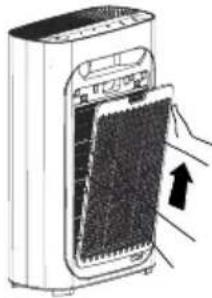
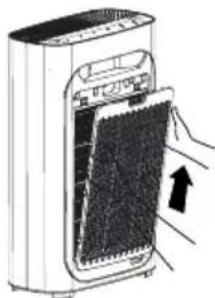
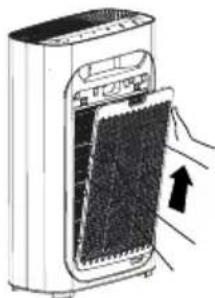
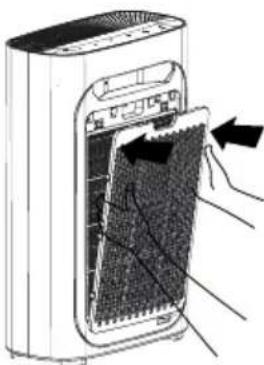
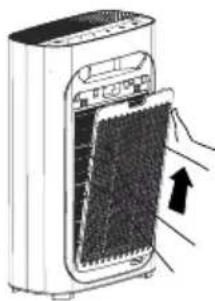
Diagram of a portable air conditioner unit with hands inserting or removing the interior panel (no text or symbols visible)- Replace the filters' cover. When closing, align the cover with the grooves at the bottom of the appliance and gently push the cover so that the protrusions of the cover around the perimeter fit into the holes in the body of the appliance.
Replacing filters
- Switch off the appliance.
- Remove the rear cover.
- Remove all the filters.
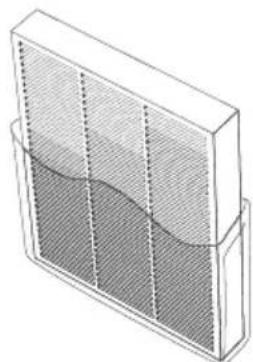
- Remove the plastic packaging from the filters and insert them into the appliance in the correct order.
- Make sure the pull-out filter labels face out.
- Reset the filter service life counter by pressing and holding the RESET button.
Filters and their function
Four-point cleaning system for efficient air cleaning and a healthier life.
Warning: Unpack the filters just before replacing them. Filters that have been unwrapped for a long time before use lose their properties.
Primary filter
The primary filter effectively blocks 2.5mm fibrous particles. Blocking rate >99.9%. It is easy to clean and the filter service life is high (up to 10,000 cleaning). It captures larger particles, such as pet fur, coarse dust, etc. Prolongs the life of other filters.
HEPA filter
It removes up to 99.9% of small particles with a size of 0.3 microns. Removes allergens and bacteria present in the air, such as pollen, smog and viruses.
Carbon filter
It is highly effective in absorbing volatile organic compounds, including unpleasant odors and many types of pollutant gases.
UV lamp
The UVC lamp emits ultraviolet radiation with a wavelength of less than 280 nm, sterilizes the air, effectively eliminates common bacteria and viruses and thus helps protect the body from various types of microorganisms.
Note: The starting voltage of the cold cathode of the UV lamp is only 500 V. It does not produce ozone and its use is therefore safe.
USE
Putting the appliance in operation
When connected to the network, a beep sounds and the indicators flash twice and then go out. The power indicator ("on / off" button) remains red and the appliance enters standby mode.
Press the "On / Off" button to start the appliance automatic mode. When turned on, the lights turn blue. The appliance warms up for approx. 5 s and the air quality is checked automatically.
The light framing of the display indicates the air quality.
The display contains the following information:
- Air quality (according to the color of the framing around the display)

Blue (PM2.5 = 0 \~ 50) Excellent

Green (PM2.5 = 51 \~ 100) Good

Purple (PM2.5 = 101-150) Bad

Red (PM2.5 = 151\~) Very bad
Note: If you want to turn off the air information display, press the "RESET" button. When you press the same button again, the display lights up again.
- Air humidity in %
- WiFi connection status (Icon on or off)
- Room temperature in ^ C
- the amount of PM2.5 particles in the air
Automatic mode
When the appliance is switched on, the automatic mode is started, which regularly checks the air quality and automatically adjusts the most suitable fan speed when it changes.


SPEED


TIMER
AUTO
SILENT

UV
(5S/IONIZER)

RESET (LIGHT)

ON/OFF
Night mode SILENT
The SILENT program uses a built-in light sensor that automatically detects the intensity of the ambient light and, if the light intensity is low, automatically reduces the brightness and reduces the fan power to a minimum.
Note: If you want to turn off the display completely, press briefly the RESET icon.
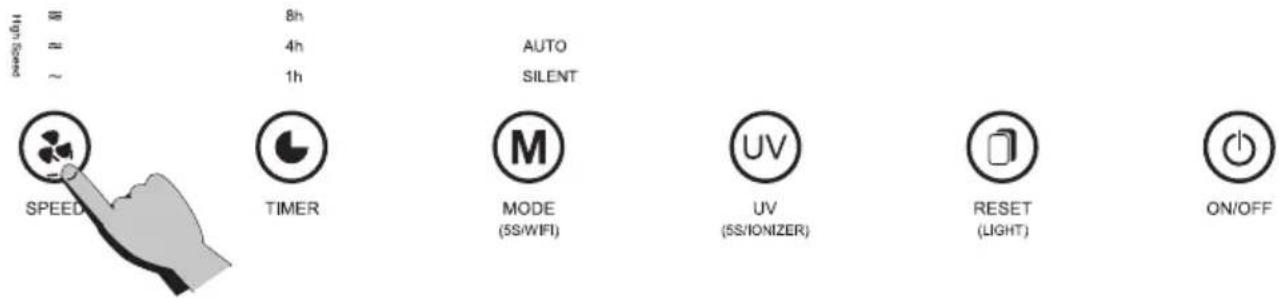
Setting the air flow speed
The appliance allows you to set the air flow in 4 levels. The highest level is set when the speed indicators are lit at the same time.
English
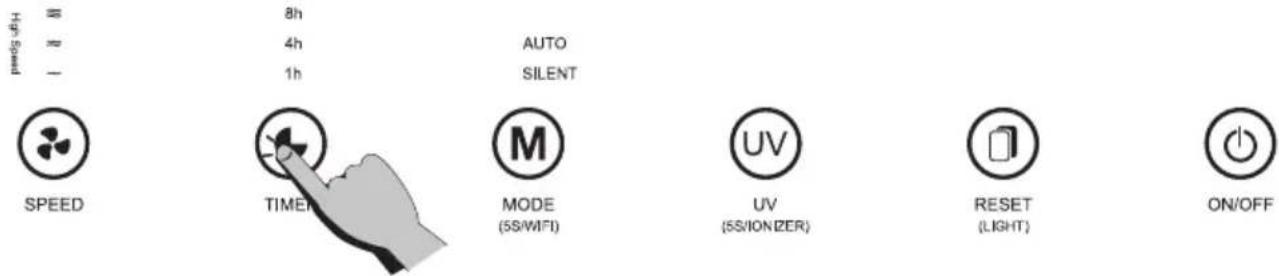
TIMER function
You can set the time after which the device switches off automatically using this function. Press this button to switch between 1 hour, 4 hours and 8 hours.
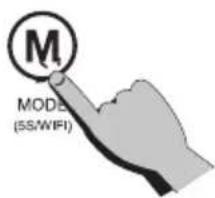
Using the application (MODE button)
A long press resets the WiFi settings and the purifier can be connected to the mobile application. Use the Wi-Fi function to connect the appliance to your home network using a mobile phone.
ATTENTION:
If you change the name of your home WiFi network or password, you will need to restore connection with your appliance.
- The application supports the operating system version of the IOS 9.0 and higher, Android 6.0 and higher; in general, the system version can be checked using setting in a mobile phone or tablet.
- This model supports WiFi network security with WEP, WPA, WPA2, WPA3, AES and TKIP.
- Configuring the appliance to access the network requires a 2.4 GHz WiFi network, the 5 GHz frequency range is not currently supported.
- WiFi configuration is required to access the appliance to the network; if the network is already once successfully configured, the application can be operated on the WiFi / 2G / 3G / 4G networks and can be controlled remotely.
- If the name of your home WiFi network is changed or the router is replaced, the appliance will be displays in the app as offline; just configure network access without any changes to your application account number.
- If others want to use the application to run the same appliance, they must be invited to the application by a "family manager" to connect (provided that the invited user downloads the application and registers).
- If the application changes, the original users may be prompted to delete the device in their mobile application, and new users can only configure a direct network connection according to the network access instructions (if the original users do not delete their device in the mobile application, it will be removed after new users successfully configure network access).
Connection
- Ensure that the mobile phone is connected to your home WiFi network

- Download the Smart Life application and register:
a. Scan the QR code or search for the Smart Life application in the Apple store or Google Play. Download the application.
b. Open the application and create your personal account.
Connect the appliance to your home network with your mobile phone using the WiFi function.
Note: The text displayed in the application is informative. The appearance and text of the application screen can be modified with new updates.
Connection via EZ Mode (AP3)
-
Plug the purifier in.
-
Briefly press the "on / off" button on the purifier and immediately press and hold the MODE button for approx. 5 seconds. A beep sounds and the WiFi icon flashes quickly on the display.
-
Open the Smart Life application on your mobile phone.
-
Use the "+" icon on the top right of the application to locate the appliance (Small Home Appliance -> Air Purifier (WiFi)).
-
Enter the WiFi and network password in the application according to the application instructions.
-
Click on the next step and set the EZ mode in the upper right corner of the application screen (basic preset EZ mode). Confirm by checking off that the Wi-Fi icon on the display flashes quickly *.
-
Click on the next step "next" in the application.
-
The purifier will connect automatically, follow the application instructions.
* If the icon no longer flashes, you need to start the setting from the beginning.
lonizer
The appliance is equipped with a negative ion generator that helps eliminate positively charged particles such as dust, bacteria, viruses, smoke and the like. At the same time, it significantly improves air quality, has a positive effect on health, the human psyche and the immune system.
Warning: You can verify the information whether ionization is in operation or not only in the phone application.




Reset button
Press the button for at least 5 seconds to reset the device. (This feature is only available after a filter change notification.)





CLEANING AND MAINTENANCE
WARNING: Switch off and unplug the appliance before cleaning and replacing filters.
Do not immerse the appliance in water or any other liquid. Do not use abrasive or flammable substances (eg bleach, alcohol or solvents) to clean the product. Only the primary filter can be washed with water, the other filters cannot be washed with water.
- Wipe off the dust with a dry soft cloth.
- Wipe the inside and outside of the air purifier with a dry soft cloth.
Cleaning of the air quality sensor:
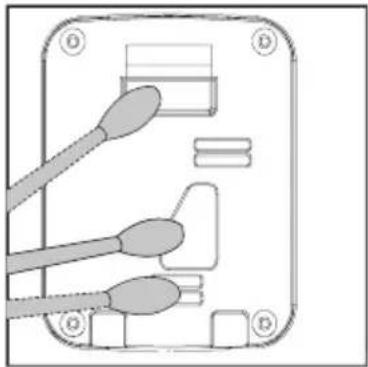
Clean the air quality sensor every two months to ensure the best air purifier performance. If you use the air purifier in a dusty environment, clean it more often.
WARNING: If the indoor humidity is too high, moisture may condense on the sensor. This means that even if the air quality is good, the air quality light may report poor quality. In this case, the air quality indicator must be cleaned or the speed adjusted manually.
natural_image
Illustration of a hand using a tool to interact with a device (no text or symbols visible)1
natural_image
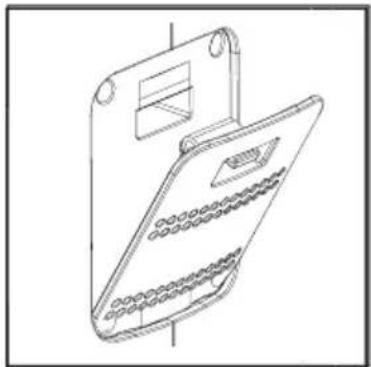
Line drawing of a handheld electronic device with a bracket and display panel (no text or symbols)2
natural_image
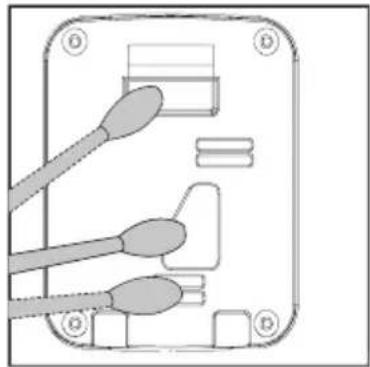
Diagram of an electronic device showing three connected cables and a connector (no text or symbols)3
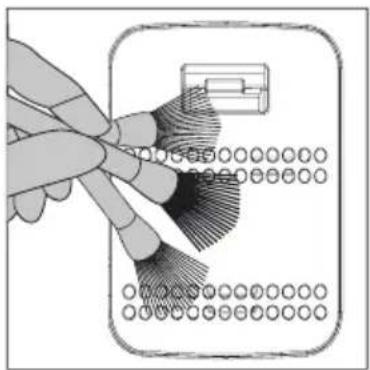
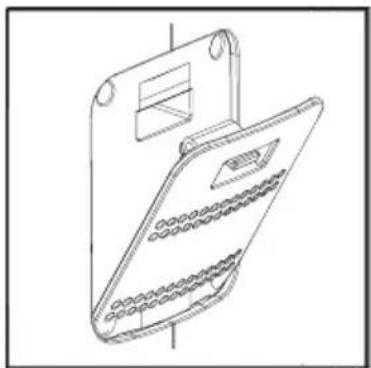
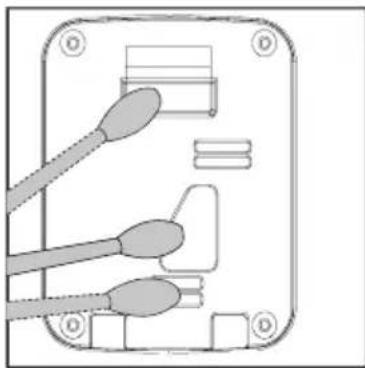
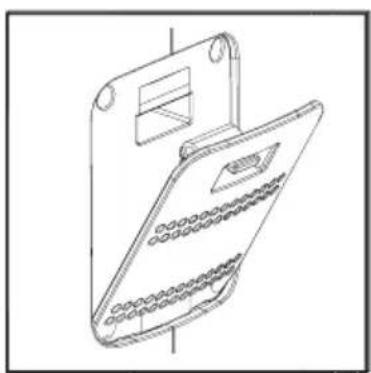
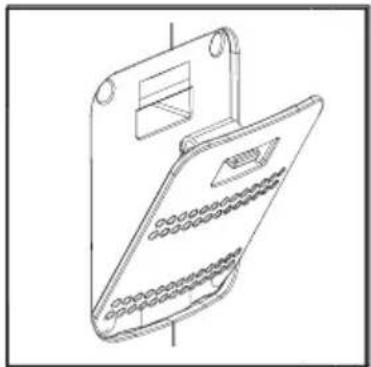
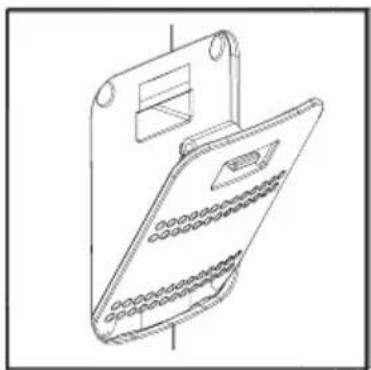
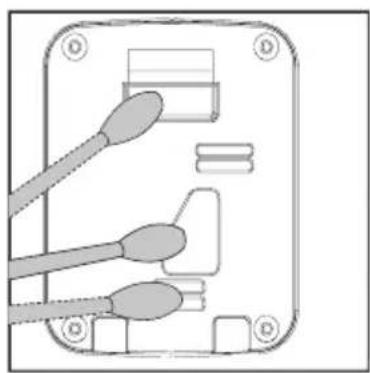
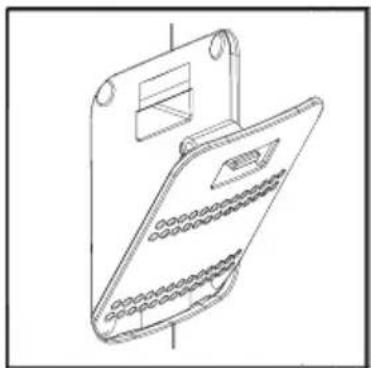
- Use a soft brush (not included) to clean the air quality sensor inlet / outlet.
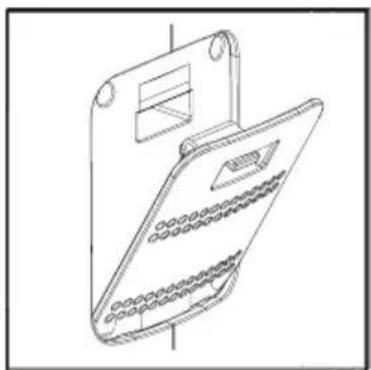
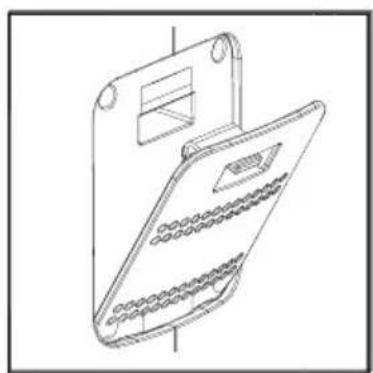
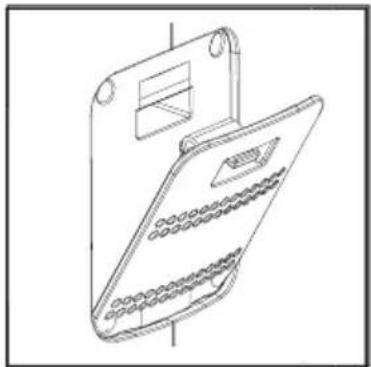
- Remove the protective cover of the air quality sensor.
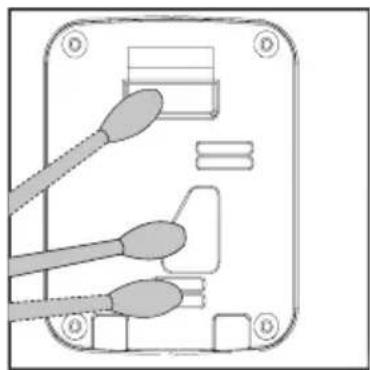
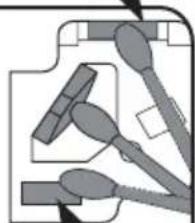
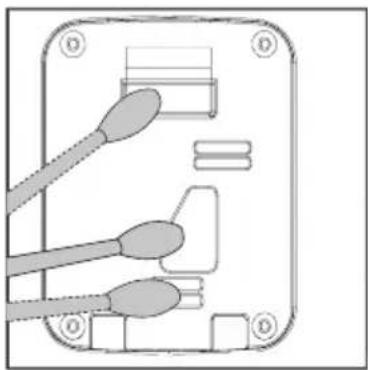
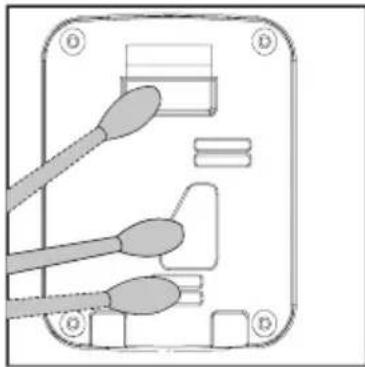
- Use a damp cotton swab to clean the air quality sensor, its inlet and outlet.
- Dry with a dry cotton swab.
- Replace the air quality sensor cover.
Primary filter cleaning
Clean and maintain the primary filter every two months (approximately after 480 hours of operation) to ensure the best performance of the device. We recommend using the device at home 8 hours a day, 7 days a week. Maintenance of external parts: use a damp cloth to wipe off the dust on the surface of the device.
- Remove the back cover and carefully remove the primary filter.
- Use a soft brush or a vacuum cleaner to remove trapped dirt and wash the filter in waterf or soapy water. Allow it to dry properly before reinstalling. Return the completely dry primary filter to the appliance and replace the filter cover.
Warning:
- Set the vacuum cleaner to the lowest power to avoid damaging the filter.
- The filter must be completely dry before reinstalling it in the device.
TROUBLESHOOTING
In the event of a malfunction, follow the table below.
If you are unable to solve the problem according to the possible solutions in the table below, contact the service center. Never try to repair the appliance yourself.
| Problem Possible cause Solution | ||
| The appliance cannot be switched on | The plug is not inserted in the electrical outlet. | Connect the appliance to the power supply and switch it on. |
| The filter cover is fitted incorrectly. | Install the filter cover according to the operating instructions. | |
| The plug or cable is damaged. Contact a service center. | ||
| The power source is not working. | Check that there is power in the outlet. | |
| The fan does not work | The air inlet or outlet is blocked. | Remove all packaging from the filter/s. |
| The appliance is not on. | Connect the appliance to the power supply and switch it on. | |
| The motor is loose or damaged. Contact a service center. | ||
| There are loose or foreign objects inside the appliance. | If the items cannot be removed without tampering with the appliance, contact a service center. | |
| The appliance is placed on an uneven surface. | Place the appliance on a flat surface. | |
| The air is not purified enough. | The filters are clogged or have not been replaced in time. | Clean the washable filters if the appliance contains them and replace the other filters with new ones. Reset the filter life cycle counter. |
| The filter was not replaced. | Replace the filter (s) with new ones and reset the filter life counter. | |
| The air inlet or outlet is blocked. | Remove all packaging from the filter/s. | |
| There is not enough free space around the appliance. | Place the appliance so that there is enough free space around it for air intake and exhaust. | |
| The appliance is located in a larger space than it is intended for. | Place the device in a room where it can work effectively. | |
| The appliance is missing a filter. | Make sure that there are all necessary filters in the appliance. | |
| Make sure that the filter is inserted correctly in the appliance. If the appliance contains more than one filter, make sure that they are inserted in the correct order. | ||
| The air quality indicator is red | There is a source of pollution close to the appliance. | Remove the source of pollution. After a certain time, the air is cleaned and the indicator changes color according to the air quality in the room. |
Basic application troubleshooting
| Problem Possible cause | Recommendation Possible solution | ||
| Application shows disconnection. | Broken connection between mobile phone and device. | Check whether the mobile phone is connected to the network. | Reconnect the mobile phone to the network. |
| Check, if the router works correctly. | Restart the router. | ||
| The appliance must be connected to a power supply. | Turn the appliance off and on again. | ||
| Wifi device configurations are erased. | Remove the appliance from the application and perform the installation again. | ||
| The network or WiFi password changed. | Delete all WiFi network configurations and reconnect the appliance to your network. | ||
| Your WiFi does not meet the standard of operation of the appliance. | Check all the parameters of your home WiFi network. | ||
| The app works slowly. | Weak network connection. | Busy network. | Restart the router and reduce the number of users with access. |
| Poor cell phone WiFi signal reception. | Check the settings of the mobile phone itself. | ||
| Network bandwidth is not adequate. | Extend the bandwidth of the WiFi network. | ||
| The application cannot be installed | The application is not compatible with the phone's operating system. | You have to use a mobile phone according to the configuration above. (iOS 9.0 and higher, Android 6.0 and higher) | Install the application in the appropriate store (GooglePlay AppStore) and add the appliance via the application. |
TECHNICAL DATA
Model: AP3 Pure Comfort
Nominal voltage: 220–240 V
Rated frequency: 50/60 Hz
Nominal input power: 33 W
CADR: 360 m
^3/h
Recommended room size: 25–43m
2
Noise level: 25–60 dB(A)
Weight: 7 kg
Remote controller:
2x AAA batteries 1.5V (not included)
USE AND DISPOSAL OF WASTE
Wrapping paper and corrugated paperboard – deliver to scrapyard. Packing foil, PE bags, plastic elements – throw into plastic recycling containers.
DISPOSAL OF PRODUCTS AT THE END OF LIFETIME
Disposal of electric and electronic equipment (valid in EU member countries and other European countries with an implemented recycling system)
The represented symbol on the product or package means the product shall not be treated as domestic waste. Hand over the product to the specified location for recycling electric and electronic equipment. Prevent negative impacts on human health and the environment by properly recycling your product. Recycling contributes to preserving natural resources. For more information on the recycling of this product, refer to your local authority, domestic waste processing organization or store, where you purchased the product.
This product meets the requirements of the EU directives on electromagnetic compatibility and electrical safety and the issue of heavy metals in electrical and electronic equipment.
The operating manual is available at www.ecg-electro.eu.
Changes of text and technical parameters reserved.
08/05

Hereby, K + B Progres, a.s. declares that the type of radio equipment AP3 is in compliance with the directive 2014/53 / EU. The full text of the EU declaration of conformity is available at the following internet address: www.ecg-electro.eu.
SICHERHEITSHINWEISE
Clean air quality sensor
Clean the air inlet and outlet of air quality sensor; Using a dry cotton swab to remove the residual stains from air quality sensor.
Note: To ensure that the filter run at optimal performance please clean every two months.
Air inlet
Reinigung des
- Please note that the location of purifier need to keep a certain distance with other objects.
- Please keep the distance around purifier, in case of affecting air inlet.

UV-C radiation is dangerous to the eyes and skin. Do not operate the UV-C lamp which is out of the appliance. Replacement of the UV-C lamp by the consumer/user is forbidden.
WARNUNG

natural_image
Line drawing of a rectangular electronic device with a circular button and mounting feet (no text or symbols)natural_image
Diagram showing a device with internal components and grid layout, no text or symbols present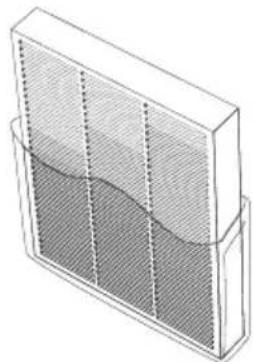
natural_image
3D diagram of a rectangular container with wavy internal layers and vertical dashed lines, no text or symbols presentnatural_image
Diagram showing a multi-panel air purifier with internal grid structure, no text or symbols present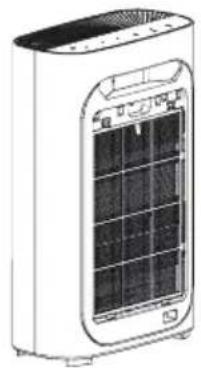
natural_image
Illustration of a white portable air conditioner unit with solar panels and ventilation slots (no text or symbols)natural_image
Diagram of a portable air conditioner unit with cooling screen and heat sink, showing internal components and arrows indicating airflow direction (no text or symbols)
UV
(SS/IONIZER)

RESET (LIGHT)

ON/OFF
Nachtmodus SILENT
Verbindung
Reset-Taste
natural_image
Illustration of a hand using a tool to interact with a device, showing a brush and circular components (no text or symbols)1
natural_image
Line drawing of a handheld electronic device with a top bracket and internal grid layout (no text or symbols)2
natural_image
Technical diagram of an electrical connector with three leads and a socket (no text or symbols)3
Do not immerse in water! – Neponořovat do vody!
Clean air quality sensor
Clean the air inlet and outlet of air quality sensor; Using a dry cotton swab to remove the residual stains from air quality sensor.
Note: To ensure that the filter run at optimal performance please clean every two months.
- Please note that the location of purifier need to keep a certain distance with other objects.
- Please keep the distance around purifier, in case of affecting air inlet.

UV-C radiation is dangerous to the eyes and skin. Do not operate the UV-C lamp which is out of the appliance. Replacement of the UV-C lamp by the consumer/user is forbidden.

VÝSTRAHA
natural_image
Simple line drawing of a rectangular electronic device with a circular button on top (no text or symbols)natural_image
Diagram of a portable air conditioner unit with heat exchanger and hand placement arrows (no text or symbols)1
natural_image
Illustration of a hand inserting a device into a power grid device (no text or symbols visible)2
natural_image
Diagram showing a device with internal components and grid layout, no text or symbols present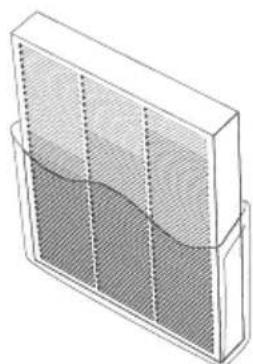
natural_image
Illustration of a 3D rectangular container with internal mesh structure and curved liquid inside (no text or symbols)natural_image
Diagram showing a device with internal components and a directional arrow, no text or symbols present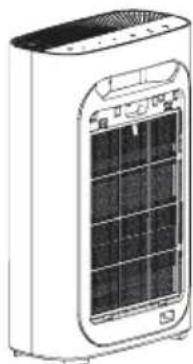
natural_image
Illustration of a white portable air conditioner unit with a solar panel display (no text or symbols visible)natural_image
Diagram of a portable air conditioner unit with cooling fins and heat exchanger (no text or symbols)
UV
(SS/IONIZER)

RESET (LIGHT)

ON/OFF
Noční režim SILENT
Připojení

RESET (LIGHT)

ON/OFF
Resetovací tlačítko
natural_image
Illustration of a hand inserting a device into a grid, with no visible text or symbols.1
natural_image
Line drawing of a mechanical device with a bracket and internal components (no text or symbols)2
natural_image
Diagram of an electrical connector with three cables and a socket (no text or symbols)3
Clean air quality sensor
Clean the air inlet and outlet of air quality sensor; Using a dry cotton swab to remove the residual stains from air quality sensor.
Note: To ensure that the filter run at optimal performance please clean every two months.
Air inlet
- Please note that the location of purifier need to keep a certain distance with other objects.
- Please keep the distance around purifier, in case of affecting air inlet.

UV-C radiation is dangerous to the eyes and skin. Do not operate the UV-C lamp which is out of the appliance. Replacement of the UV-C lamp by the consumer/user is forbidden.

HOIATUS
natural_image
Illustration of a rectangular electronic device with a circular button and base, no visible text or symbols.natural_image
Diagram of a portable electric heater with heat exchanger and hand placement arrows (no text or symbols)1
natural_image
Illustration of a hand inserting a filter into a power adapter device (no text or symbols visible)2
natural_image
Diagram showing a device with internal components and grid layout, no text or symbols presentnatural_image
Isometric line drawing of a rectangular container with internal mesh pattern and vertical dashed lines (no text or symbols)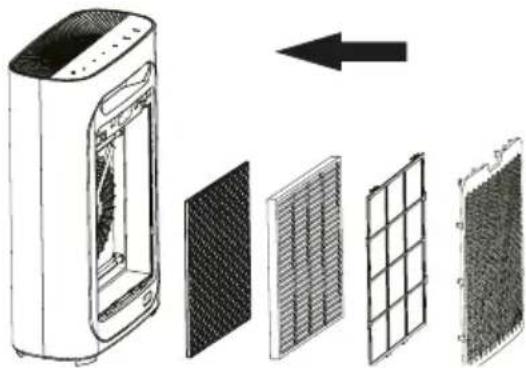
natural_image
Diagram showing a white air purifier with internal components and four different grating panels, one with an arrow indicating direction (no text or symbols present)- Sisestage filtrid seadmesse öiges järjekorras: Süsinikfilter, HEPA filter, eelfilter, filtrite kate.
natural_image
Line drawing of a white portable air conditioner unit with ventilation grilles and ventilation slots (no text or symbols)natural_image
Diagram of a portable air conditioner unit with hands inserting or removing the interior panel (no text or symbols visible)
UV
(5S/IONIZER)

RESET
(LIGHT)

ON/OFF
Öörežiim SILENT
Lähtestamise nupp
natural_image
Illustration of a hand using a tool to interact with a device, showing a grid of circular elements and a control panel (no text or symbols)1
natural_image
Line drawing of a handheld electronic device with a top bracket and internal components (no text or symbols)2
natural_image
Diagram of an electronic device showing three connected cables (no text or symbols)3
Clean air quality sensor
Clean the air inlet and outlet of air quality sensor; Using a dry cotton swab to remove the residual stains from air quality sensor.
Note: To ensure that the filter run at optimal performance please clean every two months.
- Please note that the location of purifier need to keep a certain distance with other objects.
- Please keep the distance around purifier, in case of affecting air inlet.

UV-C radiation is dangerous to the eyes and skin. Do not operate the UV-C lamp which is out of the appliance. Replacement of the UV-C lamp by the consumer/user is forbidden.

UPOZORENJE
natural_image
Simple line drawing of a rectangular electronic device with a circular button on top (no text or symbols)natural_image
Diagram of a portable electric heater with heat exchanger and cooling fins (no text or symbols)1
natural_image
Illustration of a hand inserting a textured material into a digital kitchen appliance (no text or symbols visible)2
- Otvorite stražnji poklopac filtra tako da jednom rukom uhvatite poklopac u udubini i povučete poklopac od uređaja kako biste oslobodili brave poklopca.
natural_image
Diagram showing a multi-layered air purifier with internal components and an arrow indicating direction (no text or symbols)- Uklonite sve filtre. 4. Uklonite svu ambalažu.
natural_image
Illustration of a 3D rectangular container with a wavy internal layer, no text or symbols present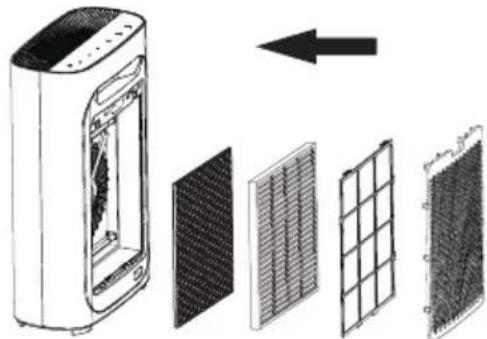
natural_image
Diagram showing a device with internal components and a grid layout, no text or symbols present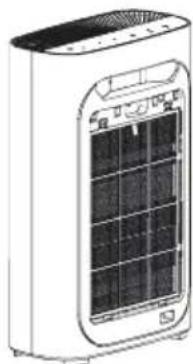
natural_image
Line drawing of a white portable air conditioner unit with a grid-patterned front panel (no text or symbols)-
Provjerite jesu li oznake filtara s jezičkom za izvlačenje usmjerene prema van.
-
Umetnite filtere u uređaj ispravnim redoslijedom: Ugljeni filtar, HEPA filtar, primarni filtar, poklopac filtra.
natural_image
Diagram of a portable air conditioner unit with hands inserting or removing the interior panel (no text or symbols visible)- Vratite poklopac filtara. Prilikom zatvaranja, poravnajte poklopac s utorima na dnu aparata i lagano gurnite poklopac tako da izbočine poklopca po obodu uđu u rupe na tijelu aparata.
Zamjena filtara
- Isključite uređaj.
- Skinite stražnji poklopac.
- Uklonite sve filtre.
- Uklonite plastičnu ambalažu s filtara i umetnite ih u uređaj pravilnim redoslijedom.
- Provjerite jesu li oznake filtara za izvlačenje usmjerene prema van.
- Resetirajte brojač životnog vijeka filtra dugim pritiskom na tipku RESET.
Filtri i njihove funkcije

UV
(5S/IONIZER)

RESET (LIGHT)

ON/OFF
Povezivanje putem EZ Mode načina (AP3)

RESET (LIGHT)

ON/OFF
Gumb za resetiranje
Za resetiranje uređaja pritisnite gumb najmanje 5 sekundi. (Ova je značajka dostupna samo nakon upozorenja o potrebi promjene filtra.)


SPEED


TIMER
AUTO
SILENT

MODE (SS/MIFI)

UV
(5S/IONIZER)

ON/OFF
ČIŠĆENJE I ODRŽAVANJE
UPOZORENJE: Prije čišćenja i zamjene filtara isključite uređaj i odspojite ga iz struje.
Ne uranjajte uređaj u vodu ili druge tekućine. Nemojte koristiti abrazivne ili zapaljive tvari (npr. izbjeljivač, alkohol ili otapala) za čišćenje proizvoda. Samo se primarni filtar može prati vodom, ostali filtri se ne mogu prati vodom.
natural_image
Illustration of a hand using a tool to clean or store items, with no visible text or symbols.1
natural_image
Line drawing of a handheld electronic device with a top bracket and internal components (no text or symbols)2
natural_image
Diagram of a device panel with three sensors and connectors (no text or labels)3
- Upotrijebite meku četku (nije uključena u pakiranju) za čišćenje ulaza/izlaza senzora kvalitete zraka.
-
Skinite zaštitni poklopac senzora kvalitete zraka.
-
Vlažnim pamučnim štapićem očistite senzor kvalitete zraka, njegov ulaz i izlaz.
- Osušite suhim pamučnim štapićem.
- Vratite zaštitni poklopac senzora kvalitete zraka.
Clean air quality sensor
Clean the air inlet and outlet of air quality sensor; Using a dry cotton swab to remove the residual stains from air quality sensor.
Note: To ensure that the filter run at optimal performance please clean every two months.
Air inlet
natural_image
Pure electrical circuit lines without any symbolsAir outlet
natural_image
Pure mechanical component diagram without any text, numbers, or symbolsIzplüde

- Please note that the location of purifier need to keep a certain distance with other objects.
- Please keep the distance around purifier, in case of affecting air inlet.

UV-C radiation is dangerous to the eyes and skin. Do not operate the UV-C lamp which is out of the appliance. Replacement of the UV-C lamp by the consumer/user is forbidden.

BRĪDINĀJUMS
natural_image
Simple line drawing of a rectangular electronic device with a circular top and base (no text or symbols)natural_image
Diagram of a portable air conditioner unit with heat exchanger and cooling fins (no text or symbols)1
natural_image
Illustration of a hand inserting a device into a power grid device (no text or symbols visible)2
- Iznemiet visus filtrus. 4. Noinemiet visu iepakojumu.
natural_image
Isometric line drawing of a rectangular container with a wavy bottom surface and vertical dashed lines on top (no text or symbols)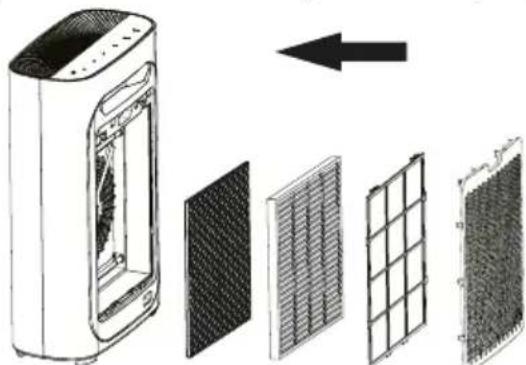
natural_image
Diagram showing a device with internal components and an arrow indicating direction (no text or symbols present)natural_image
Illustration of a portable air conditioner unit with a grid display and ventilation slots (no text or symbols visible)natural_image
Diagram of a portable air conditioner unit with hands inserting or removing the interior panel (no text or symbols visible)
UV
(5S/IONIZER)

RESET (LIGHT)

ON/OFF
Nakts režims SILENT
natural_image
Illustration of a hand using a tool to interact with a device (no text or symbols visible)1
natural_image
Line drawing of a handheld electronic device with a bracket and display panel (no text or symbols)2
natural_image
Diagram of an electronic device showing three connected cables and a connector (no text or symbols)3
Clean air quality sensor
Clean the air inlet and outlet of air quality sensor; Using a dry cotton swab to remove the residual stains from air quality sensor.
Note: To ensure that the filter run at optimal performance please clean every two months.
- Please note that the location of purifier need to keep a certain distance with other objects.
- Please keep the distance around purifier, in case of affecting air inlet.

UV-C radiation is dangerous to the eyes and skin. Do not operate the UV-C lamp which is out of the appliance. Replacement of the UV-C lamp by the consumer/user is forbidden.

WARNING
natural_image
Illustration of a rectangular electronic device with a circular button and base (no text or symbols)natural_image
Diagram of a portable air conditioner unit with heat exchanger and hand gesture (no text or symbols)1
natural_image
Illustration of a hand inserting a textured device into a power bank (no text or symbols visible)2
natural_image
Diagram showing a device with internal components and grid layout, no text or symbols presentnatural_image
Diagram showing a device with internal components and an arrow indicating direction (no text or symbols present)natural_image
Diagram of a portable air conditioner unit with cooling fins and heat exchangers, showing internal components (no text or labels)natural_image
Illustration of a rectangular container with a mesh pattern and internal wavy lines, no text or symbols present.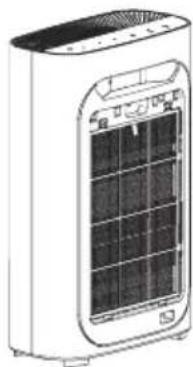
natural_image
Illustration of a portable air conditioner unit with a grid display and ventilation slots (no text or symbols visible)
RESET (LIGHT)

ON/OFF
Atstatos mygtukas
natural_image
Illustration of a hand using a tool to clean or store items on a device (no text or symbols visible)1
natural_image
Line drawing of a mechanical device with a handle and internal components (no text or symbols)2
natural_image
Diagram of an electronic device showing three connected cables and a connector (no text or symbols)3
Clean air quality sensor
Clean the air inlet and outlet of air quality sensor; Using a dry cotton swab to remove the residual stains from air quality sensor.
Note: To ensure that the filter run at optimal performance please clean every two months.
- Please note that the location of purifier need to keep a certain distance with other objects.
- Please keep the distance around purifier, in case of affecting air inlet.

UV-C radiation is dangerous to the eyes and skin. Do not operate the UV-C lamp which is out of the appliance. Replacement of the UV-C lamp by the consumer/user is forbidden.

FIGYELEM!
natural_image
Illustration of a rectangular electronic device with a circular top and base, no visible text or symbols.natural_image
Diagram of a heat exchanger with cooling fins and airflow direction arrows (no text or labels)1
natural_image
Illustration of a hand inserting a device into a power grid device (no text or symbols visible)2
natural_image
Diagram showing a device with internal components and a grid layout, no text or symbols present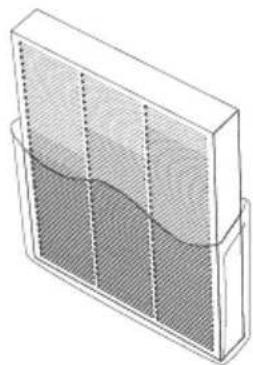
natural_image
Illustration of a 3D rectangular container with a wavy bottom surface and vertical dashed lines on top (no text or symbols)natural_image
Diagram showing a device with internal components and a grid layout, no text or symbols present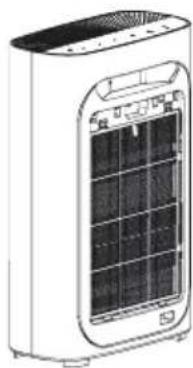
natural_image
Illustration of a white portable air conditioner unit with ventilation grilles and ventilation slots (no text or symbols)natural_image
Diagram of a portable air conditioner unit with hands inserting or removing the interior panel (no text or symbols visible)
UV
(5S/IONIZER)

RESET (LIGHT)

ON/OFF
RESET gomb
natural_image
Illustration of a hand using a brush to clean or store items on a rectangular plate (no text or symbols visible)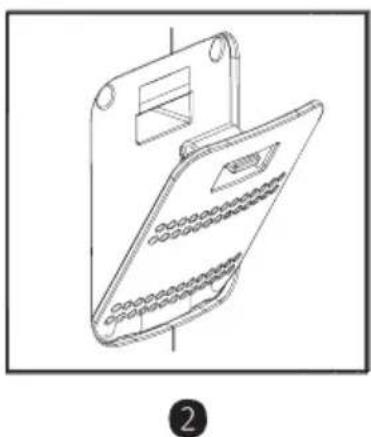
natural_image
Line drawing of a handheld electronic device with a top bracket and internal components (no text or symbols)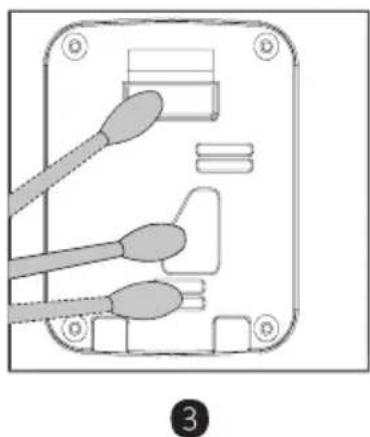
natural_image
Diagram of an electronic device showing three connected cables with pins, no text or symbols presentClean air quality sensor
Clean the air inlet and outlet of air quality sensor; Using a dry cotton swab to remove the residual stains from air quality sensor.
Note: To ensure that the filter run at optimal performance please clean every two months.
- Please note that the location of purifier need to keep a certain distance with other objects.
- Please keep the distance around purifier, in case of affecting air inlet.

UV-C radiation is dangerous to the eyes and skin. Do not operate the UV-C lamp which is out of the appliance. Replacement of the UV-C lamp by the consumer/user is forbidden.

ПРЕДУПРЕДУВАЊЕ
natural_image
Illustration of a rectangular electronic device with a circular top and base, no visible text or symbols.natural_image
Diagram of a portable electric heater with heat exchanger and cooling fins (no text or symbols)1
natural_image
Diagram of a hand inserting a textured device into a power heater (no text or symbols visible)2
natural_image
Diagram showing a device with internal components and an arrow indicating direction (no text or symbols present)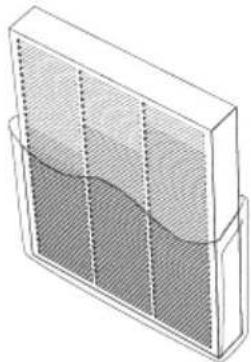
natural_image
Isometric line drawing of a rectangular container with internal mesh pattern and wavy bottom surface (no text or symbols)natural_image
Diagram showing a device with internal components and a directional arrow, no text or symbols present.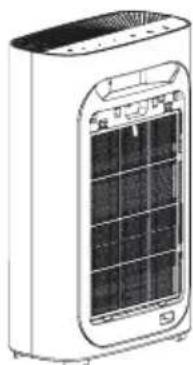
natural_image
Illustration of a white electric air purifier with visible cooling fins and ventilation slots (no text or symbols)natural_image
Diagram of a hair dryer with hands inserting or removing the cover (no text or symbols visible)
UV
(SS/IONIZER)

RESET (LIGHT)

ON/OFF
Тивко нокен режим
Копче за ресетирање
natural_image
Illustration of a hand inserting a cable into a device (no text or symbols visible)1
natural_image
Line drawing of a mechanical device with a bracket and internal components (no text or symbols)2
natural_image
Diagram of an electronic device showing three connected cables with a connector (no text or symbols)3
Clean air quality sensor
Clean the air inlet and outlet of air quality sensor; Using a dry cotton swab to remove the residual stains from air quality sensor.
Note: To ensure that the filter run at optimal performance please clean every two months.
Air inlet
- Please note that the location of purifier need to keep a certain distance with other objects.
- Please keep the distance around purifier, in case of affecting air inlet.

UV-C radiation is dangerous to the eyes and skin. Do not operate the UV-C lamp which is out of the appliance. Replacement of the UV-C lamp by the consumer/user is forbidden.
OSTRZEŻENIE

natural_image
Illustration of a rectangular electronic device with a circular top and base, no visible text or symbols.1
natural_image
Diagram of a portable air conditioner unit with hand inserting a fan (no text or symbols)2
natural_image
Diagram showing a device with internal components and a grid layout, no text or symbols presentnatural_image
Illustration of a 3D rectangular container with a wavy internal layer, no text or symbols present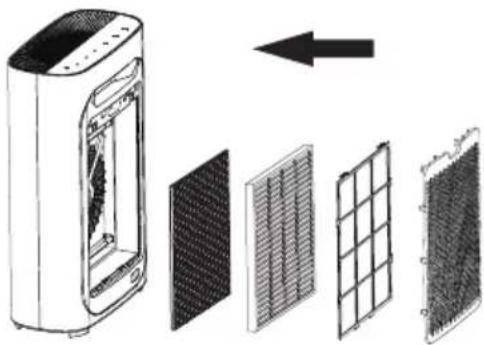
natural_image
Diagram showing a device with internal components and a directional arrow, no text or symbols presentnatural_image
Illustration of a white electric air purifier with a solar panel and ventilation grille (no text or symbols)natural_image
Diagram of a hair dryer with hands inserting or removing the cover (no text or symbols visible)
Tryb nocny SILENT

RESET (LIGHT)

ON/OFF
natural_image
Illustration of a hand using a brush to clean or store items on a device (no text or symbols visible)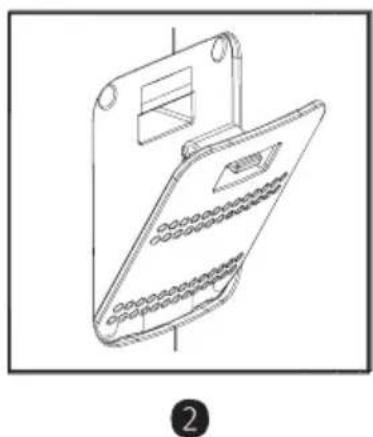
natural_image
Line drawing of a handheld electronic device with a top bracket and internal components (no text or symbols)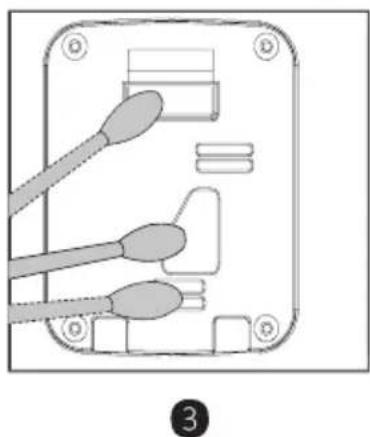
natural_image
Diagram of an electronic device showing three connected cables with a connector, labeled with number 3 (no text or symbols on the diagram itself)Clean air quality sensor
Clean the air inlet and outlet of air quality sensor; Using a dry cotton swab to remove the residual stains from air quality sensor.
Note: To ensure that the filter run at optimal performance please clean every two months.
- Please note that the location of purifier need to keep a certain distance with other objects.
- Please keep the distance around purifier, in case of affecting air inlet.

UV-C radiation is dangerous to the eyes and skin. Do not operate the UV-C lamp which is out of the appliance. Replacement of the UV-C lamp by the consumer/user is forbidden.
AVERTIZARE

- UV (ION) (ULTRAVIOLETE (IONIZATOR)):
natural_image
Illustration of a rectangular electronic device with a circular button and a blank top panel (no text or symbols)natural_image
Diagram of a portable air conditioner unit with heat exchanger and cooling fins (no text or symbols)1
natural_image
Illustration of a hand inserting a textured device into a power heater (no text or symbols visible)2
natural_image
Illustration of a rectangular bookshelf with a wavy bottom panel and vertical dashed lines indicating depth (no text or symbols)natural_image
Diagram showing a device with internal components and an arrow indicating direction (no text or symbols present)natural_image
Illustration of a portable air conditioner unit with front panel and back panel (no text or symbols visible)natural_image
Diagram of a hand inserting a device into a power adapter (no text or symbols visible)
UV
(SS/IONIZER)

RESET (LIGHT)

ON/OFF
Modul Noapte (SILENT)
natural_image
Illustration of a hand inserting a device into a device with a grid of circular elements (no text or symbols)1
natural_image
Line drawing of a mechanical device with a bracket and internal components (no text or symbols)2
natural_image
Diagram of an electrical connector with two wires and a socket (no text or symbols)3
Do not immerse in water! – Neponárat do vody!
Clean air quality sensor
Clean the air inlet and outlet of air quality sensor; Using a dry cotton swab to remove the residual stains from air quality sensor.
Note: To ensure that the filter run at optimal performance please clean every two months.
- Please note that the location of purifier need to keep a certain distance with other objects.
- Please keep the distance around purifier, in case of affecting air inlet.

UV-C radiation is dangerous to the eyes and skin. Do not operate the UV-C lamp which is out of the appliance. Replacement of the UV-C lamp by the consumer/user is forbidden.

VAROVANIE
natural_image
Illustration of a rectangular electronic device with a circular button and lid (no text or symbols)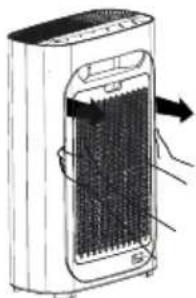
natural_image
Illustration of a portable electric heater with heat exchanger and cooling fan (no text or symbols)1
natural_image
Illustration of a portable air conditioner unit with a hand inserting a grid into the front panel (no text or symbols visible)2
natural_image
Diagram showing a device with internal components and grid layout, no text or symbols present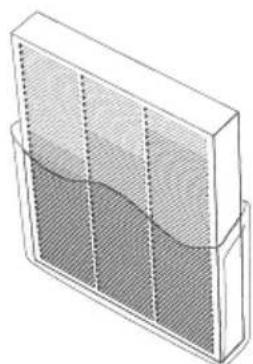
natural_image
Isometric line drawing of a rectangular container with internal mesh and a curved liquid layer (no text or symbols)natural_image
Diagram showing a device with internal components and a grid layout, no text or symbols present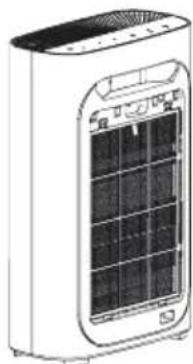
natural_image
Line drawing of a white portable air conditioner unit with a grid display (no text or symbols)natural_image
Diagram of a portable air conditioner unit with hands inserting or removing the interior panel (no text or symbols visible)
UV
(5S/IONIZER)

RESET (LIGHT)

ON/OFF
Nočný režim SILENT
Pripojenie

RESET (LIGHT)

ON/OFF
Resetovacie tlačidlo
natural_image
Illustration of a hand holding a tool interacting with a device panel (no text or symbols visible)1
natural_image
Line drawing of a mechanical device with a handle and internal components (no text or symbols)2
natural_image
Diagram of a device with three sensors and connectors, no text or symbols present3
Clean air quality sensor
Clean the air inlet and outlet of air quality sensor; Using a dry cotton swab to remove the residual stains from air quality sensor.
Note: To ensure that the filter run at optimal performance please clean every two months.
- Please note that the location of purifier need to keep a certain distance with other objects.
- Please keep the distance around purifier, in case of affecting air inlet.

UV-C radiation is dangerous to the eyes and skin. Do not operate the UV-C lamp which is out of the appliance. Replacement of the UV-C lamp by the consumer/user is forbidden.
SVARILO

natural_image
Simple line drawing of a rectangular electronic device with a circular button and base (no text or symbols)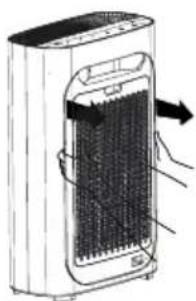
natural_image
Diagram of a portable air conditioner unit with heat exchanger and hand gesture (no text or symbols)1
natural_image
Illustration of a hand inserting a device into a power grid device (no text or symbols visible)2
-
Odstranite ves embalažni material in postavite čistilec zraka na suho, stabilno in ravno površino.
-
Odprite zadnji pokrov filtrov tako, da z eno roko primete pokrov v poglobljenem delu in s potegom pokrova od aparata sprostite ključavnico pokrova.
natural_image
Diagram showing a device with internal components and grid layout, no text or symbols present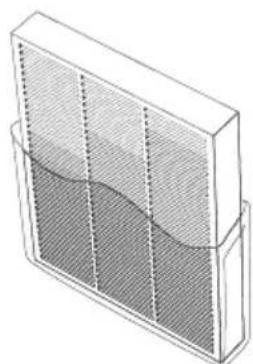
natural_image
Isometric line drawing of a rectangular container with internal mesh and a curved liquid layer (no text or symbols)- Odstranite vse filtre. 4. Odstranite vso embalažo.
natural_image
Diagram showing a device with internal components and a grid layout, no text or symbols present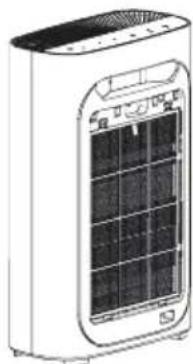
natural_image
Line drawing of a white portable air conditioner unit with a grid display (no text or symbols)-
Vstavite filtre v aparat v pravilnem vrstnem redu.: Ogljikov filter, HEPA-filter, primarni filter, pokrov filtrov.
-
Prepričajte se, da so zanke filtrov za odstranjevanje usmerjene navzven.
natural_image
Diagram of a portable air conditioner unit with hands inserting or removing the interior panel (no text or symbols visible)- Vrnite pokrov filtrov na svoje mesto. Pri zapiranju pokrov poravnajte v reže v spodnjem delu aparata in rahlo pritisnite na pokrov, da se bodo štriline pokrova po obodu usedle v odprtine v ohišju naprave.
Menjava filtrov

UV
(5S/IONIZER)

RESET (LIGHT)

ON/OFF
Nočni način SILENT
Povezava prek načina EZ (AP3)

RESET (LIGHT)

ON/OFF
natural_image
Illustration of a hand using a tool to clean or store items, with no visible text or symbols.1
natural_image
Line drawing of a handheld electronic device with a top bracket and internal components (no text or symbols)2
natural_image
Diagram of a device rear panel with three connected cables (no text or symbols)3
- Z mehko krtačko (ni priložena) očistite vhod/izhod senzorja kakovosti zraka.
-
Odstranite zaščitni pokrov senzorja kakovosti zraka.
-
S pomočjo navlažene vatirane blazinice očistite senzor kakovosti zraka, njegov vhod in izhod.
- Posušite s suho vatirano blazinico.
- Ponovno namestite zaščitni pokrov senzorja kakovosti zraka.
BEZBEDNOSNA UPUTSTVA
Clean air quality sensor
Clean the air inlet and outlet of air quality sensor; Using a dry cotton swab to remove the residual stains from air quality sensor.
Note: To ensure that the filter run at optimal performance please clean every two months.
Čišćenje senzora kvaliteta vazduha
Koristite suv pamučni štapić da očistite ulaz i izlaz vazduha i uklonite ostatke sa senzora kvaliteta vazduha.
Napomena: Da biste osigurali optimalan učinak, čistite svaka dva meseca.

- Please note that the location of purifier need to keep a certain distance with other objects.
- Please keep the distance around purifier, in case of affecting air inlet.

- Imajte na umu da se čistač mora nalaziti na određenoj udaljenosti od drugih objekata.
- Držite rastojanje oko čistača kako ne biste uticali na dovod vazduha.

WARNING
UV-C radiation is dangerous to the eyes and skin. Do not operate the UV-C lamp which is out of the appliance. Replacement of the UV-C lamp by the consumer/user is forbidden.

UPOZORENJE
UV-C zračenje je opasno za oči i kožu. Ne koristite UV-C emiter van uređaja. Zabranjena je zamena UV-C emitera od strane potrošača/korisnika.
OPIS UPRAVLJAČKE PLOČE


SPEED

TIMER

MODE (5S/WIFI)

UV
(5SIONIZER)

RESET (LIGHT)

ON/OFF
- FAN SPEED: Podešavanje brzine strujanja vazduha.
- TIMER: funkcija tajmera.
- MODE (WIFI):
Pritisnite kratko za prebacivanje između Automatskog režima rada (AUTO) i Noćnog režima rada (SILENT).
WIFI: Dugi pritisak poništava postavke wifi-a i pročišćivač se može povezati sa mobilnom aplikacijom (vidi. Priključenje uređaja na Wifi).
- UV (ION):
natural_image
Simple line drawing of a rectangular electronic device with a circular button on top (no text or symbols)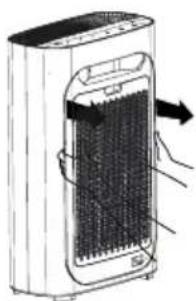
natural_image
Diagram of a portable air conditioner unit with heat exchanger and hand gesture (no text or symbols)1
natural_image
Illustration of a hand inserting a device into a power grid device (no text or symbols visible)2
-
Uklonite sav ambalažni materijal i postavite pročišćivač vazduha na suvu, stabilnu i ravnu površinu.
-
Otvorite zadnji poklopac filtra tako da jednom rukom uhvatite poklopac u udubini i povučete poklopac od uređaja kako biste oslobodili brave poklopca.
natural_image
Diagram showing a device with internal components and grid layout, no text or symbols present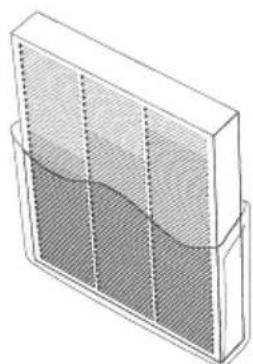
natural_image
Isometric line drawing of a rectangular container with internal mesh pattern and curved liquid (no text or symbols)- Uklonite sve filtre. 4. Uklonite svu ambalažu.
natural_image
Diagram showing a multi-panel air purifier with internal structure and grid layout, no text or symbols present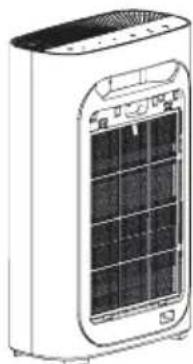
natural_image
Line drawing of a white portable air conditioner unit with a grid display (no text or symbols)-
Umetnite filtere u uređaj ispravnim redosledom: Ugljeni filtar, HEPA filtar, primarni filtar, poklopac filtra.
-
Proverite jesu li oznake filtara sa jezičkom za izvlačenje usmerene prema van.
natural_image
Diagram of a portable air conditioner unit with hands inserting or removing the interior panel (no text or symbols visible)- Vratite poklopac filtara. Kod zatvaranja, poravnajte poklopac sa utorima na dnu aparata i lagano gurnite poklopac tako da izbočine poklopca po obodu uđu u rupe na telu aparata.
Zamena filtara
- Isključite uređaj.
- Skinite stražnji poklopac.
- Uklonite sve filtre.
- Uklonite plastičnu ambalažu sa filtara i umetnite ih u uređaj pravilnim redosledom.
- Proverite jesu li oznake filtara za izvlačenje usmerene prema van.
- Resetujte brojač životnog veka filtra dugim pritiskom na dugme RESET.
Filtri i njihove funkcije

UV
(5S/IONIZER)

RESET (LIGHT)

ON/OFF
SILENT noćni režim rada
Program SILENT koristi ugrađeni svetlosni senzor koji automatski detektira intenzitet ambijentalnog svetla i, ako je intenzitet svetla nizak, automatski smanjuje svetlinu i smanjuje snagu ventilatora na minimum.


SPEED


TIMER
AUTO
SILENT

MODE (58/WIFI)

RESET (LIGHT)

ON/OFF
Dugme za resetovanje
Da biste resetovali uređaj, pritisnite dugme na najmanje 5 sekundi. (Ova je značajka dostupna samo nakon upozorenja o potrebi promene filtra.)


SPEED


TIMER
AUTO
SILENT

MODE (SS/MIFI)

UV
(5S/IONIZER)

ON/OFF
ČIŠĆENJE I ODRŽAVANJE
natural_image
Illustration of a hand holding a tool interacting with a device panel (no text or symbols visible)1
natural_image
Line drawing of a handheld electronic device with a top bracket and internal components (no text or symbols)2
natural_image
Diagram of a device panel with three connectors and a switch, no text or symbols present3
- Upotrebite meku četku (nije uključena u pakovanju) za čišćenje ulaza/izlaza senzora kvalitete vazduha.
-
Skinite zaštitni poklopac senzora kvalitete vazduha.
-
Vlažnim pamučnim štapićem očistite senzor kvalitete vazduha, njegov ulaz i izlaz.
- Osušite suvim pamučnim štapićem.
- Vratite zaštitni poklopac senzora kvalitete vazduha.
Clean air quality sensor
Clean the air inlet and outlet of air quality sensor; Using a dry cotton swab to remove the residual stains from air quality sensor.
Note: To ensure that the filter run at optimal performance please clean every two months.
Air inlet
- Please note that the location of purifier need to keep a certain distance with other objects.
- Please keep the distance around purifier, in case of affecting air inlet.

UV-C radiation is dangerous to the eyes and skin. Do not operate the UV-C lamp which is out of the appliance. Replacement of the UV-C lamp by the consumer/user is forbidden.
ΠΡΟΕΙΔΟΠΟΙΗΣΗ

- UV (ION) (ιονιστής):
natural_image
Illustration of a rectangular electronic device with a circular top and base, no visible text or symbols.1
natural_image
Diagram of a portable air conditioner unit with a hand inserting a fan into the chamber (no text or symbols visible)2
natural_image
Diagram showing a device with internal components and grid layout, no text or symbols present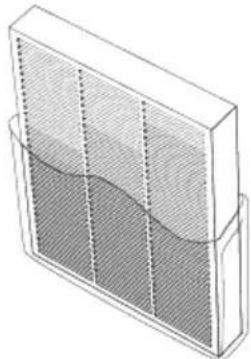
natural_image
Illustration of a rectangular bookshelf with a wavy bottom panel and vertical guide rails (no text or symbols)natural_image
Diagram showing a white air purifier with internal components and four separate grid panels, one with an arrow indicating direction (no text or symbols present)natural_image
Illustration of a white portable air conditioner unit with ventilation grilles and ventilation slots (no text or symbols)natural_image
Diagram of a portable air conditioner unit with cooling panel and ventilation slots (no text or symbols)
UV
(5S/IONIZER)

RESET (LIGHT)

ON/OFF
natural_image
Illustration of a hand using a tool to interact with a device, showing a brush and circular components (no text or symbols)1
natural_image
Line drawing of a handheld electronic device with a top bracket and internal grid layout (no text or symbols)2
natural_image
Technical diagram of an electrical connector with three leads and a socket (no text or symbols)3
Clean air quality sensor
Clean the air inlet and outlet of air quality sensor; Using a dry cotton swab to remove the residual stains from air quality sensor.
Note: To ensure that the filter run at optimal performance please clean every two months.
- Please note that the location of purifier need to keep a certain distance with other objects.
- Please keep the distance around purifier, in case of affecting air inlet.

UV-C radiation is dangerous to the eyes and skin. Do not operate the UV-C lamp which is out of the appliance. Replacement of the UV-C lamp by the consumer/user is forbidden.
ПОПЕРЕДЖЕННЯ

natural_image
Simple line drawing of a rectangular electronic device with a circular top and side ports (no text or symbols)natural_image
Diagram showing a white air purifier with internal grid structure, illustrating its components and airflow direction (no text or symbols)natural_image
Diagram of a heat exchanger with cooling fins and airflow direction arrows (no text or labels)1
natural_image
Illustration of a hand inserting a textured device into a power bank (no text or symbols visible)2
natural_image
Isometric line drawing of a rectangular container with internal wavy pattern (no text or symbols)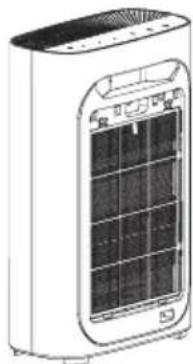
natural_image
Illustration of a portable air conditioner unit with a grid display and ventilation slots (no text or symbols visible)natural_image
Diagram of a portable air conditioner unit with hands inserting or removing the interior panel (no text or symbols visible)
UV
(SS/IONIZER)

RESET (LIGHT)

ON/OFF
Нічний режим ТИХО
Кнопка скидання
natural_image
Illustration of a hand inserting a device into a device with a magnified view of its internal structure (no text or symbols)1
natural_image
Line drawing of a mechanical device with a bracket and internal components (no text or symbols)2
natural_image
Diagram of an electrical switch panel with three cables and a connector (no text or symbols)3
250 69 Klíčany, Czech Rep. e-post: ECG@kbexpert.cz
Hrvatski
K+B Progres, a.s.
U Expertu 91 tel.: +420 272 122 111
250 69 Kličany, Czech Rep. e-mail: informacije@kbprogres.cz
Bosanski
K+B Progres, a.s.
U Expertu 91 tel.: +420 272 122 111
250 69 Kličany, Czech Rep. e-mail: informacije@kbprogres.cz
Latviešu valoda
K+B Progres, a.s.
U Expertu 91 tel.: +420 272 122 111
250 69 Klíčany, Czech Rep. e-pasts: ECG@kbexpert.cz
Lietuvių kalba
K+B Progres, a.s.
U Expertu 91 tel.: +420 272 122 111
250 69 Kličany, Czech Rep. el. paštas: ECG@kbexpert.cz
Magyar
K+B Progres, a.s.
U Expertu 91 tel.: +420 272 122 111
250 69 Klíčany, Czech Rep. e-mail: ECG@kbexpert.cz
Македонски
K+B Progres, a. s.
U Expertu 91 tel.: +420 272 122 111
250 69 Kličany, Czech Rep. e -mail: ECG@kbexpert.cz
Polski
K+B Progres, a.s.
U Expertu 91 tel.: +420 272 122 111
250 69 Klíčany, Czech Rep. e-mail: ECG@kbexpert.cz
Română
K+B Progres, a.s.
U Expertu 91 tel.: +420 272 122 111
250 69 Klíčany, Czech Rep. e-mail: ECG@kbexpert.cz
Slovenčina

- AP3 Pure Comfort
- English
- Deutsch
- Read carefully and save for future use!
- Do not immerse in water!
- Clean air quality sensor
- WARNING
- CONTROL PANEL OVERVIEW
- Remote controller
- Placing the air purifier
- FILTER INSTALLATION AND REPLACEMENT
- Note
- CAUTION
- Replacing filters
- Filters and their function
- Primary filter
- HEPA filter
- Carbon filter
- UV lamp
- USE
- Putting the appliance in operation
- The display contains the following information:
- Automatic mode
- Night mode SILENT
- Setting the air flow speed
- TIMER function
- Using the application (MODE button)
- ATTENTION:
- Connection
- Connection via EZ Mode (AP3)
- lonizer
- Reset button
- CLEANING AND MAINTENANCE
- Cleaning of the air quality sensor:
- Primary filter cleaning
- Warning:
- TROUBLESHOOTING
- TECHNICAL DATA
- Remote controller:
- USE AND DISPOSAL OF WASTE
- DISPOSAL OF PRODUCTS AT THE END OF LIFETIME
- SICHERHEITSHINWEISE
- Reinigung des
- WARNUNG
- Nachtmodus SILENT
- Verbindung
- Reset-Taste
- Do not immerse in water! – Neponořovat do vody!
- VÝSTRAHA
- Noční režim SILENT
- Připojení
- Resetovací tlačítko
- HOIATUS
- Öörežiim SILENT
- Lähtestamise nupp
- UPOZORENJE
- Zamjena filtara
- Filtri i njihove funkcije
- Povezivanje putem EZ Mode načina (AP3)
- Gumb za resetiranje
- ČIŠĆENJE I ODRŽAVANJE
- BRĪDINĀJUMS
- Nakts režims SILENT
- Atstatos mygtukas
- FIGYELEM!
- RESET gomb
- ПРЕДУПРЕДУВАЊЕ
- Тивко нокен режим
- Копче за ресетирање
- OSTRZEŻENIE
- Tryb nocny SILENT
- AVERTIZARE
- Modul Noapte (SILENT)
- Do not immerse in water! – Neponárat do vody!
- VAROVANIE
- Nočný režim SILENT
- Pripojenie
- Resetovacie tlačidlo
- SVARILO
- Menjava filtrov
- Nočni način SILENT
- Povezava prek načina EZ (AP3)
- BEZBEDNOSNA UPUTSTVA
- Čišćenje senzora kvaliteta vazduha
- OPIS UPRAVLJAČKE PLOČE
- Zamena filtara
- SILENT noćni režim rada
- Dugme za resetovanje
- ΠΡΟΕΙΔΟΠΟΙΗΣΗ
- ПОПЕРЕДЖЕННЯ
- Нічний режим ТИХО
- Кнопка скидання
- Hrvatski
- Bosanski
- Latviešu valoda
- Lietuvių kalba
- Magyar
- Македонски
- Polski
- Română
- Slovenčina
Brand : ECG
Model : AP3 Pure Comfort
Category : Air purifier