X03D - Fan Cotech - Free user manual and instructions
Find the device manual for free X03D Cotech in PDF.


| Product type | Tower fan |
| Model | X03D |
| Brand | Cotech |
| Height | 100 cm |
| Weight | 4.5 kg |
| Power supply | 230 V AC, 50 Hz |
| Power consumption | 40 W (max), 34.9 W (input) |
| Maximum airflow | 28.03 m³/min |
| Fan sound power level | 61.0 dB(A) |
| Fan speed settings | L (low), M (medium), H (high), Auto |
| Oscillation | Yes (on/off) |
| Timer | 30 min to 7.5 hours (30 min increments) |
| Modes | Normal, Nature, Sleep (night) |
| Tilt function | 6° or 12° (manual tilt) |
| Temperature control | Adjusts fan speed in Auto mode (no heating/cooling) |
| Remote control | Included with 2 × AAA/LR03 batteries |
| Display backlight | Can be turned off/on (hold function button 3s) |
| Safety features | Automatic shut-off if tipped; do not use in water |
| Cleaning | Unplug, wipe with damp cloth; vacuum intake grille |
| Disposal | Follow local regulations for electronic waste |
| Included in box | Fan, base, remote control, screws, manual |
Frequently Asked Questions - X03D Cotech
User questions about X03D Cotech
0 question about this device. Answer the ones you know or ask your own.
Ask a new question about this device
Download the instructions for your Fan in PDF format for free! Find your manual X03D - Cotech and take your electronic device back in hand. On this page are published all the documents necessary for the use of your device. X03D by Cotech.
USER MANUAL X03D Cotech
natural_image
Line drawing of a tall industrial temperature control tower with ventilation grilles and a handle (no text or symbols)ART.NO MODEL
18-2861 X03D WHITE UK
18-2862 X03D BLACK UK
36-5527 X03D WHITE
36-5528 X03D BLACK

Important!
Read the entire instruction manual carefully and make sure that you fully understand it before you use the equipment. Keep the manual for future reference.
Viktig information:
Original instructions
Bruksanvisning i original
Please read the entire instruction manual before using the product and then save it for future reference. We reserve the right for any errors in text or images and any necessary changes made to technical data. If you have any questions regarding technical problems please contact our Customer Services (see address details on the back).
Safety
- Never use the tower fan if the mains lead, plug or any other part is damaged or does not work properly.
- Never attempt to repair or modify the product in any way.
- The tower fan is designed exclusively for domestic use.
- The tower fan is only to be used indoors and in a dry and clean environment. Do not place the tower fan in such a way as to risk it falling into water or other types of liquid.
• Always unplug the tower fan from the power point when it is not in use. - Never leave children unsupervised in the vicinity of the tower fan when it is in operation.
- Never expose the tower fan to water or other liquids.
- Do not turn on the power before the tower fan is completely assembled. The fan must be vertically upright or in one of its set tilt settings during use and must never be used in a flat, horizontal position.
- Make sure that no foreign objects get inside the tower fan.
- Never turn the tower fan off by pulling the plug out of the wall socket. First turn it off using the power button on the control panel and then unplug it.
- Make sure that the tower fan is completely assembled before using it for the first time.
- Never use the tower fan in places where explosive gases or substances are stored.
- The product may be used by children aged 8 or over provided they have been instructed in its safe use and can understand and cope with any hazards or risks involved with the product's use. Cleaning and maintenance may be carried out by children aged 8 or over, but only under adult supervision. Keep the product and its mains lead out of reach of children under the age of 8.
- The product may be used by persons with reduced physical, sensory or mental capabilities or persons with a lack of experience or knowledge which could jeopardize their safety, provided they have been instructed in the safe operation of the product and understand the hazards involved. Never let children play with the product.
Assembly

natural_image
Technical diagram showing a mechanical component with arrows indicating direction, enclosed in an oval frame (no text or symbols)Remove the 4 screws from the base of the tower fan.

natural_image
Line drawing of a hand holding a mechanical component with an arrow indicating direction (no text or symbols present)Slide the two pieces of the base together.

natural_image
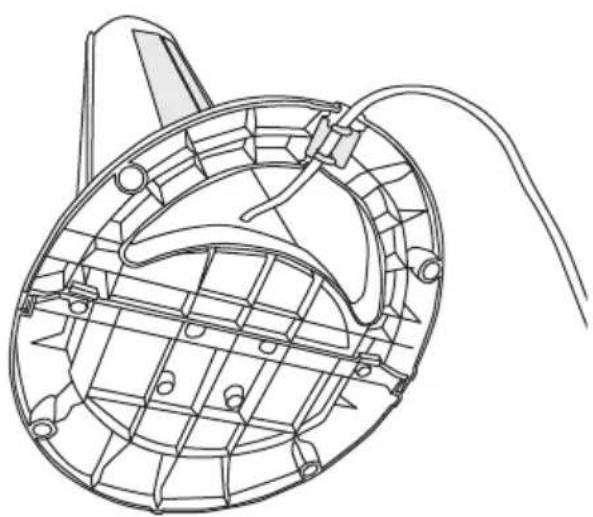
Technical line drawing of a mechanical component with internal grid structure and mounting holes (no text or symbols)Thread the mains lead through the hole in the base and fasten the lead into its retainer.

natural_image
Technical line drawing of a mechanical component with no visible text or symbolsFasten the base onto the tower fan using the 4 screws removed previously. The base only fits on in one way, with the hole lined up with the mains lead at the back of the fan.
Tilt function
The fan has two tilt settings: 6 or 12 degrees. Lean the fan back carefully to select a tilt setting. Carefully pull the fan back forwards to return it to its original upright position.

Buttons and functions
Remote control
Open the battery compartment on the back of the remote control by sliding the cover in the direction of the arrow and insert the batteries (2 x AAA/LR03). Note the polarity markings in the battery compartment to ensure correct battery insertion.
- On/off.
- Fan speed settings: AUTO - L (low), M (medium), H (high).
- Oscillation, on/off.
-
Countdown timer settings: Sets the fan's runtime. Press the required number of times for programming the desired timer setting (from 30 min to 7 h and 30 min) in 30 min increments.
-
Fan modes: normal, nature or sleep.
Note: The remote control does not have a temperature control button, which is only found on the fan's control panel.

Control panel
-
On/off, fan speed settings: AUTO - L (low), M (medium), H (high).
-
Temperature setting: Press the required number of times to set the desired temperature.
Note: The fan itself has no heating or cooling function. This setting only influences the fan speed and is only operative in AUTO mode. If the desired temperature is set below the ambient room temperature, the fan speed will increase, etc.

- Oscillation, on/off.
- Countdown timer settings: Sets the fan's runtime. Press the required number of times for programming the desired timer setting (from 30 min to 7 h 30 min) in 30 min increments.
- Fan modes: normal, nature or sleep.
Display backlight
When the fan is switched on the display comes on automatically and stays on.
If you wish to switch the display off, do so in the following way:
- Hold in the function selector button (10) on the fan (or the remote control) for 3 seconds until the display switches off.
- Pressing any button on either the fan or the remote control will then switch the display back on for a limited period of approximately 3 minutes.
- If you wish to switch the display back on so that it stays on all the time, hold in the function selector button (10) for 3 seconds.
- Unplugging the fan from the wall socket, thus cutting its power supply will reset the fan to its default factory settings so that the display stays on when the fan is switched on.
Mode description
Normal mode
Display example:

Nature mode
Display example:
In nature mode the fan will run in 5 second intervals with varying fan speed according to a fixed pattern and depending on the fan speed selected. The fan will alternate between off, low, medium and high.

If L (low) has been selected, the fan will follow the pattern shown in the diagram below.

bar
| Time (seconds) | High | Medium | Low | |---|---|---|---| | 0-5 | 1 | 0 | 1 | | 5-10 | 1 | 0 | 1 | | 10-15 | 1 | 0 | 1 | | 15-20 | 1 | 0 | 1 | | 20-25 | 1 | 0 | 1 | | 25-30 | 1 | 0 | 1 | | 30-35 | 1 | 0 | 1 | | 35-40 | 1 | 0 | 1 | | 40-45 | 1 | 0 | 1 | | 45-50 | 1 | 0 | 1 | | 50-55 | 1 | 0 | 1 | | 55-60 | 1 | 0 | 1 | | 60-65 | 1 | 0 | 1 | | 65-70 | 1 | 0 | 1 | | 70-75 | 1 | 0 | 1 | | 75-80 | 1 | 0 | 1 |If M (medium) has been selected, the fan will follow the pattern shown in the diagram below.
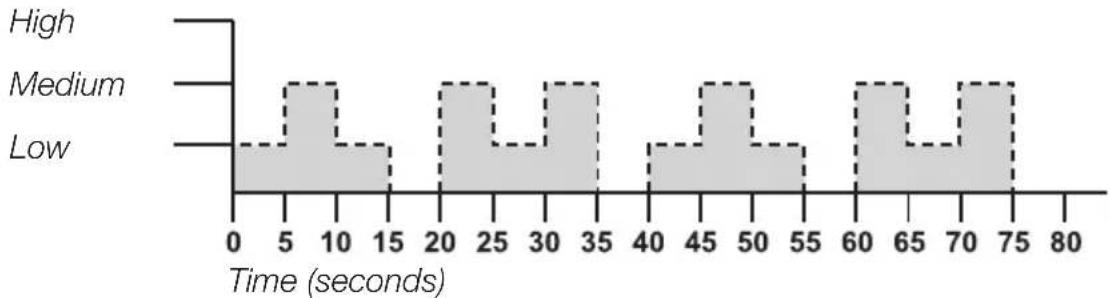
histogram
| Time (seconds) | High | Medium | Low | | -------------- | ---- | ------ | --- | | 0-5 | | | | | 5-10 | | | | | 10-15 | | | | | 15-20 | | | | | 20-25 | | | | | 25-30 | | | | | 30-35 | | | | | 35-40 | | | | | 40-45 | | | | | 45-50 | | | | | 50-55 | | | | | 55-60 | | | | | 60-65 | | | | | 65-70 | | | | | 70-75 | | | | | 75-80 | | | |If H (high) has been selected, the fan will follow the pattern shown in the diagram below.

area
| Time (seconds) | High | Medium | Low | |---|---|---|---| | 0-5 | Low | Low | Low | | 5-10 | Low | Low | Low | | 10-15 | Low | High | Low | | 15-20 | Low | Low | High | | 20-25 | Low | High | Low | | 25-30 | Low | Low | High | | 30-35 | Low | High | Low | | 35-40 | Low | Low | High | | 40-45 | Low | High | Low | | 45-50 | Low | Low | High | | 50-55 | Low | High | Low | | 55-60 | Low | High | High | | 60-65 | Low | Low | High | | 65-70 | Low | High | Low | | 70-75 | Low | High | High | | 75-80 | Low | Low | High |Night mode
Display example:
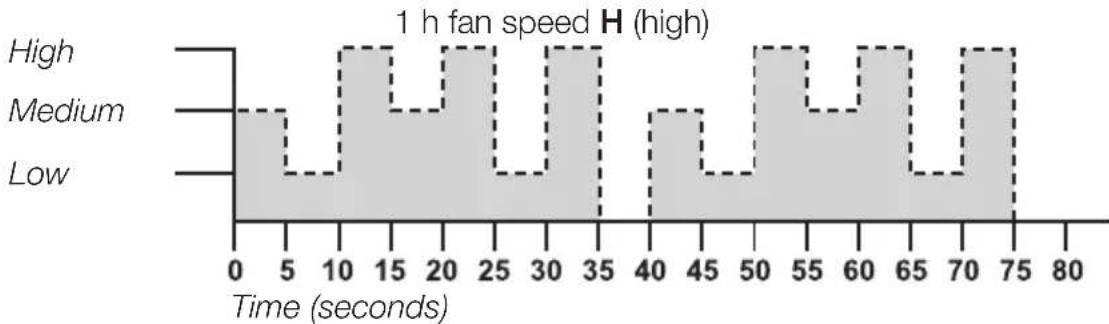
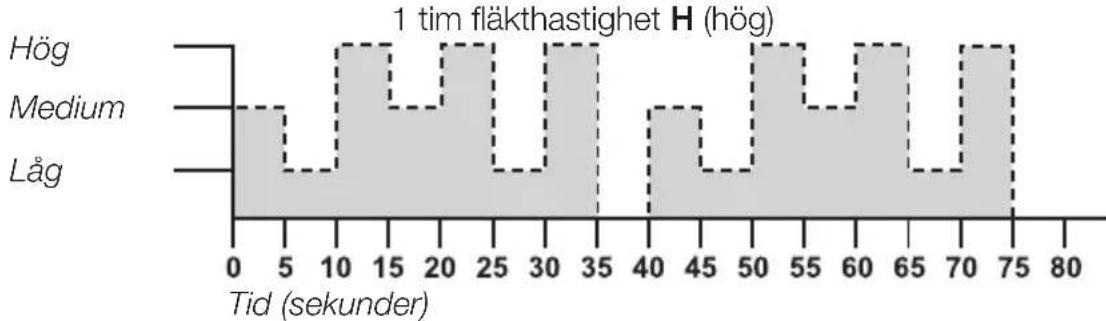
When night mode is chosen, the fan will operate in the same pattern as in the Nature mode, but with one difference – it will reduce the fan speed successively at 1-hour intervals.

Example:
High fan speed
line
| Time (seconds) | High | Medium | Low | | -------------- | ---- | ------ | --- | | 0 | 0 | 0 | 0 | | 5 | 0 | 0 | 0 | | 10 | 0 | 0 | 0 | | 15 | 0 | 0 | 0 | | 20 | 0 | 0 | 0 | | 25 | 0 | 0 | 0 | | 30 | 0 | 0 | 0 | | 35 | 0 | 0 | 0 | | 40 | 0 | 0 | 0 | | 45 | 0 | 0 | 0 | | 50 | 0 | 0 | 0 | | 55 | 0 | 0 | 0 | | 60 | 0 | 0 | 0 | | 65 | 0 | 0 | 0 | | 70 | 0 | 0 | 0 | | 75 | 0 | 0 | 0 | | 80 | 0 | 0 | 0 |- If Night mode and high speed are selected, the timer must also be set to control the length of time the fan runs before it switches off. Let us say that the fan is to run for 4 hours, it starts off running as per the Nature mode diagram for high fan speed for 1 hour.

line
| Time (seconds) | Value | | -------------- | ----- | | 0 | Low | | 5 | Medium| | 10 | Medium| | 15 | Low | | 20 | Medium| | 25 | Medium| | 30 | Medium| | 35 | Medium| | 40 | Low | | 45 | Medium| | 50 | Medium| | 55 | Low | | 60 | Medium| | 65 | Medium| | 70 | Medium| | 75 | Medium| | 80 | Low |- The fan then runs as per the diagram for medium fan speed for 1 hour.

line
| Time (seconds) | Fan Speed | | -------------- | --------- | | 0 | Low | | 5 | Low | | 10 | Low | | 15 | Low | | 20 | Low | | 25 | Low | | 30 | Low | | 35 | Low | | 40 | Low | | 45 | Low | | 50 | Low | | 55 | Low | | 60 | Low | | 65 | Low | | 70 | Low | | 75 | Low | | 80 | Low |- For the last 2 hours, the fan then runs as per the diagram for low fan speed. The fan automatically switches off after 4 hours. The fan can be switched off manually before it switches off automatically.
Medium-high fan speed
If you choose to run the fan in Night mode on medium-high fan speed, it will run as per the medium-high fan speed diagram for 1 hour and then as per the low fan speed diagram for 3 hours before switching off after 4 hours. The fan can be switched off manually before it switches off automatically.
Low fan speed
If you choose to begin running the fan in Night mode on low fan speed, it will run as per the low fan speed diagram for 4 hours before switching off after 4 hours. The fan can be switched off manually before it switches off automatically.
Bear in mind that the timer must be set to control how long the fan runs for.
Care and maintenance
• Always unplug the mains lead from the electrical socket before cleaning.
- Clean the exterior of the tower fan using a lightly moistened cloth. Use only mild cleaning agents, never solvents or corrosive chemicals.
- Turn off the fan, unplug it from the wall socket and vacuum the intake grille on the back of the fan regularly.
- If the fan is not to be used for an extended period, unplug it from the wall socket and store the fan in a dry and dust-free location.
Disposal
This product should be disposed of in accordance with local regulations. If you are unsure how to proceed, contact your local council.
Specifications
Power supply 230 V AC, 50 Hz
Power output 40 W
Height 100 cm
Weight 4.5 kg
Remote control batteries 2 × AAA/LR03
| Description Symbol Value Unit | |||
| Maximum fan flow rate F 28.03 m3/min | |||
| Fan power input P 34.9 W | |||
| Service value | SV | 0.803 (m3/min)/W | |
| Standby power consumption | PSB | 0.368 W | |
| Fan sound power level | LwA | 61.0 dB(A) | |
| Maximum air velocity | c 2.705 metres/sec | ||
| Measurement standard for service value | IEC 60879:1986 (corr.1992) | ||
Pelarfläkt 100 cm
ART.NR 18-2861, 18-2862 MODELL X03D WHITE UK, X03D BLACK UK 36-5527, 36-5528 X03D WHITE, X03D BLACK
natural_image
Technical diagram showing a mechanical component with arrows indicating direction, enclosed in an oval frame (no text or symbols)natural_image
Line drawing of a hand holding a mechanical component with an arrow indicating direction (no text or symbols present)natural_image
Technical line drawing of a mechanical component with internal grid structure and mounting holes (no text or symbols)natural_image
Technical line drawing of a mechanical component with curved and straight sections (no text or symbols)histogram
| Tid (sekunder) | Hög | Medium | Låg | | -------------- | --- | ------ | --- | | 0-5 | Low | Low | Low | | 5-10 | Low | Medium | Low | | 10-15 | Low | Low | Low | | 15-20 | Low | Low | Low | | 20-25 | Low | Medium | Low | | 25-30 | Low | Low | Low | | 30-35 | Low | Medium | Low | | 35-40 | Low | Low | Low | | 40-45 | Low | Medium | Low | | 45-50 | Low | Medium | Low | | 50-55 | Low | Medium | Low | | 55-60 | Low | Medium | Low | | 60-65 | Low | Medium | Low | | 65-70 | Low | Medium | Low | | 70-75 | Low | Medium | Low | | 75-80 | Low | Medium | Low |Exempel:
Hög fläkthastighet
line
| Tid (sekunder) | Hög | Medium | Låg | | -------------- | --- | ------ | --- | | 0 | | | | | 5 | | | | | 10 | | | | | 15 | | | | | 20 | | | | | 25 | | | | | 30 | | | | | 35 | | | | | 40 | | | | | 45 | | | | | 50 | | | | | 55 | | | | | 60 | | | | | 65 | | | | | 70 | | | | | 75 | | | | | 80 | | | |histogram
| Tid (sekunder) | Value | | -------------- | ----- | | 0-5 | Low | | 5-10 | High | | 10-15 | Low | | 15-20 | High | | 20-25 | High | | 25-30 | Low | | 30-35 | High | | 35-40 | Low | | 40-45 | High | | 45-50 | Low | | 50-55 | High | | 55-60 | Low | | 60-65 | High | | 65-70 | Low | | 70-75 | High | | 75-80 | Low |natural_image
Technical diagram showing a mechanical component with arrows indicating direction, enclosed in an oval frame (no text or symbols)
natural_image
Line drawing of a hand holding a mechanical component with an arrow indicating direction (no text or symbols)Skru ut de 4 skruene under viften. Skyv de to delene til foten sammen.
natural_image
Technical line drawing of a mechanical component with internal grid structure and mounting holes (no text or symbols)natural_image
Technical line drawing of a mechanical component with no visible text or symbolsFest foten til tårnviften med de fire skruene Den kan kun monteres på én måte, med hullet på linje med strøm-kabelen på viftens bakside.
Tiltfunksjon
Hvis viftehastigheten L (lav) er valgt, varieres viftehastigheten som vist i diagrammet nedenfor.

bar
| Category | Value | |---|---| | Høy | 0 | | Medium | 5 | | Medium | 10 | | Medium | 15 | | Medium | 20 | | Medium | 25 | | Medium | 30 | | Medium | 35 | | Medium | 40 | | Medium | 45 | | Medium | 50 | | Medium | 55 | | Medium | 60 | | Medium | 65 | | Medium | 70 | | Medium | 75 | | Medium | 80 | Tid (sekunder) | 0 to 80 |Hvis viftehastigheten M (middels) er valgt, varieres viftehastigheten som vist i diagrammet nedenfor.

histogram
| Tid (sekunder) | Høy | Medium | Lav | | -------------- | --- | ------ | --- | | 0-5 | | | | | 5-10 | | | | | 10-15 | | | | | 15-20 | | | | | 20-25 | | | | | 25-30 | | | | | 30-35 | | | | | 35-40 | | | | | 40-45 | | | | | 45-50 | | | | | 50-55 | | | | | 55-60 | | | | | 60-65 | | | | | 65-70 | | | | | 70-75 | | | | | 75-80 | | | |Eksempel:
Høy viftehastighet

line
| Tid (sekunder) | Value | | -------------- | ----- | | 0 | Low | | 5 | Medium| | 10 | High | | 15 | Medium| | 20 | High | | 25 | Low | | 30 | High | | 35 | High | | 40 | Medium| | 45 | Low | | 50 | High | | 55 | Medium| | 60 | High | | 65 | Low | | 70 | High | | 75 | High | | 80 | Low |natural_image
Technical diagram showing a mechanical component with arrows indicating direction, enclosed in an oval frame (no text or symbols)natural_image
Line drawing of a hand holding a mechanical component with an arrow indicating direction (no text or symbols present)natural_image
Technical line drawing of a mechanical component with internal grid structure and mounting holes (no text or symbols)natural_image
Line drawing of a mechanical component with curved and straight lines, no text or symbols presentarea
| Aika (sekuntia) | Korkea | Keskitaso | Matala | | --------------- | ------ | --------- | ------ | | 0 | 0 | 0 | 0 | | 5 | 0 | 0 | 0 | | 10 | 0 | 0 | 0 | | 15 | 0 | 0 | 0 | | 20 | 0 | 0 | 0 | | 25 | 0 | 0 | 0 | | 30 | 0 | 0 | 0 | | 35 | 0 | 0 | 0 | | 40 | 0 | 0 | 0 | | 45 | 0 | 0 | 0 | | 50 | 0 | 0 | 0 | | 55 | 0 | 0 | 0 | | 60 | 0 | 0 | 0 | | 65 | 0 | 0 | 0 | | 70 | 0 | 0 | 0 | | 75 | 0 | 0 | 0 | | 80 | 0 | 0 | 0 |Yötila
Esimerkki:
line
| Aika (sekuntia) | Korkea | Keskitaso | Matala | | --------------- | ------ | --------- | ------ | | 0 | 0 | 0 | 0 | | 5 | 0 | 0 | 0 | | 10 | 0 | 0 | 0 | | 15 | 0 | 0 | 0 | | 20 | 0 | 0 | 0 | | 25 | 0 | 0 | 0 | | 30 | 0 | 0 | 0 | | 35 | 0 | 0 | 0 | | 40 | 0 | 0 | 0 | | 45 | 0 | 0 | 0 | | 50 | 0 | 0 | 0 | | 55 | 0 | 0 | 0 | | 60 | 0 | 0 | 0 | | 65 | 0 | 0 | 0 | | 70 | 0 | 0 | 0 | | 75 | 0 | 0 | 0 | | 80 | 0 | 0 | 0 |natural_image
Technical diagram showing a mechanical component with arrows indicating direction, enclosed in an oval frame (no text or symbols)natural_image
Line drawing of a hand holding a mechanical component with an arrow indicating direction (no text or symbols present)natural_image
Technical line drawing of a mechanical component with grid pattern and mounting holes (no text or symbols)natural_image
Technical line drawing of a mechanical component with no visible text or symbolsBeispiel:
line
| Zeit (Sekunden) | Value | | --------------- | ----- | | 0 | 0 | | 5 | 0 | | 10 | 0 | | 15 | 0 | | 20 | 0 | | 25 | 0 | | 30 | 0 | | 35 | 0 | | 40 | 0 | | 45 | 0 | | 50 | 0 | | 55 | 0 | | 60 | 0 | | 65 | 0 | | 70 | 0 | | 75 | 0 | | 80 | 0 |POSTAL 10 – 13 Market Place
Kingston Upon Thames
Surrey
KT1 1JZ
DEUTSCHLAND


- Safety
- Assembly
- Tilt function
- Buttons and functions
- Remote control
- Control panel
- Display backlight
- Mode description
- Normal mode
- Nature mode
- Night mode
- Example:
- Medium-high fan speed
- Low fan speed
- Care and maintenance
- Disposal
- Specifications
- Pelarfläkt 100 cm
- Exempel:
- Tiltfunksjon
- Eksempel:
- Yötila
- Esimerkki:
- Beispiel:
- DEUTSCHLAND
Brand : Cotech
Model : X03D
Category : Fan