
X6 - Cooker Xblitz - Free user manual and instructions
Find the device manual for free X6 Xblitz in PDF.


| Product Type | Car video recorder (dashcam) |
| Video Resolution | 1920x1080 Full HD |
| Video Codec | MOV-H.264 |
| Lens Aperture | F2.0 |
| Viewing Angle | 140 degrees |
| ISO | Automatic |
| Photo Format | JPG |
| Microphone | Built-in condenser microphone |
| Speaker | 8 Ω / 0.5W |
| Loop Recording | Yes |
| Time-lapse Video | Yes |
| Wi-Fi | Yes (for mobile app connection) |
| Memory Card Support | microSD HC C10, up to 128 GB |
| Power Supply | 12V to 5V via USB car charger (5V/1.5A) |
| Installation | Windshield mount, connect to cigarette lighter |
| Mobile App | Compatible with Android and iOS (QR code for download) |
| G-Sensor | Yes (adjustable sensitivity) |
| Parking Monitoring | Non-functional (as per manual) |
| Audio Recording | Enabled/disabled via app |
| Mirroring | 180-degree screen rotation |
| Frequency Setting | 50 Hz or 60 Hz |
| Operating Temperature | 0 to 35 °C (use); +5 to +45 °C (storage) |
| Warranty | 24 months (see manufacturer website) |
| Spare Parts / Repairability | Memory card replaceable; power cable and car charger included; do not disassemble |
Frequently Asked Questions - X6 Xblitz
User questions about X6 Xblitz
0 question about this device. Answer the ones you know or ask your own.
Ask a new question about this device
Download the instructions for your Cooker in PDF format for free! Find your manual X6 - Xblitz and take your electronic device back in hand. On this page are published all the documents necessary for the use of your device. X6 by Xblitz.
USER MANUAL X6 Xblitz
natural_image
Exterior view of a modern K68Hz remote camera with lens and screen (no text or symbols visible)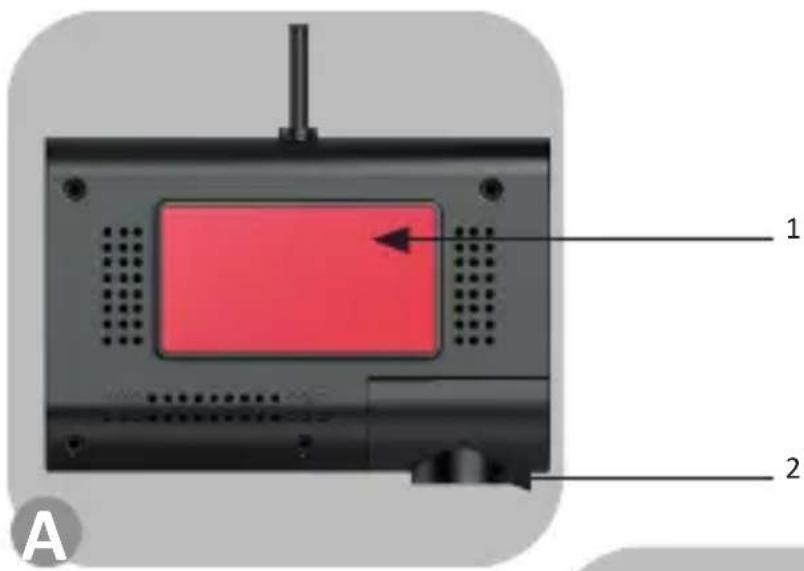
PL
INSTRUKCJA OBSŁUGI
KAMERA SAMOCHODOWA
Format wideo: 1920x1080
Format obrazu: kodek: MOV-H.264
Producent:
KGK Trade sp. z o.o. sp. k.
ul. Ujastek 5b
31-752 Kraków
Polska
Before use, please read the enclosed user manual and safety instructions carefully to avoid accidental damage to the equipment or unintentional injury.
PRODUCT INTENDED USE
The Xblitz X6 is a video recorder designed to capture road events while driving. A special mobile application is used to view footage recorded by the camera.
01. KIT
- Video recorder
- Connection cable
- Memory card reader 4 Car charger
- Car charger
- Instruction manual
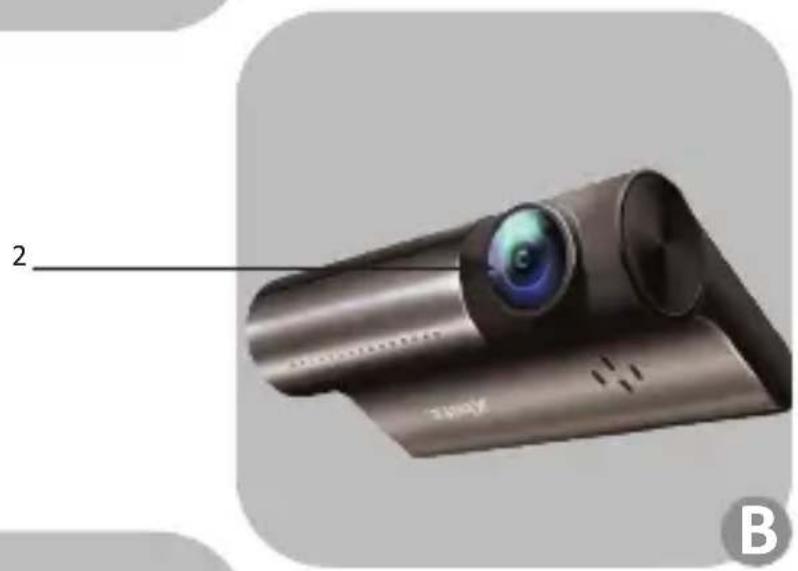
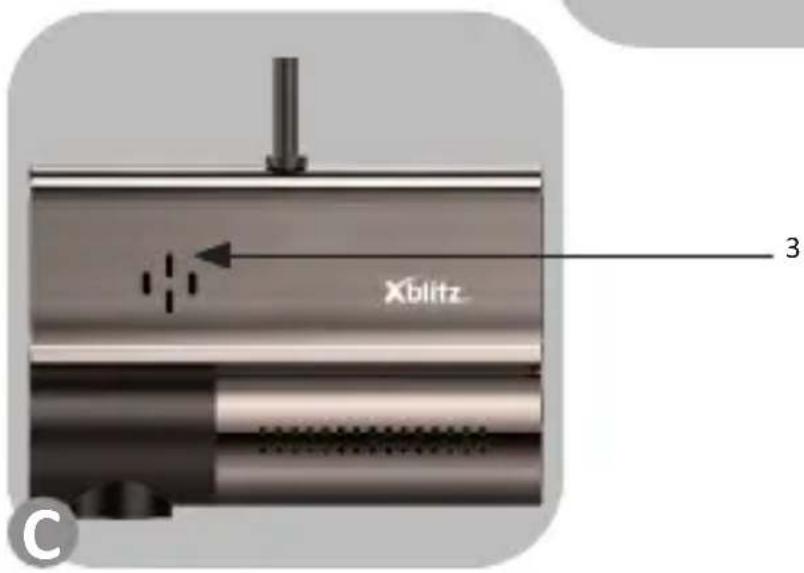
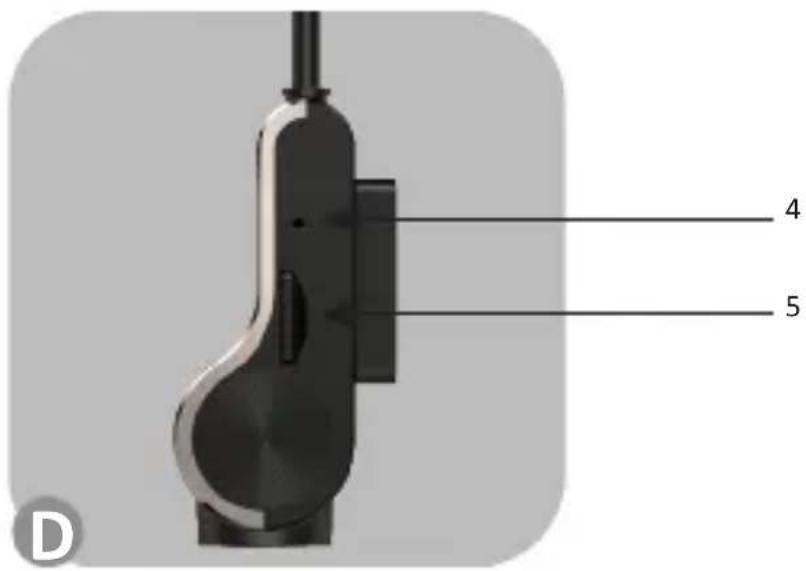
02. PRODUCT DESCRIPTION
SEE FIGURE A, B, C, D
- Retaining strap
- 2 Movable lens
- Speaker / microphone
- LED indicator
- SD card slot
03. BEFORE USE
- It is recommended to use branded microSD card (4GB - 128GB) of class 10.
- Please format the card before inserting it into the DVR.
- The camera must be turned off when inserting the memory card, otherwise the card and the DVR may be damaged. The same applies to removing the card from the device.
- When the memory card becomes full, the oldest unprotected recordings will be overwritten.
- It is recommended that you set the G - SENSOR option to minimum to avoid protecting unnecessary footage and thus losing memory card space. The card should be formatted in FAT32 file system first on your computer, then on the recorder.
- Audio: The device is equipped with a condenser microphone that records all
ambient sounds. The sounds may overlap, causing distortion.
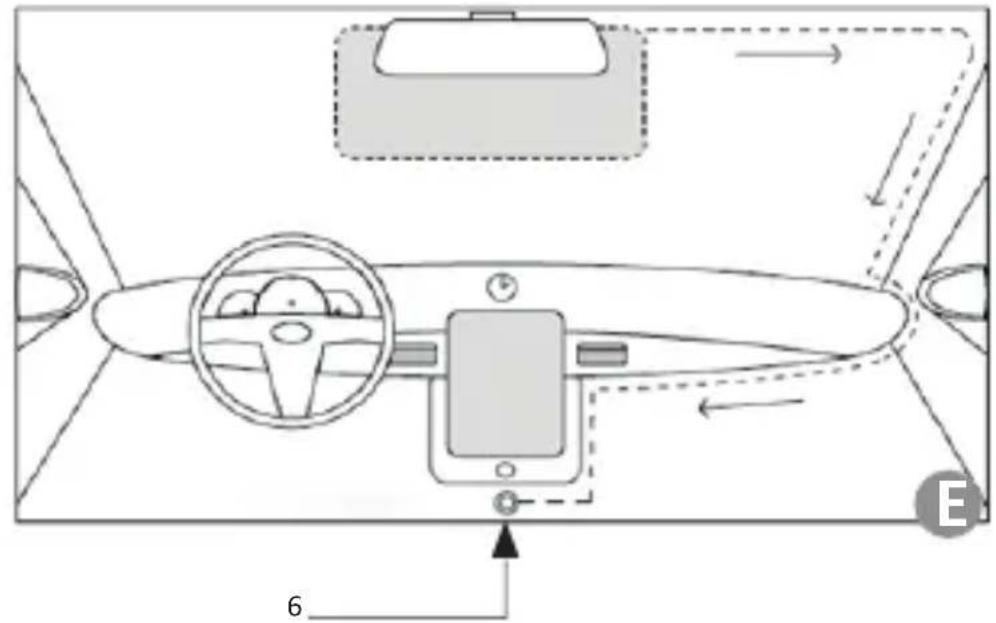
04. INSTALLATION
SEE FIGURE E
- Select and clean a mounting location for the camera.
- Mount the camera bracket.
- Insert the memory card into the camera.
- Place the camera in the camera mount.
- Point the camera lens towards the roadway.
- Connect the power adapter to the camera.
- Route the power cable so that it does not obstruct your view while driving (see picture E).
- Plug the power adapter into the cigarette lighter socket of the car.
05. CONNECTING TO THE APPLICATION
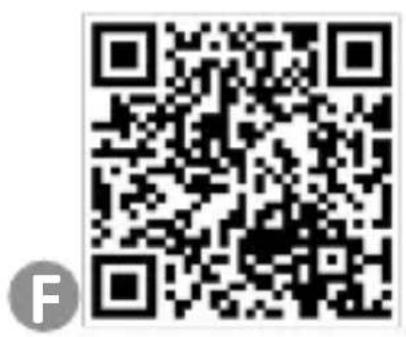
SEE FIGURE F
-
Mobile application installation instructions Scan this QR code and install the software on your phone. For Android / IOS APP download https://play.google.com/store/apps/details?id=com.lg.aroadcams&hl=pl&gl=US
-
Connecting to the mobile application
a) For Android phone
- Click this icon in the phone interface, then enter the app connection interface and click „Connect”.
- The phone will enter the phone network setting interface. Find the WiFi signal of the DVR, it's like „Xblitz X6”, then click this WiFi, enter the password: „12345678”.
- After entering the password, the connected message will appear. The phone will display the message „The current WLAN does not have Internet access. Do you want to continue using this WLAN?” Click „Save”, then return to the application and it will enter the recording interface.
b) For iPhone
- Open iPhone Wi-Fi settings, find the WiFi name of Xblitz X6 recorder, connect WiFi, the default password is 12345678.
- Go back to the main interface of the phone, open the app to use.
06. FUNCTIONS
- If there is a recording icon in the upper left corner of the app screen and the red dot is flashing, it means the recorder is recording. Tap the camera icon at the bottom of the app to take a picture. (PS: The default video recording
time is one minute for one segment.)
-
The "auto rotate" switch will put the screen in landscape mode. Turn off the "auto rotate" switch to set the app screen in portrait mode.
-
The mobile app and photo replay view
a) Click the video or photo you want to view to play, or download the file to your phone, view file information, delete files.
b) Find the downloaded video in your phone gallery and click to play.
07. SETTING FUNCTIONS IN THE APPLICATION
- Click "Settings" at the top right corner to enter the setting interface.
- Enter the application to set each function
- Automatically connect the recorder:
a) Audio recording: Click to enable and disable the recording function of APP.
b) Time: Click to enable and disable the recording time display
c) Device voice: Click to enable and disable the voice prompt of the recorder.
d) Mirroring: You can set the screen to rotate 180 degrees.
e) Frequency: You can set the refresh rate to 50/60 HZ.
f) Parking Monitoring: Non-functional
g) Format Memory Card: Click to format the memory card.
h) Restore Default Settings: Click to restore the DVR to factory default settings.
i) Device Information: Click to display the device information of the DVR.
j) Clear Cache.
08. PRECAUTIONS
- Do not disassemble or tamper with the camera yourself. If a malfunction occurs, contact service.
- Use only original accessories.
- Use only the original charger supplied. Use of another power adaptor may adversely affect the performance of the device or battery.
- Do not use this device for any purpose that is unlawful in your country or region.
- It is recommended to use the device at temperatures between 0 and 35 °C (50 and 86 °F), in storage between +5 and +45 °C (+104 and +104 °F), and at humidities between 5 and 90 °C (without condensation).
- Do not subject the unit to damage or shock.
- Keep the product, especially the lens, clean. Do not use detergents or chemicals when cleaning.
- Clean the unplugged device.
-
Keep out of the reach of children.
-
Do not expose this unit to extreme heat or fire.
-
If you smell burning plastic or electronics from the camera, unplug the device as soon as possible and contact customer service.
09. FAQ
-
The device does not turn on/off. The reason for this behavior may be a constant power source in the car cigarette lighter socket.
-
The device restarts while driving. It is recommended to check the power source.
-
The device does not record in a loop (it records randomly). Check "motion detection" setting – it should be turned off.
-
The device shows "card full" message. Check "G-sensor" and "parking mode" and set them to minimum. The card should be formatted in FAT32 format first in your computer, then in the DVR.
-
The device records noisy, distorted, unclear sound. The device has a very sensitive microphone which records all background noises. The recorded sounds may overlap. The windshield air intake may also distort the sound.
-
The device does not respond. Briefly press RESET or reset the unit to factory default settings.
-
Cross stripes appear on the recording. Incorrect setting of the frame rate value. Set the frequency value to 50Hz or 60Hz depending on local settings.
10. NOTES
-
Due to continuous product improvement, the manufacturer reserves the right to make changes to the device and its set without prior notice. Some features described in this manual may differ slightly from reality.
-
Use only the original charger with 5V/1.5A charging current. (Do not plug directly into a 220/230V outlet). Failure to comply may result in damage to the camera or lead to dangerous situations.
11. SPECIFICATIONS
Movie angle: 140 degrees
Video format: 1920x1080
Video format: codec: MOV-H.264
Lens aperture: F2.0
ISO: Automatic
Photo format: JPG
Microphone: Yes
Speaker: 8 Ω/0.5W
Loop Recording: Yes
Time-lapse video: Yes
Wi-Fi: Yes
Memory: Supports Micro SD HC C10 cards up to 128 GB
Power supply: 12V to 5V /USB 5V
12. WARRANTY CARD / COMPLAINTS
The product is covered by a 24-month warranty. Warranty terms and conditions can be found at: https://xblitz.pl/gwarancja/
Claims should be submitted using the claim form found at: http://reklamacje.kgktrade.pl/
Details, contact and service address can be found at: www.xblitz.pl. Specifications and contents are subject to change without notice. We apologize for any inconvenience.
KGK Trade declares that the XBLITZ X6 device complies with the essential requirements of Directive 2014/53/EU. The text of the declaration can be found at the link:
The crossed out trash can symbol indicates that unusable electrical or electronic devices, its accessories (such as power supplies, cords) or components (for example batteries, if included) cannot be disposed of alongside with household waste. In order to dispose of the devices or its components (for example, batteries) deliver the device to the collection point, where it will be accepted free of charge. Disposal is subject to the recast version of the WEEE Directive (2012/19/ EU) and the Directive on batteries and accumulators (2006/66 / EC). Proper disposal of the device prevents degradation of the natural environment. Information about the collection points of the facilities is issued by the competent local authorities. Incorrect disposal of waste is subject to penalties provided for by the law in force in the given area.

Manufacturer:
KGK Trade sp. z o.o. sp. k.
Ujastek 5b
31-752 Cracow
Poland
Made in PRC
Xblitz®
DE
BEDIENUNGSANLEITUNG
VIDEO-RECORDER
KGK Trade Sp. z o.o. sp. K
Ujastek 5b
31-752 Kraków
Polen
Hergestellt in PRC
Xblitz®
CZ
NÁVOD K POUŽITÍ
VIDEO RECORDÉR
Výrobce:
KGK Trade sp. z o.o. sp. k.
Ujastek 5b
31-752 Krakov
Polsko
Vyrobeno v PRC
Xblitz®
HU
HASZNÁLATI UTASÍTÁS
VIDEÓREMONDÓ
Gyártó:
KGK Trade sp. z o.o. sp. k.
Ujastek 5b
31-752 Krakkó
Lengyelország
Kínában készült
Xblitz®
SK
POUŽÍVATELŠKÁ PRÍRUČKA
VIDEO NAHRÁVAČ
Výrobca:
KGK Trade sp. z o.o. sp. k.
Ujastek 5b
31-752 Krakov
Pol'sko
Vyrobené v PRC
Xblitz®
LT
VARTOTOJO VADOVAS
VIDEO JRAŠYTOJAS
Gamintojas:
KGK Trade sp. z o.o. sp. k.
Ujastek 5b
31-752 Krokuva
Lenkija
Pagaminta KLR
Xblitz®
BG
РЪКОВОДСТВО ЗА УПОТРЕБА
ВИДЕО РЕКОРДЕР
Вносител:
KGK Trade sp. z o.o. sp. k.
Ujastek 5b
31-752 Краков
Полша
Producător:
KGK Trade sp. z o.o. sp. k.
Ujastek 5b
31-752 Cracovia
Polonia
Fabricat în RPC
Xblitz®

natural_image
Pure white background with no visible text, symbols, or objects
natural_image
Pure white background with no visible text, symbols, or objectsXblitz®


- PL
- INSTRUKCJA OBSŁUGI
- KAMERA SAMOCHODOWA
- PRODUCT INTENDED USE
- KIT
- PRODUCT DESCRIPTION
- BEFORE USE
- INSTALLATION
- SEE FIGURE E
- CONNECTING TO THE APPLICATION
- SEE FIGURE F
- FUNCTIONS
- SETTING FUNCTIONS IN THE APPLICATION
- PRECAUTIONS
- FAQ
- NOTES
- SPECIFICATIONS
- WARRANTY CARD / COMPLAINTS
- DE
- BEDIENUNGSANLEITUNG
- VIDEO-RECORDER
- CZ
- NÁVOD K POUŽITÍ
- VIDEO RECORDÉR
- HU
- HASZNÁLATI UTASÍTÁS
- VIDEÓREMONDÓ
- SK
- POUŽÍVATELŠKÁ PRÍRUČKA
- VIDEO NAHRÁVAČ
- LT
- VARTOTOJO VADOVAS
- VIDEO JRAŠYTOJAS
- BG
- РЪКОВОДСТВО ЗА УПОТРЕБА
- ВИДЕО РЕКОРДЕР
- Xblitz®
Brand : Xblitz
Model : X6
Category : Cooker