
KM0515 - Receiver Krüger&Matz - Free user manual and instructions
Find the device manual for free KM0515 Krüger&Matz in PDF.


| Product Type | Stereo Receiver |
| Brand | Krüger&Matz |
| Model | KM0515 |
| Power Output | 100W per channel (8 ohms, stereo) |
| Frequency Response | 20 Hz - 20 kHz |
| Total Harmonic Distortion | <0.1% |
| Inputs | 3x RCA, 1x Optical, 1x Coaxial |
| Outputs | Speaker terminals, Headphone jack, Subwoofer pre-out |
| Tuner | FM/AM with 30 presets |
| Remote Control | Included (IR) |
| Dimensions (W x H x D) | 430 x 140 x 320 mm |
| Weight | 8.5 kg |
| Power Supply | AC 230V, 50/60 Hz |
| Standby Power Consumption | <0.5 W |
| Supported Audio Formats | MP3, WMA, FLAC (via USB) |
| USB Port | Yes, for playback and charging |
| Bluetooth | Yes, version 4.2 |
| Display | LED display with dimmer |
| Speaker Impedance | 4-16 ohms |
| Cleaning | Wipe with a dry cloth; avoid liquids |
| Safety | Overload protection, short-circuit protection |
| Repairability | Spare parts available through authorized service |
Frequently Asked Questions - KM0515 Krüger&Matz
User questions about KM0515 Krüger&Matz
0 question about this device. Answer the ones you know or ask your own.
Ask a new question about this device
Download the instructions for your Receiver in PDF format for free! Find your manual KM0515 - Krüger&Matz and take your electronic device back in hand. On this page are published all the documents necessary for the use of your device. KM0515 by Krüger&Matz.
USER MANUAL KM0515 Krüger&Matz
ÜBERHITZUNGSSCHUTZ:
Read this instruction manual carefully before use, and keep it for future reference. Producer does not claim liability for inappropriate use and handling.
- Protect the product from water and humidity.
-
This product, in combination with speakers, may be capable of producing sound levels that could cause permanent hearing loss. Do not operate for a long period of time at a high volume level or at a level that is uncomfortable. If you experience any hearing loss or ringing in the ears, seek for medical advice.
-
Make sure the product is positioned in a place with proper ventilation. The product should be located away from heat sources such as radiators, heat vents, or other devices that produce heat.
-
The product should be connected to a power supply only of the type described in the operating instructions or as marked on the product.
-
This appliance may be used by children who are above 8 years old and by persons with reduced physical, sensory or mental capabilities, or lack of experience and knowledge, if they are supervised and guided by a person who is responsible for their safety in a cautious manner, and all the safety precautions are understood and followed. Children should not play with this device. Children should not perform cleaning and servicing of the device unsupervised.
-
Never use this device if the power supply cord is damaged.
-
When you disconnect the power cord of the device, grasp and pull the plug, not the cord/cable.
-
Keep the device and its cord/cable away from heat, water, moisture, sharp edges and any other factor which may damage the appliance or its cord.
-
Disconnect the device from the power supply if it is not going to be used for a long time.
-
Keep the remote control battery away from children. Dispose of used battery promptly, replace only with a battery of the correct type.
-
This lightning flash with arrowhead symbol, within an equilateral triangle is intended to alert the user to the presence of uninstalled "dangerous voltage"


within the product's enclosure that may be of sufficient magnitude to constitute a risk of electric shock to persons.
-
The exclamation point within an equilateral triangle is intended to alert the user to the presence of important operating and maintenance (servicing) instructions in the literature accompanying the appliance.
-
ALWAYS disconnect this device from power supply mains before cleaning. Clean it with soft, slightly damp cloth only. Do not use any chemical agents to clean the product.
-
Make sure to place this product on flat, dry and stable surface.
-
The power supply cables should be routed so that they are not likely to be walked on or pinched by items placed upon or against them, paying particular attention to cables at plugs and the point where they exit from the product.
-
Do not use unauthorized accessories as they may damage the unit.
-
Unplug this product from the wall outlet and refer servicing to qualified service personnel under the following conditions:
• If the unit exhibits sudden unusual operation
• If the product has been exposed to rain or water.
- If the product has been dropped or damaged in any way.
- Do not attempt to service this product yourself as removing cover may expose you to dangerous voltages or other hazards. Refer all servicing to qualified service personnel.
- Do not disassemble the device, as it may cause risk of electric shock. The product has no user-serviceable parts inside.
-
For added protection for this product during a thunderstorm, or when it is left unattended and unused for long period of time, unplug it from the wall outlet.
-
NOTES ON USE:
-
Avoid high temperatures
- Allow for sufficient heat dispersion when installed on a rack.
- Handle the power cord carefully.
- Hold the plug when unplugging the cord.
- Keep the set free from moisture, water and dust.
- Unplug the power cord when not using the set for long periods of time.
- Do not obstruct the ventilation holes
- Never disassemble or modify the set in any way.
PRODUCT DESCRIPTION:
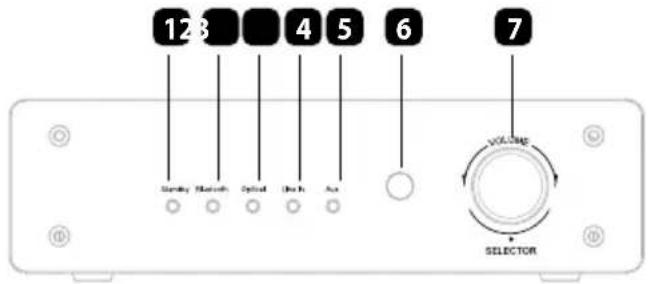
- Power/Standby indicator
- red: standby
- off: power off
• orange: standby to power mode switching / overheat - Bluetooth indicator
- Optical input indicator
- Line input indicator
- Aux input indicator
- Remote control IR sensor
- Volume and input switch knob
- Bluetooth antenna
- Aux input
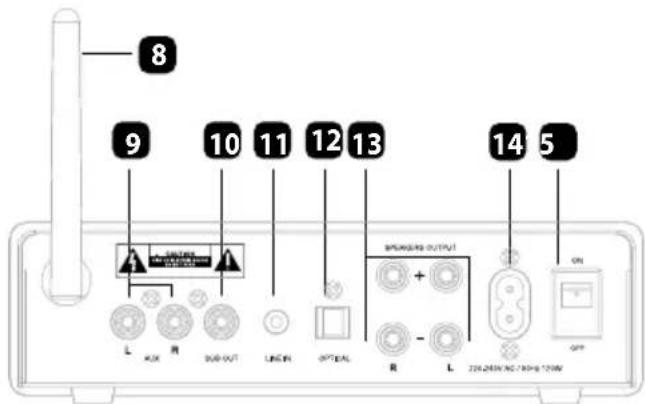
Standard wired audio source device such as CD player with RCA cable. Pay attention that make sure the correct plug: "L" for left input channel, "R" for right input channel.
- Subwoofer output
RCA type wired cable to connect an active subwoofer
- Line input
Select audio device with standard 3.5 mm jack cable to connect the amplifier, such as MP3, phone, PC to play music.
-
Optical input
-
Speaker output
Connect 2 pieces passive speakers with terminal, the speakers should be 4 ohm and 50 watts.
-
Power supply socket
-
ON/OFF switch
REMOTE
- On/Off Button
- Optical Source
- Volume +/-
- Previous/Next (only in BT mode)
- Line In Source
- Play/Pause (only in BT mode)
- AUX Source
- Mute
- Bluetooth Source

OPERATION:
- Connect the power cord to the back of the amplifier then connect it to a wall outlet.
- Line a pair passive speakers from the terminal and Sub out for active subwoofer. Connect your external device to a suitable input.
- Turn the power switch (on the rear panel) to the ON position; the unit will enter working status and the input indicator will lit up (the amplifier will automatically enter mode it was in, prior to switching off).
- Press the Bluetooth, OPT, LINE or AUX button on the remote to choose an audio source OR use the volume knob for audio source selection. Control the playback via the remote control.
Note: The amplifier will shut off automatically if the temperature exceeds 85irc C (the power indicator will turn orange). The amplifier will re-start automatically when the temperature has dropped below 60±10irc C.
BLUETOOTH PAIRING:
- Press the Bluetooth on the remote to activate the Bluetooth source.
- Activate Bluetooth on your phone/tablet and start searching for new Bluetooth devices.
- Select this amplifier (KM A30) and pair.
Note:
- Only one device can be connected at a time when using Bluetooth.
- It will connect with the previous device automatically next time.
- The distance from this unit and your device may reach up to 10 meters, but please note that range depends on environmental factors.
CONNECT YOUR DEVICE:
- Connect your active subwoofer to SUB out.
- Connect your CD player via its RCA cable to the RCA L/R input. Make sure you connect the "L" plug to the left input channel and the "R" plug to the right input channel.
- Connect your phone/tablet/MP3 via an AUX cable to Line In.
- Connect your DVD player via its optical fiber cable to the Optical Input.
- Connect your speakers to the Speaker Output. Make sure you connect the -/+ and the L/R cables to the right input.
Note: Remember to press the desired source button on the remote control for the audio source to work OR press the volume knob on the amplifier repetitively to switch the input mode (the sequence is Bluetooth > Optical > Line In > Aux).

Notice: Please set your DVD player to PCM mode when you use the DVD device.
OVER-HEAT PROTECTION:
The amplifier will shut off to
standby mode automatically if the temperature over 85irc C, and it will re-start to working mode automatically if temperature lower at about 60±10irc C
STANDBY:
- Press Power button on the remote control, the unit enters into standby mode, the power/standby indicator lights up red. Press the button again to exit standby mode.
- The amplifier will be in standby mode if there is no signal input for 15 minutes. Please pay attention that not pull out the signal input cables from the player devices, or the amplifier will not turn to standby.
TROUBLE SHOOTING:
| Problem Mögliche Ursachen | |
| No power • The AC power | cord is disconnectedInappropriate connection at the wall socket or the wall socket is inactive |
| No sound • The speakers | and components are disconnectedVolume control at lowest levelSpeaker cables short or openCheck if the signal cables are damaged and if the speakers work |
| Suddenly no sound when the product is working | Check if the audio source device works wellOver-heat protection mode |
| Bad sound • Sound source | problemBad or incorrect speakers connectionsTreble and bass control are too low |
| LED off • Check if it is connected with the power | |
SPECIFICATION:
• Max. output power: 200 W
- Rated output power: 2 × 50 W
• Frequency response: 20 Hz \~ 20 kHz
• THD: 0,05% (at 1 kHz)
• Quiescent current: 50 mA
- Impendance: 4 Ohm
- Bluetooth 4.0+EDR
- Bluetooth range: up to 10 m
• I/O:
o 2xRCA
o SUB Out
o Line In
o Optical Input
o Speaker output: 2 CH
• Power supply: 220-240 V; 50/60 Hz
LEARN MORE
For more information on this product, go to www.krugermatz.com.
Visit www.krugermatz.com website for more products and accessories. In case of any doubts or questions reach out to our Frequently Asked Questions section.
Specifications are subject to change without prior notice.
The Lechpol company declares that product KM0515 is consistent with the essential requirements and other relevant provisions of directive 1999/5/EC. The proper declaration for download from www.lechpol.eu
English
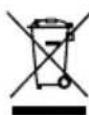
Correct Disposal of This Product
(Waste Electrical & Electronic Equipment)

(Applicable in the European Union and other European countries with separate collection systems) This marking shown on the product or Its literature, indicates that It should not be disposed with other household wastes at the end of its working life. To prevent possible harm to the environment or human health from uncontrolled waste disposal, please separate this from other types of wastes and recycle it responsibly to promote the sustainable reuse of material resources. Household users should contact either the retailer where they purchased this product, or their local government office, for details of where and how they can take this item for environmentally safe recycling. Business users should contact their supplier and check the terms and conditions of the purchase contract This product should not be mixed with other commercial wastes for disposal.
Made in China for LECHPOL Zbigniew Leszek, Miętne, 1 Garwolińska Street, 08-400 Garwolin
10. Iesire Subwoofer
CONECTATI DISPOZITIVUL DVS:
natural_image
Completely black image with no visible content or text.
line
| X | Y | |---|---| | 0.0 | 0.0 | | 0.1 | 0.1 | | 0.2 | 0.2 | | 0.3 | 0.3 | | 0.4 | 0.4 | | 0.5 | 0.5 | | 0.6 | 0.6 | | 0.7 | 0.7 | | 0.8 | 0.8 | | 0.9 | 0.9 | | 1.0 | 1.0 | | 1.1 | 0.9 | | 1.2 | 0.8 | | 1.3 | 0.7 | | 1.4 | 0.6 | | 1.5 | 0.5 | | 1.6 | 0.4 | | 1.7 | 0.3 | | 1.8 | 0.2 | | 1.9 | 0.1 | | 2.0 | 0.0 |
www.krugermatz.com
Krüger&Matz is a registered trademark

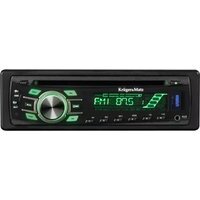

Brand : Krüger&Matz
Model : KM0515
Category : Receiver