
Amp 3 USB - Hi-Fi Auna - Free user manual and instructions
Find the device manual for free Amp 3 USB Auna in PDF.


| Product Type | Hi-Fi Stereo Amplifier |
| Power Supply | 230 V~, 50 Hz |
| Output Power (4 Ohm, 1 kHz, 1% THD) | 2 x 5 W |
| Output Power (4 Ohm, 1 kHz, 10% THD) | 2 x 6.5 W |
| Power Consumption | 25 W |
| Total Harmonic Distortion | 0.3% (1 kHz) |
| Frequency Response | 20 Hz - 20 kHz |
| Signal-to-Noise Ratio (AUX) | 72 dB |
| Signal-to-Noise Ratio (MIC) | 65 dB |
| Input Sensitivity (AUX) | 230 mV |
| Input Sensitivity (MIC) | 3.2 mV |
| Bass Control | ±10 dB at 100 Hz |
| Treble Control | ±10 dB at 100 Hz |
| Inputs | 3x AUX (RCA), 1x USB 2.0, 1x MIC (1/4") |
| Outputs | 1x Headphone (1/4"), 1x REC (RCA), 2x Speaker (push-type) |
| Speaker Impedance | 4-8 Ohms |
| Microphone Control | Volume, Pager/Mixing Mode |
| Balance Control | Yes |
| Power Indicator | LED |
| Protection Fuse | 1A/250V, 5x20mm (replaceable) |
| Safety Features | Electric shock prevention, ventilation required |
| Maintenance | Wipe with damp cloth, replace fuse as needed |
Frequently Asked Questions - Amp 3 USB Auna
User questions about Amp 3 USB Auna
0 question about this device. Answer the ones you know or ask your own.
Ask a new question about this device
Download the instructions for your Hi-Fi in PDF format for free! Find your manual Amp 3 USB - Auna and take your electronic device back in hand. On this page are published all the documents necessary for the use of your device. Amp 3 USB by Auna.
USER MANUAL Amp 3 USB Auna
| Item number 10032155 | |
| Power supply 230 V~ 50 Hz | |
| Output Power, 2 channels driven | |
| 4-Ohm, 1 kHz, 1% THD 2 x 5 W | |
| 4-Ohm, 1 kHz, 10% THD 2 x 6,5 W | |
| Power Consumption 25 W | |
| Total Harmonic Distortion, 1 kHz 0,3 % | |
| Input Sensitivity, 1 kHz, 4-Ohm Rated Power | |
| AUX1 230 mV | |
| AUX2 230 mV | |
| AUX3 230 mV | |
| MIC 3,2 mV | |
| Frequency Response 20 Hz - 20 kHz | |
| Signal to Noise Ratio 1 kHz, 4-Ohm Rated Power | |
| AUX1 72 dB | |
| AUX2 72 dB | |
| AUX3 72 dB | |
| MIC 65 dB | |
| Tone Controls | |
| Bass ±10 dB, 100 Hz | |
| Treble ±10 dB, 100 Hz | |
SAFETY INSTRUCTIONS
Explanation of the symbols on the appliance
 | CAUTION |  |
| RISK OF ELECTRIC SHOCKDO NOT OPEN | ||
| WARNING: TO REDUCE THE RISK OF ELECTRIC SHOCK; DO NOT REMOVE THE COVER OR BACK. NO USER-SERVICEABLE PARTS INSIDE: REFER SERVICING TO QUALIFIED PERSONNEL. | ||
 | The lightning symbol is intended to alert you to the presence of uninsulated, dangerous voltage within this product's enclosure that might be of sufficient magnitude to constitute a risk of electric shock.Do not open the product case. | |
 | The exclamation symbol is intended to inform you that important operating and maintenance instructions are included in the literature accompanying this product. | |
Care
- Keep the amplifier dry. If it gets wet, wipe immediately.
- Use the amplifier only in well-ventilated installations.
- Handle the amplifier away from dust and dirt.
- Wipe occasionally with a damp cloth to keep it looking new.
- Do not use harsh chemical, solvents or detergents
FEATURES AND CONTROLS
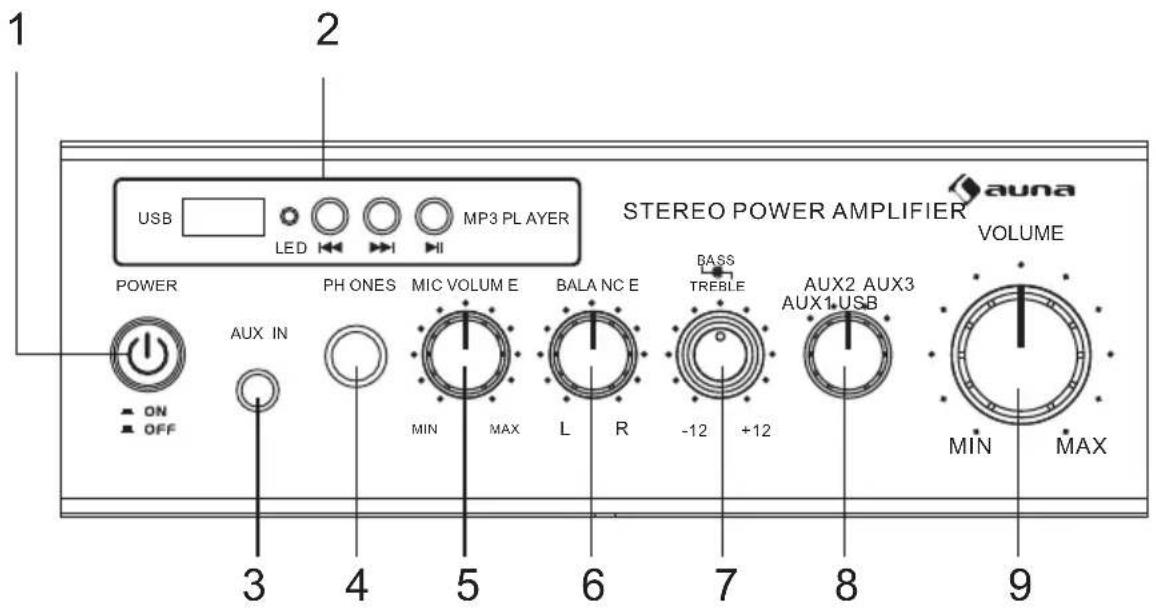

1 Power On/Off and LED Indicator
Main power switch, the indicator lights when the amplifier is turned on.
2 USB 2.0 Input Interface with LED Indicator
Press ◀ to play the last song backward, press ▶ to play the next song forward, and press ▶ to play and/or pause the song. When the song is ceased from playing, it will be memorized to resume once the amplifier is reactivated and/or the USB input is selected again.
3 AUX input
Line Input. AUX/ CD IN -Lets you easily connect the computerized MP3 Device ( player) sources, such as PC( CD ROM), laptop, walkman, iPod, and cell phone.
4 1/4" headphone jack
5 MIC Volume Control
Lets you adjust the volume of connected MIC to the proper setting.
6 BALANCE Control
Lets you adjust the sound balance between the left and right of amplifier outputs.
7 BASS and TREBLE Control
Allows you to boost or attenuate bass and treble for the desired sound.
8 AUX 1/AUX 2/AUX3/ USB Input Selector
Lets you select the desired input music source. When it is switched to AUX1, AUX2, or CD input while the USB is still on playing, the playing signal of USB continues, just it is not sent to the amplifier's output.
9 MASTER Volume Control
Lets you control the overall volume level. It doesn't affect the volume of MIC.
10 Switchable MIC PAGER and MIXING Modes
Set to PAGER, the signal from AUX I/AUX 2/CD will be attenuated BY -12dB and the signal from MIC will override to page (Auto Talkover), it is good for paging system. Set to MIXING, the signals from AUX I/AUX 2/CD and MIG will be existed at the same time, it acts like playing at KARAOKE event.
11 MIC input jack (1/4")
Lets you connect a microphone with a 3,5-mm plug.
12 AUX1/AUX2/AUX RCA inputs
A12) AUX I/AUX 2/AUX RCA Inputs Lets you connect most high level audio sources such as CD player, tape deck, tuner, camcorder, or VCR.
13 REC RCA Output
Lets you connect the amplifier to a tape deck for recording.
14 Push Type Speaker Terminal
Lets you easily connect speaker wires directly to the amplifier. The speaker impedance can be ranged from 4 to 8 Ohms for the general stereo output. The total speaker impedance must be at least 4-Ohmper channel at stereo mode.
15 Replaceable Power Fuse
The amplifier uses a fuse for protection against surges and short circuit. If the amplifier suddenly turns off and will not turn on, check the fuse and if necessary replace it with a lamp, 250-volt, fastacting, 5x20mm fuse (not supplied).
16 AC IN Power Cord
Connect to AC 230 V/ 50 Hz.
MAINTENANCE
Replacing a fuse
This amplifier requires a fuse with the proper rating for protection from power surges and short circuits. If the amplifier suddenly turns off or will not turn on, the fuse is properly blown.
- Let the amplifier cool down and see if it start again before you assume a fuse needs to be replaced.
- Unplug the amplifier from the AC outlet.
- Turn the fuse holder cap and pull out the cap.
- Remove the old fuse and replace it with an identical one.

CAUTION : Never use a fuse with a higher rating.
TROUBLESHOOTING
| Problem Possible Reason Solution | ||
| No power | The fuse might be blown Check the amplifier's fuse and replace it if necessary. | |
| No sound | Sound source or speakers may not be connected properly. | Check all connections. |
| Master volume control may be set to a minimum. | Adjust the volume control to a higher setting. | |
| The speaker's wire might be the wrong impedance. | Make sure that the speakers that you have connected to the amp are matching in impedance. | |
| The amplifier is shutting down or powering off. | Turn the amplifier off and let it cool, make sure that the amplifier is properly ventilated, and then turn it back on. | |
| Feedback | Microphone and speakers are to close together. | Reposition the microphone and speakers. |
DISPOSAL CONSIDERATIONS

natural_image
Symbol of a waste bin with crossed lines indicating no waste, and a solid black rectangle below (no text or labels)According to the European waste regulation 2012/19/EU this symbol on the product or on its packaging indicates that this product may not be treated as household waste. Instead it should be taken to the appropriate collection point for the recycling of electrical and electronic equipment. By ensuring this product is disposed of correctly, you will help prevent potential negative consequences for the environment and human health, which could otherwise be caused by inappropriate waste handling of this product. For more detailed information about recycling of this product, please contact your local council or your household waste disposal service.

Declaration of Conformity
Producer: Chal-Tec GmbH, Wallstraße 16, 10179 Berlin. Germany
This product is conform to the following European Directives:
2011/65/EU (RoHS)
2014/30/EU (EMC)
2014/35/EU (LVD)


natural_image
Abstract white logo design on dark background, resembling stylized letter 'S' or wave form (no text or symbols)

- SAFETY INSTRUCTIONS
- Care
- FEATURES AND CONTROLS
- Power On/Off and LED Indicator
- USB 2.0 Input Interface with LED Indicator
- AUX input
- 1/4" headphone jack
- MIC Volume Control
- BALANCE Control
- BASS and TREBLE Control
- AUX 1/AUX 2/AUX3/ USB Input Selector
- MASTER Volume Control
- Switchable MIC PAGER and MIXING Modes
- MIC input jack (1/4")
- AUX1/AUX2/AUX RCA inputs
- REC RCA Output
- Push Type Speaker Terminal
- Replaceable Power Fuse
- AC IN Power Cord
- MAINTENANCE
- Replacing a fuse
- TROUBLESHOOTING
- DISPOSAL CONSIDERATIONS
- Declaration of Conformity
Brand : Auna
Model : Amp 3 USB
Category : Hi-Fi