
32ATS5000-H - Television Allview - Free user manual and instructions
Find the device manual for free 32ATS5000-H Allview in PDF.


| Product Type | LED TV |
| Screen Size | 32 inches (81 cm) |
| Resolution | HD Ready (1366 x 768) |
| Aspect Ratio | 16:9 |
| Refresh Rate | 60 Hz |
| Brightness | 250 cd/m² |
| Contrast Ratio | 3000:1 (static) |
| Viewing Angle | 178° horizontal / 178° vertical |
| Audio Output | 2 x 8W |
| Tuner | DVB-T2/C/S2 |
| Inputs | 2x HDMI, 1x USB, 1x VGA, 1x AV, 1x RF |
| Outputs | 1x Coaxial digital audio, 1x Headphone |
| Connectivity | Wi-Fi (via optional dongle), LAN |
| Power Consumption | 40 W typical, < 1 W standby |
| Dimensions (with stand) | 732 x 480 x 180 mm |
| Dimensions (without stand) | 732 x 432 x 76 mm |
| Weight | 4.5 kg (with stand) |
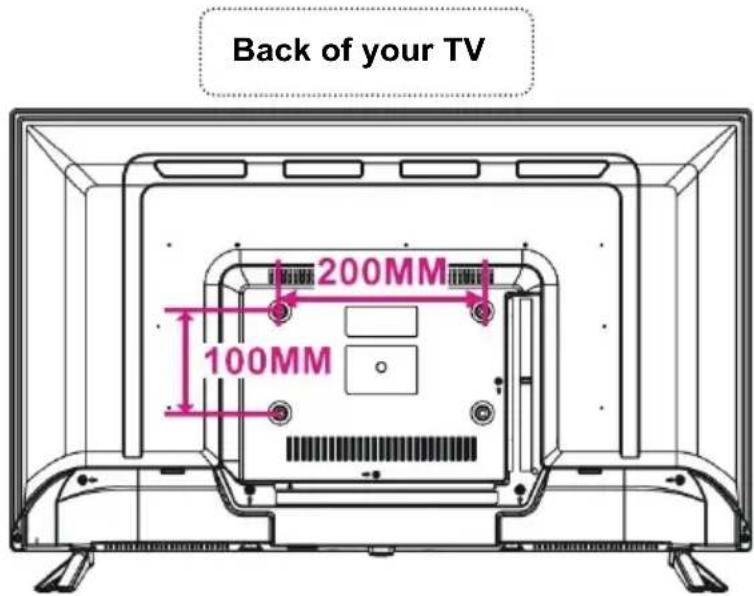
| VESA Mount | 200 x 200 mm |
| Energy Class | A+ |
| Included Accessories | Remote control, batteries, user manual, power cable |
Frequently Asked Questions - 32ATS5000-H Allview
User questions about 32ATS5000-H Allview
0 question about this device. Answer the ones you know or ask your own.
Ask a new question about this device
Download the instructions for your Television in PDF format for free! Find your manual 32ATS5000-H - Allview and take your electronic device back in hand. On this page are published all the documents necessary for the use of your device. 32ATS5000-H by Allview.
USER MANUAL 32ATS5000-H Allview
natural_image
Black-and-white display of a modern flat-screen TV showing a sunset over the ocean with waves crashing and ships visible in the background (no text or symbols on screen)USER MANUAL....2
MANUAL DE UTILIZARE....9
KASUTUSJUHEND....16
HASZNÁLATI ÚTMUTATÓ......23
NAUDOJIMO INSTRUKCIJA....30
LIETOTĀJA ROKASGRĀMATA......37
INSTRUKCJA OBSŁUGI....44
SAFETY INSTRUCTIONS

The lightning flash and arrow head within the triangle is a warning sign alerting you of "dangerous voltage" that can cause electric shocks.
CAUTION: TO REDUCE THE RISK OF ELECTRIC SHOCK, DO NOT REMOVE COVER (OR BACK). NO USER SERVICEABLE PARTS INSIDE. REFER SERVICING TO QUALIFIED SERVICE PERSONNEL.

The exclamation point within the triangle is a warning sign alerting you of important instructions accompanying the product.

WARNING – TO REDUCE THE RISK OF FIRE, ELECTRIC SHOCK, OR SERIOUS PERSONAL URY:
- In order to avoid any hazard, if the cord is damaged, it must be repaired by the manufacturer, the authorized service unit or qualified personnel.
● The cord should always be easily accessible. - In order to prevent fires, electric shocks or injuries, DO NOT INSERT THE POWER CABLE, THE SOCKET OR THE DEVICE in water or other liquids and do not place objects with water on the surface of the device.
- Do not block the ventilation holes, in order to avoid overheating the device.
- Leave a minimum distance of 10 cm around the unit to ensure sufficient ventilation.
● Naked flame sources, such as candles, should not be placed near the device.
● The device is intended for use only in a temperate climate. - Do not place the product on/near radiators, heat registers, stoves, or any other hot surfaces.
- Clean the product only as recommended by the manufacturer (see "Maintenance" section from the user guide). Unplug the power plug from the wall outlet before cleaning.
- Unplug the power plug from the wall outlet if it is unused for an extended period.
- Do not spill liquids and do not insert objects in the device.
- Operate the product only with the supplied power cord. Place power cords so they are not walked on or pinched by items placed upon or against them, paying particular attention to plugs, convenience receptacles, and the point where the power cord exits the product.
- If you're using a network connector or an extension cord to disconnect the device, the disconnecting device shall have easy access.
-
Do not operate this product under the following conditions:
-
When the power-supply cord or plug is damaged.
- If liquid has been spilled or objects have been inserted into the product.
- If the product has been exposed to rain or water.
- If the product does not operate properly or it is not used according to the instructions.
-
If the product has been dropped or damaged in any way.
-
Do not attempt to repair the product. Any intervention on the device must be made by the authorized service unit.
- Do not overload wall outlets or the extension cords.
- Connect this product to a power outlet which has grounding.

CAUTION - TO REDUCE THE RISK OR PERSONAL INJURY OR PRODUCT DAMAGE:
- This product is intended solely for non-commercial, non-industrial use as a television. Do not use this product for any other purpose.
- Do not subject the product to violent shocks, extreme temperatures, or lengthy periods of direct sunlight exposure.
- Keep the product away from magnetic objects, engines and transformers.
- Do not use outdoors, in bad weather.
- Do not use the TV while driving. It is dangerous and illegal in some areas.
BATTERY HANDLING AND USAGE:
- CAUTION: Danger of explosion if the batteries are incorrectly placed or not replaced by the same type or equivalent.
● The batteries should not be exposed to excessive heat such as sunshine, fire or a similar source.
● Different types of batteries, new and used batteries, should not be mixed.
● The batteries must be installed according to the polarity. - If the battery is worn, it must be removed from the product.
- The battery must be safely disposed. Always use the collection bins provided (check with your provider) to protect the environment.
- Keep batteries away from children and pets. Only adults should handle batteries.
- Follow the battery safety and usage instructions.
INSTRUCTIONS REGARDING RECYCLING
According to the European Directive 2002/96/EC on electrical and electronic waste exploitation (WEEE) and to Directive 2008/112/CE of the European Parliament and Council from December 16, 2008, the old household electrical appliances must not be disposed of in the normal municipal solid waste stream.
Old appliances must be collected separately in order to optimize the recovery and recycling rhythm for their components, and in order to prevent the possible negative impact on human health and the environment. The crossed out “wheeled bin” symbol should be on all products of this type in order to remind the people that they have the obligation to contact the local authorities or the selling points and ask for information regarding the adequate places of disposal of old electrical appliances.

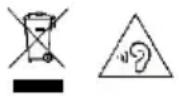
To avoid possible hearing damage, do not listen at high audio volume for long periods of time.
NOTE: This user guide contains only general instructions. For detailed instructions, please access https://www.allviewmobile.com/index.php/products/tv.html. If there are differences, the online manual will be taken into consideration
CHARACTERISTICS
32" LED DISPLAY
Hotel Mode, auto TV scanning, digital broadcasting reception
TV guide function, TELETEXT function (Europe)
USB multimedia playback, multi-language on screen display, complete control from remote
HDMI, SCART, YPBPR, AV, VGA, PC AUDIO and CI Card inputs
EARPHONES and COAXIAL output
Recording function, TIME SHIFT function
Detachable stand holder
External antenna jack
Built-in speakers
MAIN UNIT
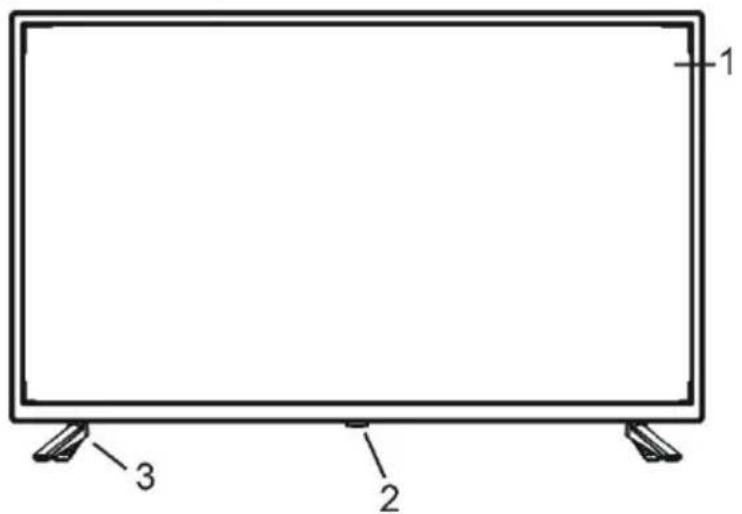
- LED display screen
- Sensor / Power indicator - In standby mode the indicator light will display a red color, and when the TV is on, the indicator light will display a blue color.
- Stand holder
Back View
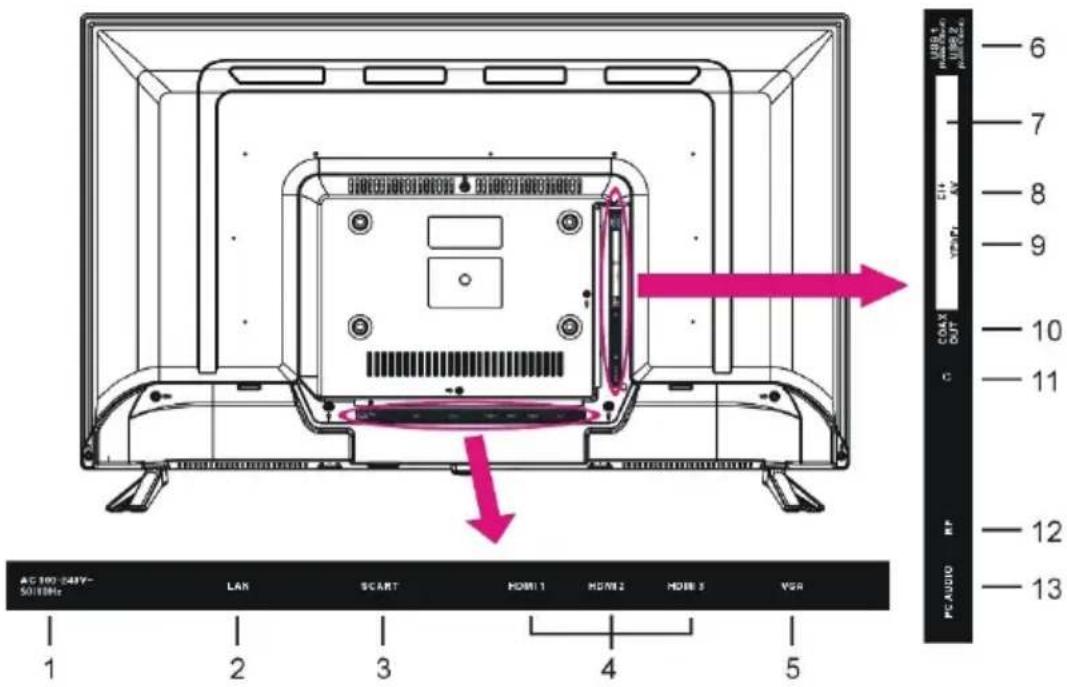
| 1. AC Power cord | 7. CI+ Slot |
| 2. LAN input | 8. Mini AV input |
| 3. SCART Input | 9. Mini YPbPr input |
| 4. HDMI input | 10. COAXIAL output |
| 5. VGA Input | 11. Earphone output |
| 6. USB input | 12. RF Antenna input - Connect the ext antenna |
| 13. PC AUDIO input |
BASIC CONNECTIONS
- Ensure all the cables are connected to the main unit before connecting it to a socket.
● Make sure all the equipment and power plugs are properly connected and the unit is set in a correct mode before any kind of operation.
NOTE: Carefully read the site instructions before connecting the device to other equipment.
BASIC OPERATIONS
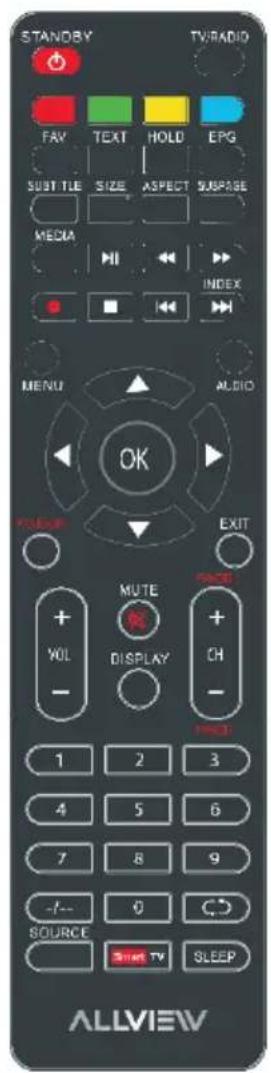
- Press the POWER button on the unit or remote control to power ON the unit (indicator will glow blue); press it again to power OFF (standby mode) the unit (indicator will glow red).
- Press SOURCE button on the unit or remote control to set the unit in DTV or ATV mode.
- Certain actions require inserting a password (0000 - default, 8899 - universal)
VOLUME CONTROL, MUTE CONTROL
SOURCE SETTING, MULTI-AUDIO SETTING
INFORMATION DISPLAY, TV GUIDE (FOR DTV MODE ONLY), FAVORITE LIST QUICK SELECT, TELETEXT, TV/RADIO (FOR DTV MODE ONLY), SUBTITLE RECORDER (FOR DTV MODE ONLY), TIME SHIFT (FOR DTV MODE ONLY)
SMART TV OPERATIONS
After completing the first installation steps, you have to connect to LAN or WiFi in order to have internet access.
By using the MOUSE/IR button, you can access the MOUSE button and the NAVIGATION button which allows you, with the help of the navigation buttons, to go through the menu and the submenus.
You have an available browser, a file manager, an app manager and a specific Settings submenu.
MAIN MENU
● The unit contains different setting modes. Once the initial programming is entered, it will remain as such until changed. This way, the unit can always be operated under the same conditions.
● The settings will remain as such until they are changed by the user, even if the TV enters in standby mode.
DTV MODE
- Press the SOURCE button to switch the TV in DTV mode.
- You have the following submenus: picture, sound, channel, features, settings
ATV AND OTHER MODES
- Press SOURCE button on the remote control to select desired input source.
- For these modes, please refer to the user guide from the website.
PC MODE
- Connect this unit to a personal computer.
- Power on your computer and this unit.
- Press the SOURCE button on the unit or from the remote control to select the PC input source.
- Press the MENU button to display the main menu. Select Setup using the UP/DOWN navigation buttons. Then press the OK or RIGHT navigation buttons to enter into the submenu.
- Select PC Setup.
- Press the UP/DOWN navigation buttons to select the preferred item.
- Press the OK or RIGHT navigation buttons to enter the submenu.
Press the LEFT/RIGHT navigation buttons to adjust the value.
MAINTENANCE
- Be sure to press the POWER button to set the TV in standby mode and disconnect the power plug before cleaning the TV.
● Never use alcohol, benzene, thinner, cleaning fluid or other chemicals. Do not use compressed air to remove dust.
● Wipe the TV with a dry, soft cloth. The scratches present on the display are not subject to the warranty certificate.
WALL MOUNTING
- Contact a professional for assistance when wall mounting your TV. We are not responsible for any damage to the product or injury to yourself, if you mount the TV on your own.
- Do not wall mount the TV while TV is turned on. It may cause personal injury due to electric shock
STAND INSTALLATION
Your TV may be packed with the stand separately. Before using this TV, please carry out the stand installation according to the detailed instructions from the online user guide.
EU DECLARATION OF CONFORMITY
No. 1569
We, S.C. Visual Fan S.R.L., with the headquarters in Brasov, 61, Brazilor St., CP 500313 Romania, registered at the Trade Commerce Brasov under no. J08/818/2002, CUI RO14724950, as the manufacturer, assure, guarantee and declare on our own responsibility, according to the provisions from article 4 HG no. 325/2017, regarding the regime of the products and services, which can be harmful for life and health, that the product 32ATS5000-H from ALLVIEW, does not jeopardize the life, health and labor protection, does not produce a negative impact over the environment and is in accordance with:
- Directive no. 2011/65/UE, modified by 2014/8/UE regarding the usage restrictions of certain dangerous substances in electric and electronic equipment
- Directive regarding the radio equipment RED 2014/53/EU (HG 740/2016)
- Directive 2014/35/UE regarding the assurance of users of low voltage equipment
- Directive regarding the compatibility EMC 2014/30/EU (HG 487/2016)
- The safety requests of the European Directive 2001/95/EC and the EN 60065:2002/A12:2011 and EN 60950-1:2006/A1:2010/A11:2009/A12:2011 standards, regarding the level of decibels emitted by the sold appliances.
The product has been assessed according to the following standards:
Health and safety: EN 62368-1:2014; EN 62368-1:2014/A11:2017; EN 50360:2017; EN 50566:2017;
EN 62209-1:2016; EN 62209-2:2010; EN 50663:2017; EN 62479:2010; EN 62479:2010
EMC EN 301 489-1 V2.2.3; EN 301 489-17 V3.2.2; EN 301 489-19 V2.1.1; EN 301 489-52 V1.1.0;
EN 55032:2015; EN 55035:2017
Radio spectrum: EN 301 511 V12.5.1; EN 301 908-1 V11.1.1; EN 301 908-2 V11.1.2; EN 303 413
V1.1.1; EN 303 345-1 V1.1.1;
The evaluation procedure of the conformity was made according to Directive 2014/53/EU, the documentation being stored at S.C. Visual Fan S.R.L., Brasov, 61, Brazilor St., CP 500313, Romania and will be offered at request. The evaluation procedure for the conformity of the product has been realized with the participation of the following bodies: Telefication bv.
The product has the CE mark on it. The declaration of conformity is available at
https://www.allviewmobile.com/index.php/products/tv.html.

Director
REV 19.08.2020
Cotuna Gheorghe
SPECIFICATIONS
| Display size | 81 cm LED TV SMART |
| Resolution | 1366x768 HD |
| Contrast Ratio | 800:1 |
| Aspect Ratio | 16:9 |
| Color System | PAL/SECAM |
| Sound System | BG/DK/I |
| Inputs | 1xRF, 1x PC Audio, 3 x HDMI, 1 x YPbPr, 2 x USB, 1 x Scart, 1 x AV IN, 1x VGA, 1 x CI+, |
| Outputs | 1 x Jack 3.5mm, Coaxial |
| USB Multimedia Playback Format | Movie, music, photo, text (according to their format) |
| Power Source | AC 100-240 V, 50/60 Hz |
| Power Consumption | <60W |
| Operation Temperature | -5°C -> + 45°C |
| Measurement | 732(W)x196(D)x474(H) |
| Weight | 3.71 kg |
Note: Specifications are subject to change without notice.
INSTRUCTIUNI DE BAZA

WYŚWIETLACZ INFORMACYJNY, TELEWIZOR TV (TYLKO DLA TRYBU DTV), ULUBIONE SZYBKI WYBÓR, TELETEKST, TV / RADIO (TYLKO DLA TRYBU DTV), SUBTITLE REJESTRATOR (TYLKO DLA TRYBU DTV), PRZESUNIĘCIE CZASU (TYLKO DLA TRYBU DTV)
OPERACJE SMART TV
natural_image
Abstract black-and-white graphic of a stylized letter 'D' with an exclamation mark (no text or symbols present)| AT | BA | BE | BG | CH | CY |
| CZ | DE | DK | EE | EL | ES |
| FI | FR | GR | HR | HU | IE |
| IS | IT | LT | LU | LV | ME |
| MK | MT | NL | NO | PL | PT |
| RO | SE | SI | SK | TR | UK |
Excessive sound pressure from earphones and headphones can cause hearing loss.
To prevent possible hearing damage, do not listen at high volume levels for long periods.
The device is restricted to indoor use only when operating in the 5150 to 5350 MHz frequency range.

- SAFETY INSTRUCTIONS
- WARNING – TO REDUCE THE RISK OF FIRE, ELECTRIC SHOCK, OR SERIOUS PERSONAL URY:
- CAUTION - TO REDUCE THE RISK OR PERSONAL INJURY OR PRODUCT DAMAGE:
- BATTERY HANDLING AND USAGE:
- INSTRUCTIONS REGARDING RECYCLING
- CHARACTERISTICS
- 32" LED DISPLAY
- BASIC CONNECTIONS
- BASIC OPERATIONS
- SMART TV OPERATIONS
- MAIN MENU
- DTV MODE
- ATV AND OTHER MODES
- PC MODE
- MAINTENANCE
- WALL MOUNTING
- STAND INSTALLATION
- EU DECLARATION OF CONFORMITY
- INSTRUCTIUNI DE BAZA
- OPERACJE SMART TV
Brand : Allview
Model : 32ATS5000-H
Category : Television