
SQTL 10 A1 - Phone Charger SILVERCREST - Free user manual and instructions
Find the device manual for free SQTL 10 A1 SILVERCREST in PDF.


| Product Type | Wireless Charger (Inductive) |
| Model | SQTL 10 A1 |
| Brand | SilverCrest |
| Charging Technology | Qi Wireless Charging |
| Input | USB-C: 5V ⎓ 2A / 9V ⎓ 1.7A |
| Max. Charging Power | 5W / 10W (depending on device) |
| Frequency Band | 110 - 205 kHz |
| Max. Transmitting Power | 20.34 dBμA/m @ 3m |
| Dimensions (Diameter x Height) | Approx. 90 mm x 38 mm |
| Weight | Approx. 112 g |
| Operating Temperature | 10 °C to 40 °C |
| Relative Humidity | 40 % to 85 % |
| LED Indication | Blue LED ring (pulses during charging, solid when full, fast flash for errors) |
| Adjustable Stand | Rotatable top part for horizontal or inclined charging |
| Included Accessories | USB-A to USB-C cable, user manual |
| Input Protection | Over-voltage, over-current, temperature protection |
| Foreign Object Detection | Yes (LED flashes rapidly) |
| Material | Plastic with non-slip base |
| Warranty | 3 years from purchase date (HOYER Handel GmbH) |
| IAN Number | 334278_1907 |
| Compliance | CE, RED 2014/53/EU, RoHS 2011/65/EU |
| Intended Use | Indoor, private use only |
| Cleaning | Disconnect cable, wipe with slightly damp microfiber cloth; no solvents |
| Disposal | Separate collection per WEEE directive (crossed-out bin symbol) |
Frequently Asked Questions - SQTL 10 A1 SILVERCREST
User questions about SQTL 10 A1 SILVERCREST
0 question about this device. Answer the ones you know or ask your own.
Ask a new question about this device
Download the instructions for your Phone Charger in PDF format for free! Find your manual SQTL 10 A1 - SILVERCREST and take your electronic device back in hand. On this page are published all the documents necessary for the use of your device. SQTL 10 A1 by SILVERCREST.
USER MANUAL SQTL 10 A1 SILVERCREST
WIRELESS CHARGER SQTL 10 A1 WIRELESS CHARGER SQTL 10 A1
GB Operating instructions
WIRELESS CHARGER
Spanish.... 2
Italian.... 24
English...... 46
German...... 68

Overview / Panoramica / Overview / Übersicht
Index
Packaging
Packaging
- Overview 47
- Intended purpose ...... 49
- Safety instructions .... 50
- Items supplied 53
- Before using for the first time 53
- Qi charging technology ..... 54
- Setting up 55
- Connecting 55
- Charging 56
- Cleaning 57
- Trouble-shooting 57
- Disposal 58
- Technical specifications ..... 59
- Notes on the EU declaration of conformity 60
- Warranty of the HOYER Handel GmbH ...... 61
1. Overview
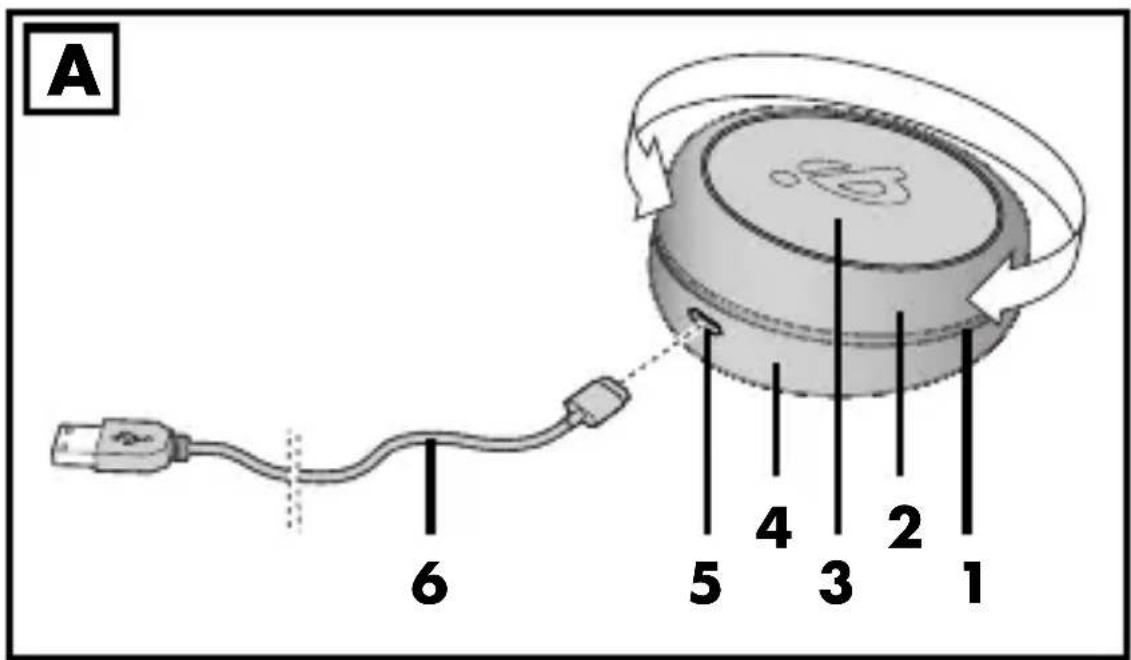
1 Blue LED ring:
| LED display Meaning | |
| Flashes 4 times | USB cable has been connected |
| Pulses (becomes lighter and darker) | The smartphone is being charged |
| Permanently lit | Smartphone fully charged (on Apple devices, the LED ring continues to pulse). |
| Flashing rapidly | Smartphone incorrectly positioned or metallic foreign object on the Qi charging surface |
2 Top part 3 Qi charging surface 4 Bottom part 5 Input USB-C port 6 USB charger cable (USB-A 2.0 to USB-C)
Thank you for your trust!
We congratulate you on your new inductive battery charger.
For safe handling of the device and in order to get to know the entire range of features:
- Read these user instructions thoroughly prior to initial use.
- Above all, observe the safety information!
- The device should only be used as described in this copy of the user instructions.
- Keep this copy of the user instructions for future reference.
- If you pass the device on to someone else, please include this copy of the user instructions. The user instructions are a part of the product.
We hope you enjoy your new inductive battery charger!
Symbols on your device

This symbol means that the content of the user instructions must be observed.

The official QI logo identifies devices certified by the Wireless Power Consortium (WPC).
2. Intended purpose
This device is intended for cable-free (inductive) charging of an external device, e.g. a smartphone.
The device is designed for private use. The device must only be used indoors. This device must not be used for commercial purposes.
Do not make any changes or carry out any repairs. The manufacturer is not liable for damage or malfunctions caused by improper repairs or modifications. This is the sole responsibility of the user.
3. Safety instructions
Warnings
If necessary, the following warnings are used in this copy of the user instructions:

DANGER! High risk: failure to observe this warning may result in injury to life and limb.
WARNING! Moderate risk: failure to observe this warning may result in injury or serious material damage.
CAUTION: low risk: failure to observe this warning may result in minor injury or material damage.
NOTE: circumstances and specifics that must be observed when handling the device.

DANGER for children and people with disabilities
- Packing materials are not children's toys. Children should not be allowed to play with the plastic bags: there is a risk of suffocation.
- This device is not designed to be used by people (including children) with limited physical, sensory or mental capabilities or people without adequate experience and/or understanding, unless they are supervised by someone responsible for their safety or are instructed by them on how to use the device.
- Children must not play with the device.
- Cleaning and user maintenance must not be performed by children.
- Keep the device out of the reach of children.

DANGER to and from pets and livestock
Electrical devices can represent a danger to pets and livestock. In addition, animals can also cause damage to the device. For this reason you should keep animals away from electrical devices at all times.

WARNING! Risk of material damage
- Do not connect the device to a computer. Use a power adapter (not included in the items supplied). Pay attention to the technical data of the devices.
- Place the device to be charged on the battery charger without a cover in order to avoid damage to the devices and disruptions to the charging process.
- Keep metal objects away from the charging surface. These can become very hot.
- Keep EC cards and other objects sensitive to magnetic fields away from the charging surface. Stored data may be damaged or deleted.
- Only use the original accessory (USB charger cable) when connecting.
- Do not cover the device during the charging process.
- Only use the device in a dry environment.
- Pull out the USB charger cable, ...
... if there is a fault, ... when you are not using the device, ... before you clean the device and ... during thunderstorms.
- Protect the device against damage, e.g. from:
- Drips and water splashes - Heat, direct sun radiation and open flames (e.g. candles) - Impacts and similar violent effects.
- Heavy objects must never be placed on the device.
- Protect the USB cable against damage, e.g. from:
- sharp edges - hot places - clamping or crushing.
- Do not use any astringent or abrasive cleaning agents.
- In order to avoid any hazards, do not make modifications to the device. Repairs must be carried out by a specialist workshop or the Service Centre.
- The device is equipped with a non-slip plastic surface on the underside. As furniture is coated with a variety of different varnishes and
acrylics, and treated with different cleaning agents, it cannot be completely ruled out that components are contained in some of these substances that could damage and soften the plastic surface. If necessary, place a non-slip mat under the device.
4. Items supplied
1 battery charger, 1 USB charger cable (USB-A 2.0 to USB-C), 1 copy of the user instructions
In the event of incomplete or defective delivery, please contact the responsible service centre of the manufacturer (see "Warranty of HOYER Handel GmbH").
5. Before using for the first time
- Remove all packing material.
- Remove any protective films from the device.
- Check that the device is undamaged. A damaged device must never be used.
6. Qi charging technology
This battery charger works with the Qi charging technology, an inductive charging technology. A smartphone (or other electronic device) can be charged wirelessly with this technology if it has the necessary reception technology.
For information on whether your smartphone features Qi charging technology, refer to the smartphone's manual.
For inductive charging, the smartphone must be very close to or touch the Qi charging surface 3 so that the energy can be transferred.
NOTES:
- There must be no covers or objects between the smartphone and the Qi charging surface 3. Remove the smartphone from its case.
- Mobile telephones must not be placed on the Qi charging surface 3 with the display facing downwards. They can't be charged like this.
7. Setting up
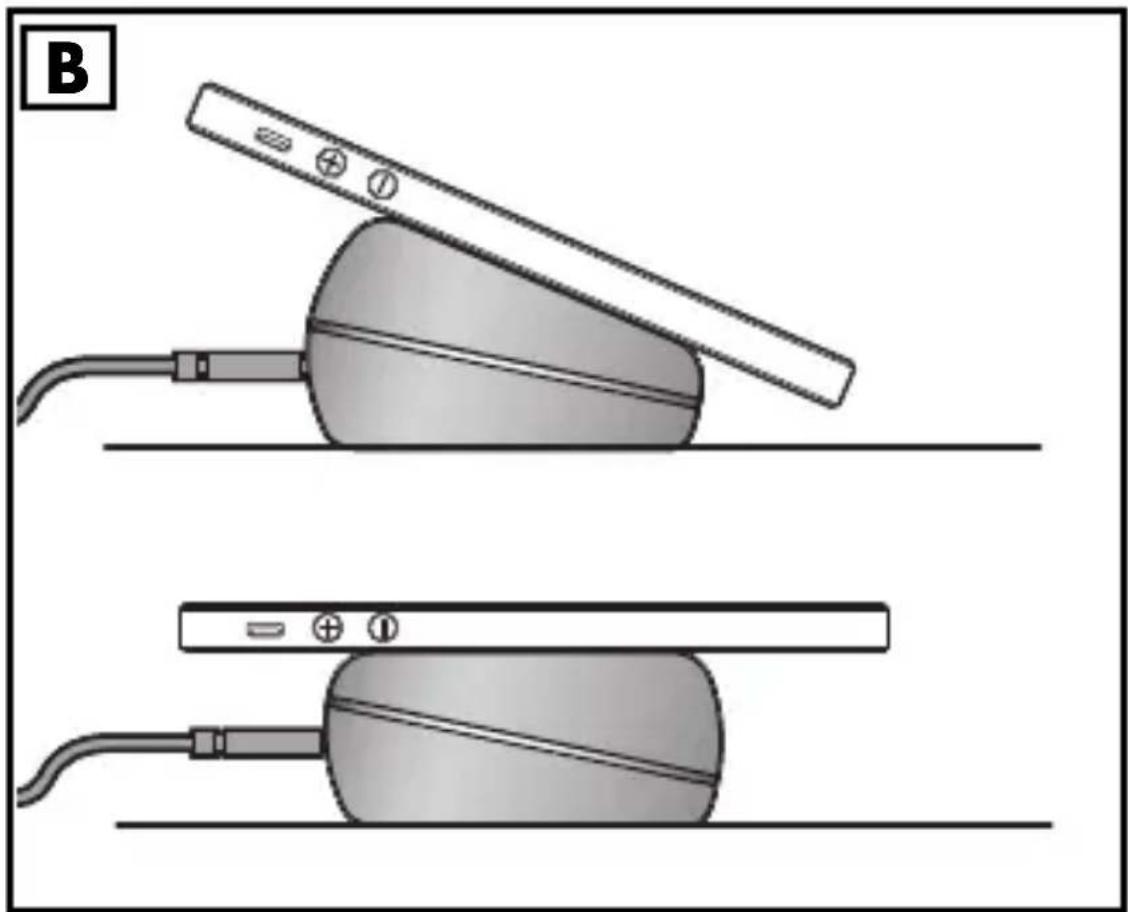
- Place the battery charger on a stable, level surface. • Figure A: you can rotate the top part 2 on the bottom part 4. Figure B: thus you will obtain a horizontal or an inclined Qi charging surface 3.
NOTE: for devices with an even back the horizontal position is recommended.
8. Connecting
WARNING! Risk of material damage!
- The technical data of the devices (battery charger, USB power unit and the device to be charged) must match.
- Plug the USB-A plug of the USB charger cable 6 into a USB power unit (not included in the items supplied).
- Plug the USB-C plug of the USB charger cable 6 into the USB-C port Input 5. The LED 1 flashes four times.
9. Charging
- Lay the back of the smartphone on the Qi charging surface 3. The smartphone display should be facing you. When the smartphone is correctly positioned, the LED ring 1 pulses (slowly becoming brighter and darker). Depending on the default settings, the smartphone will indicate that it is loading.
NOTE: if the LED ring 1 flashes rapidly, the smartphone is incorrectly positioned. Or there is a metallic foreign object on the Qi charging surface 3. Remove it!
- When the smartphone is fully charged, this will be displayed on the smartphone. The LED ring 1 is permanently lit. (On Apple devices, the LED ring 1 continues to pulse).
- After use, pull out the plugs of the USB charger cable 6.
10. Cleaning
- If necessary, disconnect the USB-C plug of the USB charger cable 6 from the USB-C port Input 5.
- Clean the device with a slightly moistened microfibre cloth. Solvents, spirits, thinners etc. must not be used, as they can damage the surface of the device.
11. Trouble-shooting
If your device fails to function as required, please try this checklist first. Perhaps there is only a minor problem, and you can solve it yourself.
| Fault Possible causes /Actions | |
| No function | Has the device been connected to the power supply? |
| Inductive charging not possible | Does your device support this function?Is there an interfering cover between the device and the Qi charging surface 3?Has the smartphone been placed on the Qi charging surface 3 with its display facing down? |
12. Disposal
This product is subject to the provisions of European Directive 2012/19/EC. The symbol showing a wheelie bin crossed through indicates that the product requires separate refuse collection in the European Union. This applies to the product and all accessories marked with this symbol. Products identified with this symbol may not be discarded with normal household waste, but must be taken to a collection point for recycling electric and electronic appliances.
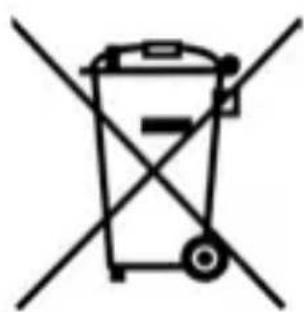
This recycling symbol marks e.g. an object or parts of the material as valuable for recycling. Recycling helps to reduce the consumption of raw materials and protect the environment.

Packaging
When disposing of the packaging, make sure you comply with the environmental regulations applicable in your country.
13. Technical specifications
| Model: SQTL 10 A1 | ||
| InputUSB-C port: 5 V | === 2 A 9 | V 1.7A |
| max. charging power: | 5 W 10 W | |
| Frequency band: | 110 - 205 kHz | |
| max. transmitting power: | 20,34 dBμA/m @ 3m | |
| LED RG: 0 | ||
| Dimensions: Diameter: approx. 90 mmHeight: approx. 38 mm | ||
| Weight: Approx. 112 g | ||
| Ambient conditions: | 10 °C to 40 °CRelative humidity 40 to 85 % | |
14. Notes on the EU declaration of conformity
HOYER Handel GmbH hereby declares that this product meets the basic requirements of the RED 2014/53/EU and the ROHS Directive 2011/65/EU.
A complete declaration of conformity can be found on the Internet at:
http://qr.hoyerhandel.com/d/334278
Symbols used
| CE | With the CE marking, HOYER Handel GmbH declares the conformity with EU guidelines. |
 | This symbol reminds you to dispose of the packaging in an environmentally friendly manner. |
 | Recyclable materials: cardboard (except corrugated cardboard) |
| [PAP] | |
 | Direct current |
Subject to technical modifications.
15. Warranty of the HOYER Handel GmbH
Dear Customer,
your device is provided with a 3 year warranty starting with the purchase date. In the event of product defects, you are entitled to statutory rights against the vendor. These statutory rights are not restricted by our warranty presented in the following.
Warranty conditions
The warranty period starts with the purchase date. Please keep the original purchase receipt in a safe place. This document is required to verify the purchase.
If within three years from the purchase date of this product a material or factory defect occurs, the product will be repaired or replaced by us – at our discretion – free of charge to you, or the purchase price will be refunded. This warranty implies that within the period of three years the defective device and the purchase receipt are presented, including a brief written description of the defect and the time it occurred.
If the defect is covered by our warranty, the repaired or a new product will be returned to you. No new warranty period starts with a repair or replacement of the product.
Warranty period and statutory claims for defects
The warranty period is not extended when the warranty has been claimed. This also applies to replaced and repaired parts. Any damages and defects already existing at the time of purchase must be reported immediately upon unpacking. Repairs arising after the expiration of the warranty period are subject to a charge.
Warranty coverage
The device was produced carefully according to strict quality guidelines and tested diligently prior to delivery.
The warranty applies to material or factory defects.
Excluded from the warranty are wear parts subject to normal wear and damages to fragile parts, e.g. switches, batteries, lamps or other parts manufactured from glass.
This warranty expires if the product is damaged, not used as intended or not serviced. For the proper operation of the product, all instructions listed in the operating instructions must be observed carefully. Any form of use and handling that is advised against in the operating instructions or warned against must always be avoided.
The product is only intended for private and not for commercial use. In the case of incorrect and improper treatment, use of force and interventions not performed by our authorised Service Centre, the warranty shall cease.
Handling in case of a warranty claim
In order to ensure prompt processing of your matter, please observe the following notes:
- Please keep the article number IAN: 334278_1907 and the purchase receipt as a purchase verification for all inquiries.
- The article number can be found on the rating plate, an engraving, the title page of your instructions (in the bottom left), or as a label on the rear or underside of the device.
- If faulty operation or other defects occur, first contact the Service Centre listed in the following by telephone or email.
- Then, you are able to send a product reported as defective free of charge to the service address specified to you, including the purchase receipt and the information on the defect and when it occurred.
At www.lidl-service.com you can download this and many other manuals, product videos and installation software.
This QR code takes you directly to the Lidl Service website (www.lidl-service.com), where you can enter the article number (IAN) 334278_1907 to open your user instructions.
Service Centre
GB Service Great Britain
Tel.: 0800 404 7657
E-Mail: hoyer@lidl.co.uk
IE Service Ireland
Tel.: 1890 930 034
(0.08 EUR/min, (peak))
(0.06 EUR/min, (off peak))
E-Mail: hoyer@lidl.ie
MT Service Malta
Tel.: 80062230
E-Mail: hoyer@lidl.com.mt
CY Service Cyprus
Tel.: 8009 4409
E-Mail: hoyer@lidl.com.cy
IAN: 334278_1907
Supplier
Please note that the following address is not a service address. First contact the aforementioned Service Centre.

Packaging


- OVERVIEW / PANORAMICA / OVERVIEW / ÜBERSICHT
- INDEX
- PACKAGING
- OVERVIEW
- THANK YOU FOR YOUR TRUST
- SYMBOLS ON YOUR DEVICE
- INTENDED PURPOSE
- SAFETY INSTRUCTIONS
- WARNINGS
- DANGER FOR CHILDREN AND PEOPLE WITH DISABILITIES
- DANGER TO AND FROM PETS AND LIVESTOCK
- WARNING! RISK OF MATERIAL DAMAGE
- ITEMS SUPPLIED
- BEFORE USING FOR THE FIRST TIME
- QI CHARGING TECHNOLOGY
- NOTES
- SETTING UP
- CONNECTING
- CHARGING
- CLEANING
- TROUBLE-SHOOTING
- DISPOSAL
- TECHNICAL SPECIFICATIONS
- NOTES ON THE EU DECLARATION OF CONFORMITY
- WARRANTY OF THE HOYER HANDEL GMBH
- WARRANTY CONDITIONS
- WARRANTY PERIOD AND STATUTORY CLAIMS FOR DEFECTS
- WARRANTY COVERAGE
- EXCLUDED FROM THE WARRANTY ARE WEAR PARTS SUBJECT TO NORMAL WEAR AND DAMAGES TO FRAGILE PARTS, E.G. SWITCHES, BATTERIES, LAMPS OR OTHER PARTS MANUFACTURED FROM GLASS
- HANDLING IN CASE OF A WARRANTY CLAIM
- SERVICE CENTRE
- SUPPLIER
Brand : SILVERCREST
Model : SQTL 10 A1
Category : Phone Charger