
HomeVac H11 - Vacuum Cleaner eufy - Free user manual and instructions
Find the device manual for free HomeVac H11 eufy in PDF.


| Product Type | Handheld Vacuum Cleaner |
| Brand | eufy |
| Model | HomeVac H11 (T2521) |
| Power Source | Rechargeable Lithium-ion Battery |
| Charging Input | 5V 2A via USB-C |
| Rated Power | 70W |
| Max Running Time | 13 minutes |
| Charging Time | 2.5 to 3.5 hours |
| Filtration System | High-performance filter + Primary filter |
| Filter Maintenance | Clean once a week (twice if pet), replace every 6 months or after 50 uses |
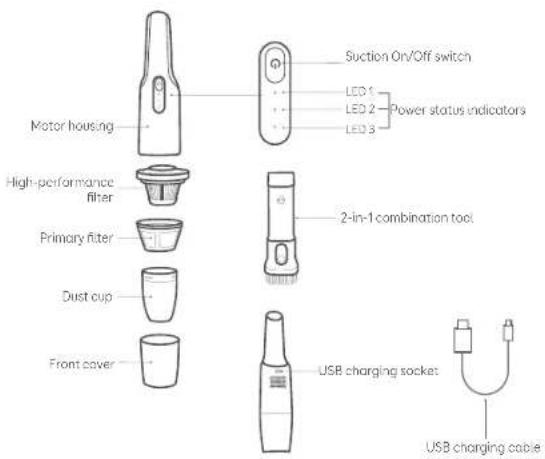
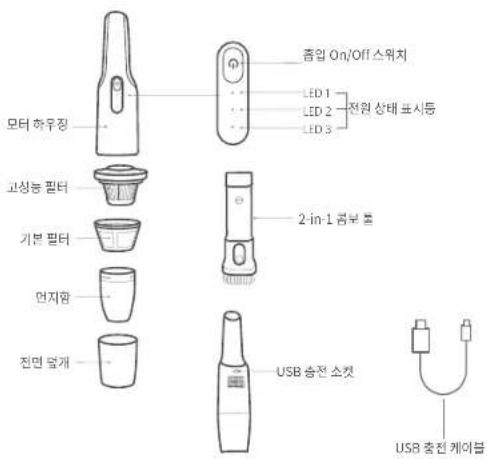
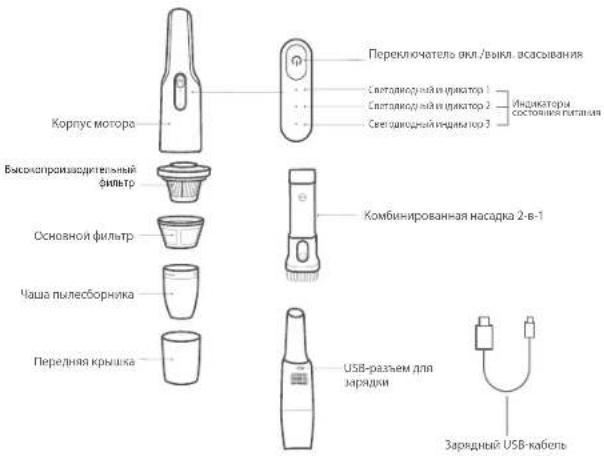
| Accessories Included | 2-in-1 Combination Tool, USB Charging Cable |
| Charging Indicator | 3 white LEDs showing battery level and status |
| Operating Temperature | 0°C to 40°C (charging), -10°C to 40°C (storage) |
| Recommended Storage | Cool, dry place indoors |
| Safety Features | Overheat protection, motor fault detection, automatic shut-off on fault |
| Cordless | Yes |
| Wet/Dry Capability | Dry only (do not pick up liquids) |
| Customer Support | Email: support@eufylife.com, Live Chat, Phone (US: +1 800-988-7973, UK: +44 1604-936200, DE: +49 69-9579-7960) |
| Weight | Approximately 0.5 kg (estimated) |
| Dimensions | Approximately 30 x 10 x 8 cm (estimated) |
Frequently Asked Questions - HomeVac H11 eufy
User questions about HomeVac H11 eufy
0 question about this device. Answer the ones you know or ask your own.
Ask a new question about this device
Download the instructions for your Vacuum Cleaner in PDF format for free! Find your manual HomeVac H11 - eufy and take your electronic device back in hand. On this page are published all the documents necessary for the use of your device. HomeVac H11 by eufy.
USER MANUAL HomeVac H11 eufy
For FAQs and more information, please visit:
www.eufylife.com

HomeVac H11
Owner's Manual
T2521 51005002007 V01
Gebrauchsanweisung | 取扱説明書 | 사용 설명서
02 Important Safety Instructions
05 What's in the Box
06 Charging
08 Vacuuming
10 Cleaning and Maintenance
12 Specifications
13 Customer Service
Thank you for purchasing the handheld vacuum cleaner. Carefully read all instructions before using this product, and keep this manual for future reference.
English 01
Important Safety Instructions
When using an electrical appliance, you should always follow these basic precautions.
READ ALL INSTRUCTIONS BEFORE USING YOUR VACUUM CLEANER
WARNING - TO REDUCE THE RISK OF FIRE, ELECTRIC SHOCK, OR INJURY:

• Do not store this appliance in a car.
- Do not use or store this appliance in an environment with a high temperature, as it may damage the device or cause battery explosion.
- This appliance can be used by children aged from 8 years and above and persons with reduced physical, sensory or mental capabilities or lack of experience and knowledge if they have been given supervision or instruction concerning use of the appliance in a safe way and understand the hazards involved. Children shall not play with the appliance. Cleaning and user maintenance shall not be done by children without supervision.
- The battery must be removed from the device before the device is disposed of.
- The device must be disconnected from the mains supply when removing the battery.
- The used battery should be placed in a sealed plastic bag and disposed of safely according to local environmental regulations
- Fully assemble before operating
• Intended for household use only. - Do not use outdoors or on wet surfaces.
- Do not leave the appliance unattended when it is plugged in. Unplug it to an outlet when you are not using it and before servicing
- Do not allow to be used as a toy. Close attention is necessary when used by or near children.
- Use only as described in this manual. Use only manufacturer recommended attachments.
-
Do not use with a damaged cord or plug. If the appliance is not working as it should, or has been dropped, damaged, or submerged in water, contact our customer service for advice.
-
Do not handle the plug or appliance with wet hands.
- Do not unplug the adapter by pulling on the cord. To unplug, grasp the plug, not the cord
- Do not pull the cord around sharp edges or corners. Do not run the appliance over the cord. Keep the cord away from heated surfaces.
- Do not put any object into openings or vents. Do not use if any opening is blocked. Keep free of dust, lint, hair, and anything else that may reduce airflow.
- Keep hair, loose clothing, fingers, and other body parts away from openings and moving parts.
• Turn off all controls before urplugging.
• Use extra care when cleaning on stairs. - Do not carry the appliance with your finger on the power switch, doing so may cause accidents.
- Do not use to pick up flammable or combustible liquids, such as gasoline, or use in areas where they may be present.
- Do not pick up anything that is burning or smoking, such as cigarettes, matches, or hot ashes.
- Do not pick up hard or sharp objects such as glass, nails, screws, coins, etc.
- Do not use without the dust collector and/or filters in place.
- Store your vacuum cleaner indoors, in a cool and dry area.
- Do not attempt to repair or disassemble the appliance. There are no user-serviceable parts inside. Repair or service must be performed by a qualified repairman and only identical replacement parts can be used. This will ensure the safety of the appliance.
- This appliance includes a rechargeable lithium-ion battery pack. Do not expose the battery pack or appliance to fire or excessive temperature (above 130°C), as it may catch fire and/or explode.
- Do not use a damaged or modified battery pack, as it may catch fire and/or explode.
- Usage and storage of the appliance should be within the ambient temperature range of 0-40°C.
- The charging speed may become slower in environments with temperatures below 10°C, which is a common phenomenon.
02 English English 03
- Follow all the charging instructions and do not charge the battery pack out of the temperature range specified in the instructions, otherwise, it may damage the battery and increase the risk of fire.
- Do not attempt to disassemble the battery pack
- Leaks from battery cells can occur under extreme conditions. If any liquid gets on the skin, wash quickly with soap and water. If any liquid gets into the eyes, do not rub eyes, immediately flush them with clean water continuously for a minimum of 15 minutes. Seek medical attention immediately.
SAVE THESE INSTRUCTIONS

This symbol on the device or its packaging indicates:
Do not dispose of electrical appliances as unsorted municipal waste, use separate collection facilities. Contact your local authority for information regarding the collection systems available. If electrical appliances are disposed of in landfills or dumps, hazardous substances can leak into the groundwater and get into the food chain, damaging your health and well-being. When replacing old appliances with new ones, the retailer is legally obliged to take back your old appliance for disposal at least free of charge.
Declaration of Conformity
Hereby, Anker Innovations Limited declares that the product type T2521 is in compliance with Directives 2014/35/EU & 2014/30/EU.
The full text of the EU declaration of conformity is available at the following internet address: https://www.eu/ylife.com/
Anker Innovations Limited
Room 1318-19, Hollywood Plaza, 610 Nathan Road, Mongkok, Kowloon, Hong Kong
04 English English 05
What's in the Box
Charging
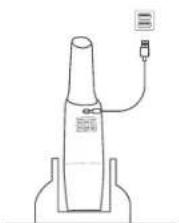
The vacuum cleaner is powered by the built-in lithium battery. Before first use, charge the battery for more than 2.5 hours.

• The vacuum cleaner cannot work while charging.
- The vacuum cleaner cannot be charged when the ambient temperature is above 40°C.
- It is not recommended to charge through a USB socket on a computer, as it cannot provide enough charging current.
natural_image
Simple line drawing of a cylindrical device with a cable and connector, no text or symbols present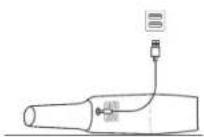
Lights During Charging
| LED 1: flashing whiteCharging, low battery | LED 1 & 2: solid whiteLED 3: flashing whiteCharging, nearly full |
| LED 1: solid whiteLED 2: flashing whiteCharging, medium battery | 90S → LED 1 & 2 & 3: solid white,then off after 90 secondsFully charged |
Lights During Vacuuming
| LED 1 & 2 & 3: solid whiteHigh battery level | LED 1: solid whiteLow battery level |
| LED 1 & 2: solid whiteMedium battery level | LED 1: flashing white for5 times, then offEmpty, needs charging |
- Place the vacuum cleaner on a flat surface.
- Charge the vacuum cleaner with the supplied USB cable through the USB charging socket.
06 English English 07
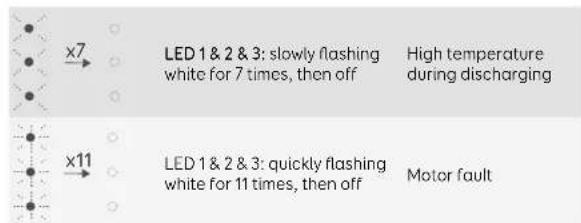
Lights When Experiencing Issues
Vacuuming

Before use, make sure that
• the battery is fully charged.
• the dust cup and filters are cleaned, dried, and fixed in place.
- the power status indicators are white.
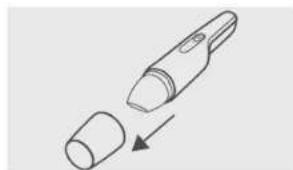
- Hold the cleaner in hand, and pull out the front cover.
- To clean dust and garbage adhering to corners, crevices and other places, insert the 2-in-1 combination tool into the dust cup.
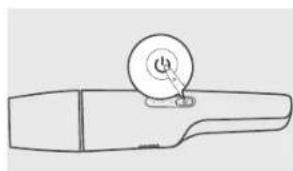
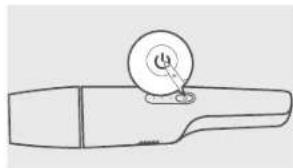
- Press to start vacuuming. • To turn off, press again.

natural_image
Simple line drawing of a device with a cylindrical body and an arrow indicating process (no text or symbols)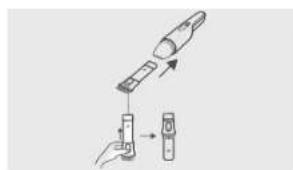
natural_image
Line drawing of a handheld device with a circular button labeled 'C' on top (no text or symbols beyond the label)Cleaning and Maintenance
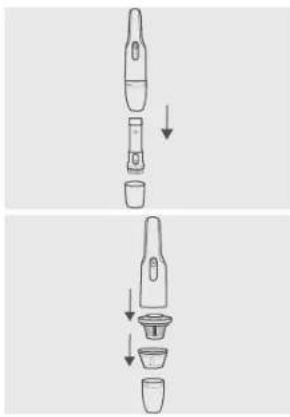
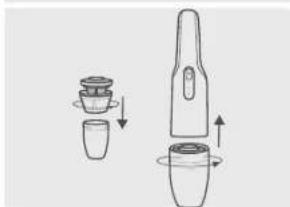
- Remove the front cover and other accessories.
- Remove the high performance filter and primary filter from the dust cup.
- Remove the high performance filter and primary filter from the dust cup.
natural_image
Two-step diagram showing a device being processed into a cup, with arrows indicating the process (no text or symbols present)- Empty the dust cup.
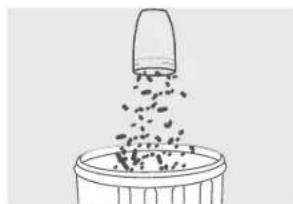
- Wash the filters and dust cup. Air-dry them completely before next use. Do not wash the motor housing and other parts.
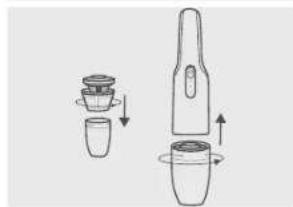
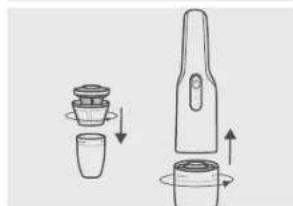
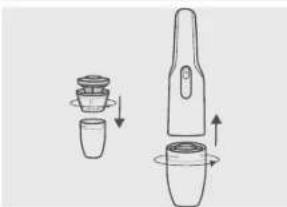
- Reassemble the filters and dust cup before next use.
natural_image
Simple line drawing of a bucket with a lid pouring liquid from a container (no text or symbols)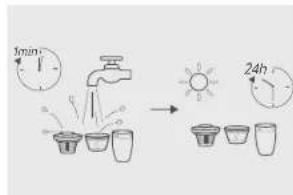
natural_image
Diagram showing two mechanical components with arrows indicating motion or assembly (no text or symbols)10 English English 11
HomeVac Part Cleaning Frequency Replacement Frequency
Dust Cup After each use -
Filter Once every week (Twice a week if you have a pet)
Every 6 months or after every 50 rounds of cleaning
Specifications
Model T2521
Charging Input 5V 2A
Rated Power 70W
Max Running Time 13 minutes
Charging Time 2.5 \~ 3.5 hours
Customer Service
For FAQs and more information, please visit www.eufylife.com.

Email: support@eufylife.com

Live Chat: www.eufylife.com

(US) +1 (800) 988 7973 Mon-Fri 9:00am - 5:00pm (PT)
(UK) +44 (0) 1604 936200 Mon-Fri 6:00 - 11:00 (GMT)
(DE) -49 (0) 69 9579 7960 Mo-Fr 6:00 - 11:00
natural_image
Simple line drawing of a cylindrical device with a connector and a label, no text or symbols present.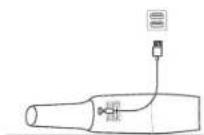
natural_image
Simple line drawing of a mechanical component with a circular dial and handle (no text or symbols)本体清掃とメンテナンス
(US) +1 (800) 988 7973 Mon-Fri 9:00am - 5:00pm (PT)
(UK) +44 (0) 1604 936200 Mon-Fri 6:00 - 11:00 (GMT)
(DE) -49 (0) 69.9579 7960 Mo-Fr 6:00 - 11:00
(中国) +86 400 0550 036 周一至周五 9:00 - 17:30
(日本)·810344557823月-金9:00-17:00


@Anker_JP@AnkerJapan

@AnkerJapan
목차
28 중요 안전 지침
31 포장 구성품
32 충전
34 청소
36 청소 및 유지 관리
38 사양
39 고객 서비스
Anker Innovations Limited
Room 1318-19, Hollywood Plaza, 610 Nathan Road, Mongkok, Kowloon, Hong Kong
포장 구성품
natural_image
Simple line drawing of a bottle with a connector and label, no text or symbols present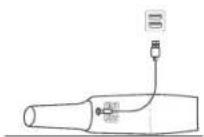
natural_image
Simple line drawing of a device with a cylindrical body and an arrow indicating process (no text or symbols)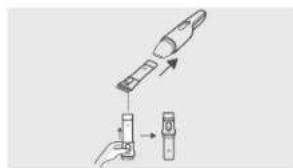
natural_image
Line drawing of a handheld device with a circular button and pointer (no text or symbols)
natural_image
Diagram showing two steps of a device with arrows indicating process flow (no text or symbols)natural_image
Simple line drawing of a bucket pouring liquid into a container (no text or symbols)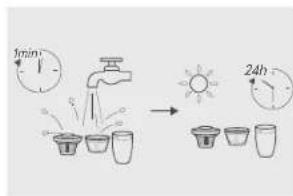
natural_image
Diagram showing two mechanical components with rotating parts and directional arrows indicating motion (no text or symbols)
(US) -1 (800) 988.7973 Mon-Fri 9:00am - 5:00pm (PT)
(UK) +44 (0) 1604 936200 Mon-Fri 6:00 - 11:00 (GMT)
(DE) +49 (0) 69 9579 7960 Mo-Fr 6:00 - 11:00
Anker Innovations Limited
Room 1318-19, Hollywood Plaza, 610 Nathan Road, Mongkok, Kowloon, Fonkoh
Комплект поставки
natural_image
Line drawing of a bottle with a connector and a small label, no text or symbols present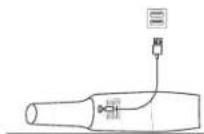
natural_image
Diagram of a pen-like device with a cylindrical body and an arrow indicating insertion or transformation (no text or symbols)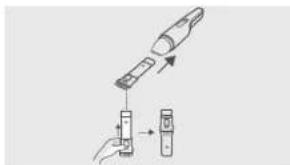
natural_image
Diagram showing a device being processed with a tool, no text or symbols present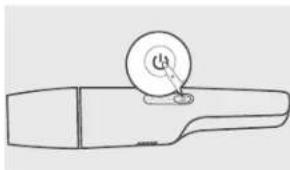
natural_image
Line drawing of a handheld device with a circular button and pointer (no text or symbols)natural_image
Diagram showing two steps of a device with arrows indicating process flow (no text or symbols)
natural_image
Simple line drawing of a bucket with a lid pouring liquid from a container (no text or symbols)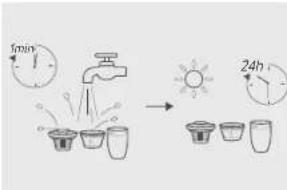
natural_image
Diagram of a mechanical device with two views showing internal components and directional arrows (no text or symbols)(US) +1 (800) 988 7973 Mon-Fri 9:00am - 5:00pm (PT)
(UK) +44 (0) 1604 936200 Mon-Fri 6:00 - 11:00 (GMT)
(DE) -49 (0) 69 9579 7960 Mo-Fr 6.00 - 11:00
(中国) +86 400 0550 036 周一至周五 9:00 - 17:30
(日本) +810344557823 月-金9.00 - 17:00
@EufyOfficial @EufyOfficial
@EufyOfficial @EufyOfficial
natural_image
Simple line drawing of a bottle with a connector and a USB symbol above it (no text or labels)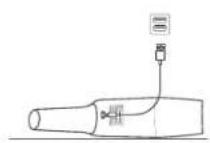
natural_image
Simple line drawing of a mechanical component with a circular dial and base (no text or symbols)
请勿使用本吸尘器吸水。
62 简体中文 简体中文 63
清洁和维护
natural_image
Simple line drawing of a bucket with a lid pouring liquid from above (no text or symbols)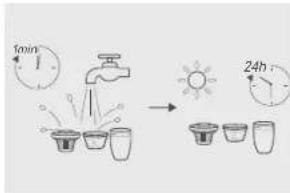
natural_image
Diagram of a mechanical device with two parts and directional arrows indicating motion (no text or symbols)吸尘器零件 建议清洁频率 建议更换频率
尘杯每次使用后-
滤网
(US) -1 (800) 988 7973 Mon-Fri 9:00am - 5:00pm (PT)
(UK) +44 (0) 1604 936200 Mon-Fri 6:00 - 11:00 (GMT)
(DE) -49 (0) 69 9579 7960 Mo-Fr 6:00 -11:00
(中国) +86 400 0550 036 周一至周五 9:00 - 17:30