
C544L - Microphone AKG - Free user manual and instructions
Find the device manual for free C544L AKG in PDF.


| Product Type | Miniature electret condenser headset microphone |
| Directivity | Cardioid |
| Frequency Response | 20 to 20,000 Hz |
| Sensitivity | 40 mV/Pa (-28 dBV re 1 V/Pa) |
| Electrical Impedance | 200 ohms (electronically balanced) |
| Recommended Load Impedance | > 2000 ohms |
| Maximum Sound Pressure Level | 126 dB SPL (1% distortion) / 130 dB SPL (3% distortion) |
| Equivalent Noise Level | 22 dB-A (IEC 60268-4) |
| Supply Voltage | 9 V (battery via B 29 L or bodypack transmitter) or 9-52 V (phantom power via MPA V L adapter) |
| Current Consumption | Approx. 2 mA |
| Dimensions (headband) | 130 mm diameter |
| Net Weight (without cable) | 30 g |
| Cable Length | 1.5 m |
| Materials | Metal headband, Noryl housing (matte black) |
| Climatic Conditions | -20 °C to +60 °C, 99% humidity at 20 °C |
| Included Accessories | W 444 windscreen, 4 O-rings |
| Key Features | Elastic suspension for noise reduction, sweat/makeup-resistant O-ring, windscreen |
| Care and Cleaning | Housing: slightly damp cloth (clear water). Windscreen: washable in mild soapy water. |
| Safety | Use only AKG-recommended power supplies. Disassemble and recycle separately at end of life. |
| Spare Parts and Repairability | Spare O-rings included. Other parts: contact your AKG dealer or www.akg.com. |
Frequently Asked Questions - C544L AKG
User questions about C544L AKG
0 question about this device. Answer the ones you know or ask your own.
Ask a new question about this device
Download the instructions for your Microphone in PDF format for free! Find your manual C544L - AKG and take your electronic device back in hand. On this page are published all the documents necessary for the use of your device. C544L by AKG.
USER MANUAL C544L AKG
natural_image
Black and white photo of a C544 audio headset with earbuds and connector (no text or symbols visible)C544
Please read the manual before using the equipment!
MODE D'EMPLOI ...... p. 22
natural_image
Pencil sketch of a person wearing a headset, head tilted forward (no text or symbols)natural_image
Sketch of a person's face with facial features and earphones, no text or symbols presentnatural_image
Close-up of two black cable connectors with a white washer, labeled 1 and 3 (no text or symbols on the cables themselves)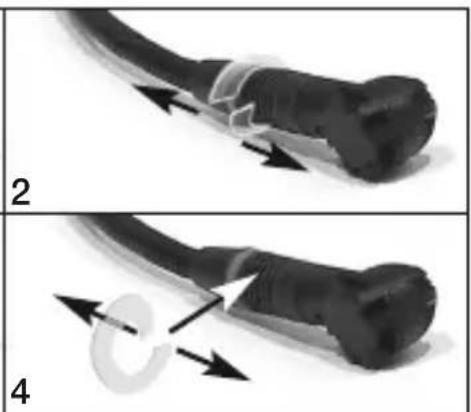
natural_image
Two-panel diagram showing a cable being twisted with arrows, labeled 2 and 4 (no text or symbols on the diagrams themselves)1 Safety and Environment 13
Safety 13
Environment....13
2 Description....14
Introduction 14
Packing List 14
Optional Accessories....14
The Microphone 14
Moisture Shield....14
3 Interfacing 15
Introduction 15
Connecting the Microphone 15
4 Operating Notes 16
Putting the Microphone On 16
Using the Windscreen 17
Replacing the Moisture Shield 17
5 Cleaning....18
Microphone Body 18
Windscreen 18
6 Troubleshooting 19
7 Specifications....20
- Please make sure that the piece of equipment your microphone will be connected to fulfills the safety regulations in force in your country and is fitted with a ground lead.

Safety
- When scrapping the equipment, separate the case, circuit boards, and cables, and dispose of all components in accordance with local waste disposal rules.
- The packaging of the equipment is recyclable. To dispose of the packaging, make sure to use a collection/recycling system provided for that purpose and observe local legislation relating to waste disposal and recycling.
Environment
2 Description
Introduction
Thank you for purchasing an AKG product. This Manual contains important instructions for setting up and operating your equipment. Please take a few minutes to read the instructions below carefully before operating the equipment. Please keep the Manual for future reference.
Packing List
• C 544 microphone
• W 444 foam windscreen
- 4 moisture shields
Optional Accessories
- For optional accessories, refer to the current AKG catalog or folder, or visit www.akg.com. Your dealer will be glad to help.
The Microphone
The C 544 is a head-worn miniature condenser microphone with a convenient behind-the-neck headband. The microphone has a cardioid polar pattern and therefore “prefers” sounds arriving from in front of it (from the user’s mouth).
The microphone body containing the condenser transducer is shock mounted on the microphone arm in order to suppress cable and mechanical noise. The microphone arm will place the microphone in front of the corner of your mouth to minimize pop noise and protect the microphone from contamination. The supplied windscreen makes the microphone even less susceptible to wind and pop noise.
Moisture Shield
A special moisture shield on the microphone capsule makes it difficult for moisture and makeup to penetrate into the microphone. This barrier prevents the microphone sound entries from being clogged by perspiration or makeup which would make the sound dull and reduce the sensitivity of the microphone. Therefore, never remove the moisture shield from the microphone!
The C 544 is a condenser microphone and therefore needs a power supply.
Introduction
- Using any power supply other than those recommended by AKG may damage your microphone and will void the warranty.

- Plug the mini XLR connector on the microphone cable all the way into one of the two mini XLR sockets on the B 29 L, the mini XLR socket on the connecting cable of the MPA V L, or the input jack on your bodypack transmitter. The connector will lock automatically.
Connecting the Microphone
- To disconnect the cable, press the unlocking button on the mini XLR connector (1) and pull the connector (1) out of the socket.
Disconnecting the cable:
- To avoid damaging the cable, never pull at the cable itself!

- B 29 L: Connect the B 29 L to the desired input. MPA V L: Connect the MPA V L to a balanced XLR microphone input with phantom power and switch the phantom power on.
Putting the Microphone On
natural_image
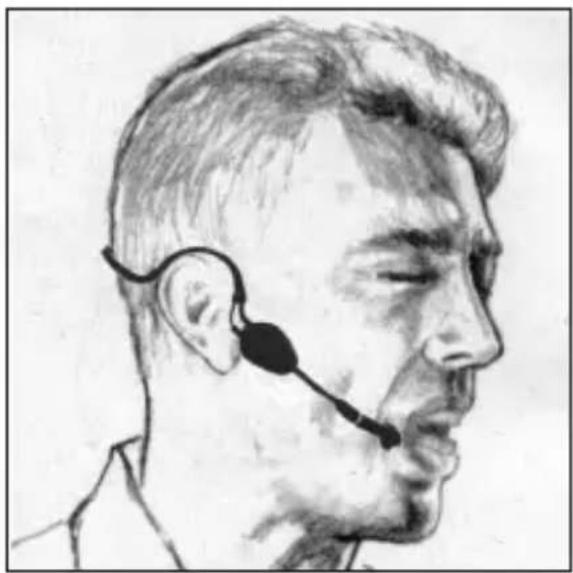
Pencil sketch of a person wearing a headset, head tilted forward (no text or symbols)Fig. 1: Putting the mic on.
- Put the microphone on as shown in fig. 1 above.
- Bend the gooseneck so that the microphone will sit to one side in front of the corner of your mouth.
natural_image
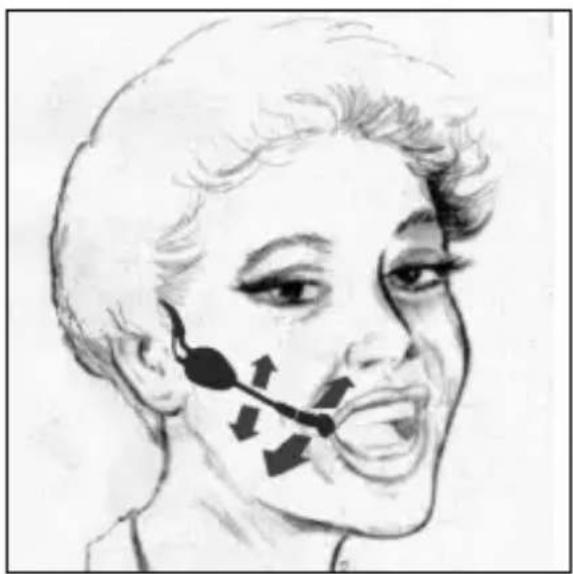
Sketch of a person's face with facial features and earphones, no text or symbols presentFig. 2: Positioning the mic.
Refer to fig. 2.
- Find the optimum position during the soundcheck.

- Should you hear excessive pop noise ("p" and "t" sounds are overemphasized unnaturally), move the microphone capsule further away from your mouth (up or back).
- If the microphone sounds "thin" or flat, move the microphone capsule closer to your mouth (refer to fig. 3).
If (for instance, in outdoor use) excessive wind or pop noise becomes audible, attach the supplied windscreen to the microphone.
Using the Windscreen
- Slide the windscreen onto the microphone capsule.
- Pull the windscreen over the outer edge of the micro phone capsule.
natural_image
Close-up of two black cable connectors with a white washer, labeled 1 and 3 (no text or symbols on the cables themselves)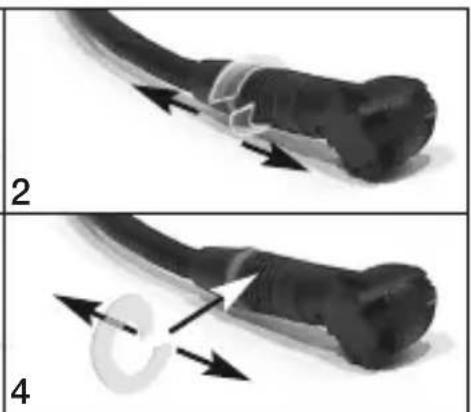
natural_image
Two-panel diagram showing a cable being twisted with arrows, labeled 2 and 4 (no text or symbols on the diagrams themselves)Replacing the Moisture Shield
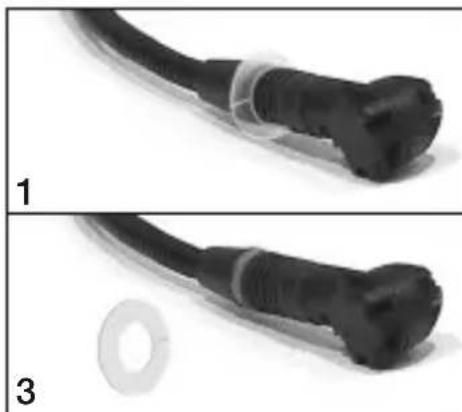
Fig. 3: Replacing the moisture shield.
- If the moisture shield gets damaged, replace it with one of the supplied extra moisture shields as shown above.
Refer to fig. 3.
5 Cleaning
Microphone Body
- To clean the microphone surface, use a soft cloth moistened with water.
Windscreen
- Clean the foam windscreen in mild soap suds. You can use the windscreen again as soon as it has dried.
| Problem Mögliche | Ursache Abhilfe | |
| No sound: | 1. Power to mixer and/or amplifier is off.2. Channel or master fader on mixer, or volume control on amplifier is at zero.3. Microphone is not connected to mix er or amplifier.4. Cable connectors are seated loosely.5. Cable is defective.6. No supply voltage. | 1. Switch power to mixer or amplifier on.2. Set channel or master fader on mixer or volume control on amplifier to desired level.3. Connect microphone to mixer or amplifier.4. Check cable connectors for secure seat.5. Check cable and replace if damaged.6. Switch phantom power on.Phantom power supply: connect to power outlet or insert battery (batteries).Check cable and replace if necessary. |
| Distortion: | 1. Gain control on the mixer set too high.2. Mixer input sensitivity too high. | 1. Turn gain control down CCW.2. Connect a 10-dB preattenuation pad between microphone cable and input. |
| Also read the transmitter and receiver manuals! | ||
7 Specifications
| Type: Pre-polarized condenser microphone | |
| Polar pattern: Cardioid | |
| Frequency range: 20 Hz to 20,000 Hz | |
| Sensitivity at 1000 Hz: 40 mV/Pa (-28 dBV re 1 V/Pa) | |
| Electrical Impedance at 1000 Hz: 200 Ω electronically balanced | |
| Recommended load impedance: >2000 Ω | |
| Max. SPL for 1% / 3% THD: 126 dB / 130 dB | |
| Equivalent noise level to IEC 60268-4: 22 dB-A | |
| Supply voltage: 9 V battery supply through B 29 L or body-pack transmitter, or 9 to 52 V universal phantom power through MPA V L adapter | |
| Current consumption: Approx. 2 mA | |
| Environment: Temperature: -20°C to +60°C | |
| R.H. at +20°C: 99% | |
| Case materials: Headband: metal | |
| Microphone body: Noryl | |
| Finish: Matte black | |
| Size: 130 mm (5.2 in.) in dia. | |
| Cable length: | 1.5 m (5 ft.) |
| Net weight: | 30 g (1.1 oz.) exc. of connector |
This product conforms to the standards listed in the Declaration of Conformity. To order a free copy of the Declaration of Conformity, visit http://www.akg.com or contact sales@akg.com.
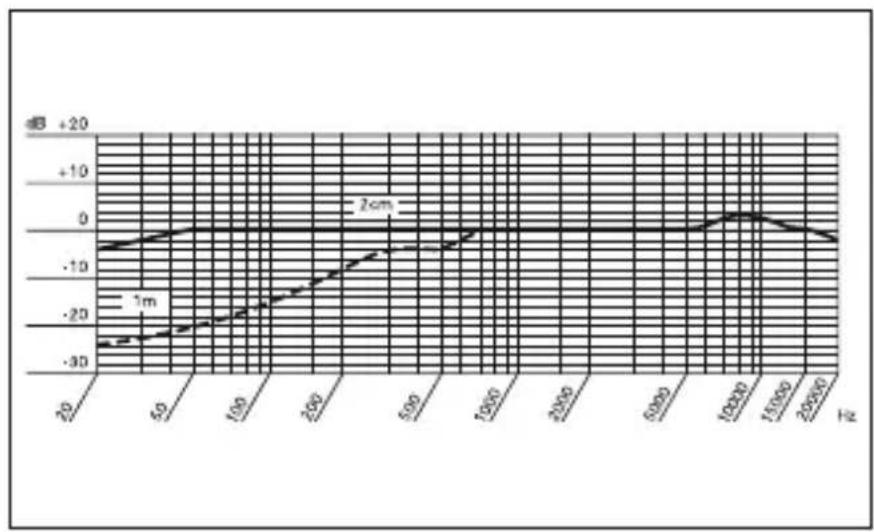
Frequency Response Polar Diagram
line
| Frequency (Hz) | Value (dB) | | -------------- | ---------- | | 20 | -30 | | 50 | -25 | | 100 | -20 | | 200 | -10 | | 500 | 0 | | 1000 | 0 | | 1500 | 0 | | 2000 | 0 | | 2500 | 0 |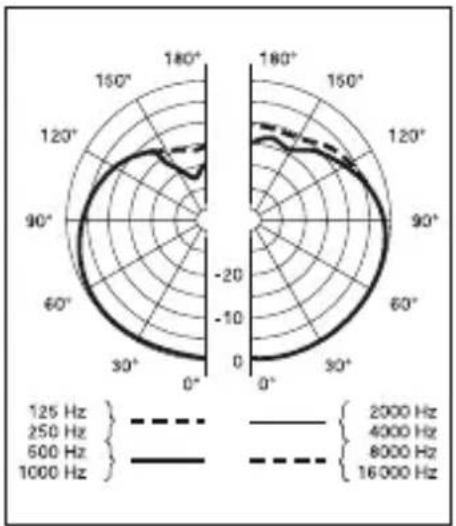
radar
| Angle | Frequency (Hz) | |-------|----------------| | 125 | 2000 | | 250 | 4000 | | 500 | 8000 | | 800 | 16000 | | 1000 | 16000 |Page
natural_image
Pencil sketch of a man wearing a headset, profile view (no text or symbols)natural_image
Pencil sketch of a person's face with facial features and earphones (no text or symbols)natural_image
Close-up of a black cable with a plug, labeled '1' in the corner (no other text or symbols visible)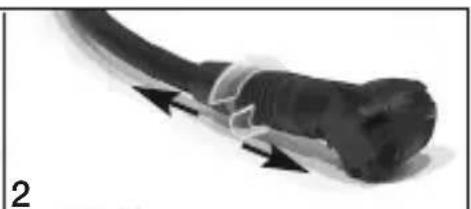
natural_image
Close-up of a black cable with white insulation and black tip, no visible text or symbols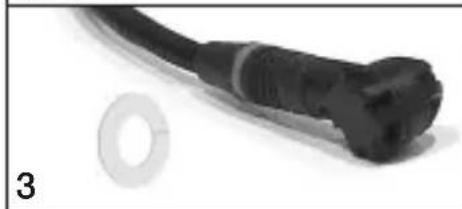
natural_image
Close-up of a black cable with a white washer and a separate circular hole, labeled '3' (no text or symbols on the main subject)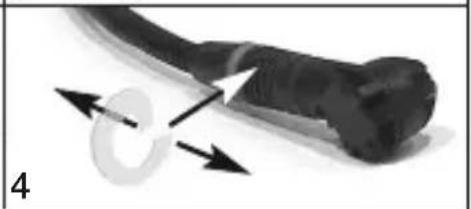
natural_image
Close-up of a black tool with directional arrows indicating motion or force (no text or symbols)natural_image
Pencil sketch of a male ear with a headset, showing profile view (no text or symbols)natural_image
Pencil sketch of a person's face with facial features and earphones (no text or symbols)natural_image
Close-up of a black cable with a plug, labeled '1' in the corner (no other text or symbols visible)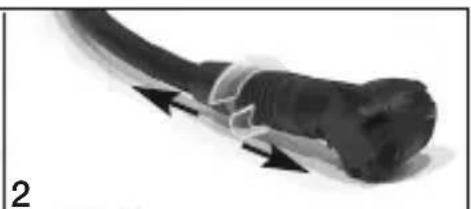
natural_image
Close-up of a black cable with white insulation and black tip, no visible text or symbols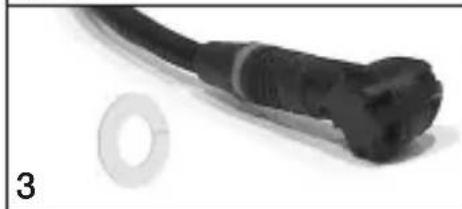
natural_image
Close-up of a black cable with a white washer and a separate circular hole, labeled '3' in the corner (no text or symbols on the main subject)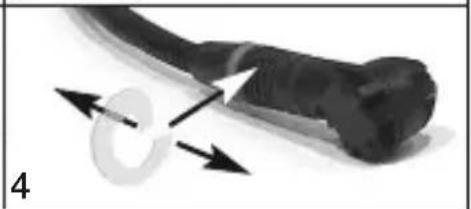
natural_image
Close-up of a black tool with directional arrows indicating motion or force (no text or symbols)natural_image
Pencil sketch of a man's profile wearing a headset (no text or symbols)natural_image
Pencil sketch of a person's face with facial features and earphones (no text or symbols)natural_image
Close-up of two black cable connectors with a white washer, labeled 1 and 3 (no text or symbols on the cables themselves)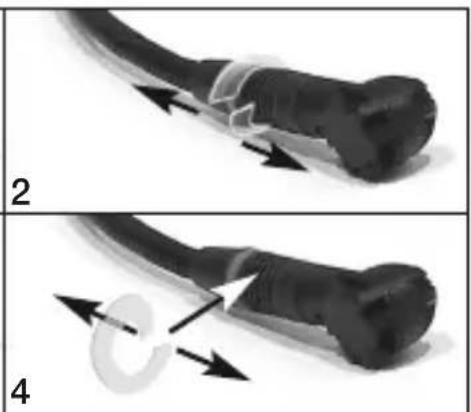
natural_image
Two-panel diagram showing a cable being twisted with arrows, labeled 2 and 4 (no text or symbols on the diagrams themselves)6 Resolver problemas....59
natural_image
Pencil sketch of a man's profile wearing a headset (no text or symbols)natural_image
Pencil sketch of a person's face with earphones and facial features (no text or symbols)natural_image
Close-up of two black cable connectors with a white washer, labeled 1 and 3 (no text or symbols on the cables themselves)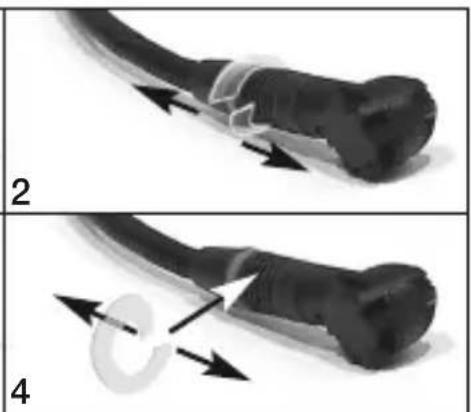
natural_image
Two-panel diagram showing a cable being twisted with arrows, labeled 2 and 4 (no text or symbols on the diagrams themselves)For other products and distributors worldwide visit www.akg.com


ROHS OK
Technische Änderungen vorbehalten. Specifications subject to change without notice. Ces caractéristiques sont susceptibles de modifications. Ci riserviamo il diritto di effettuare modifiche tecniche. Nos reservamos el derecho de introducir modificaciones técnicas. Especificações sujeitas a mudanças sem aviso prévio.
Printed in China (P.R.C.). 04/11/9100 U 13190

Brand : AKG
Model : C544L
Category : Microphone