
IAN 282648 - Alarm clock radio AURIOL - Free user manual and instructions
Find the device manual for free IAN 282648 AURIOL in PDF.


| Product Type | Alarm Clock Radio |
| Brand | Auriol |
| Model | IAN 282648 |
| Dimensions (approx.) | 140 x 80 x 60 mm |
| Weight (approx.) | 300 g |
| Power Supply | AC adapter (included) or 3x AA batteries (not included) |
| Radio Bands | FM |
| Alarm Functions | Dual alarm, snooze, radio or buzzer wake-up |
| Display | LED digital display with dimmer settings |
| Additional Features | Nap timer, sleep timer, alarm memory backup via battery |
| Material | Plastic casing |
| Cleaning | Wipe with a soft, dry cloth. Do not use abrasive cleaners. |
| Safety Warnings | Do not expose to water or moisture. Use only supplied adapter. Keep away from heat sources. |
| Spare Parts / Repairs | No spare parts available; device is not user-serviceable. Contact retailer for issues. |
| General Information | Manufacturer: Auriol, distributed by Lidl. Manual available online. |
Frequently Asked Questions - IAN 282648 AURIOL
User questions about IAN 282648 AURIOL
0 question about this device. Answer the ones you know or ask your own.
Ask a new question about this device
Download the instructions for your Alarm clock radio in PDF format for free! Find your manual IAN 282648 - AURIOL and take your electronic device back in hand. On this page are published all the documents necessary for the use of your device. IAN 282648 by AURIOL.
USER MANUAL IAN 282648 AURIOL
Usage and safety instructions

GB CY Usage and safety instructions ..... - 1 -
HR Upute za korištenje i sigurnosne upute . - 20 -
GB Usage and safety instructions
Table of contents
Table of contents - 1 M
Preliminary note ...... - 3M
Intended use - 3 M
Scope of delivery ...... - 4M
Technical specifications ...... - 4M
Important safety information Important safety information
Set up the alarm clock safely - 4 M
User - 5 M
Batteries - 6M
Display and controls ...... - 7M
Setup - 9M
Reception problems ...... - 11M
Restarting radio reception ...... - 11M
Light - 12M
12/24-hour time format - 12M
Temperature display ...... - 12M
Speed setting - 12M
Basic settings.... - 12M
- 1 -
GB CY
Alarm - 13M
Activating or deactivating the alarm ...... - 13 M
SNOOZE - 14M
Replacing the batteries - 14M
Cleaning instructions ...... - 14M
Simplified EU declaration of conformity ...... - 14 M
Disposal of the electronic appliance .... - 15M
Disposal of the batteries .... - 15M
digi-tech gmbh warranty.... - 15 M
Warranty conditions ...... - 16M
Warranty period and defects liability ...... - 16M
Scope of the warranty ...... - 17M
Warranty claim procedure - 17M
Service.... - 18M
Supplier....-19M
-2-
GB CY
ALARM CLOCK
Preliminary note
Congratulations on the purchase of your new alarm clock. You have chosen a high quality appliance. The manual is part of the appliance. It contains important safety, usage and disposal information. Please read all usage and safety instructions before using the appliance. Please only use the appliance as described and for the described uses. Please keep the packaging and the instruction manual for future reference.
Intended use
This electronic device is intended for time display and the described additional features. Any other use or modification of the electronic device does not comply with the intended uses. The manufacturer is not liable for damages caused by improper use or misuse. The device is not intended for commercial use.

Scope of delivery
Please note: Check the scope of delivery after purchase. Please ensure that all parts are included and undamaged.
- Alarm clock
• 2x battery 1.5 V AAA R03/LR03 - Instruction manual
Technical specifications
- Operates using two 1.5 V AAA R03/LR03 batteries
- Symbol for direct current
- Operating temperature 0 - +50°C

Important safety information
Set up the alarm clock safely
The alarm clock is not intended for use in rooms with high humidity (example: bath room).
Make sure that:
- the device isn't placed on a thick carpet or bed during operation;
-4-

- no direct heat sources (i.e. radiators) influence the device;
- no direct sunlight reaches the device;
- contact with splashing or dripping water must be avoided (don't place any items filled with liquids, i.e. vases, onto or next to the device);
- the device doesn't stand near magnetic fields (i.e. speakers);
- candles and other open flames must be kept away from this product at all times to prevent the spread of fire
- no foreign objects penetrate the housing.
User
This device may be used by persons (including children over 8 years of age) with reduced physical, sensory or mental abilities or lack of experience and knowledge, if they are supervised or instructed regarding the safe use of the device and understand the dangers that may arise. Children may not play with the device. Cleaning and user maintenance of the device may not be performed by children without supervision. Keep packaging films out of the hands of children. There is a danger of suffocation.

Batteries
Keep batteries out of reach of small children. If a battery is swallowed, you must seek medical attention immediately. Batteries/rechargeable batteries must always be inserted in the correct polarity. If necessary, clean the batteries and device contacts. Never attempt to recharge non-rechargeable batteries. Never short-circuit or attempt to open batteries. Never throw batteries into fire as they may explode.
If the device will not be used for an extended time period, remove the batteries and store the device in a dry and dust-free area. Improper use of the batteries can lead to explosion or leakage.
If the battery leaks, avoid contact with skin, eyes and mucous membranes. Use gloves. If you are exposed to battery acid, rinse the affected areas with plenty of clean water and immediately seek medical attention.
Remove discharged batteries from the device as they present an increased risk of leakage.

Display and controls
4-LD4587-1-2
-7-

4-LD4587-3-4
-8-

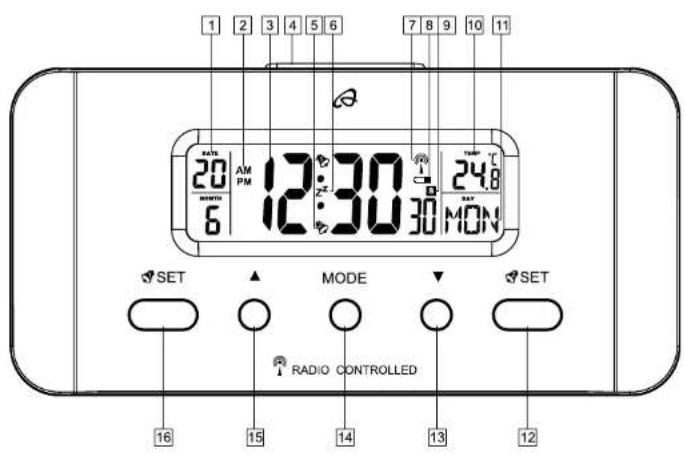
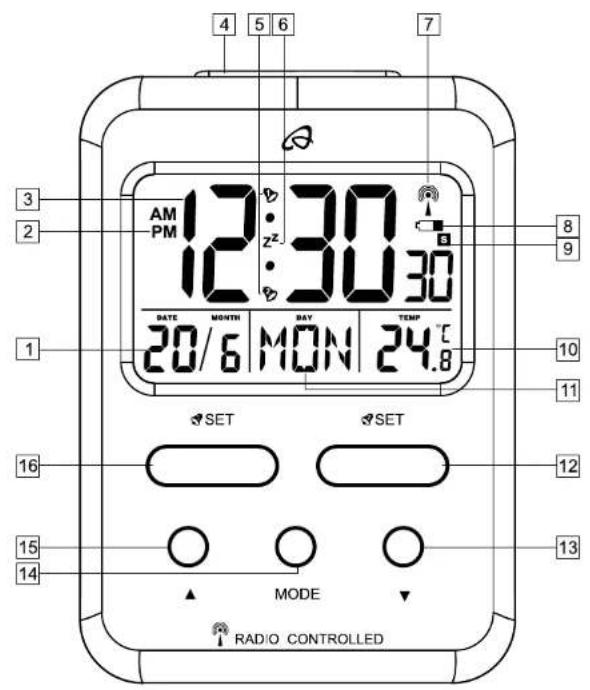
| 1 | Date - day, month |
| 2 | 12/24 h, AM/PM |
| 3 | Time - hour, minute, second |
| 4 | SNOOZE/LIGHT |
| 5 | ALARM 1 2 |
| 6 | Z^Z SNOOZE |
| 7 | Radio reception indicator tower |
| 8 | Battery level indicator |
| 9 | Daylight saving time S |
| 10 | Temperature |
| 11 | Day of the week |
| 12 | SET |
| 13 | DOWN |
| 14 | MODE |
| 15 | UP |
| 16 | SET |
Setup
Open the battery compartment on the back side of the device and insert two 1.5V AAA R03/LR03 batteries in the correct polarity. Close the battery compartment. After inserting the batteries the alarm clock will begin to receive the time signal and emit a beep. The radio

reception indicator 17 will blink on the display. This process can take from 3-10 minutes.
Please note: Do not move the alarm clock during the reception process.
The alarm clock synchronizes the internal clock every day from 01:00 to 04:00 on each full hour. If reception is unsuccessful, the clock will reattempt reception at 05:00 and 06:00. Please set the time manually, if reception fails (see "Basic settings").
If reception is successful, the radio reception indicator 📋 appears permanently on the display and the time, date and day of the week are set automatically. During daylight saving time, 📄 appears on the display.
Please note: If you are in a country, in which the clock displays the wrong time even though it can receive the time signal, please use the time zone adjustment to use your alarm clock in a time zone other than the standard time zone (UTC+1 = Central European Time). Set the difference in hours (-01 for example) to the desired time zone. Restart radio reception after changing this setting. Your clock receives the DCF77

time signal but will show the adjusted time (1 hour less for example).
Reception problems
The DCF77 radio control signal is transmitted from a location near Frankfurt am Main and can be received at a distance of up to 1500 km. However, there are some obstacles and sources of interference, which may substantially hinder reception. If your alarm clock does not correctly receive the DCF77 radio signal, please place the alarm clock in a different location at your site. Please note that devices such as computers, telephones, radios and televisions may cause electromagnetic radiation which can interfere with the DCF77 radio signal reception. Other possible detriments to reception are: strong building insulation (metal building materials), nearby mountains or atmospheric interference. It may also be necessary to replace the batteries.
Restarting radio reception
Press and hold ▼3 to restart radio time signal reception. Please set the time manually if reception fails (see "Basic settings").
-11-

Light
Press SNOOZE/LIGHT 4 on the top of the alarm clock to briefly activate the light.
12/24-hour time format
Press ▲5 to select the 12- or 24-hour time format. In 12-hour time format AM will appear on the display before noon and PM will appear after noon.
Temperature display
Press ▼3, to select the temperature unit Celsius (°C) or Fahrenheit (°F).
Speed setting
Press and hold buttons when setting numerical values to use the speed setting feature.
Basic settings
The following basic settings can be adjusted: time zone, hours, minutes, year, month, day and language of the day of the week display. Press and hold MODE 14 for about 3 seconds in normal time display mode. The time zone will blink and can be set by pressing ▲ 15 or ▼ 13. Press MODE 14 to confirm your setting.
-12-

Set the hours, minutes, year, month, day and language of the day of the week display in the same way. The following languages are available: GER = German, FRA = French, ITA = Italian, NET = Dutch, ESP = Spanish, DAN = Danish, ENG = English. Press MODE 14 to confirm your setting.
Alarm
The alarm clock has 2 alarms which can be set separately. Alarm 1 and Alarm 2.
Press and hold SET 16 or SET 12 to enter alarm time setting mode. The hour will blink on the display.
Press ▲ 15 or ▼ 13 to set the hour and confirm your setting by pressing MODE 14. Set the minutes and the days of the week in the same way. The following days of the week are available: M-S = Monday through Sunday, M-F = Monday through Friday, S-S = Saturday through Sunday.
Activating or deactivating the alarm
Press SET 16 or SET 12 in normal time display mode to activate or deactivate alarm 1 or alarm 2. The bell symbol 5 or appears when an alarm is activated.
-13-

SNOOZE
When the alarm sounds, press SNOOZE/LIGHT 4 on the top of the alarm clock. The light will be activated briefly, Z^Z and the bell symbol will blink on the display. The alarm is briefly deactivated and will sound again after about 5 minutes. Press any button other than SNOOZE/LIGHT 4 to stop the alarm.
Replacing the batteries
Replace the batteries when the battery symbol 8 appears on the display. Open the battery compartment on the back side of the alarm clock and insert two 1.5V AAA R03/LR03 batteries in the correct polarity. Close the battery compartment. All settings are lost when replacing the batteries.
Cleaning instructions
Clean the alarm clock with a soft, dry and lint-free cloth. A glasses cleaning cloth is ideal.
Simplified EU declaration of conformity
Hereby, digi-tech gmbh declares that the radio equipment type 4-LD4587 is in
-14-

compliance with Directive 2014/53/EU. The full text of the EU declaration of conformity is available at the following internet address: http://www.digi-tech-gmbh.com/ce/282648_WE.pdf
Disposal of the electronic appliance
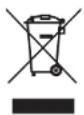
This alarm clock may not be disposed of with normal household waste. Dispose of the alarm clock at an approved disposal facility or at your local recycling centre. Please observe the current rules and regulations when disposing of appliance. Contact the disposal system if in do
Disposal of the batteries
Please dispose of your batteries properly in containers especially set up at retailers.

Batteries do not belong in household waste. Dispose of the batteries at an approved disposal facility or at your local recycling centre. Contact the disposal system if in doubt.
digi-tech gmbh warranty
This alarm clock includes a 3 year warranty starting on the day of purchase. In case of defects of this alarm clock you have, by law, certain rights regarding the vendor of the alarm clock. These rights are not
-15-

changed by the warranty which is described in the following paragraphs.
Warranty conditions
The warranty duration starts on the date of purchase. Please keep the original receipt in a safe place. The receipt is needed as a proof of purchase. If a defect occurs in the alarm clock within 3 years, the alarm clock will be repaired or replaced (according to our choice) free of charge. This warranty requires that, within the 3 year warranty period, the alarm clock and the receipt can be made available to us along with a short written description of the defect and when it occurred. If the defect is covered by the warranty, you will receive the repaired alarm clock or a new alarm clock. Repair or replacement does not cause the warranty period to restart.
Warranty period and defects liability
The warranty period is not increased by the defect liability. This also applies to repaired or replaced parts. If defects are noticed at the time of purchase they must be reported immediately upon unpacking the item. Paid repair may be available after the end of the warranty period.
-16-

Scope of the warranty
The alarm clock was manufactured according to strict quality guidelines and was carefully inspected before delivery. The warranty does not include parts that experience normal wear and tear and can thus be seen as wear parts or fragile parts that are damaged. Examples include Switches, Batteries or parts made of glass. This warranty becomes void if the alarm clock is damaged, is not used in the recommended way or is improperly repaired. For proper use of the alarm clock all instructions in this manual must be adhered to exactly. Use of the alarm clock in a way that is discouraged in the manual must be avoided. The alarm clock not intended for commercial use. Abusive or improper use, excessive force and changes that are made by non-authorized repair centers will void the warranty.
Warranty claim procedure
To ensure that your call is processed in a fast and efficient manner please note the following directions:
- Have your receipt (as proof of purchase) and the article number (282648) handy.
- The article number can be found on the type label, an engraving, the front page of the manual (bottom
-17-

left) or a sticker on the back side or bottom side of the case.
- In case defects occur, please first contact the service center (see below) by phone or email.

Visit www.lidl-service.com to download this and many other manuals, product videos and software.
Service
Please note that the following address is not a service address.
Please first contact the service address (see above).
Name: digi-tech gmbh
Street: Valterweg 27A
Town: DE-65817 Eppstein
Country: GERMANY
-19-

HR Upute za korištenje i sigurnosne upute
Sadržaj
Sadržaj - 20M
Uvod - 22M
Namjena - 22M
Opseg isporuke - 22M
Tehničke specifikacije ...... - 23M
Semnal defectuos - 48M
| 1 | Data - ziua, luna |
| 2 | 12/24 ore, AM/PM |
| 3 | Ora - ore. minute, secunde |
| 4 | SNOOZE/LIGHT |
-45-

| 5 | ALARMA 1 2 |
| 6 | Z^z Semnal ALARMA REPETATAactivata |
| 7 | TURN CONTROL RADIO |
| 8 | Afisaj nivelul bateriei |
| 9 | Ora de vara S |
| 10 | Temperatura |
| 11 | Ziua saptamanii |
| 12 | SET |
| 13 | In jos |
| 14 | MODE |
| 15 | In sus |
| 16 | SET |

- GB Usage and safety instructions
- Table of contents
- ALARM CLOCK
- Preliminary note
- Intended use
- Scope of delivery
- Technical specifications
- Important safety information
- User
- Batteries
- Setup
- Reception problems
- Restarting radio reception
- Light
- 12/24-hour time format
- Temperature display
- Speed setting
- Basic settings
- Alarm
- Activating or deactivating the alarm
- SNOOZE
- Replacing the batteries
- Cleaning instructions
- Simplified EU declaration of conformity
- Disposal of the electronic appliance
- Disposal of the batteries
- digi-tech gmbh warranty
- Warranty conditions
- Warranty period and defects liability
- Scope of the warranty
- Warranty claim procedure
- Service
- HR Upute za korištenje i sigurnosne upute
- Sadržaj
Brand : AURIOL
Model : IAN 282648
Category : Alarm clock radio