
Z30509 - Scale SILVERCREST - Free user manual and instructions
Find the device manual for free Z30509 SILVERCREST in PDF.


| Product Type | Digital Bathroom Scale |
| Brand | SilverCrest |
| Model | Z30509 |
| Dimensions (approx.) | 30 x 30 x 2 cm |
| Weight (scale) | 1.5 kg |
| Power Supply | 2 x AAA batteries (included) |
| Display | LCD, 3.5-inch |
| Maximum Weight Capacity | 180 kg / 396 lb |
| Graduation | 100 g / 0.2 lb |
| Measurement Units | kg, lb, st |
| Body Fat Analysis | Yes, with bioelectrical impedance |
| BMI Calculation | Yes |
| Body Water Percentage | Yes |
| Muscle Mass | Yes |
| Bone Mass | Yes |
| User Memory | Up to 10 users |
| Automatic On/Off | Yes |
| Surface Material | Tempered glass with stainless steel electrodes |
| Maintenance | Clean with a damp cloth; avoid immersion |
| Safety Precautions | Do not use on wet floor; not for medical use |
| Spare Parts / Reparability | Batteries replaceable; no user-serviceable parts inside |
| Included Accessories | Batteries, user manual |
Frequently Asked Questions - Z30509 SILVERCREST
User questions about Z30509 SILVERCREST
0 question about this device. Answer the ones you know or ask your own.
Ask a new question about this device
Download the instructions for your Scale in PDF format for free! Find your manual Z30509 - SILVERCREST and take your electronic device back in hand. On this page are published all the documents necessary for the use of your device. Z30509 by SILVERCREST.
USER MANUAL Z30509 SILVERCREST
Operation and Safety Notes
DE AT CH
GB / MT Operation and Safety Notes Page 47
Included items ......Page 49
Technical information......Page 50
Safety advice Page 50
Before first use
Removing the insulation strip....Page 53
Bringing into use ......Page 53
Setting the units of weight......Page 54
Switching the device on and off......Page 54
Entering body weight, memory, sex, height and age......Page 54
Measuring body fat and water content......Page 56
Replacing the batteries....Page 57
Troubleshooting......Page 57
Familiarise yourself with the product before using it for the first time. In addition, please refer carefully to the operating instructions below and the safety advice. Use the product only as described and for the indicated purpose. Keep these instructions in a safe place. If you pass the product on to anyone else, please ensure that you also pass on all the documentation.
Proper use
The product is intended for measuring the body fat and water content of the human body. Any other use or modification of the device constitutes improper use and may result in injury and/or damage to the device. The manufacturer is not liable for damage caused by improper use. The device is not intended for commercial use.
Parts list
Body fat analyser:
1 LC display 2 Electrodes 3 Handle 4 Start button 5 Down button ▼ 6 Up button ▲
7 On/Set button 8 kg/st/lb switch 9 Battery compartment 10 Battery compartment cover
LC display:
11 Body fat proportion/water content (in %) 12 Age 13 Memories (1-8) 14 Male 15 Female 16 Height 17 Units of weight 18 Weight 19 Body fat proportion too low...normal...too high 20 Body fat mode 21 Water content mode
Included items
Check that all the items are present and that the device is in perfect condition immediately after unpacking.
1 Body fat analyser 2 Batteries 3 V—(CR2032 lithium) 1 Operating instructions
Technical information
Batteries: 2 x 3 V CR2032 lithium (included)
Operating temperature: approx. 10 - 40°C
Safety advice
This safety advice is an important part of these operating instructions and must be observed every time electrical devices are used. The advice and instructions will help you to avoid risk of loss of life, accidents and damage. Therefore you must read carefully through the following information concerning safety and proper use.
WARNING! RISK OF LOSS OF LIFE OR ACCIDENT TO INFANTS AND CHILDREN! Never
leave children unsupervised with the packaging materials or the device. Otherwise there is a risk to life from suffocation.
Always keep children away from the device.
Children or persons who lack the knowledge or experience to use the device or whose physical, sensory or intellectual capacities are limited must never be allowed to use the device without supervision or instruction by a person responsible for their safety. Children must never be allowed to play with the device. The product is not a toy.
WARNING! DANGER TO LIFE! Never use the product if you
have a pacemaker. Never use the product near people that have a pacemaker or use other medical devices.
- Do not use the device in hospitals or medical establishments. This may lead to life-support systems not working properly.
- Do not expose the device to extremely high electromagnetic fields. These could detrimentally affect the proper functioning of the de-
vice and the LC display 1. If this happens, remove the batteries and re-insert them.
- Avoid rubbing the outside of the device too vigorously with textiles. Otherwise this may lead to the build-up of static charges and affect the readings. ■ Protect the device from impact, moisture, dust, chemicals and sudden changes in temperature and keep it away from sources of heat (ovens, heating radiators). ■ Do not expose the device to:
- extreme temperatures,
- strong vibrations,
- high mechanical loads,
- direct solar radiation,
- moisture.
Failure to observe this advice may result in damage to the device.
- Check the device for damage before bringing it into use. If the device is damaged do not use it. ■ Remove the battery if the device breaks down or is defective.
Otherwise the battery is more likely to leak.
■ Never open the device housing. This could result in personal injury or damage to the device. Always have any repairs carried out at the service centre or by an electrical equipment repair specialist. ■ The product is not suitable for pregnant women.
Warning! Dangers arising from the use of batteries
WARNING! DANGER TO LIFE! Batteries are not intended to be in the hands of children. Do not leave batteries lying around.
They could be swallowed by children or pets. In the event of swallowing a battery, contact a doctor immediately!

CAUTION! DANGER OF EXPLOSION! Never
recharge single-use batteries. Do not short-circuit or open them. Overheating, fire or destruction of the batteries
might result. Never throw batteries into fire or water. The batteries might explode.
- Avoid extreme environmental conditions and temperatures as they may affect batteries, e.g., above radiators. Otherwise, the batteries are more likely to leak.
- Exhausted or damaged batteries can cause caustic burns upon contact with the skin. To avoid this, always wear suitable protective gloves in these circumstances!
- Avoid contact with the skin, eyes, and mucous membranes if fluid is leaking from a battery. If you come into contact with corrosive battery fluids, flush the affected area thoroughly with clean water and contact a doctor immediately.
- Clean any light dirt deposits on the contacts of the batteries or on the contacts of the device with a dry, fluff-free cloth before insertion.
- When inserting the batteries, ensure the correct polarity! This is shown in the battery compartment. ■ Remove spent batteries immediately from the device. There is an increased danger of leaks! ■ Batteries must not be disposed of in the normal domestic waste! ■ Every consumer is legally obliged to dispose of batteries in the proper manner!
- Keep batteries away from children; do not throw them in the fire, short-circuit them, or take them apart. If the above instructions are not complied with, the batteries may discharge themselves beyond their end voltage. There is then a danger of leaking. If the batteries have leaked inside your device, you should remove them immediately in order to prevent damage to the device!
Safety advice / Before first use / Bringing into use
■ Always replace all batteries at the same time and only use the same type of batteries. ■ Remove the batteries from the device if they have not been used for a long period.
- Before first use
- Removing the insulation strip
Note: The device is supplied with batteries already inserted. Before using your device for the first time, remove the insulation strip from between the batteries and the battery compartment 9.
☐ Open the battery compartment 9 by sliding the battery compartment cover 10 in the direction shown by the arrow. ☐ Remove the battery compartment cover 10. □ Remove the insulation strip. ☐ Close the battery compartment 9 by placing the battery compartment cover 10 back in place and sliding it in the opposite direction to that shown by the arrow until you feel and hear it engage.
● Bringing into use
Note: The device measures body fat and water content by means of electrodes 2. Always enter body weight, sex, height, and age individually to ensure correct measurements when the device is used by different people. The device has 8 memories 13 to store this information.
Note: This is not a medical device. The measured results and the tables are intended to provide a general indication only.
Bringing into use
Reminder:
Please be sure to re-input personal data (age, height, weight, sex) if the unit is passed to a different person to use, as these 4 parameters play an important role in calculating the body fat proportion & water content (%) and the BIA (Bio Impedance) measured between the 2 electrodes. If these 4 personal data have not been re-set to the personal data of the new user, then the measured results will be very much different from the actual values & could be misleading.
- Setting the units of weight
☐ Set the units of weight for the device display by moving the kg/st/lb switch 8 into the desired position (kg, lb, st:lb).
Note: The device automatically adjusts itself to work in the corresponding units of length (cm for kg; foot / inch for lb, st:lb).
- Switching the device on and off
☐ Press the On/Set button 7 to switch on the device.
☐ The device switches itself off automatically after the measuring process.
- Entering body weight, memory, sex, height and age
Note: Pressing the On/Set button 7 stores the currently entered information and the device jumps forward automatically into the next mode.
Note: The device does not measure your weight. Determine your body weight beforehand on a separate weighing scale.
Note: If you press and keep pressed the Up button 6 or the Down button 5, you can accelerate the setting process and reach the desired value more quickly.
☐ Press the On / Set button 7 to switch on the device. ☐ The previously selected memory 13 then flashes. ☐ Select a memory 13 by pressing the Up button 6 or the Down button 5. ☐ Press the On/Set button 7 to confirm the memory 13 to be used and allow the sex to be selected. The previously selected sex (Male 14 or Female 15) then flashes. ☐ Press the On/Set button 7 to confirm the current sex or select the other sex by pressing the Up button 6 or the Down button 5. ☐ Press the On/Set button 7 to store the sex Male 14 or Female 15 and allow the entry of the height. The height 16 field flashes. ☐ Enter the height by pressing the Up button 6 or Down button 5. ☐ Press the On/Set button 7 to confirm the height 16 and allow the age 12 to be entered. ☐ Enter the age 12 by pressing the Up button 6 or Down button 5. ☐ Press the On/Set button 7 to confirm the age 12 to be used and allow the weight 18 to be entered. ☐ The previously selected units of weight 17 (kg, lb, st:lb) flash. Enter the weight by pressing the Up button 6 or Down button 5. Press the On/Set button 7 to confirm the weight 18.
Note: By repeatedly pressing the On/Set button 7, you can jump from mode to mode and satisfy yourself that your data are correct.
Tip: If your data are already stored in a memory 13, press the On/Set button 7 to switch on the device. Then press the Up button 6 or the Down button 5 to select the memory 13 as described above, press the Start button 4 and then continue immediately
with "Measuring body fat and water content".
Note: When the device is switched on, it automatically jumps to the last selected memory 13 for the convenience of the current user.
Measuring body fat and water content
Note: Make sure your hands are clean, dry and free of creams etc., otherwise the measurements may not be correct.
Grasp the electrodes 2 with both hands (one handle 3 for each hand) and press the Start button 4 with the thumb of your right hand. Hold the device so that you have a good view of the LC display 1. The measuring process starts and lasts a few seconds (display: ☐☐☐). The LC display 1 alternately shows body fat and water content 11 in % when the measuring process is complete. The Body fat mode 20 and Water content mode 21 fields alternate. The body fat proportion field 19 shows the relationship of body fat to height, age and weight.
| Interpretation LCD Indication | |
 | too thin |
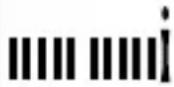 | lean |
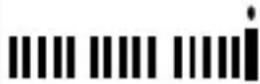 | normal |
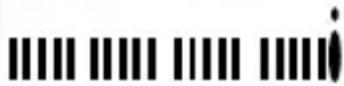 | fat |
 | extremely over weight |
Note: This is not a medical device. The measured results and the tables are intended to provide a general indication only.
The device switches itself off automatically after it has shown the body fat proportion and the water content alternately three times.
Replacing the batteries
Note: The device is supplied with batteries already inserted.
Note: When you are inserting the batteries, make sure that you do not permanently bend the contacts.
Open the battery compartment 9 by sliding the battery compartment cover 10 in the direction shown by the arrow and then take off the battery compartment cover 10. Remove the exhausted batteries from the battery compartment 9. Note: Use a pointed object (e.g. paper clip) to remove the batteries. Insert the new batteries, observing the correct polarity. Close the battery compartment 9 by placing the battery compartment cover 10 back in place and sliding it in the opposite direction to that shown by the arrow until you feel and hear it engage.
Troubleshooting
Fault
Reason
O = Solution
Bringing into use / Cleaning / Disposal
● = The LC display 1 shows the error message "Err."
O = Wait until the device switches itself off or remove the batteries (see "Replacing the batteries") return the device to the default settings. Switch on the device using the On/Set button 7.
● = The LC display 1 shows the error message "LO".
© = The batteries are exhausted.
O = Replace the batteries (see "Replacing the batteries").
● = The LC display 1 shows the error message "Err-h" / "Err-L".
- = The measured body fat proportion is outside the displayable range.
O = The body fat analyser is not suitable for the measurement of people who are extremely under- or overweight (below 4.0 or above 60 %).
- Cleaning
- Do not use chemical cleaners or scouring agents for cleaning the device. ■ Never immerse the device in water or other liquids. Ignoring this advice may damage the device. □ Clean the device using a slightly moist cloth. For more stubborn dirt you can also apply a weak soap solution to the cloth.
- Disposal
The packaging is made entirely of recyclable materials, which you may dispose of at local recycling facilities.
Contact your local refuse disposal authority for more details of how to dispose of your worn-out product.
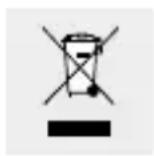
To help protect the environment, please dispose of the product properly when it has reached the end of its useful life and not in the household waste. Information on collection points and their opening hours can be obtained from your local authority.
Faulty or used batteries must be recycled in accordance with Directive 2006/66/EC. Please return the batteries and/or the device to the available collection points.
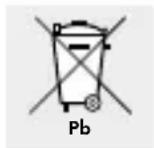
Environmental damage through incorrect disposal of the batteries!
Batteries may not be disposed of with the usual domestic waste. They may contain toxic heavy metals and are subject to hazardous waste treatment rules and regulations. The chemical symbols for heavy metals are as follows: Cd = cadmium, Hg = mercury, Pb = lead. That is why you should dispose of used rechargeable batteries at a local collection point.
EMC €
Product description:
Body fat analyser
Model No.: Z30509
Version: 12/2010
Introduction
c/o Milomex Services
Hilltop Cottage
Barton Road
Pulloxhill
Bedfordshire
MK45 5HP
UK
© by ORFGEN Marketing



- SAFETY ADVICE PAGE
- BEFORE FIRST USE
- BRINGING INTO USE ......PAGE
- PROPER USE
- PARTS LIST
- BODY FAT ANALYSER
- LC DISPLAY
- INCLUDED ITEMS
- TECHNICAL INFORMATION
- SAFETY ADVICE
- WARNING! RISK OF LOSS OF LIFE OR ACCIDENT TO INFANTS AND CHILDREN! NEVER
- WARNING! DANGER TO LIFE! NEVER USE THE PRODUCT IF YOU
- WARNING! DANGERS ARISING FROM THE USE OF BATTERIES
- CAUTION! DANGER OF EXPLOSION! NEVER
- SAFETY ADVICE / BEFORE FIRST USE / BRINGING INTO USE
- REMOVING THE INSULATION STRIP
- ● BRINGING INTO USE
- BRINGING INTO USE
- REMINDER
- SETTING THE UNITS OF WEIGHT
- SWITCHING THE DEVICE ON AND OFF
- ENTERING BODY WEIGHT, MEMORY, SEX, HEIGHT AND AGE
- MEASURING BODY FAT AND WATER CONTENT
- REPLACING THE BATTERIES
- TROUBLESHOOTING
- BRINGING INTO USE / CLEANING / DISPOSAL
- CLEANING
- DISPOSAL
- ENVIRONMENTAL DAMAGE THROUGH INCORRECT DISPOSAL OF THE BATTERIES
- EMC €
- PRODUCT DESCRIPTION
- INTRODUCTION
Brand : SILVERCREST
Model : Z30509
Category : Scale