
Voice 00184054 - Headphones HAMA - Free user manual and instructions
Find the device manual for free Voice 00184054 HAMA in PDF.


| Type | Bluetooth Stereo Headphones |
| Weight | 180 g |
| Battery Type | Li-Po 3.7 V |
| Battery Capacity | 250 mAh |
| Standby Time | 375 h |
| Talking Time (Bluetooth) | 18 h |
| Music Playback Time (Bluetooth) | 16 h |
| Charging Time | 3 h |
| Frequency Range (Headphones) | 20 Hz – 20 kHz |
| Frequency Range (Microphone) | 100 Hz – 10 kHz |
| Impedance (Headphones) | 16 Ω |
| Impedance (Microphone) | < 2.2 kΩ |
| Sensitivity (Headphones) | 100 dB |
| Sensitivity (Microphone) | -42 dB |
| Bluetooth Version | 4.2 |
| Bluetooth Profiles | HFP V1.6, HSP V1.2, A2DP V1.2, AVRCP V1.4, DI V1.3 |
| Transmission Frequency | 2.4 – 2.48 GHz |
| Maximum Range | 10 m |
| Charging Voltage | Max. 5 V USB |
| Current Consumption | Max. 180 mA |
| Audio Input | 3.5 mm stereo AUX (with microphone) |
| Charging Port | Micro-USB |
| Controls | Multifunction button (MFB), Volume +/-, Voice Assistant button |
| Microphone | Built-in |
| LED Indicator | Red (charging), Blue (charged/flash for pairing/connection) |
| Voice Assistant | Supports Siri and Google Assistant |
Frequently Asked Questions - Voice 00184054 HAMA
User questions about Voice 00184054 HAMA
0 question about this device. Answer the ones you know or ask your own.
Ask a new question about this device
Download the instructions for your Headphones in PDF format for free! Find your manual Voice 00184054 - HAMA and take your electronic device back in hand. On this page are published all the documents necessary for the use of your device. Voice 00184054 by HAMA.
USER MANUAL Voice 00184054 HAMA
Bluetooth® StereoHeadphones
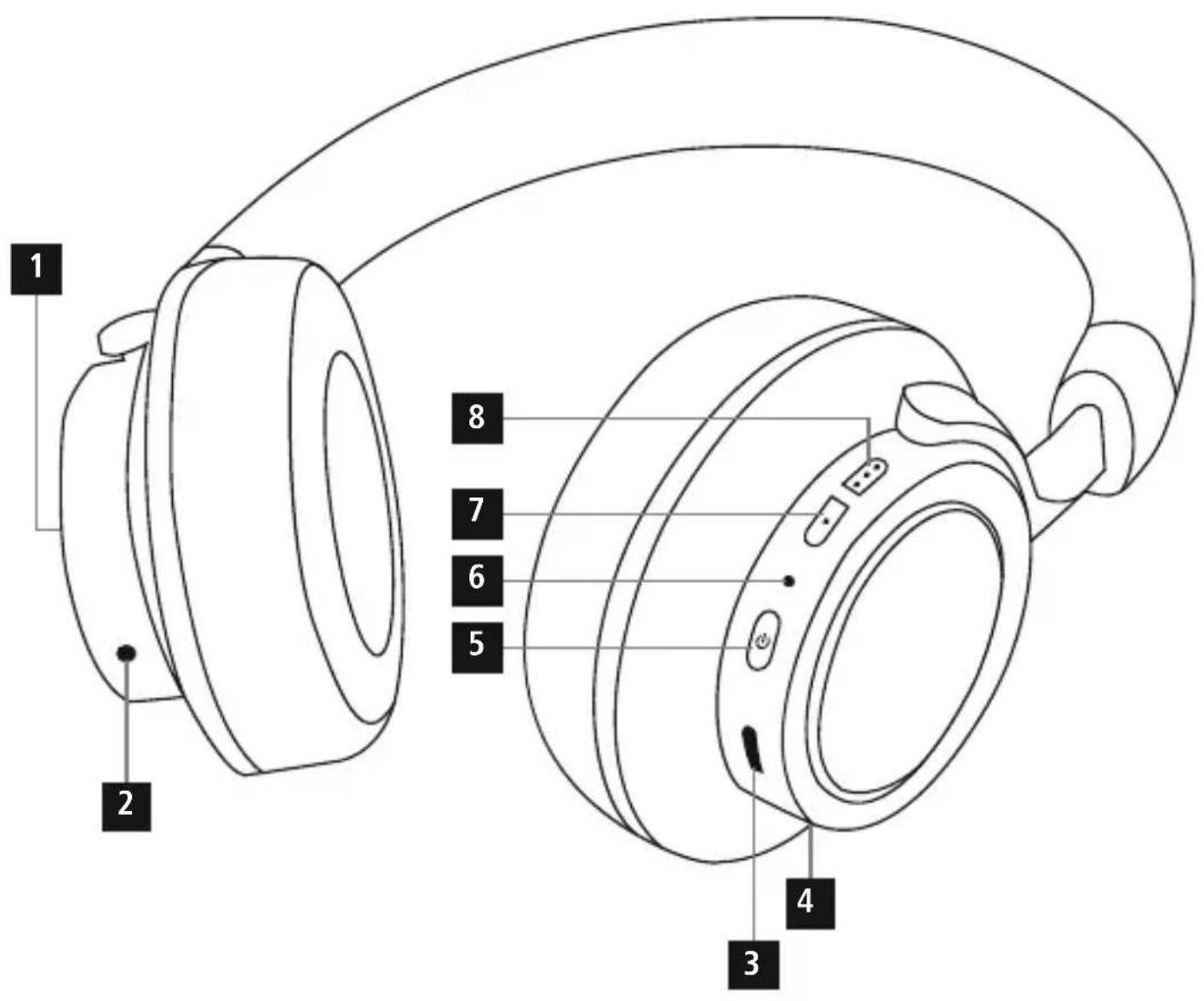
ControlsandDisplays
- VoiceAssistantbutton
2.3.5-mmAUXinput
-
Micro-USBchargingsocket
-
Microphone
-
Multifunction button (MFB): Power / Play / Pause / Call acceptance
6.LEDfunctionindicator
7.Volume- / Previousssong
8.Volume+ / Nextsong
Thankyouforchoosinga H amaproduct.
Takeyourtimeandreadthefollowinginstructionsandinformation completely. Please keep these instructions in a safe place for future reference. If you sell the device, please pass these operating instructionsontothenewowner.
1. ExplanationofWarningSymbolsandNotes
Warning

This symbol is used to indicate safety instructions to draw your attention to specific hazards and risks.
Note

This symbol is used to indicate additional information or important notes.
2.PackageContents
• 1 x Bluetooth stereoheadphones
• 1 x Micro-USBchargingcable
• 1 x 3 .5-mmstereoAUXcablewithmicrophone
• T heseoperatinginstructions
3. SafetyNotes
• T heproductisintendedforprivate,non-commercialuseonly.
• U setheproductforitsintendedpurposeonly.
- Protect the product from dirt, moisture and overheating, and only use it in a dry environment.
• D o n otusetheproductintheimmediatevicinityofheatersor otherheatsourcesorindirectsunlight.
• D o n otdroptheproductanddonotexposeittoanymajorshocks.
- D on otoperatetheproductoutsidethepowerlimitsgivenin thespecifications.
- D on otopenthedeviceorcontinuetooperateitifitbecomes damaged.
- S incethebatteryisintegratedandcannotberemoved,youwill needtodisposeoftheproductasa w hole.Dothisincompliance withthelegalrequirements.
- D isposeofpackagingmaterialimmediatelyaccordingtolocally applicableregulations.
- Do not modify the product in any way. Doing so voids the warranty.
- Do not attempt to service or repair the product yourself. Leave anyandallserviceworktoqualifiedexperts.
Warning-Battery

- O nlyusesuitablechargingdevicesorUSBconnectionsfor charging.
- A s a rule, donotcharged devices or USB connection that are defective and donottry to repair them yourself.
- D o n otoverchargetheproductorallowthebatteryto completelydischarge.
- A voidstoring, chargingorusingbatteriesinextreme temperatures.
- When stored over a long period of time, batteries should be charged regularly(atleasteverythreemonths).
Warning- H ighvolumes

• H ighsoundpressure level!
• There is a risk of hearing damage.
- To prevent hearing loss, avoid listening at high volume levels forlongperiods.
• Always keep the volume at a reasonable level. Loud volumes, evenovershortperiods, cancausehearingloss.
- U singthisproductlimitsyourperceptionof ambientnoise. For thisreason, donot operateanyvehiclesormachineswhile usingthisproduct.
4. Getting Started
- The headphones are equipped with a rechargeable battery. The battery must be fully charged before using the device for the first time.
- Ensure that the headphones are switched off before charging.
- B eginchargingbyconnectingtheincludedUSBchargingcable tothechargingsocket(3)aswellastotheUSBconnection ofa P C/laptop.
- Alternatively, you can charge the headphones using a suitable USBcharger. P leaserefertotheoperatinginstructionsforthe USBchargerused.
• The LED (6) is constantly lit red during charging.
• It takes around 3 hours until the battery is completely charged. - O ncethechargingprocessiscomplete,theLED(6)islitblue.
• D isconnectallcableandmainsconnectionsafteruse.
Note

• T heBluetooth® connectionisnotavailableduringcharging.
- If the battery level is low, a voice says, 'Low Battery'. Themessageisrepeatedtwiceat5-minuteintervals (approximately)before t heheadphonesautomaticallyswitch off. The LED indicator (6) begins to flash red. Connect the headphonestoa suitableUSBportusingthechargingcable, inordertorechargethebattery.
5.Operation
Switchingtheheadphoneson/off
- Press and hold the MFB button (5) for about 4 seconds until youhearanacousticsignalandtheLED(6)emitsflashesof alternatingred a ndbluelight.
- To switch off the headphones, press and hold the MFB button (5) for about 4 seconds until the LED (6) goes out.
Note
The functions described in this section are only available for Bluetooth®-capable terminal devices.

5.1. Bluetooth ^® pairing
Note- Pairing
- M akesure t hatyourBluetooth®-capableterminaldeviceison andBluetooth® isactivated.
- M akesure thatyourBluetooth®-capableterminaldeviceis visibleforotherBluetooth® devices.
- For more information, please refer to the operating instructions of your terminal device.
- T heheadphonesandtheterminaldevicesshouldbenofurther thanonemetre a part.Theshorterthedistance,thebetter.
• Make sure that the headphones are switched off. - S witchontheheadphonesbypassingandholdingtheMFB button(5)forabout4 secondsuntilyouhearanacousticsignal and the LED (6) emits flashes of alternating red and blue light. Theheadphonesare searchingfora Blue to o® connection.
- O pentheBluetooth® settingsonyourterminaldeviceand waituntil HamaBTHVOICE appearsinthelistofBluetooth devicesfound.
- S electHamaBTHVOICEandwaituntiltheheadphonesare listedasconnectedintheBluetooth ® settingsyourterminal device.
- I f t heconnectionwassuccessful,youwillhearanotheracoustic signalandtheLED(6)slowlyflashesblue.
Note- Bluetooth password

Some terminal devices require a password in order to connect to anotherBluetooth ^® device.
- If your terminal device requests a password for connection to theheadphones, enter0000.
Note
• After a successful connection, the LED (6) slowly flashes blue.
- If the connection could not be set up, first switch off the device and then repeat the steps for the Bluetooth connection listed under 5.1.

5.2.AutomaticBluetooth ^® connection(aftersuccessful pairing)

Note
Oncetheheadphoneshaveconnectedtoa terminaldevice,they willstore the deviceandautomaticallyconnecttoitagainwhen the deviceiswithinrangeandhasBluetooth® enabled. Renewed pairingisnotrequiredforterminaldevicesthathavepreviously beenconnectedtotheseheadphones.
When the headphones are switched on, they will automatically attempttoconnecttotheterminaldevicelastconnected. If youwanttoconnecttheheadphonestoa n ewterminaldevice, pleasefollowthestepsfortheBluetooth ^ connectionlisted under5.1.
As soon as the headphones are connected to your terminal device, musicistransmittedviaBluetooth ^® usingthese headphones. For further information, please also refer to the operatinginstructionsofyourterminaldevice.
- Switch on the headphones with the MFB button (5). The LED (6) begins to emit flashes of alternating red and blue light, and the headphones automatically connect to the terminal device last used.
Note

- If the connection was successful, the LED (6) slowly flashes blue.
- If the connection could not be set up, first switch off the headphonesandthenrepeatthestepsfortheBluetooth connectionlistedunder5.1.
- I t maybenecessarytochangethesettingsonyour terminaldevicetoenableittoautomaticallyconnecttothe headphones.
Note— C onnectionimpaired

Aftertheheadsetandterminaldevicehavebeenpaired, a connectionisestablishedautomatically. If t heBluetooth ^® connectionisnotestablishedautomatically, c heckthefollowing:
- ChecktheBluetooth® settingsofyourterminaldevicetosee whether HamaBTHVOICE isconnected.Ifnot,repeatthe stepslistedunder5.1.Bluetooth ® pairing.
- Check whether obstacles are impairing the range. If so, move the devices closertogether.
- The performance can also be affected by a weak battery.
5.3.Audioplayback

Note
- Note that the functions described under 5.3., 5.4. and 5.5 are o nlypossiblewithanactiveBluetooth ^ connection.
- Y ourterminaldevicemustalsosupporttheindividual functions.
Note
- For more information, please refer to the operating instructions of your terminal device.
• F unctionscanstillbecontrolleddirectlyviatheterminaldevice. - Set the volume on your terminal device to a low level.
- S witchontheheadphoneswiththeMFBbutton(5).
- S tartaudioplaybackontheconnectedterminaldevice.
- Press and hold Volume + (8) to increase the volume.
- Press and hold Volume - (7) to reduce the volume.
- Briefly press the MFB button (5) to start or pause audio playback.
- Briefly press Volume + (8) to skip to the next track.
- Briefly press Volume - (7) to skip back to the previous track
Note
Anacousticsignalisgivenwhentheminimumormaximum volumeisreached.

5.4.Hands-freefunction
- Press the MFB button (5) once to answer an incoming call.
- Press and hold the MFB button (5) for 2 seconds or use your telephonetorejectanincomingcall.
• During a call, press the MFB button (5) once to end the call. - Press and hold Volume + (8) to increase the volume.
- Press and hold Volume - (7) to reduce the volume.
- Press the MFB button (5) twice to redial the number last dialled.

Note
- Not all terminal devices support all the functions specified above. For more information, please also refer to the operating instructionsofyourterminaldevice.
- Some functions and acoustic signals are dependent on your terminal device.

Note- Callquality
To increase the call quality, please make sure that you are near yourmobilephoneduringthecall.

5.5.VoiceAssistantfunction
TheVoiceAssistantisanintegrated,interactivefunctionthat enablesyoutostartcommunicationwithyourSiriorGoogle Assistant at the press of a button. This function enables you to ask questionsandgetvariousformsofhelpfromyourvoiceassistant, evenifyouare n otholdingyourtelephoneinyourhands. Belowyouwillfindsomeexamplesselectedfromthelargenumber ofpossibilities.
Note-Siri
SiriisonlyavailableonsuitableterminaldeviceswithiOS5or higher(fromiPhone4sonwards).

Note- GoogleAssistant

- The Google Assistant is only available on suitable terminal devices with Android 5.0 or higher, Google Play Services, >1.5 GB of free memory and a minimum screen resolution of 720P.
- The GoogleAssistantapp must be available on your terminal device and set asthedefaultvoiceassistant.
PresstheVoiceAssistantbutton(1)whiletheheadphonesare connectedviaBluetooth® tostartcommunicationwithyourSirior GoogleAssistant.Assoonasyouhearanacousticsignal,yourvoice assistantisreadytohelpyou.
- Example1:
PresstheVoiceAssistantbutton(1)andthenspeakintoyour headphones: 'What's t hewetherliketoday?' Thevoiceassistant willanswerasfollows,forexample: 'Mainlycloudywithsome showers'
- Example2:
PresstheVoiceAssistantbutton(1)andthenspeakintoyour headphones: 'Whattimeisit? Thevoiceassistantwillansweras follows,forexample:'Itis8 p m'
• Other examples: Set an alarm for tomorrow at 7 am.
Playmusic.
What's in thenews?
5.6. Audioinputsocket
InadditiontoconnectingtheseheadphonesviaBluetooth®,you canconnectthemusingtheincludedAUXcable.
Todos, insertoneendofthecableintotheterminaldevice and theotherendintotheAudioinputsocket(2)ontheleftside ofyourheadphones.TheBluetooth® connectionisautomatically endedwhenyouplugintheaudiocable.Theheadphonesnow functionaswiredheadphones.

Note
TooperatetheheadphoneswiththeAUXcable,theheadphones donothavetobeswitchedon.TheVolume+/-,Play/Pauseand Next/Previoustrackfunctionsare c ontrolledsolelyusingyour terminaldevice.
5.7.Disconnectingtheheadphones
• S witchofftheheadphones.
- D isconnecttheheadphonesviatheBluetooth® settingsonyour terminaldevice.
5.8.LEDindicator
ThetablebelowprovidesanoverviewofthevariousLEDindicators youmayseeduringuseoftheheadphones,andexplainswhat theymean.
| Duringcharging | |
| LEDindicatorStatusoftheheadphones | |
| RedLEDonCharging | |
| BlueLEDonChargingcompleted | |
| Duringoperation | |
| LEDindicatorStatusoftheheadphones | |
| LEDquicklyflashesred andblue | SettingupBluetooth® connection |
| LEDslowlyflashesblue | Bluetooth® connection successful |
| LEDflashesred | Weakbattery- p l e a s e recharge |
6.Troubleshooting
| ProblemSolution | |
| Nosound | S witchontheheadphonesand,if necessary, c hargethebattery.I ncreasethevolumeonyour headphonesorterminaldevice.B ringyourterminaldeviceandtheheadphonesclosertogether, a nd removeanysourcesofinterference orobstacles.T ryanothermusicsource.C onnecttheheadphonestoanother terminaldevice. |
| Poorsoundquality | T ryanothermusicsource.C onnecttheheadphonestoanother terminaldevice.B ringyourterminaldeviceandtheheadphonesclosertogether, a nd removeanysourcesofinterference orobstacles. |
| Chargingwon't start | C heckthecableconnections.U seanothercharger. |
| ProblemSolution | |
| MyGoogle Assistantdoesn't respond | T hisfunctionisonlysupportedby terminaldeviceswithAndroid5.0 orhigher.C heckwhethertheGoogleAssistantis installedonyourterminaldeviceandis setasthedefaultvoiceassistant.C heckthatyourAndroidterminal deviceisconnectedtothe headphones.C heckwhethertheGoogleAssistantis availableinyourcountry.F urthersupportcanbefoundat: www.support.google.com/assistant. |
| Louddialtone/noisesduring activationofthe GoogleAssistant | C heckwhetheryouare u singthe mostup-to-dateversionoftheGoogle Assistantapp.D isabletheGoogleAssistantinthe settingsonyourAndroidterminal device(underSettings>A pps>GoogleApp>D isable).Thentap Enable(ifyouhavedeletedtheGoogle app,pleasereinstallit). |
7. Care and Maintenance
Onlycleanthisproductwitha s lightlydamp,lint-freeclothanddo notuseaggressivecleaningagents.Makesure t hatwaterdoesnot getintotheproduct.
8.WarrantyDisclaimer
Hama GmbH & Co KG assumes no liability and provides no warrantyfordamageresultingfromimproperinstallation/mounting, improperuseoftheproductorfromfailure t o o bservetheoperating instructionsand/orsafetynotes.
9. Service and Support
PleasecontactHamaProductConsultingifyouhaveanyquestions aboutthisproduct.
Hotline:+499091502-115(German/English)
Furthersupportinformationcanbefoundhere:www.hama.com
10.TechnicalData
 | Bluetooth®headphones |
| Earphone/microphoneimpedance | 16Ω/ < 2 ,2kΩ |
| Frequency | 20 Hz – 20 kHz / 100 Hz – 10 kHz |
| Earphone/microphonesensitivity | 100dB/ - 4 2 d B |
| WBCV≥75mV | |
| Rangemax.10m | |
| Bluetooth®technologyv4.2 | |
| Profile | HFP V1.6 / HSP V1.2 / A2DP V1.2/AVRCPV1.4/ D I V 1.3 |
| Transmissionfrequency2,4– 2 ,48GHz | |
| BatteryLi-Po 3 ,7V | |
| Batterycapacity250mAh | |
| Currentconsumptionmax.180mA | |
| Chargingvoltagemax.5 V USB | |
| Totalweight180g | |
| Batterylifeinstandbymode | 375h |
| Talking time / music playback timeBluetooth® | 18h / 1 6 h |
| Chargingtime3h |
11. Recycling Information
Noteonenvironmentalprotection:
AftertheimplementationoftheEuropeanDirective 2012/19/EUand2006/66/EUinthenationallegal system, the following applies: Electricandelectronic devicesaswellasbatteriesmustnotbedisposedof withhouseholdwaste. Consumers are o bligedbylaw
toreturnelectricalandelectronicdevicesaswellasbatteriesatthe endoftheirservicelivestothepubliccollectingpointssetupfor this purpose or point of sale. Details to this are defined by the nationallawoftherespectivecountry. T hissymbolontheproduct, the instruction manual or the package indicates that a product is subjecttotheseregulations.Byrecycling,reusingthematerialsor otherformsofutilisingolddevices/Batteries,youare m akingan importantcontributiontoprotectingourenvironment.
12. Declaration of Conformity

Hereby, Hama GmbH & Co KG declares that the radio equipmenttype[00184054] is in compliance with Directive2014/53/EU. The full text of the EU
declarationofconformityisavailableatthefollowinginternet address:
www.hama.com->00184054->Downloads.
| Frequencyband(s) | 2402MHz– 2 480MHz |
| Maximumradio-frequency powertransmitted | 0.82mWE.I.R.P. |
The Bluetooth ^® word mark and logos are registered trademarks owned by Bluetooth SIG, Inc. and any use of such marks by Hama GmbH & Co KG is under license. Other trademarks and trade names are those of their respective owners.
All listed brands are trademarks of the corresponding companies. Errors and omissions excepted, and subject to technical changes. Our general terms of delivery and payment are applied.
- Bluetooth® StereoHeadphones
- ControlsandDisplays
- ExplanationofWarningSymbolsandNotes
- Warning
- Note
- 2.PackageContents
- SafetyNotes
- Warning-Battery
- Warning- H ighvolumes
- Getting Started
- 5.Operation
- Switchingtheheadphoneson/off
- Bluetooth ® pairing
- Note- Pairing
- Note- Bluetooth password
- 5.2.AutomaticBluetooth ® connection(aftersuccessful pairing)
- Note— C onnectionimpaired
- 5.3.Audioplayback
- 5.4.Hands-freefunction
- Note- Callquality
- 5.5.VoiceAssistantfunction
- Note-Siri
- Note- GoogleAssistant
- - Example1:
- - Example2:
- Audioinputsocket
- 5.7.Disconnectingtheheadphones
- 5.8.LEDindicator
- Care and Maintenance
- 8.WarrantyDisclaimer
- Service and Support
- Recycling Information
- Noteonenvironmentalprotection:
- Declaration of Conformity
Brand : HAMA
Model : Voice 00184054
Category : Headphones