
Neckband - Headphones HAMA - Free user manual and instructions
Find the device manual for free Neckband HAMA in PDF.


| Product Type | Bluetooth® Stereo Earphones (Neckband) |
| Weight | 23 g |
| Battery Type | Li-Po 3.7 V, 115 mAh (integrated) |
| Charging Time | Approx. 2 hours |
| Music Play Time | Up to 12 hours |
| Talk Time | Up to 11 hours |
| Standby Time | Up to 360 days |
| Charging Voltage | Max. 5 V USB |
| Bluetooth® Version | v5.0 |
| Bluetooth® Profiles | A2DP V1.3, AVRCP V1.6, HFP V1.7, HSP |
| Frequency Range | 20 – 20,000 Hz |
| Earphone Impedance | 32 Ω |
| Microphone Impedance | 1.4 – 2.2 kΩ |
| Earphone Sensitivity | 96 dB |
| Microphone Sensitivity | -42 dB |
| Range | Max. 10 m |
| Power Supply | Internal rechargeable battery, USB charging |
| Controls | Multi-function button, Volume +/-, On/Off, Voice control |
| Included Accessories | USB charging cable, 3 pairs ear cushions (S/M/L), 2 pairs silicone ear hooks (M/L) |
| Safety Features | Overheating protection, volume limit warnings |
| Care Instructions | Clean with slightly damp, lint-free cloth; avoid water ingress |
| Warranty | Liability and warranty excluded for improper use or modification |
Frequently Asked Questions - Neckband HAMA
User questions about Neckband HAMA
0 question about this device. Answer the ones you know or ask your own.
Ask a new question about this device
Download the instructions for your Headphones in PDF format for free! Find your manual Neckband - HAMA and take your electronic device back in hand. On this page are published all the documents necessary for the use of your device. Neckband by HAMA.
USER MANUAL Neckband HAMA
OperatingInstructions
Bedienungsanleitung
Instruccionesdeuso
natural_image
Line drawing of a pair of outdoor earbuds with attached straps and earphones (no text or symbols)
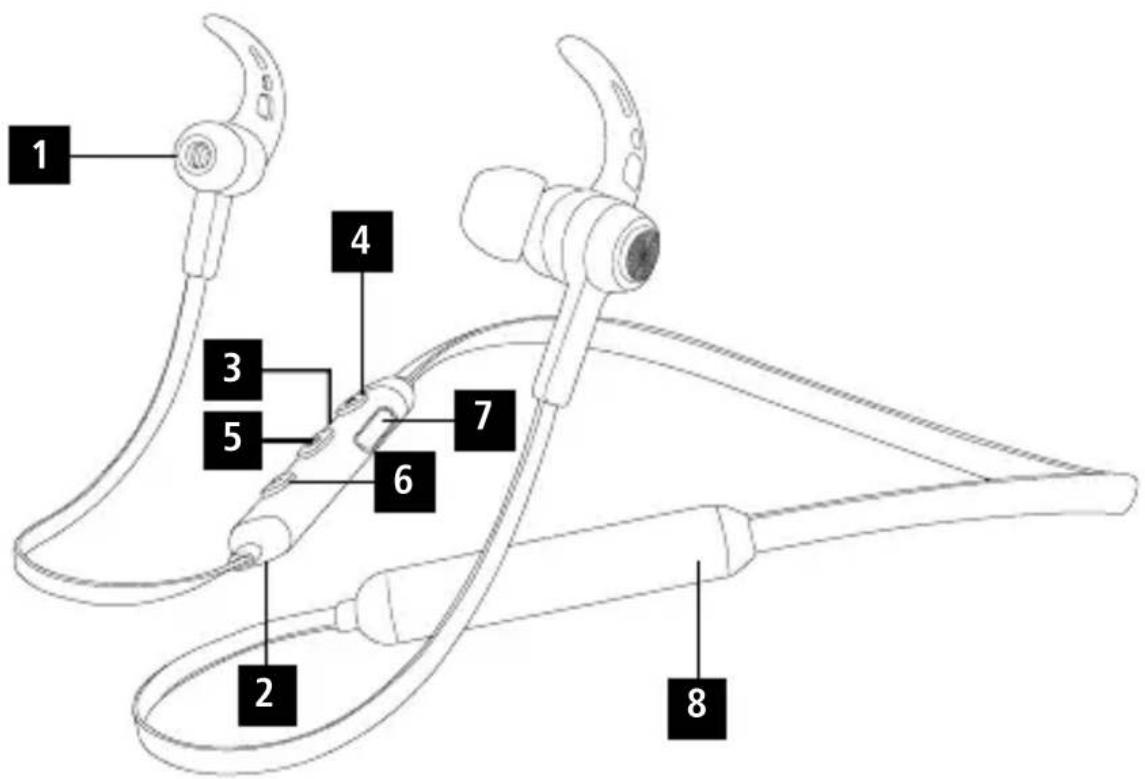
ControlsandDisplays
-
Earphones
-
Microphone
-
StatusLEDs
4.Volume+,jumpforward o netitle
- On/offbutton, voicecontrol, multifunction button(MF)
6.Volume-,jumpbackward o netitle
7.Chargingsocket
8.Battery
Thankyouforchoosinga H amaproduct.
Takeyourtimeandreadthefollowinginstructions andinformationcompletely. P leasekeepthese instructions in a safe place for future reference. If yousellthedevice,pleasepasstheseoperating instructionsontothenewowner.
1. ExplanationofWarningSymbolsandNotes
Warning

This symbol is used to indicate safety instructions ortodraw your attention to specific hazard and risks.
Note

This symbolised to indicate additional information or important notes.
2.PackageContents
• 1 x Bluetooth® stereoearphones
• 1 x U SBchargingcable
• 3 pairsofearcushions(sizesS,M,L)
• 2 pairsofsiliconeearhooks(sizesM,L)
• T heseoperatinginstructions
3.SafetyNotes
• T heproductisintendedforprivate,non-commercialuseonly.
• U setheproductforitsintendedpurposeonly.
- P rotectheproductfromdirt,moisture a n d overheating,andonlyuseitina d ryenvironment.
- D o n otusetheproductintheimmediatevicinity ofheatersorotherheatsourcesorindirect sunlight.
• D o n otdroptheproductanddonotexposeitto anymajorshocks.
• D o n otoperatetheproductoutsidethepower limitsgiveninthespecifications.
- D o n otopenthedeviceorcontinuetooperateitif itbecomesdamaged.
• S incethebatteryisintegratedandcannotbe
removed, you will need to dispose of the product as a hole. Do this in compliance with the legal requirements.
• D isposeofpackagingmaterialimmediately accordingtolocallyapplicableregulations.
- Do not modify the product in any way. Doing so voidsthewarranty.
- Do not use the product in areas where the use of electronic devices is not permitted.
- D o n otattempttoserviceorrepairtheproduct yourself. L eaveanyandallserviceworkto qualifiedexperts.
- Do not throw the battery or the product into fire.
- D on ottamperwithordamage/heat/disassemble thebatteries/rechargeablebatteries.
• U setheitemonlyinmoderateclimaticconditions.
- D o n otallowyourselftobedistractedbythe product,forexamplewhendrivinga v ehicleor operatingsportsequipment.Alwayspayattention tothesurroundingtraffic a ndyourenvironment.
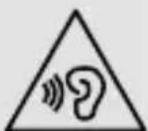
Warning- H ighvolumes

• H ighsoundpressure level!
• There is a risk of hearing damage.
- To prevent hearing loss, avoid listening at high volume levels for long periods.
- Always keep the volume at a reasonable level. Loudvolumes, evenovershortperiods, can causehearingloss.
- U singthisproductlimitsyour perceptionofambientnoise. For t hisreason, donotoperate anyvehiclesormachineswhile usingthisproduct.
4. GettingStarted
Warning-Battery

- O nlyusesuitablechargingdevicesorUSB connectionsforcharging.
- A s a rule, donotcharged devices or USB connection that are effective and donotry to repair them yourself.
• D o n otoverchargetheproductorallowthe batterytocompletelydischarge.
- A voidstoring, chargingorusingthe device inextremetemperaturesandextremelylow atmospheric pressure (forexample,athigh altitudes).
- W henstoredovera longperiodoftime, batteriesshouldbechargedregularly(atleast everythreemonths).
- The earphones are equipped with a rechargeable battery. T hebatterymustbefullychargedbefore usingthedeviceforthefirsttime.
- Ensure that the earphones are switched off before charging them.
- B eginchargingbyconnectingtheincludedUSB chargingcabletothechargingsocket(7)as wellastotheUSBconnectionofa P C/laptop.
- A Internatively, y oucanchargetheearphones using a suitable USB charger. Please refer to the operatinginstructionsfortheUSBchargerused.
- The display lights up constantly in red during the charging process.
- It takes around 2 hours until the battery is completely charged.
- O ncthechargingprocessiscomplete,thered lightoftheLED(3)turnstobluelight.
- D isconnectallcableandmainsconnections afteruse.
5.Operation
Switchingtheearphoneson/off
- Press the MF button (5) until a voice says "Power ON" and the blue LED flashes.
- To switch it off, press and hold the MF button (5)untila v oicesays"PowerOFF"andthered LEDflashes.
Note

The functions described in this section are only available for Bluetooth ^ -capable terminal devices.
5.1. Bluetooth ^® pairing
Note—P airing

- M akesure thatyourBluetooth®-capable terminaldeviceisonandBluetooth ® is activated.
- M akesure t hatyourBluetooth®-capable terminaldeviceisvisibleforotherBluetooth devices.
- Formore information, pleaserefertothe operatinginstructionsofyourterminaldevice.
- T heearphonesandtheterminaldevicesshouldbe no furtherthanonemetre a part. Thesmallerthe distance, the better.
- S witchontheearphoneswiththeMFbutton(5).
- Press and hold the MF button (5) until the red and blueLEDsflashalternatingly. Theearphones are searchingfora Blue to Connection.
- O pentheBluetooth® settingsonyourterminal deviceandwaituntil HamaBTHNeckband appearsinthelistofBluetooth® devicesfound.
- S e |HamaBTHNeckband andwaituntil thearphonesare listedasconnectedinthe Bluetooth® settingsonyourterminaldevice.

Note- Bluetooth password
Some terminal devices require a password in order to connect to another Bluetooth ^ device.
- If your terminal device requests a password for connectiontotheearphones,enter0000.
Note

- O nctheconnectionhasbeenestablished, a voicesays, "Connected".
- I f t heconnectionattempttakeslongerthan 300secondstocomplete,itiscancelled and theLEDsgoout.Inthiscase,repeatthesteps listedpreviouslyunder5.1Bluetooth® pairing.
5.2.AutomaticBluetooth ^® connection(after successfulpairing)
Note

- M akesure t hatyourBluetooth®-capable terminaldeviceisonandBluetooth ® is activated.
- M akesure t hatyourBluetooth®-capable terminaldeviceisvisibleforotherBluetooth devices.
- Formore information, pleaserefertothe operatinginstructionsofyourterminaldevice.
- S witchontheearphoneswiththeMFbutton(5). TheblueLEDbeginstoflashandtheearphones automaticallyconnectwiththelastterminal deviceused.
Note

- O nctheconnectionhasbeenestablished, a voicesays, "Connected".
- If the connection attempt takes longer than 300 second to complete, it is cancelled and the LEDsgout. In this case, repeat the steps listed previously under 5.2.
- I t m aybenecessarytochangethesettings onyourterminaldevicetoenableitto automaticallyconnecttotheearphones.
Note- C onnectionimpaired

Aftertheheadsetandterminaldevicehavebeen paired, a c onnectionisestablishedautomatically. IftheBluetooth ^® connectionisnotestablished automatically, c heckthefollowing:
Note- C onnectionimpaired

- C hecktheBluetooth® settingsofyourterminal device to see whether Hama BTHNeckband is connected. If not, repeat the steps listed under
5.1. Bluetooth ^® pairing.
- Checkwhetherobstaclesare i mpairingthe range.Ifso,movethedevicesclosertogether.
• T heperformancecanalsobeaffectedbya weakbattery.
5.3. Bluetooth ^® multipointconnection
TheseearphonescanconnecttotwoBluetooth®-enabledterminaldevicessimultaneously(multipoint).
- Firstconnecttheearphoneswiththefirstterminal deviceasdescribedin5.1.
- T hendisableBluetooth® onthatterminaldevice.
- N ext,connecttheearphoneswiththesecond terminaldeviceasdescribedin5.1.
- A ctivateBluetooth® on the first terminal device once more. The earphones now connect to that terminal device automatically.
5.4.Audioplayback
Note

- N otethatthefunctionsdescribedunder5.3. and 5.4. are only possible with an active Bluetooth® connection.
- Y ourterminaldevicemustalsosupportthe individualfunctions.
- Formore information, pleaserefertothe operatinginstructionsofyourterminaldevice.
- F unctionscanstillbecontrolleddirectlyviathe terminaldevice.
- S etthevolumeonyourterminaldevicetoa lowlevel.
- S witchontheearphoneswiththeMFbutton (5). Uponsuccessfulconnection,a v oicesays, "Connected".
- S tartaudioplaybackontheconnectedterminal device.
- Press Volume + (4) to increase the volume. There is an announcement when the maximum volume is reached.
- Press Volume - (6) to reduce the volume.
- Press the MF button (5) to start or pause audio playback.
- Press and hold Jump forward one title (4) to skiptothenexttitle.
- Press and hold Jump backward one title (6) to skiptotheprevioustitle.
5.5.Hands-freefunction
• P resstheMFbutton(5)oncetoansweran incomingcall.
- Press the MF button(5) twice or use your telephone to reject an incoming call.
- During a call, press the MF button (5) once to endthecall.
- Press the MF button (5) twice to call the number ofthelastcall.
Note- Callquality

To increase the call quality, make sure that you are n eartheearphoneswithyourmobilephone duringthecall.
5.6.Disconnectingtheearphones
• S witchofftheearphones.
- D isconnecttheearphonesviatheBluetooth® settingsonyourterminaldevice.
5.7.Batterycapacity
- An announcement is made and the display flashes inred w henthebatteryislow
- C hargetheearphonesasdescribedin4.Getting started.
6.CareandMaintenance
Onlycleanthisproductwitha s lightlydamp,lint-free clothanddonotuseaggressivecleaningagents. Makesure t hatwaterdoesnotgetintotheproduct.
7.WarrantyDisclaimer
HamaGmbH& C o KGassumesnoliabilityand providesnowarrantyfordamageresultingfrom improperinstallation/mounting,improperuseof theproductorfromfailure t o o bservetheoperating instructionsand/orsafetynotes.
8.TechnicalData
| [C4xD] | Bluetooth® earphones |
| Earphone/microphone impedance | 32 Ω / 1.4 – 2.2 kΩ |
| Frequency20– 2 0 0 0 0 Hz | |
| Earphone/microphone sensitivity | 96dB/ - 4 2 dB |
| WBCV≥75mV | |
| RangeMax.10m | |
| Bluetooth® technologyv5.0 | |
| Profile | A2DPV1.3/ A VRCPV1.6/ HFPV1.7/ H S P |
| Transmissionfrequency2.4– 2 .48GHz | |
| BatteryLi-Po 3 .7V | |
| Batterycapacity115mAh | |
| CurrentconsumptionMax.90mA | |
| ChargingvoltageMax.5 V USB | |
| Totalweight23g | |
| Max.TalkTime/ Max.MusicPlayTime* | 11h / 1 2 h |
| Standbytime* | 1 |
| Readyforuse* | 3 60d |
| Chargingtime | 2h |
9. Recycling Information
Noteonenvironmentalprotection:
Aftertheimplementationof the European Directive2012/19/EU and 2006/66/EU inthenationallegal system, thefollowingapplies:Electric and electronicdevicesas wellas
batteries must not be disposed of with household waste. Consumers are obliged by law to return electrical and electronic devices as well as batteries at the end of their service lives to the public collecting points set up for this purpose or point of sale. Details to this are defined by the national law of the respective country. This symbol on the product, the instruction manual or the package indicates that a product is subject to these regulations. By recycling, reusing the materials or other forms of utilising old devices/Batteries, you are making an important contribution to protecting our environment.
10. Declaration of Conformity

Hereby, Hama GmbH & Co KG declares that theradioequipmenttype [00184022, 00184058, 00184059] is in
compliance with Directive 2014/53/EU. The full text of the EU declaration of conformity is available at the following internetaddress: www.hama.com->00184022, 00184058, 00184059 ->Downloads.
| Frequency band(s) | 2402MHz – 2480MHz |
| Maximum radio-frequency power transmitted | 3.5mW EIRP |
* afterfullcharge
The Bluetooth® word mark and logos are registered trademarks owned by Bluetooth SIG, Inc. and any use of such marks by Hama GmbH & Co KG is under license. Other trademarks and trade names are those of their respective owners.
All listed brands are trademarks of the corresponding companies. Errors and omissions excepted, and subject to technical changes. Our general terms of delivery and payment are applied.

- ControlsandDisplays
- ExplanationofWarningSymbolsandNotes
- Warning
- Note
- 2.PackageContents
- 3.SafetyNotes
- Warning- H ighvolumes
- GettingStarted
- Warning-Battery
- 5.Operation
- Switchingtheearphoneson/off
- Bluetooth ® pairing
- Note—P airing
- Note- Bluetooth password
- 5.2.AutomaticBluetooth ® connection(after successfulpairing)
- Note- C onnectionimpaired
- Bluetooth ® pairing.
- Bluetooth ® multipointconnection
- 5.4.Audioplayback
- 5.5.Hands-freefunction
- Note- Callquality
- 5.6.Disconnectingtheearphones
- 5.7.Batterycapacity
- 6.CareandMaintenance
- 7.WarrantyDisclaimer
- Recycling Information
- Noteonenvironmentalprotection:
- Declaration of Conformity
Brand : HAMA
Model : Neckband
Category : Headphones