
CN-E70-200MM T4.4 L IS KAS S - Lens CANON - Free user manual and instructions
Find the device manual for free CN-E70-200MM T4.4 L IS KAS S CANON in PDF.


| Product Type | Digital Cinema Zoom Lens |
| Model | CN-E70-200MM T4.4 L IS KAS S |
| Brand | Canon |
| Lens Mount | Canon EF |
| Focal Length | 70-200 mm |
| Maximum Aperture | T4.4 (constant) |
| Iris Blades | 9 |
| Image Circle | 28.2 mm (1.78:1) / 29.6 mm (1.9:1) |
| Minimum Object Distance | 1.2 m (from image sensor) |
| Filter Diameter | 77 mm |
| Front Diameter | 84 mm |
| Length | 182.3 mm |
| Weight | Approx. 1.25 kg |
| Focus Rotation | Endless (130° range) |
| Zoom Rotation | 90° |
| Iris Rotation | 90° |
| Image Stabilization | Yes (3 modes: A, B, C) |
| Power Supply | From camera or external DC 12V (10-17V) |
| Compatible Extenders | Canon EF 1.4x III, EF 2x III |
| Supported Cameras | Canon digital cinema cameras and compatible DSLRs |
| Accessories Included | Lens cap, rear lens cap, hood, lens case |
| Cleaning | Use lens blower or soft brush; lens cleaning fluid for fingerprints |
| Storage | Keep with caps on; use desiccant in humid conditions |
| Safety Warnings | Avoid liquid ingress; do not stare at sun through lens |
Frequently Asked Questions - CN-E70-200MM T4.4 L IS KAS S CANON
User questions about CN-E70-200MM T4.4 L IS KAS S CANON
0 question about this device. Answer the ones you know or ask your own.
Ask a new question about this device
Download the instructions for your Lens in PDF format for free! Find your manual CN-E70-200MM T4.4 L IS KAS S - CANON and take your electronic device back in hand. On this page are published all the documents necessary for the use of your device. CN-E70-200MM T4.4 L IS KAS S by CANON.
USER MANUAL CN-E70-200MM T4.4 L IS KAS S CANON
Read this operation manual before using the product.
Keep the manual in place for future reference.
natural_image
Technical line drawing of a DSLR camera lens assembly with no visible text or symbolsnatural_image
Technical illustration of a camera lens assembly with no visible text or symbolsnatural_image
Technical line drawing of a DSLR camera with lens assembly and external components (no text or symbols)3-5. アクセサリー取付け寸法
CN-E18-80mm T4.4 L IS KAS S
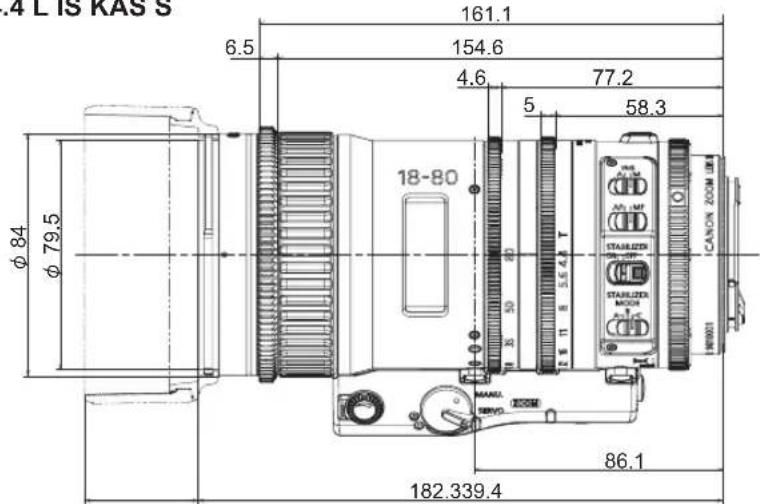
(Unit : mm)
ギア仕様
natural_image
Technical line drawing of a mechanical component with a circular housing and mounting brackets (no text or symbols)グリップ
アタッチメント
natural_image
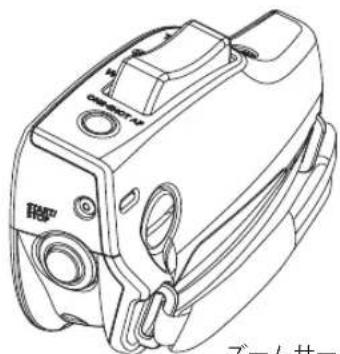
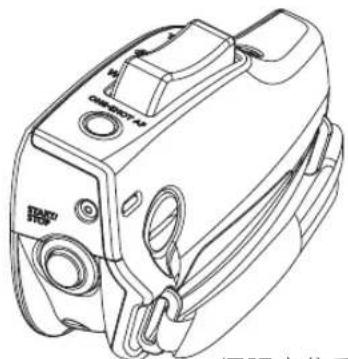
Line drawing of a mechanical device with no visible text or symbolsズームサーボグリップ本体
2. 各部の名称
The English version is the operation manual for countries other than Japan.
This operation manual explains the handling of three following products.
Refer to the operation manual of the product which you purchased.
Digital Cinema Lens CN-E18-80mm T4.4 L IS KAS S
CN-E70-200mm T4.4 L IS KAS S
Lens Accessory Zoom Servo Grip ZSG-C10
Only for Digital Cinema Lens CN-E18-80mm T4.4 L IS KAS S, CN-E70-200mm T4.4 L IS KAS S
FCC REGULATIONS
This device complies with Part 15 of the FCC Rules. Operation is subject to the following two conditions: (1) This device may not cause harmful interference, and (2) this device must accept any interference received, including interference that may cause undesired operation.
Note: This equipment has been tested and found to comply with the limits for a Class B digital device, pursuant to Part 15 of the FCC Rules. These limits are designed to provide reasonable protection against harmful interference in a residential installation. This equipment generates, uses and can radiate radio frequency energy and, if not installed and used in accordance with the instructions, may cause harmful interference to radio communications. However, there is no guarantee that interference will not occur in a particular installation. If this equipment does cause harmful interference to radio or television reception, which can be determined by turning the equipment off and on, the user is encouraged to try to correct the interference by one or more of the following measures:
-- Reorient or relocate the receiving antenna.
-- Increase the separation between the equipment and receiver.
-- Connect the equipment into an outlet on a circuit different from that to which the receiver is connected.
-- Consult the dealer or an experienced radio/TV technician for help.
Do not make any changes or modifications to the equipment unless otherwise specified in the manual. If such changes or modifications should be made, you could be required to stop operation of the equipment.
Canon U.S.A., Inc.
One Canon Park, Melville, NY 11747, USA
Tel No.1-800-OK-CANON(1-800-652-2666)
Only for Digital Cinema Lens CN-E18-80mm T4.4 L IS KAS S, CN-E70-200mm T4.4 L IS KAS S
Canadian Radio Interference Regulations
CAN ICES-3(B)/NMB-3(B)
Only for European Union and EEA (Norway, Iceland, and Liechtenstein)
This symbol indicates that this product is not to be disposed of with your household waste, according to the WEEE Directive (2012/19/EU) and national legislation. This product should be handed over to a designated collection point, e.g., on an authorized one-for-one basis when you buy a new similar product or to an authorized collection site for recycling waste electrical and electronic equipment (EEE). Improper handling of this type of waste could have a possible negative impact on the environment and human health due to potentially hazardous substances that are generally associated with EEE. At the same time, your cooperation in the correct disposal of this product will contribute to the effective usage of natural resources. For more information about where you can drop off your waste equipment for recycling, please contact your local city office, waste authority, approved WEEE scheme or your household waste disposal service.
For more information regarding return and recycling of WEEE products, please visit www.canon-europe.com/weee.
Canon Europa N.V.
Bovenkerkerweg 59, 1185 XB Amstelveen, The Netherlands
Only for the United Kingdom
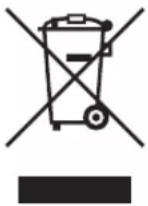
This symbol indicates that this product is not to be disposed of with your household waste, according to the UK Waste Electrical and Electronic Equipment Regulations. This product should be handed over to a designated collection point, e.g., on an authorized one-for-one basis when you buy a new similar product or to an authorized collection site for recycling waste electrical and electronic equipment (EEE). Improper handling of this type of waste could have a possible negative impact on the environment and human health due to potentially hazardous substances that are generally associated with EEE. At the same time, your cooperation in the correct disposal of this product will contribute to the effective usage of natural resources. For more information about where you can drop off your waste equipment for recycling, please contact your local city office, waste authority, approved WEEE scheme or your household waste disposal service.
For more information regarding return and recycling of WEEE products, please visit www.canon-europe.com/sustainability/approach/.
Table of Contents
GENERAL SAFETY INFORMATION......E1
To the customer who purchased Digital Cinema Lens
Digital Cinema Lens CN-E18-80mm T4.4 L IS KAS S CN-E70-200mm T4.4 L IS KAS S
- Standard Product Configuration ....E7
- Names of Parts.....E8
3.How to Mount.....E9
3-1. Mounting the Lens on the Camera....E9
3-2. Detaching the Lens from the Camera ....E11
3-3. Attaching/Detaching the Hood.....E12
3-4. Available Accessories....E13
3-5. Dimensions of Parts .....E14
4.Turning on the Power ......E16
- Back Focus Adjustment ...... E17
6.Zoom Operation.....E18
6-1. Manual/Servo Zoom Operation ....E 18
6-2. Operation by Zoom Demand....E19
7.Focus Operation....E20
7-1. Manual/Auto Focus Operation.....E20
7-2. Operation by Focus Demand ......E21
8.Manual/Auto Iris Operation....E22 - Operating IS (Image Stabilizer) Function.....E23
10.Specifications.....E24
Reference Information......E26
Appendix
DEPTH-OF-FIELD Table ...... apx. 1
External view ...... apx. 13
Index ......apx. 17
To the customer who purchased Lens Accessory Zoom Servo Grip
Lens Accessory Zoom Servo Grip ZSG-C10
- Standard Product Configuration ......E29
- Names of Parts.....E30
- Attaching Zoom Servo Grip to the Lens .....E31
- Zoom Operation.....E32
- Other Functions....E33
Appendix
DEPTH-OF-FIELD Table ...... apx. 1
External view....apx. 13
Index ...... apx. 17
GENERAL SAFETY INFORMATION
The safety warnings and cautions provided on the product or in this operation manual must be observed. Failure to observe these warnings and cautions provided to guard against hazards may result in injury or accident. Read this manual carefully to familiarize yourself with its contents and to ensure proper operation of this product.
Also, keep this manual in a safe place where it can easily be referenced whenever required.
This manual uses the following symbols and terms in the warning and caution notices for preventing accidents and protecting the safety of the customer and others.

WARNING
This indicates a potentially hazardous situation which, if not heeded, may result in death or serious injury to you or others. Be sure to heed all warning notices to ensure safe operation at all times.

CAUTION
This indicates a potentially hazardous situation which, if not heeded, may result in a minor injury to you or others, or damage to property. Be sure to heed all caution notices to ensure safe operation at all times.
NOTE
This indicates cautions and recommendations for operation. It contains information which, if not heeded, may result in this product failing to function properly. These notices also contain useful information for operation.
HANDLING THE PRODUCT

WARNING
- Do not get this product wet or allow liquid inside. If water gets inside, stop using the product immediately. Continuing to use the product under this condition may cause a fire or electric shocks.
- Do not stare at the sun or other bright objects through the lens. It may injure your eyes.
- Be sure to hold the connector when disconnecting the cable. Pulling on the cable may sever or damage it and pose a risk of a fire or electric shocks from a short circuit.

CAUTION
- Be careful not to drop the product when carrying it. Dropping the product may cause injury.
- Ensure that all mountings are securely tightened. If a mounting becomes loose, parts may fall off and cause injury.
- Inspect mountings regularly (about every six months to one year) to ensure they are securely tightened. If a mounting becomes loose, parts may fall off and cause injury.
- When this product is used under a blazing sun, the inside of the unit may be heated to high temperature. When it is expected that the unit is exposed to elevated temperature, take measures against heat as appropriate on the customer's side.
NOTE
- Striking or dropping the lens may cause the malfunction of the product.
- This product is not waterproof. Take measures to avoid direct contact with rain, snow, or moisture. Otherwise it may cause the malfunction of the product.
- In dusty environments, cover the lens mount when using, attaching or removing the lens. If dust enters inside, it may cause the malfunction of the product.
- Take measures to avoid sudden changes in temperature where the lens is used, which may prevent operation temporarily if condensation forms in the lens.
- Before use in particular environments, such as places where chemical products are used, contact your Canon sales representative or dealer.
DEALING WITH ABNORMALITIES

WARNING
If any of the following situations occurs, immediately disconnect the cable and contact your Canon sales representative or dealer.
- Smoke, fumes, or unusual noises
- Entry of foreign objects (such as liquid or metal objects) inside the product
MAINTENANCE AND INSPECTION

WARNING
Be sure to disconnect the cable and remove the lens from the camera before cleaning outside of the lens. Do not use benzene, thinner, or other flammable substances to clean the product. Otherwise it may cause a fire or electric shocks.
NOTE
- Clean off any dust on the lens surface using a lens blower or a soft lens brush. In case of getting fingerprints or stains on the lens, use a clean cotton cloth moistened with commercial lens cleaning fluid, or use lens cleaning paper. Gently wipe in a spiral pattern from the center of the lens. Be careful not to rub dust across the lens, which may scratch the lens surface.
- Routine inspection about once a year is recommended, depending on the conditions and environment of use. Request overhaul, if needed.
STORAGE

WARNING
Always attach the lens cap, hood cap, dust cap or covers accompanied with the product when purchased before storage. Storing the lens without the caps or covers attached poses a risk of fire if the lens concentrate light in direct sunlight.
NOTE
Immediately wipe off any moisture on the lens from misty or foggy environments, using a dry cloth. Seal the lens in a plastic bag with a desiccant (preferably new) to prevent moisture inside. Otherwise it may cause the mold or the malfunction of the product.
TO THE CUSTOMER
- Canon shall bear no responsibility for damage resulting from improper operation of this product by the customer.
- Canon shall make no guarantees about its marketability and suitability for the customer's purpose on the product quality, functions, or operation manual. Moreover, Canon shall bear no responsibility for any damage, direct or incidental, that results from usage for the customer's purpose.
- The product specifications, configuration, and appearance are subject to change without prior notice.
- For further information on repairs, maintenance, or adjustments not mentioned in this operation manual, contact your Canon sales representative or dealer.
- Note that Canon may be unable to undertake servicing or repair of a product if it is modified without consulting Canon or your Canon sales representative.
All rights reserved.
No part of this operation manual may be reproduced or copied in any form or by any means without the written permission of Canon Inc.
Digital Cinema Lens
CN-E18-80mm T4.4 L IS
CN-E70-200mm T4.4 L I
Forward
Thank you for purchasing Canon products.
This operation manual is applicable for the following models.
CN-E18-80mm T4.4 L IS KAS S CN-E70-200mm T4.4 L IS KAS S
This lens is for use with Canon digital cameras*.
* Canon digital cameras: In this documentation, Canon digital cinema cameras and interchangeable lens digital cameras that this lens can be attached to are referred to as "Canon digital cameras."
Depending on the camera used, accessories such as a mount adapter may be required. Some functions may be limited depending on the camera used. For details on the cameras that can be attached to this product, contact your Canon deal
Always use the latest version of the firmware for this lens and the camera. For the availability of the latest version of the firmware and how to update it, refer to Canon's website.
1. Standard Product Configuration
Lens body....1
Lens cap....1
Rear lens cap ....1
Hood....1
Lens case....1
Operation manual
Make sure all the following items are included in the packing box. If you find any item missing, please contact your Canon dealer.
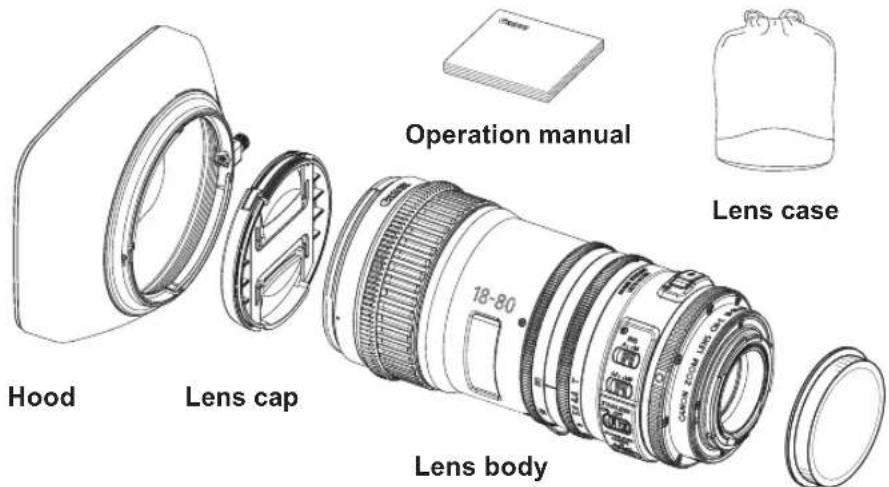
- The illustrations in this manual show standard CN-E18-80mm T4.4 L IS KAS S. Actual shapes may be slightly different depending on models and specifications.
• Accessories other than those mentioned above may be required depending on the specifications of your lens. For details, contact your Canon dealer.
- CN-E70-200mm T 4.4 L IS KAS S can be used with Canon extenders.
Rear lens cap
2. Names of Parts
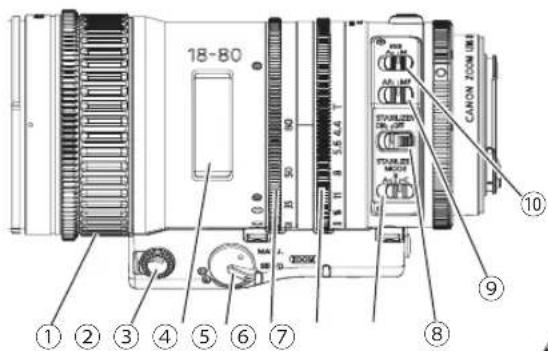
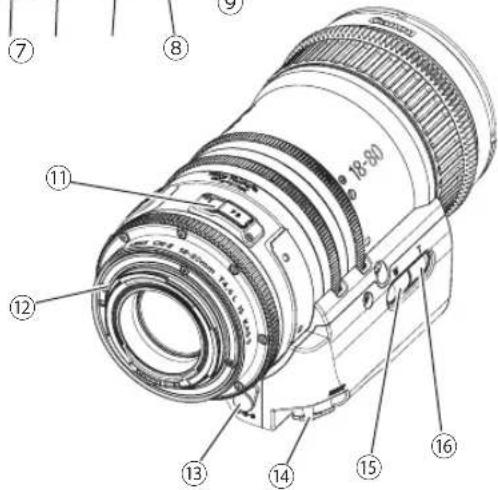
① Focus Ring
② Zoom Speed Adjusting Volume
③ Focus Index Window
④ Zoom Operation Change-over Knob
⑤ Zoom Ring
⑥ Iris Ring
⑦ IS (Image Stabilizer) Mode Switch
⑧ IS (Image Stabilizer) Switch
⑨ Auto/Manual Focus Change-over Switch
⑩ Iris Auto/Manual Change-over Switch
⑪ F.B. Adjuster
⑫ EF Mount
⑬ External Power Input
⑭ Zoom/Focus Remote Connector
⑮ Zoom Operation Switch (Wide Angle Side)
⑯ Zoom Operation Switch (Telephoto Side)
3. How to Mount
For the details of mounting the lens on the camera or detaching the lens from the camera, refer to the operation manual of the camera.
3-1. Mounting the Lens on the Camera
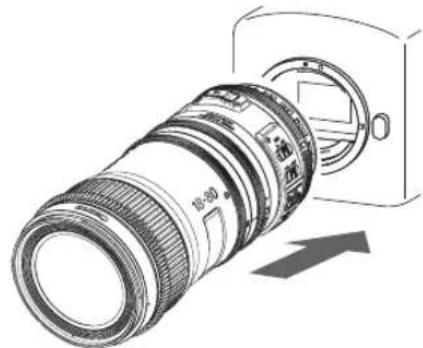
natural_image
Diagram of a digital camera lens assembly with an arrow indicating direction (no text or symbols present)- Remove the rear lens cap from the lens.
- Mount the lens on the camera.
NOTE
- Depending on the camera used, accessories such as a mount adapter may be required. For details, refer to Canon's website.
- The following Canon extenders can be used with CN-E70-200mm T4.4 L IS KAS S.
Extender EF1.4 × III、EF2 × III - When attaching an extender or mount adapter, follow the instructions in the extender or mount adapter's operation manual to attach it to the lens or camera.
When an extender or mount adapter is attached
(An extender can only be attached to the CN-E70-200mm T4.4 L IS KAS S lens.)
NOTE
- For stable shooting, using the Canon lens holder LH-CS01 attached to the lens and fixed to the rig (rod) is recommended.
- LH-CS01 and the hexagon socket head wrench are included in the packing box with Zoom Servo Grip ZSG-C10.
• For purchasing LH-CS01 (the hexagon socket head wrench included) separately, contact your Canon dealer.
Attaching the lens holder to the lens
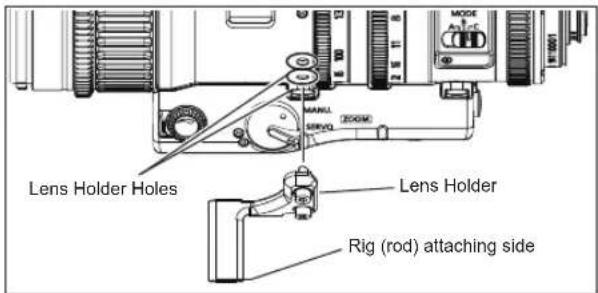
- After attaching an extender or mount adapter, use the hexagon socket wrench to attach the lens holder to the lens holder attachment hole on the lens body.
- Attach the lens to the camera. Refer to the operation manual of the camera for the details of attaching the lens to the camera.
- Attach the rig (rod) available in the market to the lens holder. For the procedure to attach the rig (rod) and the lens holder, refer to the operation manual of the rig (rod).
3-2. Detachting the Lens from the Camera
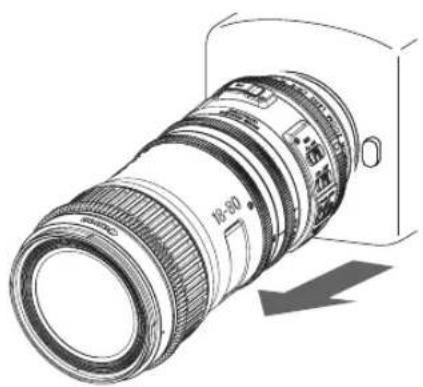
natural_image
Technical illustration of a camera lens with visible aperture and adjustment arrow (no text or symbols)-
Detach the lens from the camera.
-
Attach the rear lens cap to the detached lens.
NOTE
• To detach the lens, reverse the attachment procedure.
• After detaching the lens, place the lens with the rear end up to prevent the lens surface and contacts from getting scratched.
- If the contacts get soiled, scratched, or have fingerprints on them, corrosion or faulty connections can result. The camera and lens may not operate properly.
- If the contacts get soiled or have fingerprints on them, clean them with a soft cloth.
3-3. Attaching/Detaching the Hood
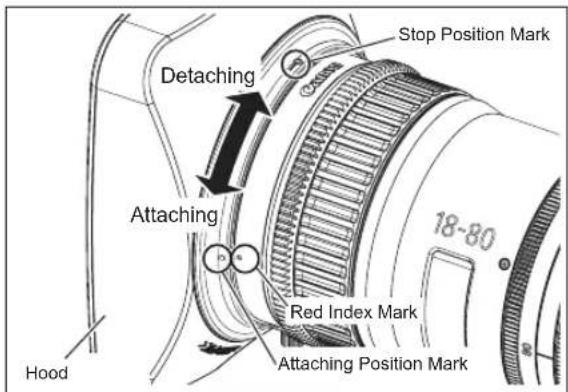
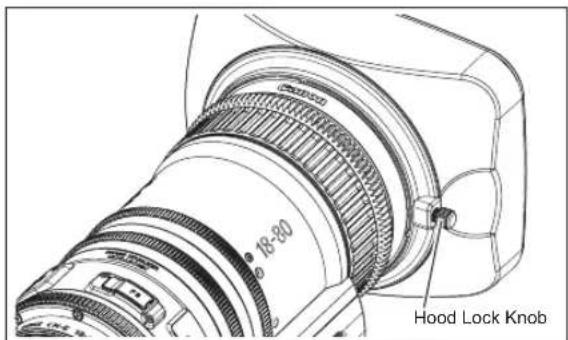
Attaching the hood
- Align the red attaching position mark on the hood and the red index mark on the lens.
- Turn the hood until the red index mark on the lens and the stop position mark on the hood are aligned. Then tighten the hood lock knob.
Detaching the hood
- Loosen the hood lock knob.
- Turn the hood in the detaching direction.
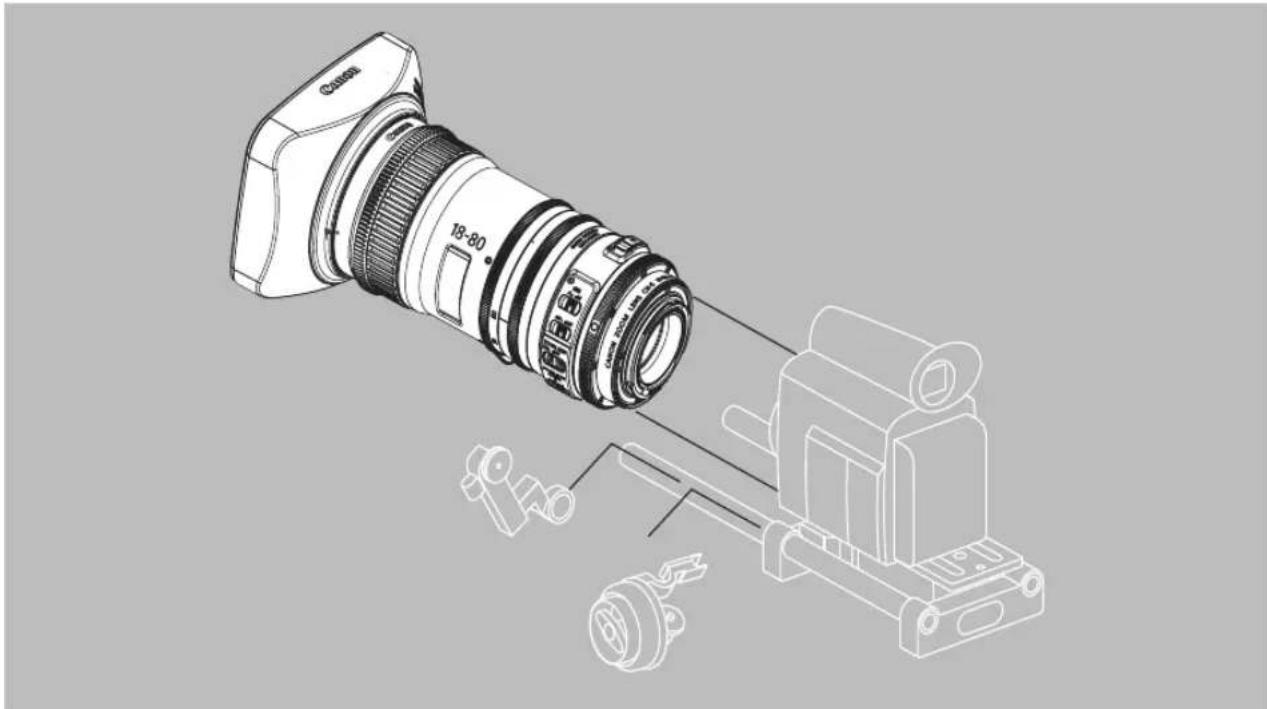
3-4. Available Accessories
A variety of accessories are available by using the cinema lens adaptor with 15 in rod diameter.
natural_image
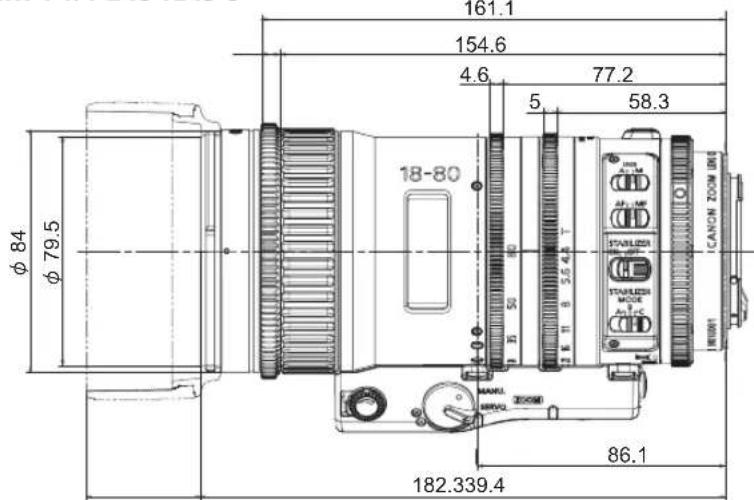
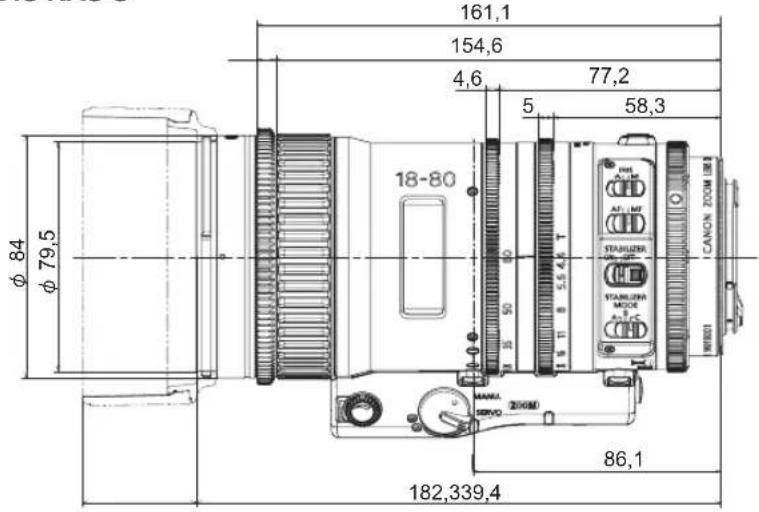
Technical line drawing of a DSLR camera with attached mechanical component (no text or symbols)3-5. Dimensions of Parts
CN-E18-80mm T4.4 L IS KAS S
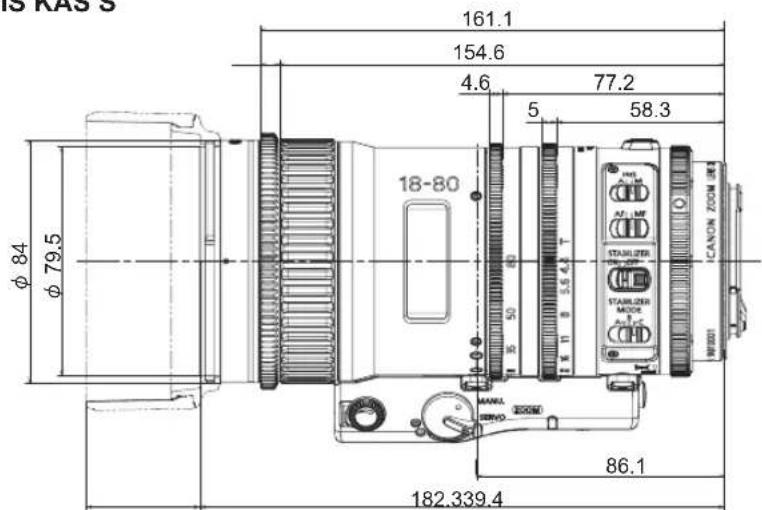
(Unit : mm)
Spur gear specifications
| Focus drive gear Zoom drive gear Iris drive gear | |||
| Number of teeth | 109 162 162 | ||
| Module | 0.8 0.5 0.5 | ||
| P.C.D. | 87.2 | 81.0 | 81.0 |
| Angular rotation | Endless (Operation range 130° ) | 90° 90° | |
CN-E70-200mm T4.4 L IS KAS S
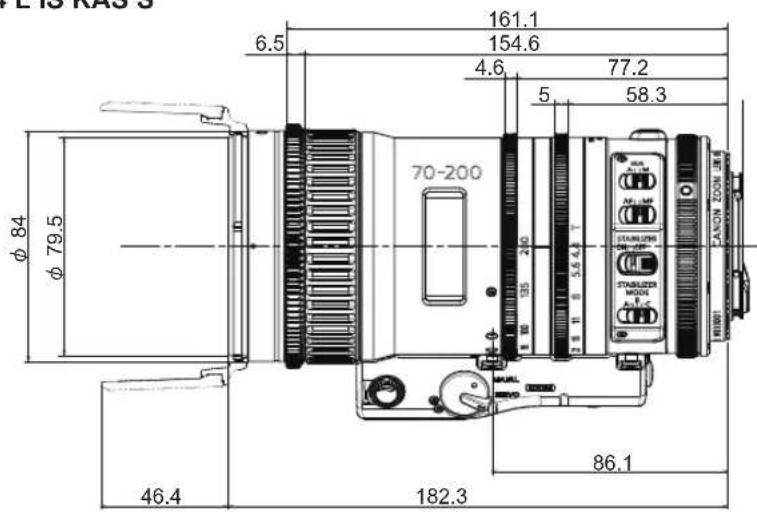
(Unit : mm)
Spur gear specifications
| Focus drive gear Zoom drive gear Iris drive gear | |||
| Number of teeth | 109 162 162 | ||
| Module | 0.8 0.5 0.5 | ||
| P.C.D. | 87.2 | 81.0 | 81.0 |
| Angular rotation | Endless (Operation range 130^ ) | 90^ 90^ | |
4. Turning on the Power
Turn on the camera, and the power of the lens will be supplied.
For the details of camera operation, refer to the operation manual of the camera.
- Power supply from the camera can be reduced by supplying the power to the external power supply input of the lens.
- When the power is supplied from the external power supply input, power supply from the camera is also required.
NOTE
If a battery or adapter is used, the output voltage may be higher than the rated voltage depending on the manufacturers and therefore the above voltages must be observed strictly. If a voltage outside the normal operation range is used, the lens may be damaged.
Rated voltage : DC 12V
Normal operation range : DC 10V to 17V
Complied plug : EIAJ RC5320A TYPE4
And the external power supply input has the positive and negative polarities. Make sure to connect the power cable to the correct polarity when connecting the batteries or the adaptors. Connecting the cable to the incorrect polarity may cause the damage to the product.
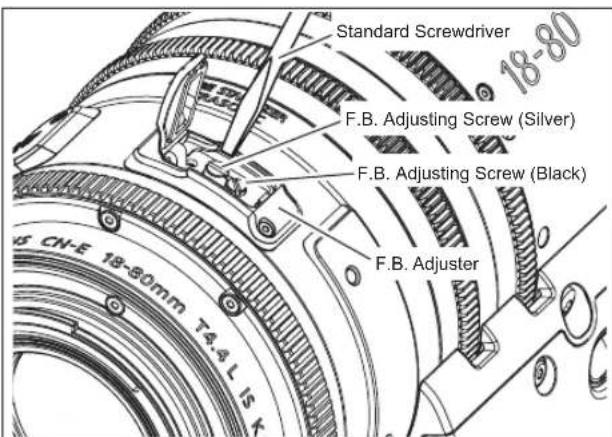
5. Back Focus Adjustment
If the relation between the image plane of the lens and the image plane of the camera is incorrect, the object goes out of focus during the zoom operation. Follow the procedures below to adjust the back focus of the lens.
NOTE
When attaching an extender or mount adapter, be sure to adjust the flange back after it is attached.
(An extender can only be attached to the CN-E70-200mm T4.4 L IS KAS S lens.)
- Open the rubber cap of F.B. adjuster and loosen the F.B. adjuster screw(black) using the standard screwdriver.
- Select an object at an appropriate distance (approx. 2 to 5m). Use any object with sharp contrast to facilitate the adjustment work.
- Set the iris fully open.
- Set the lens to the telephoto angle by turning the zoom ring.
- Bring the object into focus by turning the focus ring.
- Set the lens to the widest angle by turning the zoom ring.
- Turn the F.B. adjusting screw (silver) clockwise or counterclockwise to bring the object into focus.
- Repeat steps 4 to 7 a few times until the object is brought into focus both at hte widest end and the telephoto end.
- After the back focus adjustment is completed, tighten the F.B. adjuster screw. Then close the rubber cap.
6. Zoom Operation
6-1. Manual/Servo Zoom Operation
Zoom operation can be performed by the zoom ring or the zoom operation switch of the lens.
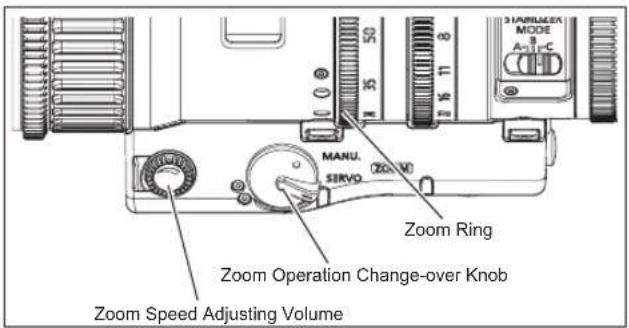
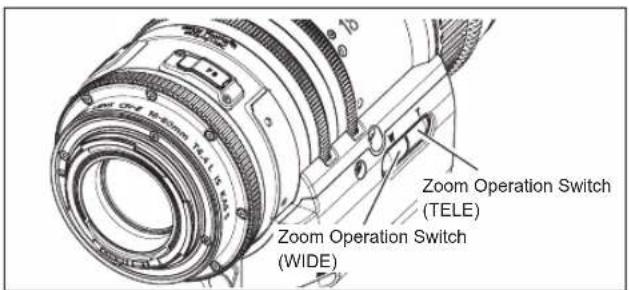
Manual Zoom Operation
- Set the zoom operation change-over knob of the lens to MANU. position.
- Turn the zoom ring to perform zoom operation.
Servo Zoom Operation
- Set the zoom operation change-over knob of the lens to SERVO position.
- Press the zoom operation switch (WIDE/TELE) to start zoom operation.
Zoom speed can be adjusted by the zoom speed adjusting volume.
6-2. Operation by Zoom Demand
Zoom operation by the zoom demand can be performed by connecting the zoom demand to the lens.
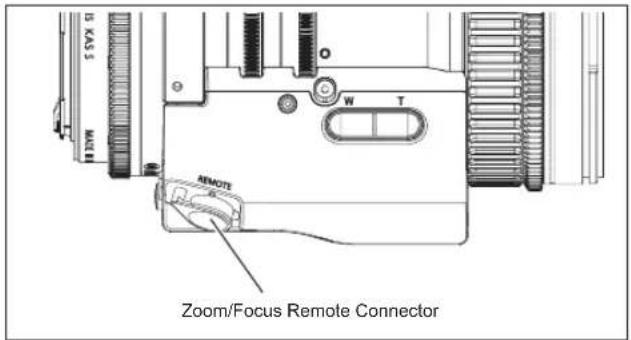
- Set the zoom operation change-over knob of the lens to SERVO position.
- Connect the zoom demand to the zoom/focus remote connector.
- Refer to the operation manual of the zoom demand for the detailed operation.
NOTE
- Canon Zoom Demand ZSD-300D can be connected. Shtl/Memo/RET switches become ineffective. Frame switch functions as one-shot AF (Auto Focus) switch.
- Attach the baseplate, which is available on the market and is suitable to the camera, to the camera securely before mounting the camera onto the tripod when connecting the demand cable to the zoom/focus remote connector. The demand cable might not be connected to the connector if the baseplate is not attached to the camera. For the procedure of the baseplate attachment, refer to the operation manual of the baseplate.
7. Focus Operation
NOTE
Depending on the Canon digital camera used, there may be some limitations on the motorized drive.
7-1. Manual/Auto Focus Operation
When used with a Canon digital camera, autofocus is activated.
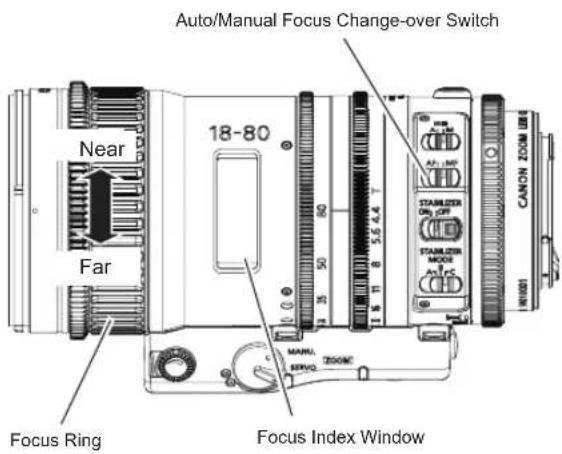
Manual Focus Operation
- Set the auto/manual focus change-over switch of the lens to MF position.
- Turn the focus ring to bring the near or far object into focus.
Auto Focus Operation
- Set the auto/manual focus change-over switch of the lens to AF position. Refer to the operation manual of the camera for the auto focus setting on camera side.
- Focusing becomes in-focus status based on the focus command from the camera.
Focus operation by the focus ring can be performed while auto focus is operated.
7-2. Operation by Focus Demand
Focus operation by the focus demand can be performed by connecting the focus demand to the lens.
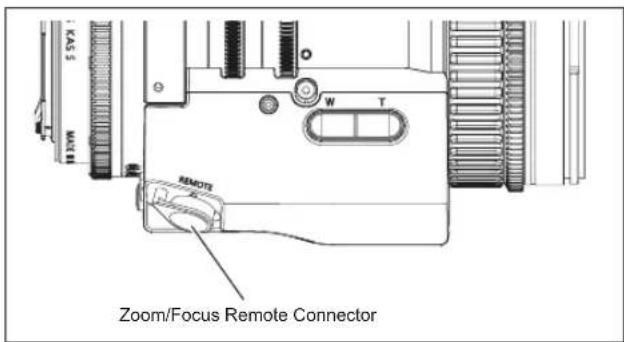
- Set the auto/manual focus change-over switch of the lens to MF position.
- Connect the focus demand to the zoom/focus remote connector.
- Refer to the operation manual of the focus demand for the detailed operation.
NOTE
-
Canon Focus Demand FPD-400D can be connected.
-
FPD-400D: Focus characteristics curve selection switch of the focus demand becomes ineffective.
-
Operation by focus demand can be performed while auto focus is operated unless camera side sends the different command.
-
Attach the baseplate, which is available on the market and is suitable to the camera, to the camera securely before mounting the camera onto the tripod when connecting the demand cable to the zoom/focus remote connector. The demand cable might not be connected to the connector if the baseplate is not attached to the camera. For the procedure of the baseplate attachment, refer to the operation manual of the baseplate.
- Depending on the Canon digital camera used, an external power supply may be required for focus demand operation.
8. Manual/Auto Iris Operation
Iris operation by the iris ring of the lens can be performed.
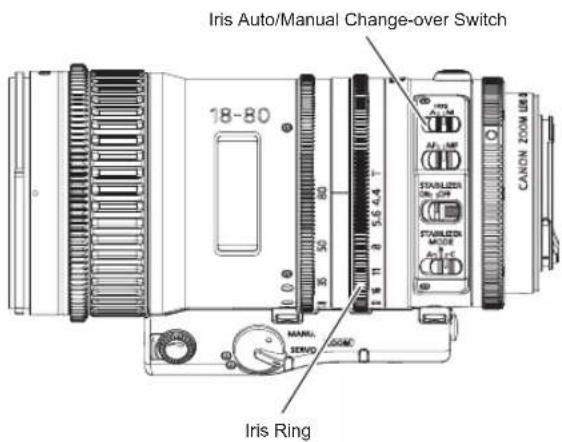
Manual Iris Operation
- Set the iris auto/manual change-over switch of the lens to MANU. position.
- Turn the iris ring of the lens manually to perform iris operation.
Auto Iris Operation
When used with a Canon digital camera, auto iris operation is activated.
- Set the iris auto/manual change-over switch of the lens to AUTO position.
- Iris operation starts based on the command from the camera.
When switching from auto iris operation to manual iris operation, iris operation is performed based on the value of the iris ring.
9. Operating IS (Image Stabilizer) Function
Shaking at the time of shooting can be compensated by setting the IS (Image Stabilizer) function.
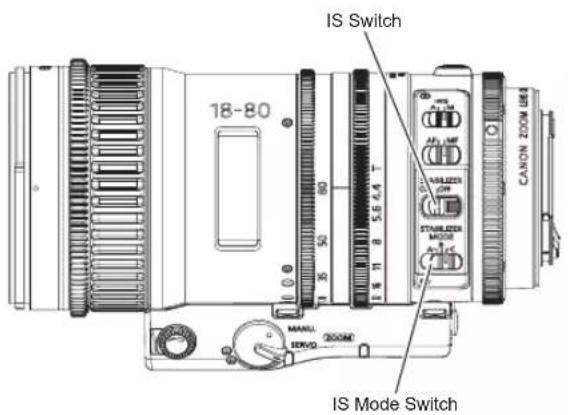
- Set the IS switch to ON position.
-
Select the mode which is suitable for your shooting environment by switching IS mode switch. One of 3 (A/B/C) modes can be assigned.
-
Mode A: Standard mode recommended for the shooting with the hand-carried lenses
- Mode B: Maximum image stabilization mode recommended for the shooting with the hand-carried lenses
IS performance of this mode is higher than that of Mode A. Image fluctuation after panning operation is large due to higher IS performance.
- Mode C: Recommended mode for the shooting with the lenses on the tripod
10. Specifications
| CN-E18-80mm T4.4 L IS KAS S | ||
| Lens Mount Canon EF | ||
| Focal Length | 18-80 mm | |
| Maximum T-stop | 1 : 4.4 (f =18 - 80 mm) | |
| Iris Blades | 9 | |
| Image Circle | 28.2 mm | 29.6 mm |
| Coverage (H x V ) 24.6 x 13.8 mm | 26.2 x 13.8 mm | |
| Aspect ratio | 1.78 : 1 1.9 : 1 | |
| Widest end angular field of view ( H x V )Telephoto angular field of view ( H x V ) | 68.7° x 41.9° at 18mm17.5° x 9.9° at 80mm | 72.1° x 41.9° at 18mm18.6° x 9.9° at 80mm |
| Minimum Object Distance (M.O.D.) | 0.5m / 1.7ft (from the image sensor) | |
| Object Dimensions at M.O.D. | 43.4 x 24.3cm at 18mm9.5 x 5.3cm at 80mm | 46.2 x 24.3cm at 18mm10.1 x 5.3cm at 80mm |
| Focus Angular Rotation | Endless (Operation range 130°) | |
| Focus Gear Module 0.8 | ||
| Zoom Angular Rotation 90° | ||
| Zoom Gear Module 0.5 | ||
| Iris Angular Rotation 90 | ° | |
| Iris Gear Module 0.5 | ||
| Front Diameter | 84mm | |
| Filter Diameter | 77mm | |
| Length | 182.3mm | |
| Weight | Approx. 1.2kg | |
CN-E18-80mm T 4.4 L IS KAS S cannot be used with the extenders.
| CN-E70-200mm T4.4 L IS KAS S | ||
| Lens Mount Canon EF | ||
| Focal Length | 70-200 mm | |
| Maximum T-stop | 1 : 4.4 (f =70 - 200 mm) | |
| Iris Blades | 9 | |
| Image Circle | 28.2 mm | 29.6 mm |
| Coverage (H x V ) 24.6 x 13.8 mm | 26.2 x 13.8 mm | |
| Aspect ratio | 1.78 : 1 1.9 : 1 | |
| Widest end angular field of view ( H x V ) | 19.9° x 11.3° at 70mm | 21.2° x 11.3° at 70mm |
| Telephoto angular field of view ( H x V ) | 7.0° x 4.0° at 200mm | 7.5° x 4.0° at 200mm |
| Minimum Object Distance (M.O.D.) | 1.2m / 4ft (from the image sensor) | |
| Object Dimensions at M.O.D. | 31.3 x 17.5cm at 70mm | 33.3 x 17.5cm at 70mm |
| 11.5 x 6.4cm at 200mm | 12.2 x 6.4cm at 200mm | |
| Focus Angular Rotation | Endless (Operation range 130°) | |
| Focus Gear Module 0.8 | ||
| Zoom Angular Rotation 90° | ||
| Zoom Gear Module 0.5 | ||
| Iris Angular Rotation 90 | ° | |
| Iris Gear Module 0.5 | ||
| Front Diameter | 84mm | |
| Filter Diameter | 77mm | |
| Length | 182.3mm | |
| Weight | Approx. 1.25kg | |
Reference Information
This lens is a digital cinema lens for shooting movies.
- EF Cinema lenses were developed primarily for movie production, and have a color balance typical for movies. This means that the color reproduction is warmer (shifted toward yellow in the CCI coordinate system) than that of EF lenses which are basically used to shoot still images. Therefore, when using both types of lens together, adjust the color balance (redo the white balance etc.) as necessary.
- In general, the depth of field becomes shallow and the focusing range becomes extremely narrow near the widest aperture and when shooting a subject at close range. In addition, this tendency increases for lenses with longer focal lengths. When shooting images, carefully check the focusing condition using the zoom mode of the finder or other means, and shoot a sufficient number of test images before performing focus operations.
Lens Accessory
Zoom Servo Grip
ZSG-C10
Forward
Thank you for purchasing Canon products.
This operation manual is applicable for the following model.
ZSG-C10
1. Standard Product Configuration
Zoom servo grip body .....1
Grip attachment....1
Lens holder ....1
Grip case ....1
Hexagon socket head wrench....1
Operation Manual
Make sure all the following items are included in the packing box. If you find any item missing, please contact your Canon dealer.
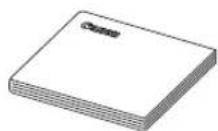
Operation manual
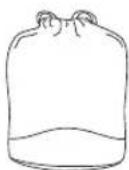
Grip case
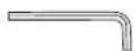
Hexagon socket
head wrench
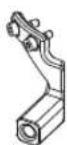
Lens holder
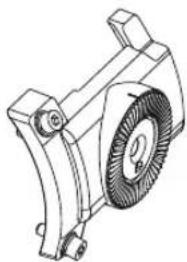
natural_image
Technical line drawing of a mechanical component with no visible text or symbolsGrip attachment
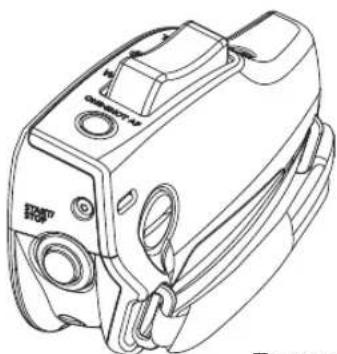
natural_image
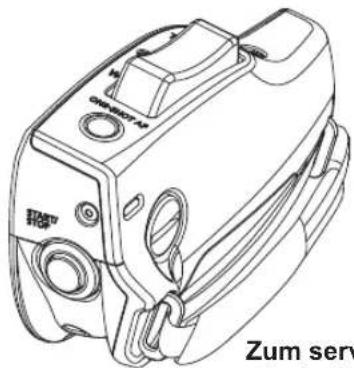
Line drawing of a mechanical device with no visible text or symbolsZoom servo grip body
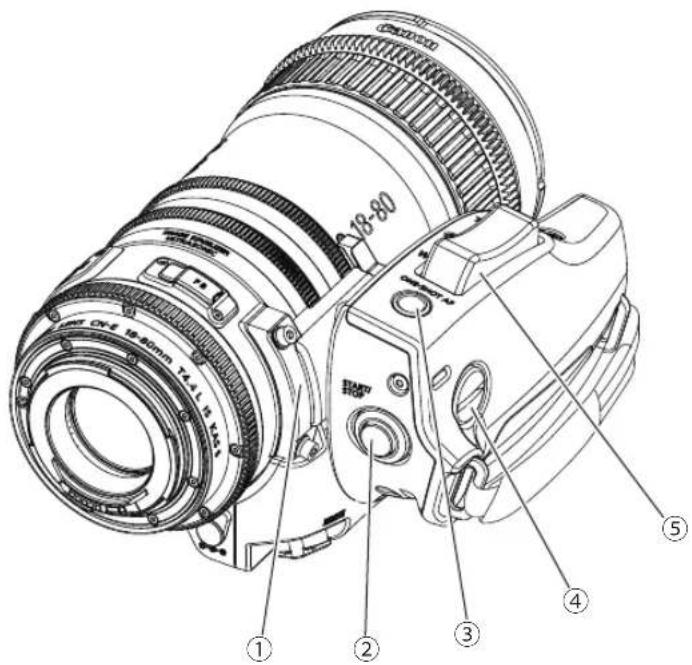
2. Names of Parts
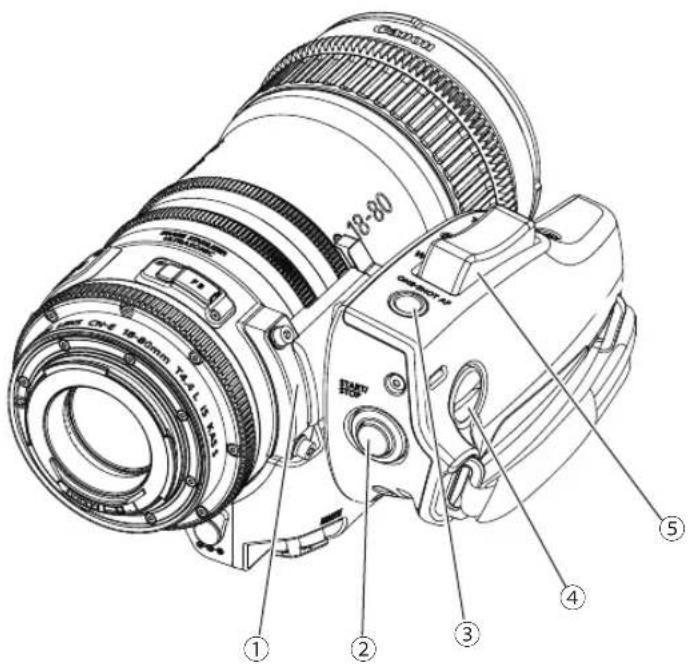
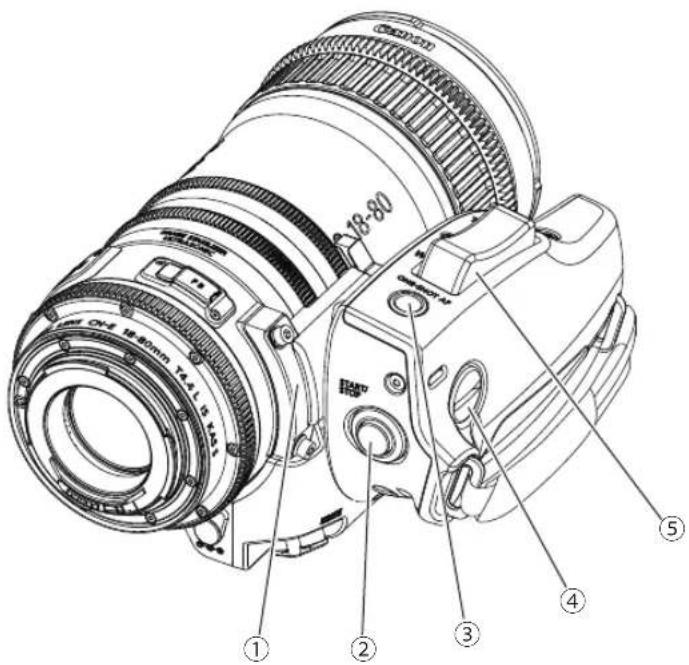
① Grip Attachment
② Start/Stop Switch
③ One-shot AF (Auto Focus) Switch
④ Slotted-head Screw for Attaching Grip
⑤ Zoom Operation Switch
3. Attaching Zoom Servo Grip to the Lens
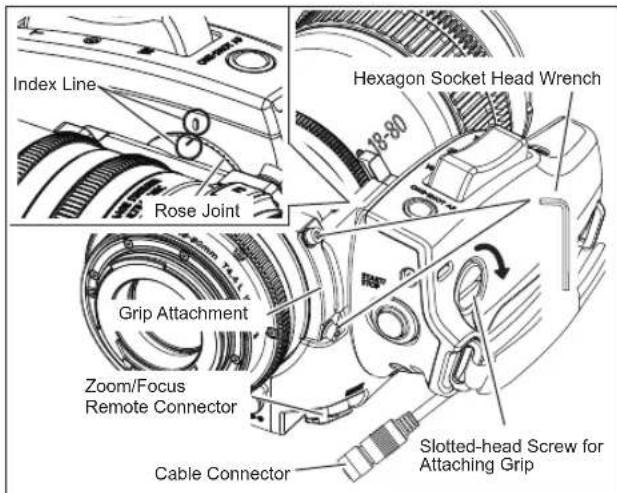
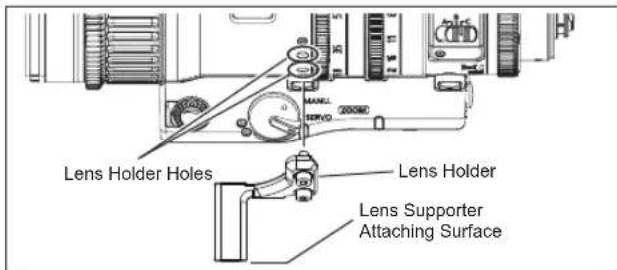
-
Attach the grip attachment to the lens using the hexagon socket head wrench provided with the zoom servo grip
-
Attach the lens holder to the lens holder holes of the lens using the hexagon socket head wrench.
-
Attach the lens to the camera. Refer to the operation manual of the camera for the details of attaching the lens to the camera.
-
Align the index line of the grip attachment and the index line of the zoom servo grip. Then mate the rose joint of the grip attachment with the rose joint of the zoom servo grip. Tighten the slotted-head screw for attaching grip to fix the grip to the grip attachment. The attaching angle of the zoom servo grip can be adjusted by changing the mating position of the rose joints.
-
Attach the lens supporter available on the market to the lens holder. For the procedure of attaching the lens supporter to the lens holder, refer to the operation manual of the lens supporter.
-
Connect the cable connector of the zoom servo grip to the zoom/focus remote connector of the lens.
NOTE
When attaching the zoom servo grip to the lens, mount the lens onto the lens supporter. Otherwise the lens may be damaged.
4. Zoom Operation
Zoom operation can be performed by the zoom operation switch.
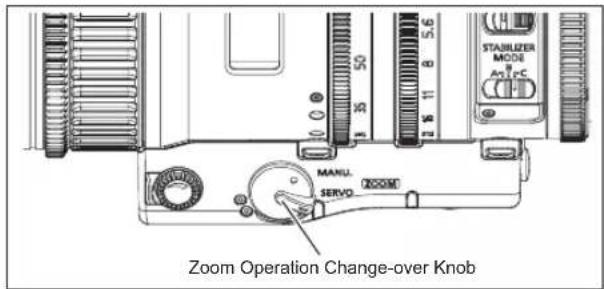
- Set the zoom operation change-over knob of the lens to SERVO position.
- The zoom can be operated by pressing the zoom operation switch. The zoom speed changes depending on how deep the switch is pressed. The deeper the switch is pressed, the faster the zoom speed becomes.
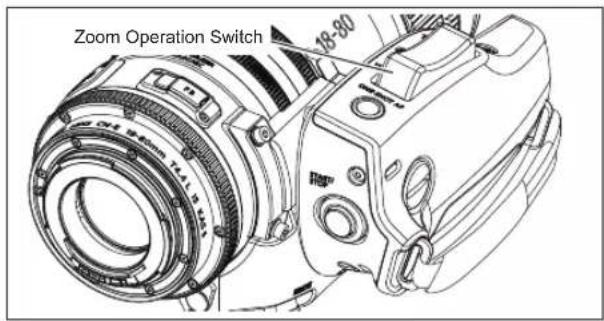
Zoom speed adjusting volume becomes ineffective while zoom operation switch is operated.
5. Other Functions
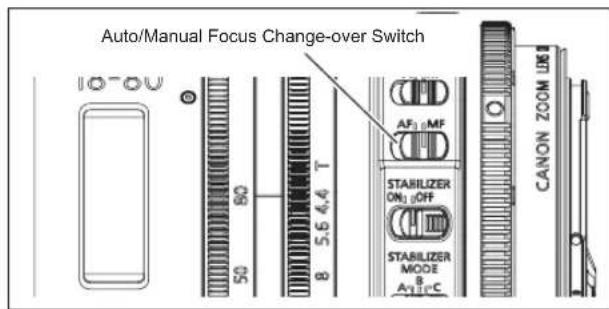
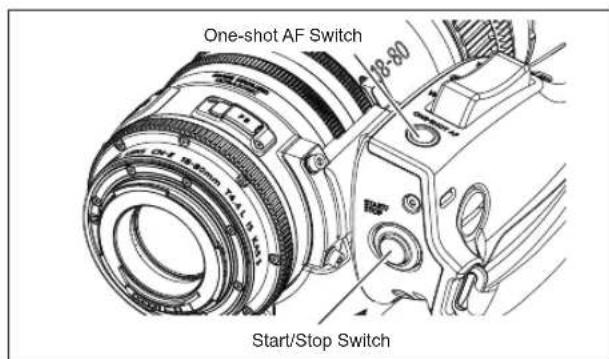
One-shot AF (Auto Focus) Switch
When used with a Canon digital camera, the One-shot AF (Auto Focus) switch becomes effective. Auto focus operation is activated every time this switch is pressed.
- Set the auto focus mode of the camera to one-shot mode. Refer to the operation manual of the camera for the setting on the camera side.
- Set the auto/manual focus change-over switch of the lens to AF position.
- One-shot AF operation is activated by pressing one-shot AF switch.
Start/Stop Switch
When used with a Canon digital camera, the Start/Stop switch becomes effective. The start and stop of recording on the camera side is switched every time pressing this switch.
memo
中文中文
natural_image
Technical line drawing of a camera lens assembly with an arrow indicating direction (no text or symbols present)natural_image
Technical line drawing of a camera lens with no visible text or symbols安装遮光罩
natural_image
Technical line drawing of a DSLR camera with lens assembly and external components (no text or symbols)3- 5. 各部位尺寸
CN-E18-80mm T4.4 L IS KAS S
(单位: mm)
直齿轮规格直齿轮规格
natural_image
Technical line drawing of a mechanical component with a central gear-like structure (no text or symbols)手柄配件
natural_image
Line drawing of a camera device with no visible text or symbols伺服变焦手柄本体
2. 各部位名称
30-2, Shimomaruko 3-chome, Ohta-ku, Tokyo 146-8501, Japan
natural_image
Diagram of a camera lens assembly with an arrow indicating direction (no text or symbols present)natural_image
Technical illustration of a camera lens assembly with no visible text or symbolsnatural_image
Technical line drawing of a DSLR camera with attached mechanical components (no text or symbols)3-5. Parça Ölçüleri
CN-E18-80mm T4.4 L IS KAS S
(Birim : mm)
natural_image
Technical line drawing of a mechanical component with a circular fan-like feature (no text or symbols)Tutucu eklentisi
natural_image
Line drawing of a camera module with no visible text or symbols30-2 Shimomaruko 3-chome, Ohta-ku, Tokyo 146-8501, Japan
ООО "Канон Ру"
natural_image
Technical line drawing of a camera lens assembly with no visible text or symbolsnatural_image
Technical line drawing of a camera lens assembly with no visible text or symbols30-2, Shimomaruko 3-chome, Ohta-ku, Tokyo 146-8501, Japan
ТУТЫНУШЫГА АРНАЛГАН АКПАРАТ
natural_image
Diagram of a camera lens assembly with an arrow indicating direction (no text or symbols present)natural_image
Technical line drawing of a camera lens assembly with no visible text or symbolsBack Focus (F.B.) E17
Focus.....E20,E21,E33
Hood....E 12
Image Stabilization E23
Iris....E 22
One-Shot AF....E33
Start/Stop....E33
Zoom E18,E19,E32
Dizin
Please contact your dealer or the contacts below, if you have questions on the products.
https://canon.ca/en/Contact-Support/Pro-
Photo-Video
Tel: +1 905 863 8321
MEXICO
Canon Mexicana,S.de R.L.de C.V.
SOUTH & SOUTHEAST ASIA
Canon Singapore Pte. Ltd.
http://www.canon-asia.com/bctv
TAIWAN
Canon Marketing (Taiwan) Co., Ltd.
http://www.canon.com.tw/index.aspx
EUROPE, MIDDLE EAST, AFRICA
Canon Europe Ltd.
http://www.canon-europe.com
Tel:+44(0)20-8588-8000
OCEANIA
AUSTRALIA
Canon Australia Pty. Ltd.
http://www.canon.com.au
NEW ZEALAND
Canon New Zealand Ltd.
http://www.canon.co.nz
Canon
キャノン株式会社
30-2, Shimomaruko 3-chome, Ohta-ku, Tokyo 146-8501, Japan
修订:2021.6.1
Pub No. BT1-B001-E ©2021.06 CANON INC.
原产地:日本
- 3-5. アクセサリー取付け寸法
- 各部の名称
- FCC REGULATIONS
- Table of Contents
- To the customer who purchased Digital Cinema Lens
- Digital Cinema Lens CN-E18-80mm T4.4 L IS KAS S CN-E70-200mm T4.4 L IS KAS S
- Appendix
- To the customer who purchased Lens Accessory Zoom Servo Grip
- Lens Accessory Zoom Servo Grip ZSG-C10
- GENERAL SAFETY INFORMATION
- WARNING
- CAUTION
- NOTE
- HANDLING THE PRODUCT
- DEALING WITH ABNORMALITIES
- MAINTENANCE AND INSPECTION
- STORAGE
- TO THE CUSTOMER
- Forward
- Standard Product Configuration
- Names of Parts
- How to Mount
- 3-1. Mounting the Lens on the Camera
- When an extender or mount adapter is attached
- 3-2. Detachting the Lens from the Camera
- 3-3. Attaching/Detaching the Hood
- Attaching the hood
- Detaching the hood
- 3-4. Available Accessories
- 3-5. Dimensions of Parts
- Turning on the Power
- Back Focus Adjustment
- Zoom Operation
- 6-1. Manual/Servo Zoom Operation
- Manual Zoom Operation
- Servo Zoom Operation
- 6-2. Operation by Zoom Demand
- Focus Operation
- 7-1. Manual/Auto Focus Operation
- Manual Focus Operation
- Auto Focus Operation
- 7-2. Operation by Focus Demand
- Manual/Auto Iris Operation
- Manual Iris Operation
- Auto Iris Operation
- Operating IS (Image Stabilizer) Function
- Specifications
- Reference Information
- Attaching Zoom Servo Grip to the Lens
- Zoom Operation
- Other Functions
- One-shot AF (Auto Focus) Switch
- Start/Stop Switch
- 中文中文
- 安装遮光罩
- 3- 5. 各部位尺寸
- 各部位名称
- 3-5. Parça Ölçüleri
- ООО "Канон Ру"
- ТУТЫНУШЫГА АРНАЛГАН АКПАРАТ
- Dizin
- MEXICO
- SOUTH & SOUTHEAST ASIA
- TAIWAN
- EUROPE, MIDDLE EAST, AFRICA
- OCEANIA
- AUSTRALIA
- NEW ZEALAND
- Canon
Brand : CANON
Model : CN-E70-200MM T4.4 L IS KAS S
Category : Lens