
2200MP - Vidéo-projecteur DELL - Free user manual and instructions
Find the device manual for free 2200MP DELL in PDF.


| Product Type | DLP Projector |
| Model | 2200MP |
| Brand | Dell |
| Power Supply | 100–240 VAC, 50–60 Hz, 2.7 A |
| Projection Technology | DLP |
| Resolution | Native: 1024 x 768 (XGA) (typical for 2200MP) |
| Brightness | 2200 ANSI lumens (estimated based on model) |
| Contrast Ratio | 2000:1 (typical) |
| Zoom | Manual zoom with zoom ring |
| Focus | Manual focus with focus ring |
| Input Connectors | Composite video, S-Video, D-sub (RGB/YPrPb), USB, Audio (RCA and mini-pin) |
| Projection Distance | 1.2 m to 12.0 m |
| Screen Size (Diagonal) | 27.9" to 337.5" (70.8 cm to 857.1 cm) |
| Lamp Life | Typical 2000 hours (estimated) |
| Dimensions (approximate) | 325 x 260 x 120 mm (estimated) |
| Weight (approximate) | 3.5 kg (estimated) |
| Included Accessories | Carrying case, batteries, cables, user manual |
| Safety Certifications | FCC Part 15 Class B, CE, UL, cUL, NOM, VCCI Class 2 |
| Operating Environment | Indoor use only, temperature 5-35°C |
| Lamp Type | Replaceable UHP lamp (typical) |
Frequently Asked Questions - 2200MP DELL
User questions about 2200MP DELL
0 question about this device. Answer the ones you know or ask your own.
Ask a new question about this device
Download the instructions for your Vidéo-projecteur in PDF format for free! Find your manual 2200MP - DELL and take your electronic device back in hand. On this page are published all the documents necessary for the use of your device. 2200MP by DELL.
USER MANUAL 2200MP DELL
natural_image
Three types of cable connectors shown in line drawings, no text or symbols presentS-Videokabel (2,0 m) USB-Kabel (1,8 m)
Composite-Videokabel (1,8 m)
natural_image
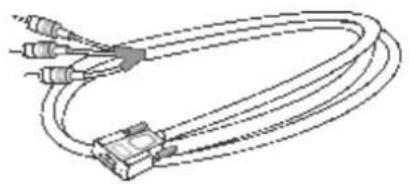
Line drawing of a multi-pin cable with connectors and connectors (no text or symbols)D-sub an YPbPr Kabel (1,8 m)
natural_image
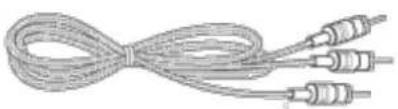
Coiled cable with three connectors (no text or symbols visible)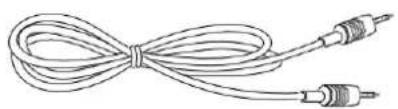
natural_image
Line drawing of a coiled cable with two connectors (no text or symbols)RCA an Audiokabel (1,8 m) Mini-Pin an Mini-Pin-Kabel (1,8 m)
natural_image
Illustration of a CD or DVD disc with three blades, no text or symbols presentBenutzerhandbuch
natural_image
Line drawing of a briefcase with handle and clasp (no text or symbols)Tragetasche
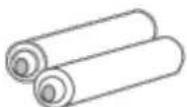
Batterien (2)
Projektor
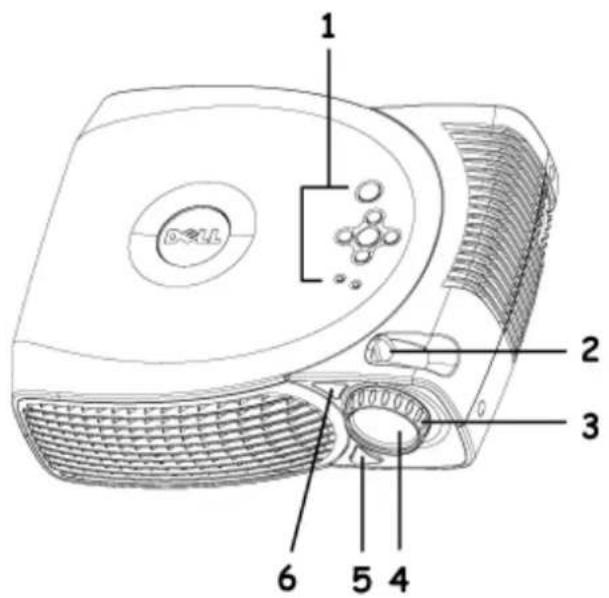
| 1 Zoom-Regler |
| 2 Fokusring |
bar
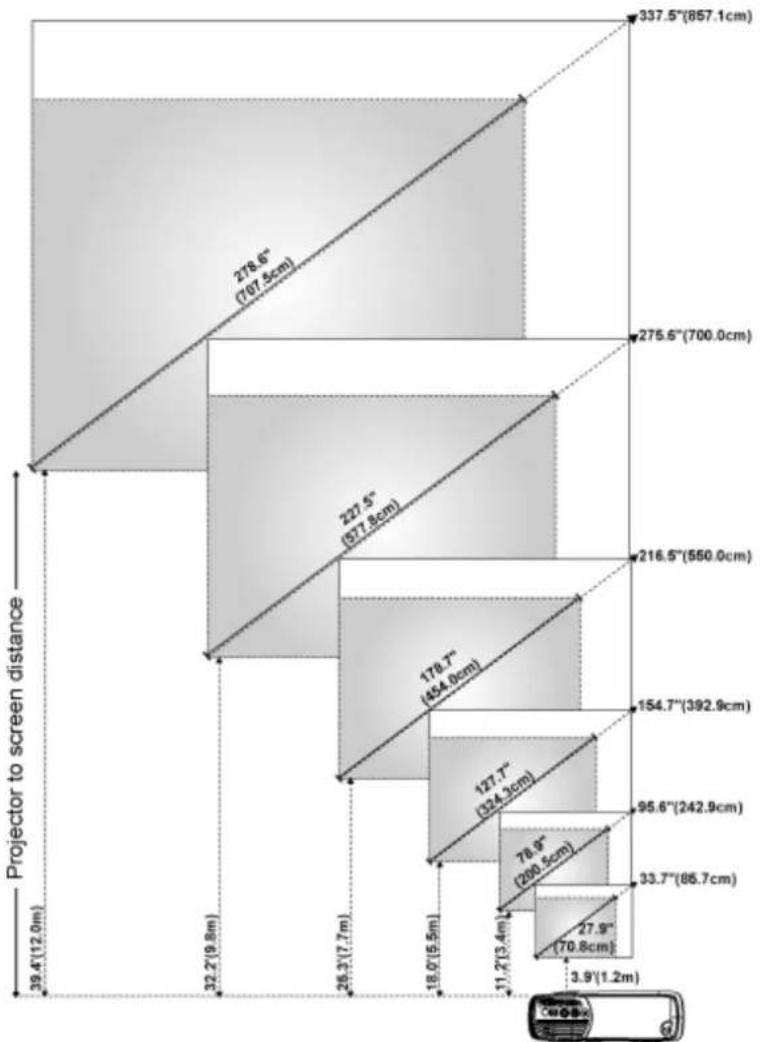
| Projector to screen distance | Height (cm) | Width (cm) | | :--- | :--- | :--- | | 39.4 (12.0m) | 337.5 | 857.1 | | 32.2 (9.8m) | 278.6 | 707.5 | | 26.3 (7.7m) | 227.5 | 577.8 | | 18.0 (5.5m) | 178.7 | 454.8 | | 11.2 (3.4m) | 154.7 | 392.9 | | 78.9 (200.5cm) | 95.6 | 242.9 | | 33.7 (86.7cm) | 33.7 | 86.7 | | 27.9 (70.8cm) | 27.9 | 1.2 | The chart displays a single bar for each height category, with values labeled on top of each bar and width labeled below it. The bottom label is 'C#O-xx'. The x-axis is unlabeled but implies a hierarchical or sequential progression.| Bildgröße (diagonal) | Max. | 33.7" (85,7cm) | 95.6" (242,9cm) | 154.7" (392,9cm) | 216.5" (550,0cm) | 275.6" (700,0cm) | 337.5" (857,1cm) |
| Min. | 27.9" (70,8cm) | 78.9" (200,5cm) | 127.7" (324,3cm) | 178.7" (454,0cm) | 227.5" (577,8cm) | 278.6" (707,5cm) | |
| Bildgröße | Max.(WxH) | 27.0"X20.2" | 76.5"X57.4" | 123.7"X92.8" | 173.2"X129.9" | 220.5"X165.4" | 270.0"X202.5" |
| (68,6cmX51,4cm) | (194,3cmX145,7cm) | (314,3cmX235,7cm) | (440,0cmX330,0cm) | (560,0cmX420,0cm) | (685,7cmX514,3cm) | ||
| Min.(WxH) | 22.3"X16.7" | 63.1"X47.4" | 102.1"X76.6" | 143.0"X107.2" | 182.0"X136.5" | 222.8"X167.1" | |
| (56,6cmX42,5cm) | (160,4cmX120,3cm) | (259,4cmX194,6cm) | (363,2cmX272,4cm) | (462,3cmX346,7cm) | (566,0cmX424,5cm) | ||
| Entfernung zur Leinwand | 3.9'(1,2m) 11.2'(3,4m) 18.0'(5.5m) 25.3'(7,7m) 32.2'(9,8m) 39.4'(12,0m) | ||||||
| * Die angegebenen Werte sind Richtwerte. | |||||||
natural_image
Exploded view diagram of an electronic device showing internal components and housing (no text or labels)
Power
Federal Communications Commission (FCC) Notice (U.S. Only)
FCC Declaration of Conformity
CE Declaration of Conformity for a Class B Digital Device
Canadian Regulatory Information (Canada Only)
EN 55022 Compliance (Czech Republic Only)
VCCI Class 2 Notice (Japan Only)
MIC Notice (South Korea Only)
Polish Center for Testing and Certification Notice
NOM Information (Mexico Only)
Regulatory Listing
Federal Communications Commission (FCC) Notice (U.S. Only)
NOTICE: This equipment has been tested and found to comply with the limits for a Class B digital device, pursuant to Part 15 of the FCC Rules. These limits are designed to provide reasonable protection against harmful interference in a residential installation. This equipment generates, uses, and can radiate radio frequency energy and, if not installed and used in accordance with the instructions, may cause harmful interference to radio communications. However, there is no guarantee that interference will not occur in a particular installation. If this equipment does cause harmful interference to radio or television reception, which can be determined by turning the equipment off and on, the user is encouraged to try to correct the interference by one or more of the following measures:
• Reorient or relocate receiving antenna.
- Increase the separation between the equipment and receiver.
- Connect the equipment into an outlet on a circuit different from that to which the receiver is connected.
- Consult the dealer or an experienced radio/TV technician for help.
This device complies with Part 15 of the FCC rules. Operation is subject to the following two conditions:
• This device may not cause harmful interference.
- This device must accept any interference received including interference that may cause undesired operation.
Instructions to Users: This equipment complies with the requirements of FCC (Federal Communication Commission) equipment provided that the following conditions are met.
- Power cable: Shielded power cable must be used.
- Video inputs: The input signal amplitude must not exceed the specified level.
NOTICE: Changes or modifications not expressly approved by the party responsible for compliance could void the user's authority to operate the equipment.
FCC Declaration of Conformity
According to 47 CFR, Part 15 of the FCC Rules
* For the following named product:
DLP Projector
2200MP/DELL
CHC7229
* Manufactured at:
Coretronic Corporation
We hereby declare that this device complies with Part 15 of the FCC Rules. Operation is subject to the following two conditions:
- This device may not cause harmful interference, and
- This device must accept any interference received, including interference that may cause undesired operation.
* FCC Rules: Tested to comply with FCC part 15, class B
* Test site at: Advance Data Technology Corporation
No.81-1, Lu Liao Keng, 9 Ling, Wu Lung Tsung, Chiung Lin Hsiang, Hsin Chu Hsien, Taiwan
Coretronic Corporation
* Responsible Party for Product Compliance:
No 11, Li Hsing Rd, Science-Based Industrial Park, Hsinchu, Taiwan Tel: 886-3-5772000 Fax: 886-3-5790066
* Manufacturer Information: Coretronic Corporation RD Center
No 11, Li Hsing Rd, Science-Based Industrial Park, Hsinchu, 300, Taiwan
Technology Engineering Associate Vice President
October 01, 2003
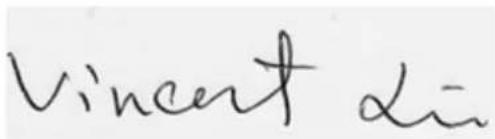
Hsinchu, October 01, 2003 Mr. Vincent Lin
CE Declaration of Conformity for a Class B Digital Device
Directives to which conformity is declared:
EMC Directives 89/336/EEC and Amending Directive 92/31/EEC
And
Low Voltage Directive 73/23/EEC
Standards to which conformity is declared
EN55022: 1998; EN55024: 1998; EN60950: 2000;
EN61000-3-2: 1995; EN61000-3-3: 1995
Manufacturer's Name: Coretronic Corporation
Manufacturer's Address: No 11, Li Hsing Rd, Science-Based Industrial Park, Hsinchu, Taiwan
Importer's Address: Dell Products Europe BV
Raheen Industrial Estate, Limerick, Ireland
Type of Equipment: DLP Projector
Model Number(s): 2200MP
Reference Report Number:
Previously Declared Models:
I, the undersigned, hereby declare that the equipment specified above conforms to the above Directive(s) and standards.
Hsinchu, Taiwan
$$ \text {Vincent} \alpha = $$
October 01, 2003 Mr. Vincent Lin Head of RD Center
Canadian Regulatory Information (Canada Only)
This digital apparatus does not exceed the Class B limits for radio noise emissions from digital apparatus set out in the Radio Interference Regulations of the Canadian Department of Communications.
Note that Industry Canada regulations provided, that changes or modifications not expressly approved by Dell Inc. could void your authority to operate this equipment.
This Class B digital apparatus meets all requirements of the Canadian Interference-Causing Equipment Regulations.
EN 55022 Compliance (Czech Republic Only)
This device belongs to Class B devices as described in EN 55022, unless it is specifically stated that it is a Class A device on the specification label. The following applies to devices in Class A of EN 55022 (radius of protection up to 30 meters). The user of the device is obliged to take all steps necessary to remove sources of interference to telecommunication or other devices.
VCCI Class 2 Notice (Japan Only)
This equipment complies with the limits for a Class 2 digital device (devices used in or adjacent to a residential environment) and conforms to the standards for information technology equipment that are set by the Voluntary Control Council for Interference for preventing radio frequency interference in residential areas.
Class B ITE
MIC Notice (South Korea Only)
B Class Device
Please note that this device has been approved for non-business purposes and may be used in any environment, including residential areas.
Polish Center for Testing and Certification Notice
The equipment should draw power from a socket with an attached protection circuit (a three-prong socket). All equipment that works together (computer, monitor, printer, and so on) should have the same power supply source.
The phasing conductor of the room's electrical installation should have a reserve short-circuit protection device in the form of a fuse with a nominal value no larger than 16 amperes (A).
To completely switch off the equipment, the power supply cable must be removed from the power supply socket, which should be located near the equipment and easily accessible.
A protection mark "B" confirms that the equipment is in compliance with the protection usage requirements of standards PN-93/T-42107 and PN-89/E-06251.
NOM Information (Mexico Only)
The following information is provided on the device(s) described in this document in compliance with the requirements of the official Mexican standards (NOM)
Exporter: Dell Inc.
One Dell Way
Round Rock, TX 78682
Importer: Dell Computer de México,
Paseo de la Reforma 2620, 11th Floor
Col. Lomas Altas
México DF
CP 11950
Ship to: Dell Computer de Mexico,
Supply voltage: > 100–240 VAC
Frequency: 50–60 Hz
Current consumption: 2.7 A
Regulatory Listing
Safety Certifications:
- UL 60950
• cUL
• NOM
• CE Mark--EN60950: 2000
• EZU
IEC 60950:1999 - TÜV GS
• PCB
• GOST - CCC
- PSB
• TüV-S
EMC Certifications:
• FCC Part 15 Class B
- CE Mark--EN55022:1998 Class B, EN61003-3:1995, EN55024:1998, EN61000-3-2:1995, EN61000-3-3:1995
ICES-003
- EZU
- PCBC
C-Tick
• VCCI Class B ITE
MIC
Back to Contents Page
Dell kontaktieren
| Land (Stadt) Bezeichnung der Abteilung oder des Servicebereiches, Website und E-Mail-Adresse | Ortsvorwahl | Rufnummer odergebührenfreie Telefonnummern | |
| Anguilla General Support | toll free:800-335-0031 | ||
| Antigua and Barbuda | General Support | 1-800-805-5924 | |
| Argentina(Buenos Aires)International Access Code:00Country Code:54City Code:11 | Technical Support and Customer Care | toll free: 0800 444 0733 | |
| Sales | toll free: 0810 444 3355 | ||
| Tech Support Fax 11 4515-7139 | |||
| Customer Care Fax 11 4515-7138 | |||
| Website: www.dell.com.ar | |||
| Aruba General Support | toll-free:800-1578 | ||
| Australia(Sydney) | E-mail (Australia):au_tech_support@dell.com | ||
| International Access Code:0011Country Code:61City Code:2 | E-mail (New Zealand):nz_tech_support@dell.com | ||
| Home and Small Business 1-300-65-55-33 | |||
| Government and Business toll free: 1-800-633- | 559 | ||
| Preferred Accounts Division (PAD) toll free: 1-800-060- | 889 | ||
| Customer Care | toll free: 1-800-819-339 | ||
| Corporate Sales toll free: 1-800-808- | 385 | ||
| Transaction Sales toll free: 1-800-808- | 312 | ||
| Fax toll free: 1-800-818- | 341 | ||
| Austria(Vienna)International Access Code:900Country Code:43City Code:1 | Switchboard 01 491 040 | ||
| Home/Small Business Sales 01 795676-02 | |||
| Home/Small Business Fax 01 795676-05 | |||
| Home/Small Business Customer Care | 01 795676-03 | ||
| Preferred Accounts/Corporate Customer Care | 0660-8056 | ||
| Home/Small Business Technical Support | 01 795676-04 | ||
| Preferred Accounts/Corporate Technical Support | 0660-8779 | ||
| Website: support.euro.dell.com | |||
| E-mail:tech_support_central_europe@dell.com | |||
| Bahamas | General Support | toll-free:1-866-278-6818 | |
| Barbados | General Support | 1-800-534-3142 | |
| Belgium(Brussels)International Access Code:00Country Code:32 | Technical Support | 02 | 481 92 88 |
| Customer Care | 02 | 481 91 19 | |
| Home/Small Business Sales | toll free: 0800 16884 | ||
| Corporate Sales | 02 | 481 91 00 | |
| City Code:2 | Fax 02 481 92 99 | ||
| Switchboard 02 481 91 00 | |||
| Website: support.euro.dell.com | |||
| E-mail: tech_be@dell.com | |||
| E-mail for French Speaking Customers: support.euro.dell.com/be/fr/emaildell/ | |||
| Bermuda General Support | 1-800-890-0748 | ||
| Bolivia General Support | toll free: 800-10-0238 | ||
| Brazil International Access Code:00 Country Code:55 City Code:51 | Customer Support, Technical Support | toll free: 0800 90 3355 | |
| Technical Support Fax 51 481-5470 | |||
| Customer Care Fax 51 481-5480 | |||
| Sales | toll free: 0800 90 3390 | ||
| Website: www.dell.com/br | |||
| British Virgin Islands | General Support | toll-free:1-866-278-6820 | |
| Brunei Country Code:673 | Customer Technical Support (Penang, Malaysia) | 604 633 4966 | |
| Customer Service (Penang, Malaysia) | 604 633 4949 | ||
| Transaction Sales (Penang, Malaysia) | 604 633 4955 | ||
| Canada (North York, Ontario) International Access Code:011 | Automated Order-Status System | toll free: 1-800-433-9014 | |
| AutoTech (Automated technical support) | toll free: 1-800-247-9362 | ||
| Customer Care Home & Home Office & Small Business | 1-800-847-4096 | ||
| Customer Care Medium, Large, Commercial, Government (100+ Employees) | 1-800-326-9463 | ||
| Technical Support Home & Home Office & Small Business | 1-800-847-4096 | ||
| Technical Support Medium, Large, Commercial, Government (100+ Employees) | 1-800-387-5757 | ||
| Sales (direct-from outside Toronto) | |||
| Sales (direct-from within Toronto) | |||
| Sales (federal government, education, and medical) | |||
| TechFax toll free: 1-800-950- | |||
| Cayman Islands General Support | |||
| Chile(Santiago)Country Code:56City Code:2 | Sales, Customer Support, and Technical Support | toll free: 1230-020-4823 | |
| China(Xiamen)Country Code:86City Code:592 | Tech Support website:support.ap.dell.com/china | ||
| Tech Support E-mail: cn_support@dell.com | |||
| Tech Support Fax | |||
| Projector Technical Support Phone toll free: 800 858 | 818-1350 | ||
| Customer Experience toll free: 800 858 | 2920 | ||
| Home and Small Business | 2060 | ||
| Preferred Accounts Division | |||
| Large Corporate Accounts North | |||
| Large Corporate Accounts NorthGovernment and Education | toll free: 800 8582955 | ||
| Large Corporate Accounts East | |||
| Large Corporate Accounts East Government and Education | toll free: 800 8582669 | ||
| Large Corporate Accounts Queue Team | toll free: 800 858 2572 | ||
| Large Corporate Accounts South | toll free: 800 858 2355 | ||
| Large Corporate Accounts West | toll free: 800 858 2811 | ||
| Large Corporate Accounts GCP | toll free: 800 858 2055 | ||
| Large Corporate Account Key Accounts | toll-free:800-858-2628 | ||
| Large Corporate Accounts Spare Parts | toll free: 800-858--2621 | ||
| Colombia General Support | 980-9-15-3978 | ||
| Costa Rica General Support | 0800-012-0435 | ||
| Czech Republic (Prague) International Access Code:00 Country Code:420 City Code:2 | Technical Support 02 22 83 27 27 | ||
| Customer Care 02 22 83 27 11 | |||
| Fax 02 22 83 27 14 | |||
| TechFax 02 22 83 27 28 | |||
| Switchboard 02 22 83 27 11 | |||
| Website: support.euro.dell.com | |||
| E-mail: czech_dell@dell.com | |||
| Denmark (Horsholm) International Access Code:00 Country Code:45 | Technical Support | 70230182 | |
| Customer Care(Relational) | 70230184 | ||
| Home/Small Business Customer Care | 32875505 | ||
| Switchboard (Relational) | 32871200 | ||
| Fax Switchboard (Relational) | 32871201 | ||
| Switchboard (Home/Small Business) | 32875000 | ||
| Fax Switchboard (Home/Small Business) | 32875001 | ||
| Website: support.euro.dell.com | |||
| E-mail Support (portable computers): den_nbk_support@dell.com | |||
| E-mail Support (desktop computers): | |||
| den_support@dell.com | |||
| E-mail Support (servers):Nordic_server_support@dell.com | |||
| Dominica General Support | toll free: 1-866-278-6821 | ||
| Dominican Republic | General Support | toll free: 1-800-156-1588 | |
| Ecuador General Support | toll-free 999-119 | ||
| El Salvador General Support | 01-889-753-0777 | ||
| Finland (Helsinki)International Access Code:990Country Code:358City Code:9 | Technical Support 09 253 313 60 | ||
| Technical Support Fax 09 253 313 81 | |||
| Relational Customer Care 09 253 313 38 | |||
| Home/Small Business Customer Care 09 693 | 791 94 | ||
| Fax 09 253 313 99 | |||
| Switchboard 09 253 313 00 | |||
| Website: support.euro.dell.com | |||
| E-mail: fin_support@dell.com | |||
| France (Paris)(Montpellier)International Access Code:00Country Code:33City Code:(1)(4) | Home and Small Business | ||
| Technical Support | 0825 | 387 270 | |
| Customer Care | 0825 | 823 833 | |
| Switchboard | 0825 | 004700 | |
| Switchboard (calls from outside of France) | 04 | 99 75 40 00 | |
| Sales | 0825 | 004 700 | |
| Fax (calls from outside of France) | 04 | 99 75 40 001 | |
| Website: support.euro.dell.com | |||
| E-mail:support.euro.dell.com/fr/fr/emaildell/ | |||
| Corporate | |||
| Technical Support | 0825 | 004 719 | |
| Customer Care | 0825 | 338 339 | |
| Fax 01 55 94 71 01 | |||
| Switchboard 01 55 94 71 00 | |||
| Sales | 01 55 94 | 71 00 | |
| Germany (Langen) International Access Code:00 Country Code:49 | Technical Support 06103 766-7200 | ||
| Home/Small Business Customer Care | 0180-5-224 400 | ||
| Global Segment Customer Care 06103 766-9570 | |||
| Preferred Accounts Customer Care 06103 766-9420 | |||
| Large Accounts Customer Care 06103 766-9560 | |||
| Public Accounts Customer Care 06103 766-9555 | |||
| Switchboard 06103 766-7000 | |||
| Website:support.euro.dell.com | |||
| E-mail: tech_support_central_europe@dell.com | |||
| Grenada | General Support | toll free:1-866-540-3355 | |
| Guatemala | General Support | 1-800-999-0136 | |
| Guyana | General Support | toll free:1-877-440-6511 | |
| Hong Kong International Access Code:001 Country Code:852 | Technical Support(DimensionTM and InspironTM) | 296-93188 | |
| Technical Support (OptiPlexTM, LatitudeTM, and Dell PrecisionTM) | 296-93191 | ||
| Customer Service (non-technical, post-sales issues) | 800-93-8291 | ||
| Transaction Sales | toll free: 800 96 4109 | ||
| Large Corporate Accounts HK | toll free: 800 96 4108 | ||
| Large Corporate Accounts GCP HK | toll free: 800 90 3708 | ||
| India | Technical SupportSales | 1600-33-80451600-33-8044 | |
| Ireland (Cherrywood) International Access Code:16 Country Code:353 | Ireland Technical Support 1850 543 543 | ||
| UK Technical Support (dial within UK only) | 0870 908 | 0800 | |
| Home User Customer Care 01 204 4095 | |||
| Small Business Customer Care 01 204 4444 | |||
| Corporate Customer Care 01 204 4003 | |||
| UK Customer Care (dial number within UK only) | 0870 906 | 0010 | |
| Ireland Sales 01 204 4444 | |||
| UK Sales (dial within UK only) 0870 907 4000 | |||
| SalesFax 01 204 0144 | |||
| Fax 01 204 5960 | |||
| Switchboard 01 204 4444 | |||
| Website:support.euro.dell.com | |||
| E-mail: dell_direct_support@dell.com | |||
| Italy (Milan) International Access Code:00 Country Code:39 City Code:2 | Home and Small Business | ||
| Technical Support 02 577 826 | 90 | ||
| Customer Care | 02 | 696 821 14 | |
| Fax 02 696 821 13 | |||
| Switchboard 02 696 821 12 | |||
| Website:support.euro.dell.com | |||
| E-mail:support.euro.dell.com/it/it/emaildell/ | |||
| Corporate | |||
| Technical Support 02 577 826 | 90 | ||
| Customer Care | 02 | 577 825 55 | |
| Fax 02 577 035 30 | |||
| Switchboard 02 577 821 | |||
| Website:support.euro.dell.com | |||
| E-mail: support.euro.dell.com/it/it/emaildell/ | |||
| Jamaica | General Support (dial from within Jamaica only) | 1-800-404-9205 | |
| Japan (Kawasaki) International Access Code:001 Country Code:81 | Web site: support.jp.dell.com | ||
| Technical Support toll free: 0120-981- | 690 | ||
| Technical Support outside of Japan 44 556-3468 | |||
| Customer Care 44 556-4240 | |||
| Korea (Seoul) International Access Code:001 Country Code:82 City Code:2 | Technical Support toll free: 080-200- | 3800 | |
| Sales toll free: 080-200- | 3600 | ||
| Customer Service (Penang, Malaysia) toll free: 604-633- | 4949 | ||
| Customer Service (Seoul, Korea) | 080-200-3800 | ||
| Fax 2194-6202 | |||
| Switchboard 2194-6000 | |||
| Latin America | Customer Technical Support (Austin, Texas, U.S.A.) | 512 728-4093 | |
| Customer Service (Austin, Texas, U.S.A.) 512 | 728-3619 | ||
| Fax (Technical Support and Customer Service) (Austin, Texas, U.S.A.) | 512 728-3883 | ||
| Sales (Austin, Texas, U.S.A.) | 512 728-4397 | ||
| SalesFax (Austin, Texas, U.S.A.) | 512 728-4600 or 728-3772 | ||
| Luxembourg International Access Code:00 Country Code:352 | Technical Support (Brussels, Belgium) | 02 | 481 92 88 |
| Home/Small Business Sales (Brussels, Belgium) | toll free: 080016884 | ||
| Corporate Sales (Brussels, Belgium) | 02 | 481 91 00 | |
| Customer Care (Brussels, Belgium) | 02 | 481 91 19 | |
| Switchboard (Brussels, Belgium) | 02 | 481 91 00 | |
| Fax (Brussels, Belgium) | 02 | 481 92 99 | |
| Website: support.euro.dell.com | |||
| E-mail: tech_be@dell.com | |||
| Macao | Technical Support | toll free: 0800 582 | |
| Country Code:853 | Customer Service (Penang, Malaysia) 604 633 | 4949 | |
| Transaction Sales toll free: 0800 581 | |||
| Malaysia(Penang) | Technical Support toll free: 1 800 888 | 298 | |
| International Access Code:00 | Customer Service 4 633 4949 | ||
| Country Code:60 | Transaction Sales toll free: 1 800 888 | 202 | |
| City Code: 4 | Corporate Sales toll free: 1 800 888 | 213 | |
| Mexico | Customer Technical Support 001-877-384-8979 | or 001-877-269-3383 | |
| International Access Code:00 | Sales 50-81-8800 | or 01-800-888-3355 | |
| Country Code:52 | Customer Service 001-877-384-8979 | or001-877-269-3383 | |
| Main 50-81-8800 | or 01-800-888-3355 | ||
| Montserrat | General Support | toll free:1-866-278-6822 | |
| Netherlands Antilles | General Support | 001-800-882-1519 | |
| Netherlands(Amsterdam) | Technical Support | 20 | 674 4500 |
| International Access Code:00 | Home/Small and Medium Business | 20 | 674 5500 |
| Country Code:31 | Home/Small and Medium Business Fax | 20 | 674 4775 |
| City Code:20 | Home/Small and Medium Business Customer Care | 20 | 674 4200 |
| Corporate | 20 | 674 5000 | |
| Corporate Fax | 20 | 674 4779 | |
| Corporate Customer Care | 20 | 674 4325 | |
| Website:support.euro.dell.com | |||
| E-mail:support.euro.dell.com/nl/nl/emaildell/ | |||
| New Zealand E-mail | (New Zealand):nz_tech_support@dell.com | ||
| E-mail (Australia):au_tech_support@dell.com | |||
| Home and Small Business | 0800 446 255 | ||
| Government and Business 0800 444 617 | |||
| Sales 0800 441 567 | |||
| Fax 0800 441 566 | |||
| Nicaragua General | Support | 001-800-220-1006 | |
| Norway(Lysaker)InternationalAccess Code:00Country Code:47 | Technical Support 671 16882 | ||
| Relational Customer Care | 671 17514 | ||
| Home/Small Business Customer Care | 231 62298 | ||
| Switchboard 671 16800 | |||
| Fax Switchboard 671 16865 | |||
| Website: support.euro.dell.com | |||
| E-mail Support (portable computers):nor_nbk_support@dell.com | |||
| E-mail Support (desktop computers):nor_support@dell.com | |||
| E-mail Support (servers):nordic_server_support@dell.com | |||
| Panama | General Support | 001-800-507-0962 | |
| Peru | General Support | 0800-50-669 | |
| Poland(Warsaw)InternationalAccess Code:011Country Code:48 | Customer Service Phone | 22 | 57 95 700 |
| Customer Care | 22 | 57 95 999 | |
| Sales | 22 | 57 95 750 | |
| Switchboard | 22 | 57 95 999 | |
| Customer Service Fax | 22 | 57 95 806 | |
| Reception Desk Fax 22 57 95 998 | |||
| Website:support.euro.dell.com | |||
| E-mail: pl_support_tech@dell.com | |||
| PortugalInternationalAccess Code:00Country Code:35 | Technical Support 35 800 834 077 | ||
| Customer Care 800 300 415 | or 800 834 075 | ||
| Sales | 800 300 410 or 800 300 411 or 800 300 412 or 121 422 07 10 | ||
| Fax 35 121 424 01 12 | |||
| E-mail: support.euro.dell.com/es/es/emaildell/ | |||
| Puerto Rico General | Support | 1-800-805-7545 | |
| St. Kitts and Nevis | General Support | toll free:1-877-441-4731 | |
| St. Lucia General S | Support | 1-800-882-1521 | |
| St. Vincent and the Grenadines | General Support | toll free:1-877-441-4740 | |
| Singapore (Singapore)International Access Code:005Country Code:65 | Technical Support toll free: 800 6011 | 051 | |
| Customer Service (Penang, Malaysia) 604 633 4949 | |||
| Transaction Sales | toll free: 800 6011 054 | ||
| Corporate Sales | toll free: 800 6011 053 | ||
| South Africa (Johannesburg)International AccessCode:09/091Country Code:27City Code:11 | Technical Support | 011 709 7710 | |
| Customer Care | 011 709 7707 | ||
| Sales | 011 709 7700 | ||
| Fax | 011 706 0495 | ||
| Switchboard | 011 709 7700 | ||
| Website:support.euro.dell.com | |||
| E-mail: dell_za_support@dell.com | |||
| Southeast Asian/Pacific Countries | Customer Technical Support, Customer Service, and Sales (Penang, Malaysia) | 604 633-4810 | |
| Spain (Madrid)International Access Code:00Country Code:34City Code:91 | Home and Small Business | ||
| Technical Support 91 902 100 130 | |||
| Customer Care 91 902 118 540 | |||
| Sales 91 902 118 541 | |||
| Switchboard 91 902 118 541 | |||
| Fax 91 902 118 539 | |||
| Website:support.euro.dell.com | |||
| E-mail:support.euro.dell.com/es/es/emaildell/ | |||
| Corporate | |||
| Technical Support 91 902 100 130 | |||
| Customer Care 91 902 118 546 | |||
| Switchboard 91 722 92 00 | |||
| Fax 91 722 95 83 | |||
| Website:support.euro.dell.com | |||
| E-mail:support.euro.dell.com/es/es/emaildell/ | |||
| Sweden (Upplands Vasby)International Access Code:00Country Code:46City Code:8 | Technical Support 08 590 05 199 | ||
| Relational Customer Care 08 590 05 642 | |||
| Home/Small Business Customer Care 08 587 | 70 527 | ||
| Employee Purchase Program (EPP) Support | |||
| Fax Technical Support | 08 590 05 594 | ||
| Sales 08 590 05 185 | |||
| Website:support.euro.dell.com | |||
| E-mail: swe_support@dell.com | |||
| E-mail Support for Latitude and Inspiron:Swe-nbk_kats@dell.com | |||
| E-mail Support for OptiPlex:Swe_kats@dell.com | |||
| E-mail Support for Servers:nordic_server_support@dell.com | |||
| Switzerland (Geneva) | Technical Support (Home and Small Business) | 22 0844 | 811 411 |
| International Access Code:00 | Technical Support (Corporate) 22 0844 822 844 | ||
| Customer Care (Home and Small Business) | 22 0848 | 802 202 | |
| Country Code:41 | Customer Care(Corporate) | 0848 821 721 | |
| City Code:22 | Switchboard 22 799 01 01 | ||
| Fax 22 799 01 90 | |||
| Website: support.euro.dell.com | |||
| E-mail:swisstech@dell.com | |||
| E-mail for French-speaking HSB and Corporate Customers: support.euro.dell.com/ch/fr/emaildell/ | |||
| Taiwan | Technical Support (portable and desktop computers) | toll free: 00801 86 | 1011 |
| International Access Code:002 | Technical Support (Servers) toll free: 0080 60 | 1256 | |
| Country Code:886 | Transaction Sales toll free:0800 651 | 228 or 0800 33 556 | |
| Corporate Sales toll free: | 0080 651 227/ 0800 33 555 | ||
| Thailand | Technical Support | toll free: 088 006 | 007 |
| International Access Code:001 | Customer Service (Penang, Malaysia) | 604 633 4949 | |
| Country Code:66 | Sales | toll free: 088 006 | 009 |
| Trinidad and Tobago | General Support | 1-800-805-8035 | |
| Turks and Caicos Islands | General Support | toll free:1-866-540-3355 | |
| U.K. (Bracknell) | Technical Support (Corporate/Preferred Accounts/PAD [1000+ employees]) | 0870 | 908 0500 |
| International Access Code:44 | Technical Support (Direct/PAD and general) | 0870 | 908 0800 |
| Country Code:44 | Global Accounts Customer Care | 01344 | 373 185 or 373 186 |
| Corporate Customer Care 0870 908 0500 | |||
| Preferred Accounts (500-5000 employees) Customer Care | 01344 373 | 196 | |
| Central Government Customer Care 01344 373 193 | |||
| Local Government & Education Customer Care | 01344 373 | 199 | |
| Health Customer Care 01344 373 194 | |||
| Home/Small Business Sales 0870 907 4000 | |||
| Home/Small Business Customer Care 0870 906 0010 | |||
| Corporate/Public Sector Sales 01344 860 456 | |||
| Website: support.euro.dell.com | |||
| Customer Care website: dell.co.uk/lca/customerservices | |||
| E-mail: dell_direct_support@dell.com | |||
| Uruguay General Support | toll free:000-413-598-2521 | ||
| U.S.A. (Austin, Texas) International Access Code:011 Country Code:1 | Automated Order-Status System toll free: 1-800-433- | 9014 | |
| AutoTech (portable and desktop computers) | toll free: 1-800-247- | 9362 | |
| Projectors Technical Support | toll free: 1-877-459- | 7298 | |
| Customer Service toll free: 1-800-624- | 9897 | ||
| Dell Sales | toll free: 1-800-289- | 3355 | |
| or toll free: 1-800-879-3355 | |||
| Dell Outlet Store (Dell refurbished computers) | toll free: 1-888-798- | 7561 | |
| Software and Peripherals Sales | toll free: 1-800-671- | 3355 | |
| Spare Parts Sales | toll free: 1-800-357-3355 | ||
| Extended Service and Warranty Sales toll free: 1-800-247- | 4618 | ||
| Fax toll free: 1-800-727- | 8320 | ||
| Dell Services for the Deaf, Hard-of-Hearing, or Speech-Impaired | toll free: 1-877-DELLTTY (1-877-335-5889) | ||
| U.S. Virgin Islands | General Support | 1-877-673-3355 | |
| Venezuela General | Support | 8001-3605 | |
Power
Power



- Power
- Federal Communications Commission (FCC) Notice (U.S. Only)
- FCC Declaration of Conformity
- CE Declaration of Conformity for a Class B Digital Device
- Canadian Regulatory Information (Canada Only)
- EN 55022 Compliance (Czech Republic Only)
- VCCI Class 2 Notice (Japan Only)
- Polish Center for Testing and Certification Notice
- NOM Information (Mexico Only)
- Regulatory Listing
- Safety Certifications:
- EMC Certifications:
- Dell kontaktieren
Brand : DELL
Model : 2200MP
Category : Vidéo-projecteur