
R-CD1800M - CD Player SHARP - Free user manual and instructions
Find the device manual for free R-CD1800M SHARP in PDF.



| Product type | Commercial microwave oven |
| Brand | SHARP |
| Model | R-CD1800M |
| Dimensions (W x D x H) | 445 mm x 520 mm x 346 mm |
| Weight | Approximately 32 kg |
| Power supply | 230/208 V, 60 Hz, AC, 15 A minimum |
| Microwave output power | 1800 W (according to IEC standard) |
| Frequency | 2450 MHz (Class B/Group 2) |
| Memory capacity | 100 programs (memories 0-99) |
| Number of cooking stages | Up to 4 stages |
| Power levels | 11 levels (0% to 100%) |
| Special functions | Memory cooking, express defrost, double/triple quantity, program lock, custom help |
| Demo mode | Yes |
| Control type | Digital touch panel |
| Cavity material | Stainless steel with vault protection |
| Turntable | No (fixed ceramic plate) |
| Air filter | Yes, removable and washable |
| Interior light | Yes, replaceable bulb |
| Safety | Door lock, grounding, automatic stop, error codes |
| Maintenance | Regular cleaning of interior, air filter, and protection panel |
| Certifications | NSF, UL, CSA, Health Canada |
| Warranty | 3 years parts and labor |
Frequently Asked Questions - R-CD1800M SHARP
User questions about R-CD1800M SHARP
0 question about this device. Answer the ones you know or ask your own.
Ask a new question about this device
Download the instructions for your CD Player in PDF format for free! Find your manual R-CD1800M - SHARP and take your electronic device back in hand. On this page are published all the documents necessary for the use of your device. R-CD1800M by SHARP.
USER MANUAL R-CD1800M SHARP
MODELS/MODELES/MODELOS R-CD1200M/CD1800M/CD2200M
To aid in reporting this commercial microwave oven in case of loss or theft, please record below the model number and serial number located on the unit. We also suggest you record all the information listed and retain for future reference.
(for your nearest Sharp Authorized Servicer and Parts Distributor)
Sharp Electronics Corporation
Customer Assistance Center
1300 Naperville Drive
Romeoville, IL 60446-1091
Please provide the following information when you write or call: model number, serial number, date of purchase, your complete mailing address (including zip code), your daytime telephone number (including area code) and description of the problem.
For Customer Assistance......Front cover
Contents 1
Precautions to Avoid Possible Exposure to Excessive Microwave Energy.1
Limited Warranty. 2
Important Safety Instructions 3
Service Call Check 4
Grounding Instructions. 5
Installation 6
Part Names 7
Before Operation 8
Memory Operation 8
Memory Cooking 8
Cooking double/triple quantity with memory. 9
Express Defrost with Memory 10
Manual Operations. 10
Time Cooking. 10
Single Stage Cooking. 10
Multi Stage Cooking. 10
Express Defrost. 11
Express Defrost Chart. 11
Program & Customize. 12
Custom Help. 12
Counter Check. 14
To Reset the Counter to "0" 15
Saving Memories. 18
Other Convenient Features 23
Demonstration Mode 23
Monitor 23
Care and Cleaning 23
Cooking Guide 25
Utensils 25
Guidelines for microwave heating. 26
Timing guide 27
Heating and cooking time guide. 28
Reminders 30
Specifications 30
PRECAUTIONS TO AVOID POSSIBLE EXPOSURE TO EXCESSIVE MICROWAVE ENERGY
(a) Do not attempt to operate this oven with the door open since open-door operation can result in harmful exposure to microwave energy. It is important not to defeat or tamper with the safety interlocks.
(b) Do not place any object between the oven front face and the door or allow soil or cleaner residue to accumulate on sealing surfaces.
(c) Do not operate the oven if it is damaged. It is particularly important that the oven door close properly and that there is no damage to the: (1) door (bent), (2) hinges and latches (broken or loosened), (3) door seals and sealing surfaces.
(d) The oven should not be adjusted or repaired by anyone except properly qualified service personnel.
LIMITED WARRANTY
SHARP ELECTRONICS CORPORATION warrants to the first end-user purchaser that this Sharp brand product (the "Product"), when shipped in its original container, will be free from defective workmanship and materials, and agrees that it will, at its option, either repair the defect or replace the defective Product or part there of with a new or remanufactured equivalent at no charge to the purchaser for parts or labor for the period(s) set forth below.
This warranty does not apply to any cosmetic, consumable, or appearance items of the Product, or if the serial number or model number has been removed, defaced, changed, altered, or tampered with.
In order to enforce the rights under this limited warranty, the purchaser should follow the steps set forth below. The purchaser must be able to provide proof of purchase, which includes the date of purchase to the servicer.
To the extent permitted by applicable state law, the warranties set forth herein are in lieu of, and exclusive of, all other warranties, express or implied. ALL OTHER WARRANTYES OTHER THAN THOSE SET FORTH ABOVE ARE EXCLUDING. ALL EXPRESS AND IMPLIED WARRANTYES INCLUDING THE WARRANTYES OF MERCHANTABILITY, FITNESS FOR USE, AND FITNESS FOR A PARTICULAR PURPOSE ARE SPECIFICALLY EXCLUDING. IF, UNDER APPLICABLE STATE LAW, IMPLIED WARRANTYES MAY NOT VALIDLY BE DISCLAIMED OR EXCLUDING, THE DURATION OF SUCH IMPLIED WARRANTYES IS LIMITED TO THE PERIOD(S) FROM THE DATE OF PURCHASE SET FORTH BELOW.
Neither the sales personnel of the seller nor any other person is authorized to make any warranties other than those described herein, or to extend the duration of any warranties beyond the time period described herein on behalf of Sharp.
The warranties described above shall be the sole and exclusive warranties granted by Sharp and shall be the sole and exclusive remedy available to the purchaser and only for the time periods set forth herein. Correction of defects, in the manner and for the period of time described herein, shall constitute complete fulfillment of all liabilities and responsibilities of Sharp to the purchaser with respect to the Product, and shall constitute full satisfaction of all claims, whether based on contract, negligence, strict liability or otherwise. Sharp does not warrant nor shall Sharp be liable, or in any way responsible for products which have been subjected to accident, misuse, negligence, lack of reasonable care, alteration, modification, tampering, misuse, improper operation or maintenance or any damages or defects in the Product which were caused by repairs or attempted repairs performed. Nor shall Sharp be liable or in any way responsible for any incidental or consequential economic or property damage. Some states do not allow limits on warranties or on remedies for breach in certain transactions; in such states, the limits herein may not apply.
Your Product Model Number & Description:
R-CD1200M, R-CD1800M or R-CD2200M
Commercial Microwave Oven
(Be sure to have this information available when you need service for your oven.)
Warranty Period for this Product:
Three (3) years for parts and labor in the end user's place of business.
Additional Item(s) Excluded from Warranty Coverage (if any):
Non-functional accessories and light bulb.
Where to Obtain Service:
Contact your Sharp Authorized Servicer to obtain on-site service for this Product. The Servicer will come to your location and if it is necessary to remove the Product, the Servicer will reinstall it. Be sure to have Proof of Purchase available.
TO OBTAIN SUPPLY, ACCESSORY OR PRODUCT INFORMATION, CALL 1-877-427-7696.
Save the proof of purchase as it is needed should your oven require warranty service.
IMPORTANT SAFETY INSTRUCTIONS
When using electrical appliances basic safety precautions should be followed, including the following: WARNING - To reduce the risk of burns, electric shock, fire, injury to persons or exposure to excessive microwave energy:
- Read all instructions before using the appliance.
- Read and follow the specific "PRECAUTIONS TO AVOID POSSIBLE EXPOSURE TO EXCESSIVE MICROWAVE ENERGY" on page EN-1.
- This appliance must be grounded. Connect only to properly grounded outlet.
See "GROUNDING INSTRUCTIONS" on page EN-5.
- Install or locate this appliance only in accordance with the provided installation instructions.
- Some products such as whole eggs and sealed containers – for example, closed glass jars – are able to explode and should not be heated in this oven.
- Use this appliance only for its intended use as described in this manual. Do not use corrosive chemicals or vapors in this appliance. This type of oven is specifically designed to heat, cook or dry food. It is not designed for industrial or laboratory use.
- As with any appliance, close supervision is necessary when used by children.
- Do not operate this appliance if it has a damaged cord or plug, if it is not working properly or if it has been damaged or dropped.
- This appliance should be serviced only by qualified service personnel. Contact nearest Sharp Authorized Servicer for examination, repair or adjustment.
- Do not cover or block any openings on the appliance.
- Do not store or use this appliance outdoors. Do not use this product near water – for example, near a kitchen sink, in a wet basement, near a swimming pool or similar locations.
- Do not immerse cord or plug in water.
- Keep cord away from heated surfaces.
- Do not let cord hang over edge of table or counter.
- See door surface cleaning instructions on pages EN-23 - EN-24.
- To reduce the risk of fire in the oven cavity:
a. Do not overcook food. Carefully attend appliance when paper, plastic or other combustible materials are placed inside the oven to facilitate cooking.
b. Remove wire twist-ties from paper or plastic bags before placing bag in oven.
c. If materials inside the oven ignite, keep oven door closed, turn oven off and disconnect the power cord or shut off power at the fuse or circuit breaker panel.
d. Do not use the cavity for storage purposes. Do not leave paper products, cooking utensils or food in the cavity when not in use.
- Liquids, such as water, coffee, or tea are able to be overheated beyond the boiling point without appearing to be boiling. Visible bubbling or boiling when the container is removed from the microwave oven is not always present. THIS COULD RESULT IN VERY HOT LIQUIDS SUDDENLY BOILING OVER WHEN A SPOON OR OTHER UTENSIL IS INSERTED INTO THE LIQUID.
To reduce the risk of injury to persons:
a. Do not overheat the liquid.
b. Stir the liquid both before and halfway through heating it.
c. Do not use straight-sided containers with narrow necks. Use a wide-mouthed container.
d. After heating, allow the container to stand in the microwave oven at least for 20 seconds before removing the container.
e. Use extreme care when inserting a spoon or other utensil into the container.
SAVE THESE INSTRUCTIONS
SERVICE CALL CHECK
Please check the following before calling for service!
- Plug the power cord into a three-pronged electric-outlet. (See page EN-5)
- Open the door
A. Does the oven light come on?
Yes No
- Place one cup of water (approx. 250ml) in a microwave-safe glass measuring cup in the oven and close the door securely. Oven lamp should go off if door is closed properly.
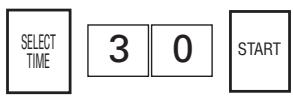
Set the oven for 30 seconds on 100% (HIGH). At this moment:
Press these pads:
A. Does the oven light come on?
Yes No
B. Does the "ON" indicator come on?
Yes No
C. At the end of 30 seconds, is the water hot?
Yes No
IF SERVICE IS NEEDED, PLEASE CONTACT YOUR NEAREST AUTHORIZED SHARP SERVICER.
ERROR MODE
Should any of the error indicators appear in the display, follow the instructions:
| EE Mode | Reason | Action Required |
| EE 1, EE 2 | Failure of single magnetron | Call for service.★ |
| EE 3 | Both magnetrons failed | Call for service. |
| EE 4 | Voltage too high | Call for service. |
| EE 5 ★★ | Voltage too low | Call for service. |
| EE 7 | Oven cavity or component temperature too high | Check that nothing is blocking air intake openings on oven back or that oven exterior is very hot. Correct. Wait a few minutes and try again. If problem persists, call for service. |
| EE 8 | Circuit failure | Call for service. |
| EE 9 | Maximum cooking time is exceeded. | Check NOTE for Cooking Double/Triple Quantity with Memory on page EN-10, NOTES 2 for Single Stage Cooking or NOTES 2 for Multi Stage Cooking on page EN-11 in the Operation Manual. Press the STOP/CLEAR pad, and re-input by reducing Total Cooking Time or power levels. |
| EE 0 | Cooling fan motor and other motor failure. Oven ceiling cover is not installed properly. | Cooling fan motor and other motors: Call for service. Oven ceiling cover: Check that oven ceiling cover is properly installed. If problem persists, call for service. (See page EN-23 - EN-24) |
EE 1 and EE 2: In case of single magnetron failure, oven can be used until servicing by changing Custom Help settings to allow operation under single magnetron only (see page EN-16). However, check food carefully as additional cooking time will be needed when operating with a single magnetron.
★★EE5
: EE5 is displayed only in R-CD1800 and R-CD2200.
Press the STOP/CLEAR pad to clear the error indicator. Any time an error code appears, check the reason and be sure to call for service except EE7 and EE9. As for EE7, follow Action Required and if EE7 is still displayed, be sure to call for service.
MAINTENANCE MODE
Should any of maintenance indicators appear in the display, follow the instruction:
| CC Mode | Reason | Action required |
| CC1 | Operation time of magnetrons exceeds 1,250 hours. | Call for service to replace the parts promptly. Failure to replace parts that have exceeded recommended operation time may cause failure of the microwave oven. |
| CC2 | ||
| CC4 | Operation time of the control unit, relays, switches exceeds 200,000 times. | |
| CC3 | Operation time of exhaust motor exceeds 3,000 hours. | Even though CC3 is displayed, your oven can still be operated for short periods of time. Call for service to replace parts promptly. |
NOTES:
- The CC and " * " indicator will appear in the display when recommended parts life is exceeded. The CC and " * " indicator can be cleared by pressing the STOP/CLEAR pad. Call for service to replace the parts promptly. Failure to replace parts that have exceeded recommended operation time may cause failure of the microwave oven.
- If one maintenance mode or more than one maintenance mode occurs at the same time, the display will show CC and the numbers of the modes separated by a period. For example, if CC1 occurs, the display will show CC and 1 reciprocally or if CC2 and CC4 occur at the same time, the display will show CC and 2.4. reciprocally.
GROUNDING INSTRUCTIONS
GROUNDING INSTRUCTIONS
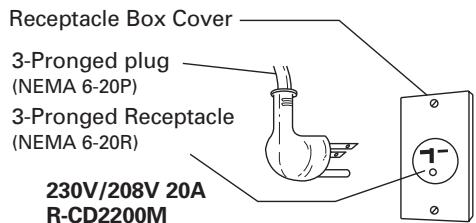
This appliance must be grounded. In the event of an electrical short circuit, grounding reduces the risk of electric shock by providing an escape wire for the electric current. This appliance is equipped with a cord having a grounding wire with a grounding plug. The plug must be plugged into an outlet that is properly installed and grounded in accordance with the National Electrical Code and local codes and ordinances.
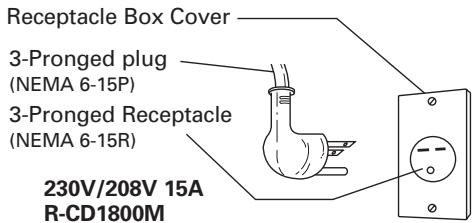
WARNING - Improper use of the grounding plug can result in a risk of electric shock. The electrical requirements are 120 Volt, 60 Hz, AC only, and 20 Amp or more (R-CD1200M); 230/208 Volt, 60 Hz, AC only, and 15 Amp or more (R-CD1800M); 230/208 Volt, 60 Hz, AC only, and 20 Amp or more (R-CD2200M) fused electrical supply. It is recommended that a separate circuit serving only this appliance be provided. When installing this appliance, observe all applicable codes and ordinances. If it is necessary to use an extension cord, use only a 3-wire extension cord that has a 3-blade grounding plug and a 3-slot receptacle that will accept the plug on the appliance. The marked rating of the extension cord should be AC120 Volt 20 Amp (R-CD1200M), AC230/208 Volt 15 Amp (R-CD1800M), AC230/208 Volt 20 Amp (R-CD2200M). Consult a qualified electrician or serviceman if the grounding instructions are not completely understood or if doubt exists as to whether the appliance is properly grounded.
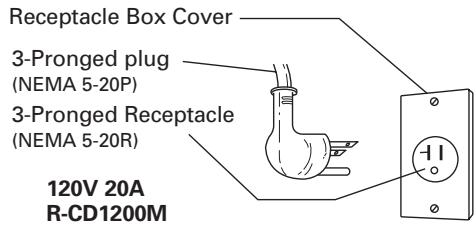
Plug Configuration
Radio or TV Interference
Should there be any interference caused by the microwave oven to your radio or TV, check that the microwave oven is on a different electrical circuit, relocate the radio or TV as far away from the oven as feasible or check position and signal of receiving antenna.
INSTALLATION
INSTALLATION
Because your Sharp Commercial Microwave Oven will be used frequently, place it so that there is easy safe access for all users.
- Be sure all electrical requirements are met. See page EN-5.
- Remove all packing materials from the oven cavity. Check the unit for any damage, such as a misaligned door, damaged door seals around the door or dents inside the oven cavity or on the door. If there is any damage, please do not operate the oven until it has been checked by a SERVICE CENTER APPROVED BY SHARP and repaired, if necessary.
- Install the unit where no excessive heat or steam is generated. Do not place next to an oven or cooking surface.
- The unit can be secured to a countertop or stand. Any surface the unit is placed on must be level.
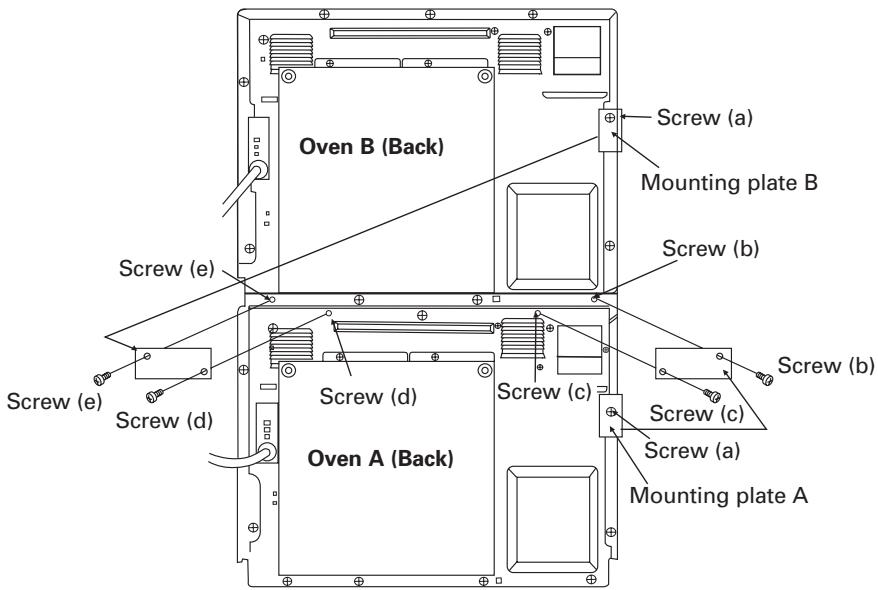
- STACKING PROCEDURE FOR TWO MICROWAVE OVENS
Two units can be installed together by placing one on top of the other. Follow these instructions:
A. Place oven A in the desired location. Position Oven B on top of Oven A as shown in the figure.
B. Remove Screws (a) and Mounting plate A and B from the right side of the back of Oven A and B.
C. Replace Screws (a) removed at step B and tighten them.
D. Remove Screws (b), (c), (d), and (e) and then install Mounting Plate A and B which were removed at step B to the each lower edge of Oven B as shown in the figure.
E. Replace Screws (b), (c), (d), and (e) which were removed at step D and tighten them.
- Following models can be stacked. Power source voltage must be the same.
1) Combination of R-CD1200M and R-CD1200M
2) Combination of R-CD1800M and R-CD1800M
3) Combination of R-CD1800M and R-CD2200M
4) Combination of R-CD2200M and R-CD2200M
WARNING:
When two ovens are installed together by placing one on top of another:
- Always use two mounting plates.
- Make sure that the power supply cords are not caught between the ovens.
- Do not install more than one oven on top of another.
PART NAMES
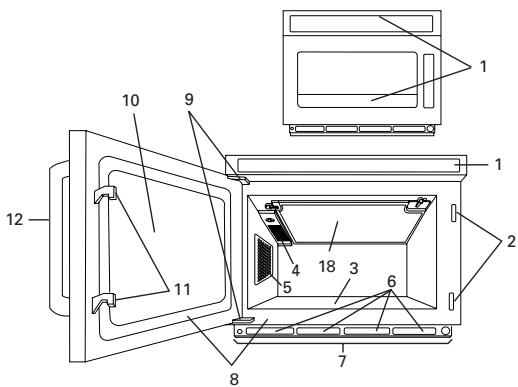
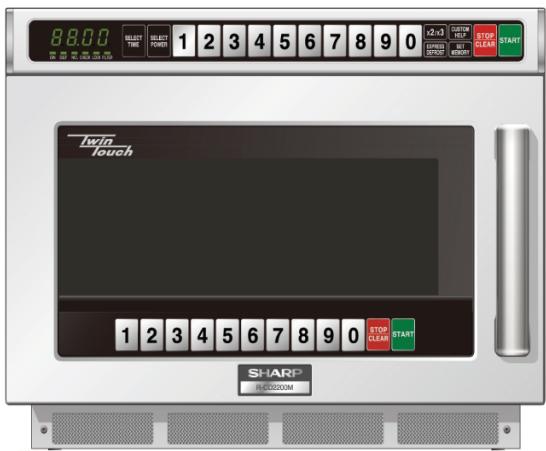
- Touch control panels
- Door latch openings
- Ceramic shelf
- Splash cover
- Oven light
- Air intake openings
- Air intake filter
- Door seals and sealing surfaces
- Door hinges
- Oven door with see-through window
- Door latches
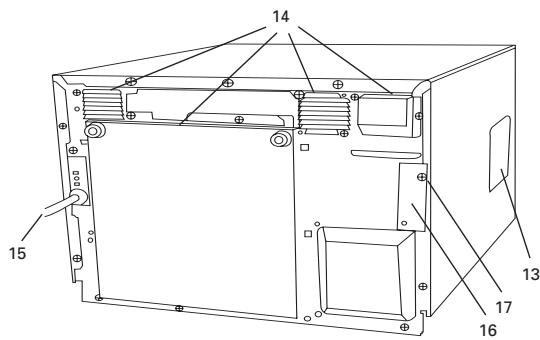
- Door handle
- Service window for replacing the oven light bulb
- Ventilation openings
- Power supply cord
- Mounting plate
- Screw for mounting plate
- Oven ceiling cover
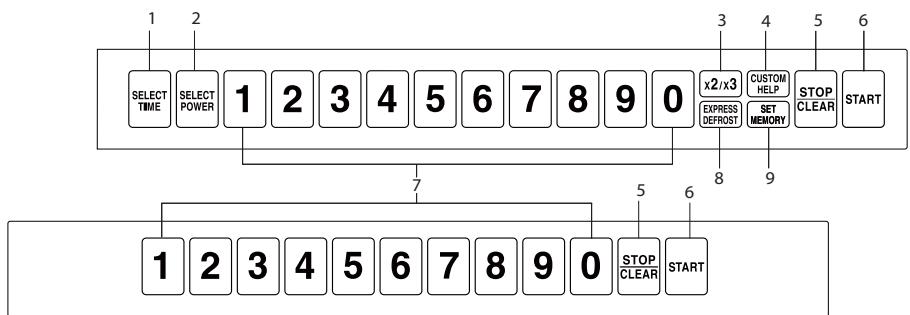
- SELECT TIME pad
- SELECT POWER pad
- DOUBLE/TRIPLE QUANTITY pad
- CUSTOM HELP pad
-
STOP/CLEAR pad
-
START pad
- Ten number pads
- EXPRESS DEFROST pad
- SET MEMORY pad
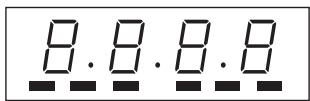
ON DEF. NO. CHECK LOCK FILTER
BEFORE OPERATION
- Before operating your new oven, make sure you read and understand this operation manual completely.
1) Plug in the oven.
- The digital display will then show “ . “
2) Control panels can only be operated when the door is closed.
3) Oven light will go on for 1 minute when the door is opened.
Cancellation:
- Cooking data is canceled when keys are not pressed for more than three minutes when setting programming.
-
Cooking stops when the STOP/CLEAR pad is pressed and cooking data remains. However if subsequent keys are not pressed within three minutes, cooking data will be canceled. To resume cooking press the START pad.
-
Cooking stops when the door is opened and cooking data remains. However once the door is closed, cooking data will be canceled if subsequent keys are not pressed within 3 minutes. To resume cooking press the START pad.
- Cooking is immediately canceled by pressing the STOP/CLEAR pad twice.
Checking food:
Press the STOP/CLEAR pad then open the door, check food, close the door and press the START pad to continue cooking.
Cooking Completion:
When food is not taken out after cooking completion, End will be shown in the display until the food is taken out.
HELPFUL TIPS for the Memory Input Method
The Memory Input Method determines how to input memory numbers for Memory Cooking and Custom Help and Saving memories, therefore follow the method below. Refer to HELPFUL TIPS below as well as in Memory cooking.
- Dual Digit Input: Must input two numbers to select a memory, even though the first number is 0. Memory programming is limited to 0 - 99.
- Single Digit Input: Can only input one number to select a memory. Memory programming is limited to 0 - 9.
- Repeat Digit Input: Input one, two, or three numbers to select a memory. Memory programming is limited to 0 - 29.
- For Repeat Digit Input/Auto Start ON only, push number pads within one second of the previous number.
- Regardless of Input Method selected, Counter Check/Clear (Custom Help 7) and Multiplication Factor for Double/ Triple Quantity (Custom Help 10) only use the Dual Digit Input Method. As for Custom Help 10, enter memory number after pressing the DOUBLE/TRIPLE QUANTITY pad.
The Memory Input Method
| Memory No. | 0 | 2 | 12 | 22 |
| Memory Examples | ||||
| Input Method | ||||
| Dual Digit Input | 0, 0 | 0, 2 | 1, 2 | 2, 2 |
| Single Digit Input | 0 | 2 | ||
| Repeat Digit Input | 0 | 2 | 2, 2 | 2, 2, 2 |
MEMORY OPERATION
Memory Cooking
- Your oven has 100 memory banks from 0 to 99. Memory number from 0 to 29 can be used in all 6 operating methods. (Single Digit Input has 10 memory banks).
- Memory 0 - 9 are programmed as factory settings. See the table of Programmed Memories on the right side. Memory 10 - 99 must be programmed before using Memory Cooking. When a memory number which has not been programmed is entered, End will be shown in the display. See Saving Memories page EN-18 - EN-22 to program a new memory.
Programmed Memories
| Memory No. | Cook time | Power level |
| 1 | 10 sec. | 100% |
| 2 | 20 sec. | 100% |
| 3 | 30 sec. | 100% |
| 4 | 45 sec. | 100% |
| 5 | 1 min. | 100% |
| 6 | 1 min. 15 sec. | 100% |
| 7 | 1 min. 30 sec. | 100% |
| 8 | 2 min. | 100% |
| 9 | 2 min. 30 sec. | 100% |
| 0 | 3 min. | 100% |
- Memory Cooking can be set in 6 operating ways.
There are multiple methods of selecting memories depending on the input method selected and whether or not Auto Start is turned on or off. To avoid mistakenly selecting the incorrect memory, please confirm your settings by checking Custom Help (see Custom Help 1 and 2 on page EN-12).
<6 operating ways>
- Dual Digit Input/Auto Start OFF (memory 00 - 99)
- Dual Digit Input/Auto Start ON (memory 00 - 99)
- Repeat Digit Input/Auto Start OFF (memory 0 - 29)
- Repeat Digit Input/Auto Start ON (memory 0 - 29)
- Single Digit Input/Auto Start OFF (memory 0 - 9)
- Single Digit Input/Auto Start ON (memory 0 - 9)
HELPFUL TIPS for the Display of Memory Input Status and the START pad
When Auto Start ON has been selected,
- "0" should be displayed before entering memory number.
When "0" is not displayed, open the door and close to reset. -
The START pad does not need to be pressed.
Cooking will automatically start when the memory number is input. -
Dual Digit Input/Auto Start OFF (with the Start pad)
- Suppose you want to cook with memory 2, which was programmed for 1 minute at 100% .
| Procedure | |
| 1 Place food in oven. Enter memory number. | 0 2 |
| 2 Press the START pad. | START |
-
Dual Digit Input/Auto Start ON (without the Start pad)
-
Suppose you want to cook with memory 12, which was programmed for 10 seconds at 100% .
| Procedure | |
| 1 Place food in the oven. Enter memory number. | 1 2 |
-
Repeat Digit Input/Auto Start OFF (with the Start pad)
-
Suppose you want to cook with memory 2, which was programmed for 10 seconds at 100% .
| Procedure | |
| 1 Place food in oven. Enter memory number. | 2 |
| 2 Press the START pad. | START |
- Repeat Digit Input/Auto Start ON (without the Start pad)
- Suppose you want to cook with memory 12, which was programmed for 10 seconds at 100% .
| Procedure | |
| 1 | Place food in oven. Enter memory number. |
| 2 | × 2 |
- Single Digit Input/Auto Start OFF (with the Start pad)
- Suppose you want to cook with memory 2, which was programmed for 1 minute at 100% .
| Procedure | |
| 1 Place food in oven. Enter memory number. | 2 |
| 2 Press the START pad. | START |
- Single Digit Input/Auto Start ON (without the Start pad)
- Suppose you want to cook with memory 2, which was programmed for 10 seconds at 50% .
| Procedure |
| 1 Place food in oven. Enter memory number. |
Cooking Double/Triple Quantity with Memory
Double/Triple Quantity is a feature where the oven will automatically calculate how to cook two or three servings of a programmed food. It does not simply double or triple the time. Factory setting is multiplication factor 1.8 for double quantity and 2.6 for triple quantity. Press the DOUBLE/TRIPLE QUANTITY pad once for Double Quantity (2 servings), and twice for Triple Quantity (3 servings).
- Suppose you want to cook 3 servings with memory number 2 programmed Single Digit Input/Auto Start ON.
| Procedure | |
| 1 Place food in oven. Press the DOUBLE/TRIPLE QUANTITY pad twice. | x2/x3 x 2 |
| 2 Enter memory number. | 2 |
NOTE : If your total cooking time is over the maximum time allowed, error message EE9 will be displayed. Press the STOP/CLEAR pad to clear the error message and reduce the quantity or cook without using Double/Triple Quantity. For details see Custom Help 10 on page EN-16 and Maximum Cooking Time on page EN-22.
Express Defrost with Memory
- Suppose you want to cook with memory 0, which was programmed for 10 minutes Express Defrost sequence, Single Digit Input/Auto Start ON.
Procedure
1 Place food in oven. Enter memory number.

Midway through the defrosting cycle, the CHECK indicator will light in the display and an audible signal will be heard unless signal volume has been set to Mute. You may open the door, turn food over and shield any warm portions. Close the door.
Procedure
2 Press the START pad to continue defrosting.
START
NOTES:
- Even though CHECK lights up in the display, your oven continues defrosting and does not stop to check.
- Press the START pad at step 2 to continue defrosting as once the door is closed, cooking data will be canceled if subsequent keys are not pressed within 3 minutes.
- See HELPFUL TIP for Express Defrost on page EN-11.
MANUAL OPERATION
Time Cooking
Your oven can be programmed for up to 4 cooking sequences and has 11 preset microwave power levels.
Maximum Cooking Time
Microwave 100% - 60% Maximum of 60 minutes Microwave 50% - 10% Maximum of 120 minutes (Please see Maximum Cooking Time on page EN-22)
Microwave Power Level
| Press the SELECT POWER PAD once then press | APPROXIMATE PERCENTAGE OF POWER | Display |
| SELECT POWER | 100% | P-H |
| 9 | 90% | P-☐ |
| 8 | 80% | P-B |
| 7 | 70% | P-☐ |
| 6 | 60% | P-G |
| 5 | 50% | P-☐ |
| 4 | 40% | P-☐ |
| 3 | 30% | P-☐ |
| 2 | 20% | P-☐ |
| 1 | 10% | P-☐ |
| 0 | 0% | P-☐ |
Single Stage Cooking
- Suppose you want to cook for 2 minutes and 30 seconds at 50% .
Procedure
1 Place food in oven and press the SELECT TIME pad. Enter cooking time.

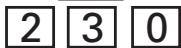
2 Press the SELECT POWER pad and enter power level.
Procedure
3 Press the START pad.
START
NOTES:
- It is not necessary to press the SELECT POWER pad for 100% in Single Stage Cooking.
- If cooking time input is over the maximum allowed time, error message EE9 will be displayed. Press the STOP/CLEAR pad to clear the error message and reduce cooking time or power level. For details, see Maximum Cooking Time on page EN-22.
Multi Stage Cooking
- Suppose you want to cook for 1 minute at 70% power for 1st stage and then continue to cook for 2 minutes at 50% power for 2nd stage and to cook for 3 minutes at 100% power for 3rd stage.
Procedure
1 Place food in oven and press the SELECT TIME pad. Enter cooking time for 1st stage.

2 Press the SELECT POWER pad. Enter power level for 1st stage.


3 Press the SELECT TIME pad. Enter cooking time for 2nd stage.

| Procedure | |
| 4 Press the SELECT POWER pad. Enter power level for 2nd stage. | SELECT POWER 5 |
| 5 Press the SELECT TIME pad. Enter cooking time for 3rd stage. | SELECT TIME |
| 3 0 0 | |
| 6 Press the START pad. | START |
NOTES:
- It is not necessary to press the SELECT POWER pad for 100% at the last stage in Multi Stage Cooking.
- If the Total Cooking Time is over the maximum time allowed, error message, EE9 will be displayed. Press the STOP/CLEAR pad to clear the error message pad and reduce Total Cooking Time, power levels or stages. For details, see Maximum Cooking Time on page EN-22.
Express Defrost
Use EXPRESS DEFROST to defrost meat and poultry. Calculate total defrost time using chart below. Express Defrost can be programmed for a maximum of 90 minutes.
* Suppose you want to defrost one pound of lamb chops for 3 minutes and 30 seconds.
| Procedure | |
| 1 Place food in oven. Press the EXPRESS DEFROST pad. | EXPRESS DEFROST |
| Procedure | |
| 2 Enter defrosting time. (Refer to chart below.) | 3 3 0 |
| 3 Press the START pad. | START |
| Midway through the defrosting cycle, the CHECK indicator will light in the display and an audible signal will be heard unless signal volume has been set to Mute. You may open the door, turn food over and shield any warm portions. Close the door. | |
| 4 Press the START pad to continue defrosting. | START |
NOTES:
- Even though CHECK lights up the display, your oven continues defrosting and does not stop to check.
- Press the START pad at step 4 to continue defrosting. Once the door is closed, cooking data will be canceled if subsequent keys are not pressed within 3 minutes.
HELPFUL TIP for Express Defrost
Allow foods to stand a few minutes after defrosting to equalize the temperature for better cooking results. Check food after standing. If additional time is needed, continue to defrost with manual cooking.
Foods that are the same thickness throughout defrost better. If foods have varied thickness, it may be necessary to shield the thin edges with small flat pieces of aluminum foil to prevent overdefrosting.
Express Defrost Chart
| Food | Thickness | Time (min./lb.) | ||
| R-CD1200M | R-CD1800M | R-CD2200M | ||
| Beef steak | less than 1" | 4-41/2 | 2-21/2 | 13/4-21/4 |
| more than 1" | 5-51/2 | 21/2-31/2 | 2-3 | |
| Lamb chops | 1" | 4-5 | 2-31/2 | 13/4-23/4 |
| Pork chops | less than 1" | 31/2-4 | 2-21/2 | 13/4-21/4 |
| more than 1" | 5-51/2 | 21/2-31/2 | 2-3 | |
| Boneless chicken breasts | 12"-3/4" | 4-5 | 2-3 | 11/2-21/2 |
| 34"-1" | 41/2-51/2 | 21/2-31/2 | 2-3 | |
| Fish steak | 12"-3/4" | 2-3 | 11/4-2 | 1-13/4 |
| 34"-1" | 3-4 | 13/4-21/2 | 11/4-2 | |
PROGRAM & CUSTOMIZE
Custom Help
You can check your oven settings and customize your oven by changing Custom Help settings.
The CUSTOM HELP pad has 11 operations.
- Selecting Memory Input Method
- Selecting Auto Start Operation
- Program Lock Setting
- Audible Signal Sound Volume Setting
- Cooking Completion Signal Setting
- Memory Check
- Counter Check/Clear
- Air Intake Filter Counter
- Selecting Operation in case of Magnetron Failure
- Multiplication Factors for Double/Triple Quantity
- Express Defrost Setting
To use Custom Help Function, press the CUSTOM HELP pad twice within 2 seconds, and desired option pads. See detailed instructions below.
NOTE : You will hear an audible signal the second time the CUSTOM HELP pad is pressed to indicate that you have entered Custom Help.
1. Selecting Memory Input Method
Your oven has 3 ways to select memory numbers.
CH11 : Dual Digit Input (100 memory banks)
=Factory Setting
CH12 : Single Digit Input (10 memory banks)
CH13 : Repeat Digit Input (30 memory banks)
To set Input Method
Press the CUSTOM HELP pad twice within 2 seconds then enter the numbers
1,1 for Dual Digit Input
1,2 for Single Digit Input
1,3 for Repeat Digit Input
Press the START pad to save settings and the STOP/CLEAR pad to exit from the Custom Help Function.
- Suppose you want to set Repeat Digit Input.
Procedure
CUSTOM HELP
1 Press the CUSTOM HELP pad twice within 2 seconds.
1 3
2 Enter 1,3 for Repeat Digit Input.
START
3 Press the START pad to save the setting.
STOP CLEAR
4 Press the STOP/CLEAR pad to exit from the Custom Help function.
2. Selecting Auto Start Operation
Your oven has 2 ways to start memory cooking.
CH21 : Auto Start OFF = Factory Setting
CH22 : Auto Start ON
The factory setting is Auto Start OFF. Under Auto Start OFF, cooking will not begin until the START pad is pressed. Under Auto Start ON, cooking will automatically start after the memory number is input.
To set AUTO START
Press the CUSTOM HELP pad twice within 2 seconds then enter the numbers
2, 1 for Auto Start OFF
2, 2 for Auto Start ON
Press the START pad to save settings and the STOP/CLEAR pad to exit from the Custom Help Function.
- Suppose you want to set Auto Start ON.
| Procedure | |
| CUSTOM HELP × 2 | 1 Press the CUSTOM HELP pad twice within 2 seconds. |
| 2 2 | 2 Enter 2, 2 for Auto Start ON. |
| START | 3 Press the START pad to save the setting. |
| STOP CLEAR | 4 Press the STOP/CLEAR pad to exit from the Custom Help Function. |
3. Program Lock Setting
You can select Program Lock ON or OFF
CH31:ProgramLockOFF = FactorySetting
CH32:ProgramLockON
Program Lock OFF is the Factory setting. Program Lock prevents accidental changes to settings. When the CUSTOM HELP pad is pressed twice within 2 seconds in program Lock ON, the LOCK indicator will light up. Turn Program Lock OFF when you want to change the settings.
To turn Program Lock ON/OFF
Press the CUSTOM HELP pad twice within 2 seconds then enter the numbers
3, 1 for Program Lock OFF
3, 2 for Program Lock ON
Press the START pad to save settings and the STOP/CLEAR pad to exit from the Custom Help Function.
- Suppose you want to set Program Lock ON.
| Procedure | |
| CUSTOM HELP × 2 | 1 Press the CUSTOM HELP pad twice within 2 seconds. |
| 3 2 | 2 Enter 3, 2 for Program Lock ON. |
| START | 3 Press the START pad to save the setting. |
| STOP CLEAR | 4 Press the STOP/CLEAR pad to exit from the Custom Help Function. |
NOTE : If you select Program Lock OFF, the LOCK indicator in the display will disappear when you press the START pad.
Operation when Program Lock ON is set
| KEY Operation | Custom Help Title | When Program Lock ON is set |
| 1 | Selecting Memory Input Method | no operation |
| 2 | Selecting Auto Start Operation | no operation |
| 3 | Program Lock Setting | operation |
| 4 | Audible Signal Sound Volume Setting | no operation |
| 5 | Cooking Completion Signal Setting | no operation |
| 6 | Memory Check | operation |
| 7 | Counter Check/Clear | check : operation clear : no operation |
| 8 | Air Intake Filter Counter | check, clear : operation set : no operation |
| 9 | Selecting Operation in case of Magnetron Failure | no operation |
| x2/x3 | Multiplication Factors for Double/ Triple Quantity | check : operation set : no operation |
| EXPRESS DEFROST | Express Defrost Setting | check : operation set : no operation |
4. Audible Signal Sound Volume Setting
The volume of the audible signal can be adjusted to High, Medium, or Mute.
CH41 : High = Factory Setting
CH42 : Medium
CH43 : Mute
To set cooking completion signal volume
Press the CUSTOM HELP pad twice within 2 seconds then enter the numbers
4, 1 for High
4, 2 for Medium
4, 3 for Mute
Press the START pad to save setting and the STOP/CLEAR pad to exit from the Custom Help Function.
NOTE: Even when errors occur, your oven will not beep in mute setting.
5. Cooking Completion Signal Setting
There is a choice of 4 different signals on your oven.
CH51 : 1 long beep = Factory setting
CH52 : Repeating long beeps
CH53 : 4 short beeps
CH54 : Repeating short beeps
To set the signal type
Press the CUSTOM HELP pad twice within 2 seconds then enter the numbers
5, 1 for 1 long beep
5, 2 for repeating long beeps
5, 3 for 4 short beeps
5, 4 for repeating short beeps
Press the START pad to save settings and the STOP/CLEAR pad to exit from the Custom Help Function.
6. Memory Check
Use this setting to check the programming for a certain memory.
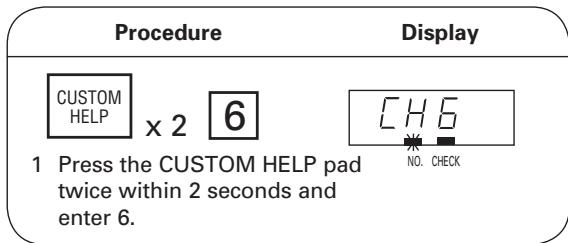
- Suppose you want to know the information programmed into memory 1, programmed for 4 minutes at 60% for the 1st stage and 2 minutes at 30% at the 2nd stage programmed Dual Digit Input.
| Procedure | Display |
| 0 | NO. CHECK |
| 1 | NO. CHECK |
| 2 Enter memory number. | After about 1 sec. |
| (After entering the memory number, the memory setting of each content is shown for 1.5 seconds at 0.3 second intervals until the STOP/CLEAR pad is pressed.) | 1-5L |
| CHECK | |
| 4.00 | |
| CHECK | |
| P-60 | |
| CHECK | |
| 2-5L | |
| CHECK | |
| 2.00 | |
| CHECK | |
| P-30 | |
| CHECK | |
| STOP/CLEAR | |
| 3 Press the STOP/CLEAR pad to exit from the Custom Help Function. | |
NOTES:
- If is displayed at step 2 the memory has not been programmed.
- Multiple memories can be checked until the STOP/CLEAR pad is pressed to exit from the Custom Help Function.
- The way to enter memory numbers depends on the programmed Memory Input Method.
- When Express Defrost is set for 30 minutes in the memory, and 30.00 are displayed repeatedly at step 2.
7. Counter Check/Clear
Confirm counters are set to "0" before using oven for the first time.
Counter Check
Counter check can be used to check the total number of times the oven has been used, or the number of times each pre-programmed memory pad, manual cooking, or Express Defrost has been used.
Total usage
Press the CUSTOM HELP pad twice within 2 seconds, then enter 7. Total usage will be displayed.
To check more than one counter
Press each pad as indicated below, after the previous usage is displayed.
Total each
Input memory number.
memory usage
Total manual
Press the SELECT TIME
cooking usage
pad.
Total Express
Press the EXPRESS
Defrost usage
DEFROST pad.
- Suppose you want to know total usage and each memory usage. In this case the oven was used 8268 times and memory 1 in any Memory Input Method was used 513 times.
| Procedure | Display |
| CUSTOM HELP x 2 7 1 Press the CUSTOM HELP pad twice within 2 seconds, then enter 7. Total usage will be displayed. | After about 1 sec. 82 68 CHECK |
| 0 1 2 Enter memory number 1, to check the total memory usage of memory 1. | NO. CHECK NO. CHECK After about 1 sec. 5 13 CHECK |
NOTES:
- To exit from Counter Check, press the STOP/CLEAR pad.
- Each counter will count up to 9999, and then will automatically reset to 0 and begin counting again.
- As shown in the above example, multiple counters can be checked before pressing the STOP/CLEAR pad to exit.
- Only Dual Digit Input Method can be used when inputting memory numbers in Counter Check/Clear.
To Reset the Counter to "0"
Each counter can be manually reset to "0" by pressing the START pad after the count is displayed.
- Suppose you want to reset the count for memory number 1 in any Memory Input Method
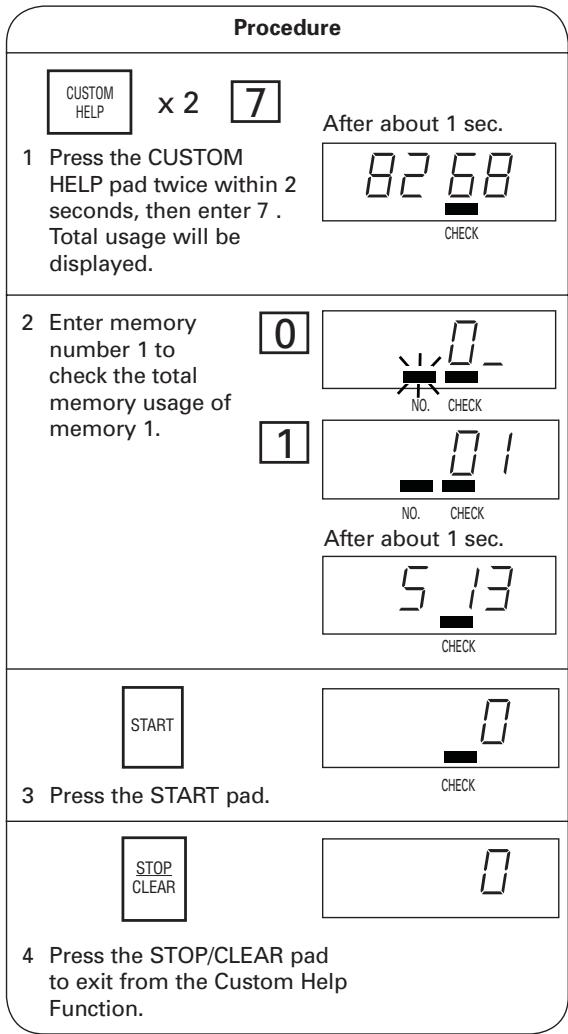
NOTES:
- Only Dual Digit Input method can be used when inputting memory numbers in Counter Check/Clear.
- To clear total manual cooking usage, press the SELECT TIME pad in Step 2 instead of the number pad.
- To clear total Express Defrost usage, press the EXPRESS DEFROST pad in Step 2 instead of the number pad.
- To clear total usage, skip Step 2.
8. Air Intake Filter Counter
Use Custom Help Function for Air Intake Filter Counter to check total usage hours since the Air Intake Filter was last reset to "0".
CH81 : The total used air intake filter time appears.
CH82 : The limit time for using a filter can be changed.
Use Custom Help Function for Air Intake Filter Counter to change the Air Intake Filter cycle from 001-999. The factory setting is 100 hours. When 100 hours is exceeded, the FILTER indicator on the display will start to flash on and off as a reminder to clean the air filter, even if in the middle of cooking. Furthermore "FILt" flashes on and off in stead of displaying ". . ." during standby and at the same time FILTER indicator flashes on and off. Clean Air Intake Filter (See page EN-23 - EN-24), when the FILTER indicator appears in the display, and then clear the total usage to reset it to "0".
- Suppose you want to know the total usage hours which has been 99 hours since the last reset.
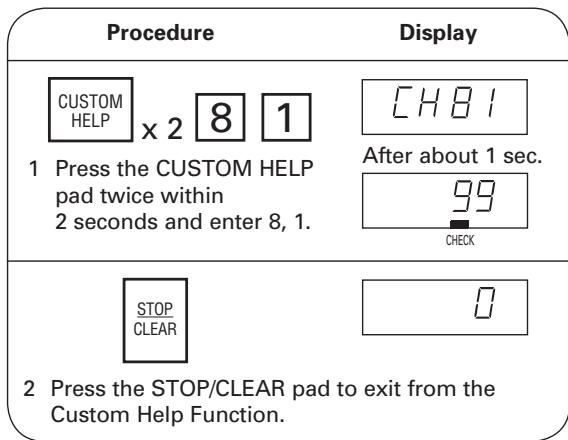
To Reset the Air Intake Filter Counter
Reset the Air Intake Filter Counter after cleaning the air intake filter.
- Suppose you want to reset the air filter counter which has been 101 hours since the last reset and the Air Intake Filter cycle is preset to 100.
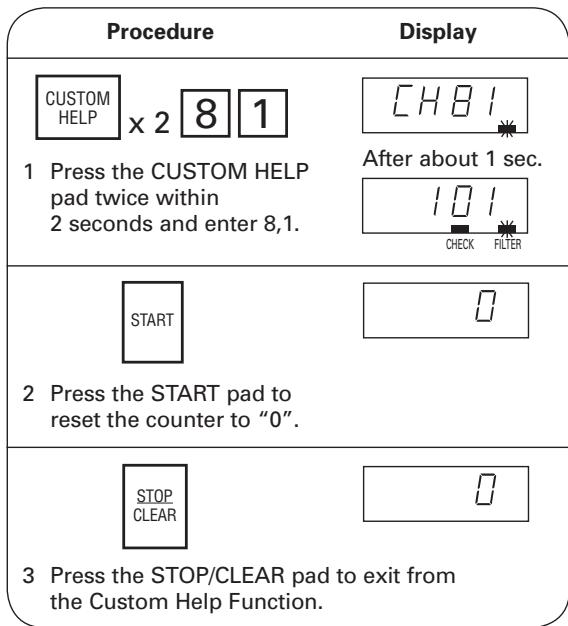
Air Filter Cycle
Air Filter Cycle can be changed from the factory setting of 100 hours to 001-999 hours
- Suppose you want to set the cycle to 250 hours.
| Procedure | Display |
| CUSTOM HELP × 2 8 2 1 Press the CUSTOM HELP pad twice within 2 seconds and enter 8, 2. | CHB2 After about 1 sec. 100 CHECK |
| SELECT TIME | 0 |
| 2 Press the SELECT TIME pad. | |
| 2 5 0 3 Enter desired time. (Ex:Enter 2, 5, 0 for 250 hours). | 250 |
| START | CH- |
| 4 Press the START pad to save settings. | |
| STOP CLEAR | 0 |
| 5 Press the STOP/CLEAR pad to exit from the Custom Help Function. | |
9. Selecting Operation in case of Magnetron Failure
Your oven has 2 magnetrons. In case of single magnetron failure, the oven can be used until servicing by changing settings to allow operation under single magnetron only. However, check food carefully as additional cooking time will be needed when operating with a single magnetron.
CH91 : Your oven does not work when one magnetron fails = Factory setting
CH92 : Your oven works even if one magnetron fails.
To set magnetron failure options
Press the CUSTOM HELP pad twice within 2 seconds then enter the numbers
9, 1 to stop operation when one magnetron fails
9, 2 to allow operation of one magnetron only
Press the START pad to save settings and the STOP/CLEAR pad to exit from the Custom Help Function.
10. Multiplication Factor for Double/Triple Quantity
The multiplication factors of the double and triple quantities for memory cooking are preset to 1.80 and 2.60. You can check or change the multiplication factors.
- Suppose you want to know the multiplication factor for double quantity with memory 1, and change it to 2.00 in any Memory Input Method.
| Procedure | Display |
| CUSTOM HELP x2 x2/x3 1 Press the CUSTOM HELP pad twice within 2 seconds and press the DOUBLE/TRIPLE QUANTITY pad. | NO. CHECK |
| 0 1 2 Enter memory number. | NO. CHECK NO. CHECK After about 1 sec. 1.80 CHECK |
| SELECT TIME | 0.00 |
| 3 Press the SELECT TIME pad. | |
| 2 0 0 | 2.00 |
| 4 Enter desired multiplication. (Ex:Enter 2,0,0 for 2.00.) | |
| START | NO. CHECK |
| 5 Press the START pad to save settings. | |
| STOP CLEAR | |
| 6 Press the STOP/CLEAR pad to exit from the Custom Help Function. |
NOTES:
- Only Dual Digit Input method can be used when inputting memory numbers in Multiplication Factor for Double/Triple Quantity.
- The multiplication factors can be set from 0.01 to 9.99 for double quantity and triple quantity.
- When you want to know the multiplication factor for triple quantity, press the DOUBLE/TRIPLE QUANTITY twice at step 1 after pressing the CUSTOM HELP pad twice.
- Multiplication Factors for Double/Triple Quantity can be checked or changed before pressing the STOP/CLEAR pad to exit for Custom Help Function.
11. Express Defrost Setting
Express Defrosting uses 3 stages to defrost foods quickly.
The defrosting sequence is preset as follows, but you can change the setting.
| Defrosting Time | Power Level | |
| STAGE 1 | T × A1: (0.20*) + B1: (20%) sec. | PL1 (40*) % |
| STAGE 2 | T × A2: (0.13*) + B2: (30%) sec. | PL2 (30*) % |
| STAGE 3 | T - STAGE1 - STAGE2 | PL3 (20*) % |
| Pause Timing | See the table for The Pause Timing below (50*) |
T : INPUT TIME (TOTAL COOKING TIME)
* : The numbers in the parentheses are factory settings and can be adjusted.
Express Defrost is preset to pause during the sequence when 50% of total defrosting time has passed to check food. Pause timings can also be adjusted.
Pause Timing
| KEY | Display | Pause Timing |
| 0 | 0 | No pause. |
| 1 | 1 | After 10% of total cooking time. |
| 2 | 2 | After 20% of total cooking time. |
| 3 | 3 | After 30% of total cooking time. |
| 4 | 4 | After 40% of total cooking time. |
| 5 | 5 | After 50% of total cooking time. |
| 6 | 6 | After 60% of total cooking time. |
| 7 | 7 | After 70% of total cooking time. |
| 8 | 8 | After 80% of total cooking time. |
| 9 | 9 | After 90% of total cooking time. |
| START | A | After ending of each stage |
- Suppose you want to change the Express Defrost set factory settings to the following:
| Defrosting Time | Power Level | |
| STAGE 1 | T × 0.30 + 10 sec. | 50% |
| STAGE 2 | T × 0.15 + 20 sec. | 20% |
| STAGE 3 | T - STAGE1 - STAGE2 | 10% |
| Pause Timing | When 70% of total defrosting time has passed. | |
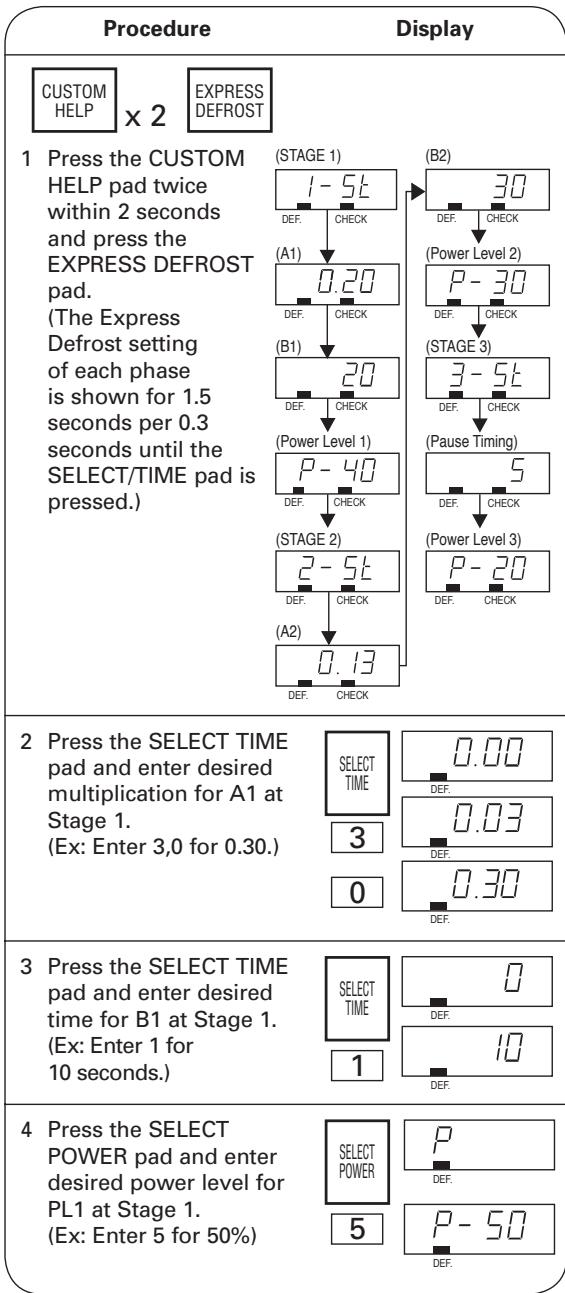
| Procedure | Display |
| 5 Press the SELECT TIME pad and enter desired multiplication for A2 at Stage 2. (Ex: Enter 1, 5 for 0.15.) | SELECT TIME DEF. 1 DEF. 5 0.15 DEF. |
| 6 Press the SELECT TIME pad and enter desired time for B2 at Stage 2. (Ex: Press 2 for 20 seconds.) | SELECT TIME DEF. 2 20 DEF. |
| 7 Press the SELECT POWER pad and enter desired power level for PL2 at Stage 2. (Ex: Enter 2 for 20%) | SELECT POWER DEF. 2 20 DEF. |
| 8 Press the SELECT TIME pad and enter the pause timing. (Ex: Enter 7 for when 70% of total defrosting time has passed.) | SELECT TIME DEF. 7 7 DEF. |
| 9 Press the SELECT POWER pad and enter desired power level for PL3 at Stage 3. (Ex: Enter 1 for 10%) | SELECT POWER DEF. 1 10 DEF. |
| START H_10 Press the START pad. | |
| STOP CLEAR D_11 Press the STOP/CLEAR pad to exit from the Custom Help Function. | |
NOTES:
- See the table for Microwave Power Level on page EN-10 and The Pause Timing on page EN-17.
- You can enter minus numbers for B1 and B2 at steps 3 and 6.
In that case,
press the SELECT TIME pad twice at step 3 or 6 (- is displayed.) and enter desired time for or B1 and B2 at Stage 1 and 2.
Press the SELECT TIME pad again to enter positive numbers. (□□ is displayed.)
Saving Memories
- Memory 0 - 9 are programmed as factory settings. See the table of Programmed Memories on page EN-8.
- Memories must be programmed before memory cooking can be used.
Memory banks
Dual Digit: Memory 0-99
Single Digit: Memory 0-9
Repeat Digit Input: Memory 0-29
Max. cooking stages: 4 stages
Setting time and power level for Single Stage
- Suppose you want to set 1 minute at 70% with memory 2.
| Procedure | Display |
| SET MEMORY X 2 | NO. |
| 1 Press the SET MEMORY pad twice within 2 seconds. | |
| 2 | NO. |
| 2 Enter memory number. | |
| SELECT TIME | . |
| 3 Press the SELECT TIME pad. | |
| 1 0 0 | 1.00 |
| 4 Enter cooking time. | |
| SELECT POWER | P- |
| 5 Press the SELECT POWER pad. | |
| 7 | P-70 |
| 6 Enter power level. | |
| SET MEMORY | NO. |
| 7 Press the SET MEMORY pad to save memory. | |
| STOP CLEAR | |
8 Press the STOP/CLEAR pad to exit.
NOTES:
- Press the SET MEMORY pad twice within 2 seconds.
- If the cooking time is over the maximum time, the display will show error code EE9. To clear the error code, press the STOP/CLEAR pad and re-program. See Maximum Cooking Time on page EN-22.
- It is not necessary to press the SELECT POWER pad for 100% in Single Stage.
- Suppose you want to set 1 minute at 70% with memory 12.
| Procedure | Display |
| SET MEMORY X 2 | NO. |
| 1 Press the SET MEMORY pad twice within 2 sec. | |
| 2 2 | NO. |
| 2 Enter memory number. | |
| SELECT TIME | . |
| 3 Press the SELECT TIME pad. | |
| 1 0 0 | 1.00 |
| 4 Enter cooking time. | |
| SELECT POWER | P- |
| 5 Press the SELECT POWER pad. | |
| 7 | P-NO |
| 6 Enter power level. | |
| SET MEMORY | NO. |
| 7 Press the SET MEMORY pad. | |
| STOP CLEAR | |
| 8 Press the STOP/CLEAR pad to exit. | |
NOTES:
- Press the SET MEMORY pad twice within 2 seconds.
- If the programmed cooking time is over the maximum time, the display will show error code EE9. To clear the error code, press the STOP/CLEAR pad and re-program. See Maximum Cooking Time on page EN-22.
- It is not necessary to press the SELECT POWER pad for 100% in Single Stage.
< Dual Digit Input>
- Suppose you want to set 4 minutes at 60% with memory 1 and 2 minutes at 30% with memory 2.
| Procedure | Display |
| SET MEMORY X 2 | NO. |
| 1 Press the SET MEMORY pad twice within 2 seconds. | |
| 0 1 | NO. |
| 2 Enter memory number. | |
| SELECT TIME | . |
| 3 Press the SELECT TIME pad. | |
| 4 0 0 | 4.00 |
| 4 Enter cooking time for memory 1. | |
| SELECT POWER | P- |
| 5 Press the SELECT POWER pad. | |
| 6 | P-60 |
| 6 Enter power level for memory 1. | |
| SET MEMORY | NO. |
| 7 Press the SET MEMORY pad to save memory 1. | |
| 0 2 | NO. |
| 8 Enter memory number. | |
| SELECT TIME | . |
| 9 Press the SELECT TIME pad. | |
| 2 0 0 | 2.00 |
| 10 Enter cooking time for memory 2. | |
| SELECT POWER | P- |
| 3 | P-30 |
| 12 Enter power level for memory 2. | |
| SET MEMORY | NO. |
| 13 Press the SET MEMORY pad to save memory 2. | |
| STOP CLEAR | |
| 14 Press the STOP/CLEAR pad to exit. | |
NOTES:
- Press the SET MEMORY pad twice within 2 seconds.
- If the programmed cooking time is over the maximum time, the display will show error code EE9. To clear the error code, press the STOP/CLEAR pad and re-program. See Maximum Cooking Time on page EN-22.
- It is not necessary to press the SELECT POWER pad for 100% in Single Stage.
Programming Multi Stage Cooking
- Suppose you want to set 4 minutes at 60% for the 1st stage and 2 minutes at 30% for the 2nd stage with memory 2 using of Dual Digit Input.
| Procedure | Display |
| SET MEMORY X 2 | NO. |
| 1 Press the SET MEMORY pad twice within 2 seconds. | |
| 0 2 | NO. |
| 2 Enter the memory number. | |
| SELECT TIME | . |
| 3 Press the SELECT TIME pad. | |
| 4 0 0 | 4.00 |
| 4 Enter cooking time for 1st stage. | |
| SELECT POWER | P- |
| 5 Press the SELECT POWER pad. | |
| Procedure | Display |
| 6 | P-50 |
| 6 Enter power level for 1st stage. | |
| SELECT TIME | . |
| 7 Press the SELECT TIME pad. | |
| 200 | 2.00 |
| 8 Enter cooking time for 2nd stage. | |
| SELECT POWER | P- |
| 9 Press the SELECT POWER pad. | |
| 3 | P-30 |
| 10 Enter power level for 2nd stage. | |
| SET MEMORY | NO. |
| 11 Press the SET MEMORY pad to save memory. | |
| STOP CLEAR | |
| 12 Press the STOP/CLEAR pad to exit. | |
NOTES:
- Press the SET MEMORY pad twice within 2 seconds.
- If the programmed cooking time is over the maximum time, the display will show error code EE9. To clear the error code, press the STOP/CLEAR pad and re-program. See Maximum Cooking Time on page EN-22.
- It is not necessary to press the SELECT POWER pad for 100% in the last stage in Multi Stage Cooking.
Setting Total Cooking Time of Express Defrost
- Suppose you want to set the total cooking time of Express Defrost to 30 minutes with memory 2 using Dual Digit Input.
| Procedure | Display | |
| SET MEMORY X 2 | NO. | |
| 1 Press the SET MEMORY pad twice within 2 seconds. | ||
| 0 2 | NO. | |
| 2 Enter memory number. | ||
| EXPRESS DEFROST | . . . . . . . . . . . . . . . . . . . . . . . . . . . . . . . . . . . . . . . . . . . . . . . . . . . . . . . . . . . . . . . . . . . . . . . . . . . . . . . . . . . . . . . . . . . . . . . . . . . . . . DEF. | |
| 3 Press the EXPRESS DEFROST pad. | ||
| 3 0 0 0 | 30.00.00.00.00.00.00.00.00.00.00.00.00.00.00.00.00.00.00.00.00.00.00.00.00.00.00.00.00.00.00.00.00.00.01.00.00.00.00.00.00.00.00.00.00.00.00.00.00.00.00.00.00.00.00.00.00.00.00.00.00.00.00.00.00.00.00.00. DEF. | |
| SET MEMORY | NO. | |
| 5 Press the SET MEMORY pad. | ||
| STOP CLEAR | NO. | |
| 6 Press the STOP/CLEAR pad. | ||
NOTES:
- Press the SET MEMORY pad twice within 2 seconds.
- If the programmed cooking time is over the maximum time, the display will show error code EE9. To clear the error code, press the STOP/CLEAR pad and re-program. See Maximum Cooking Time on page EN-22.
-
Refer to Defrosting 2 and 3 on page EN-27.
-
Suppose you want to set the Total Cooking Time of Express Defrost to 30 minutes with memory 2 using Single Digit Input.
| Procedure | Display |
| SET MEMORY X 2 1 Press the SET MEMORY pad twice within 2 seconds. | NO. |
| 2 2 Enter memory number. | NO. |
NOTES:
- Follow steps 3-6 on the left side of page EN-21 to complete.
- Press the SET MEMORY pad twice within 2 seconds.
- If the programmed cooking time is over the maximum time, the display will show error code EE9. To clear the error code, press the STOP/CLEAR pad and reprogram. See Maximum Cooking Time on page EN-22.
- Refer to Defrosting 2 and 3 on page EN-27.
- Suppose you want to set the Total Cooking Time of Express Defrost to 30 minutes with memory 12 using Repeat Digit Input.
| Procedure | Display |
| SET MEMORY X 2 | NO. |
| 1 Press the SET MEMORY pad twice within 2 seconds. | |
| 2 2 | NO. |
| 2 Enter memory number. | |
NOTES:
- Follow steps 3-6 on the left side of page EN-21 to complete.
- Press the SET MEMORY pad twice within 2 seconds.
- If the programmed cooking time is over the maximum time, the display will show error code EE9. To clear the error code, press the STOP/CLEAR pad and re-program. See Maximum Cooking Time on page EN-22.
- Refer to Defrosting 2 and 3 on page EN-27.
Maximum Cooking Time
- 100% 60% power level : The Total Cooking Time of all cooking stages is maximum 60 minutes.
- 50% 10% power level : The Total Cooking Time of all cooking stages is maximum 120 minutes.
- Multi Stage Cooking : The Maximum Cooking Time is limited by the following calculation. Each stage has 100 60% power level or 50 10% power level.
Maximum Cooking Time Calculation
Total Cooking Time of 100% Power Level
Total Cooking Time of 50 10% Power Level ≤ 60 minutes
-
Suppose you want to cook 5 minutes at 100% for 1st stage, 15 minutes at 80% for 2nd stage, 40 minutes at 30% for 3rd stage and 20 minutes at 10% for 4th stage. In this case actual Cooking Time is 80 minutes, and the calculated time is 50 minutes, see the calculation below. [5min + 15min] + [(40min + 20min) / 2] ≤ 60min .
-
0% power level : Maximum 99 minutes and 99 seconds can be input at one stage (Max. 4 stages).
- Express Defrost : The Maximum Defrosting Time is 90 minutes. See Maximum Cooking Time Calculation above.
OTHER CONVENIENT FEATURES
Demonstration Mode
To demonstrate, press the SELECT TIME pad, 0 and then press the START pad and hold for 3 seconds. Cooking operations can now be demonstrated with no power in the oven. The timer will count down rapidly.
To cancel, press the SELECT TIME pad, then 0 and the STOP/ CLEAR pad or unplug your oven.
To set cooking during the Demonstration Mode, press the SELECT TIME pad and enter time and press the START pad. After cooking, press the STOP/CLEAR pad to show Demonstration again.
Monitor
Monitor function is used to check the power level during cooking.
To check the power level, press the SELECT POWER pad and the power level will be displayed. As long as the SELECT POWER pad is pressed, the power level is displayed. When the SELECT POWER pad is released, the display will return to the previous display.
CARE AND CLEANING
VERY IMPORTANT CAUTIONS
- DO NOT OPERATE your oven without the oven ceiling cover or the splash cover in place.
- DO NOT REMOVE the antenna cover. It is not designed to be removable.
- DO NOT REMOVE the ceramic shelf from the oven. It is not designed to be removable.
- DO NOT OPERATE the oven without the air intake filter in place.
- DO NOT USE commercial oven cleaners, abrasive or harsh cleaners or scouring pads on any part of your microwave oven.
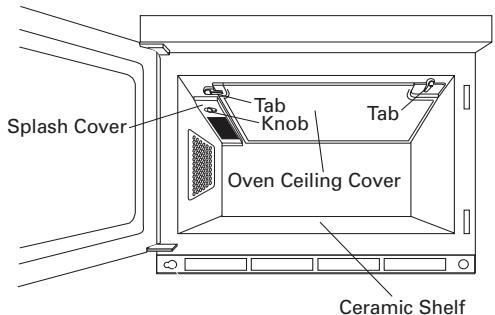
Fig.1
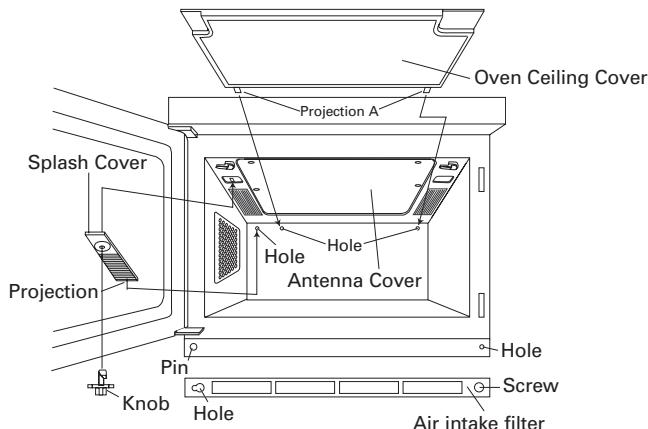
Fig.2

Fig.3
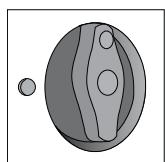
Fig.4
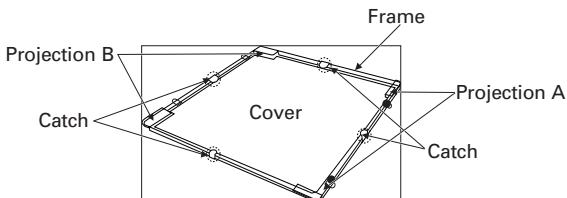
Fig.5 Oven Ceiling Cover
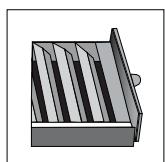
Fig.6
Oven Exterior
The outside of your oven can be easily cleaned with mild soap and water. Make sure to rinse thoroughly and dry the exterior with a soft towel.
Control Panels
Care should be taken in cleaning the control panels. Open the door before cleaning to inactivate the control
panel pads. Using a cloth dampened with water only, gently wipe the panels until clean. Avoid the use of excess water. Do not use chemical or abrasive cleaners because they may cause severe damage to the panels and make programming impossible.
Oven Interior
1) For easy cleaning, wipe any spatters or spills with a soft damp cloth or sponge at the end of each day. For heavier spills, use mild soap and rinse thoroughly with hot water.
2) At least once a week, remove the splash cover and the oven ceiling cover, and then clean them.
SPLASH COVER
Remove the splash cover as shown in Fig. 2. Wash in a mild detergent solution. Don't use detergent with orange oil, as the splash cover may melt.
OVEN CEILING COVER (Frame + Cover)
Remove the oven ceiling cover as shown in Fig. 2 and separate the frame from the cover.
COVER:
Wipe any grease, spills or spatters on the oven ceiling cover with a soft cloth dampened with a mild detergent solution.
Don't soak the oven ceiling cover in detergent or wash it.
FRAME:
Wipe any grease, spills or spatters on the frame with a soft cloth dampened with a mild detergent solution. Scrape hardened spills or spatters with a plastic spatula. Don't use metallic brushes or sharp-edged tools, as scratches on the frame may cause the frame to warp or break during heating. To remove hardened spills or spatters, soak the frame in a mild detergent solution for a short period of time. Don't use detergent with orange oil, as the frame may melt.
ANTENNA COVER
If antenna cover has grease, spills or spatters, wipe antenna cover with a soft cloth dampened with a mild detergent solution. Don't use metallic brushes or sharp-edged tools, as scratches on the antenna cover may cause the cover to warp or break during heating.
How to remove the oven ceiling cover
Remember to unplug the power cord. Turn the 2 tabs holding the oven ceiling cover to the oven cavity ceiling as shown in Fig. 2, then gently pull the cover downwards to separate from the oven cavity ceiling. Then separate the cover from the frame. It is held in place by 4 catches.
How to remove the splash cover
Remember to unplug the power cord. Turn the knob holding the splash cover to the ceiling of the oven as shown in Fig. 3 and remove it from the ceiling of the oven.
How to install the oven ceiling cover
Remember to unplug the power cord. Replace the cover in the frame. Insert projection A (2) into the 2 holes in the rear cavity wall and then insert projection B (2) into the 2 holes in the oven cavity ceiling as shown in Fig. 2. Then slide the tabs in place.
How to install the splash cover
Remember to unplug the power cord. Then insert the knob into the hole of splash cover as shown in Fig. 4 and turn it as shown in Fig. 3. Insert the splash cover projection into the hole in the rear cavity wall as shown in Fig. 2 and then replace the knob in the hole through the splash cover. Turn knob as shown in Fig. 4 to hold the splash cover in place.
3) Wipe any grease, spills or spatters on the door seal surfaces with a soft damp cloth or sponge so that they do not build up. The door seals must always be free of grease and/or spatters so that the door closes properly. Build-up could result in leakage of microwave energy from the oven.
CERAMIC SHELF
Wipe spills or spatters immediately with a soft cloth or sponge dampened with a mild detergent solution. Do not allow grease, spills, or spatters to build up. Do not use abrasive or harsh cleaners, scouring pads, metallic brushes or sharp-edged tools. Take care when cleaning to not damage the silicone seal.
Operating the unit with excessive buildup may result in cracking or breakage of the ceramic shelf. Do not operate the unit with a cracked or broken ceramic shelf.
Door
Wipe the door and window on both sides frequently with a soft damp cloth or sponge to remove any spills or spatters. Always keep the door seals and seal surfaces clean so that any grease, spills or spatters are not allowed to build up. Build-up could result in leakage of microwave energy from the oven.
Air Intake Filter
Clean at least every two weeks (equivalent to 100 hours usage) or more often for heavy use. See Custom Help 8 Air Intake Filter Counter on page EN-14. Loosen the screw holding the air intake filter to the oven and move the air intake filter to the left a little bit to remove the air intake filter from the pin. Wash the air intake filter in mild soapy water, rinse and dry with a soft cloth. After cleaning and drying completely, re-install the air intake filter.
NOTES:
- Take care not to misplace the tiny knob used to fasten the splash cover.
- The screw and the knob can be loosened and tightened either by hand or by using a coin.
- Install the oven ceiling cover properly. Operating the oven with an incorrectly installed oven ceiling cover may damage the components in the oven cavity and shorten the expected life span of your oven.
- When the oven ceiling cover is not installed properly, the display will show error code "EE0". To clear the error code, press the STOP/CLEAR pad and re-install the oven ceiling cover properly.
COOKING GUIDE
Utensils
METAL
1) Frozen Precooked Foods in Foil Containers
When cooking foods in foil containers, the container should be no more than 1/2'' deep. The best method to use is, after removing the foil cover, return the metal container to the paper box or package it came in and place this entire unit in the microwave oven. There must be more food than metal, and the metal container must not touch the oven walls.
2) Metal Skewers
Small metal skewers may be used if there is a large proportion of food to the amount of metal. If arcing does begin, stop the oven, remove the food and change to a wooden skewer.
Whenever using metal foil, foil containers or metal skewers, be sure that the metal does not touch the sides of the oven.
GLASS, GLASS-CERAMIC, CERAMIC AND CHINA UTENSILS
Most glass, glass ceramic, ceramic and china utensils are excellent for use in microwave ovens. Heatresistant glassware, unless it has metallic trim or metal portions, can almost always be used in the microwave oven, no matter whether it is clear or opaque. However, you must be careful not to use delicate glassware since it might crack from the heat of the food but not from the microwaves.
Most dinner plates, unless they have metallic trim, are acceptable for heating foods.
Utensils with metallic trim or metal parts, such as screws, bands, handles, etc. must be avoided. Cracked or crazed glazes or chips are also indications that a dish should not be used. Ceramic mugs or cups with glued on handles are also not recommended for use in a microwave oven.
PAPER GOODS
For low heat cooking, such as reheating or very short cooking times and for foods with low fat, sugar or water content, paper is a good utensil for microwave oven use. Napkins, towels, plates, cups, cartons, paper freezer wrap and the paper pulp board that some meats come packed in are also convenient utensils for use in the microwave oven. Cardboard can also be used. Paper is used in the microwave oven as a moisture insulator. Wax coated paper plates and cups should be avoided since the high temperatures that the foods reach may cause the wax to melt. Plastic coated dishes, however, are fine for use in the microwave oven.
Wax paper and paper towels provide an excellent loose cover for foods and help prevent spatters. Do not use paper towels, plates or other utensils made from recycled paper. Recycled paper products may contain certain impurities which could cause the paper to ignite during microwave heating. Some paper products may contain harmful substances.
PLASTIC AND FOAM UTENSILS
Plastic and foam dishes and containers should not be used for cooking foods with high fat or high sugar content since the heat of the food is too hot for the plastic and may cause it to melt or lose its shape. Cooking pouches designed to withstand boiling and freezing for conventional cooking, work well in the microwave oven. Do not close plastic cooking pouches with the metal tie wraps provided, since they get very hot and will melt the plastic wrap. Any closed pouch or cooking container should be pierced so that steam is allowed to escape. Do not attempt to cook in plastic storage bags as they will not withstand the heat of the food. Plastic wrap may be used to cover foods during cooking. Stretch-type plastic wraps are not suitable for use in the microwave oven because they form too tight a seal. Whenever removing plastic wrap that has been tightly formed around the utensil, just lift the plastic away from you so that the steam can vent and there will be no danger of scalding. Melamine is not recommended for use in the microwave oven.
WICKER, WOOD AND STRAW
Wicker, wood and straw may be used in the oven for short periods of time; however, they should not be used for high fat or high sugar content foods since the heat of the food could possibly char the utensil. Wooden handle scrapers and spatulas may be left in the microwave oven during cooking.
Guidelines for microwave heating
Several factors should be kept in mind when selecting utensils to be used for microwave heating.
- A plate with a narrow rim of about 1/2-inch is recommended. This keeps the food all at the same level for more even, uniform heating.
- Casseroles and sauced items should be heated in straight sided containers.
- Containers should be chosen to be large enough to contain foods as they expand with heating. Milk products are especially subject to boil-overs.
- Most foods heat better if they are covered. Covering retains the heat that has been created, reduces dehydration and helps keep the oven clean. There should be an opening for steam to escape from the food. Covers should also be non-metallic to allow for proper heating.
Techniques
- Microwave cooking is ideal for times when you run out of certain items or for preparation during slow periods.
- Avoid overcooking. Small portions of food should stand 2-3 minutes following cooking; during this standing time foods will complete cooking. Large portions require longer standing times.
- When a range of times is given in a recipe (2-3 minutes), always cook the shorter amount of time and check for doneness. Foods can always be returned to the microwave for additional cooking. Overcooked foods are tough or dry.
- Arrange foods with thicker portions or larger pieces toward the outside of the cooking container. Most foods cook more evenly and faster if covered.
- The microwave oven is quite useful in reducing broiling times for steaks and chops. Partially prepare the meat in microwave oven, then broil for a shorter period of time.
- Sliced meats should be at least 1/2-inch thick for best heating results. Turning the meat product overonce during the heating process will yield more uniform heating.
- Stir liquids briskly before heating and allow to stand at least for 20 seconds after heating before stirring or drinking to avoid eruption.
Pastries
- Placing rolls or muffins on a paper towel or napkin or wrapping in a paper towel eliminates excess moisture and gives best results.
- Avoid overheating. Baked items will be hotter on the inside than on the outside. Overheating causes baked products to be dry and tough.
Breakfast Items
- Eggs should be slightly undercooked when preparing them for later reheating in the microwave. Cool quickly and store covered.
- Arrange foods on platter with easily heated items near center of plate (eggs) and denser items toward outside (sausage).
- Do not cook eggs in the shell. Pressure will build up inside the shell and it will burst. Do not reheat cooked eggs unless they are scrambled or chopped. Puncture the yolk before cooking eggs.
Sandwiches
- Pre-toast bread and cool on air rack. Egg and shortening rich bread gives best results.
- Sandwich meats should be sliced very thin. When assembling sandwich, place thicker portions toward outside edges.
- Cover sandwiches and refrigerate no longer than three hours. When ready to heat in the microwave, unwrap and place on paper towel or napkin. Most sandwiches should be heated uncovered unless wrapped in paper towel or napkin. The paper absorbs excess moisture, preventing the sandwich from becoming soggy.
- Avoid overheating. Filling heats rapidly, and overheated sandwiches become dry and tough.
Casseroles
- Arrange casseroles with larger pieces or bulk of food around the perimeter of the casserole; depress in center.
- Casseroles should be heated covered with a non-metallic cover or plastic wrap except casseroles with crusts. If tightly covered, puncture plastic wrap or loosen at one corner so steam can escape. Be careful when removing plastic wrap; pull wrap away from you with the tines of a fork.
- Cover cassetoles evenly with sauce or gravy before refrigerating.
Vegetables
- Arrange vegetables with larger pieces around the perimeter of the dish; depress in center.
- Small uniform sized vegetables like peas, diced carrots and corn heat easily in the microwave oven. A butter sauce will speed the process.
-
Heat vegetables covered with either a non-metallic cover or plastic wrap. If tightly covered, puncture plastic wrap or loosen at one corner so steam can escape. Be careful when removing plastic wrap; pull wrap away from you with the tines of a fork.
-
Most vegetables should be slightly undercooked when preparing for later reheating in the microwave. Cool quickly and store covered.
- Microwaved vegetables retain their bright color, flavor and nutrients.
Defrosting
- See page EN-11 for Express Defrost directions.
- Avoid over-defrosting. Foods should be removed from the microwave when they are still slightly icy in the center. Allow foods to stand covered for 1 to 2 minutes to complete defrosting.
- Select Power allows you to defrost food at the power level and speed you choose. Generally defrosting is done at 30% or lower. To use Select Power for defrosting, first program time followed by pressing the Select Power pad and the number pad for percentage of power level (for example, 3 represents 30% power). The microwave power will pulse on and off to defrost frozen foods gently without heating.
Timing guide
Since different foods heat at different rates of speed, there are several influencing factors that should be taken into consideration when heating foods with microwave energy.
- The lower the initial temperature of a food, the longer it will take to heat in a microwave oven.
- Since with a microwave oven you are heating with time rather than temperature, it is helpful to know the starting temperatures of the foods. Foods held at room temperature will heat more quickly than refrigerated foods.
- The different chemical makeup of foods affect the heating times. Highly salted foods heat faster than non-cured items. Animal fats heat more quickly than lean parts of meat. Fats in a colloidal state heat faster than protein (egg yolk cooks before the white).
- The density of a food is determined by how compact the molecules are arranged within the food. A pound of roast beef is denser than a pound of bread. Even though they weigh the same, the bread contains more air and is therefore less dense. Denser foods require longer heating times.
- The thicker the food, the longer the heating time. If two foods have the same density, the thinner food will heat before the thicker one.
- The shape of the food also affects the heating time. Low round foods that are depressed in the center heat faster than highly mounded scooped foods. This has to do again with the density. The denser the mass to be heated, the longer the heating time.
- The more food placed in the oven cavity at one time, the longer the heating time. This is because there is a constant level of energy coming out of the magnetron tube during the heating process. If there are several food items in the oven, they will each absorb some of the energy thus making the total heating time longer. The time required for heating is not directly proportional to the increased amount of food. The heating time should be increased by about 80% for each additional like food item.
Heating and cooking time guide
| Quantity Item | Approximate Heating Time 100% Power(segments) | Comment: | |||
| R-CD1200M | R-CD1800M | R-CD2200M | |||
| Pastries, Rolls and Baked Goods | |||||
| 2 | Biscuit | 7-9 | 5-6 | 4-5 | Heat, uncovered, from room temp. |
| 1 | Bun | 5-7 | 3-4 | 3-4 | Heat, uncovered, from room temp. |
| 1 | Danish Pastry | 7-9 | 5-6 | 4-5 | Heat, uncovered, from room temp. |
| 1 | Dinner, Roll | 5-7 | 3-4 | 3-4 | Heat, uncovered, from room temp. |
| 1 | Doughnut | 5-7 | 3-4 | 3-4 | Heat, uncovered, from room temp. |
| 1 | Muffin (small) | 5-7 | 3-4 | 3-4 | Heat, uncovered, from room temp. |
| 1 | slice Pie | 30 | 22 | 20-22 | Heat, uncovered, from refrig. |
| 1 | Sweet Roll | 7-9 | 5-6 | 4-5 | Heat, uncovered, from room temp. |
| Breakfast Items | |||||
| 8 oz. | French Toast & Bacon | 40-50 | 35-45 | 25-35 | Heat, uncovered, from refrig. |
| 8 oz. | French Toast & Sausage | 40-50 | 35-45 | 25-35 | Heat, uncovered, from refrig. |
| 6 oz. | Pancakes & Bacon | 35-45 | 30-35 | 20-25 | Heat, uncovered, from refrig. |
| 6 oz. | Pancakes & Sausage | 35-45 | 30-35 | 20-25 | Heat, uncovered, from refrig. |
| 5 oz. | Scrambled Eggs & Bacon | 40-50 | 30-35 | 25-30 | Heat, covered, from refrig. |
| 5 oz. | Scrambled Eggs & Sausage | 40-50 | 30-35 | 25-30 | Heat, covered, from refrig. |
| 4 strips | Bacon | 40-50 | 30-35 | 25-30 | Heat, covered, from refrig. |
| 4 links | Sausage | 40-50 | 30-35 | 25-30 | Heat, covered, from refrig. |
| Sandwiches | |||||
| 4-5 oz. | Bacon & Tomato | 20-30 | 13-18 | 10-15 | Heat, uncovered, from refrig. |
| 4-5 oz. | Beef Barbecue | 20-30 | 13-18 | 10-15 | Heat, uncovered, from refrig. |
| 4-5 oz. | Burger | 30-35 | 18-23 | 15-20 | Heat, uncovered, from refrig. |
| 4-5 oz. | Cheeseburger | 38-43 | 24-29 | 20-25 | Heat, uncovered, from refrig. |
| 4-5 oz. | Corned Beef | 20-30 | 13-18 | 10-15 | Heat, uncovered, from refrig. |
| 2 oz. | Frankfurter | 30-35 | 21-24 | 17-20 | Heat, uncovered, from refrig. |
| 5 oz. | Jumbo Frankfurter | 40-45 | 31-35 | 27-30 | Heat, uncovered, from refrig. |
| 31/2 oz. | Grilled Cheese | 20-30 | 13-18 | 10-15 | Heat, uncovered, from refrig. |
| 4 oz. | Ham Sandwich | 20-30 | 13-18 | 10-15 | Heat, uncovered, from refrig. |
| 4-5 oz. | Ham & Cheese | 20-30 | 13-18 | 10-15 | Heat, uncovered, from refrig. |
| 5 oz. | Italian Sausage | 30-40 | 21-25 | 20-24 | Heat, uncovered, from refrig. |
| 4-5 oz. | Pastrami | 20-30 | 13-18 | 10-15 | Heat, uncovered, from refrig. |
| 4 oz. | Roast Beef | 20-30 | 13-18 | 10-15 | Heat, uncovered, from refrig. |
| 4-5 oz. | Submarine/Hoagie | 20-35 | 13-18 | 13-18 | Heat, uncovered, from refrig. |
| 5 oz. | Chili Burger | 38-43 | 24-29 | 20-25 | Heat, covered, from refrig. |
| 4 oz. | Chili Dog | 20-30 | 13-18 | 10-15 | Heat, covered, from refrig. |
| 4 oz. | Sloppy Joe | 20-30 | 13-18 | 10-15 | Heat, covered, from refrig. |
| Casseroles | |||||
| 8 oz. | Baked Beans | 70-80 | 45-50 | 40-45 | Heat, covered, from refrig. Stir. |
| 8 oz. | Beef Burgundy | 80-90 | 55-60 | 50-55 | Heat, covered, from refrig. Stir. |
| 8 oz. | Beef Goulash | 70-80 | 45-50 | 40-45 | Heat, covered, from refrig. Stir. |
| 8 oz. | Beef Stew | 80-90 | 55-60 | 50-55 | Heat, covered, from refrig. Stir. |
| 8 oz. | Beef Slices with Gravy | 70-80 | 45-50 | 40-45 | Heat, covered, from refrig. |
| 8 oz. | Cabbage Rolls | 80-90 | 55-60 | 50-55 | Heat, covered, from refrig. |
| 8 oz. | Chicken Fricassee | 70-80 | 45-50 | 40-45 | Heat, covered, from refrig. Stir. |
| 8 oz. | Chicken a la King | 65-75 | 38-43 | 35-40 | Heat, covered, from refrig. Stir. |
| 8 oz. | Chili Con Carne | 80-90 | 55-60 | 50-55 | Heat, covered, from refrig. Stir. |
| 8 oz. | Creamed Chicken | 65-75 | 40-45 | 35-40 | Heat, covered, from refrig. Stir. |
| 8 oz. | Lasagna | 75-85 | 52-58 | 45-50 | Heat, covered, from refrig. |
| 8 oz. | Meat Loaf | 70-80 | 43-47 | 40-45 | Heat, covered, from refrig. |
| 8 oz. | Macaroni (beef sauce) | 80-90 | 55-60 | 50-55 | Heat, covered, from refrig. Stir. |
Heating and Cooking Time Guide Can't
| Quantity Item | Approximate Heating Time | Comment: | |||
| 100% Power(segments) | |||||
| R-CD1200M | R-CD1800M | R-CD2200M | |||
| 8 oz. | Macaroni (cheese sauce) | 65-75 | 40-45 | 35-40 | Heat, covered, from refrig. Stir. |
| 8 oz. | Stuffed Peppers | 85-95 | 55-60 | 50-58 | Heat, covered, from refrig. |
| 8 oz. | Pot Pie | 70-80 | 48-53 | 40-45 | Heat, covered, from refrig. |
| 8 oz. | Ravioli | 70-80 | 48-53 | 40-45 | Heat, covered, from refrig. |
| 8 oz. | Shrimp Creole | 60-70 | 35-40 | 30-35 | Heat, covered, from refrig. |
| 8 oz. | Shrimp Newburg | 60-70 | 35-40 | 30-35 | Heat, covered, from refrig. |
| 8 oz. | Short Ribs of Beef | 80-90 | 55-60 | 50-55 | Heat, covered, from refrig. |
| 8 oz. | Spaghetti | 80-90 | 55-60 | 50-55 | Heat, covered, from refrig. |
| 8 oz. | Stew, Chicken | 80-90 | 55-60 | 50-55 | Heat, covered, from refrig. |
| 8 oz. | Tuna Casserole | 80-90 | 55-60 | 50-55 | Heat, covered, from refrig. |
| 8 oz. | Turkey Slices | 65-75 | 40-45 | 35-40 | Heat, covered, from refrig. |
| Vegetables | |||||
| 4 oz. | Asparagus | 20-30 | 15-20 | 10-15 | Heat, covered, from refrig. |
| 4 oz. | Beans, Green | 20-30 | 15-20 | 10-15 | Heat, covered, from refrig. |
| 4 oz. | Broccoli | 20-30 | 15-20 | 10-15 | Heat, covered, from refrig. |
| 4 oz. | Carrot Slices | 40-50 | 30-35 | 25-30 | Heat, covered, from refrig. |
| 4 oz. | Cauliflower | 40-50 | 30-35 | 25-30 | Heat, covered, from refrig. |
| 4 oz. | Corn Niblets | 20-30 | 15-20 | 10-15 | Heat, covered, from refrig. |
| 4 oz. | Mushrooms | 20-30 | 10-20 | 8-15 | Heat, covered, from refrig. |
| 4 oz. | Peas | 20-30 | 10-20 | 8-15 | Heat, covered, from refrig. |
| 4 oz. | Potatoes au Gratin | 30-45 | 20-30 | 15-25 | Heat, covered, from refrig. |
| 8 oz. | Potatoes (pre-baked) | 70-80 | 47-52 | 40-45 | Heat, uncovered, from refrig. |
| Quantity Item | Approximate Heating Time 100% Power | Comment: | |||
| R-CD1200M | R-CD1800M | R-CD2200M | |||
| Plated Meals | |||||
| 1 small | Plated Meal | 1-11/2min. | 40-60 sec. | 35-45 sec. | Heat, covered, from refrig. |
| 1 large | Plated Meal | 2-3 min. | 2-21/2min. | 11/4-13/4min. | Heat, covered, from refrig. |
| Primary Cooking | |||||
| 4 slices | Bacon | 13/4-2 min. | 11/4-11/2min. | 1-11/4min. | Cook between paper towels. |
| 1 pound | Bacon (precook to reheat) | 5 min. | 3 min. | 21/2-3 min. | Cook between paper towels. |
| 2 | Scrambled Eggs | 40-50 sec. | 30-35 sec. | 25-30 sec. | Stir during cooking. |
| 12 | Scrambled Eggs (precook to reheat) | 31/2-4 min. | 3 min. | 2-21/2min. | Stir during cooking. |
| 1 ear | Corn on the Cob | 11/4-13/4min. | 1-11/2min. | 40-50 sec. | Cover, turn over during cooking. |
| 1 medium | Potato | 21/2min. | 2 min. | 11/2-13/4min. | Wash, dry, prick. |
| 2 medium | Potatoes | 5 min. | 4 min. | 21/2-3 min. | Wash, dry, prick. |
| 40 oz. | Frozen Broccoli Pieces | 11 min. | 81/2-9 min. | 7-71/2min. | Rearrange during cooking. |
| 24 oz. | Frozen Broccoli Spears | 6 min. | 31/2min. | 3 min. | Rearrange during cooking. |
| 96 oz. | Refrigerated Lasagna | 30 min. at 40 % | 21 min. at 40 % | 15 min. at 40 % | Cover with lid for first half of cooking time. Uncover for remaining half of cooking time. |
REMARKERS
- Do not operate the oven empty. Either food or water should always be in the oven during operation to absorb microwave energy.
- Limit use of metal to those specific examples given in this booklet. Generally, metal should not be used in the microwave oven during operation.
- Do not heat eggs in the shell. Pressure will build up inside the shell and it will explode. Do not reheat cooked eggs unless they are scrambled or chopped. Puncture the yolk before heating eggs.
- Do not heat oil or fat for deep fat frying.
- Pierce the "skin" of potatoes, whole squash, apples or any fruit, vegetable or meat with a skin covering before heating.
- Use only popcorn packaged in special microwavable packages. Pop using 100% power. Listen carefully when popping corn. When popping slows to one or two seconds between pops, remove from oven. Should you ever smell scorching, remove bag from oven immediately. If any unpopped kernels remain, do not try to re-pop; it may cause a fire.
- Do not use paper towels, plates or other utensils made from recycled paper for microwave heating. Recycled paper products may contain certain impurities which could cause the paper to ignite during microwave heating.
- Stir liquids briskly before heating and allow to stand at least for 20 seconds after heating before stirring or drinking to avoid eruption.
SPECIFICATIONS
| R-CD1200M | R-CD1800M | R-CD2200M | |
| AC Line Voltage | Single phase 120V, 60Hz, A.C. only | Single phase 230/208V, 60Hz, A.C. only | |
| AC Power Required | 1.9kW | 2.7kW | 3.2kW |
| 120V-16A | 230V-12.3A | 230V-14A | |
| 208V-13.5A | 208V-16A | ||
| Output Power Frequency | 1200W ★ | 1800W ★ | 2200W ★ |
| 2450 MHz (Class B/Group 2) ★★ | |||
| Outside Dimensions | 171/2''(W) x 201/2''(D) x 135/8''(H)445 mm (W) x 520 mm (D) x 346 mm (H)(including feet) | ||
| Cavity Dimensions | 14''(W) x 13''(D) x 71/8''(H)355 mm (W) x 326 mm (D) x 177 mm (H) | ||
| Weight | Approx. 65 lbs/29.5 kg | Approx. 70 lbs/32.0 kg | |
| Depth (Door Open) | 922 mm 361/4'' | ||
★ IEC Test Procedure
The International Electrotechnical Commission's standardized method for measuring output wattage. This test method is widely recognized.
This is the classification of ISM (Industrial, Scientific and Medical) equipment described in the International Standard CISPR11.
In Compliance with Standards set by
FCC - Federal Communications Commission Authorized.
DHHS Complies with Department of Health and Human Services (DHHS) rule, CFR, Title 21 Chapter I, Subchapter J.
Health Canada-Complies with Health Canada, Radiation Emitting Device Regulation for microwave oven.


This symbol on the nameplate means the product is certified by NSF International (NSF-4).
This symbol on the nameplate means the product is listed by Underwriters Laboratories, Inc. for both the UL and CSA (Canadian Standard Association) standards.
TABLE DES MATIÈRES
FONCTIONNEMENT MANUEL
R-CD1200M R-CD1800M R-CD2200M
Repas preparés
FCC - Federal Communications Commission Authorized.
Horno microondas commercial R-CD1200M, R-CD1800M o R-CD2200M