DA33 - Iron Eldom - Free user manual and instructions
Find the device manual for free DA33 Eldom in PDF.


| Product type | Steam iron with dry ironing capability |
| Brand | Eldom |
| Model | DA33 |
| Power supply | 220-240 V, 50-60 Hz |
| Power | 2000-2400 W |
| Soleplate type | Stainless steel with non-stick coating |
| Water tank capacity | 250 ml |
| Heat-up time | Approx. 60 seconds |
| Steam output (continuous) | Up to 30 g/min |
| Steam boost | Up to 100 g/min |
| Anti-drip function | Yes |
| Self-cleaning function | Yes |
| Auto shut-off | Yes, after 8 minutes of inactivity |
| Adjustable temperature | Yes, with fabric guide |
| Spray function | Yes |
| Vertical steam function | Yes |
| Dimensions (L x W x H) | 30 x 12 x 15 cm |
| Weight | 1.2 kg |
| Cable length | 1.8 m |
| Water type recommended | Distilled or demineralized water |
| Cleaning method | Use self-cleaning function regularly; descale as needed |
| Spare parts availability | Contact Eldom customer service |
| Repairability index (France) | 8.5/10 (based on manual rating) |
Frequently Asked Questions - DA33 Eldom
User questions about DA33 Eldom
0 question about this device. Answer the ones you know or ask your own.
Ask a new question about this device
Download the instructions for your Iron in PDF format for free! Find your manual DA33 - Eldom and take your electronic device back in hand. On this page are published all the documents necessary for the use of your device. DA33 by Eldom.
USER MANUAL DA33 Eldom
natural_image
Exterior view of a modern office building (no signage)INSTRUKCJA OBSŁUGI ŻELAZKO Z NAWILŻACZEM DA33
natural_image
Close-up of a heart-shaped object with a dark red interior, labeled with the number 4 (no other text or symbols visible)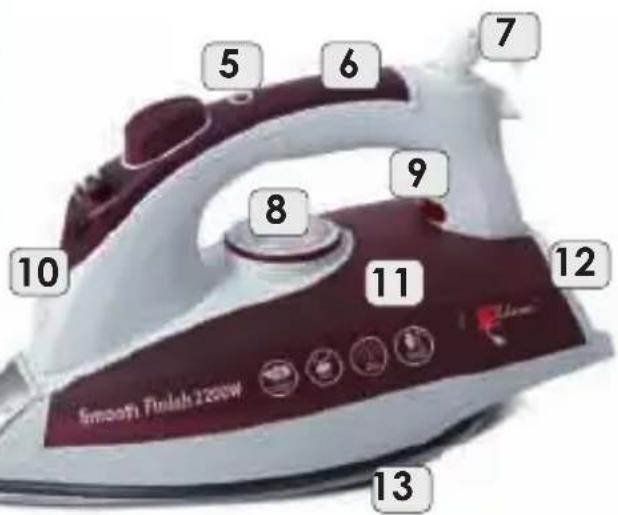
OPIS OGÓLNY
natural_image
Close-up of a dark, glossy, heart-shaped object with a small label '4' on the left (no other text or symbols visible)
GENERAL DESCRIPTION
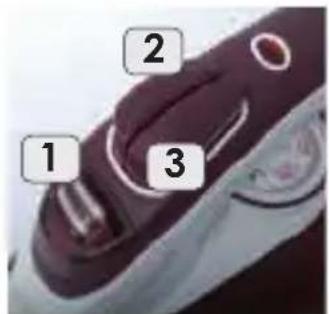
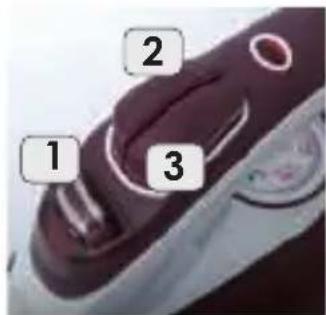
- Steam control + SELF CLEAN function
- Steam burst button
- Spray button
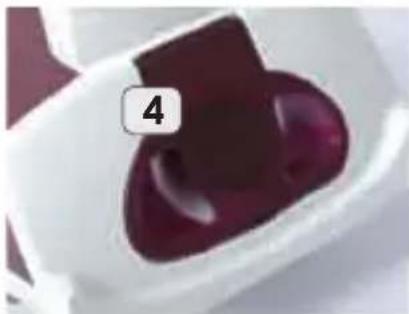
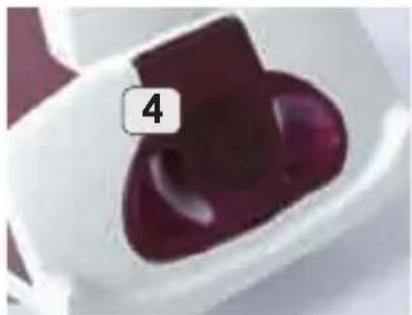
- Water inlet
- Control light – "auto shut-off" function
- Handle
- Power cord
- Thermostat knob
- Control light
- Spray nozzle
- Water tank
- Base
- Sole plate
TECHNICAL DETAILS
- power: 2200W
- steam burst output: 15-25g/min
- rated voltage: 230V \~50Hz
USE
Before switching on the iron for the first time, remove the factory protection of the sole plate (13) and unwind the power cord (7). During the first few uses, a harmless odour may be given off. This has no effect on the use of the iron and will disappear quickly.
Before plugging in, place the iron on the base (12). Switch the thermostat knob (8) to "0" position and set the steam control slide (1) to the position marked with symbol.
After plugging in, the control light (5) comes on. After setting the temperature using the thermostat (8), the light (9) comes on. The light will go off when the desired temperature is reached.
The selected ironing temperature should match the type of the fabric. If the type of the fabric is unknown, start with the lowest temperature and increase it gradually until best ironing results are achieved.
IRONING WITHOUT STEAM
Place the iron on the base (12).
Set the steam controller (1) to the position market with switching off the iron, set the thermostat (8) to "0" position.
Symbol. Before plugging in or
IRONING WITH STEAM
Steam and steam burst ironing is possible only with high temperature. The highest temperature is marked on the thermostat knob (8) as "MAX". With other temperature setting, the steam function will not work properly.
The amount of steam can be adjusted using the slide (1).
Additional steam can be generated by pressing the button (2). Additional steam burst makes it easier to remove stubborn wrinkles.
CAUTION. The steam is hot. There is a risk of scalding. The iron sole plate becomes hot very quickly and cools down slowly. Do not touch the sole plate.
FILLING THE WATER TANK
The water inlet (4) is located in the base (12).
Before filling the water tank make sure that the iron is unplugged from the mains and that the steam controller (1) is set to the position marked with symbol.

Fill the iron with tap or distilled water with room temperature. Never use mineral or very hard water.
To fill the water tank, use the included container that fits the inlet. Do not fill the tank with running water! While filling the tank, make sure that the water level does not exceed the "MAX" level on the tank (11).
SELF CLEAN
The SELF CLEAN function of the sole plate should be used from time to time. It prevents limescale build-up. In order to use it:
- fill the iron with water (to the top),
- place the iron on the base (12), plug it in and set the thermostat (8) to "MAX" position,
- when the control light (9) goes off, unplug the device from the mains and hold it horizontally e.g. above the sink,
- switch the controller (1) to "SELF CLEAN" position and hold it for a minute or so, shaking the iron,
- when the iron cools down, wipe the sole plate with a damp cloth to remove any possible dirt.
CAUTION. Be careful. Water and steam coming out of the iron during self-cleaning are hot. There is a risk of scalding.
SPRAY
After filling the tank, you may use the spray function to moisten the fabric by pressing the button (3).
"AUTO SHUT-OFF" FUNCTION
If the iron is not used for a while, it will turn off automatically after ca. 30 seconds when on its sole plate or after several minutes when upright.
If this function is active, the control light (5) will flicker and a sound effect will be heard for a few seconds.
In order to turn the iron ON again, shake it vigorously.
TIPS
- use only tap or distilled water,
- the iron is equipped with a stable, comfortable vertical base (12),
- setting the thermostat knob to a lower temperature does not reduce the temperature of the iron immediately, wait until the control light (9) comes on again,
- during dry ironing, the water tank can be empty. Make sure that the steam controller is set to minimum. You can use any temperature, depending on the type of the fabric. If the water tank is full, you can use the spray function.
- store the iron in upright position, unplugged, cooled down and empty,
- when using lower temperature, do not use steam
CLEANING AND MAINTENANCE
- before cleaning, unplug the device from the mains and wait until it cools down,
- do not put the iron in water,
- do not clean the iron with abrasive cloths or sponges as they may cause damage,
- wipe the body and the sole plate with a damp cloth and then wipe them dry with a clean, dry cloth
SAFETY INSTRUCTIONS
- before first use, read this manual carefully,
- before plugging in the iron, make sure that the information on the name plate match the parameters of the mains,
- plug the iron into an earthed socket,
- always set the temperature controller to "0" before plugging/unplugging the device,
- disconnect the device from the mains by pulling the plug, never pull the cord
- before cleaning or storage always wait until the iron cools down and empty the water tank,
- store the iron in a safe place in upright position so that the remaining water leaking from the steam holes do not damage the sole plate. You can wind the cord around the iron loosely during storage. Do not wind the cord too tightly around the device, as it may be damaged,
- keep the power cord away from heat sources,
- unplug the device from the mains before filling the water tank,
- do not leave the plugged iron unsupervised,
- this device is not intended for use by persons (including children) with reduced physical, sensory or mental capabilities, unless such persons are supervised by a person responsible for their safety,
- do not let children play with the device,
- do not leave children unattended with the device,
- do not use the device outdoors,
- do not put the cord or the device in water,
- the device is intended for household use only,
- the iron is designed for ironing clothes only,
- the iron is designed for ironing clothes in horizontal position,
- the iron must be used and stored on a flat surface,
- do not use the device if it has been dropped, it has visible damage or is leaky,
- do not open the water inlet during ironing,
- do not press the steam burst button if the device is switched off or if, during use, the thermostat knob is not set to red area as it may cause leaking,
- touching hot metal parts of the iron or hot steam may cause scalding. Be very careful when ironing.
- when ironing, never leave the iron in horizontal position on the ironing board,
- never use the iron if the power cord is damaged,
- damaged power cord must be replaced by the manufacturer in order to avoid hazard,
- the device can be repaired by an authorised service only (please find enclosed the list of service outlet or visit our website: www.eldom.eu). Any alterations or use of non-original replacement parts is prohibited and dangerous,
- Eldom Sp. z o.o. company shall not be liable for any damage arising as a result of improper use of the device
ENVIRONMENTAL PROTECTION
- the device is made of recyclable materials.
- the device should be handed over to a special collection point dealing with recycling of electric and electronic devices.
WARRANTY
- the device has been designed for household use,
- the device cannot be used for industrial purposes,
- the control lights are not covered by the warranty,
- the warranty will be void if the device is used incorrectly.
Detailed terms of warranty are specified in the attachment.
INSTRUKCE OBSLUHY
ŽEHLIČKA NAPAŘOVACÍ DA33
natural_image
Close-up of a dark, glossy, heart-shaped object with a small number '4' on top (no text or symbols on the object itself)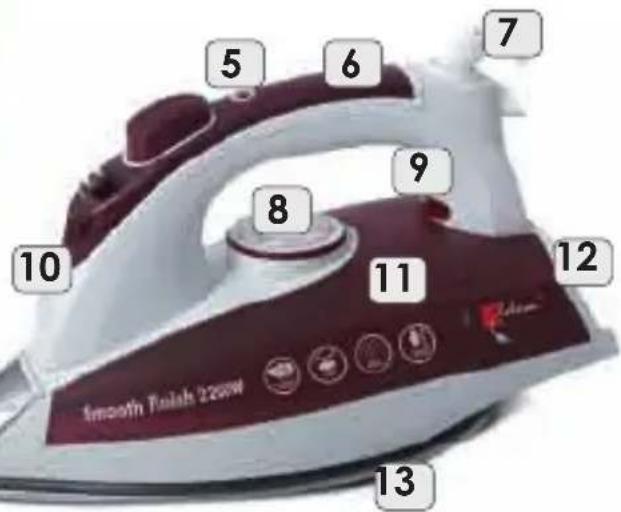
CELKOVÝ POPIS
natural_image
Close-up of a glossy, dark red object with a white base and a small number '4' in the corner (no text or symbols on the object itself)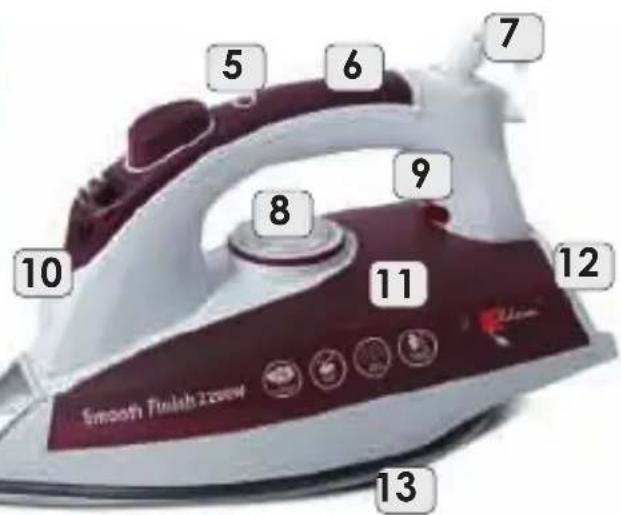
natural_image
Close-up of a glossy, maroon chocolate chip with a small square block and the number 4 above it (no text or symbols on the chip itself)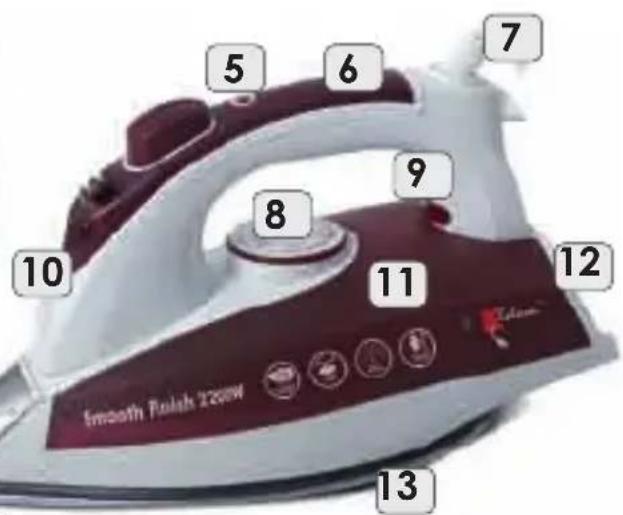
ОБЩАЯ ИНФОРМАЦИЯ


- INSTRUKCJA OBSŁUGI ŻELAZKO Z NAWILŻACZEM DA33
- OPIS OGÓLNY
- GENERAL DESCRIPTION
- TECHNICAL DETAILS
- USE
- IRONING WITHOUT STEAM
- IRONING WITH STEAM
- FILLING THE WATER TANK
- SELF CLEAN
- SPRAY
- "AUTO SHUT-OFF" FUNCTION
- TIPS
- CLEANING AND MAINTENANCE
- SAFETY INSTRUCTIONS
- ENVIRONMENTAL PROTECTION
- WARRANTY
- INSTRUKCE OBSLUHY
- ŽEHLIČKA NAPAŘOVACÍ DA33
- CELKOVÝ POPIS
- ОБЩАЯ ИНФОРМАЦИЯ
Brand : Eldom
Model : DA33
Category : Iron