Roller Creek - Station de charge / station d'accueil NGS - Free user manual and instructions
Find the device manual for free Roller Creek NGS in PDF.


User questions about Roller Creek NGS
0 question about this device. Answer the ones you know or ask your own.
Ask a new question about this device
Download the instructions for your Station de charge / station d'accueil in PDF format for free! Find your manual Roller Creek - NGS and take your electronic device back in hand. On this page are published all the documents necessary for the use of your device. Roller Creek by NGS.
USER MANUAL Roller Creek NGS
natural_image
Pure concentric circle diagram with a small top edge, no text or symbols present
ROLLER CREEK
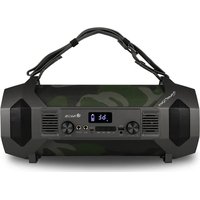
BLUETOOTH TRUE WIRELESS WATERPROOF IPX7 SPEAKER
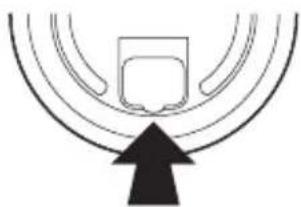
IMPORTANT!
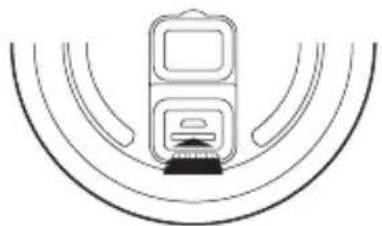
Close the rear rubber correctly to prevent water getting in
natural_image
Abstract diagram with concentric arcs and a black upward arrow at the bottom (no text or symbols)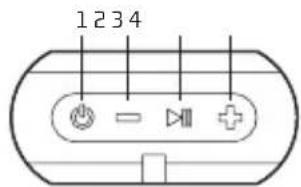
text_image
1234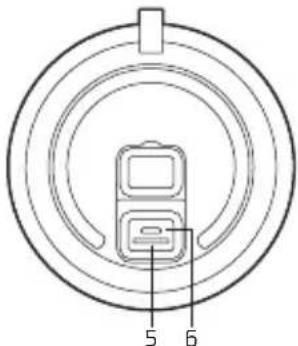
text_image
5 6OVERVIEW
1 Power on/power off
2 Volume - / previous track
3 Volume + / next track
4 Play/pause
5 Micro SD card slot
6 Micro USB charging port
CHARGING THE BLUETOOTH SPEAKER
- Connect the Bluetooth speaker's micro USB socket with the computer's USB port through USB cable.
- The charging LED will turn ON in red light; the rechargeable battery is in charging.
- The charging LED red light will turn OFF when the rechargeable battery is fully charged.
- Disconnect the USB cable.
BLUETOOTH SPEAKER PAIRING / RECONNECTING
- Hold down the ⏻ button for 3 seconds, a message sound "beep" will announce from speaker and the mode LED will blinking in blue; the device is turned ON and goes into searching / paring / reconnect mode for pair.
- Now, turn ON the Bluetooth function on your mobile phone.
- Search for "NGS ROLLER CREEK" and select it to pair (for first time pairing or pairing a new mobile device).
-
The Bluetooth speaker will be reconnecting automatically if your mobile phone has been paired (Depend on the of mobile phone's type and configuration, manual reconnection may require on some devices).
-
If pairing is successful, a message sound; "beep" will announce from speaker and the mode LED light will keep turn on.
MODES
BLUETOOTH / MICRO SD CARD
To switch between modes, press the 🔊key. If the device is not connected to a micro SD card, it will skip this mode.
BLUETOOTH SPEAKER CONTROL FUNCTION
- In playing music, press ▶ button to pause music, press it once again to play.
- Press the + button to increases the volume level.
- Press the - button to decreases the volume level.
- Press and hold the + button to play next music file.
- Press and hold the - button to play previous music file.
HAND FREE FUNCTION
BLUETOOTH MODE ONLY
When there is an incoming call;
- The ringing sound will up and the playing music will pause automatically.
- Press ▶ button to pick up the call if you want.
- Now you have hand free function with the Bluetooth speaker.
- Hold down the ▶ button for 2 seconds to hand up the call when finished. And,
- The paused music will start to play automatically.
HOW TO CONNECT 2 LOUDSPEAKERS TO EACH OTHER
- In order to connect them to each other, both speakers must be the same model; NGS Roller Creek.
- Turn on both speakers and press the play/pause button on each of them for 5 seconds. You will hear a beep and the blue LED will flash.
- Now press the power button on one of them twice (you will hear 2 consecutive beeps) and enter True Wireless pairing mode. Once paired, you will hear another beep, and the blue LED of the secondary device (the one on which we have not yet pressed the power button) will remain fixed, while the other light will flash.
- Open the bluetooth options on your mobile device (phone, tablet, computer, etc...) and select the NGS ROLLER CREEK device.
- In this manner, they will be synchronised and ready to use with your mobile device.
MICRO SD CARD MODE
- Insert the micro SD card or a USB flash drive into the slot.
natural_image
Diagram of a vehicle with two rectangular components and curved motion lines, no text or symbols present- The device will automatically play any music in MP3 format on the card or USB flash drive.
Battery warranty: The battery is a consumer product, and as such it is under warranty for 12 months.
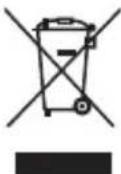
If at any time in the future you should need to dispose of this product please note that:
Waste electrical products should not be disposed of with household waste. Please recycle where facilities exist.
Check with your Local Authority or retailer for recycling advice.
(Waste Electrical and Electronic Equipment Directive)

ROLLER CREEK
HAUT-PARLEURS, BLUETOOTH TRUE WIRELESS ETANCHES IPX7
IMPORTANT!
natural_image
Abstract diagram with concentric arcs and a black upward arrow at the bottom (no text or symbols)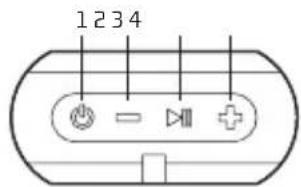
text_image
1234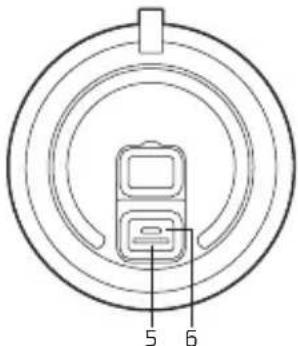
text_image
5 6APERÇU GENERAL
natural_image
Pure diagram of a train station with tracks and equipment, no text or symbols presentnatural_image
Abstract diagram with concentric arcs and a black upward arrow at the bottom (no text or symbols)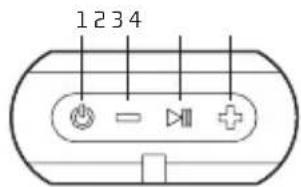
text_image
1234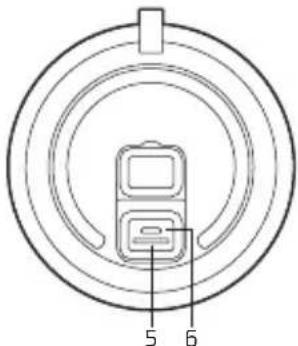
text_image
5 6natural_image
Pure diagram of a vehicle with two rectangular components and curved motion lines, no text or symbols present.natural_image
Abstract diagram with concentric arcs and a black upward arrow at the bottom (no text or symbols)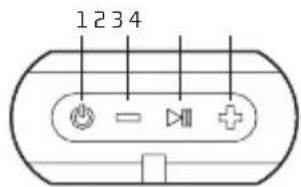
text_image
1234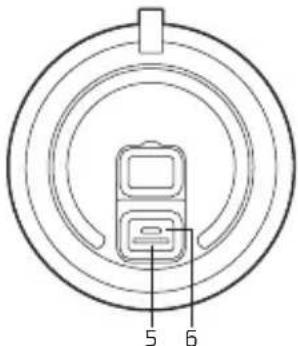
text_image
5 6ALLGEMEINE PRESENTATION
natural_image
Diagram of a device with two rectangular components and curved lines, no text or symbols presentnatural_image
Abstract diagram with concentric arcs and a black upward arrow at the bottom (no text or symbols)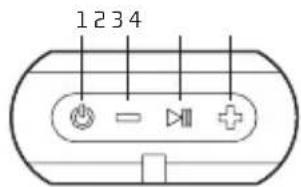
text_image
1234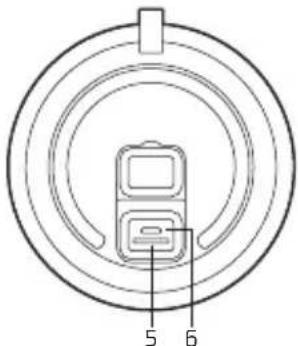
text_image
5 6natural_image
Diagram of a vehicle with two rectangular components and curved motion lines, no text or symbols presentnatural_image
Abstract diagram with concentric arcs and a black upward arrow at the bottom (no text or symbols)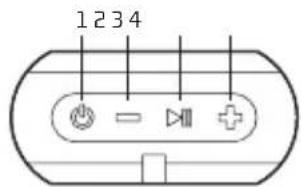
text_image
1234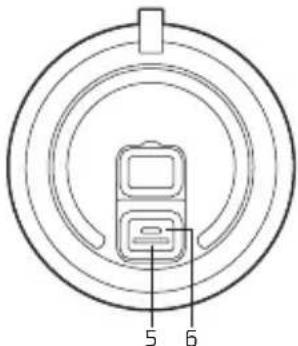
text_image
5 6APRESENTAÇÃO GERAL
natural_image
Pure diagram of a train station with curved tracks and no text or symbolsnatural_image
Abstract diagram with concentric arcs and a black upward arrow at the bottom (no text or symbols)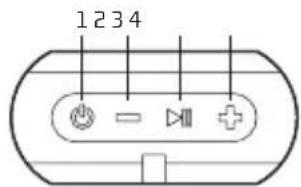
text_image
1234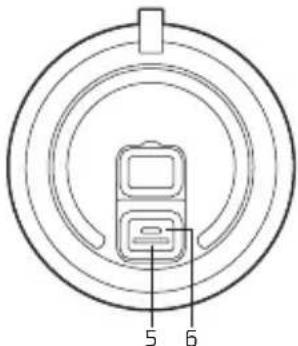
text_image
5 6CECHY OGÓLNE
natural_image
Pure diagram of a device with curved lines and no text or symbolsnatural_image
Abstract diagram with concentric arcs and a black upward arrow at the bottom (no text or symbols)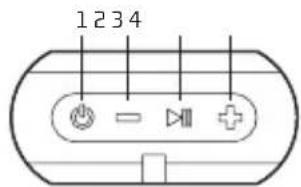
text_image
1234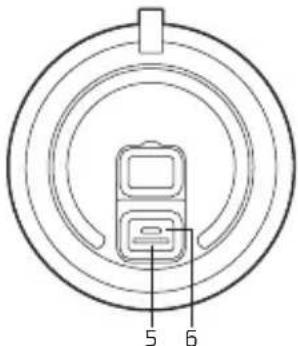
text_image
5 6ALGEMENE PRESENTATIE
natural_image
Pure diagram of a vehicle inside a circular track with lane markings (no text or symbols)natural_image
Abstract diagram with concentric arcs and a black upward arrow at the bottom (no text or symbols)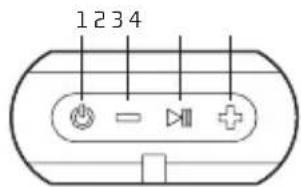
text_image
1234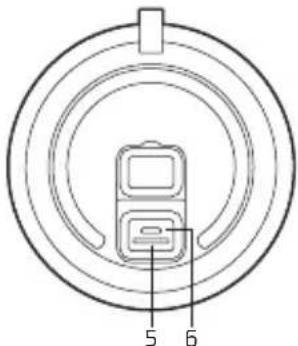
text_image
5 6VŠEOBECNÝ PŘEHLED
natural_image
Pure diagram of a vehicle with two wheels and a sensor, no text or symbols presentnatural_image
Abstract diagram with concentric arcs and a black upward arrow at the bottom (no text or symbols)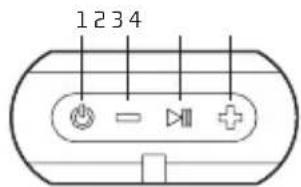
text_image
1234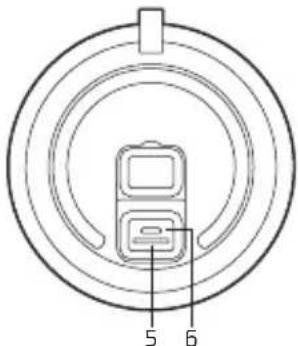
text_image
5 6ΕΠΙΣΚΟΠΗΣΗ
natural_image
Pure diagram of a device with curved lines and no text or symbolsHAS BEEN TESTED AND FOUND IN CONFORMITY WITH THE FOLLOWING HARMONIZED EUROPEAN STANDARDS:
HA SIDO TESTADO EN CONFORMIDAD CON LAS SIGUIENTES NORMAS STANDARD EUROPEAS ARMONIZADAS:
ETSI EN 301 489-1 V 1.9.2 (2011-09) EN 62479:2010
ETSI EN 301 489-17 V 2.2.1 (2012-09) EN 60065:2014
ETSI EN 300 328 V1.8.1 (2012-06)
AND THEREFORE COMPLY WITH THE ESSENTIAL REQUIREMENTS AND PROVISIONS OF THE FOLLOWING DIRECTIVES OF THE EUROPEAN PARLIAMENT AND EUROPEAN COUNCIL:
Y, POR LO TANTO, CUMPLE CON LOS REQUERIMIENTOS Y PROVISIONES DE LAS SIGUIENTES DIRECTIVAS DEL PARLAMENTO EUROPEO
ELECTROMAGNETIC COMPATIBILITY DIRECTIVE (EMC) 2014/30/EU
RADIO EQUIPMENT DIRECTIVE 2014/53/EU
ROHS DIRECTIVE 2011/65/EU
DIRECTIVA DE COMPATIBILIDAD ELECTROMAGNÉTICA (EMC) 2014/30/EU