
ZPU5500 - Air purifier Zelmer - Free user manual and instructions
Find the device manual for free ZPU5500 Zelmer in PDF.


| Product Type | Air Purifier |
| Brand | Zelmer |
| Model | ZPU5500 |
| Power Supply | Included adaptor (safety voltage as per rating label) |
| Control Type | Touch buttons: Power, Timer, Wind Speed, Light, Anion |
| Timer Settings | 2h, 4h, 8h |
| Wind Speeds | Low, Medium (Auto), High (plus Auto mode based on air quality) |
| Air Quality Sensor | Built-in dust sensor (Blue=good, Orange=fair, Red=poor) |
| Filter Type | Special replaceable filter (for this model only) |
| Filter Replacement Indicator | Red flashing power indicator; reset by pressing power button 7s |
| Anion Function | Yes, with separate button and indicator light |
| Light Control | Adjustable brightness (off/low/high) |
| Noise Level | Quiet at low speed; higher at high speed |
| Maintenance | Wipe exterior with soft cloth and neutral cleanser; do not wash filter |
| Safety Features | Children 8+ with supervision; automatic shut-off on timer; do not use outdoors |
| Warranty | 2 years (B&B TRENDS S.L.) |
| Compliance | WEEE Directive 2012/19/EU |
Frequently Asked Questions - ZPU5500 Zelmer
User questions about ZPU5500 Zelmer
0 question about this device. Answer the ones you know or ask your own.
Ask a new question about this device
Download the instructions for your Air purifier in PDF format for free! Find your manual ZPU5500 - Zelmer and take your electronic device back in hand. On this page are published all the documents necessary for the use of your device. ZPU5500 by Zelmer.
USER MANUAL ZPU5500 Zelmer
natural_image
Exterior view of a modern electric water heater (no signage)natural_image
Simple line drawing of a cylindrical object with a labeled dimension line (no text or symbols on the object itself)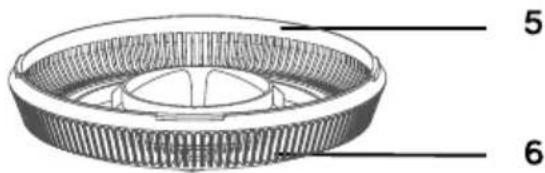
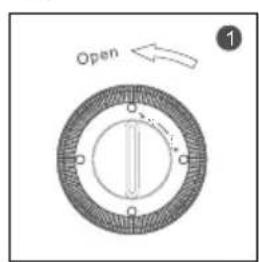
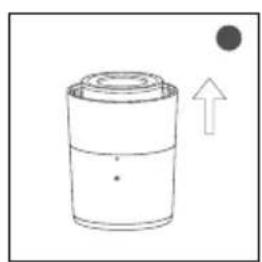
Fig. 1
natural_image
Simple line drawing of a cylindrical container with an upward arrow and a dot (no text or symbols)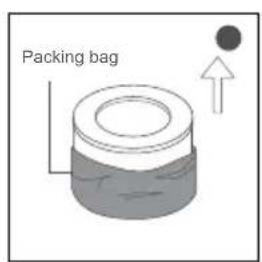
natural_image
Simple line drawing of a cylindrical object with a downward arrow, no text or symbols present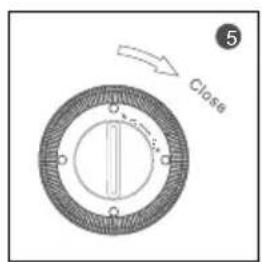
DZIEKUJEMY, ŻE ZDECYDOWALI SIĘ PAŃSTWO NA ZAKUP BLENDERA UFESA. MAMY NADZIEJĘ, ŻE PRODUKT SPEŁNI PAŃSTWA OCZEKIWANIA.
OSTRZEŻENIE
WE WOULD LIKE TO THANKS YOU FOR CHOOSING ZELMER, WE WISH THE PRODUCT PERFORMS TO YOUR SATISFACTION AND PLEASURE.
WARNING
PLEASE USE THE INSTRUCTIONS FOR USE CAREFULLY PRIOR TO USING THE PRODUCT. STORE THESE IN A SAFE PLACE FOR FUTURE REFERENCE
DESCRIPTION
Body
- air outlet
- Control panel
- Lighting
- Filter
- Base
- Air inlet
Control panel
a. Power button
b. Timer button
c. Wind speed button
d. Light control button
e. Anion button
SAFETY INSTRUCTIONS
This appliance can be used by children aged from 8 years and above and persons with reduced physical, sensory or mental capabilities or lack of experience and knowledge if they have been given supervision or instruction concerning use of the appliance in a safe way and understand the hazards involved.
Children shall not play with the appliance.
Cleaning and user maintenance shall not be made by children without supervision.
This device can only be used with the adaptor model supplied with the device and powered with the safety voltage indicated in the rating label of the device.
The adaptor cable cannot be replaced; If the cable is damaged, the adaptor will be discarded.
Appliance must be disconnected from the supply mains prior to cleaning or other maintenance.
This device is designed for use at a maximum altitude up to 2000m above sea level.
IMPORTANT WARNINGS
This appliance is designed for home use and should never be used for commercial or industrial use under any circumstances. Any incorrect use or improper handling of the product shall render the warranty null and void.
Prior to plugging in the product, check that your mains voltage is the same as the one indicated on the product label.
The mains connection cable must not be tangled or wrapped around the product during use.
Do not use the device, or connect and disconnect to the supply mains with the hands and / or feet wet.
Do not pull on the connection cord in order to unplug it or use it as a handle.
This product cannot replace normal ventilation, daily dust collection or oil pumping when cooking.
To prevent plastic parts from melting or catching on fire, do not place the product near heating appliances.
Ensure both the filter and its cover is properly installed before using.
Product must be used on a level and stable surface.
Do not use outdoors.
Unplug the product immediately from the mains in the event of any breakdown or damage and contact an official technical support service. In order to prevent any risk of danger, do not open the device.
Only qualified technical personnel from the brand's Official technical support service may carry out repairs or procedures on the device.
B&B TRENDS SL. disclaims all liability for damages that may occur to people, animals or objects, for the non-observance of these warnings.
INSTRUCTIONS FOR USE
Before use:
Make sure that the packaging from the filter has been removed (following the steps for installing filter).
FILTER INSTALLATION
Ensure the appliance is unplugged before removing or installing the filter.
When the power indicator keeps flashing in red, the filter should be replaced.
Please wipe the dust on the filter regularly, do not wash or use it repeatedly.
Please use the filter specially designed for this product.
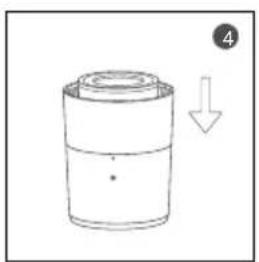
Steps for installing filter (fig.1)
Unplug the power socket of the machine before replacing or installing the filter.
- Invert the machine and rotate the base along the direction marked "Open".
- Take out the filter from the appliance.
- Remove the packaging filter into the item.
- Then install the filter into the machine.
- Then install the base, rotate and tighten the base along the direction marked "Close".
Note: Please press the power button for 7 s to reset after installing a new filter, and the anion indicator light will stop flashing.
USE
When connect the appliance to the mains, the buzzer will ring for 1 second.
Button operation:
Power button (a)
Touch the power button to turn on the machine, the buzzer will ring for one time, the power indicator and the low grade of wind speed indicator light blue.
Touch the button again, the button again, the buzzer will ring for one time and the machine will turn off with all the lights off.
Note:
- The machine will record the wind speed and anion function when turns off without unplugging the power socket.
- The lamp always on and the timer always off when push the power button and open the appliance.
Timer button (b)
In the condition of working, press the timer button to set among the circulation of 2h, 4h and 8h timer with buzzer rings, and the corresponding indicator will be on.
Press again, the timer indicator turns off and the machine will work continuously without timer.
In the status of timing, the machine begins of count down. When the time is up, the fan will stop working and all the lights will be off.
Wind Speed button (c)
In the condition of working, press the wind speed button, the buzzer will ring for one time when the machine is on.
L: low wind speed
H: high wind speed
Auto: auto wind speed. The appliance will work according to the air quality of the room.
Press again to adjust the wind speed among the circulation of low, middle, auto grade with buzzer rings, the corresponding indicator will be on, when the machine is on.
Light control (d)
When press light button (d) button for the second time, the light is off.
When press light button (d) for 3rd time, the light gets stronger.
Anion function (e)
Press anion button (e) again, the Anion function will be off and the Anion lamp is off when the machine is on.
Press anion button (e) one time, the Anion function is on and the Anion lamp is on when the machine is on.
Dust Sensor
The brightness of the lighting will change as per as the air quality in the room
- Blue represents good air quality
- Orange represents fair air quality
- Red represents poor air quality.
REMINIDER OF REPLACING FILTER
When the machine detects the filter is saturated, the power indicator will keep flashing.
Please press the power button for 7 seconds to reset after installing a new filter.
MAINTENANCE AND CLEANING
Ensure the item is power off and unplugged before starting any cleaning tasks.
Do not immerse the machine into water or any other liquid.
Do not use abrasive, corrosive or flammable cleansers (such as bleach or alcohol) to clean any part of the unit.
Do not use a vacuum cleaner to clean the filter or wash it directly.
Use a soft cloth with neutral cleanser to clean away any dust or debris from the surface of the unit and air inlet/outlet.
After the machine completely dry out, store it in a cool and well ventilated place.
If you do not use it for a long time, in the basic of previous steps, please turn out the machine for a few minutes from time to time to ensure a good performance.
Note: Do not drop any water into the machine.
TROUBLESHOOTING
| Situation Cause Solution | ||
| No Working • Is it plugged into a power socket? Is there a power outage?• Is the home leakage switch or fuse cut off?• Is the filter replacing keep flashing | • Plug the appliance on• Put the leakage switch or fuse in on position• Replace the filter | |
| Poor performance • Is there any dust in the surface of pre filter?• Is there any obstacle blocking the air inlet/outlet? | • Clean the filter as per as cleaning paragraph• Remove the obstacle | |
| Noisy • Is there anything stuck on the fan in the air outlet?• Is the machine tilted? | • Please set a lower grade of wind speed if the noise is too loud, or set low grade of wind speed when using in bedroom at night. | |
| Smell coming out the appliance • It is the normal phenomenon that the machine emits the smell of plastic for the first time. | • The machine will emit nasty smell if the filter is dusty, so in this situation, please clean or replace the filter.• If the burning smell emits from the machine, please unplug the power socket and contact with buyer or customer service | |
| Replacing filter reminder still flashing after user have put a new one | • Please press the power button for 7s to reset the machine and the life counter of the filter will start. |
PRODUCT DISPOSAL
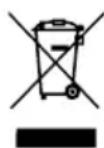
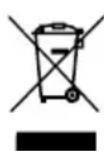
This product complies with European Directive 2012/19/EU on electrical and electronic devices, known as WEEE (Waste Electrical and Electronic Equipment), provides the legal framework applicable in the European Union for the disposal and reuse of waste electronic and electrical devices. Do not dispose of this product in the bin, instead going to the electrical and electronic waste collection center closest to your home.
ELIMINAREA PRODUSULUI
B&B TRENDS, S.L. guarantees compliance of this product for the use for which it is intended for a period of two years. In the case of breakdown during the term of this warranty, users are entitled to repair or else the replacement of the product at no charge if the former is unavailable, unless one of these options proves impossible to fulfill or is disproportionate. In this case, you can then opt for a reduction in price or cancellation of the sale, which must be dealt with directly with the sales vendor. This also covers replacement of spare parts provided that the product has been used according to the recommendations specified in this manual for both cases, and has not been tampered with by any third party that is not authorised by B&B TRENDS, S.L. The warranty will not cover any parts subject to wear and tear. This warranty does not affect your rights as a consumer in accordance with the provisions in Directive 1999/44/EC for member states of the European Union.
USE OF WARRANTY
Customers must contact a B&B TRENDS, S.L. authorised Technical Service for repair of the product. Since any tampering of the same by anyone not authorised by B&B TRENDS, S.L., or the careless or improper use of the same shall render this warranty null and void. The warranty must be fully completed and delivered along with the receipt or delivery docket for the effective exercise of rights under this warranty.
This warranty should be retained by the user as well as the invoice, receipt or the delivery docket to facilitate the exercise of these rights. For technical service and after-sales care outside the Polish territory, please submit your query to the point of sale where you purchased the item or check for further aftersales information at www.zelmer.com


- OSTRZEŻENIE
- WARNING
- DESCRIPTION
- Body
- Control panel
- SAFETY INSTRUCTIONS
- IMPORTANT WARNINGS
- INSTRUCTIONS FOR USE
- Before use:
- FILTER INSTALLATION
- Unplug the power socket of the machine before replacing or installing the filter.
- USE
- Button operation:
- Power button (a)
- Timer button (b)
- Wind Speed button (c)
- Light control (d)
- Anion function (e)
- Dust Sensor
- REMINIDER OF REPLACING FILTER
- MAINTENANCE AND CLEANING
- PRODUCT DISPOSAL
- ELIMINAREA PRODUSULUI
- USE OF WARRANTY
Brand : Zelmer
Model : ZPU5500
Category : Air purifier