ManualGo.com
AVIC-X3II - GPS Car Stereo PIONEER - Free user manual and instructions
Find the device manual for free AVIC-X3II PIONEER in PDF.



Download the instructions for your GPS Car Stereo in PDF format for free! Find your manual AVIC-X3II - PIONEER and take your electronic device back in hand. On this page are published all the documents necessary for the use of your device. AVIC-X3II by PIONEER.
USER MANUAL AVIC-X3II PIONEER
@ IMPORTANT SAFEGUARDS
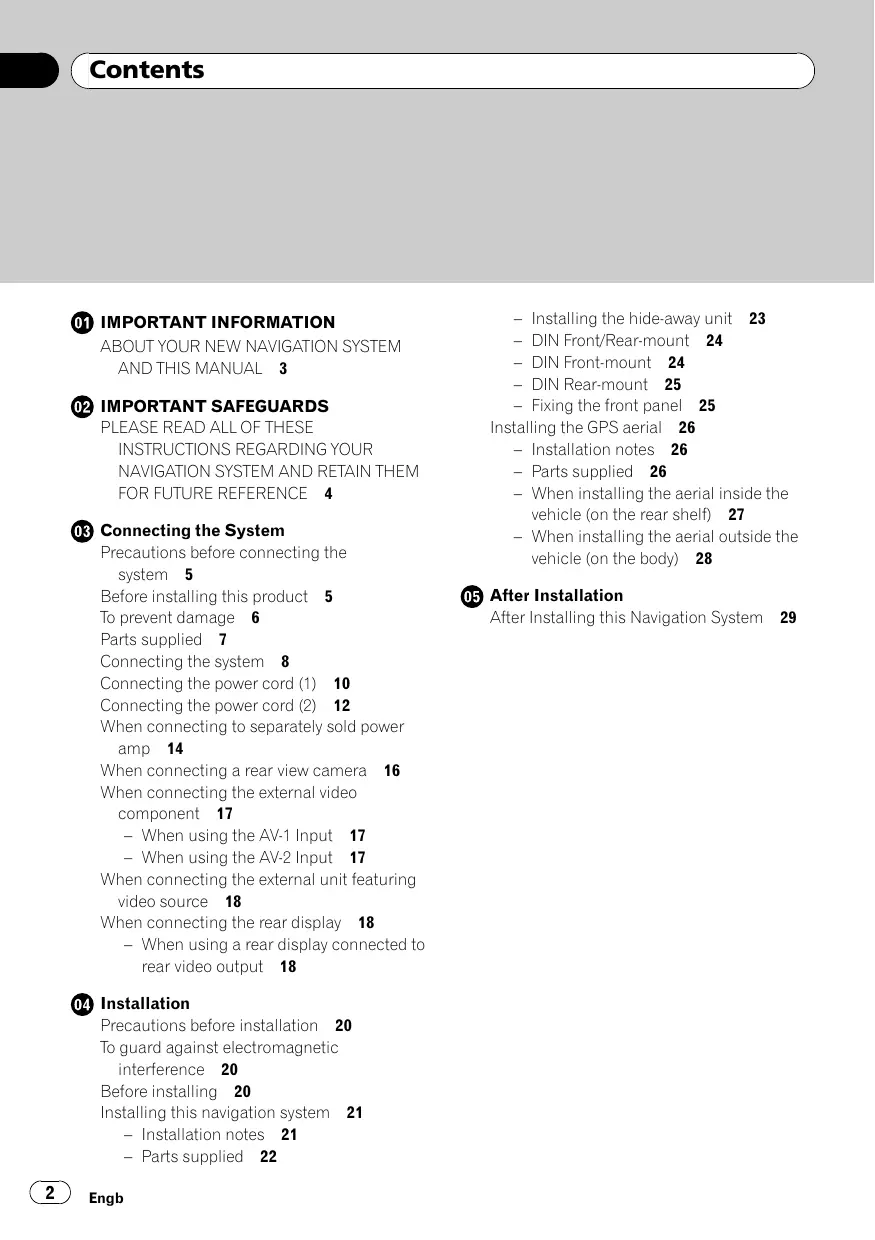
@® Connecting the System Précautions before connecting the system 5 Before installing this product 5 To prevent damage 6 Parts supplied 7 Connecting the system 8 Connecting the power cord (1) 10 Connecting the power cord (2) 12 When connecting to separately sold power amp 14 When connecting a rear view camera 16 When connecting the external video component 17 — When using the AV: Input 17 — When using the AV2 Input 17 When connecting the external unit featuring video source 18 When connecting the rear display 18 — When using à rear display connected to rear video output 18 @ installation Precautions before installation 20 To guard against electromagnetic interference 20 Before installing 20 Installing this navigation system 21 — Installation notes 21 — Parts supplied 22 Engb — Installing the hide-away unit 23 — DIN Front/Rearmount 24 — DIN Front-mount 24 — DIN Rear-mount 25 — Fixing the front panel 25 Installing the GPS aerial 26 — Installation notes 26 — Parts supplied 26 — When installing the aerial inside the vehicle (on the rear shelf) 27 When installing the aerial outside the vehicle (on the body) 28 After Installation After Installing this Navigation System 29
(IMPORTANT INFORMATION
THIS MANUAL +_ The navigation features of this product (and rear view camera option if purchased) are intended solely to aid you in the opera- tion of your vehicle. lt is not a substitute for your atfentiveness, judgement and care when driving + Never use this navigation system to route to hospitals, police stations, or similar facil- ities in an emergency. Please call the ap- propriate emergency number. +_ Do not operate this navigation system (or the rear view camera option if purchased) if doing so in any way will divert your atten- tion from the safe operation of your vehicle Traffic restrictions and advisories currently in force should always take precedence over guidance given by this product. AI- ways obey current traffic restrictions, even if this product provides contrary advice. + This manual explains how to install this na- vigation system in your vehicle. Operation of this navigation system is explained in the separate Operation Manual for the navi- gation system Do not install the display unit or the hide- away unit where it may (1) obstruct the dri- ver's vision, (i) impair the performance of any of the vehicle's operating systems of safety features, including airbags, hazard lamp buttons or (ii) impair the driver's abil- ity to safely operate the vehicle. In some cases, it may not be possible to install this product because of the vehicle type or the shape of the vehicle interior. (=) Engb Section
Section D (IMPORTANT SAFEGUARDS ) PLEASE READ ALL OF THESE could expose you to the risk of electric shock or INSTRUCTIONS REGARDING °°" 0
FUTURE REFERENCE 1 Read this manual fully and carefully before in- stalling your navigation system: Keep this manual handy for future reference
3. Pay close attention to all warnings in this
manual and follow the instructions carefully. 4 This navigation system may in certain circum- stances display erroneous information regard- ing the position of your vehicle, the distance of objects shown on the screen, and compass directions. In addition, the system has certain limitations, including the inability to identify one-way streets, temporary traffic restrictions and potentially unsae driving areas. Please exercise your own judgement in the light of actual driving conditions 5 As with any accessory in your vehicles inter- ior the navigation system should not divert your attention from the safe operation of your vehicle. f you experience difficulty in operat- ing the system or reading the display, please make adjustments while safely parkedi 6 Please remember to wear your seat belt at all times while operating your vehicle. If you are ever in an accident, your injuries can be con- siderably more severe if your seat belt is not properiy fastened Tin certain countries, laws may restrict the pla- cement and use of navigation systems in your vehicle, Please comply with all applicable laws and regulations in the installation and operation of your navigation system PA WARNING Do not attempt to install or service your naviga- tion system by yourself. Installation or servicing of the navigation system by persons without train ing and experience in electronic equipment and automotive accessories may be dangerous and Engb
( Connecting the System
Precautions before connecting the system VAN WARNING Pioneer does not recommend that you install your navigation system yourself. We recom- mend that only authorised Pioneer service personnel, who have special training and ex- perience in mobile electronics, set up an! stall this product. NEVER SERVICE THIS PRODUCT YOURSELF. Installing or servi- cing this product and its connecting cables may expose you to the risk of electric shock or other hazards, and can cause damage to the navigation system that is not covered by warranty. FIN CAUTION + you decide to perform the installation yourself, and have special training and ex- perience in the mobile electronics instal- lations, please carefully follow all of the steps in the installation manual. + Secure all wiring with cable clamps or electrical tape. Do not allow any bare wir- ing to remain exposed. +_ Do not directly connect the yellow lead of this product to the vehicle battery. If the lead is directly connected to the battery, engine vibration may eventually cause the insulation to fail at the point where the wire passes from the passenger com- partment into the engine compartment. If the yellow lead's insulation tears as a re- sult of contact with metal parts, short-cir- cuiting can occur, resulting in considerable danger. +_Itis extremely dangerous to allow the cables to become wound around the steer- ing column or gearstick. Be sure to install this product, its cables, and wiring away in such a way that they will not obstruct or hinder driving. + Make sure that the cables and wires are routed and secured so they will not inter- fere with or become caught in any of the vehicle's moving parts, especially the steering wheel, gearstick, handbrake, slid- ing seat tracks, doors, or any of the veh cle’s controls. + Do not route wires where they will be ex- posed to high temperatures. If the insula- tion heats up, wires may become damaged, resulting in a short circuit or malfunction and permanent damage to the product. + Do not cut the GPS aerial cable to shorten it or use an extension to make it longer. Altering the aerial cable could result in a short circuit or malfunction. + Do not shorten any leads. If you do, the protection circuit (fuse holder, fuse resis- tor or filter, etc.) may fail to work properly. + Never feed power to other electronic pro- ducts by cutting the insulation of the power supply lead of the navigation sys- tem and tapping into the lead. The current capacity of the lead will be exceeded, causing overheating. + The black lead is earth. Please earth this lead separately from the earth of high-cur- rent products such as power amps. Do not earth more than one product together with the earth from another product. For example, you must separately earth any amp unit away from the earth of this navi- gation system. Connecting earths to- gether can cause a fire and/or damage the products if their earths became Before installing this product +_ This product is for vehicles with a 12-volt battery and negative earthing. Check the battery voltage of your vehicle before instal- lation. Engb Section us!Buz
Section Ç Connecting the System + To avoid shorts in the electrical system, be sure to disconnect the (-) battery cable be- fore beginning installation: To prevent damage PIN WARNING + When replacing the fuse, be sure to only use a fuse of the rating prescribed on the fuse holder. + When disconnecting a connector pull the connector itself. Do not pull the lead, as you may pull it out of the connector. +_ This product cannot be installed in a vehicle without ACC (accessory) position on the igni tion switch ACC position No ACC position To avoid short-circuiting, cover the discon- nected lead with insulating tape. lt is espe- cially important to insulate all unused speaker leads, which if left uncovered may cause a short circuit. Attach the connectors of the same colour to the corresponding coloured port, i.e., blue connector to the blue port, black to black, etc. Refer to the owner's manual for details on connecting the power amp and other units, then make connections accordingly Engb + Since a unique BPTL circuit is employed do not directly earth the © side of the speaker lead or connect the © sides of the speaker leads together. Be sure to connect the © side of the speaker lead to the © side of the speaker lead on this navigation system +_Ifthe RCA pin jack on this product will not be used, do not remove the caps attached to the end of the connector. + Never connect speakers with an output rat- ing of less than 50 W channel or impe- dance outside of the 4 ohms to 8 ohms specifications to your navigation system Connecting speakers with output and/or impedance values other than those noted here may result in the speakers catching fire, emitting smoke, or becoming da- maged. Notice for the blue lead + _Asignal is output through the blue lead to control the aerial of your vehicle. The tim- ing varies depending on the setting. (For more detailed information on changing [Antenna Control] mode, refer to the op- eration manual.) + When [Antenna Control] mode is set to [Radio], the vehicle's aerial can be stowed or turned off by following the instructions below. — Change the source from radio (MW/LW or FM) to another source — Turn the source off — Turn off the ignition switch (ACC OFF) +_|f[Antenna Control] mode is set to [Power], the vehicles aerial can be stowed or turned off only when the ignition switch is turned off (ACC OFF). Do not connect this lead to the system con- trol terminal of external power amps. Be sure not to use this lead as the power supply lead for the auto-aerial or aerial booster. Such connection could cause ex- cessive current drain and malfunction.
Ç Connecting the System Section
Notice for the blue/white lead + Whenthe ignition switch is turned on (ACC ON), a control signal is output through the blue/white lead. Connect to an external power amp's system remote control term- inal (max. 300 mA 12 V DC). The control sig- nal is output through the blue/white lead, even if the audio source is switched off. +. Do not connect this lead to the auto-aerial relay control terminal or the aerial booster power control terminal +_ Be sure not to use this lead as the power supply lead for the external power amps. Such connection could cause excessive current drain and malfunction. Parts supplied The hide-away unit Power cord Extension lead Extension lead (for reverse signal) {for speed signal) 80-pin cable GPS aerial Extension aerial cable Lock tie RCA connector Engb usiBuz
Section Ç Connecting the System ) Connecting the system 30-pin cable 3m Yellow RCA cable (sold separately) plied) (VIDEO IN) GPS aerial ision &erial cable plied) Vehicle aerial Light grey sn Light grey
IP-BUS able (supplied with Multi-DVD player) To video output (FRONT) es P-BUS cab! {supplied with Bluetooth adapter) Black Blue EF Bluetooth adapter ' (sold separately) Micropl V with adapter) P-BUS cable UB100) Multi-CD player (sold separateh S00 Separate (sold separately) Engb
Section Ç Connecting the System
Pleas e Instruction Manual for the Wired Remote Control Adapters (sold separately)
(Guide speaker output) *: This terminal is intended to support future equipment and should not be used if you are using this product by itself. The display unit Digital output* Mutti-DVD play {XDV (sold iPod® with Dock Connector** Interface cable for iPod® 4 (CD-1200) (sold separatel, F+:For details concerning operations and compatiblity, 7 refer to the operation manual.
25-pin cable (supplied with Multi-DVD player) /\orenre + To avoid the risk of accident and the potential violation of applicable laws, this product should never be used while the vehicle is being driven except for navigation purposes. And, also Rear Displays should not be in a location where it is a visible distraction to the driver. + In some countries, the viewing of images on a display inside a vehicle even by persons other than the driver may be illegal. Where such regulations apply they must be obeyed and this product's video source should not be used. Engb
Section Ç Connecting the System ) Connecting the power cord (1) Note Notes Depending on the kind of vehicle, the function + When a subwoofer (*8) is connected to this of *3 and #5 may be different, In his case, be navigation system instead of a rear speaker, sure to connect *2 to *5 and *4 to *3. change the rear output setting in the Initial Setting. (Refer to the operation manual.) The subwoofer output of this navigation system is monaural. = + When using a subwoofer of 70 W (2 Q), be sure to connect with violet and violet/black leads of this ee navigation system. Do not connect anything with t green and green/black leads. Connect leads of same colour to each is other Cap (*1) ' When not using this terminal i Fuse holder do not remove the cap. i Fuse (10 A) EF = db Yellow (3) Yellow(2) 1 [ Backup To terminal always suppli (or accesson) with power regardiess of gnition switch position:
Red (*5) Red (*4) Accessory To electric terminal controlled by (or backup) ignition switch (12 V DC) ON/OFF. Orange/White To lighting switch t resistor Black (earth) To vehicle (metal) body ISO connector Speaker leads White: Front left ® p” Front left © 4 Note Front righi Front right © Rear left ® or Subwoofer ® (*8) Rear left © or Subwoofer © (*8) Rear right ® or Subwoofer ® (*8) Violet/Black: Rear right © or Subwoofer © (*8) In some vehicles, the ISO connector may be divided into two. In this case, be sure to connect to both connectors. Engb
Section Ç Connecting the System unit Power cord Yellow/Black (MUTE) If you use an equipment with mute function, connect that £ to the Audio Mute lead. If not, keep the Audio d free of any connections. Note Audio source will be set to mute or attenuate, while the following sounds will not be muted or attenuated. For details, see the operation manual. — voice guidance of the navigation —incoming ringtone and incoming voice of the mobile phone that is connected to this navigation system via Bluetooth wireless technology Note The aerial will automatically retract or turn off, yet the timing varies depending on the setting, Blue (*7) To Auto-aerial relay control terminal. IFthe vehicle has à glass aerial connect to the aerial booster power control terminal (max. 300 mA 12V DC) The pin position of the ISO connector will differ depending on the type of vehicle. Connect *6 and *7 when Pin 5 is an aerial control type. In other types of vehicle, never connect *6 and *7. Engb (11)
Section Ç Connecting the System ) Connecting the power cord (2) Connection method Pass the extension cord ££a andthe lead for the speed CE =) mondiale through this hole.
Extension lead or speed signal) Pink (CAR SPEED SIGNAL INPUT) 7] The mobile navigation system is connected here to detect the distance the vehicle travels. s connect the vehicle's speed detection circuit or the ND-PG1 speed pulse generator, sold separately. Failure to make this connection will increase errors in the cation display, CN warnine PA Note
IMPROPER CONNECTION MAY RESULT IN
SERIOUS DAMAGE OR INJURY INCLUDING
ELECTRICAL SHOCK, AND INTERFERENCE WITH
THE OPERATION OF THE VEHICLE'S ANTILOCK
BRAKING SYSTEM, AUTOMATIC GEARBOX AND
SPEEDOMETER INDICATION. The position of the speed detection circuit and the position ofthe handbrake switch vary depending on the vehicle model. For details, consult your authorised Pioneer dealer or an installation professional Violet/White (REVERSEGEAR SIGNAL INPUT) This is connected so that the navigation system can detect whether the vehicle is moving fonwards or backwards. Connect the violet/white lead to the lead whose voltage changes when the reverse gear is engaged. Unless connected, the sensor may not detect your vehicle travelling forward/backward property, and thus the position of your vehicle detected by the sensor may be misaligned from the actual position.
Notes À canon separately), please make sure to connect this lead. lead. Use of another lead could cause fire, + When you use à rear view camera, please make sure to | smoke and/or damage this navigation connect this lead. Othenwise you cannot switch to rear | system. view camera picture. Engb + When you use the ND-PGT speed pulse generatr (sold | Be sure to use only the supplied extension | —
Ç Connecting the System Section
ES) Yellow/Black (GUIDE ON) When combining this navigation system with the other Pioneer audio unit for the vehicle, if the vehicle stereo has yellow/black leads, connect them to those leads. In this way the vehicle stereo is automatically muted to reduce the vehicle stereo volume when: — the guidance audio is output — the mobile phone is used via Bluetooth adapter 30 cm The display unit LE Power cord Light green (PARKING BRAKE) Used to detect the ON/OFF status of the handbrake. This lead must be connected to the power supply side of the handbrake switch If this connection is made incorrectly or omitted, certain functions of your navigation system will be unusable.
USE OF THIS LEAD MAY VIOLATE APPLICABLE LAW AND MAY RESULT IN SERIOUS INJURY OR DAMAGE. Connection method Clamp the lead
ss Clamp tirmiy with needle-nosed pliers. Fuse resistor Reversing lamp lead Extension lead {for reverse signal) Check the position of your vehicle's when the gearstick is in reverse [RI) and find the reversing lamp lead in the boot. Engb
Section Ç Connecting the System ) When connecting to separately sold power amp output or nonf ding output (SU ER OUTPUT or NON. PT OUTPUT) | Dem "fl F' NE nd RCA connector Rear output l {REAR OUTPUT) | Sem a ie B— NE Ce ie | nt output E © {FRONT OUTPUT) l FD Co Ben Sep Cd
Section Ç Connecting the System Perform these connections when using t 7 optional ampliier Power amp {sold separately)
Power amp {sold separately) Power amp (sold separately) Left Right Front speaker [) Front speaker Rear speaker Subwoofer Subwoofer You can change the RCA output of the subwoofer depending on your subwoofer system. (Refer to the operation manual.) Engb (15)
Ç Connecting the System When connecting a rear view camera When this product is used with a rear view camera, it is possible to automatically switch from the video to rear view image when the gearstick is moved to REVERSE (R). Rear View mode also allows you to check what is behind you while driving PIN WARNING USE INPUT ONLY FOR REVERSE OR MIRROR IMAGE REAR VIEW CAMERA. OTHER USE MAY RESULT IN INJURY OR DAMAGE. PIN CAUTION + The screen image may appear reversed: + The rear view camera function is to use this product as an aid to keep an eye on trailers, or backing into a tight parking spot. Do not use this function for entertainment purposes. + The object in rear view may appear closer or more distant than in reality. + Please note that the edges of the rear view camera images may differ slightiy according to whether full screen images are displayed when backing, and whether the images are used for checking the rear when the vehicle is moving forward À CAUTION Be sure to use only the supplied extension lead. Use of another lead could cause fire, smoke and/or damage this navigation sys- tem. Rear view camera {ND-BC2/ND-BC20PA) | <— (soldéeparatel] To video output RCA cable 7 (sold separately) Brown (REAR VIEW CAMERA IN) sc% . Oo
The hide-away unit Violet/Wh Extension lead (for reverse signal)
Fuse resistor For more details about the wiring, refer to Connecting the power cord (2) 72 Notes + _Itis necessary to set [Camera] in [System] to [On] when connecting the rear view camera: (For details, refer to the operation manual.) + Connect to the rear view camera. Do not con nect to any other equipment. (#)
Section Ç Connecting the System
When connecting the external video component When using the AV-1 Input The hide-away unit EMSOOLIN CN (VIDEO IN) RCA cables {sold separately) To video output To audio outputs y + External video component {sold separately) +_itis necessary to set [AV1 Input] in [System] to [Video] when connecting the external video component. (For details, refer to the operation manual.) When using the AV-2 Input The hide-away unit usiBuz CD-RM10 (sold separately) To video output External video component (sold separately) +_Itis necessary to set [AV2 Input] in [System] to [Video] when connecting the external video component. (For details, refer to the operation manual.) Engb (17)
Section Ç Connecting the System PIN CAUTION Be sure to use à CD-RM10 (sold separately) for wiring. If you use other cables, there is a case where wiring position differs, images and sounds may be disturbed
L: Left audio (White) AN ANS R2 Right audio (Red) VGR When connecting the external unit featuring video source The hide-away unit © à #90a Yellow (VIDEO IN) lely) To IP-BUS | Black output Pioneer external unit {sold separately) To video output +_Itis necessary to set [AV1 Input] in [System] to [EXT] when connecting the ex- ternal video component. (For details, refer to the operation manual.) (®) When connecting the rear display de-away unit #08 O Yellow (AUDIO OUT) (VIDEO OUT) RCA cables (sold separately) To video input 0 audio inputs
y + + Rear display with RCA input jacks When using a rear display connected to rear video output PIN WARNING NEVER install the rear display in a location that enables the driver to watch the video source while driving. This navigation system's rear video output is for connection of a display to enable passen- gers in the rear seats to watch the video source You can switch the rear screen mode in “AW MENU". (For details, refer to the operation manual.)
Ç Connecting the System Section
7 Notes + The map screen navigation images output to the rear display differ from standard NTSC for- mat images. Therefore, their quality will be in- ferior to the images that appear on the front display. + The navigation system automatically switches the colour system (NTSC, PAL) for each video and outputs the video on the “Rear Display". To correctly output each type of video on the *Rear Display”, we recommend using à “Rear Display" with a function to automatically switch the colour system (e.g. AVD- W7900V). (=)
Precautions before stallation VAN WARNING Pioneer does not recommend that you install or service your navigation system yourself. Installing or servicing the product may ex- pose you to risk of electric shock or other ha- zards. Refer all installation and servicing of your navigation system to authorised Pioneer service personnel. â CAUTION + Never install this product in places where, or in a manner that: — H could injure the driver or passengers ifthe vehicle stops suddenly. — H may interfere with the drivers opera- n of the vehicle, such as on the floor in front of the driver’s seat, or close to the steering wheel or gearstick. Make sure there is nothing behind the dashboard or panelling when drilling holes in them. Be careful not to damage fuel lines, brake lines, electronic compo- nents, communication wires or power cables. When using screws, do not allow them to come into contact with any electrical lead. Vibration may damage wires or insulation, leading to a short circuit or other damage to the vehicle. To ensure proper installation, use the sup- plied parts in the manner specified. any parts other than the supplied ones are used, they may damage internal parts of this product or they may work loose and the product may become detached. It is extremely dangerous to allow the cables to become wound around the steer- ing column or gearstick. Be sure to install this product, its cables, and wiring away in such a way that they will not obstruct or hinder driving. Make sure that leads cannot get caught in a door or the sliding mechanism of a seat, resulting in a short circuit. Please confirm the proper function of your vehicle’s other equipment following installation of the navigation system. Engb + Certain government laws may prol restrict the placement and use of this sys- tem in your vehicle. Please comply with all applicable laws and regulations re- garding the use, installation and operation of your navigation system. + Do not install the display unit or the hide- away unit where it may (i) obstruct the drivers vision, (ii) impair the performance of any of the vehicle’s operating systems or safety features, including airbags, ha- zard lamp buttons or (iii) impair the dri- vers ability to safely operate the vehicle. +_ Install the display unit between the dri- vers seat and front passenger seat so that it will not be hit by the driver or passenger if the vehicle stops quickly. + Never install the display unit in front of or next to the place in the dash, door, or pil- lar from which one of your vehicle’s air- bags would deploy. Please refer to your vehicle's Owner's Manual for reference to the deployment area of the frontal air- bags. + Do not install the navigation system in a place where it will impair the performance of any of the vehicle’s operating systems, including airbags and headrests. (») To guard against electromagnetic interference In order to prevent interference, set the follow ing items as far as possible from this naviga- tion system, other cables or leads: + TVaerial and aerial lead + FM, MW/LW aerial and its lead + GPS aerial and its lead In addition you should lay or route each aerial lead as far as possible from other aerial leads. Do not bind them together, lay or route them together, or cross them. Such electromagnetic noise will increase the potential for errors in the location display. (=) Before installing + Consult with your nearest dealer if installa- tion requires the drilling of holes or other modifications of the vehicle:
Section (Installation
+_ Before making a final installation of this product, temporarily connect the wiring to confirm that the connections are correct and the system works properly.(s] Installing this navigation system Installation notes + Do not install the display unit orthe hide- away unit in places where it may become subject to high temperatures or humidity, such as: — Places close to a heater, vent or air con- ditioner. — Places exposed to direct sunlight, such as on top of the dashboard or the rear shel. — Places that may be splashed by rain, for example close to the door. + When installing the unit choose a position that is strong enough to bearthe weight of the unit, Choose positions where the dis- play unit or the hide-away unit can be firmly installed, and install it securely. Unless the display unit orthe hide-away unit are se- curely attached, the current location of the vehicle cannot be displayed correcty. + Do not install the hide-away unit on the board covering the spare tyre or other places which are subject to vibration. + When the hide-away unit is installed under a front seat, ensure that it does not ob- struct the sliding action of the seat + When installing the hide-away unit, choose a position that ensures there will be no con- tact with luggage. The impact of a heavy weight or sudden shock on the hide-away unit will adversely affect the accurate dis- play of the current location of the vehicle + Avoid installing the hide-away unit in places where it will interfere with loading and unloading of the spare tyre, jack, tools, etc. + Check that a disc can be ejected with the display unit installed Install the hide-away unit horizontally on a surface withil tolerance (Within five degrees to the left or right of your vehicle’s direction of travel) n +30 degrees to -80 degrees usiBuz Mis-installing the unit with the surface tilted more than these tolerances would in- crease the potential for errors in the loca- tion display, and might otherwise cause reduced display performance. If installation zontal, the di angle exceeds 30° from hori- splay unit might not give its optimum performance. 30° The cords must not cover up the area shown in the figure below. This is neces- sary to allow the amps and navigation me- chanism to dissipate heat. The display unit 5-0: O0:
Do not cover this area. The hide-away unit © a 0000 = The semiconi Do not cover this area. ductor laser will be damaged if it overheats, so don't install the display unit anywhere hot — for instance, near a heater outlet. Engb (21)
+ When installing the hide-away unit in the Parts supplied ae nn ve (eg. CD- Parts marked (*) are pre-installed +_ Do not install the display unit in a position where the opening of the LCD panel is ob- structed by any obstacles, such as the gearstick. This may cause interference with the gearstick, or a malfunction of the me- chanism of the display unit. + Make sure you leave enough gap between the dashboard and the LCD panel of the display unit so the LCD panel can be opened and closed without contacting with the dashboard Dashboard —_ Side bracket Leave gap pes)
Section Ç nstallation Binding screw
Rubber bush (6 mm x 6 mm) CS) Flush surface screw Screw (6 mm x 6mm) (mm x 3 mm) pcs) pes) Fixing screw @pcs) FIN CAUTION Install with the left and right sides of the hide-away unit parallel to your vehicle’s direction of travel. Do not install diagon- ally to your vehicle’s direction of travel or the current location will be displayed in- correctly. Forward/Backward direction of vehicle
Be sure to install the hide-away unit on the floor with the silk printing side is fa- cing up. The navigation system will oper- ate properly only in this position. Installing the hide-away unit 1 Attach the side brackets to the hide- away unit. When the hide-away unit is installed on the floor or the installation board under the pas- senger seat, etc. the side brackets should be attached to the unit. Use the following holes in the side brackets. 16 of the side brackets are shifted in par also use other holes that match up with the holes in the hide-away unit. Washer faced screw ( mm x 8 mm) Side bracket When the hide-away unit is installed under the passenger seat, etc. use the installation board. 2 Decide on theinstallation position, and drill the holes.
+ Dril holes of between 4 mm and 45 mm in diameter. De NS
3. Secure it firmly using the self-tapping
screws. Selftapping screw | (6 mm X 16 mm) DIN Front/Rear-mount The display unit can be properly installed either from “Front” (conventional DIN Front- mount) or “Rear” (DIN Rearmount installation, using threaded screw holes at the sides of unit chassis). For details, refer to the following illu- strated installation methods. Before installing the unit © Remove the frame and the holder. Extend top and bottom of the frame outwards to remove the frame. And then loosen the screws (2mm x 3 mm) to remove the holder. + When reattaching the frame, push the frame onto the unit until it clicks after reat- taching the holder. Screw (2 mm x 3 mm) NS Frame DIN Front-mount Installation with the rubber bush 1 Decide the position of the side brack- ets. = When installing in a shallow space, change the position of side brackets (small). In this case, stick conceal tape on parts that protrude from the dashboard. (The frame is not used.) Side bracket (small) Screw for fixing the side bracket (5 mm X 6 mm) = _ li you prefer an off-set installation in which the front panel is pushed further back, when there is à space available at the back of the unit, use the side brackets (large). Screw for fixing the side bracket (5 mm X 6 mm)
(Installation ) Co4 | 2 Install the unit into the dashboard. + When installing in a shallow space, use the mn After inserting the holder into the dashboard following screw holes. In this case, stick e select the appropriate tabs according to the conceal tape on parts that protrude from ri thickness of the dashboard material and bend the dashboard 7 them. (Install as firmly as possible using the top and bottom tabs. To secure, bend the tabs 90 degrees.) Concéal tape
LEA D" “Binding screw (5 mm X 6 mm) 3 mm) s @ mm x 8 mm) —SY w + When using the side brackets (large), reat- tach the frame Factory radio mounting bracket DIN Rear-mount Installation using the screw holes on Fixing the front panel the side of the unit If you do not operate the removing and attach- ing the front panel function, use the supplied © Fastening the unit to the factory radio- fixing screws to fix the front panel to the dis- mounting bracket. play unit Select a position where the screw holes of the . | | bracket and the screw holes of this product + Fix the front panel to the display unit become aligned (are fitted), and tighten the ping the fixing screws after removing the rame. screws at 2 places on each side. Use any of screws (4mm x 3 mm), binding screws (5 mm x 6mm) or flush surface screws (5 mm x 6 mm), depending on the shape of the screw holes in the bracket. À #1 Use screws (4 mm x 3 mm) only.
Installing the GPS aerial PIN CAUTION Do not cut the GPS aerial lead to shorten it or use an extension to make it longer. Alter- ing the aerial cable could result in a short cir- cuit or malfunction and permanent damage to the navigation system. Installation notes +_ The aerial should be installed on a level sur- face where radio waves will be blocked as little as possible. Radio waves cannot be re- ceived by the aerial if reception from the sa- tellite is blocked. Installation on the vehicle roof or boot lid is recommended to opti- mise reception.
Boot lid Roof Rearshelf When installing the GPS aerial inside the vehicle, be sure to use the metal sheet pro- vided with your system. this is not used, the reception sensitivity will be poor. Do not cut the accessory metal sheet. This would reduce the sensitivity of the GPS aer- ial Take care not to pull the aerial lead when removing the GPS aerial, The magnet at- tached to the aerial is very powerful, and the lead may become detachedi The GPS aerial is installed with a magnet When installing the GPS aerial, be careful not to scratch the vehicle body Engb + When installing the GPS aerial on the out- side of the vehicle, always put it in the vehi- cle when going through an automatic vehicle wash. I it is left on the outside it may be knocked off and scratch the vehicle body. +_ Do not paint the GPS aerial, as this may af- ect its performance Parts supplied
Section (Installation ) Co4 | When installing the aerial in le the vehicle (on the rear shelf) Affix the metal sheet on as level a surface as possible where the GPS aerial faces the window. Place the GPS aerial on the metal sheet. (The GPS aerial is fastened with its magnet.) Metal sheet Peel off the protective sheet on the rear.
Make sure the surface is free of moisture, dust, grime, Clamps oil, etc., before affixing the metal sheet Use clamps to secure the lead where necessary inside the vehicle. 72 Notes + The metal sheet contains a strong adhesive which may leave à mark on the surface if it is removed! + When attaching the metal sheet, do not cut it into small pieces. + Some models use window glass that does not allow signals from GPS satellites to pass through. On such models, install the GPS aer- ial on the outside of the vehicle Engb (27)
When installing the aerial outside the vehicle (on the body) Put the GPS aerial in a position as level as possible, such as on the roof or boot lid. (The GPS aerial is fastened with a magnet.) GPS aerial
» Al Fig. 1 Fig.2 When routing the lead in from inside When routing the lead in from the the boot top of the door Fig. 1 Fig. 2 Clamps Waterproof pad Use clamps to secure the … Make sure the waterproof lead where necessary in- pad contacts the top of side the vehicle. the rubber packing Make a U-shaped loop in the lead on the outside to prevent rainwater from flowing along the lead into the interior of the vehicle.
Clamps Use clamps to secure the lead where Rubber packing Make a U-shaped loop in ecessary inside he vehicle ae the lead outside the rub ber packing to prevent rainwater from flowing along the lead into the in- terior of the vehicle. Engb
Ç After Installation Section
After Installing this Navigation System 1 Reconnecting the battery. First, double-check that all connections are correct and that this product is installed cor- rectly. Reassemble all vehicle components that you previously removed. Then reconnect the negative () cable to the negative (- term- inal of the battery. 2 Start the engine. 3 Press RESET button. Press RESET button on the display unit using a pointed object such as the tip of a pen. ms) 4 Enterthe following settings: 1 Install the programme in the navigation sys- tem.
2. Setthe time and language.
3 Drive until the initialised sensors start oper ting normally Set the navigation system as explained in the operation manual 72 Note After installing this navigation system, be sure to check at a safe place that the vehicle is perform- ing normally.(]
ED (INFORMATION IMPORTANTE
Section (Installation
Section (Installation