ME 90 - Smartwatch BEURER - Free user manual and instructions
Find the device manual for free ME 90 BEURER in PDF.


User questions about ME 90 BEURER
0 question about this device. Answer the ones you know or ask your own.
Ask a new question about this device
Download the instructions for your Smartwatch in PDF format for free! Find your manual ME 90 - BEURER and take your electronic device back in hand. On this page are published all the documents necessary for the use of your device. ME 90 by BEURER.
USER MANUAL ME 90 BEURER
- Getting to know your device 22
- Important notes.... 22
- Device description.... 27
3.1 Main functions.... 27
3.2 Included in delivery.... 27
3.3 Mobile ECG device....28
3.4 Display symbols 28 - Before initial use: 29
4.1 Inserting the batteries.... 29
4.2 Setting the date and time 29
4.3 Important information for obtaining accurate measurements .. 29 - Taking measurements 30
- Display of results 35
- Beurer CardioExpert.... 36
7.1 System requirements PC version 36 - Problems/solutions.... 37
- Technical data 38
Dear customer,
Thank you for choosing one of our products. Our name stands for high-quality, thoroughly tested products for applications in the areas of heat, weight, blood pressure, body temperature, pulse, gentle therapy, massage and air. Please read these instructions for use carefully and keep them for later use, be sure to make them accessible to other users and observe the information they contain.
With kind regards,
Your Beurer team
1. Getting to know your device
The mobile ECG ME 90 is used to monitor heart rhythm at home and on the move. The device provides information about your average pulse value as well as any divergence from a normal ECG. To accurately assess the data measured and to display it in more detail, the device can be connected to the PC via the integrated USB port. The results can be presented as images using the Beurer CardioExpert software that comes with the device, and it can be printed out so you can pass it on to your doctor. You can also transfer the data onto your smartphone using Bluetooth® Smart.
2. Important notes

Signs and symbols
The following symbols are used in these instructions for use, on the packaging and on the type plate for the device and the accessories:
 | Attention |
 | NoteNote on important information |
 | Observe the instructions for use |
 | Application part, type CF |
| ——— | Direct current |
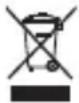 | Please dispose of the device in accordance with EC Directive – WEEE (Waste Electrical and Electronic Equipment). |
 | Manufacturer |
Storage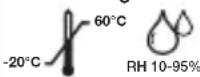 | Permissible storage temperature and humidity |
 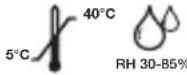 | Permissible operating temperature and humidity |
 | Protect from moisture |
 | Serial number |
 | The CE labelling certifies that the product complies with the essential requirements of Directive 93/42/EEC on medical products. |

General notes
- The ME 90 device is a single-channel electrocardiogram (ECG) device that you can use to rapidly record an electrocardiogram (ECG) when you are on the move. In addition, the device provides a clear evaluation of the recording, particularly as regards any disruption of the heart rhythm.
-
The ME 90 device displays changes in the heart rhythm, which may have various different causes. These may be harmless, but may also be triggered by illnesses or diseases of differing degrees of severity. Please consult a medical specialist if you believe you may have an illness or disease.
-
Electrocardiograms recorded using the ME 90 reflect heart activity at the time of measurement. As such, any changes occurring before or after the measurement is taken may not necessarily be detected.
-
The ECG measurements, such as those taken with the ME 90, cannot detect all heart disorders. Regardless of the measurement taken using the ME 90, you should consult your doctor immediately if you experience symptoms that could indicate acute heart disease. Such symptoms could include, but are not limited to:
-
pain or pressure felt on the left of the chest area or abdomen,
- radiating pain in the mouth/jaw/facial area, in the shoulder, arm or hand
- back pain,
- nausea,
- burning sensation in the chest,
- tendency to collapse,
- breathlessness,
- rapid heartbeat or irregular heart rhythm
- especially in combination with these symptoms.
ALWAYS consult a doctor IMMEDIATELY if you experience any of these symptoms. If you have any doubts, seek an emergency medical examination.
- Do not self-diagnose or self-medicate on the basis of the ME 90 measurement without consulting your doctor. In particular, do not start taking any new medication or change the type and/or dosage of any existing medication without prior approval.
- The ME 90 device is not a substitute for a medical examination of your heart function or for medical electrocardiogram recordings, which require more complex measurements.
- It is not possible to use the ME 90 device to diagnose illnesses or diseases that may be causing an ECG change. This is exclusively the responsibility of your doctor.
- We recommend that you record the ECG curves obtained and that you show these to your doctor if required. This is particularly important when the status messages of the ME 90 do not display the „OK“ symbol.

Important safety notes
We recommend against using the device if you have a pacemaker or other implanted devices. Follow the advice given by your doctor, if applicable.
- Do not use the device with a defibrillator.
- Do not use the device during an MRI scan.
- Do not expose the device to any static electricity. Always ensure that you are free of static electricity before operating the device. *
- Do not place the device in water or liquids. Do not clean the device with acetone or other volatile solutions. Clean the device with a cloth dampened with water or a mild cleaning liquid. Then dry the device using a dry cloth.
- Do not place the device in pressure containers or gas sterilisation devices.
- Avoid dropping the device, stepping on the device or shaking it.
- Do not dismantle the device as this may result in damage, defects or malfunctions.
- Do not use the device on people with sensitive skin or allergies.
- This device is not intended for use by people (including children) with restricted physical, sensory or mental skills or a lack of experience and/or a lack of knowledge, unless they are supervised by a person who has responsibility for their safety or they receive instructions from this person on how to use the device. Supervise children around the device to ensure they do not play with it.
- This device must not be used on children weighing less than 10 kg.
- Do not allow the electrodes of the device to come into contact with other conductive parts (including earth).
- Do not store the device in the following locations: locations in which the device is exposed to direct sunlight, high temperatures or levels of moisture, or heavy contamination; locations near to sources of water or fire; or locations that are subject to strong electromagnetic influences.
* Static electricity can damage electronic components. To prevent electrostatic damage to the device, ensure that your body is free of static electricity before using the device. Contact with earthedobjects or devices will discharge the energy that has built up and cause electrostatic discharge.

Instructions for storage and maintenance
- Protect the device from impacts, humidity, dirt, marked temperature fluctuations and direct sunlight.
- Do not drop the device.
- Do not use the device in the vicinity of strong electromagnetic fields and keep it away from radio systems or mobile telephones.

Notes on handling batteries
- If your skin or eyes come into contact with battery fluid, rinse the affected areas with water and seek medical assistance.
- Choking hazard! Small children may swallow and choke on batteries. Store the batteries out of the reach of small children.
- Observe the plus (+) and minus (-) polarity signs.
- If a battery has leaked, put on protective gloves and clean the battery compartment with a dry cloth.
- Protect the batteries from excessive heat.
- Risk of explosion! Never throw batteries into a fire.
- Do not charge or short-circuit batteries.
- If the device is not to be used for a relatively long period, take the batteries out of the battery compartment.
- Use identical or equivalent battery types only.
• Always replace all batteries at the same time. - Do not use rechargeable batteries!
- Do not disassemble, open or crush the batteries.

Battery disposal
- The empty, completely flat batteries must be disposed of through specially designated collection boxes, recycling points or electronics retailers. You are legally required to dispose of the batteries.
• The codes below are printed on batteries containing harmful substances:
Pb = Battery contains lead,
Cd = Battery contains cadmium,
Hg = Battery contains mercury.
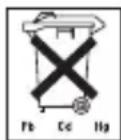

General disposal
For environmental reasons, do not dispose of the device in the household waste at the end of its useful life. Dispose of the unit at a suitable local collection or recycling point. Dispose of the device in accordance with EC Directive – WEEE (Waste Electrical and Electronic Equipment). If you have any questions, please contact the local authorities responsible for waste disposal.
3. Device description
3.1 Main functions
- The device takes about 30 seconds to produce the cardiogram measurement.
- The device performs an automatic analysis using the data and provides the corresponding results.
- The ME 90 allows a maximum of 36 measurement data records to be stored on the device itself. After that, the old measurement records are overwritten.
- The Beurer CardioExpert software and app can be used for the following processes:
■Downloading ECG data
Configuring your ECG device
Saving your measurements in chronological order
■Independently monitoring your health
■Displaying ECG waveforms as reference data for medical specialists
■Printing the ECG as a useful means of providing important information to your doctor
3.2 Included in delivery
■ 1 mobile ECG device
■ Docking Station (USB cable)
■ CD-ROM with Beurer CardioExpert
■ 2 x 3 V CR2032 button cells
■ These instructions for use
■ Annex for attending doctor
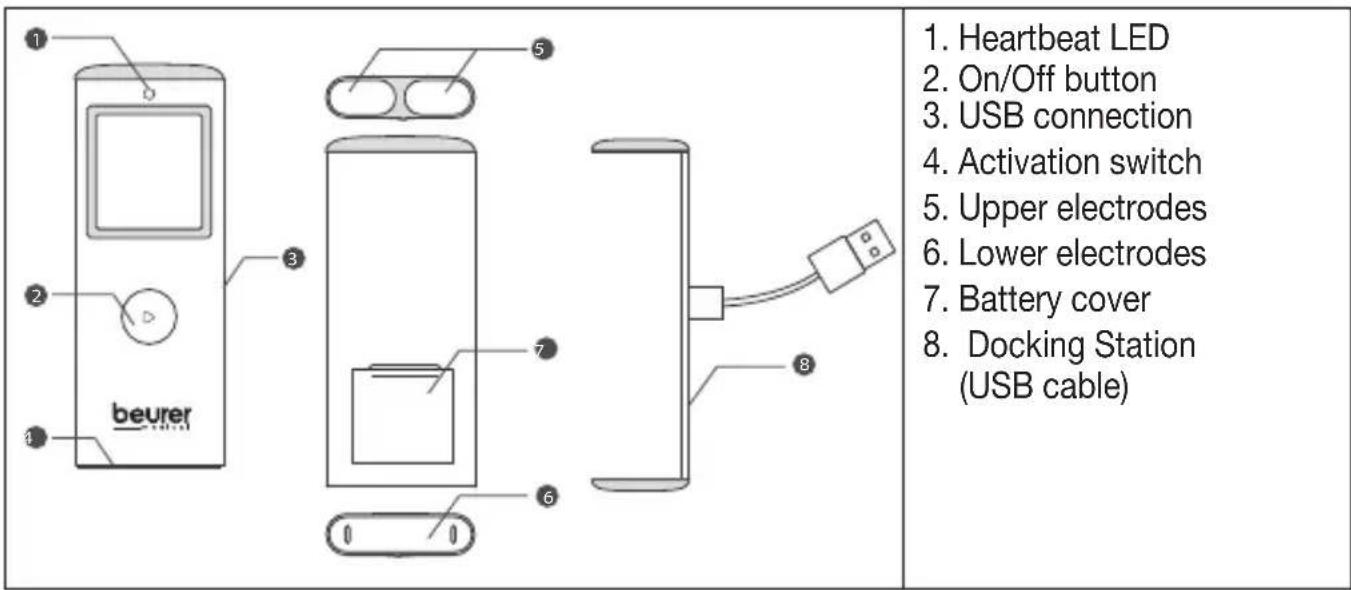
3.3 Mobile ECG device
3.4 Display symbols
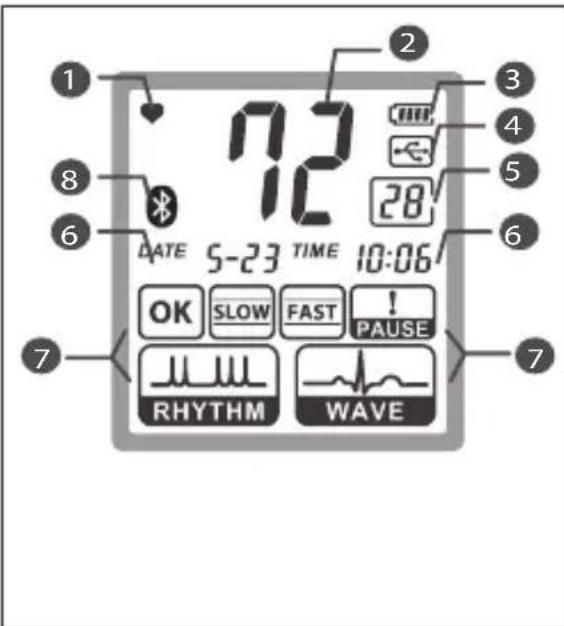
- Heartbeat display: flashes in synch with your heartbeat during the measurement.
- Heart rate: shows the average heart rate during the recording process. ***
- Battery status indicator: shows the current battery charge status
- USB connection: shows the status of the USB connection with the computer.
- Number display: shows the sequential number of the measurements recorded in the memory. Shows the 30-second countdown during the measurement.
- Date and time.
- Display of results
- Bluetooth

***The heart rate, measured in beats per minute, is determined by dividing the heartbeat interval into 60 seconds.
4. Before initial use:
4.1 Inserting the batteries
- Open the battery compartment lid
- Insert the two CR 2032 batteries. Make sure that the batteries are inserted the correct way round. Do not use rechargeable batteries.
- Subsequently close the battery compartment lid carefully.
4.2 Setting the date and time
It is essential to set the date and time. This is the only way the measurements can be saved with the correct date and time to be recalled at a later date. Open the app and go into the settings. This is where you can synchronise the ME 90 with your smartphone. The date and time are carried over from your smartphone. Alternatively, you can also set the date and time using the PC software. To do this, go to the settings menu.
4.3 Important information for obtaining accurate measurements
- The electrodes must be laid directly on the skin.
- If your skin or hands are dry, wet them using a damp cloth before you take the measurement.
- If the electrodes are dirty, remove the dirt using a soft cloth or cotton bud dampened with disinfectant alcohol.
- During the measurement, do not touch your body with the hand with which you are taking the measurement.
- Make sure there is no skin contact between your right and left hand (measuring method C), or between your hand and chest (measuring methods A/B). Otherwise, the measurement cannot be taken correctly.
- Do not move during the measurement, do not speak and hold the device still. Movements of any kind will falsify the measurements.
- Ideally perform the measurement either sitting down or lying down, and not standing up.
5. Taking measurements
- There are three different methods of taking the measurement. Start with measurement method A, „right index finger-chest“. If this method does not deliver measurements, or delivers only unstable measurements („EE“ is frequently displayed), switch to method B „left index finger-chest“ and, if necessary, to method C „left hand-right hand“.
The most suitable method/procedure depends on the heart configuration (shape of the heart) of each individual user. If it is not possible to take stable measurements using a given measurement method, this could have a harmless cause such as the shape of the heart. However, the cause may also be an illness or disease.
Note: measurement method C offers maximum comfort, but offers a much lower measurement stability than methods A or B.
- Press the on/off button for about three seconds to turn the device on. The device shows the full display.

Warning
If segments are missing, stop using the device and immediately contact customer services. To test whether the full display is completely displayed, hold the On/Off button when switching on the device.
| Measurement method A | "right index finger-chest"(approximately corresponds to "lead 2") |
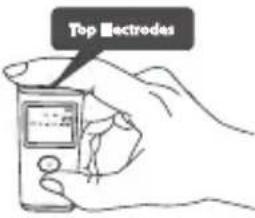 | Place your right index finger on the two upper electrodes on the device and hold the device vertically in your hand. |
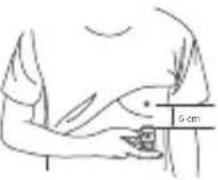 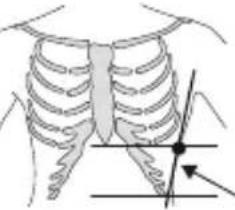 | You can determine the correct position for placing the lower electrode of the device against your chest using the following methods:Draw an imaginary line from the front of your armpit downwards.At the same time, draw an imaginary line going up 10 cm from the lowest rib on the left side of your body. Place the lower electrode of the device at the point where these two lines meet.orDraw an imaginary line from the bottom of the centre of your chest (sternum) to the left. At the same time, draw an imaginary line from the front of your armpit downwards. Place the lower electrode of the device at the point where these two lines meet. |
| Lightly press the electrode against your chest until you hear or feel a click.Important: Do not press the device too firmly against your skin. | |
| Measurement method B | "left index finger-chest"(approximately corresponds to "lead 3") |
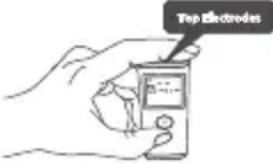 | Place your left index finger on the two upper electrodes on the device and hold the device vertically in your hand. |
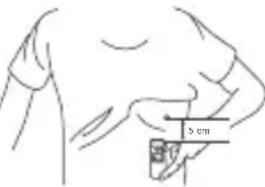 | You can determine the correct position for placing the lower electrode of the device against your chest using the following methods:Draw an imaginary line from the front of your armpit downwards.At the same time, draw an imaginary line going up 10 cm from the lowest rib on the left side of your body. Place the lower electrode of the device at the point where these two lines meet.orDraw an imaginary line from the bottom of the centre of your chest (sternum) to the left. At the same time, draw an imaginary line from the front of your armpit downwards. Place the lower electrode of the device at the point where these two lines meet. |
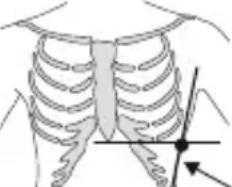 | |
| Lightly press the electrode against your chest until you hear or feel a click.Important: Do not exert excessive pressure on the electrodes with your fingers. | |
| Measurement method C | "left hand-right hand"(approximately corresponds to "lead 1") |
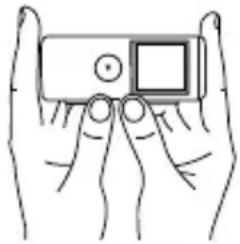 | Place your right index finger on the two upper electrodes on the device.Place a finger of your left hand on the lower electrode. |
| Press the lower electrode until you hear or feel a click.Important: Do not press the device too firmly against your skin. | |

Note: Please note that there must be no skin contact between your right and left hand (measurement method C) or hand and chest (measurement methods A/B). Otherwise, the measurement cannot be taken correctly.
Do not move during the measurement, do not speak and hold the device still. Movements of any kind will falsify the measurements.
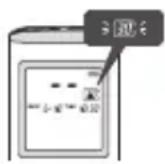
- The device will start beeping (if the beep is enabled) and the number indicator will flash for a few seconds. This indicates that the measurement is about to begin.
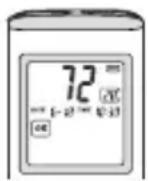
- The measurement is completed, and the results are displayed at the end of the 30-second countdown.
Note: If the bottom electrode is removed within the space of three seconds after the measurement starts, the measurement will be displayed as EE.
Common reasons for imprecise measurements
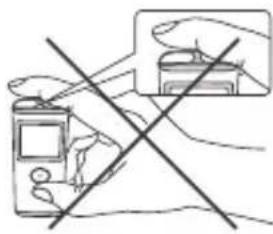 | Inadequate contact between the electrodes and your finger. |
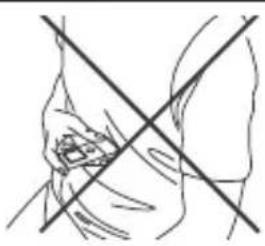 | Taking measurements through items of clothing. |
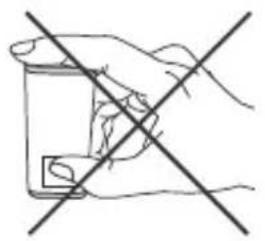 | Holding the device the wrong way round. |
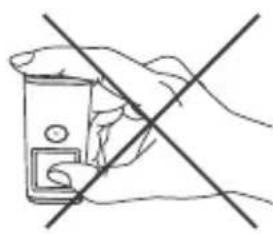 | Pressing the wrong side of the device against your chest. |
| Skin contact between your left and right hand (measurement method C) or between the hand you are using for the measurement and your chest (measurement methods A/B). |
6. Display of results
Once you have taken the measurement, the following results may appear on the LCD display.
 | ECG recording is OK. Indicates one on more pauses in  the cardiac cycle, each of which is longer than 2 [s]. the cardiac cycle, each of which is longer than 2 [s]. | ||
 | Indicates a decreased heart rate (bradycardia) of less than 55 [bpm]. | 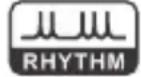 | Indicates a disruption to the rhythm during the ECG recording. |
 | Indicates an increased heart rate (tachycardia) of greater than 100 [bpm]. | 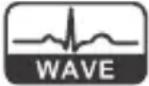 | Altered waveform |
Note: If the heart rate display is flashing, this means that the ECG signals are unstable or weak. In this case, please repeat the measurement.
You can find background information and medical parameters that you may potentially submit to your doctor in the „Annex for the attending doctor“, which comes with your device.
Displaying the measurements
When the device is switched on, you can display previously recorded measurements by pressing the ⏻ button.
7. Beurer CardioExpert
For a detailed view of your recorded data, you can use the PC version of Beurer Cardio-Experts on the CD that comes with the device, or you can use the app version, which is available as a free download from the App Store or the Google Play Store. You can transfer the data either via the USB port or via Bluetooth® Smart.
7.1 System requirements
PC version
■ Operating systems: Windows XP, Windows Vista, Windows 7, Windows 8
■ Processor: at least Intel Core 3-3220 3.3 GHz
■ Internal memory: at least. 1 GB
■ Hard disk: at least 1 GB with 1 GB of free memory
■ Screen resolution: at least 1280 x 1024
■ CD-ROM drive, USB port
App requirements
■ Bluetooth® 4.0, iOS at least version 7.0,
■ Android™ devices at least Version 4.3 with Bluetooth® Smart Ready
8. Problems/solutions
| Problem Possible cause Solution | ||
■ Measurements display flashing for heart rate.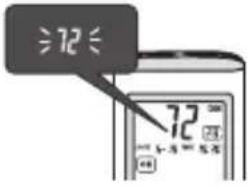 | Unstable or weak ECG signals. | Repeat the measurement as per the instructions in these Instructions for use. |
■ Measurements display EE (EE = error)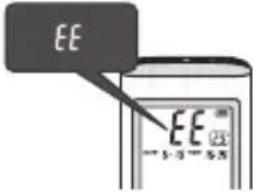 | Insufficient contact pressure or you spoke or moved during the measurement. | Repeat the measurement as per the instructions in these Instructions for use. |
| ■ The device does not switch on after pressing the On/Off button for 3 seconds. | The batteries are empty. | Replace batteries. |
| ■ The electrode is touching your skin, but the measurement does not start. | Insufficient pressure. Press | the lower electrode until you hear or feel a click. |
| ■The measurements are no longer displayed in the devices memory. | The memory capacity of 36 measurements has been reached. As a result, old data records are replaced with new ones. | Download data to your computer on a regular basis to save them. |
| ■When starting the programme, the message "Verification error" is displayed. | The device is not connected to a PC or the Beurer CardioExpert did not install correctly. | Make sure the ME 90 is connected to your computer and restart the programme. |
The word mark Bluetooth ^® and the associated logo are registered trade marks of Bluetooth ^® SIG, Inc. Any and all use of these brands by Beurer GmbH is done so under licence. Other trademarks and trade names are the property of the relevant holder.
9. Technical data
| Model ME 90 | |
| Measuring system Single-channel | ECG in freely selectable front positions / ECG signal ground (earth) referenced. |
| Bandwidth 0.05 to 40 Hz | |
| Sample rate 256 Hz | |
| Measurement range for heart rate | 5 to 199 beats per min |
| Memory 36 measurements | |
| Power supply 2 x 3V CR2032 | |
| Battery lifetime approx. 500 measurements | |
| Transport conditions -20°C to +60°C, 10%-95% humidity | |
| Storage conditions -20°C to +60°C, 10%-95% humidity | |
| Operating conditions +5°C to +40°C, 30%-85% humidity | |
| Weight 36 g (incl. Batteries) | |
| Dimensions 95.5 mm x 38 mm x 9 mm | |
| Patent TWI307273, TWM460636, | TWI379663 /CN100546539C, CN101953686B, CN102018509B /US8644915, US20120179060 / EP2477541 /WO2011006356 |
This device complies with European Standard EN60601-1-2 and is subject to special precautionary measures regarding electromagnetic compatibility. Please note that portable and mobile HF communication systems may interfere with this unit. More details can be requested from the stated Customer Services address or found at the end of the instructions for use.
■ The device complies with the EU Medical Devices Directive 93/42/EEC, the German Medical Devices Act and the standards IEC 60601-2-25 (Medical electrical devices - part 2-25: Particular requirements for the safety of electrocardiographs) and IEC 60601-2-47 (Medical devices - part 2-47: Particular requirements for the safety, including essential performance characteristics of ambulatory electrocardiographic systems).
■ The safety class of the device is CF.
■ We hereby guarantee that this device complies with the European R&TTE directive1999/5/EC.
Please contact the specified service address to obtain more detailed information such as the CE conformity declaration.
Electromagnetic Compatibility Information
Table 1 For all ME EQUIPMENT and ME SYSTEMS
| Guidance and manufacturer's declaration – electromagnetic emissions | ||
| The ME 90 is intended for use in the electromagnetic environment specified below. The customer or the user of the ME 90 should assure that it is used in such an environment. | ||
| Emissions test | Compliance | Electromagnetic environment – guidance |
| RF emissions CISPR 11 | Group 1 | The ME 90 uses RF energy only for its internal function. Therefore, its RF emissions are very low and are not likely to cause any interference in nearby electronic equipment. |
| RF emissions CISPR 11 Class B The ME | 90 is suitable for use in all establishments, including domestic establishments and those directly connected to the public low-voltage power supply network that supplies buildings used for domestic purposes. | |
| Harmonic emissions IEC 61000-3-2 Class A | ||
| Voltage fluctuations/ flicker emissions | Complies | |
Table 2 For all ME EQUIPMENT and ME SYSTEMS
| Guidance and manufacturer's declaration – electromagnetic immunity | |||
| The ME 90 is intended for use in the electromagnetic environment specified below. The customer or the user of the ME 90 should assure that it is used in such an environment. | |||
| IMMUNITY test | EC 60601test level | Compliancelevel | Electromagnetic environment – guidance |
| Electrostaticdischarge (ESD)IEC 61000-4-2 | ±6 kVcontact ±8kV air | ±6 kV contact±8 kV air | Floors should be wood, concrete or ceramic tile. If floors are covered with synthetic material, the relative humidity should be at least 30 %. |
| Electrical fasttransient/burstIEC 61000-4-4 | ±2 kV forpower sup-ply lines | ±2 kV for powersupply lines | Mains power quality should be that of a typical commer -cial or hospital environment. |
| SurgeIEC 61000-4-5Voltage dips, short interruptions and | ±1 kV line(s) to line(s)±2 kV line(s) to earth3Vrms150 kHz to 80 MHz3V/m80 MHz to 2.5 GHz | ±1 kV line(s) toline(s)±2 kV line(s) toearth3V/m3V/m | Mains power quality should be that of a typical commer -cial or hospital environment.Portable and mobile RF communications equipment should be used no closer to any part of the ME 90 , including cables, than the recommended separation distance calculated from the equation applicable to the frequency of the transmitter.Recommended separation distanceRecommended separation distance: d = 1.2 d = 1.2 80 MHz to 800 MHz d = 2.3 800 MHz to 2.5 GHzWhere P is the maximum output power rating of the transmitter in watts (W) according to the transmitter manufacturer and d is the recommended separation distance in meters (m).Field strengths from fixed RF transmitters, as determined by an electromagnetic site survey, ^a should be less than the compliance level in each frequency range. ^b Interference may occur in the vicinity of equipment marked with the following symbol: |
| Power frequency (50/60 Hz) magnetic field IEC 61000-4-8 | 3 A/m Not applicable | Not applicable | |
| NOTE UT is the a.c. mains voltage prior to application of the test level | |||
Table 3 For all ME EQUIPMENT and ME SYSTEMS
| Guidance and manufacturer's declaration – electromagnetic immunity | |||
| The ME 90 is intended for use in the electromagnetic environment specified below. The customer or the user of the ME 90 should assure that it is used in such an environment. | |||
| IMMUNITY test IEC 60601 | test level | Compliance level | Electromagnetic environment – guidance |
| Conducted RF IEC 61000-4-6 | 3 Vrms150 kHz to 80 MHz | 3 Vrms | Portable and mobile RF communications equipment should be used no closer to any part of the ME 90, including cables, thanthe recommended separation distance calculated from the equation applicable to the frequency of the transmitter. |
| Radiated RF IEC 61000-4-3 | 3 V/m80 MHz to2.5 GHz | 3 V/m | Recommended separation distance where P is the maximum output power rating of the transmitter in watts (W) according to the trans - mitter manufacturer and d is the recommended separation Distance in metres (m). |
| Conducted RF IEC 61000-4-6 | 3 A/m, 50/60Hz 3 A/m | Power frequency magnetic fields should be at levels characteristic of a typical location in a typical commercial or hospital environment. | |
| NOTE 1 At 80 MHz and 800 MHz, the higher frequency range applies.NOTE 2 These guidelines may not apply in all situations. Electromagnetic propagation is affected by absorption and reflection from structures, objects and people. | |||
| a. Field strengths from fixed transmitters, such as base stations for radio (cellular/cordless) telephones and land mobile radios, amateur radio, AM and FM radio broadcast and TV broadcast cannot be predicted theoretically with accuracy. To assess the electromagnetic environment due to fixed RF transmitters, an electromagnetic site survey should be considered. If the measured field strength in the location in which the ME 90 is used exceeds the applicable RF compliance level above, the ME 90 should be observed to verify normal operation. If abnormal performance is observed, additional measures may be necessary, such as re-orienting or relocating the ME 90. | |||
The ME 90 is intended for use in an electromagnetic environment in which radiated RF disturbances are controlled. The customer or the user of the ME 90 can help prevent electromagnetic interference by maintaining a minimum distance between portable and mobile RF communications equipment (transmitters) and the ME 90 as recommended below, according to the maximum output power of the communications equipment.
Table 4 For ME EQUIPMENT and ME SYSTEMS that are not LIFE-SUPPORTING
| Recommended separation distances between portable and mobile RF communications equipment and the ME 90 | |||
| The ME 90 is intended for use in an electromagnetic environment in which radiated RF disturbances are controlled. The customer or the user of the ME 90 can help prevent electromagnetic interference by maintaining a minimum distance between portable and mobile RF communications equipment (transmitters) and the ME 90 as recommended below, according to the maximum output power of the communications equipment. | |||
| Rated maximum output power of transmitter (W) | Separation distance according to frequency of transmitter (m) | ||
| 150 kHz to 80 MHz d = 1.2 | 80 MHz to 800 MHz d = 1.2 | 800 MHz to 2.5 GHz d = 2.3 | |
| 0.01 0.12 0.12 0.23 | |||
| 0.1 0.38 0.38 0.73 | |||
| 1 1.2 1.2 2.3 | |||
| 10 3.8 3.8 7.3 | |||
| 100 12 12 23 | |||
| For transmitters rated at a maximum output power not listed above, the recommended separation distance d in meters (m) can be estimated using the equation applicable to the frequency of the transmitter, where P is the maximum output power rating of the transmitter in watts (W) according to the transmitter manufacturer.NOTE 1 At 80 MHz and 800 MHz, the separation distance for the higher frequency range applies.NOTE 2 These guidelines may not apply in all situations. Electromagnetic propagation is affected by absorption and reflection from structures, objects and people. | |||

BEURER GmbH • Söflinger Str. 218 • 89077 Ulm (Germany)
www.beurer.com
CE 0483