
Connect Neck - Headphones HAMA - Free user manual and instructions
Find the device manual for free Connect Neck HAMA in PDF.


| Product Type | Neckband Bluetooth Headphones |
| Brand | Hama |
| Model | Connect Neck |
| Dimensions (L x W x H) | Approx. 150 x 150 x 20 mm (neckband unfolded) |
| Weight | Approx. 30 g |
| Power Supply | Built-in rechargeable lithium-ion battery, 120 mAh |
| Charging Port | Micro USB |
| Wireless Technology | Bluetooth 5.0 |
| Range | Up to 10 m (33 ft) |
| Battery Life | Up to 8 hours of music playback |
| Charging Time | Approx. 2 hours |
| Microphone | Built-in, supports hands-free calling |
| Controls | Volume, playback, call management on neckband |
| Earphone Type | In-ear with silicone ear tips |
| Audio Codec Support | SBC |
| Frequency Response | 20 Hz – 20 kHz |
| Impedance | 32 Ω |
| Cleaning and Maintenance | Wipe with a soft, dry cloth. Do not use liquids or abrasives. |
| Safety Warnings | Do not use while driving or operating machinery. Keep away from water and moisture. |
| Spare Parts and Repairability | Ear tips may be replaceable. For other repairs, contact Hama support. |
| General Information | Designed for music and calls on the go. Supports voice assistants. |
Frequently Asked Questions - Connect Neck HAMA
User questions about Connect Neck HAMA
0 question about this device. Answer the ones you know or ask your own.
Ask a new question about this device
Download the instructions for your Headphones in PDF format for free! Find your manual Connect Neck - HAMA and take your electronic device back in hand. On this page are published all the documents necessary for the use of your device. Connect Neck by HAMA.
USER MANUAL Connect Neck HAMA
Bluetooth® In-EarStereoHeadset
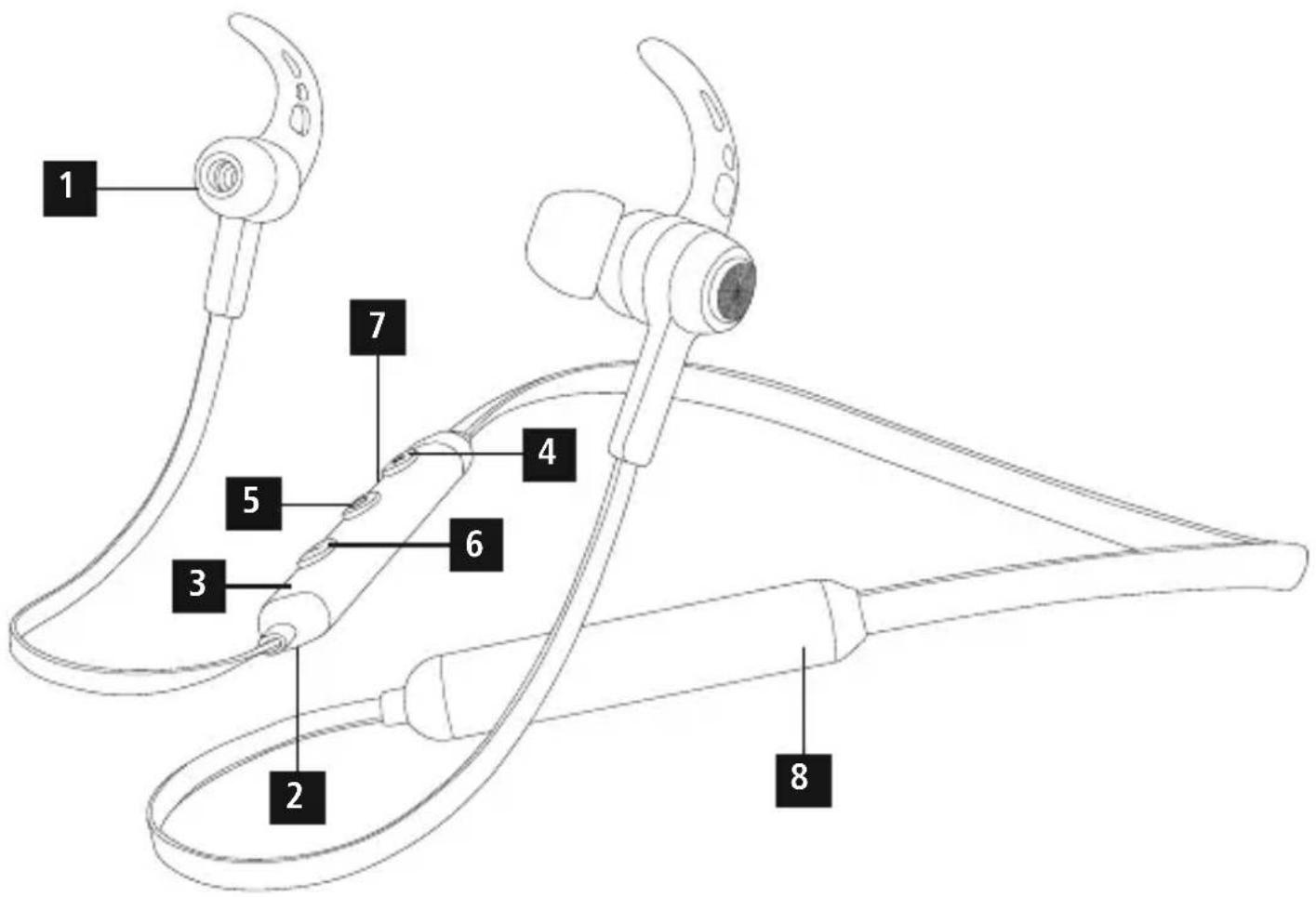
ControlsandDisplays
- Earphones
- Microphone
- StatusLEDs
- Volume+, jumpforward o netitle
- On/offbutton, voicecontrol, multifunctionbutton(MF)
- Volume-, jumpbackward o netitle
- Charging socket
- Battery
Thankyouforchoosinga H amaproduct.
Takeyourtimeandreadthefollowinginstructionsandinformation completely. Please keep these instructions in a safe place for future reference. If you sell the device, please pass these operating instructionsontothenewowner.
1. ExplanationofWarningSymbolsandNotes

Warning
This symbol is used to indicate safety instructions to draw your attention to specific hazards and risks.

Note
This symbol is used to indicate additional information or important notes.
2.PackageContents
- 1 x Bluetooth® stereoheadset
• 1 x U SBchargingcable
• 3 pairsofearcushions(sizesS,M,L)
• 2 pairsofsiliconeearhooks(sizesM,L)
• Theseoperatinginstructions
3. SafetyNotes
• T heproductisintendedforprivate,non-commercialuseonly.
- Protect the product from dirt, moisture and overheating, and only useitina dry environment.
• D o n otdroptheproductanddonotexposeittoanymajorshocks.
- D o n otoperatetheproductoutsidethepowerlimitsgiveninthe specifications.
- D o n otopenthedeviceorcontinuetooperateitifitbecomes damaged.
- S incethebatteryisintegratedandcannotberemoved,youwill needtodisposeoftheproductasa w hole.Dothisincompliance withthelegalrequirements.
- D isposeofpackagingmaterialimmediatelyaccordingtolocally applicableregulations.
- Do not modify the product in any way. Doing so voids the warranty.

Warning-Battery
- O nlyusesuitablechargingdevicesorUSBconnections forcharging.
- A s a rule, donotcharged devices or USB connection that are defective and donottry to repair them yourself.
- D o n otoverchargetheproductorallowthebatteryto completelydischarge.
- A voidstoring, chargingorusingbatteriesinextreme temperatures.
- When stored over a long period of time, batteries should be charged regularly(atleasteverythreemonths).

Warning- H ighvolumes
- U singthisproductlimitsyourperceptionofambientnoise. For thisreason, donotoperateanyvehiclesormachines while using thisproduct.
- A lwayskeepthevolumeata reasonable level.Loudvolumes,evenovershort periods,cancausehearingloss.
4. Getting Started
- The headset is equipped with a rechargeable battery. The battery must be fully charged before using the device for the first time.
- Ensure that the headset is switched off before charging it.
- B eginchargingbyconnectingtheincludedUSBchargingcable tothechargingsocket(7)aswellastotheUSBconnection ofa P C/laptop.
- Alternatively, you can charge the headset using a suitable USB charger. P leaserefertotheoperatinginstructionsfortheUSB chargerused.
- The display lights up constantly in red during the charging process.
- I t takesaround2-3hoursuntilthebatteryiscompletelycharged.
- Once the charging process is complete, the red light of the LED (3)turnstobluelight.
- D isconnectallcableandmainsconnectionsafteruse.
5.Operation
Switchingtheheadsetoff/on
- Press the MF button (5) until a voice says "Power ON" and the blueLEDflashes.
- To switch it off, press and hold the MF button (5) until a voice says "Power OFF" and the red LED flashes.

Note
The functions described in this section are only available for Bluetooth®-capable terminal devices.
5.1. Bluetooth ^® pairing

Note—Pairing
- M akesure thatyourBluetooth®-capableterminaldeviceis onandBluetooth ® isactivated.
- M akesure thatyourBluetooth®-capableterminaldeviceis visibleforotherBluetooth® devices.
-
For more information, please refer to the operating instructionsofyourterminaldevice.
-
T heheadsetandtheterminaldevices should not be any further than 1 metre away from each other. The smaller the distance, the better.
- S witchtheheadsetonusingtheMFbutton(5).
- Press and hold the MF button (5) until the red and blue LEDs flash alternatingly. The headset is searching for a Bluetooth® connection.
- O pentheBluetooth® settingsonyourterminaldeviceandwait until HamaBTHCONNECT appearsinthelistofBluetooth® devicesfound.
- SellHamaBTHCONNECT andwaituntiltheheadsetislisted asconnectedintheBluetooth® settingsonyourterminaldevice.

Note- Bluetooth®password
Some terminal devices require a password in order to connect toanotherBluetooth ^® device.
- If your terminal device requests a password for connection withtheheadset,enter0000.

Note
- Once the connection has been established, a voice says, "Connected".
- I f t heconnectionattempttakeslongerthan300secondsto complete, itiscancelledandtheLEDsgoout. In this case, repeatthestepslistedpreviouslyunder5.1 Bluetooth ^ pairing.
5.2.AutomaticBluetooth ^® connection(aftersuccessful pairing)

Note
- M akesure thatyourBluetooth®-capableterminaldeviceis onandBluetooth ® isactivated.
- M akesure thatyourBluetooth®-capableterminaldeviceis visibleforotherBluetooth® devices.
- For more information, please refer to the operating instructions of your terminal device.
- S witchtheheadsetonusingtheMFbutton(5).TheblueLED beginstoflashandtheheadsetautomaticallyconnectswiththe lastterminaldeviceused.

Note
- Once the connection has been established, a voice says, "Connected".
- I f t heconnectionattempttakeslongerthan300secondsto complete, itiscancelledandtheLEDsgoout. In this case, repeatthestepslistedpreviouslyunder5.2.
- I t m aybenecessarytomakesettingsonyourterminaldevice toenableautomaticconnectionwiththepairedheadset.

Note- C onnectionimpaired
Aftertheheadsetandterminaldevicehavebeenpaired, a connectionisestablishedautomatically. If theBluetooth® connectionisnotestablishautomatically, checkthe following:
- C hecktheBluetooth® settingsofyourterminaldevicetosee whetherHama BTHCONNECT isconnected.Ifnot,repeatthe stepslistedunder5.1.Bluetooth ® pairing.
- Check whether obstacles are impairing the range. If so, movethedevicesclosertogether.
- The performance can also be affected by a weak battery.
5.3. Bluetooth ^® multipointconnection
ThisheadsetcanbeconnectedwithtwoBluetooth®-enabled terminaldevicessimultaneously.
- First connect the headset with the first terminal device as described in 5.1.
- T hendisableBluetooth® onthatterminaldevice.
- N ext, connect the headset with these second terminal device as described in 5.1.
- A ctivateBluetooth® onthefirstterminaldeviceoncemore. The headsetnowconnectstothatterminaldeviceautomatically.
5.4.Audioplayback

Note
- Note that the functions described under 5.3. and 5.4. are only possible with an active Bluetooth ^ connection.
- Y ourterminaldevicemustalsosupporttheindividual functions.
- For more information, please refer to the operating instructionsofyourterminaldevice.
-
Functionscanstillbecontrolleddirectlyviatheterminaldevice.
-
Set the volume on your terminal device to a low level.
- S witchtheheadsetonusingtheMFbutton(5).Uponsuccessful connection,a v oicesays,"Connected".
- S tartaudioplaybackontheconnectedterminaldevice.
- Press Volume + (4) to increase the volume. There is an announcementwhenthemaximumvolumeisreached.
- Press Volume - (6) to reduce the volume.
- Press the MF button (5) to start or pause audio playback.
- Press and hold Jump forward one title (4) to skip to the nexttitle.
- Press and hold Jump backward one title (6) to skip to the previoustitle.
5.5.Hands-freefunction
- Press the MF button (5) once to answer an incoming call.
- Press the MF button(5) twice or use your telephone to reject an incomingcall.
- During a call, press the MF button (5) once to end the call.
- Press the MF button (5) twice to call the number of the last call.

Note— Callquality
To increase the call quality, make sure that you are near the headsetwithyourmobilephoneduringthecall.
5.6.Disconnectingtheheadset
- S witchtheheadsetoff.
- D isconnecttheheadsetviatheBluetooth ® settingsonyour terminaldevice.
5.7. Batterycapacity
- An announcement is made and the display flashes in red when the batteryislow
- C hargetheheadsetasdescribedin4.GettingStarted.
6.CareandMaintenance
Onlycleanthisproductwitha s lightlydamp,lint-freeclothanddo notuseaggressivecleaningagents.Makesure t hatwaterdoesnot getintotheproduct.
7.WarrantyDisclaimer
Hama GmbH & Co KG assumes no liability and provides no warrantyfordamageresultingfromimproperinstallation/mounting, improperuseoftheproductorfromfailure t o o bservetheoperating instructionsand/orsafetynotes.
8. Service and Support
PleasecontactHamaProductConsultingifyouhaveanyquestions aboutthisproduct.
Hotline:+499091502-115(German/English)
Furthersupportinformationcanbefoundhere:
www.hama.com
9.TechnicalData
 | Bluetooth® Headset |
| Earphone/microphoneimpedance | 32Ω/1.4-2.2kΩ |
| Frequency20-20000Hz | |
| Earphone/microphonesensitivity | 96dB/-42dB |
| WBCV≥75mV | |
| RangeMax.10m | |
| Bluetooth® technologyv4.2 | |
| Profile | A2DPV1.3/A VRCPV1.5/H F P V1.6/H S P |
| Transmissionfrequency2.4-2.48GHz | |
| BatteryLi-Po 3.7V | |
| Batterycapacity120mAh | |
| CurrentconsumptionMax.80mA | |
| ChargingvoltageMax.5V USB | |
| Totalweight23g | |
| Standby/talkingtime360h / 7 h | |
10. Recycling Information
Noteonenvironmentalprotection:
Aftertheimplementationof the EuropeanDirective 2012/19/EU and2006/66/EUinthe nationallegal system, thefollowingapplies:Electric andelectronic devices as well as batteries must not be disposed of with household waste. Consumers are obliged by law
to return electrical and electronic devices as well as batteries at the end of their service lives to the public collecting points set up for this purpose or point of sale. Details to this are defined by the national law of the respective country. This symbol on the product, the instruction manual or the package indicates that a product is subject to these regulations. By recycling, reusing the materials or other forms of utilising old devices/Batteries, you are making an important contributiontoprotecting ourenvironment.
11. Declaration of Conformity

Hereby, Hama GmbH & Co KG declares that the radio equipment type[00184022] is in compliance with Directive 2014/53/EU. The full text of the EU
declaration of conformity is available at the following internet address:
www.hama.com->00184022->Downloads.
| Frequency band(s)2402MHz- 2 480MHz | |
| Maximum radio-frequency power transmitted | 3.5mW EIRP |
The Bluetooth ^® word mark and logos are registered trademarks owned by Bluetooth SIG, Inc. and any use of such marks by Hama GmbH & Co KG is under license. Other trademarks and trade names are those of their respective owners.
All listed brands are trademarks of the corresponding companies. Errors and omissions excepted, and subject to technical changes. Our general terms of delivery and payment are applied.

- Bluetooth® In-EarStereoHeadset
- ControlsandDisplays
- ExplanationofWarningSymbolsandNotes
- Warning
- Note
- 2.PackageContents
- SafetyNotes
- Warning-Battery
- Warning- H ighvolumes
- Getting Started
- 5.Operation
- Switchingtheheadsetoff/on
- Bluetooth ® pairing
- Note—Pairing
- Note- Bluetooth®password
- 5.2.AutomaticBluetooth ® connection(aftersuccessful pairing)
- Note- C onnectionimpaired
- Bluetooth ® multipointconnection
- 5.4.Audioplayback
- 5.5.Hands-freefunction
- Note— Callquality
- 5.6.Disconnectingtheheadset
- Batterycapacity
- 6.CareandMaintenance
- 7.WarrantyDisclaimer
- Service and Support
- Recycling Information
- Noteonenvironmentalprotection:
- Declaration of Conformity
Brand : HAMA
Model : Connect Neck
Category : Headphones