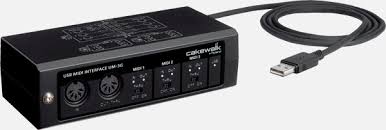
UM-3G - MIDI Controller ROLAND - Free user manual and instructions
Find the device manual for free UM-3G ROLAND in PDF.


| Product Type | MIDI Controller / MIDI USB Interface |
| Brand | ROLAND |
| Model | UM-3G |
| MIDI IN Connectors | 3 (16 MIDI channels x 3) |
| MIDI OUT/THRU Connectors | 3 (16 MIDI channels x 3) |
| USB Connector | 1 (type B) |
| Power Supply | USB bus (powered by computer) |
| Power Consumption | 90 mA |
| MIDI THRU Switch | Yes (ON/OFF) - allows redirecting incoming MIDI messages |
| MODE Switch | MASTER/SLAVE - to configure the device as master or slave |
| UNIT Switch | 1/2/3 - unit number for identification |
| Maximum Connectable Devices | 3 (daisy-chain) |
| Supported Operating Systems | Windows 7, Windows Vista, Windows XP, Mac OS X (10.4 to 10.6) |
| Drivers | Included on supplied CD-ROM |
| LED Indicators | MIDI IN, MIDI OUT, USB (operation indicators) |
| Maintenance | Soft dry cloth, no solvents or alcohol |
| Safety | Do not open the device, avoid humidity and high temperatures |
| Supplied Accessories | CD-ROM, instruction manual, USB cable |
| Reparability | Contact the dealer or an authorized Roland service center |
Frequently Asked Questions - UM-3G ROLAND
User questions about UM-3G ROLAND
0 question about this device. Answer the ones you know or ask your own.
Ask a new question about this device
Download the instructions for your MIDI Controller in PDF format for free! Find your manual UM-3G - ROLAND and take your electronic device back in hand. On this page are published all the documents necessary for the use of your device. UM-3G by ROLAND.
USER MANUAL UM-3G ROLAND
122,9 (L) x 48,0 (P) x 28,0 (H) mm
Poids
125g
Accessoires
Mode d'emploi
[MODE] 10-11, 13, 16, 20, 40, 42, 44-46
N
Numero UNIT 39,41
P
Installation (Macintosh) 19
Installation (Windows 7) 12
Installation (Windows Vista) 12
Installation (Windows XP) 15
[UNIT] 10-11, 13, 16, 20, 40, 42, 44-46
W
Windows 7 12
Windows Vista 12,40
Windows XP 15,42
For the USA
FEDERAL COMMUNICATIONS COMMISSION RADIO FREQUENCY INTERFERENCE STATEMENT
This equipment has been tested and found to comply with the limits for a Class B digital device, pursuant to Part 15 of the FCC Rules. These limits are designed to provide reasonable protection against harmful interference in a residential installation. This equipment generates, uses, and can radiate radio frequency energy and, if not installed and used in accordance with the instructions, may cause harmful interference to radio communications. However, there is no guarantee that interference will not occur in a particular installation. If this equipment does cause harmful interference to radio or television reception, which can be determined by turning the equipment off and on, the user is encouraged to try to correct the interference by one or more of the following measures:
- Reorient or relocate the receiving antenna.
- Increase the separation between the equipment and receiver.
- Connect the equipment into an outlet on a circuit different from that to which the receiver is connected.
- Consult the dealer or an experienced radio/TV technician for help.
This device complies with Part 15 of the FCC Rules. Operation is subject to the following two conditions:
(1) this device may not cause harmful interference, and
(2) this device must accept any interference received, including interference that may cause undesired operation.
Unauthorized changes or modification to this system can void the users authority to operate this equipment.
This equipment requires shielded interface cables in order to meet FCC class B Limit.
For Canada
NOTICE
This Class B digital apparatus meets all requirements of the Canadian Interference-Caising Equipment Regulations.
AVIS
This product contains chemicals known to cause cancer, birth defects and other reproductive harm, including lead.
For the USA
DECLARATION OF CONFORMITY Compliance Information Statement
Model Name: UM-3G
Type of Equipment: USB MIDI Interface
Responsible Party: Cakewalk, Inc.
Address: 268 Summer Street Boston, MA 02210 USA
Telephone: (617) 423-9004
For EU Countries


This symbol indicates that in EU countries, this product must be collected separately from household waste, as defined in each region. Products bearing this symbol must not be discarded together with household waste.

