
CAKEWALK A-800PRO - MIDI Controller ROLAND - Free user manual and instructions
Find the device manual for free CAKEWALK A-800PRO ROLAND in PDF.


| Product Type | MIDI Controller |
| Brand | Roland |
| Model | Cakewalk A-800PRO |
| Keyboard | 61 velocity-sensitive keys with channel aftertouch |
| Controllers | 8 pads (A1-A8), 4 buttons (B1-B4), 9 L buttons (L1-L9), 9 rotary knobs (R1-R9), 9 sliders (S1-S9), pitch bend/modulation wheel, keyboard aftertouch, Hold and Expression pedal jacks |
| Display | Backlit LCD, 16 characters x 2 lines |
| Connectivity | USB (bus power), MIDI In/Out, Hold pedal (1/4\") and Expression pedal (1/4\") jacks, DC 9V input |
| Power | 9V AC adapter (sold separately) or USB bus power |
| Power Consumption | 300 mA (AC adapter), 300 mA (USB bus) |
| Dimensions (W x D x H) | 1001.9 x 250.8 x 91.4 mm |
| Weight | 4.5 kg |
| Main Features | Play mode, Edit mode, system settings, ACT (Active Controller Technology) control, 19 preset control maps, control map editing with A-PRO Editor, Dual mode, Split mode, transpose, octave shift, velocity and aftertouch settings, MIDI clock, MIDI merge |
| Included Software | A-PRO CD-ROM (drivers), Cakewalk Production Plus Pack DVD-ROM |
| Supported Operating Systems | Windows 7, Windows Vista, Windows XP, Mac OS X (10.5 and later) |
| Care and Cleaning | Clean with a soft, dry cloth or one slightly dampened with water. Do not use benzene, thinner, alcohol, or solvent. |
| Safety | Do not open or modify the device. Use only the specified AC adapter. Do not expose to moisture, dust, or high temperatures. Disconnect during storms. Keep out of reach of children. |
| Spare Parts and Repairability | Contact the dealer or an authorized Roland service center for any repairs. Options: DP-2/DP-10 footswitch, EV-5/EV-7 expression pedal, AC adapter. |
| General Information | Complete user manual available in PDF. Translation available on request. |
Frequently Asked Questions - CAKEWALK A-800PRO ROLAND
User questions about CAKEWALK A-800PRO ROLAND
0 question about this device. Answer the ones you know or ask your own.
Ask a new question about this device
Download the instructions for your MIDI Controller in PDF format for free! Find your manual CAKEWALK A-800PRO - ROLAND and take your electronic device back in hand. On this page are published all the documents necessary for the use of your device. CAKEWALK A-800PRO by ROLAND.
USER MANUAL CAKEWALK A-800PRO ROLAND
Bank Select (BANK) 43
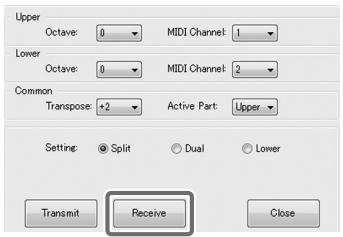
[Transmit], [Receive]
6 Aftertouch mode (AFT Mode)
[Transmit], [Receive]
| Commande | Touche (Windows) | Touche (Mac OS X) |
| [File]–[New] | Ctrl + N | Command + N |
| [File]–[Open] | Ctrl + O | Command + O |
| [File]–[Save] | Ctrl + S | Command + S |
| [File]–[Save As] | Ctrl + Shift + S | Command + Shift + S |
| [File]–[Exit] | Alt + F4 | Command + Q |
| [Edit]–[Copy] | Ctrl + C | Command + C |
| [Edit]–[Paste] | Ctrl + V | Command + V |
| [Edit]–[NO ASSIGN] | Del | Del |
| Next controller | Ctrl + F | Command + F |
| Previous controller | Ctrl + B | Command + B |
Program Change (Min-Max)
Bank Select + Program Change
Program Change - Dec
Program Change - Inc
2 Cliques sur [Receive].
Affectation RPN/NRPN
Mode 1: OMNI ON, POLY
Mode 2: OMNI ON, MONO
O:Yes
Mode 3: OMNI OFF, POLY
Mode 4: OMNI OFF, MONO
X:No
Channel Message 24,33,34,35,36,37
Channel Pressure 25,33
Export Assign List 27
EXPRESSION 11
F
F6 37
FACTORY RESET 58,70
NO ASSIGN 24,27,33,56
Note 33
NRPN 36,53
Output Port 23, 25, 29
P
PAD AFTERTOUCH CURVE 57,63
PAD VELOCITY CURVE 57,63
Program Change 34, 35
Program Change - Dec 35
Program Change - Inc 36
Program Change (Min-Max) 35
R
raccourcis 28
Show Keyboard Panel 27
Show Messages 27
SMF 27,32
SONAR 21
SPLIT 45
Bouton [SPLIT] 9
STARTUP MEMORY 57
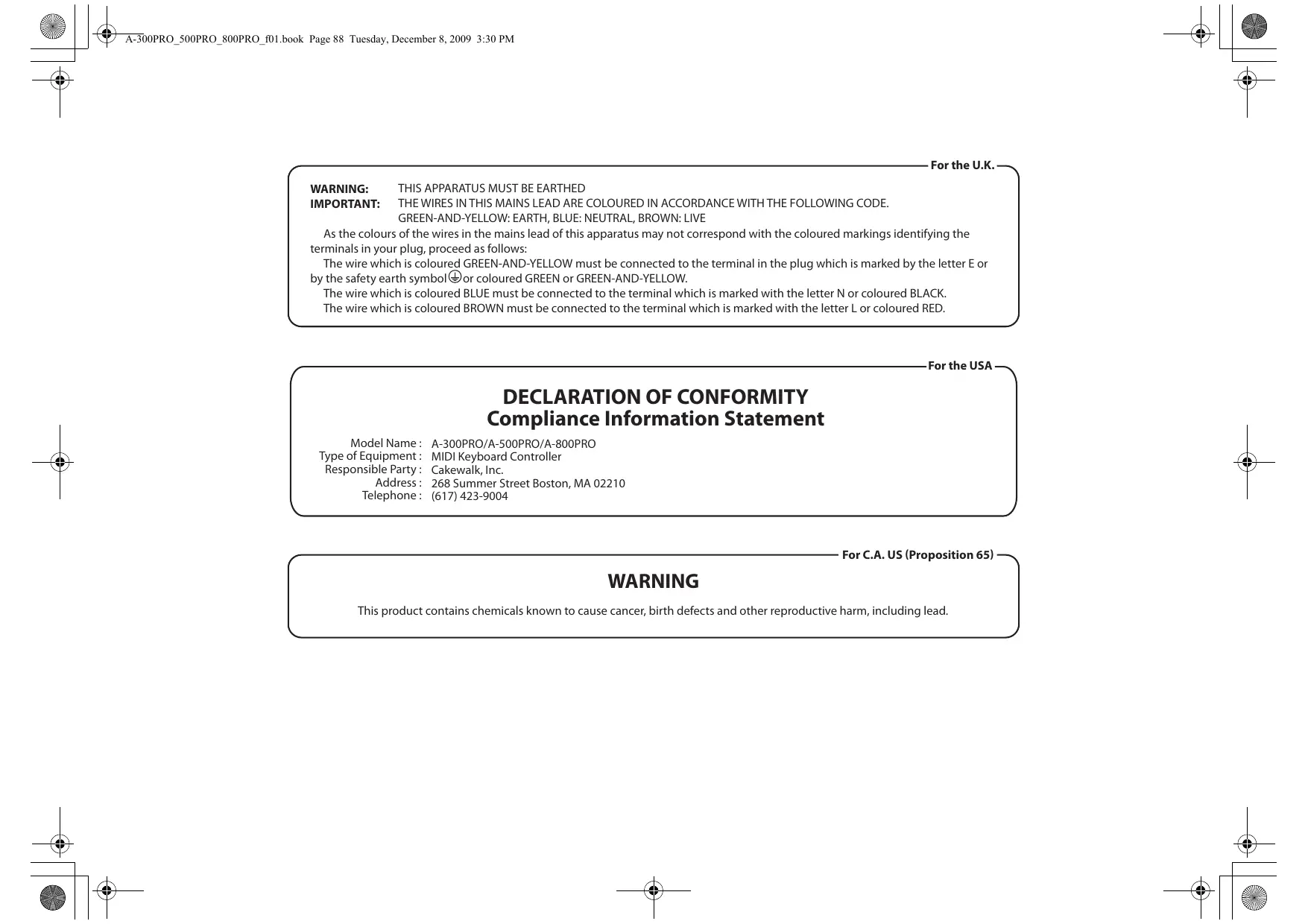
IMPORTANT: THE WIRES IN THIS MAINS LEAD ARE COLOURED IN ACCORDANCE WITH THE FOLLOWING CODE.
GREEN-AND-YELLOW: EARTH, BLUE: NEUTRAL, BROWN: LIVE
As the colours of the wires in the mains lead of this apparatus may not correspond with the coloured markings identifying the terminals in your plug, proceed as follows:
The wire which is coloured GREEN-AND-YELLOW must be connected to the terminal in the plug which is marked by the letter E or by the safety earth symbol or coloured GREEN or GREEN-AND-YELLOW.
The wire which is coloured BLUE must be connected to the terminal which is marked with the letter N or coloured BLACK.
The wire which is coloured BROWN must be connected to the terminal which is marked with the letter L or coloured RED.
For the USA
DECLARATION OF CONFORMITY Compliance Information Statement
Model Name: A-300PRO/A-500PRO/A-800PRO
Type of Equipment: MIDI Keyboard Controller
Responsible Party: Cakewalk, Inc.
Address: 268 Summer Street Boston, MA 02210
Telephone: (617) 423-9004
For C.A.US (Proposition 65)
WARNING
This product contains chemicals known to cause cancer, birth defects and other reproductive harm, including lead.
For the USA
FEDERAL COMMUNICATIONS COMMISSION RADIO FREQUENCY INTERFERENCE STATEMENT
This equipment has been tested and found to comply with the limits for a Class B digital device, pursuant to Part 15 of the FCC Rules. These limits are designed to provide reasonable protection against harmful interference in a residential installation. This equipment generates, uses, and can radiate radio frequency energy and, if not installed and used in accordance with the instructions, may cause harmful interference to radio communications. However, there is no guarantee that interference will not occur in a particular installation. If this equipment does cause harmful interference to radio or television reception, which can be determined by turning the equipment off and on, the user is encouraged to try to correct the interference by one or more of the following measures:
- Reorient or relocate the receiving antenna.
- Increase the separation between the equipment and receiver.
- Connect the equipment into an outlet on a circuit different from that to which the receiver is connected.
- Consult the dealer or an experienced radio/TV technician for help.
This device complies with Part 15 of the FCC Rules. Operation is subject to the following two conditions:
(1) this device may not cause harmful interference, and
(2) this device must accept any interference received, including interference that may cause undesired operation.
Unauthorized changes or modification to this system can void the users authority to operate this equipment.
This equipment requires shielded interface cables in order to meet FCC class B Limit.
For Canada
NOTICE
This Class B digital apparatus meets all requirements of the Canadian Interference-Caising Equipment Regulations.
AVIS
- [Transmit], [Receive]
- Aftertouch mode (AFT Mode)
- Program Change (Min-Max)
- Bank Select + Program Change
- Program Change - Dec
- Program Change - Inc
- Affectation RPN/NRPN
- F
- P
- R
- DECLARATION OF CONFORMITY Compliance Information Statement
- WARNING
- FEDERAL COMMUNICATIONS COMMISSION RADIO FREQUENCY INTERFERENCE STATEMENT
- NOTICE
- AVIS
Brand : ROLAND
Model : CAKEWALK A-800PRO
Category : MIDI Controller