
CPT525E - Toaster CUISINART - Free user manual and instructions
Find the device manual for free CPT525E CUISINART in PDF.


| Product Type | 2-Slice Wide-Slot Toaster |
| Brand | Cuisinart |
| Model | CPT525E |
| Digital Display | Yes, with countdown and settings |
| Toasting Functions | Bread type selection (white, bagel, fruit bread, sourdough, rye/whole wheat, cereal) and browning level (1-7) |
| MemorySet Function | Stores up to 4 custom settings |
| Frozen Function | Defrosts and toasts frozen bread |
| 1 Slice Function | Adjusts heat to toast a single slice evenly |
| QuickView Function | Lifts bread to check color without interrupting the cycle |
| +30 Seconds Function | Extends toasting by 30 seconds |
| Activation/Cancel Bar | Press bar down to toast, up to cancel |
| Audible Signal | Indicates end of toasting cycle |
| Crumb Tray | Sliding and removable for easy cleaning |
| Cord Storage | Cleats under toaster to wrap excess cord |
| Warranty | 3 years against manufacturing defects |
| Usage | Household, indoor only |
| Maintenance | Wipe exterior with a damp cloth, empty crumb tray |
| Safety | Do not insert metal objects, do not use near combustible materials, hot surface |
Frequently Asked Questions - CPT525E CUISINART
User questions about CPT525E CUISINART
0 question about this device. Answer the ones you know or ask your own.
Ask a new question about this device
Download the instructions for your Toaster in PDF format for free! Find your manual CPT525E - CUISINART and take your electronic device back in hand. On this page are published all the documents necessary for the use of your device. CPT525E by CUISINART.
USER MANUAL CPT525E CUISINART
natural_image
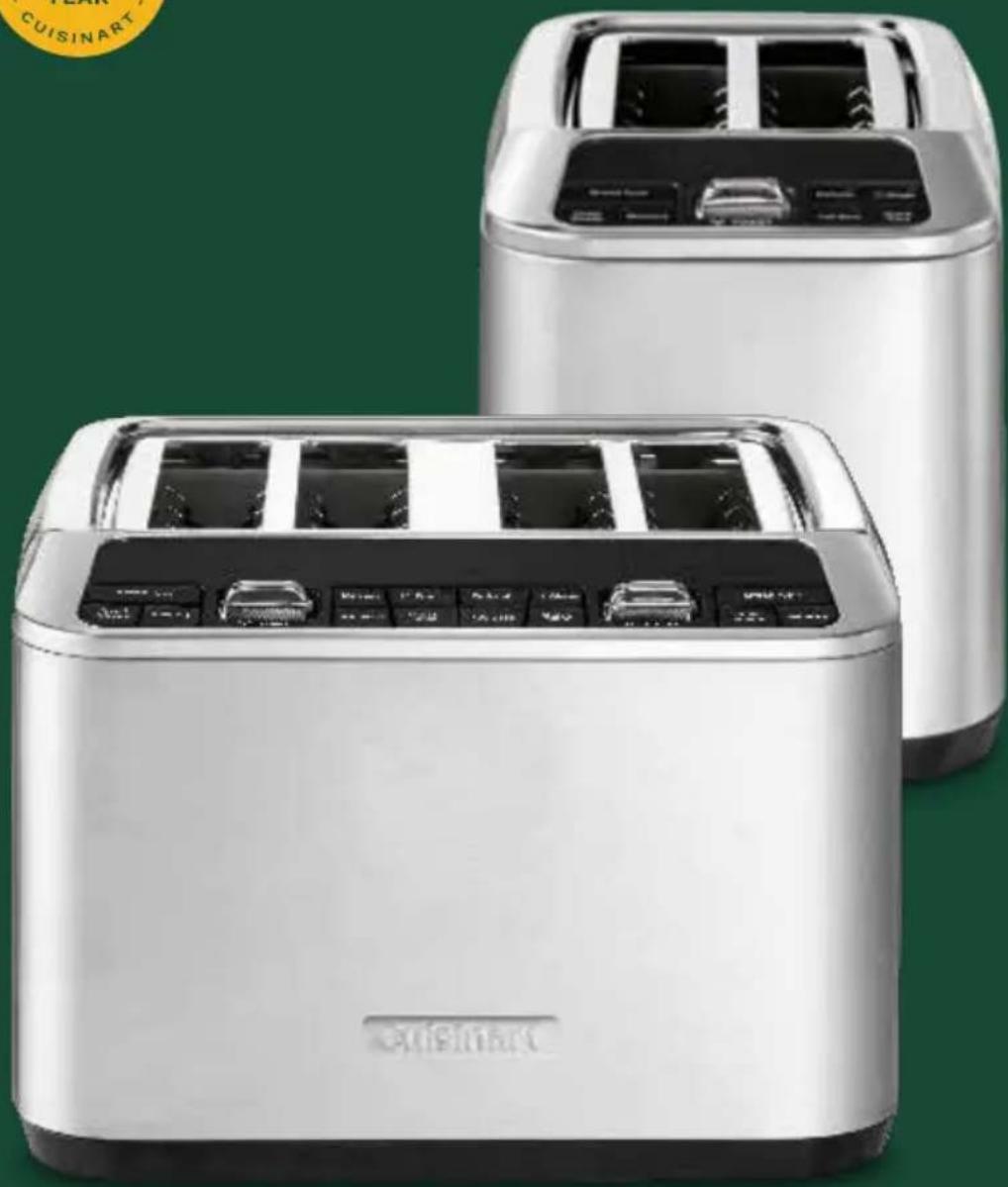
Two stainless steel kitchen grilles with digital display screens, displayed against a green background (no visible text or symbols)Instruction
Booklet
For your safety and continued enjoyment of this product, always read the instruction book carefully before using.
GB: CONTENTS
Important Safeguards 4
Special Cordset Instructions...... 4
Before First Use.... 5
Parts & Features.... 6
MemorySet Feature 7
Functions 8
Tips and Hints 9
Cleaning and Maintenance.... 9
Troubleshooting 10
Guarantee 81
FR: CONTENU
Carefully read all the instructions before using the appliance and keep in a safe place for future reference.

- CAUTION: BURN HAZARD - Hot surface.
- The temperature of accessible surfaces may be high when the appliance is in use.
• This appliance if for indoor use only.
- To move the appliance only lift by the base. Lifting the appliance by the trays instead of the base could result in electrocution if energized.
- Never insert any hard, sharp or metal instruments into the slots as this could damage the toaster and cause a safety hazard. Risk of electrocution if metal objects are inserted when plugged in.
- Because the bread can burn, do not use the toaster near or under combustible materials like curtains or under kitchen wall cabinets.
- This appliance is intended for strictly domestic use and is not intended to be used in applications such as: staff kitchen areas in shops, offices and other working environments; farm houses; by clients in hotels, motels and other residential type environments; bed and breakfast type environments.
- If the power cable is damaged, it should be replaced by the manufacturer, its after-sales service or a similarly qualified professional to avoid danger.
- This appliance is not intended for use by persons (including children) with reduced physical, sensory or mental capabilities, or lack of experience and knowledge, unless
they have been given supervision or instruction concerning use of the appliance by a person responsible for their safety. Children should be supervised to ensure that they do not play with the appliance.
- Let the appliance cool down completely and disconnect it before cleaning. Wipe the outside of the toaster with a clean damp cloth, then dry it carefully. To remove crumbs, slide out the crumb tray and throw the breadcrumbs away, then put the crumb collector back in place.
Do not use the toaster without the crumb collector. To remove pieces remaining in the toaster, turn it upside down and shake gently to cause the pieces to drop.
- Do not place the appliance on or near a hot appliance. Do not use on heat-sensitive surfaces.
- Do not leave the appliance unattended when on.
- Always unplug the appliance after use and before cleaning. Never leave the appliance unattended when plugged in. Pull on the plug to unplug, never on the cable.
- The appliance should not be used with an external timer or with a separate remote control system.
- Do not use the appliance if it has fallen or if it looks damaged.
ELECTRICAL SAFETY
The appliance is not intended to be operated by means of external timer or separate emote-control system.

WARNING: The polyethylene bags over the product or its packaging may be dangerous. Keep these bags out of the reach of babies and
children.
Never use them in cribs, children's beds, pushchairs or playpens. The thin film may cling to the nose and mouth and prevent breathing. A bag is not a toy.
Disposing of electrical and electronic appliances at the end- of-life
This symbol on the product or on the packaging indicates that this product may not be treated as household waste. Instead it should be handed over to the appliance collection point for the recycling of electrical and electronic equipment. By ensuring this product is disposed of correctly you will help prevent potential negative consequences for the environment and human health which could otherwise be caused by inappropriate waste handling of the product. For more detailed information about the recycling of this product, please contact your local council office or your household waste disposal service.
SAVE THESE INSTRUCTIONS
BEFORE FIRST USE
Before using your Digital Toaster for the first time, remove any dust from shipping by wiping the unit, with a damp cloth (Refer to Cleaning and Maintenance on page 9).
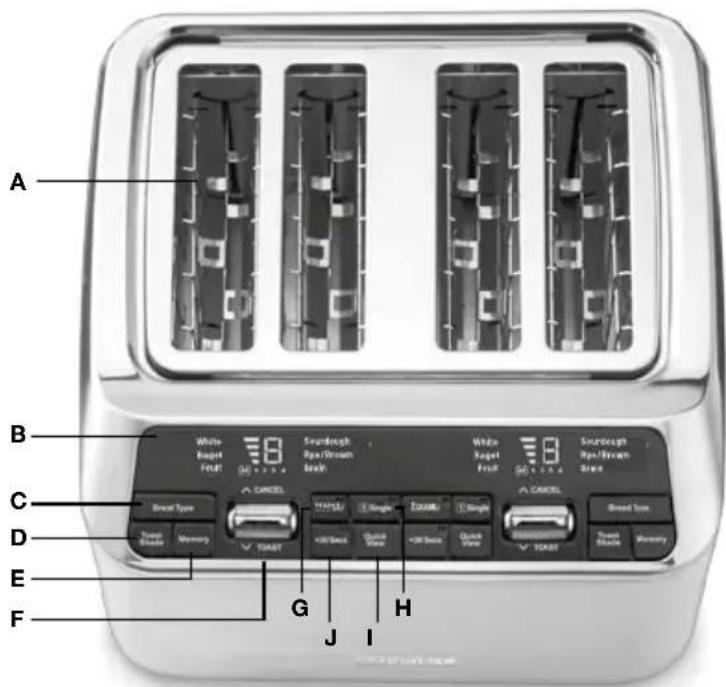
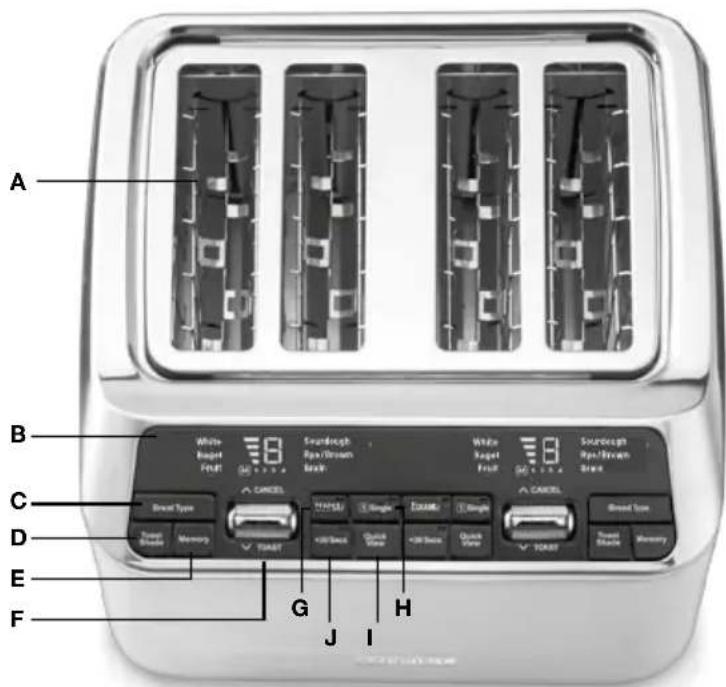
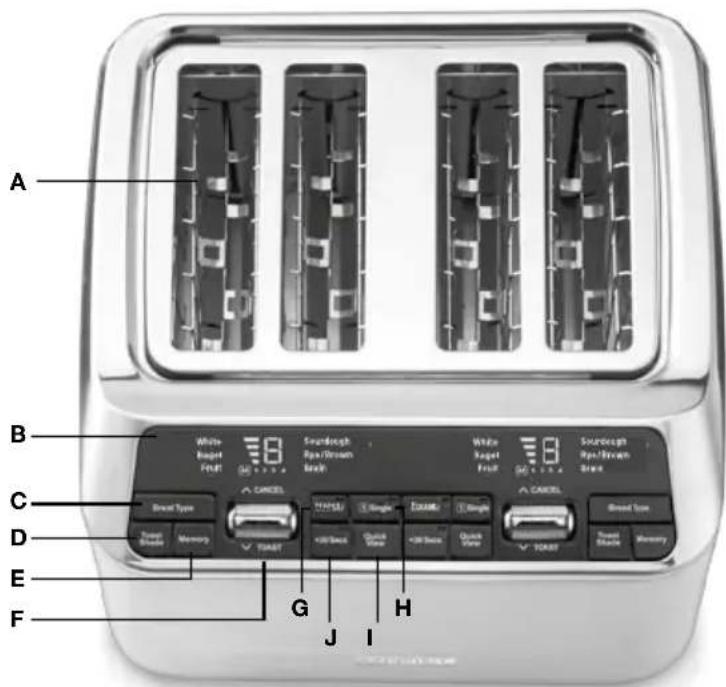
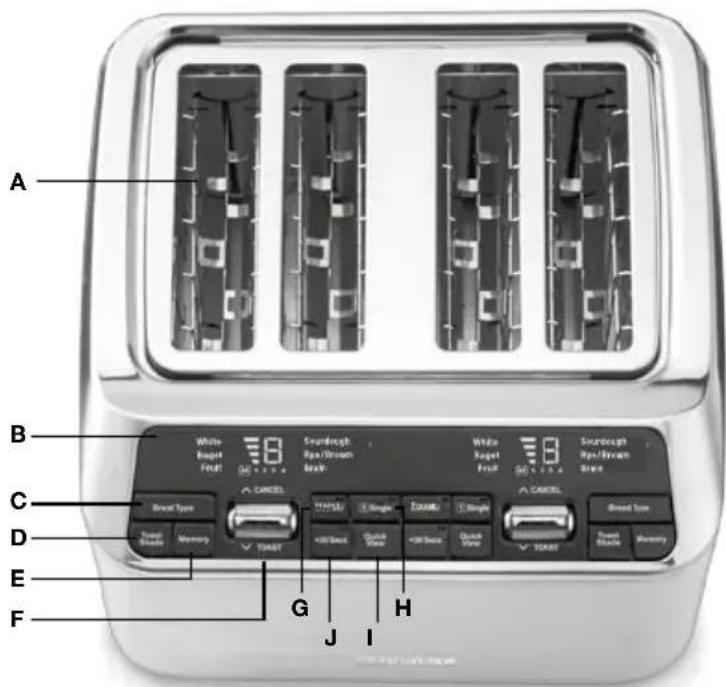
PARTS & FEATURES
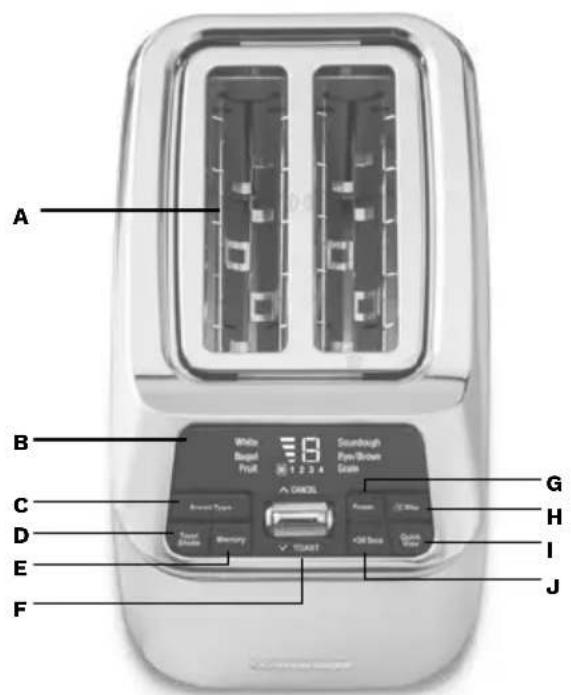
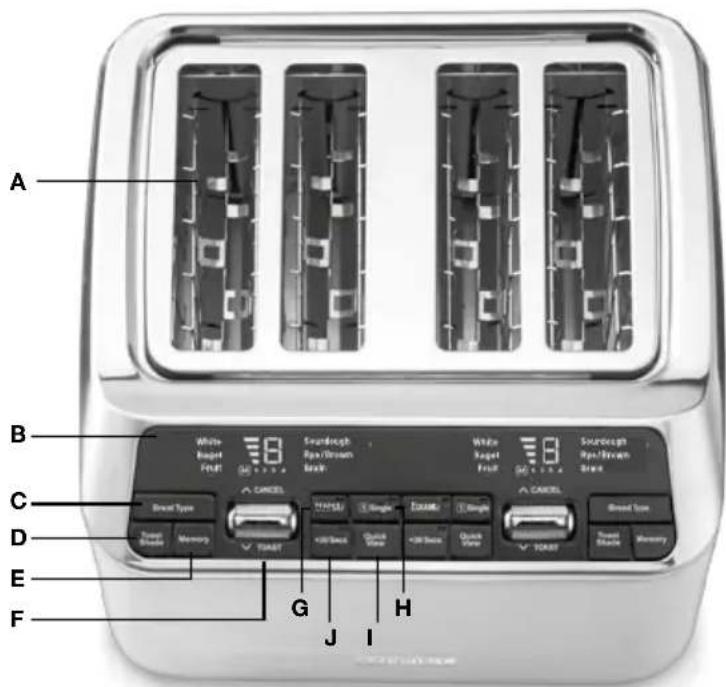
A. Dual Toasting Slots
Wide slots accommodate a variety of bread types.
B. Digital Display
Shows selected shade and bread settings, the memory function and provides a countdown so you know when your toast will be ready.
C. Bread Type Button
Press to select desired bread function (white, bagel, fruit bread, sourdough, rye/brown and grain bread). Selected bread will flash during programming and be lit solid during toasting.
D. Toast Shade Button
Press to select desired shade level (1-7). Currently selected shade setting will be displayed.
E. Memory Button
MemorySet feature to program up to 4 of your favorite settings. See page 5 for more details.
F. Toast/Cancel Activation Bar
Activate the toasting function by pressing the bar down towards TOAST; the motorized carriage will lower the bread into the toasting chamber. Press the bar up towards CANCEL to stop the toasting process and automatically lift the bread.
G. Audible Tone (not shown)
Lets you know when toasting is finished.
To mute the audible sound on the toaster, press and hold both "Toast Shade" and "Memory" buttons simultaneously. To re-active the audible sound press and hold both "Toast Shade" and "Memory" buttons simultaneously
H.FrozenButton
Frozen then toasts frozen bread. LED indicator will illuminate when selected.
I. ① Slice Button
Adjusts the heat from the middle elements to evenly toast one slice of bread. LED indicator will illuminate when selected. Don't use for bagels.
J.QuickViewButton
Press during toasting to momentarily lift the bread to observe the shade status without interrupting the toasting cycle. See page 6 for more details.
K.+30SecsButton
Can be used to toast for 30 seconds or to extend an originally selected browning shade setting for an additional 30 seconds.
L. Slide Out Crumb Tray (not shown)
A removable tray located on back of toaster that collects crumbs and slides out for easy cleaning.
M.CordStorage (not shown)
Wraps the excess cord to keep countertop neat.
OPERATING INSTRUCTIONS
1. Insert slice(s) of bread
2. Select desired bread options and/or functions
Choose setting according to the bread type from white, bagel, fruit bread, sourdough, rye/brown and grain breads. Select the “Slice” or “Frozen” options if required. Alternatively, use the Memory Button to retrieve one of your 4 saved settings. Press the Memory Button until your desired memory setting is displayed (if this option is chosen, skip to step 4).
3. Set the browning shade
Use the Toast Shade button to select your desired shade setting.
The shade number will be displayed.
Shade range is as follows:
| SETTING | COLOUR |
| 1-2 | light |
| 3-5 | medium |
| 6-7 | dark |
4. To begin toasting
Press the Activation Bar down towards Toast. The motorized carriage will lower the bread into the toasting chamber and toasting will begin. Countdown bars will flash to indicate how much toasting time remains.
5. To stop toast cycle
When the toasting cycle is finished and the toast will be raised. If you wish to stop the cycle before it is finished, simply press the Activation Lever up towards CANCEL.
- After use, unplug the toaster from the electrical outlet.
NOTE: After 3 minutes of no operation, the toaster will go into sleep mode and the digital display will turn off. Press any button or push down the activation bar, and the digital display will turn on.
MEMORYSET FEATURE
The MemorySet feature is designed to easily save up to 4 of your preferred toast settings.
To program a memory setting:
- Select desired bread options and/or functions and toast shade.
- Press and hold the Memory Button until the M lights and 1 flashes on the display.
- Select your desired memory setting number by pressing the Memory Button until the desired number (1-4) flashes.
- Confirm by pressing and holding the Memory Button again until flashing stops. Or, if nothing is pressed for 3 seconds, flashing will stop automatically and setting display will be saved.
NOTE: Any memory function setting can be revised by repeating the steps above and overriding the current setting.
NOTE: Memory settings will remain saved even when toaster is unplugged.
To easily erase all memory settings:
- Unplug the toaster.
- Press and hold the BREAD TYPE and MEMORY buttons together.
- Continue to hold the BREAD TYPE and MEMORY buttons while plugging toaster into the power outlet. Once the three beeps stop, release buttons and all memory settings should have reverted to default (White Bread, shade 4).
FUNCTIONS
The BREAD TYPE function is designed to toast, or frozen (in conjunction with the FROZEN setting) various types of bread based on their unique properties. Some breads require more or less time due to density, sugar content, and other factors.
The WHITE BREAD function is designed for soft, white sandwich breads. These breads are made mostly of refined white flour and are more commonly known as the sliced, packaged varieties found in the supermarket bread aisle.
The BAGEL setting activates additional heat to the outside heating element to toast bagel tops and lightly toast the base.

To toast bagels, place the bagels into the toaster with the tops facing outwards.
A directional icon located on the top of the toaster shows you the correct way to insert your bagel.
The RYE / BROWN & GRAIN functions are designed for unrefined, nutrient-dense breads made from 100% whole grains, or mostly whole grains, including varieties such as whole wheat, high fibre, oat, flax, etc.
The FRUIT BREAD function reduces the time of the toasting cycle, as fruit breads commonly contain more sugar and therefore less toasting is required to reach the desired shade.
Frozen
The Frozen function is a longer cycle designed to first defrost and then toast the bread to the desired browning shade. LED indicator will illuminate when selected.
① Slice
① Slice button adjusts heat to evenly toast one slice of bread. LED indicator will illuminate when selected.
NOTE: While both slots heat up, the heaters automatically adjust time and intensity to ensure great results with even side-to-side browning. Do not use this setting for Bagels or Sourdough.
QuickView™
The QuickView™ feature allows you to check on the toasting progress without interrupting the cycle. Simply press the button during toasting to momentarily lift the bread to observe the shade status. The bread will automatically lower back down and continue toasting without interrupting the cycle.
NOTE: The QuickView™ function can be activated a maximum of three times during a toasting cycle. Operating the QuickView™ function more than once will affect the toast colour.
+30 Secs
The +30 SECS function allows you to extend the toasting time by 30 seconds.
If selected during toasting cycle:
- The +30 Secs LED indicator will flash. Current shade countdown will be paused. Upon completion of the 30-second cycle, the originally selected browning shade cycle will resume.
If selected after toasting cycle has completed:
- The +30 Secs LED indicator will light and shade setting will disappear. Once toasting begins the +30 Secs indicator will flash until time has elapsed.
TIPS AND HINTS
Notes on Browning
Toasting is a combination of cooking and drying of the bread. Therefore, differences in moisture level from one item to another can result in varying toasting times.
- For lighter, airier, or slightly dry breads, use a lower shade setting than normal.
- For very fresh bread, use the Rye / Brown setting.
- For breads with uneven surfaces, use the Sourdough setting.
- For thicker, denser, or very fresh breads, use a higher shade setting than normal. Very thick slices may require a second cycle.
- When toasting raisin or other fruit breads, remove any loose raisins, etc., from the surface of the bread before placing into the toaster. This will help prevent fruit pieces from falling into the toaster or sticking on the guide wires in the slots.
For Best Results
- Never force foods into the toasting slots. Foods should fit freely between the guide wires.
- Do not place buttered breads in the toaster, as this could create a fire hazard.
- Uneven toasting is usually due to inserting slices of uneven thickness.
CLEANING AND MAINTENANCE
- Always allow the toaster to cool completely before cleaning.
- Always unplug the toaster from the electrical outlet before cleaning.
- Do not use abrasive cleaners. Simply wipe the exterior with a clean, damp cloth and dry thoroughly.
- To remove crumbs, slide out the crumb tray and discard crumbs. Wipe clean and replace. Never operate the toaster without the crumb tray in place.
- To remove any pieces of bread remaining in the toaster, unplug the toaster, turn it upside down and gently shake. Never insert any hard or sharp instruments into the slots, as this could damage the toaster and cause a safety hazard.
- Never wrap the cord around the outside of the toaster. Use the cord storage cleats on the underside of the toaster.
- Any other servicing should be performed by an authorized service representative.
TROUBLESHOOTING
| PROBLEM SOLUTION | |
| Why won’t my unit turn on? | Make sure your unit is plugged into a functional outlet. |
| Why does the bread go up and down repeatedly and/or display shows an “E” while my toaster beeps? | Your bread may have gotten caught. This happens most often when the bread is too thick for the slot. Unplug the toaster, let it cool down and check that the bread is not stuck and try running a toast cycle with no bread.If the issue persists, contact customer service via our website. |
| Why do both heaters turn on when I select 1 Slice? | It is normal for both heaters to turn on. They are internally programmed to adjust the intensity and time when 1 Slice is selected. |
| Can I add time during the toasting cycle? | Yes, you can add time to the toasting cycle by increasing your shade level or pressing the +30 Secs button. |
| I can’t get my Memory settings to reset, what should I do? | Try following the steps 1-3 on page 5 of this instruction booklet.Make sure you are pressing the BREAD TYPE and MEMORY buttons while plugging the unit back in the outlet. |
MESURES DE SÉCURITÉ IMPORTANTES
A. Ranuras dobles para tostar
Never use them in cribs, children's beds, pushchairs or playpens. The thin film may cling to the nose and mouth and prevent breathing. A bag is not a toy.
D. Paahdustason painike
K.+30sekuntia-painike
G. Hørbar tone (ikke vist)
4. For at begynde at riste
G. Hørbar tone (ikke vist)
Forteller deg når ristingen er ferdig.
H Frossen-knapp
3. Still inn bruningsgraden
natural_image
Simple line drawing of a laptop with an @ symbol on the screen (no text or labels)www.cuisinart.eu
CUISINART
ENGLISH: CUISINART guarantees easier contact with its customer services in every country. For details of the customer services in your area, call:
Cuisinart offers you a 3-year warranty. We offer a standard exchange of the appliance (identical or equivalent) during this period. To benefit from the warranty, the original proof of purchase (sales ticket or receipt) must be attached to this warranty slip along with your full contact details. The warranty does not cover damage resulting from misuse, falls, dismantling, or repair by unauthorized persons. This guarantee in no way affects your rights under statutory law.

- GB: CONTENTS
- FR: CONTENU
- ELECTRICAL SAFETY
- Disposing of electrical and electronic appliances at the end- of-life
- SAVE THESE INSTRUCTIONS
- BEFORE FIRST USE
- PARTS & FEATURES
- Dual Toasting Slots
- Digital Display
- Bread Type Button
- Toast Shade Button
- Memory Button
- Toast/Cancel Activation Bar
- Audible Tone (not shown)
- H.FrozenButton
- ① Slice Button
- J.QuickViewButton
- K.+30SecsButton
- Slide Out Crumb Tray (not shown)
- M.CordStorage (not shown)
- OPERATING INSTRUCTIONS
- Insert slice(s) of bread
- Select desired bread options and/or functions
- Set the browning shade
- To begin toasting
- To stop toast cycle
- MEMORYSET FEATURE
- To program a memory setting:
- To easily erase all memory settings:
- FUNCTIONS
- Frozen
- ① Slice
- QuickView™
- +30 Secs
- TIPS AND HINTS
- Notes on Browning
- For Best Results
- CLEANING AND MAINTENANCE
- MESURES DE SÉCURITÉ IMPORTANTES
- Ranuras dobles para tostar
- Paahdustason painike
- K.+30sekuntia-painike
- Hørbar tone (ikke vist)
- For at begynde at riste
- Still inn bruningsgraden
Brand : CUISINART
Model : CPT525E
Category : Toaster