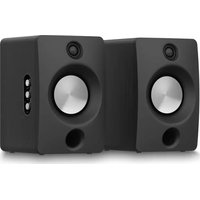
ERBS-01 - Speaker Essentiel B - Free user manual and instructions
Find the device manual for free ERBS-01 Essentiel B in PDF.


| Product type | Bookshelf speaker pair |
| Brand | Essentiel B |
| Model | ERBS-01 |
| Total power | 100 W RMS |
| Frequency response | 40 Hz - 20 kHz |
| Speakers | 2 x 1" tweeters and 2 x 4.5" woofers |
| Power supply | 100-240 V~ 50/60 Hz |
| Power consumption | 40 W (< 0.5 W standby) |
| Dimensions (W x H x D) | 174 x 273 x 235 mm |
| Inputs | USB (5 V, 500 mA), AUX RCA, optical, coaxial, Bluetooth 5.4, HDMI ARC |
| Bluetooth version | 5.4 |
| Bluetooth range | Up to 10 m (8 m recommended) |
| Remote control | Yes, with AAA batteries included |
| Included cables | Power cable, sound connection cable |
| Audio modes | VOICE, MOVIE, MUSIC |
| Auto standby | After 15 minutes of inactivity |
| Adjustments | Bass, treble, volume |
| Standby power consumption | 0.56 W |
| Power consumption in off mode | 0 W |
| Environmental protection | WEEE, recycling |
Frequently Asked Questions - ERBS-01 Essentiel B
User questions about ERBS-01 Essentiel B
0 question about this device. Answer the ones you know or ask your own.
Ask a new question about this device
Download the instructions for your Speaker in PDF format for free! Find your manual ERBS-01 - Essentiel B and take your electronic device back in hand. On this page are published all the documents necessary for the use of your device. ERBS-01 by Essentiel B.
USER MANUAL ERBS-01 Essentiel B
natural_image
Two black audio/video speakers with visible sound waves and speaker grille (no text or symbols)Notice d'utilisation / User guide / Bedienungsanleitung / Gebruiksaanwijzing
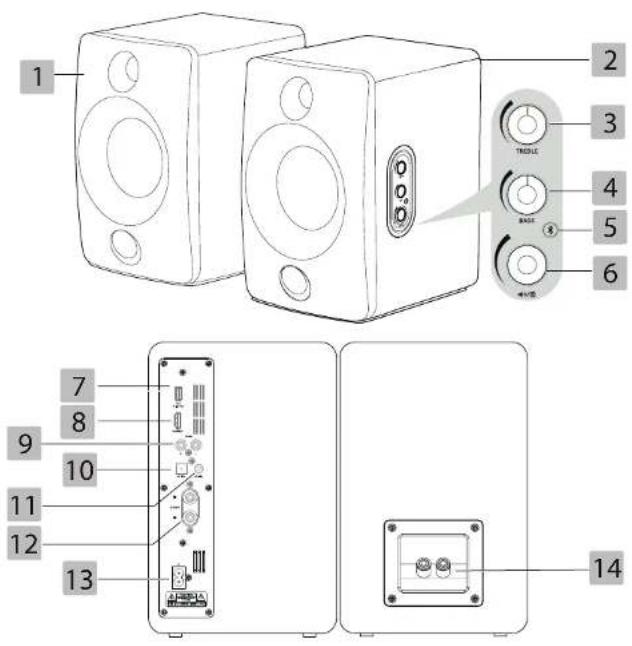
| FR EN DE NL | ||||
| 1 | Haut-parleur gauche | Left speaker | Linker Lautsprecher | Luidspreker links |
| 2 | Haut-parleur droit | Right speaker | Rechter Lautsprecher | Luidspreker rechts |
| 3 | Bouton de réglage des aigus | Treble knob | Drehregler zur Einstellung der Höhen | Treble-regelknop |
| 4 | Bouton de réglage des graves | Bass knob | Drehregler zur Einstellung der Bässe | Bass-regelknop |
| 5 | Bouton Bluetooth*/ appairage | Bluetooth*/Pair button | Bluetooth*/Pai-ring-Taste | Bluetooth*/ koppelingsknop |
| 6 | Bouton on/off / volume / source / anneau lumineux | Volume knob/ power/source button/indicator light | On/Off-Taste / Lautstärke-Drehregler / Quellentaste / Leuchtring | Knop on/off / volume / bron / lichtring |
| 7 | Port USB | USB socket | USB-Anschluss USB-poort | |
| 8 | Entrée HDMI ARC | HDMI ARC socket | HDMI-Eingang mit ARC | HDMI ARC-ingang |
| 9 | Prise AUX | AUX socket | AUX-Anschluss AUX-aansluiting | |
| 10 | Entrée optique | Optical socket | Optischer Eingang Optische ingang | |
| 11 | Entrée coaxiale | Coaxial socket | Koaxialeingang Coaxiale ingang | |
| 12 | Bornier de connexion de l'enceinte droite | Right speaker sockets | Anschlussklemme für rechten Lautsprecher | Aansluiting voor rechterluidspreker |
| 13 | Prise d'alimentation | Power socket | Anschlusssteck-dose | Voedingskabel |
| 14 | Bornier de connexion de l'enceinte gauche | Left speaker sockets | Anschlussklemme für linken Lautsprecher | Aansluiting linkerluidspreker |
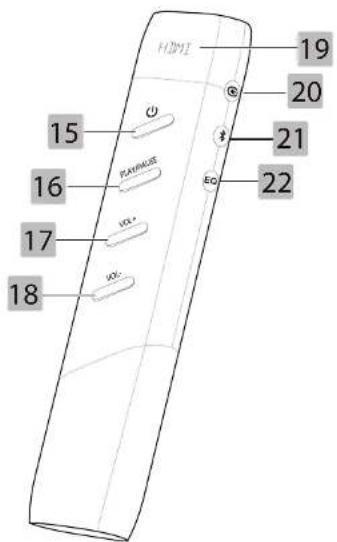
| FR EN DE NL | ||||
| 15 | Bouton on/off On | /off button On/Off- | Taste On/off-knop | |
| 16 | Bouton lecture/pause | Play/pausebutton | Wiedergabe-/Pause-Taste | Afspelen/pauze-knop |
| 17 | Bouton volume + Volume | + button Taste Lautstärke + Knop Volume + | ||
| 18 | Bouton volume - | Volume - button | Taste Lautstärke - Knop volume - | |
| 19 | Affichage | Display panel | Anzeige Weergave | |
| 20 | Bouton source | Source button | Quellentaste | Bronknop |
| 21 | Bouton Bluetooth* | Bluetooth* button | Bluetooth*-Taste | Bluetooth*-knop |
| 22 | Bouton effets sonores | Sound effectsbutton | Taste für Soundeffekte | Knop geluidseffecten |
votre produit
Contenu de la boîte
CONNEXION BLUETOOTH* DE LA TÉLECOMMANDE
natural_image
Line drawing of a cable inserted into a device with an outlet connector (no text or symbols)Connexion Bluetooth\*
Augmenter les aigus
Baisser les aigus
• 1 pair of bookshelf speakers
- 1 power cord
• 1 sound connection cable
• 1 remote control
- 1 user guide
Technical features
• Power: 100 W RMS
• Voltage: 100-240 V\~ 50/60 Hz
• Frequency response: 40 Hz - 20 kHz
• Dimensions: 174 x 273 x 235 mm
• 2 Tweeter 1" & 2 Woofer 4,5"
• Consumption: 40 W (<0.5 W in standby mode)
• USB port (5 V--- 500 mA)
• RCA auxiliary socket
- Optical input
- Coaxial input
- Bluetooth* 5.4 input (<10 dbm, 2402 MHz \~ 2480 MHz)
- HDMI ARC input
*This EssentielB product is compatible with the brands listed (brands belonging to third parties with no links to Sourcing & Creation).
| Product Information for energy consumption and maximum time required to reach applicable low-power mode | |
| Energy consumption in "off" mode 0 W | |
| Energy consumption in standby mode 0.55 W | |
| Maximum time required for the equipment to automatically reach applicable low power mode | NA |
| Standby power consumption with network connection maintained if all wired network ports are connected and all wireless network ports are enabled | NA |
before initial use
- Remove all packaging.
- Before making any connections, make sure the device is switched off. Always switch off the device before removing or plugging in any connection cables.
- Do not connect the power cord until all connections have been completed.
- Insert the batteries (2 AAA batteries supplied) into the remote control, observing the polarity indicated.
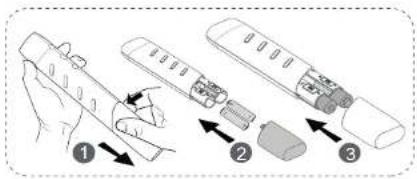
BLUETOOTH* CONNECTION OF THE REMOTE CONTROL
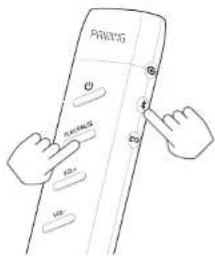
By default, your remote control is already connected to your speakers. In the event of a malfunction, you can reconnect the remote control to your speakers:
- After checking that your speakers are switched on and that the batteries are inserted in the remote control, press the Play/Pause and ✗ buttons on your remote control for 3 seconds.
- The screen displays "Pairing".
- Wait a few moments and the screen will display "Connected", indicating that the remote control is connected to the speakers.
connections
It is important to connect external devices before connecting your speakers to the mains.
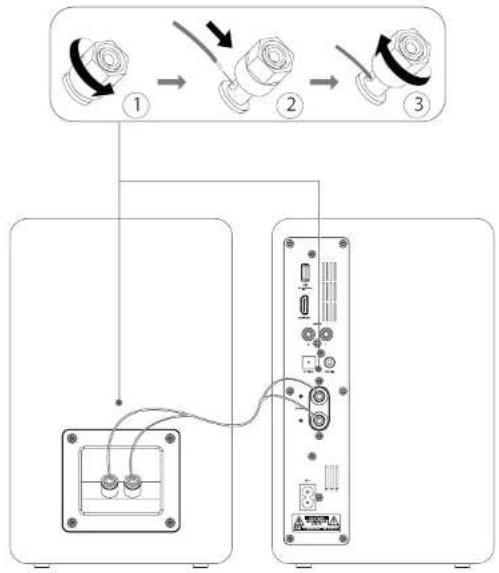
Connecting the speakers
- Unscrew the red and black connectors on the back of the left and right speakers.
- Insert the silver end of the red section of the sound connection cable (supplied) in the red connector on each speaker. Screw the red connector into each speaker.
- Insert the silver end of the black section of the sound connection cable (supplied) in the black connector on each speaker. Screw the red connector into each speaker.
flowchart
graph TD
    A["Port 1"] -->|Cable Link| B["Port 2"]
    B -->|Cable Link| C["Port 3"]
    D["Port 2"] -->|Cable Link| E["Server"]
    E -->|Cable Link| F["Port 3"]
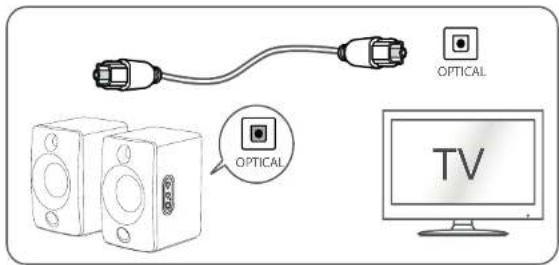
Connecting a device using an optical cable
Your pair of speakers has an optical input so you can connect them to a digital source, such as a compatible television or home cinema system. The optical cable (not supplied) is used to transfer a high-quality audio signal.
Connect an optical cable (not supplied) to the OPTICAL socket on the main speaker and to the OPTICAL socket on your television or home cinema system.
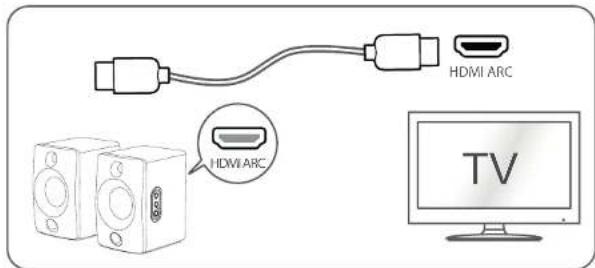
Connecting a device using an HDMI ARC cable
Your pair of speakers is equipped with a HDMI ARC (Audio Return Channel) input, so you can establish a digital audio-video link with a video source that is compatible with ARC technology. The HDMI ARC cable (not supplied) allows sound to be transmitted bidirectionally between your television and your audio equipment.
Connect a high-definition HDMI cable (not supplied) to the HDMI ARC socket on the main speaker and to the HDMI ARC socket on your television or home cinema system.
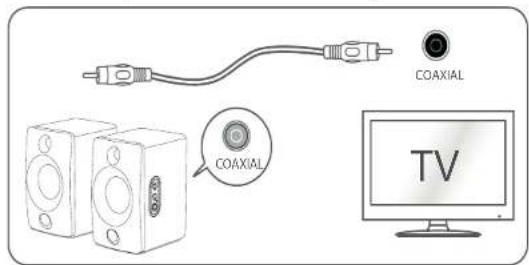
Connecting a device using a coaxial cable
Your pair of speakers has a coaxial input so you can connect them to a digital source, such as a television or home cinema system. The coaxial cable (not supplied) is used to transfer a quality audio signal.
Connect a coaxial cable (not supplied) to the COAXIAL socket on the main speaker and to the COAXIAL socket on your television or home cinema system.
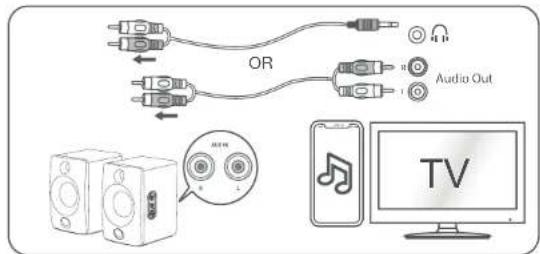
Connecting a device using an RCA audio cable
Your pair of speakers has an RCA AUX input that allows you to carry a stereo analogue signal from a source such as a compatible CD player, vinyl turntable, television or home cinema. The RCA cable (not supplied) is used to transfer the audio signal.
Connect the red end of both sides of the cable (not supplied) to the red AUX IN socket on the main speaker and to the red output on your device. Then connect the white end of both sides of the cable (not supplied) to the white AUX IN socket on the main speaker and to the white output on your device.
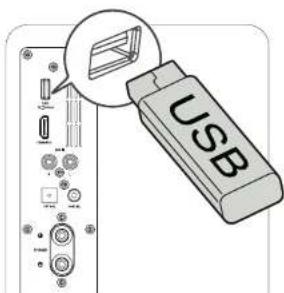
Connecting a USB device
Your pair of speakers has a USB port so you can play content from a source such as a USB dongle or laptop.
Plug the USB dongle or cable into the USB port on the main speaker.
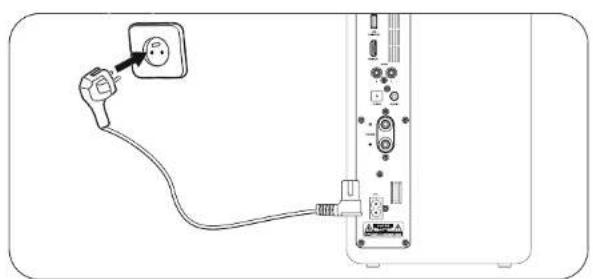
Power supply connection
Before connecting to a wall socket, check that the voltage of your installation corresponds with the voltage indicated on the device's data plate.
Once you've made the necessary connections, you'll need to connect your pair of speakers to a mains supply before you can use them. To do this, connect the supplied power cable to the power socket on the main speaker and to a wall socket.
natural_image
Line drawing of a cable inserted into a device with an outlet connector (no text or symbols)Bluetooth\* connection
To use a Bluetooth device with your pair of speakers, you need to pair the device with your speakers first. To do this, follow the steps below:
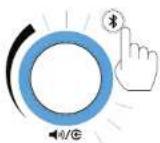
- After switching on your speakers, press on your remote control or control panel. The light ring fl ashes blue rapidly, indicating that it is searching for compatible devices.
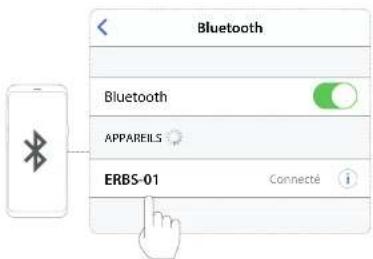
- Activate the Bluetooth* function on your device (refer to your device's user manual).
- Your device should read "ERBS-01". Select it to establish the connection.
- Wait a few moments for the connection to succeed. When the light ring is solid blue, the connection is successful and you can play music from your device.
- Repeat the steps with any new Bluetooth device you wish to connect to your speakers.
COMMENTS:
- if no Bluetooth device is connected within 2 minutes, the speakers will reconnect to the last connected device.
- if the distance between the speakers and the Bluetooth ^* device is more than 8 m, the connection may be lost, in which case the device should be brought closer to the speakers and paired again.
use
Control panel operation
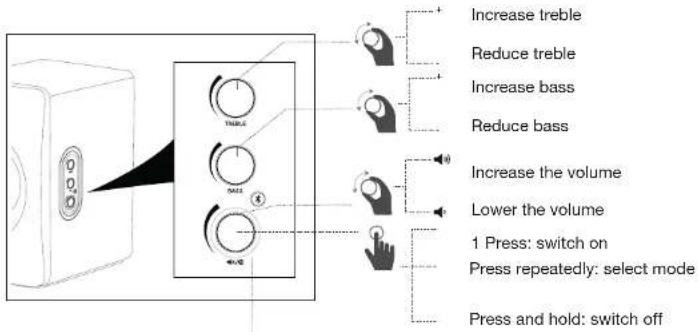
The right speaker is fitted with a number of control buttons that allow you to operate and configure your system. Here are the basic principles:
| Indicator light status Meaning | |
| Red Sleep | |
| Green AUX mode | |
| Light blue USB mode | |
| Purple | PC-USB mode |
| Orange | Optical mode |
| Light green | Coaxial mode |
| White | HDMI ARC mode |
| Blue | Mode Bluetooth* |
| Rapid fl ashing | Bluetooth^ pairing |
| Slow fl ashing | Bluetooth^ mode without connection |
Switching on/off
After connecting your speakers to a mains supply, switch them on:
- Press the ◄/@ button on the control panel or the ⏻button on the remote control once to switch on your speakers.
- Press and hold the ◄/€ button on the control panel or press the ◀button on the remote control once to switch off your speakers. The light ring turns red.
COMMENTS:
- to save energy, switch off your speakers completely when you are not using them. If the speakers are not used for 15 minutes, they automatically go into standby mode.
- when you switch on the speakers, they are set to the last source selected.
Playback from external devices
MODE SELECTION
Your speakers have a range of inputs and functions that allow you to use them in a multitude of ways. To play content from external devices, select the usage mode as follows:
- Make the necessary connections as described in the "Connections" section. Make sure the device is switched on.
- Press the ◄/◎ button on the control panel or the Ⓐbutton on the remote control several times to select the mode of your choice (see below).
- The colour of the light ring indicates the mode currently selected.

HDMI mode

Mode Bluetooth*

USB mode

USB-PC mode

Optical Mode

Mode Coaxial

AUX
mode
- You can start playing content on your device (TV, home cinema sound system, turntable, etc.) which will be transmitted via your speakers.
USB DEVICE
To play content from a USB dongle or laptop connected via a USB cable, proceed as follows:
- First connect your USB dongle or laptop (via a USB cable) to the USB port on the speaker.
- Press the ◄/◎ button on the control panel or the ⏻ button on the remote control several times to select USB or USB-PC mode.
- If you have a USB dongle, the content will launch automatically. If not, press the PLAY/PAUSE button on the remote control. In the event of a laptop, it's up to you to open a multimedia player software/application and play content.
- To pause or resume playback, press the PLAY/PAUSE button on the remote control.
- Go to the next track by pressing the PLAY/PAUSE button on the remote twice quickly, or three times quickly to return to the previous track.
BLUETOOTH\* DEVICE
To play content from a Bluetooth device*, proceed as follows:
- First, pair up your Bluetooth device as described in the "Connections" section. Please note that the device and speakers must be no more than 8 metres apart to ensure optimum operation, with no obstacles in the way of connection.
- Launch a media player application on your Bluetooth device* and play content.
- You can use the PLAY/PAUSE button on the remote control to start/pause playback.
COMMENTS:
• to save energy, switch off your speakers completely when you are not using them. If the speakers are not used for 15 minutes, they automatically go into standby mode.
- when you switch on the speakers, they are set to the last source selected.
Settings
To get the best possible sound, your speakers can be set to various parameters, which you can defi ne as follows:
- Turn the TREBLE knob on the control panel to adjust the treble level.
- Turn the BASS knob on the control panel to adjust the bass level.
- Turn the ◀/G knob on the control panel or press the VOL+ or VOL- buttons on the remote control to adjust the volume.
- Press several times on the Ⓐ button on the remote control to select the sound effect of your choice: VOICE / MOVIE / MUSIC.
troubleshooting guide
Before contacting your store's customer service centre, carry out the following basic checks.
Symptoms Possible cause Solution
| The device does not switch on | The device is not plugged in or the connection is incorrect.There is no power at the mains plug.The device is not switched on. | Plug the device correctly into a mains socket.Connect another device to the same power outlet to cross-check the outlet.Press the button on the control panel or the button on the remote control once. |
| The remote control is not working. | The batteries are not inserted or are inserted incorrectly.The speakers and the remote control are too far apart.The batteries are flat.The selected source is incorrect. | Insert the batteries as described in the “before initial use” section.Move closer to the speakers.Replace old batteries with new ones.Select the correct source by pressing the button on the control panel or the button on the remote control. |
| No sound | The volume is too low.The selected source is not correct.The source device is not working.The source device is incorrectly connected. | Increase the volume by turning the knob on the control panel or by pressing the VOL+ button on the remote control.Select the correct source by pressing the button on the control panel or the button on the remote control.Switch on the source device and play content.Check the connections. |
| The USB device is not recognised | The audio files stored on the USB device are not compatible.The USB device is not properly connected. | Use a playback format compatible with this device.Unplug the removable media and plug it in again. |
| The Bluetooth* connection cannot be established | • Your audio source is not in pairing mode. | • Refer to the user manual of your audio source for more details. |
| Make sure the speaker and your Bluetooth* device are less than 8 metres apart and that no walls or electronic devices are blocking the transmission. | ||
Ihr Produkt
Packungsinhalt
BLUETOOTH\*-VERBINDUNG DER FERNBEDIENUNG
Verbindungen
natural_image
Diagram of a cable being inserted into a device, showing plug and socket (no text or symbols)Höhen anheben
Höhen absenken
Bass anheben
Bass absenken
BLUETOOTH\*-VERBINDING VAN DE AFSTANDSBEDIENING
natural_image
Diagram showing a plug inserted into a device with cable, no text or symbols presentBluetooth\*-verbinding
BLUETOOTH\*-APPARAAT
All information, designs, drawings and pictures in this document are the property of SOURCING & CREATION. SOURCING & CREATION reserves all rights to its brands, designs and information. Any copy and reproduction through any means shall be deemed and considered as counterfeiting.
Protection of the environment
This symbol attached to the product means that it is an appliance whose disposal is subject to the directive on waste from electrical and electronic equipment (WEEE). This appliance may not in any way be treated as household waste and must be subject to a specific type of removal for this type of waste. Recycling and
recovery systems are available in your area (waste removal) and by distributors. By taking your appliance at its end of life to a recycling facility, you will contribute to environmental conservation and prevent any harm to your health.

Umweltschutz
\* Tested in our laboratories
Warranty valid from the date of purchase (receipt as proof of purchase). This warranty does not cover defects or damage caused by improper set up, incorrect use, or normal wear and tear of this product.
\* In unseren Labors getestet
Customer Relations Department /
Kundenservice / Klantenafdeling
Avenue de la Motte
CS 80137
59811 Lesquin cedex
contact@sc-ub.com
Art. 8011811
Ref. ERBS-01