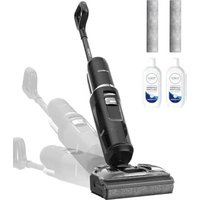
Floor One S5 Extreme - Vacuum Cleaner TINECO - Free user manual and instructions
Find the device manual for free Floor One S5 Extreme TINECO in PDF.


User questions about Floor One S5 Extreme TINECO
0 question about this device. Answer the ones you know or ask your own.
Ask a new question about this device
Download the instructions for your Vacuum Cleaner in PDF format for free! Find your manual Floor One S5 Extreme - TINECO and take your electronic device back in hand. On this page are published all the documents necessary for the use of your device. Floor One S5 Extreme by TINECO.
USER MANUAL Floor One S5 Extreme TINECO
Smart Cordless Vacuum & Washer
Bedienungsanleitung
Instruction Manual
Manual De Uso
Mode D'emploi
natural_image
Black Tineco vacuum cleaner with attached power cord, shown from front and back angles (no text or symbols on device body)*Actual product may differ from illustration.
text_image
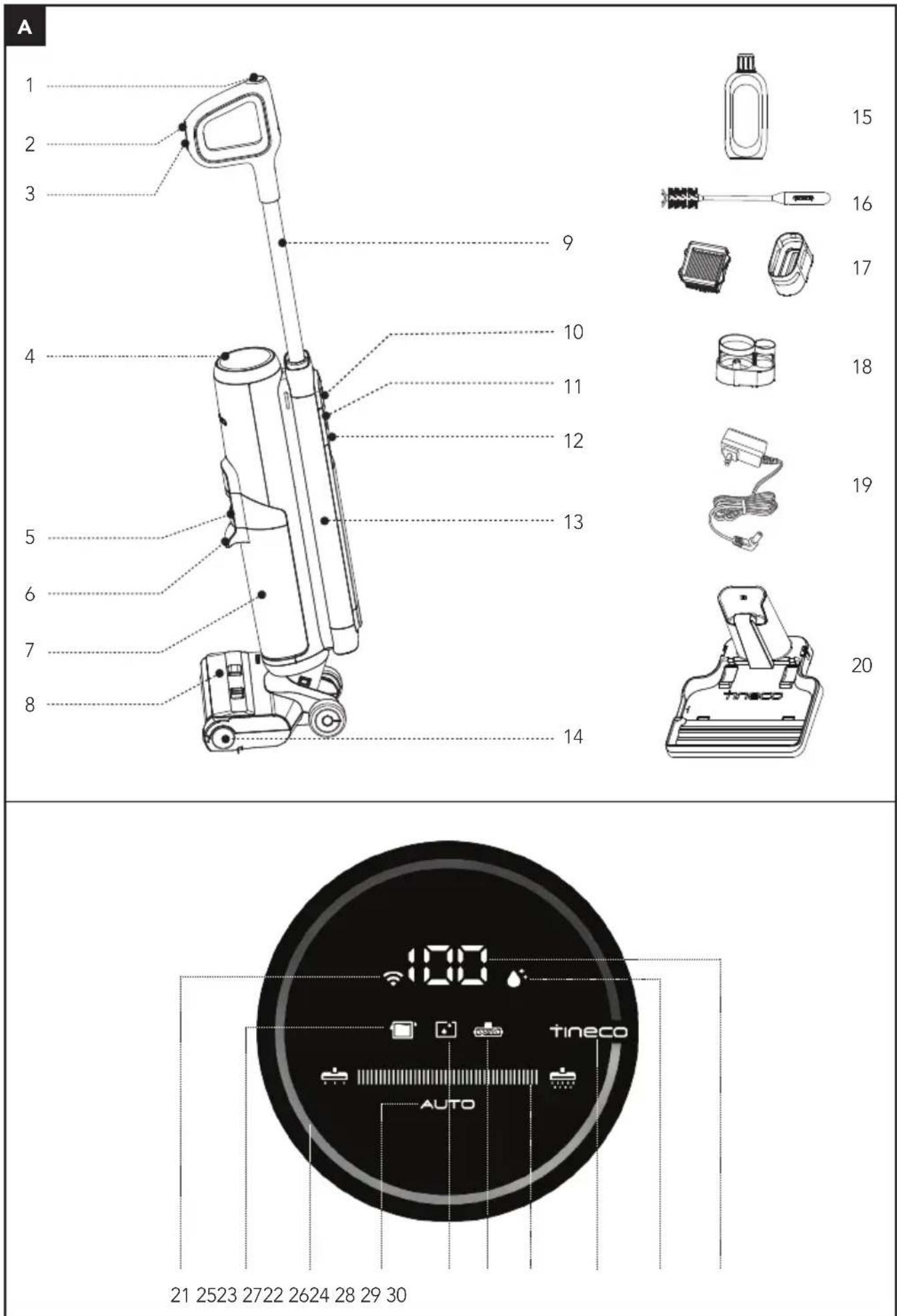
A 1 2 3 9 4 10 11 12 13 5 6 7 8 14 15 16 17 18 19 20 21 2523 2722 2624 28 29 30 tineco AUTO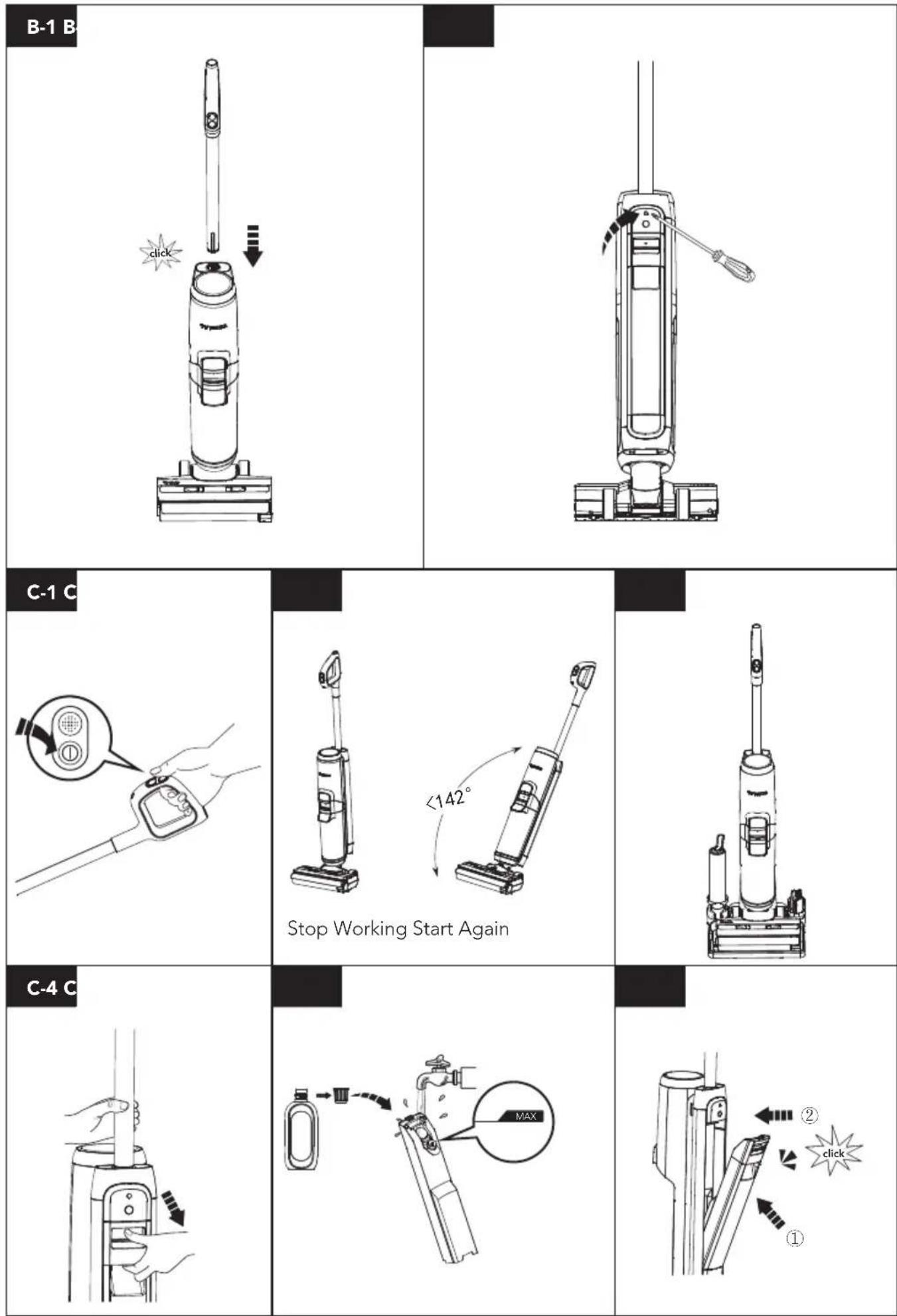
D-4
text_image
Illustration showing four steps of a device cleaning or cleaning process, with arrows indicating movement and a 'click' label highlighting the action.①
②
③
④
D-5
natural_image
Illustration of four different cleaning or cleaning techniques: a handheld device, a handheld device with water spray, a fan-shaped tool, and a hand holding a tool (no text or symbols present)①
②
③
④
natural_image
Illustration showing three different methods of cleaning a surface: a hand washing a faucet, a hand holding a tool, and a hand using a spray gun (no text or symbols present)D-6 D
natural_image
Illustration showing three different cleaning or cleaning techniques: a handheld device, a water tap with water spray, and a tool on a sun (no text or symbols present)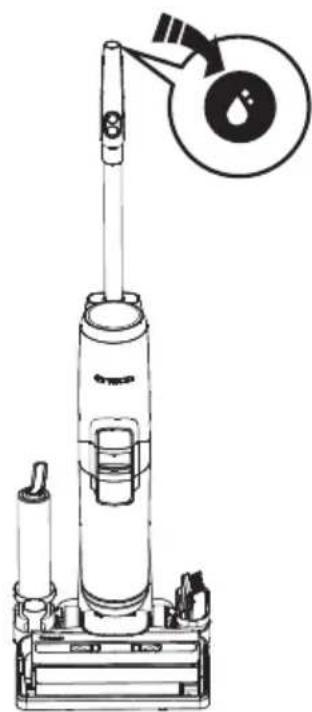
natural_image
Line drawing of a vacuum cleaner with a droplet symbol and handle (no text or labels)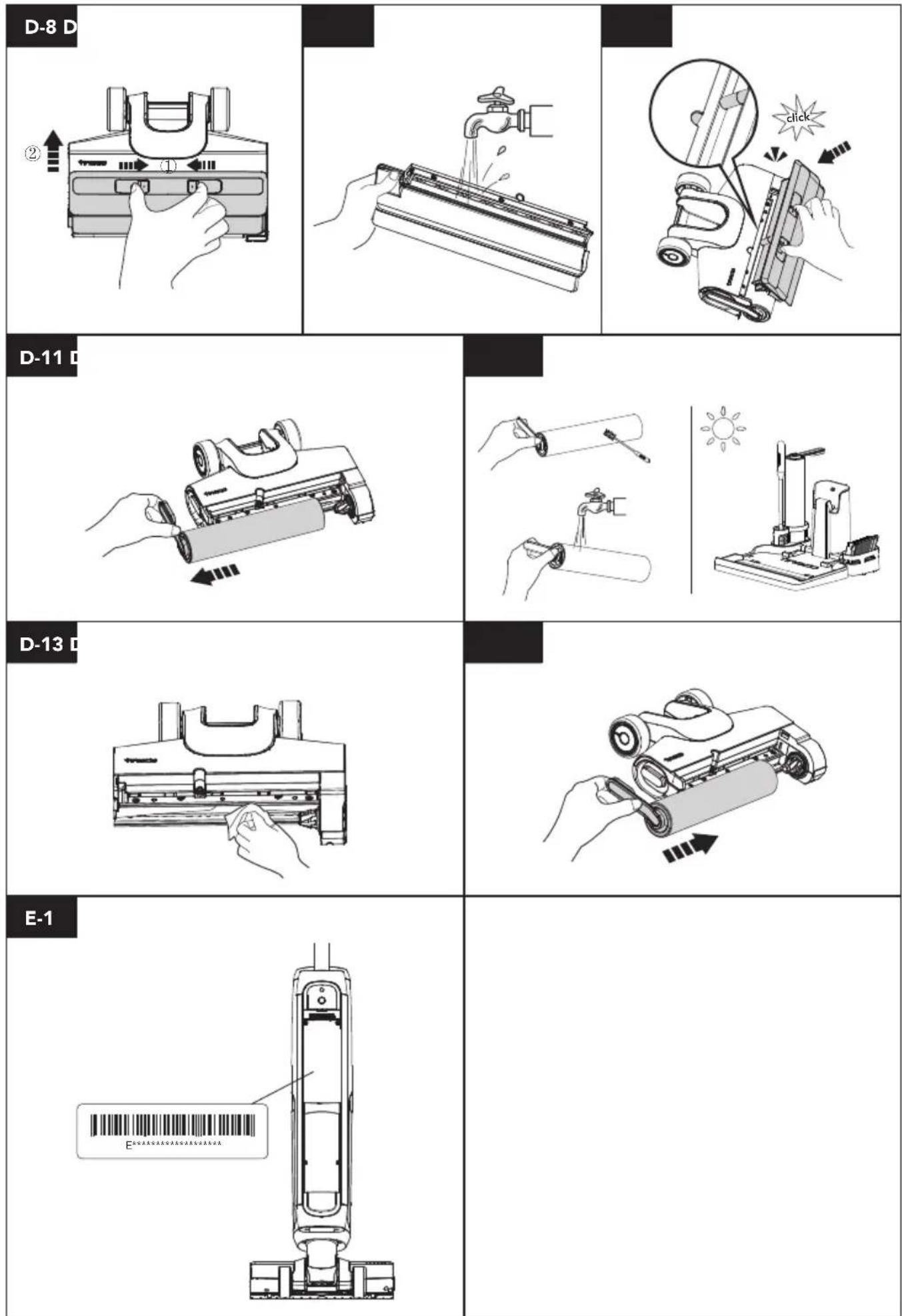
INHALT
Important Safety Instructions....18
Specifications 21
Overview 21
Assembly 22
Operation 22
Maintenance 25
Troubleshooting....26
Warranty 27
IMPORTANT SAFETY INSTRUCTIONS
SAVE THESE INSTRUCTIONS Household use only.
When using an electrical appliance, basic precautions should always be followed, including the following: READ ALL INSTRUCTIONS BEFORE USING (THIS APPLIANCE). Failure to follow the warnings and instructions may result in electric shock, fire and/or serious injury.
WARNING – To reduce the risk of fire, electric shock, or injury:
-
This appliance can be used by children aged from 8 years and above and persons with reduced physical, sensory or mental capabilities or lack of experience and knowledge if they have been given supervision or instruction concerning use of the appliance in a safe way and understand the hazards involved. Children should not play with the appliance. Cleaning and user maintenance shall not be performed by children without supervision.
-
The appliance is not to be used by persons (including children) with reduced physical, sensory or mental capabilities, or lack of experience and knowledge, unless they have been
given supervision or instruction.
-
Use only indoors, on non-carpeted floor surfaces such as vinyl, tile, sealed wood, etc. Be careful not to run over loose objects or edges of area rugs. Stalling the brush may result in premature belt failure.
-
Do not allow to be used as a toy. Close attention is necessary when used by or near children, pets or plants.
-
Use only as described in this manual. Use only manufacturer's recommended attachments.
-
Do not use with a damaged cord or plug. If appliance has been dropped, damaged, left outdoors, dropped into water, or is not working as it should, return it to a service center.
-
Do not handle charger, including charger plug, and charger terminals with wet hands.
-
Do not put any object into openings. Do not use with any opening blocked; keep free of dust, lint, hair, and anything that may reduce air flow.
-
Keep hair, loose clothing, fingers, and all parts of your body away from openings and moving parts.
-
Use extra care when cleaning on stairs.
-
Do not use to pick up flammable or combustible liquids, such as gasoline, or use in areas where they may be present.
-
Do not pick up anything that is burning or smoking, such as cigarettes, matches, or hot ashes.
-
Do not use without filter.
-
Prevent unintentional activation. Ensure the switch is in the off-position before picking up or carrying the appliance. Carrying the appliance with your finger on the switch or energizing appliance that have the switch on invites accidents.
-
Always switch off the appliance before making any adjustments, changing accessories, or storing the appliance. Such preventive safety measures reduce the risk of starting the appliance
accidentally.
-
Recharge only with the charger specified by Tineco. A charger that is suitable for one type of battery pack may create a risk of fire when used with another battery pack.
-
Use appliances only with specifically designated Tineco battery packs. Use of any other battery packs may create a risk of injury and fire.
-
Under abusive conditions, liquid may be ejected from the battery; avoid contact. If contact accidentally occurs, flush with water. If liquid comes into eye contact, seek medical help. Liquid ejected from the battery may cause irritation or burns.
-
Do not use a battery pack or appliance that is damaged or modified. Damaged or modified batteries may exhibit unpredictable behavior resulting in fire, explosion or risk of injury.
-
Do not expose a battery pack or appliance to fire or excessive temperature. Exposure to fire or temperature above 266^ F ( 130^ C) may cause an explosion.
-
Follow all charging instructions and do not charge the battery pack or appliance outside of the temperature range specified in the instructions. Charging improperly or at temperatures outside of the specified range may damage the battery and increase the risk of fire.
-
Have servicing performed by a qualified repair person using only identical replacement parts. This will ensure that the safety of the product is maintained.
-
This appliance contains battery cells that are non-replaceable. Do not modify or attempt to repair the appliance or the battery pack except as indicated in the instructions for use and care.
-
Always turn off this appliance before connecting or disconnecting the motorized nozzle.
-
Do not charge or store the appliance outdoors or inside the car. Only charge,
store or use the battery in a dry indoor area where the temperature is higher than 39.2^ F ( 4^ C) but lower than 104^ F ( 40^ C). The charger is for indoor use only.
-
Do not use to pick up ultrafine particles, such as lime, cement, sawdust, gypsum powder, or ashes.
-
Do not use to pick up sharp objects, such as metallic nails, pieces of glass, metal paper clips, or pins.
-
Do not use to pick up hazardous material and chemicals, such as solvent, drain cleaner, strong acids, or strong alkali.
-
Stop using immediately if the appliance is overheating, making unusual noises, producing unusual odors, performing low suction, or leaks electricity.
-
Turn cleaner OFF and disconnect from electrical outlet for long-term storage.
-
Always clean the Dirty Water Tank after each use to avoid potential blockage, which may lead to low suction power, motor overheating, or reduce the service life of the appliance.
-
Store appropriately indoors in a dry place after use.
-
Do not place or submerge appliance in standing water or try to clean flooded areas.
-
All data and technical instructions of this manual are based on results from lab tests of Tineco or designated third parties. The company reserves all rights for final explanations.
-
The plug must be removed from the socket-outlet before cleaning or maintaining the appliance.
-
A hazard may occur if the appliance runs over the supply cord.
-
Do not use the appliance when the water depth is more than 5mm above the surface.
Range of Usage
- The cordless hard floor cleaner is to be used on indoor hard floors, such as vinyl, tile, sealed wood, etc. Use on a rough surface may not get the best performance.
- Keep your appliance away from heat sources, such as fireplace or heater, to avoid casing deformation.
- Do not use to pick up flammable or combustible liquids, ultrafine particles, sharp objects, hazardous material, chemicals or anything that is burning or smoking, as described above.
About Cleaning Solution
- A large amount of cleaning solution entering into the motor may cause damage to the appliance.
- Add solution as instructed in the Operation section. We recommend using the provided cleaning solution. Do not use the product with acidic, alkaline solution, or any substances harmful to the environment.
- Keep out of the reach of children. Avoid contact with eyes and skin, otherwise, rinse thoroughly with water. If irritation persist, seek medical advice. If product is swallowed seek medical advice.
- Dirty water and solution disposal should comply with local environmental regulations.
About the Appliance
- Do not modify or attempt to repair the appliance except as indicated in the instructions for operating and cleaning.
- Charge the appliance with the Tineco adaptor. Input Voltage: AC 100-240V. Both high and low voltages can damage the adaptor, appliance, or even cause danger to the user.
- Use extra care when cleaning on stairs.
- Ensure that the Power Switch is in the OFF-position before picking up or carrying the appliance. Do not lay flat or
lean the appliance so as to prevent dirty water from entering into the motor.
- To avoid being tripped accidentally, please put away the appliance on the charging base.
- Always install the Dirty Water Tank and Clean Water Tank properly before use.
- Do not allow the appliance or charger to get wet to avoid risk of fire or injury caused by a short circuit.
Recycling Instructions according to Battery Law
The rechargeable battery contains materials that are harmful to the environment and must therefore be removed from the device before disposal. The device must be switched off to remove the rechargeable battery.
Batteries and rechargeable batteries must not be disposed of in household waste! Every consumer is obliged to hand in all batteries and rechargeable batteries, regardless of whether they contain harmful substances or not, at a collection point in his or her municipality/ district or at a retailer, so that they can be disposed of in an environmentally friendly manner. Batteries and rechargeable batteries should only be returned when discharged. Batteries and rechargeable batteries are therefore marked with the symbol left.
Recycling Instructions according to WEEE
Waste electrical and electronic equipment must not be disposed of with household waste! Every consumer is obliged to hand in all appliances at the end of their service life at a collection point in his or her municipality/district or at a retailer so that they can be disposed of properly and in an environmentally friendly manner. The illustration left shows the wheelie bin symbol indicating separate collection of waste electrical and electronic equipment (WEEE).
For EU Countries:
For EU Declaration of Conformity information, please visit www.tineco.com.
Symbols:
 | Read the instruction manual |
 | Class II |
 | Short-circuit-proof safety isolating transformer |
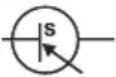 | Switch mode power supply |
 | For indoor use only |
 | Direct current |
 | Alternating current |
SPECIFICATIONS
| Product FLOOR | ONE S5 SERIES |
| AC Input 100~240V | |
| Voltage 21.6V | = 4000mAh Lion |
| Rated Power 220W | |
| Running Time | AUTO: ~35 minsMAX: ~28 mins |
| Charging Time 4-5 hrs | |
| Water Flow Rate | 30~100ml/min |
| CWT Capacity ~0.8L | |
| DWT Capacity ~0.7L | |
| Waterproof IPX4 | |
OVERVIEW
Note:
Accessories may vary between markets. If you require more accessories, please go to
www.tineco.com or store.tineco.com.
1 Self-cleaning Button
2 Mode Switch
3 Power On/Off
4 Digital Display
5 Dirty Water Tank Release
6 Dirty Water Tank Handle
7 Dirty Water Tank (DWT)
8 Brush Roller Cover
9 Tube
10 WiFi/Mute Button
11 Clean Water Tank Release
12 Clean Water Tank Handle
13 Clean Water Tank (CWT)
14 Brush Roller
15 Deodorizing & Cleaning Solution
16 Cleaning Tool
17 Dry Filter & Holder
18 Accessory Holder
19 Adaptor
20 Charging Base
21 WiFi Indicator
22 DWT Full or Blocked
23 Dirt Monitoring Loop (Blue to red according to the dirt amount)
24 AUTO Mode
25 CWT Empty
26 Brush Roller Tangled Indicator
27 Power Indicator
28 Tineco Logo
29 Self-cleaning Icon
30 Battery Level Indicator
Fig.A
ASSEMBLY
How to Assemble/Disassemble Note:
For water tank and brush assembly, please refer to "Operation" and "Maintenance".
- To assemble the handle, insert it into the appliance until you hear a click.
Fig.B-1
- In the event that the handle need to be disassembled, press the spring to release the handle with a tool (like a screwdriver) and lift the released handle from the appliance.
Fig.B-2
OPERATION
Preparing for Use
- Before first use, please charge the appliance for 4-5 hours (refer to "Charging Instructions" for details).
* Based on results from Tineco lab tests. Lab temperature 39.2°F (4°C) \~ 104°F (40°C).
- Press the button and the appliance will start in AUTO mode by default. Press it again to turn off the appliance. Switch between AUTO, MAX and SUCTION mode by pressing the button.
Fig.C-1
Tips (SUCTION mode not available):
- Solution mode/ Water Only mode: Appliance starts with Solution mode by default. Power on while the appliance is upright, long-press for 3s to switch between the two modes.
- Switch to Water Only mode: LED Loop: Red → Blue (use water only)
- Switch to Solution mode: LED Loop: Blue → Red (use cleaning solution)
- The appliance will stop working when put uprightly and start running again when you recline.
* Do not recline more than 142° to protect against water leakage.
Fig.C-2
- Place the appliance on the charging base vertically after use for recharge and storage.
Fig.C-3
Note:
- Selecting the appropriate mode depending on the CWT contents is vital for maximum dirt detection effectiveness.
- Do not vacuum foamed liquid.
- To vacuum water left on the surface, the appliance will switch off in 3 seconds after power off.
- Suction mode is only available in selected models, please refer to the actual product.
Filling Clean Water Tank
- Press the Clean Water Tank release button to remove it from the appliance.
Fig.C-4
- Open the tank cap, and fill with tap water to the Max line. When deep cleaning is necessary, add one bottle cap of solution to the CWT and tightly close the cap.
Fig.C-5
Note:
Only use water under 140°F/60°C. DO NOT USE HOT WATER.
- Place the tank back into the appliance. You should hear a "Click" if done correctly.
Fig.C-6
Charging Instructions
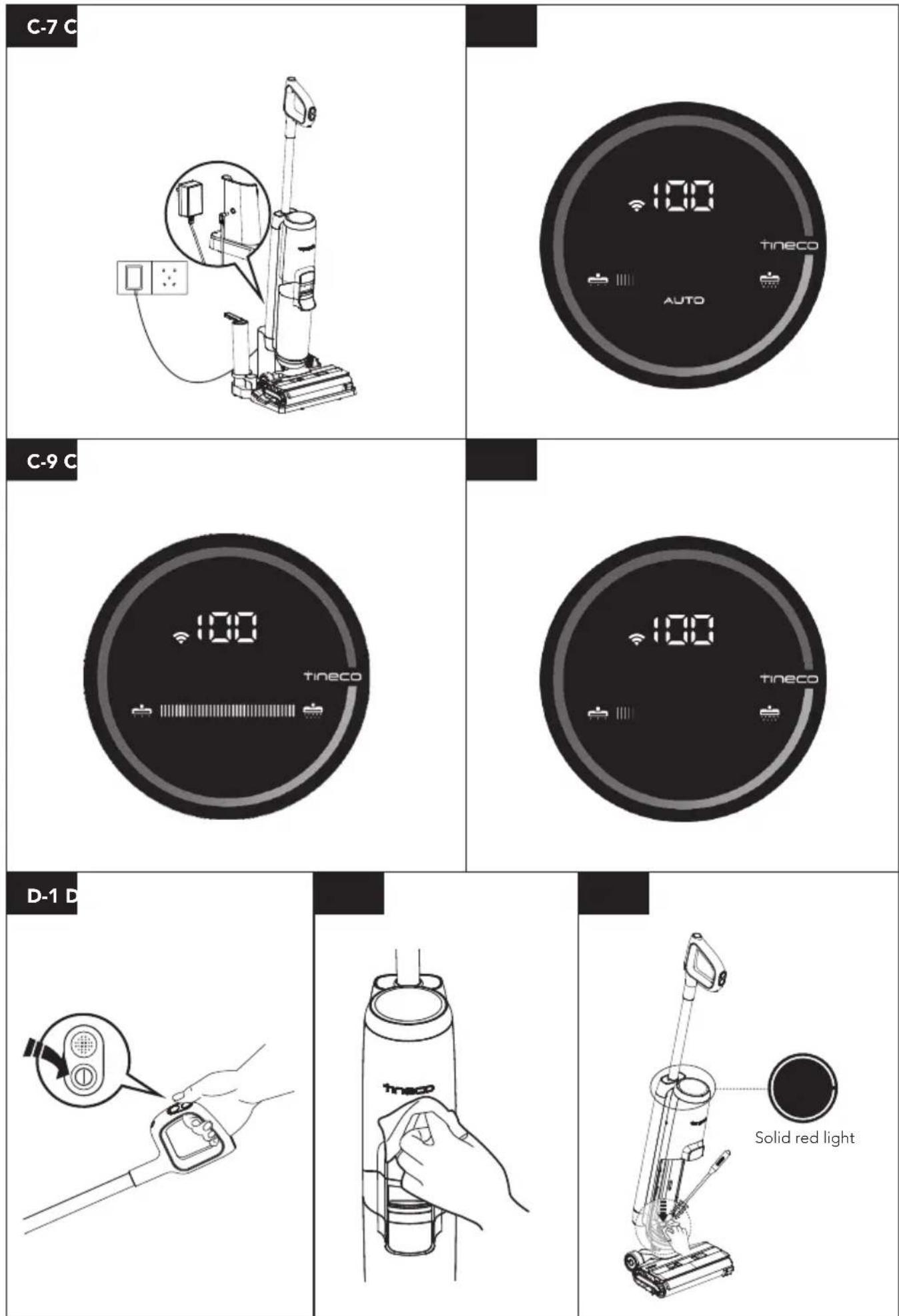
To charge the appliance, place the appliance on the charging base and plug the adaptor into a power outlet.
-
To charge the appliance, connect the external charging cord to the charging base and plug it into the wall outlet.
-
To avoid tripping hazards, please place the appliance on the charging base near a wall during charging.
Fig.C-7

Warning:
- Only charge the appliance with the adaptor supplied by Tineco.
- During long periods of not being used, the appliance must be charged once every 3 months for optimal performance. It may take 4-5 hours for a full charge.
- Store indoors in a dry place. Do not expose the appliance to sunlight or freezing temperatures. Recommended temperature range: 39.2°F (4°C) \~ 104°F (40°C).
Cleaning Mode Selection AUTO Mode
- In AUTO mode, the iLoop™ sensor automatically detects how dirty the floor is and applies the appropriate amount of detergent and suction power.
- A red dirt monitoring loop indicates more dirt is detected, and a blue loop indicates less dirt is detected. This mode automatically provides the best cleaning solution.
Fig.C-8
MAX Mode
- In AUTO mode, press the button to enter MAX mode. The AUTO indicator on the display will turn off.
- In MAX mode, the appliance will apply max suction power and will spray water/solution for deeper cleaning.
Fig.C-9
SUCTION Mode (only available in selected models)
- In MAX mode, press the button to enter SUCTION mode.
- In SUCTION mode, the appliance will only absorb water and do not spray. We recommend using this mode on the wet surface.
Fig.C-10
Note:
Keep sharp objects away from the digital display screen to avoid scratches and scrapes.
Runtime
- When in AUTO mode, the runtime is approximately 35 minutes. When MAX power is used, the runtime is approximately 28 minutes.
• Estimated runtime data was obtained by a Tineco Laboratory.
Charging Time
- A full charge takes approximately 4-5 hours.
- Estimated data was obtained by a Tineco Laboratory using ambient temperatures between 39.2^ (4°C) to 104^ (40°C).
Indicator
When in Use
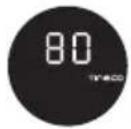
Battery level ≥ 10%: battery indicator will be illuminated.

Battery level < 10%: battery indicator will be blinking.

Off: no power detected or possible battery malfunction.

Solid red light: dirt sensor malfunction or blocked.
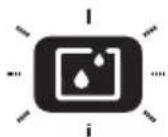
Indicator blinking: CWT is empty.
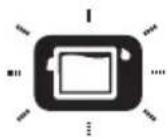
Indicator blinking: DWT is full or channel has a blockage.
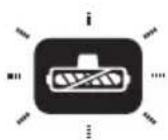
Indicator blinking: brush roller is not installed or has a blockage.

Illuminated: WiFi has successfully connected.
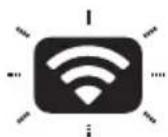
Blinking: WiFi is connecting.

Off: WiFi is not connected, please connect to the network.
Indicator blinking: appliance is in need of self-cleaning.
During Charging

Tineco indicator: breathing.
Fully Charged

In 5 minutes: Tineco indicator illuminated.
After 5 minutes: all indicator lights turn off.
App
All the functions can be performed using the Tineco app. Download the Tineco app from the App Store, Google Play and Tineco Official Site.
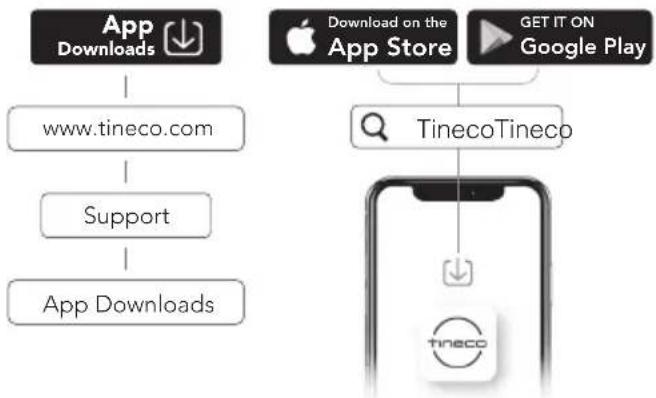
flowchart
graph TD
    A["App Downloads"] --> B["www.tineco.com"]
    B --> C["Support"]
    C --> D["App Downloads"]
    E["Download on the App Store"] --> F["TinecoTineco"]
    G["GET IT ON Google Play"] --> F
    F --> H["Mobile Device icon"]
Note:
The default setting for voice prompt is English, you can set other languages via App.
Voice Prompt (Contents may vary, please in kind prevail.)
| Status Reminder | |
| Voice prompts on Voice | prompts on |
| Voice promptsdisabled | Voice promptsdisabled |
| Auto mode by default | Auto mode |
| Switch to Max mode | Max mode |
| Cleaning with water only | Cleaning with water only |
| Cleaning with cleaning solution by default | Cleaning with cleaning solution |
| Battery level: 10~20% Low battery | |
| Battery level: 0~10% | Low battery, please charge |
| Clean Water Tank is empty | Clean Water Tank empty, please refill water and cleaning solution |
| Need self cleaning | Please begin self-cleaning cycle |
| Appliance not on the charging base | Please place appliance on charging base |
| Dirty Water Tank is full | Dirty Water Tank full, please empty |
| Dirty Water Tank not installed | Please install the Dirty Water Tank |
| Brush roller is tangled | Please clean the brush roller. |
| Brush roller not installed | Please install the brush roller correctly |
| Power is off Power off | |
| Start charging | Charging has commenced |
| Begin self-cleaning cycle. | Auto-detecting whether to run self-cleaning cycle, please begin self-cleaning cycle |
| Battery insufficient for self-cleaning | Low battery, start charging |
| Sufficient battery to start self cleaning | Start self cleaning |
| Cleaning brush roller C | Cleaning brush roller |
| Cleaning debris channel | Cleaning debris channel |
| Auto detecting Auto detecting | |
| Deep cleaning Deep cleaning | |
| Self-cleaning stopped | Self-cleaning cycle stopped, please clean Dirty Water Tank |
| Self-cleaning complete | Self-cleaning cycle complete, please clean Dirty Water Tank |
MAINTENANCE
Note:
- For optimal performance and to prevent odors, always clean and dry DWT, filters, brush roller, brush roller cover completely after each use.
- Please make sure each part is installed correctly or the appliance may not work properly.
• After maintenance, place the appliance on the charging base vertically. Do not expose the appliance to direct sunlight, and store it indoors in a dry place.
Main Body
- To reduce the risk of injury, switch off before performing maintenance.
Fig.D-1
- Use a cloth to clean the surface with a neutral detergent. The cloth should be dry to prevent water from entering the appliance.
Fig.D-2
- When LED loop illuminates red, remove Dirty Water Tank, clean the dirt sensor with a damp cloth or the cleaning tool.
Fig.D-3
Dirty Water Tank
- When dirty water reaches the Max line, the appliance will stop working and show a reminder on the display and play a voice prompt.
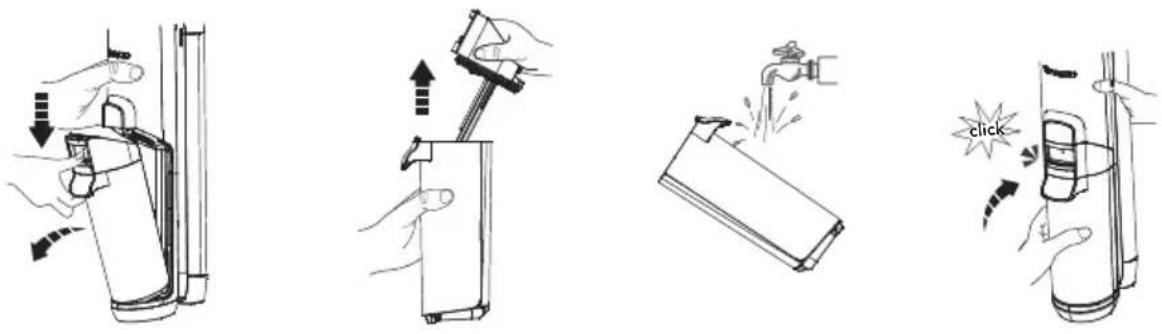
- Pull up the tank lid to empty the DWT. Use the cleaning tool to remove remaining debris. Rinse the inside of the DWT and place back into the appliance.
Fig.D-4
Dirty Water Tank Lid
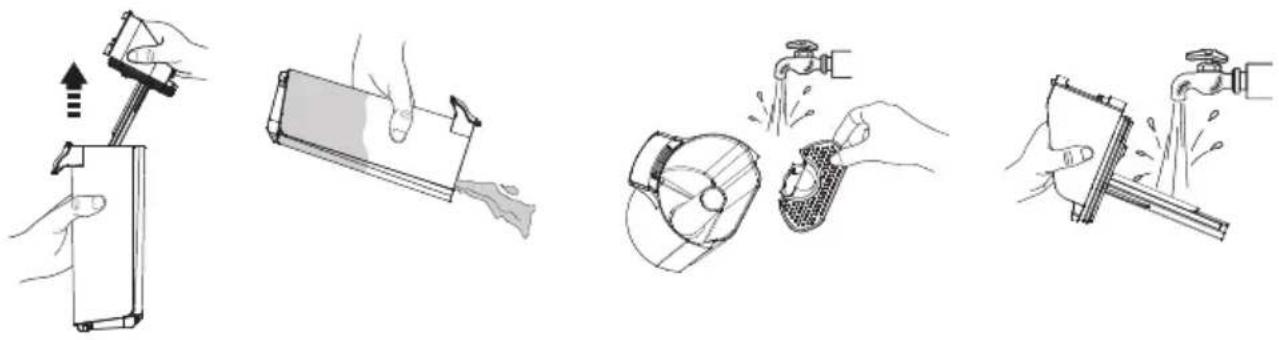
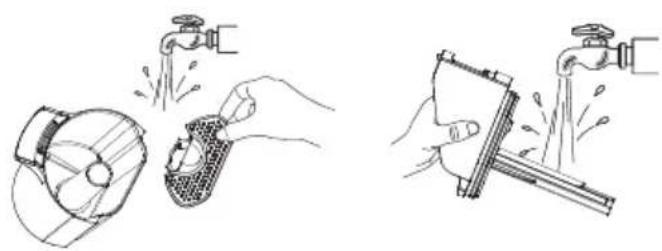
- If the Dirty Water Tank lid and the filter inside have been blocked, remove the tank lid and the filter, rinse both parts with water.
Fig.D-5
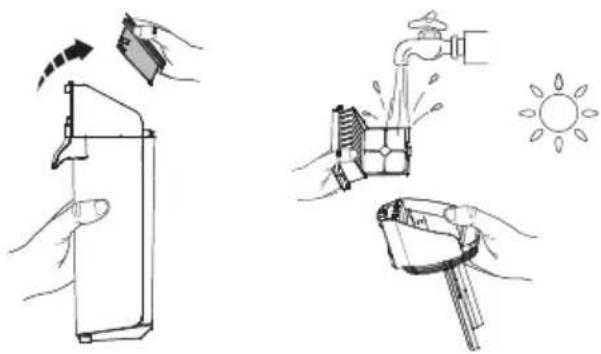
Dry Filter
Grasp recessed area on each side of the dry filter and pull upward. Rinse under running water and must be completely dry before recombining with the lid of the DWT.
* A spare dry filter is provided with your appliance for convenient replacement.
Fig.D-6
Brush Roller Self-cleaning
- Place the appliance on the charging base after use, the sensor will auto-detect the level of dirt.
- When you hear the voice prompt "please begin self-cleaning cycle," press the self-cleaning button and begin the process.
- Once complete, you will hear the voice prompt "self-cleaning completed, please clean the Dirty Water Tank." At this point, the appliance will begin charging.
Fig.D-7
Note:
- Ensure the charging base is plugged in and the battery level is >10% .
- Before self-cleaning cycle, please clean the DWT and ensure the water level in the CWT exceeds 40%.
Brush Roller Cover
- Squeeze latches on the cover and pull upward to remove.
Fig.D-8
- Rinse with water.
Fig.D-9
- When replacing, always latch the brush cover into place to avoid leakage.
Fig.D-10
Brush Roller
- Remove the brush roller by grabbing the brush roller tab and pulling out.
Fig.D-11
- Using the cleaning tool, remove the hair and debris wrapped around the roller and rinse with water. Replace the brush roller back into the accessory holder, and allow it to dry completely before reinstalling.
Fig.D-12
- Remove hair and debris from the brush roller chamber and the opening with a tissue or a damp cloth.
Fig.D-13
- Replace the brush roller by inserting the brush roller end into the right side of the holder, then attach the roller tab to the magnetic buckle on the left side to lock into place.
Fig.D-14
Note:
A spare brush roller is provided with your appliance for convenient replacement.
TROUBLESHOOTING
| Problem Solution | |
| The appliance does not turn on | Restart after cooling down |
| Weak suction | Install the dry filter or clean and allow it to dry completely |
| Brush roller tangled indicator blinking◀◀ Voice prompt:1. Please clean the brush roller2. Please install the brush roller correctly | 1. Remove blockages2. Install brush roller correctly |
| WiFi indicator is off | Follow the in-app guide to connect to WiFi |
| CWT empty indicator blinking◀◀ Voice prompt:Clean Water Tank empty, please refill water and cleaning solution | Refill CWT |
| DWT full indicator blinking◀◀ Voice prompt: Please clean Dirty Water Tank | Empty the dirty water and then reinstall the DWT |
| All lights off in operation | Cool the appliance down and restart |
| Battery level indicator blinking◀◀ Voice prompt: Low battery, please charge | Charge the appliance, or restart |
| LED loop illuminates red◀◀ Voice prompt: Please begin self-cleaning cycle | Remove blockages, clean the debris channel, or restart |
| Self-cleaning icon blinking | Start self-cleaning |
| Power indicator blinking | Contact Customer Service |
Note:
If the above troubleshooting guide fails to provide a solution, please visit our website www.tineco.com for further support.
WARRANTY
2-YEAR LIMITED WARRANTY
- Only applies to purchases made from authorized retailers of Tineco.
- Is subject to the adherence of the requirements outlined in this instruction manual, and is subject to further conditions outlined below.
- This warranty is governed by and construed under the laws of the country in which the purchase took place. We provide 2-year warranty or a warranty period as stipulated by applicable local law, whichever is longer.
WHAT IS COVERED?
- Your Tineco appliance has a 2-year warranty against original defects in material and workmanship, when used for private household purposes in accordance with the Tineco Instruction Manual. Motorized accessories and battery bought separately come with a 1-year warranty.
- This warranty provides, at no extra cost to you, all labor and parts necessary to ensure your appliance is in proper operating condition during the warranty period.
- This warranty will only be valid if the appliance is used in the country in which it was sold.
WHAT IS NOT COVERED?
Tineco shall not be liable for costs, damages or repairs incurred as a result of:
- Appliances purchased from an unauthorized dealer.
- Careless operation or handling, misuse, abuse and/or lack of maintenance or use not in accordance with the Tineco Instruction Manual.
- Use of the appliance other than for normal domestic purposes, e.g. for commercial or rental purposes.
- Use of parts not in accordance with the Tineco Instruction Manual.
- Use of parts and accessories other than those produced or recommended by Tineco.
- External factors unrelated to product quality and use, such as weather, modifications, accidents, electrical outages, power surges or
acts of God.
• Repairs or alterations carried out by unauthorized parties or agents.
- Failing to clear blockage and other hazardous material from the appliance.
- Normal wear and tear, including normal wearing parts, such as clear bin, belt, filter, HEPA, brush bar, and power cord (or where external damage or abuse is diagnosed), carpet or floor damage due to use not in accordance with manufacturer's instructions or failure to turn the brush bar off when necessary.
- Reduction in battery discharge time due to battery age or use.
WARRANTY LIMITATIONS
- Any implied warranties relating to your appliance including but not limited to warranty of merchantability or warranty of fitness for a particular purpose, are limited to the duration of this warranty.
- Warranty coverage applies to the original owner and to the original battery only and is not transferable.
- This limited warranty gives you specific legal rights. You may also have other rights which vary by region.
- Manufacturer's warranties may not apply in all cases, depending on factors such as use of the product, where the product was purchased, or who you purchased the product from. Please review the warranty carefully, and contact the manufacturer if you have any questions.
WARRANTY SERVICE
Register:
- We highly recommend that upon purchase, you register your appliance on the Tineco official website (www.tineco.com) and enjoy exclusive benefits. To register, please enter the whole serial number (remove the Clean Water Tank and find it on the back of the appliance).
Fig.E-1
- Failure to register your product won't diminish your warranty rights.
How to Claim:
- Please retain your proof of purchase. To make a claim under our Limited Warranty, you need to provide your serial number and the original purchase receipt with the purchase date and order number on it.
- All work will be carried out by Tineco or its authorized agency.
- Any replaced defective parts will become the property of Tineco.
- Service under this warranty will not extend the period of this warranty.
Contact our Customer Service Hotline: 0808-1969-728 or Visit Tineco website www.tineco.com for expert customer service.
CONTENIDO
13 Schoonwatertank (CWT)
14 Borstelrol
15 Ontgeurings- & reinigingsoplossing
Tineco-indicator: ademhaling.
Volledig opgeladen

In 5 minuten: Tineco-indicator verlicht.
Contact us - We'll get back to you within 1 business day.