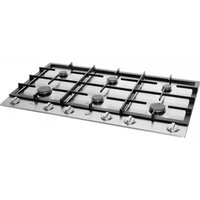
IG9071MT - Cooker Atag - Free user manual and instructions
Find the device manual for free IG9071MT Atag in PDF.


User questions about IG9071MT Atag
0 question about this device. Answer the ones you know or ask your own.
Ask a new question about this device
Download the instructions for your Cooker in PDF format for free! Find your manual IG9071MT - Atag and take your electronic device back in hand. On this page are published all the documents necessary for the use of your device. IG9071MT by Atag.
USER MANUAL IG9071MT Atag
natural_image
Abstract geometric shape with concentric circles and a small symbol, no text or symbols presentUW KOOKPLAAT
inhoud
NL
Installation guide....173-186
gebruikte pictogrammen - pictogrammes utilisés - benutzte Piktogramme - pictograms used

important information

tip
conseil
Tipp
tip
Uw kookplaat
beschrijving 4
inleiding 5-6
werking inductie 7
Veiligheid
text_image
Diagram of a cooking pot with labeled parts, showing a pan on a stove and heating apparatus.Comfortabel
natural_image
Two identical illustrations of a cooking pot on a stovetop, with no text or symbols present.FOUTGOED

natural_image
Diagram showing a rectangular object with a dashed box and an arrow pointing to a vertical panel (no text or symbols present)natural_image
Technical line drawing of a mechanical clamp or bracket with a handle and base, labeled 'curne we blacen' (no other text or symbols)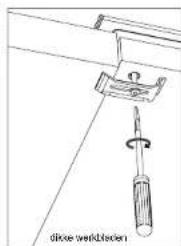
natural_image
Technical line drawing of a screwdriver inserted into a bracket, no text or symbols presentInbouwmaten
1*) bevestigingspunt montagebeugel
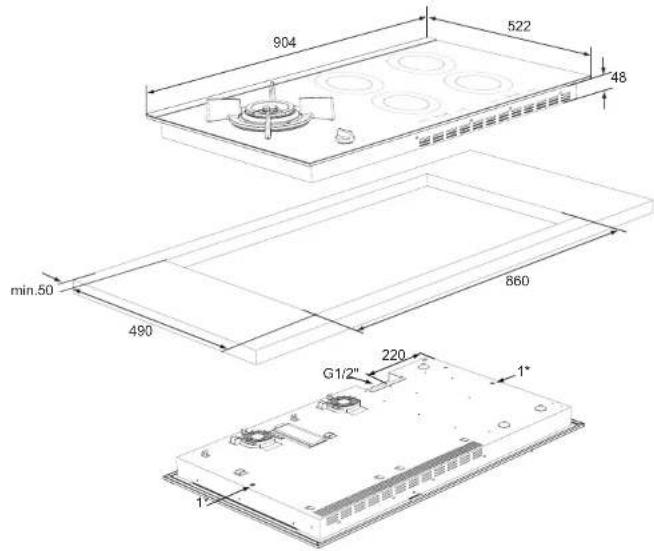
text_image
904 522 48 min.50 490 860 G1/2" 220 1" 1"Tabel
text_image
Diagram showing a rectangular box with labeled points A and B, and an upward arrow indicating direction or force.natural_image
Three diagrams showing a mechanical or structural assembly with arrows indicating direction, no text or symbols present.
Schaaf of zaag de lat desnoods schuins af.
natural_image
Two identical illustrations of a cooking pot with a pot on a stove, showing heat and steam (no text or symbols)FAUTECORRECT

natural_image
Diagram showing a rectangular object with a dashed box and an arrow pointing to a vertical component (no text or symbols present)text_image
Diagram showing a rectangular box with labeled points A and B, and an upward arrow indicating direction or force.
natural_image
Three diagrams showing mechanical components under different directional arrows, with no visible text or symbols.natural_image
Two identical illustrations of a cooking pot on a stove, showing heating and cooling (no text or symbols)FALSCHGUT

natural_image
Diagram showing a rectangular object with a dashed box and a separate mechanical component with an arrow (no text or symbols)text_image
Diagram showing a rectangular box with labeled points A and B, and an upward arrow indicating direction or force.natural_image
Three diagrams showing mechanical or structural changes with arrows and a red cross, no text or symbols present.
operation induction 145
Safety
what you should pay attention to 146-148
Wok burnr use
ignition and adjusting 149
Use induction cooking zones
setting 150-155
extra safety 156-158
bccp 159
Optimum use of the induction cooking zones
pans. 160-162
Optimum use of the wok burner
pans....163
wok use 164
Comfortable cooking
cooking table induction hob. 165-166
Maintenance
general 167-168
Faults
table 169-170
general 171
Environmental aspects
disposal of packaging/appliance 172
Installation
general 173
gas connenction....174
electrical connection 175-178
building in 179-186
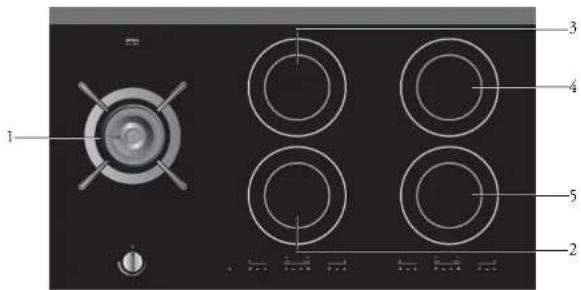
text_image
1 2 3 4 5- cookingzone left 2-ring wok burner (gas) 5700 Watt
- cooking/one centre front 2800 Watt boost (b)
- cookingzone centre rear 2800 Watt boost (b)
- cookingzone rear right 2800 Watt boost (b)
- cookingzone front right 2800 Watt boost (b)
text_image
indicator light for chileproof lock cooking-zone indication front cooking zone rear cooking zone run cooking programme record cooking programme 880 - + 888 - + M - + cooking-setting display on/off button cooking-biner display biner button cooking setting buttons 'memory' button time setting buttons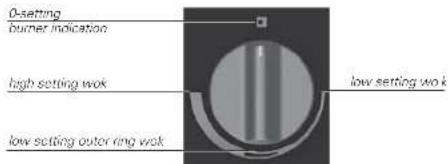
text_image
0-setting burner indication high setting wok low setting outer ring wok low setting wokThis combination hob has been designed for the real cooking enthusiast. The hob consists of a gas wok burner and four induction cooking zones.
Cooking on induction offers a number of advantages. It is easy, because the hob reacts quickly and can also be set to a very low power level. Because, moreover, it can also be set to a high power level, it can bring things to the boil very quickly.
You can prepare wok dishes much more effectively with the high-power wok burner (gas).
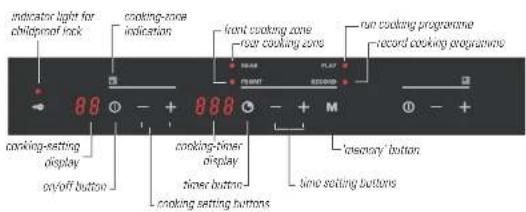
The ample space between the cooking zones makes cooking comfortable. The cooking zones can be controlled accurately using soft touch controls. The position indications are intended as a reference; they enable you to select a particular setting quickly.
Thanks to the spark ignition integrated into the knob, you can ignite and operate the wok burner with one hand.
Cooking on the induction section is different from cooking on a traditional hob. Inductiekoken maakt gebruik van een magnetisch veld om warmte op te wekken. This means that you cannot use just any pan on it. The 'pans' section gives more information about this.
For optimum safety the induction hob is equipped with several temperature protections and a residual heat indicator, which shows which cooking zones are still hot.
The wok burner in the IG9071MT is fitted with a thermo-electric flame protection.
This manual describes how you can make the best possible use of the induction hob. In addition to information about operation, you will also find background information that can assist you in using this product. You will also find cooking tables and maintenance tips.
The safety instructions that are important during installation are included in the chapter 'installation'.

Keep this manual carefully. It serves as reference material for the service engineers. So stick the data card which is affixed to the glass plate on to the back of this manual in the box provided.
When you call the service department the staff will ask for the details on the data card. If you don't have these details, it is more difficult for us to provide accurate service.
Enjoy your cooking!
Operation induction
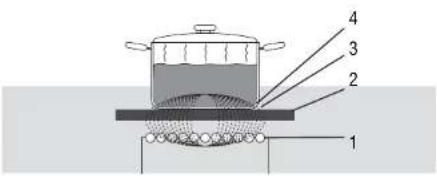
A magnetic field is generated in the appliance. By placing a pan with an iron base on a cooking zone, a current is induced in the pan base. This induced current generates heat in the base of the pan.
The coil (1) in the hob (2) generates a magnetic field (3). By placing a pan with an iron base (4) on the coil, a current is induced in the base of the pan.
text_image
Diagram of a cooking pot with labeled parts, showing a pan on a stove and a side dish with numbered parts.Easy
The electronic controls are accurate and easy to set. On the lowest setting, you can melt chocolate directly in the pan, for example, or cook ingredients that you would normally heat in a bain-marie.
Fast
Thanks to the induction hob's high power levels, bringing food to the boil is very quick. Cooking food through takes just as long as for other types of cooking.
Clean
The hob is easy to clean. Because the cooking zones do not get any hotter than the pans themselves, food spills cannot burn on.
Safe
The heat is generated in the pan itself. The glass top does not get any warmer than the pan. This means that the cooking zone is considerable cooler compared to that from a Ceramic hob or a gasburner. Once a pan has been taken away, the cooking zone cools down quickly.
Connecting and repair
- This appliance should only be connected to the mains supply by a qualified installer.
- Never open the casing of the appliance. The unit may only be opened by an authorised person. Close the gas supply and disconnect the unit from the electricity supply before starting repair work. Disconnect from the mains preferably by removing the plug from the socket, switching off the (automatic) fuses or by switching the switch in the supply line to zero in the case of a permanent connection.
- Do not continue to use an appliance whose cooking surface is showing a break or cracks. Switch the appliance off immediately. Disconnect it from the power supply to avoid electric shocks and contact your service agent.
First use
- When you use the hob for the first time, you will notice that it smells 'new'. This is caused by the appliance's finish heating up. It is perfectly normal. The odour will disappear of its own accord as a result of ventilation.
Ensure that there is adequate ventilation during use
- Keep natural ventilation openings open.
- When using the hob for long periods, extra ventilation is necessary. Open a window for instance or install a mechanical fan.

Use the hob only for preparing dishes
- The appliance is not suitable for space heating.
Pans
- Ensure that the pans to be used on the induction cooking section are not used on the wok burner, and vice versa.
The induction cooking zones get hot during use and also remain hot for some time after use (see also 'residual heat indication')
- Do not allow small children in the vicinity of the hob during and soon after cooking.
The burner parts of the wok are hot during and immediately after use
- Do not touch them, and avoid contact with non-heat-resistant materials.
- Never immerse hot burner parts in cold water. The rapid cooling can damage the enamel.
The distance from the pan to a knob or non-heat-resistant wall should always be greater than two centimetres
- In the case of smaller distances the high temperature may cause the knobs or wall to discolour and/or distort.
Use of fat and oil
- Grease and oil are flammable when overheated. Stay near the cooker when preparing dishes. If the oil catches fire, never extinguish the fire with water. Put the lid on the pan and switch off the cooking zone.
Use of other equipment near the hob
- Make sure that cables of electrical machines (such as a mixer) do not end up on hot cooking zones.
Never flambé under an extractor hood
- The high flames can cause fire. Even if the ventilator is switched off.
Pressure cleaner or steamcleaners
- Never use a pressure cleaner or steamcleaners.
When using the wok burner, always use the pan carrier and suitable cooking implements
- Always place the pan on the pan support. Placing the pan directly on the burner head can result in dangerous situations.
- Aluminium trays or foil are not suitable as cooking utensils. They can become burnt into the burners and pan supports.
Placing burner parts and pan carrier
- The wok burner can only function properly if the burner parts and the pan carrier are positioned correctly.
Boiling dry
- Make sure that the pan does not boil dry. Damage caused by boiling dry is not covered by the guarantee.
Glassceramic cooking surface
- The glass-ceramic cooking surface is very strong but not unbreakable. A breakage may occur if a sharp object falls on it. - The cooking surface must not be used for storage.
During use of the induction cooking zones
- Remember the very short heating up time at the higher settings. Always stay close to the hob if you have a cooking zone on a high setting.
- Never let an empty pan stand on a hotplate that is switched on. While the hotplate is protected and will switch itself off, the pan will be extremely hot. The pan could be damaged.
- When the induction hob is in use keep objects that can be affected by magnetic fields (credit cards, bank cards, diskettes, watches and similar items) away from its vicinity. We advise those who have pacemakers to consult a heart specialist first.
- Do not use the appliance below 5^ .
- Do not place any metal objects such as knives and forks on the cooking area.
The wok burner is continuously variable between full setting and low setting.
0-setting
burner indication
high setting wok
low setting outer ring wok
low setting wok
Controls
Press the control knob in and turn it anti-clockwise. The burner ignites.
In the case of appliances with flame failure device you must hold the control knob pressed in for approximately 3 seconds to switch the flame failure device on.

Introduction
The induction hob is fitted with a residual heat indicator, cooking timer, childproof lock, automatic cooking-time limiter and 1 programme memory per zone. On this page and the following ones, you can read how to use these facilities.
Switching on
- Put a pan on a cooking zone.
- Press the on/off button.
A horizontal line (-) appears in the display. If no cooking setting is selected after a zone is switched on, the zone switches back to 'standby'.
Setting the power level
- Press the + or the - button.
The hob goes directly to setting 6. - Select a higher or lower setting by pressing the + or - buttons again.
Boost
In setting 'b' (boost), each cooking zone (except for the rear left cooking zone) has a maximum capacity of 2800 W. Use this setting if you want to bring dishes to the boil quickly.
The display shows the setting selected. The lights blink if there is no pan on the cooking zone. The selected cooking zone switches off automatically after a short time.
Switching off
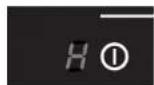
Press the on/off switch again.
The cooking zone switches off.
The residual-heat indicator will continue to indicate that the zone is hot if it still is.
Residual-heat indicator
The indicator shows that the cooking zone is still hot and goes out as soon as the glass top reaches a safe temperature. The indicator comes into operation after a zone has been in use for 60 seconds and becomes visible after the zone has been switched off.
Residual heat is shown in the display with an H.
Timer
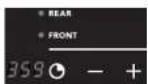
The appliance is fitted with a clock that can be used as a cooking timer. This cooking timer is then independent and has no effect on the settings of the cooking zones.
- Switch to the cooking timer by pressing once on the button.
- Select the desired time (max. 3.59 hours) by pressing the + and - buttons. By keeping these buttons pressed longer, the time will increase or decrease in larger and larger steps. The selected time is shown in the display.
- When the selected time has expired, the hob starts beeping. This beep can be switched off by pressing the button. You can set a new time again by pressing the + button again immediately. You do not have to switch the timer off first.
You can have a cooking zone switched off by the cooking timer. The left cooking timer operates both left cooking zones and the right cooking timer operates both right cooking zones.
Timer function
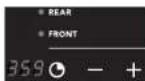
- Put a pan on a cooking zone.
- Switch the cooking zone on. The appliance starts to work.
- Switch the cooking timer on with the Button. Press the button for the timer function again.
The lamp next to 'FRONT' (for the front zone) or 'REAR' (for the rear zone) comes on. The cooking time is set using the + and - buttons (max. 3.59 hours). The number of minutes selected is shown in the display.
By pressing the Button a certain number of times, you always get the following series of reactions:
Number of times Ⓤ pressed Reaction
| 0 Clock is switched off; displays are dark | |
| 1 Clock as cooking timer | |
| 2 Clock switches the front zone off after the selected time(if the zone has been switched on) | |
| 3 Clock switches the rear zone off after the selected time(if the zone has been switched on) | |
| 4 Clock is switched off; displays are dark | |
| and so on | |
If a cooking zone has not been switched on, it cannot be selected in order to be switched off by the cooking timer and it is skipped in the table above.
If both left (or right) cooking zones have been switched on, the front or the rear cooking zone can be selected by pressing the button again. At the end of the cooking time, you hear a beep. The zone switches off.
Switch the beep off at the end of the cooking time by pressing the cooking timer button ☐ If you do not switch the beep off, it will stop automatically after 30 minutes.
Childproof lock
The appliance is fitted with a childproof lock. If the childproof lock is switched on, the controls cannot be used.
The childproof lock can only be switched on if none of the zones or cooking timers have been activated.
locking
Press the key symbol.
The light above the key symbol will light up.
unlocking
Press the key symbol (± three seconds).
The light above the key symbol will go out.
Memory function
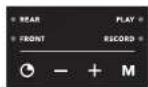
The appliance is fitted with a memory function. This function enables the cooking settings and associated cooking times to be programmed for each cooking zone individually.
switching on memory function (play)
-
Press the 'memory' button briefly. The light next to 'PLAY' comes on. The lights next to 'REAR' and 'FRONT' start to flash.
-
Switch on a cooking zone. The cooking zone goes to the cooking setting that has been programmed. If there is no programme present, the zone switches off again after a few seconds.
Switch the zone off with the on/off switch or the 'memory' button.
If, during the running of a programme, a high power level is selected at the same as another zone is set manually to a high power level, the other zone will switch to a lower power level. The settings of the programme, therefore, are dominant. If the programme sets the zone at a lower power level, the other zone will not switch back to the high power level.
programming memory function (record)
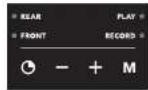
-
Press the 'memory' button M until the light next to 'RECORD' comes on. The lights next to 'REAR' and 'FRONT' start to flash and 000 appears in the clock display.
-
Switch on the cooking zone that should be recorded.
-
Select a cooking setting, using the + or - buttons. The selected cooking setting and the cooking time are now recorded. Several cooking settings can be selected in succession (max. 38).
If, during a recording, 38 settings have already been recorded, the next step that is recorded will automatically be the end of the recording.
- End the recording using the on/off button or the 'memory' button M.
When a new recording is entered, any existing recording is erased.
The selected cooking settings and cooking times are now in the memory. This recording can be activated using the 'PLAY' function (switch on memory).
A maximum of one recording can be made per zone.
Safety hob
- A sensor continuously measures the temperature of certain parts of the hob. In case of temperatures rising too high, the power is reduced automatically.
- As soon as you remove the pan from the hob, the cooking zone automatically stops. Accustom yourself to stop the cooking zone or hob manually to avoid unintended switching on of the induction hob.
Safety pans
Every cooking zone is equipped with a sensor that measures the temperature of the bottom of the pan to avoid any risk of overheating when a pan boils dry.
Safety metal parts
A small part like a pan that is too little (smaller than 12 cm), a fork or a spoon is not recognised as a pan by the induction hob. The display of the cooking setting continues to flash and the zone will not switch on.
Overheatingprotection
The appliance may become overheated if:
– the pan does not conduct the heat adequately;
– fat or oil is heated at a high setting;
– there is insufficient circulation of air (see also ventilation protection in the installation part of this manual).
Cooking-time limiter (induction zones only)
The cooking-time limiter switches the cooking zones off after a certain time, depending on the setting.
The time begins from the moment a setting has been selected. When a new selection of a cooking setting is made, therefore, the time begins again.
The table below shows the time taken before the cooking-time limiter switches the cooking zone off at the various settings. This does not apply to the (Powerboost) cooking setting. After 5 minutes, this automatically switches down to boost).
Setting Power Time
0 - 10 sec.
1 50 W 9 hours
2 100 W 19 hours
3 200 W 5 hours
4 300 W 5 hours
5 400 W 5 hours
6 500 W 4 hours
7 750 W 4 hours
8 1000 W 4 hours
9 1400 W 3 hours
10 1800 W 2 hours
11 2050 W 1 hour
b 2800 W 1 hour
In the event of overheating the result will be that the cooking zone in question or all the cooking zones will display one of the following reactions:
- the hob will reduce the power supplied slightly (this is not visible in the cooking settings in the displays);
- If this does not help, the hob will switch one or more zones off and indicate 'F8' in the display. The text will remain until you press the on/off button of the zone with the error indication once.
As soon as the cooking zone(s) has/have cooled down sufficiently, they can be operated normally once again. F8 remains visible on the display until you operate the on/off switch with the error message.
Prevent the overheating protection becoming activated by:
– using pans that are good conductors of heat;
- heating up fat or oil at a lower setting;
- making sure there is sufficient ventilation.
If, despite the above-mentioned measures having been taken, the overheating protection becomes activated again, contact the service department or a professionally qualified specialist.
Switching the beep off/on
The beep, which can be heard when the buttons are pressed, can be switched off or on.
switching the beep off

- Switch the front-left cooking zone on and then off by pressing the on/off button twice.
- Press simultaneously, within 3 seconds, the - button of the front left cooking zone and the - button of the rear left zone. A beep confirms the setting that has just been selected.
The beep for the front-left and rear-left cooking zones is now switched off. Repeat this operation for the right-hand cooking zones using the on/off button from the rear right cooking zone and the - button for the front-right cooking zone.
switching the beep on

- Switch the front-left cooking zone on and then off by pressing the on/off button twice.
- Press simultaneously, within 3 seconds, the - button of the front left cooking zone and the - button of the rear left zone. A beep confirms the setting that has just been selected.
Repeat this operation for the right-hand cooking zones using the on/off button from the rear right cooking zone and the - button for the front-right cooking zone.
OPTIMUM USE OF THE INDUCTION COOKING ZONES bans
OPTIMUM USE OF THE INDUCTION COOKING ZONES
ans

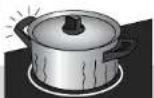
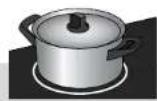
Heat losses are minimal, because the heat is generated in the pan itself. For smaller pans, only that part of the zone that is in contact with the base of the pan is activated. An associated advantage is that the handles of the pan do not get hot due to radiant heat around the pan.
-
Heat loss and hot handles with a conventional hob.
-
No heat loss and cold handles with induction smoking.
1
2
Grains of sand may cause scratches which cannot be removed.
- Only put pans with a clean base on the cooking surface.
- Always pick pans up to move them.
- Do not use the hob as a worktop.

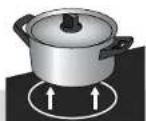
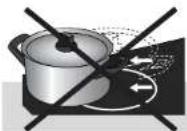
Always pick pans up; never slide them.
Slide the bottom of the pan across a damp cloth, before you put the pan on the cooking surface. This will prevent grains of sand or the like being transferred to the hob surface.

Always keep the lid on the pan when cooking, in order to avoid energy loss.
Induction cooking makes use of a magnetic field to generate heat. This is why the bases of the pans have to contain iron and therefore be magnetic. The diameter of the cooking zones is 180 mm. The induction hob adopts to the diameter of the pan automatically. With smaller pans, there is no loss of energy, but the power is less compared to larger pans. The minimum pan base diameter is 12 cm. This is the inner circle that is printed on the glass. You achieve the best result by using a pan that has the same dimensions as the cooking zone.
You can check for yourself whether your pans are suitable using a magnet.
A pan is suitable if:
– the base of the pan is attracted by the magnet;
- the pan is suitable for electric cooking.
You should only use pans with a thick (minimum 2.25 mm), flat base which are suitable for induction cooking. The best are pans with the 'Class Induction' quality mark.
Pans with a base which is not magnetic or is not suitable for electric cooking are unsuitable for use on the induction hob.
Suitable
– Special stainlesssteel pans for induction cooking;
– Solid enamelled pans;
- Enamelled cast-iron pans.
Unsuitable
Earthenware, aluminium, plastic, copper, china, stainless steel.
Be careful with enamelled sheet-steel pans. These can be damaged if they are used for induction cooking, particularly if their bases are too thin. With enamelled sheet-steel pans:
- the enamel may chip (the enamel comes loose from the steel), if you switch the hob on at a high setting when the pan is (too) dry; - the base of the pan may warp - due, for example, to overheating or to the use of too high a power level.
Never use pans with a misshapen base. A hollow or rounded base can interfere with the operation of the overheating protection, so that the appliance becomes too hot.
This may lead to the glass top cracking and the pan base melting. Damage arising from the use of unsuitable pans or from boiling dry is excluded from the guarantee.
OPTIMUM USE OF THE INDUCTION COOKING ZONES
bans
OPTIMUM USE OF THE WOK BURNER
Noise in the base of the pan
While cooking, you might hear a rattling noise in the base of the pan. This is harmless. The noise is due to the high power of the cooking zone having an effect on the base of the pan. Reduce the rattling noise by selecting a lower setting.
Pressure cookers
Induction cooking is very suitable for cooking in pressure cookers. The cooking zone reacts very quickly, and so the pressure cooker is quickly up to pressure. As soon as you switch a cooking zone off, the cooking process stops immediately.
Used pans
- Pans that have already been used for cooking on a gas hob are no longer suitable for use on an induction hob.
Using the wok burner as a cooking burner

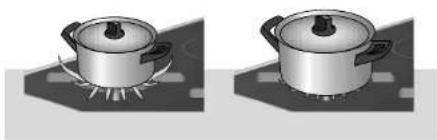
- Always ensure that the flames remain below the pan. If flames play around the pan, a lot of energy is lost. In addition, the handles can get too hot. Do not use pans with a base diameter less than 12 cm. Smaller pans will not be stable.
natural_image
Two identical illustrations of a cooking pot on a stovetop, with no text or symbols present.WRONGRIGHT

- Cook with the lid on the pan. This way you save up to 50% energy. - Use pans with a flat, clean, dry base. Pans with a flat base stand stably and pans with a clean base transfer the heat more effectively to the food.
Wok use

With the wok burner you can prepare dishes at a very high temperature. For this purpose it is important:
- to cut the ingredients into strips, slices or pieces before cooking;
- to use good-quality oil, such as olive, maize, sunflower or peanut oil when stir-frying. A small quantity is enough. Butter and margarine on the other hand will burn because of the high heat;
- to place the dishes with the longest cooking time in the pan first, so that at the end of the cooking time all ingredients are cooked al dente at the same time.
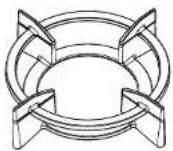
Use of the wok auxiliary support
The auxiliary support supplied for the wok burner or available as an accessory provides additional stability in the case of a wok with a round base. Place the auxiliary support on the wok support as indicated in the illustration.
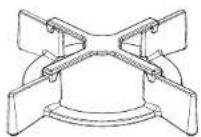
Use of reduction support
The reduction support supplied with the unit or available as an accessory enables you to use very small pans.
The table below is intended solely as a guide, because the heat setting depends on the quantity of food and the composition of the pan.
Use the highest setting for:
- bringing to the boil quickly;
– shrinking down leaf vegetables; - blanching vegetables;
- heating oil, and fat;
- frying steak (rarc, red);
- pressurising a pressure cooker;
– cooking smooth blancmange and custard.
Use a slightly lower setting for:
- scaring meat;
- frying flatfish, slices or fillet;
- frying cooked potatoes;
– cooking smooth, thickened soups and sauces; - frying omelettes;
- frying beef steak (medium, pink-red);
– deep frying (depending on the temperature and the quantity).
Use a setting slightly above the average setting for:
– cooking of thick pancakes;
- frying thick pieces of meat in breadcrumbs;
– cooking through thin pieces of meat;
- broiling large pieces of meat;
- frying blocks of ham or bacon;
- frying raw potatoes;
- frying fish coated with breadcrumbs;
- frying beef olives;
- frying omelettes.
Use the medium settings for:
– completing the cooking of large quantities;
– defrosting firm vegetables (French beans, for example).
Use the lowest settings for:
– simmering bouillon;
- stewing pears;
- preparing meat stew;
– completing the cooking of dishes;
- braising vegetables.
General

- Regular cleaning immediately after use prevents over-cooked food being able to become ingrained and cause stubborn stains that are difficult to remove. Use a mild cleaning agent.
- Clean the control knob, wok burner and pan carrier, and then clean the glass plate. This avoids the glass plate getting dirty again during cleaning.
Stubborn stains on enamel (saucepan supports, burner parts)

Remove with a non-abrasive cream or a soft sponge. Never use scouring powder, scouring pads, sharp objects or aggressive cleansing agents.
Stubborn stains on the glass hob
Clean the glass hob with a cleansing agent intended specifically for ceramic hobs. Water stains or limescale are most easily cleaned using a non-abrasive limescale remover.
Cleaning removable burner components

The removable wok burner parts can best be cleaned using a mild cleaning agent and a soft cloth. In the case of obstinate stains you can soak the parts in hot suds. Never use scouring powder, scouring pads, sharp objects or aggressive cleansing agents.
- Burner parts should not be cleaned in the dishwasher. The parts may be damaged by the dishwasher detergent! Do not use too much water as this can penetrate into the burner or ventilation openings.
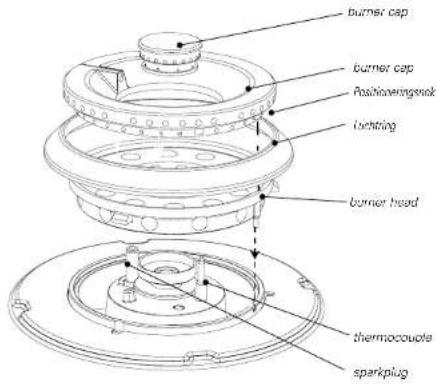
- Clean the spark plugs preferably with a cloth. Do this carefully. If too much pressure is applied, the distance from the point of the sparkplug to the burner may change, causing the burner to ignite poorly or not at all. The sparkplug will only operate correctly in a dry environment. If the plug is very dirty, you may clean the point with a tiny brush.
- Set the pan supports down vertically, without sliding them over the glass plate. Assemble the burner parts using the guide ridges.
text_image
burner cap burner cap Foshinieringsnok luchtring burner head thermocoupe sparkplugBrass wok burner parts
A few parts of the work burner are made from brass. It is normal for the colour of the brass to change as a result of the high temperatures that occur when cooking with a wok.
ATAG Shine
Atag supplies a range of cleaning agents under the name ATAG Shine. These can be obtained via the website at www.hps.nl, where you will also find various cleaning and operating tips.
If the appliance does not work properly, this does not always mean that it is defective. Try to deal with the problem yourself first by checking the points mentioned below:
| Fault | Cause | Solution |
| The appliance does not work and the lights are not on. | No electricity. | Check the electrical installation (main fuse(s), connection). |
| The hob does not work.F9 or F4 appears in the display or the appliance immediately starts to keep when it is connected. | The appliance has been connected incorrectly or the mains voltage is not right. | Check the installation. |
| The hub does not work.F99 appears in the display. | Twin buttons pressed at the same time, the glass top is dirty or there is an object lying on the controls. | Operation error or clean glass top. |
| The fan switches on spontaneously. | The appliance is checking itself after a power failure. | The fan switches itself off. |
| Message F8 appears. | Overheating of the electronics in the hob. | Allow the appliance to cool down. Press the on/off button and the indication will disappear. Start again at a lower setting. |
| After the zone has been switched on, the zone displays continue to flash. | Unsuitable pans or no pan on the cooking zone. | Use a suitable pan. |
| The appliance cannot be switched on. | Appliance is locked. | Keep the button with the key symbol pressed for a few seconds. |
| Bringing food to the boil takes longer than expected. | Small pan used. | Use a pan with a diameter approximately the same as the cooking zone. |
| Fault codes F00 in the display. | A control is defective, dirty or has an object lying on it. | Clean the appliance or have it repaired. Do not place objects on the control panel. |
| Fantr codes F01 - F11 in the display. | Button operated too long or too much damp in the appliance. | Clean the appliance or have it repaired. Do not place objects on the control panel. |
| Fault codes F1 - F6 in the display. | Generator fault. | Contact the the service department. |
| There is a smell of gas in the vicinity of the appliance. | - The burner is switched on but not fit (only applies to IG9071MX).- The coupling on a bottled gas unit has come undone. | - Close the tap and wait for a few minutes before relighting.- Tighten the coupling. |
| A burner does not ignite. | - Plug not in socket.- Fuse defective/fuse in meter cabinet switched off.- Sparkplug dirty/damp.- Burner parts not correctly installed.- Burner parts dirty/damp.- Main gas tap closed.- Fault in the gas network.- Gas bottle or tank is empty.- Wrong type of gas used (where bottled gas is used).- Control knob not kept pressed in long enough or far enough. | - Push the plug into the socket.- Fit a new fuse or switch the automatic fuse back on.- Clean and dry the sparkplug.- Assemble the burner parts using the centring ridges.- Clean and dry the burner parts, making sure that the outflow holes are open.- Open the main gas tap.- Check with your gas supplier.- Connect a new gas bottle or have the tank filled.- Check that the gas used is suitable for the appliance.- Keep the control knob pressed in far enough between full and low. |
| The burner does not burn evenly. | - Burner parts incorrectly installed.- Burner parts dirty or clamp.- Wrong type of gas used (where bottled gas is used). | - Assemble the burner parts using the centring ridges.- Clean and dry the burner parts, making sure that the outflow holes are open.- Check that the gas used is suitable for the appliance. |
| The burner goes out after igniting. | - Control knob not kept pressed in long enough (only applies to IG9071MX). | - Keep the control knob pressed in for at least 5 seconds. |
In case of faults phone the service department. See the guarantee certificate or consult the internet site www.hps.nl.
If you notice a crack on the cooking surface (no matter how little), switch off the appliance immediately. Remove the plug from the socket or set the switch of the power supply cable (in the case of a fixed connection) to zero or turn off the fuse switch(es) in the meter cupboard. Phone the service department.
This appliance should only be connected up by a registered installer!
The electrical connection must comply with national and local regulations.
Damage caused by incorrect connection, incorrect use or incorrect building in is not covered by the guarantee.

ENVIRONMENTAL ASPECTS disposal of packaging/appliance
INSTALLATION
In the manufacturing of this appliance use has been made of durable materials.
The appliance packaging is recyclable. The following may have been used:
- cardboard;
• paper;
• polythene film (PE);
• CFC-free polystyrene (PS hard foam);
• polypropylcnc tape (PP).
Dispose of these materials in a responsible manner and in accordance with government regulations.
On the data plate is put the symbol of a crossed-out wheeled dustbin:
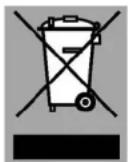
This means that at the end of its working life, the product must not be disposed of as urban waste. It must be taken to a special local authority differentiated waste collection centre or to a dealer providing this service.
Disposing of a household appliance separately avoids possible negative consequences for the environment and health deriving from inappropriate disposal and enables the constituent materials to be recovered to obtain significant savings in energy and resources.
As a reminder of the need to dispose of household appliances separately, the product is marked with a crossed-out wheeled dustbin.
This appliance meets all relevant CE guidelines.
The data plate on the underside of the appliance indicates the total nominal load, the required voltage and the frequency. The type of gas, connection pressure and the country for which the unit was designed are listed on the information plate.
Safety
This appliance should only be connected up by a registered installer! The connection must comply with national and local regulations.
The appliance should always be carthed.
Damage caused by incorrect connection, incorrect use or incorrect building in is not covered by the guarantee.
The walls and the worktop around the appliance must be made of heat-resistant ( >85^ ) material. Even if the appliance itself does not get hot, the heat from a hot frying pan, for instance, could cause discolouring or damage to the wall or worktop.
For correct operation of the appliance it is important that:
- That there is sufficient ventilation to allow the hob to cool down, in accordance with the possibilities specified in this chapter.
- The ventilation air drawn in by the hob must not be warmer than 35^ . Bear this in mind if the oven is to be built in under the hob.
Ensure that the connection cables hang freely. If there is a drawer underneath the hob, make sure that the contents do not project above the edge of the drawer and interfere with the ventilation.
The fitting of the appliance should only be carried out by a registered Corgi gas fitter.
please note
The type of gas and the country for which the appliance has been designed are indicated on the ratings plate.
This is a category 3 appliance.
Gas connection
The gas connection must comply with national and local regulations.
We recommend that the hob be connected by means of a fixed pipe. Connection using a specially designed safety hose is also permitted.
Behind an oven use must be made of a pipe made entirely out of metal.

please note
A safety hose may not be bent and must not come into contact with moving parts of kitchen units.
In all cases the connection tap for the appliance must be positioned such that it is easily accessible.
Before using the appliance for the first time check the connections using water and washing-up liquid to ensure that there are no gas leaks.
General
For the connection, use an approved cable, in accordance with the regulations. The cable must bear one of the following indications: H05V2V2-F, H05RR-F of H05RN-F.
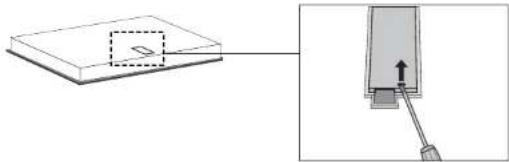
There is a label on the underside of the appliance with the wiring diagrams. The connection terminals are accessible once you have opened the junction box on the underneath. The junction box cover can be opened with a screwdriver.
natural_image
Diagram showing a device with a rectangular block and a separate view of a mechanical component with a lever (no text or symbols)The wall socket and plug must be accessible at all times.
If you want to make a fixed connection, make sure that a multi-polar switch with a contact separation of at least 3 mm is fitted in the supply line. The switch must be accessible at all times.
text_image
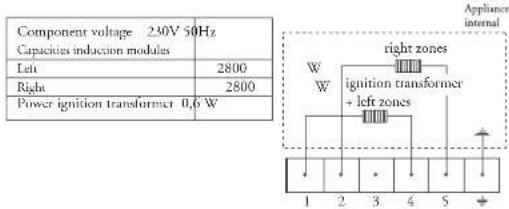
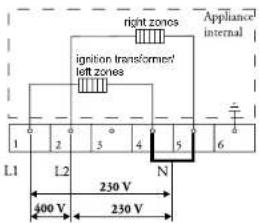
Component voltage 230V 50Hz Capacities induction modules Left 2800 Right 2800 Power ignition transformer 0.6 W Appliance internal W W right zones ignition transformer + left zones 1 2 3 4 5 +The appliance can be connected in the following ways:
2 phase connection
2 lives with 2 neutrals connection (2 2N a.c. 230 V /
50 Hz / Cooking circuit): The voltage between live and neutral is 230 V a.c. There may be a voltage of 0 V between the phases if they are connected to the same phase in the meter cupboard but also 400 V if they are connected to 2 different phases. Your groups must be fused with at least 16 A (2x). The connecting power cable must have a minimum core cross section of 2.5 mm ^2 .
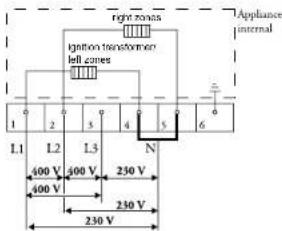
text_image
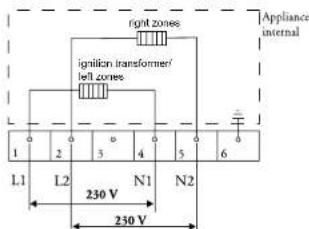
Appliance internal right zones ignition transformer/ left zones 1 2 3 4 5 6 L1 L2 N1 N2 230 V 230 V2 lives with 1 neutral connection (2 IN a.c. 400 V /
50 Hz): The voltage between the phases and the neutral is 230 V a.c. Between the lives there is a voltage of 400 V. If there is not a voltage of 400 V between the lives, two wires have been taken from the same live in the meter cupboard and the hob must be connected with two neutral wires, as indicated above under 2 lives with 2 neutrals. Install a connecting bridge between the connection points 4-5. Your groups must be fused with at least 16 A (2x). The connecting power cable must have a minimum core cross section of 2.5 mm ^2 .
text_image
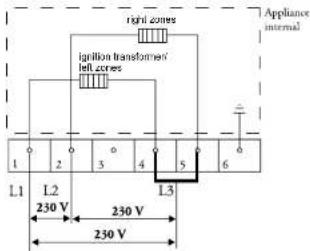
right zones ignition transformers left zones Appliance internal 1 2 3 4 5 6 L1 L2 N 230 V 400 V 230 V3 phase connection
3 lives with 1 neutral connection (3 IN a.c. 400 V /
50 Hz / Power circuit): The voltage between the phases and the neutral is 230 V a.c. There is a voltage of 400 V between the lives. Fit a connecting bridge between the connection points 4-5. Phase 3 carries no load. Your groups must be fused with at least 16 A (3x). The connecting power cable must have a minimum core cross section of 2,5 mm ^2 .
text_image
right torus ligation transformer left cones Appliance internal 1 2 3 4 5 6 L1 L2 L3 N 400 V 400 V 250 V 400 V 230 V 230 V3-phase connection (3 a.c. 230 V / 50 Hz):
The voltage between the phases and the neutral is 230 V a.c. Install connecting bridges between the connection points 4-5. Your groups must be fused with at least 16 A (3x). The connecting power cable must have a minimum core cross section of 2,5 mm².
text_image
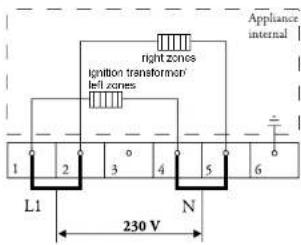
right corners ignition transformed left corners Appliance internal 1 2 3 4 5 6 L1 L2 L3 230 V 230 V 230 V1 phase connection
1 phase connection (1 1N a.c. 230 V / 50 Hz):
The voltage between live and neutral is 230 V a.c.
Install connecting bridges between connection points 1-2 and 4-5. Your group must be protected by a fuse of at least 32 A. The connecting power cable must have a minimum core cross section of 6 mm ^2 .
text_image
Appliance internal right zones Ignition transformers left zones 1 2 3 4 5 6 L1 N 230 VConnecting block
You can use the bridges provided on the connecting block to make the required interconnections as indicated in the preceding illustrations. How to install the bridges is indicated in the junction box cover and in the illustration below. The bridges should not be placed immediately on top of the connecting wires, but between the screw-head and the clamp around the connecting wire.
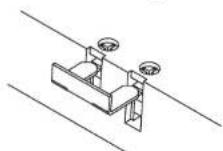
Secure the cable with the strain relief and close the cover.
Preparing the hob
text_image
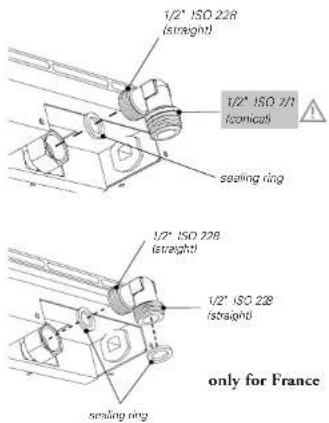
1/2" ISO 228 (straight) 1/2" ISO 7/1 (comical) sealing ring 1/2" ISO 228 (straight) 1/2" ISO 228 (straight) sealing ring only for FranceFit the elbow supplied on the appliance's gas connection.
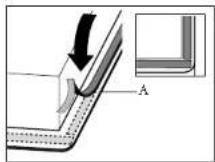
Remove the protective foil of the sealing strip (A) and attach the sealing strip in the groove of the aluminium profiles or the edge of the glass plate. Do not attach the sealing strip through the corner. Instead, cut 4 pieces that fit tightly together in the corners.
Cut opening in worktop
Saw the opening in the worktop. This should be done very accurately (see table). Also saw out any partitions that may be present. The distance from the saw line to the rear wall and/or side wall is indicated in the table.
If the woodtop is made of treated wood, then coat the sawn surfaces of the top with scaling varnish, to prevent moisture causing the top to swell.
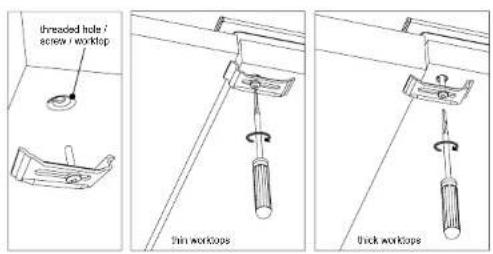
Attachment points for mounting brackets
text_image
threaded hole / screw / worktop thin worktop thick worktopBuilding in dimensions
1*) attachment point for mounting bracket
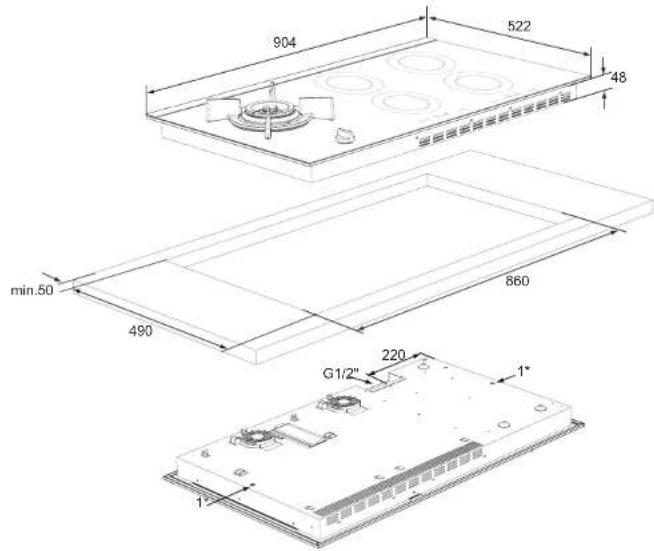
text_image
904 522 48 min.50 490 860 G1/2" 220 1" 1"Table
| Type of hob | IG9071M |
| Appliance width x depth | 904 x 522 mm |
| Installation height from top of worktop | 48 mm |
| Cur our dimensions width x depth | 860 x 490 mm |
| Distance from saw line to rear wall | 50 mm minimum |
| Distance from appliance to side wall | 100 mm minimum |
Space to be left free around the appliance
A hob generates heat. Leave a sufficient distance between the appliance and non heat-resistant materials. Take care also with materials that may discolour (such as stainless steel).
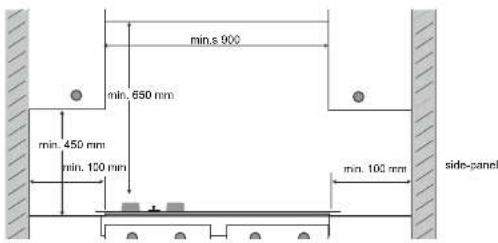
text_image
min.s 900 min. 650 mm min. 450 mm min. 150 mm min. 100 mm side-panelThe gas hob may only be built in next to one vertical wall.

please note
The bottom of the hob becomes hot. Do not place combustible items in a drawer if the drawer is fitted directly below the hob.
Ventilation
The electronics in the appliance require cooling. The ventilation openings are located on the underside of the appliance. It must be possible for cool air to be drawn in through these openings. The appliance is fitted with outlet openings at the front and bottom. The kitchen unit will require a few modifications to allow optimum cooling of the hob.
Above drawer or fixed panel
Saw out the ventilation openings (min. 100 cm ^2 ). Ventilation is via plinth and rear of cupboard.
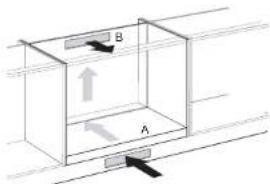
text_image
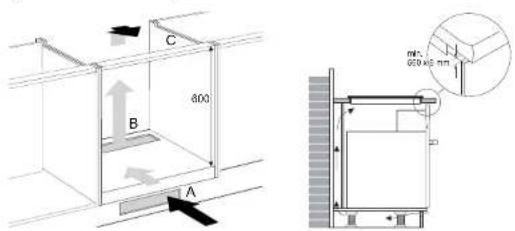
Diagram showing a 3D box with labeled sections A and B, indicating directional movement or force vectors.Do not allow the ventilation openings on the underside of the appliance to be blocked by a drawer. Where there is a drawer, a gap of at least 560 x 6 mm should be made at the front. The distance between drawer A and the hob should be a minimum of 10 mm.

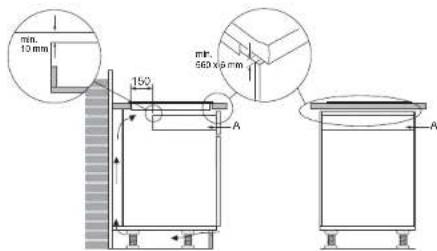
text_image
min. 10 mm 150 A A mm. 560 x 9 mmNo extra modifications for ventilation need be made where there is a fixed panel.
Ventilationprotection
The electronics in the appliance require cooling. The cool air is sucked from behind the cupboard and blown out at the front and at the bottom in the front of the appliance. The hob can only operate if there is sufficient circulation of fresh air. The appliance will switch off after a short time if there is not enough circulation. See to it that the traverse lath does not hinder the airflow.

natural_image
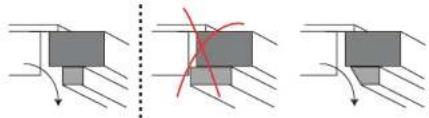
Three diagrams showing mechanical components under different directional arrows, with no visible text or symbols.Plane or saw the lath oblique if necessary.
Above an oven of the ATAG brand
text_image
C 400 B A min. 600 x 40 mmRecess height minimum 600 mm. Ventilation is via plinth and rear of oven. Where there is a oven, a gap of at least 560 x 6 mm should be made at the front. Cut out ventilation openings 'A' + 'B' (100 cm). If you use a 600 mm wide cabinet with a work surface with a thickness of less than 50 mm, you must saw recess C on both sides of the cabinet, so that the unit is not in contact with the cabinet. The hob may only be combined with ATAG ovens, not with combi-microwave ovens.
Installation above a combimicrowave oven, or an oven of a different brand
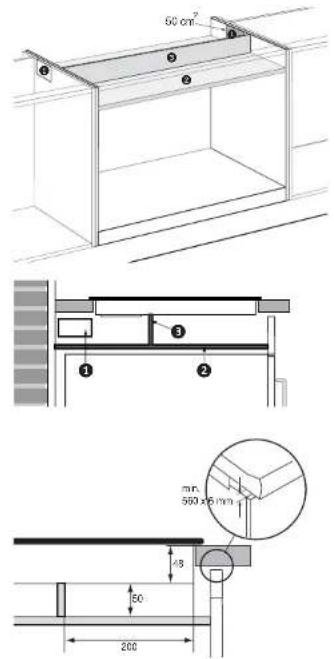
Saw out the ventilation opening(s), making sure that the total surface of the holes is a minimum of 100 cm ^2 . See the drawing, for example, showing 2 holes. Fit a protective plate between the oven and the hob. The plate should be at least 10 mm thick and heat-resistant (85 °C). The space between the underside of the hob and the protective plate must be at least 50 mm. To protect the air flow, fit a protective panel - of the same material as the protective plate - between the protective plate and the hob. Ventilation is via the adjoining cupboards.
text_image
50 cm² ① ② ③ ④ mm. 550 x 6 mm 4.9 60 260
- Connect the appliance to the electricity supply. The displays will light up briefly.
- Check its operation. If the appliance has been connected incorrectly, it will emit a beep signal or the displays will not illuminate.
- Hand over the instructions to your customer.
Immediately after switching on the fan will start. The appliance will now carry out a self-check for a few seconds.
Install appliance and make connections
Place the appliance in the worktop and secure it using the mounting brackets and screws supplied.
Connect to the gas supply.
Check with soap suds that the connection is gastight.
Connect the appliance to mains electricity.
Gas information
| G25 25 mbar (kW) | G20 20 mbar (kW) | G25 20 mbar (kW) | G30 29 mbar (kW/g/h) | G31 29 mbar (kW/g/h) | G31 37 mbar (kW/g/h) | G30 50 mbar (kW/g/h) | G31 50 mbar (kW/g/h) | |
| Burner type | ||||||||
| Wok 5.70 | 5.70 5.00 5 | 50/396 4.8 | /350 5.50/3 | 96 5.50/396 | 4.75/342 |