
YT-82144 - Electric planer Yato - Free user manual and instructions
Find the device manual for free YT-82144 Yato in PDF.


| Product Type | Electric Planer |
| Brand | Yato |
| Model | YT-82144 |
| Supply Voltage | 230-240 V ~ |
| Frequency | 50 Hz |
| Rated Power | 1300 W |
| No-Load Speed | 16 000 min⁻¹ |
| Cutting Depth | 0 to 3.5 mm (adjustable) |
| Max Planing Width | 110 mm |
| Weight | 4.8 kg |
| Insulation Class | II |
| Protection Rating | IP20 |
| Sound Pressure Level | 84 ± 3 dB(A) |
| Sound Power Level | 95 ± 3 dB(A) |
| Vibration Level | 7.11 ± 1.5 m/s² |
| Included Accessories | Dust Collection Bag |
| Main Functions | Surface planing, chamfering, rebating |
| Depth Adjustment | Knob with graduated scale |
| Extraction System | Outlet for external extraction (reversible orientation) |
| Maintenance | Regular cleaning of ventilation openings, replacement of blades and belt |
| Spare Parts | Planer blades, drive belt, dust bag |
Frequently Asked Questions - YT-82144 Yato
User questions about YT-82144 Yato
0 question about this device. Answer the ones you know or ask your own.
Ask a new question about this device
Download the instructions for your Electric planer in PDF format for free! Find your manual YT-82144 - Yato and take your electronic device back in hand. On this page are published all the documents necessary for the use of your device. YT-82144 by Yato.
USER MANUAL YT-82144 Yato
natural_image
Close-up of hands using a screwdriver to adjust or install a mechanical component (no visible text or symbols)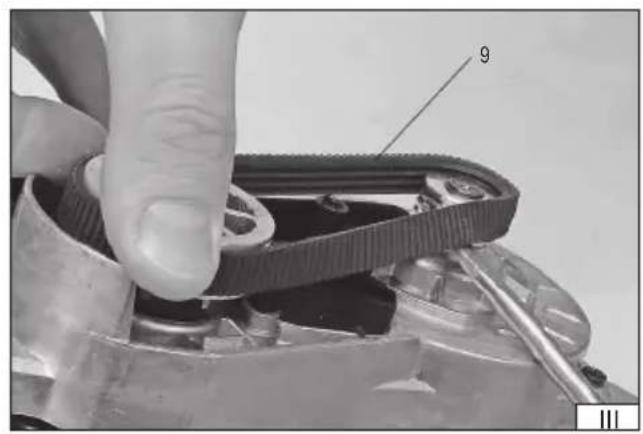
natural_image
Close-up of a hand adjusting a mechanical belt drive mechanism (no visible text or symbols)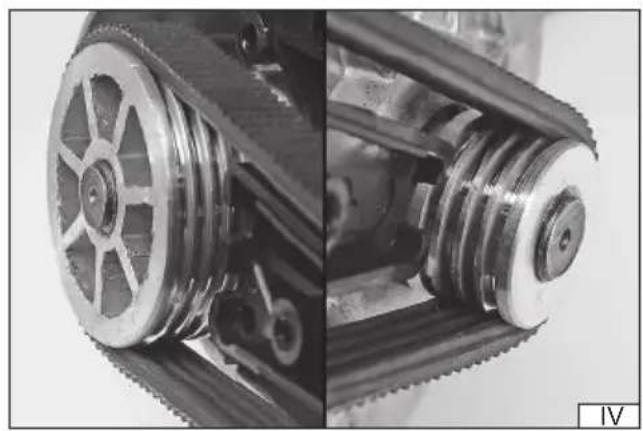
natural_image
Close-up of mechanical components including a gear and pulley system (no visible text or symbols)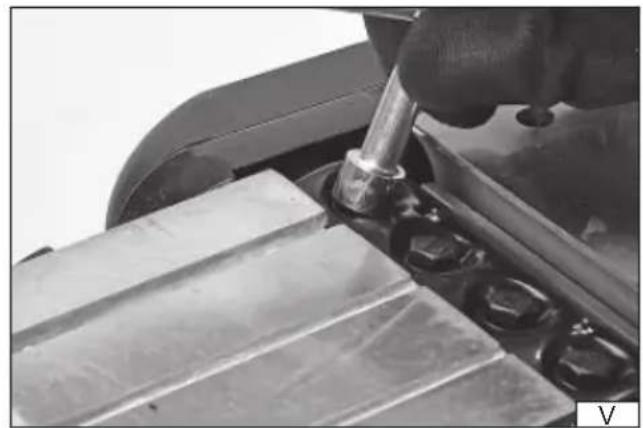
natural_image
Close-up of a hand using a screwdriver to work on a metal cutting board (no visible text or symbols)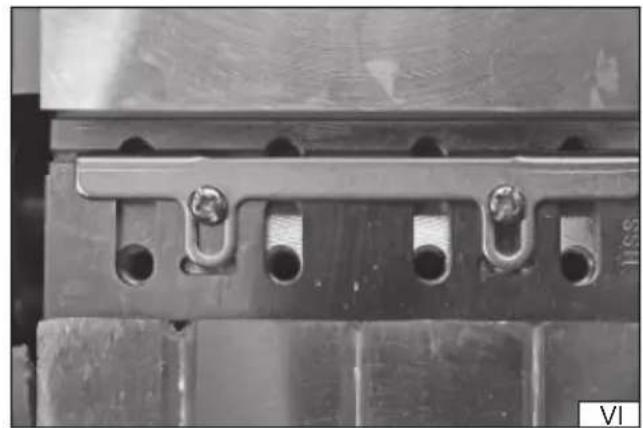
natural_image
Close-up of a mechanical component with multiple circular holes and metal fasteners (no visible text or symbols)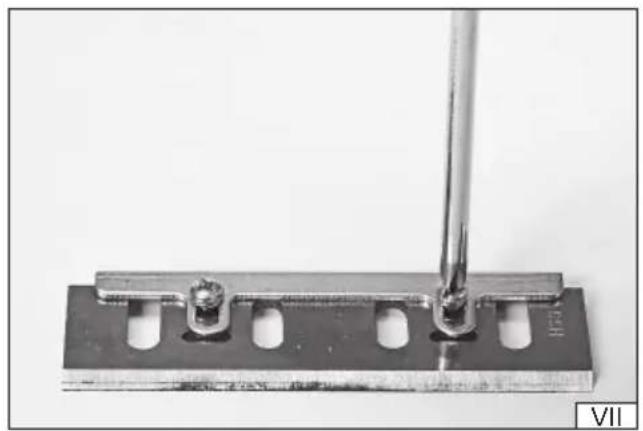
natural_image
Close-up of a metal tool with a cylindrical rod inserted into a rectangular plate, showing internal components (no text or symbols visible)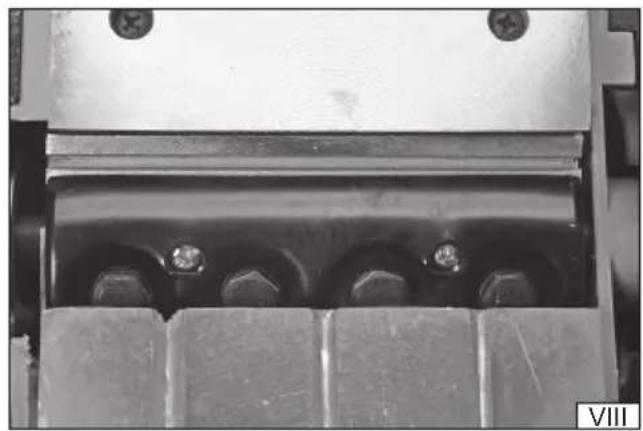
natural_image
Close-up of a mechanical component with bolts and a base plate (no visible text or symbols)natural_image
Close-up of a hand using a power tool on a cutting board (no visible text or symbols)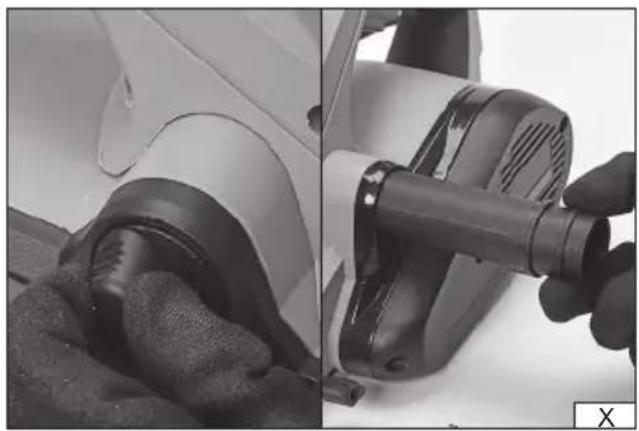
natural_image
Close-up of a hand using a hairdryer to clean the white object, showing mechanical components and texture (no text or symbols visible)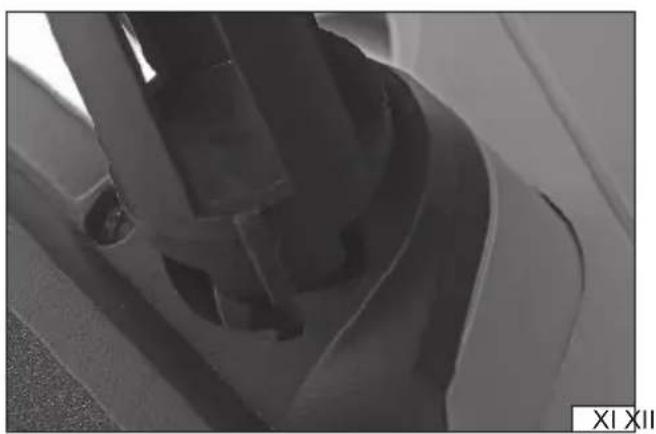
natural_image
Close-up of a mechanical component with no visible text or symbols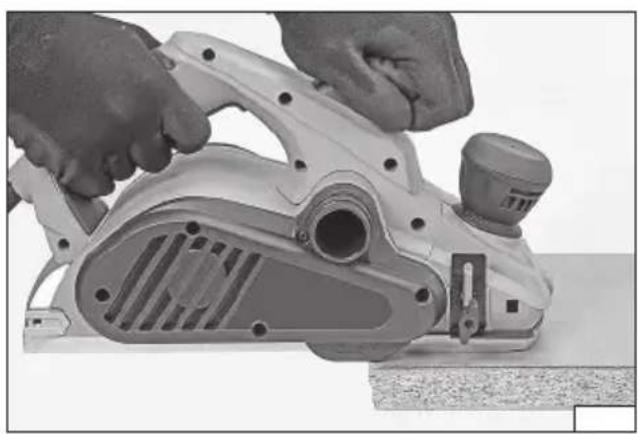
natural_image
Close-up of hands operating a manual power tool on a workbench (no visible text or symbols)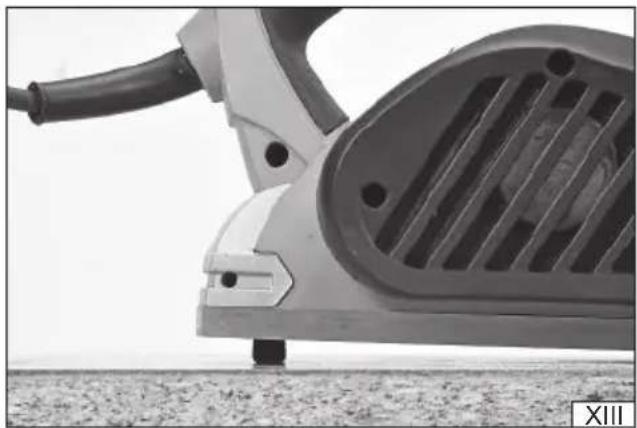
natural_image
Close-up of a white electric vehicle charging plug with visible grille and cable, standing on gravel (no text or symbols)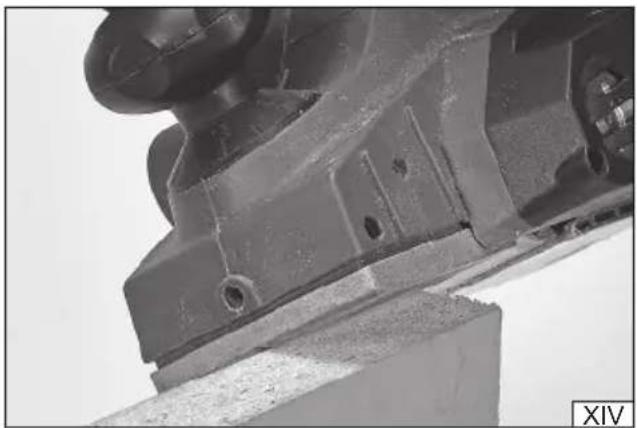
natural_image
Close-up of a mechanical component with mounting holes and a wooden base (no visible text or symbols)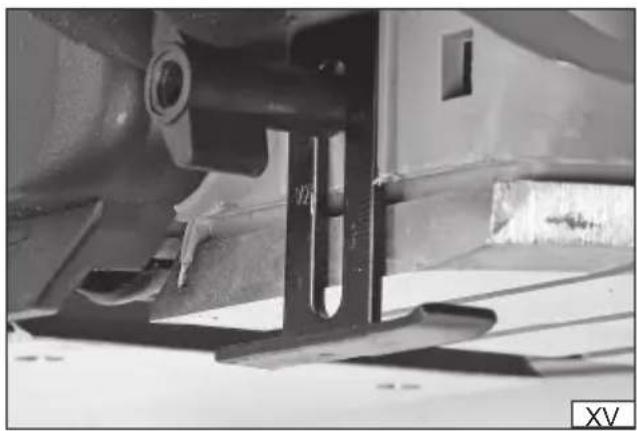
natural_image
Close-up of a mechanical component with visible structural details and mounting brackets (no text or symbols)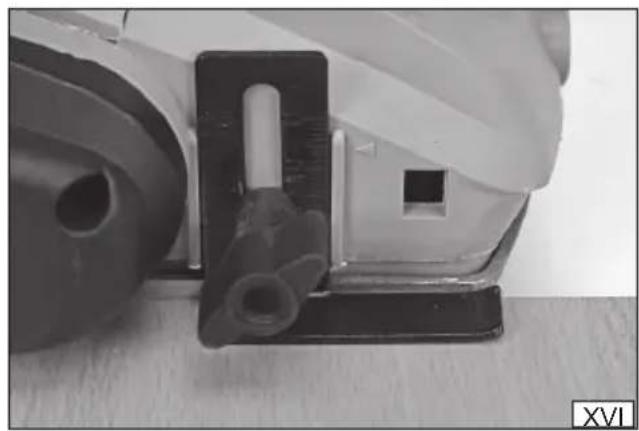
natural_image
Close-up of a mechanical component with a cylindrical part inserted into a housing (no visible text or symbols)PL
- body and handle
- planing depth adjustments
- foot
- electric switch
- switch lock
- power supply cord with plug
- dust extraction ferrule
- power transmission belt protection
- power transmission belt
DE
Read the operating instruction
Wear protective goggles
Schutzbrille tragen
Wear hearing protectors
This symbol indicates that waste electrical and electronic equipment (including batteries and storage cells) cannot be disposed of with other types of waste. Waste equipment should be collected and handed over separately to a collection point for recycling and recovery, in order to reduce the amount of waste and the use of natural resources. Uncontrolled release of hazardous components contained in electrical and electronic equipment may pose a risk to human health and have adverse effects for the environment. The household plays an important role in contributing to reuse and recovery, including recycling of waste equipment. For more information about the appropriate recycling methods, contact your local authority or retailer.
The manual electric plane for wood is an ordinary electric tool, insulation class II, designed for planing, bevelling and forming rebates in wood and wood-derived materials. The tool permits to adjust the depth of planing, and it is equipped with a guide and a ferrule to extract dust and shavings. Under no circumstances should the tool be used for other materials than wood. A correct, reliable and safe functioning of the electric tool depends on its proper use, so:
Before you proceed to operate the device, read the manual thoroughly and keep it.
The supplier will not be held responsible for any damage resulting from the safety regulations and the recommendations indicated hereby not being observed.
EQUIPMENT
The factory box should contain the following:
- plane
- the dust bag
TECHNICAL PARAMETERS
| Parameter Unit of measurement Value | ||
| Catalogue number YT-82144 | ||
| Mains voltage [V~] 230 - 240 | ||
| Mains frequency [Hz] 50 | ||
| Nominal power [W] 1300 | ||
| Rotation (idle) [min] | ^-1 16000 | |
| Depth of planing [mm] 0 - 3,5 | ||
| Maximum width of planing [mm] | 110 | |
| Mass | [kg] | 4,8 |
| Level of noise | ||
| acoustic pressure | [dB(A)] | 84 ± 3 |
| acoustic power | [dB(A)] | 95 ± 3 |
| Level of vibration | [m/s ^2 ] | 7,11 ± 1,5 |
| Insulation class | II | |
| Protection grade | IP20 |
GENERAL WARNINGS FOR THE SAFETY OF POWER TOOLS
Warning! Read all safety warnings, illustrations and specifications provided with this power tool. Failure to do so may result in electric shock, fire or serious injury.
Keep all warnings and instructions for future reference.
The term "power tool" used in warnings applies to all tools driven by power both wired and wireless.
Workplace safety
Keep the workplace well-lit and clean. Disorder and poor lighting can be causes of accidents.
Do not work with power tools in an environment with an increased risk of explosion, containing flammable liquids, gases or vapors. Power tools generate sparks that can ignite dust or fumes.
Children and third persons should not be allowed to enter the workplace. Loss of concentration can result in loss of control.
Electrical safety
The plug of the electric cable must match the power socket. You must not modify the plug in any way. Do not use any plug adapters with earthed power tools. An unmodified plug that fits the outlet reduces the risk of electric shock.
Avoid contact with earthed surfaces such as pipes, radiators and coolers. Grounding the body increases the risk of electric shock.
Do not expose power tools to contact with atmospheric precipitation or moisture. Water and moisture that gets inside the power tool increases the risk of electric shock.
Do not overload the power cable. Do not use the power cord to carry, pull or unplug the power plug from the power outlet.
Avoid contact of the power cable with heat, oils, sharp edges and moving parts. Damage or entanglement of the power cord increases the risk of electric shock.
In the case of working outside closed rooms, use extension cords intended for work outside closed rooms. The use of an extension cord adapted for outdoor use reduces the risk of electric shock.
EN
When using a power tool in a humid environment is unavoidable as a protection against supply voltage use a residual current device (RCD). The use of RCD reduces the risk of electric shock.
Personal safety
Stay alert, pay attention to what you do and keep common sense while working with the power tool. Do not use a power tool when you are tired or under the influence of alcohol or medication. Even a moment of inattention while working can lead to serious personal injury.
Use personal protective equipment. Always wear eye protection. The use of personal protective equipment such as dust masks, anti-slip safety shoes, helmets and hearing protection reduce the risk of serious personal injury.
Prevent accidental operation. Make sure that the electric switch is in the “off” position before connecting to the power supply and / or battery, lifting or moving the power tool. Moving the power tool with the finger on the switch or powering the power tool, when the switch is in the “on” position can lead to serious injuries.
Before turning on the power tool remove any keys and other tools that were used to adjust it. The key left on the rotating parts of the power tool can lead to serious injuries.
Do not reach and do not lean too far. Keep the right attitude and balance all the time. This will allow easier control over the power tool in case of unexpected work situations.
Dress accordingly. Do not wear loose clothing or jewelry. Keep your hair and clothing away from moving parts of the power tool. Loose clothing, jewelry or long hair can be caught by moving parts.
If the devices are fitted for the connection of dust extraction or dust collection, make sure that they are connected and used properly. The use of dust extraction reduces the risk of dust hazards.
Do not let the experience acquired from frequent use of the tool resulted in carelessness and ignoring safety rules. Carefree action can cause serious injuries in a fraction of a second.
Use and care of the power tool
Do not overload the power tool. Use the power tool appropriate for the selected application. The right power tool will provide a better and safer job if used according to the designed load.
Do not use the power tool, if the electric switch does not allow switching on and off. Power tool, which cannot be controlled by means of a power switch is dangerous and must be returned for repair.
Disconnect the plug from the power socket and / or remove the battery if it is detachable from the power tool before adjusting, changing accessories or storing the tool. Such preventive measures will allow you to avoid accidentally turning on the power tool.
Keep the tool out of the reach of children, do not let people who do not know how to operate the power tool or these instructions use a power tool. Power tools are dangerous in the hands of untrained users.
Maintain power tools and accessories. Check the tool for mismatches or jams of moving parts, damage to parts and any other conditions that may affect the operation of the power tool. Damage must be repaired before using the power tool. Many accidents are caused by incorrectly maintained tools.
Keep cutting tools sharp and clean. Properly maintained cutting tools with sharp edges are less prone to jamming and are easier to control when working.
Use power tools, accessories and inserted tools etc. in accordance with these instructions, taking into account the type and conditions of work. The use of tools for work other than designed is likely to result in a dangerous situation.
Handles and gripping surfaces must be dry, clean and free from oil and grease. Slippery handles and gripping surfaces do not allow for safe operation and control of the tool in dangerous situations.
Repairs
Repair the power tool only in authorized facilities using only original spare parts. This ensures proper operation safety of the power tool.
ADDITIONAL SAFETY INSTRUCTIONS
Do not put the tool down before the knife stops. An exposed rotating knife may „catch“ the ground and impede the control of the tool and cause serious injuries.
Hold the tool only by the insulated surfaces, since the cutting element may touch the power supply cable of the tool. If the cable is cut, the metal elements of the tool might become live, which might cause electric shock to the operator.
Use clamps or other elements to fix the processed element to a stable surface. If the processed material is held with a hand or another part of the body, the tool is not stable and the operator may lose control over it.
INSTALLATION OF WORKING ELEMENTS
Attention! Installation of the accessories must be realised with the power supply off (Remove the plug of the cord of the grinder from the socket!!
Attention! It is always required to replace all the knives the plane is equipped with. It is prohibited to operate the tool, if not all the knives are installed. The drum rotates at a high velocity and it is adequately balanced for operation with all the knives installed. If not all the knives are installed, the plane may be damaged during operation, which may cause serious injuries.
EN
Replacement of the power transmission belt
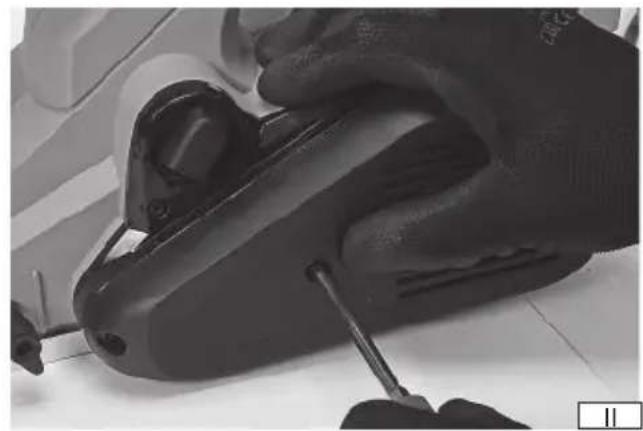
Remove the protection of the power transmission belt (II). Lift the edge of the belt with a wide and plane screwdriver close to the smaller pulley, while simultaneously turning the belt with the bigger pulley (III), until the belt has come off the smaller pulley.
Install a new belt on the bigger pulley and make sure the wedges at the internal side of the belt are aligned with the grooves of the pulley. Placing the belt on the smaller pulley, simultaneously turn the belt with the bigger pulley, until the belt has been placed on the smaller pulley. Make sure all the wedges at the internal side of the belt are aligned with the grooves of the pulleys (IV).
Installation and replacement of knives
Before changing blades, it is recommended to remove the drive belt guard (II), which will make it easier to manoeuvre the drum during blade assembly. The blades should be disassembled one by one in order to maintain the correct assembly pattern.
To dismantle the blade, the screws fixing the blade holder must be screwed in (V). Remove the handle and the clamping rail with blade (VI) and then unscrew the screws fixing the blade to the clamping rail (VII). Thoroughly clean the place of installation of the blade, the blade and all fixing elements from dust generated during operation, e.g. with a soft bristle brush.
Secure the new blade to the fixing rail with screws. The holes in the rail allow the blade to be moved. Then slide the rail with the attached blade into the slot of the drum. Pay attention to the correct assembly direction, turn the drum and install the blade holder in the same manner as for the other blades. Mount the blade holder and tighten all fixing screws. The edge of the blade holder should be parallel to the edge of the drum gap (VIII). Repeat the operation for the remaining blades. Always replace the blades as a set. Rotate the drum with the mounted blades a few full turns in one direction and the other and make sure that the blades or fixing elements do not catch on the tool structure. Install the drive belt guard.
Caution! It is forbidden to use the planer without the drive belt guard installed.
PREPARATION FOR WORK
Before work make sure the body and the cord with plug are not damaged.
In case any damage is detected it is prohibited to operate the tool.
Attention! All the activities related to replacement of the knives, the transmission belt, installation of the guards and guides, adjustments, etc. must be carried out with the power off, so first: Remove the plug of the cord of the grinder from the socket!
Before first operation of the plane, check the adjustments and installation of the knives and the knife shaft.
Adjustments of the depth of planing (IX)
Adjust the required planing depth, turning the planing depth adjustment knob. The setting may be read out from the scale around the knob.
Chip extraction
The planer is equipped with a bag to collect chips and dust generated during operation, but it is recommended to use an external chip and dust extraction system, e.g. an industrial vacuum cleaner. The use of an external dust extraction system improves efficiency and safety at work.
The planer can be connected to a bag or an external dust extraction system on both sides of the housing. To transfer the connector to the dust extraction system, push and hold the locking latch (X) and then slide the sleeve out of the planer housing. Slide the sleeve into the housing from the other side. The sleeve has a guide rail which must fit into the housing notch (XI). Otherwise it will not be possible to install the sleeve in the housing. Slide the sleeve to the end so that the latch locks the sleeve in the housing. Correctly fixed sleeves shall not be disassembled otherwise than by sliding and holding the locking latch.
Connect the end of the external dust extraction system to the spigot in such a manner that it does not interfere with work and does not obstruct the view of the working area.
The bag is mounted on the spigot by pressing the handles of the bag inlet ring so that the ring enlarges its diameter, which will allow it to be mounted on the planer spigot. The ring should be placed in such a manner that it rests against the spigot flange to prevent accidental sliding of the bag off the spigot during operation.
ATTENTION! During work with the plane it is required to always wear hearing protectors and eye protectors.
Safety instructions
During operation of the tool it is required to use personal protection means, such as sight protection, hearing protection, gloves, protective clothes and shoes. It is also required to use dust masks to protect the respiratory system.
Only well sharpened knives ensure correct planing and prolong the durability of the tool.
Do not overload the plane to the point when it stops.
Do not ever proceed to plane surfaces with metal elements (nails, screws, stitches etc.).
Use only verified knives which are approved for the rotational speed indicated on the tool.
The plug of the tool may be inserted into the mains socket only if the device is off.
EN
The power supply cord must be always placed behind the device.
The plane must be applied to the processed object only after it has been started.
During planing the plane must adhere completely with the whole surface of the runner to the processed object.
During work the plane must be always guided with both hands.
Uniform moving of the plane during planing extends the life of the knives and reduces the risk of accidents.
Do not ever put your fingers into the shavings eject opening. If the opening is blocked, remove the plug from the mains contact and clean the hole of the accumulated shavings, using a wooden stick.
Always connect an external dust extraction device.
Make regular breaks during work.
Do not overload the tool – the temperature of the external surfaces must not exceed 60°C.
Do not operate the plane as a stationary device.
Always observe general instructions of safe operation of electric tools.
Once the work with the plane has concluded, you may put it down when it has been disconnected from the mains socket and the knife shaft has completely stopped.
Once the work has finished perform maintenance activities and inspect the tool.
Planning of surfaces (XII)
Place one hand on the handle and the other on the additional handle to grasp the planer with both hands. Adopt a firm and stable posture. Place the planer on the workpiece with the front part of the planer's shoe touching the workpiece surface, making sure that the blades do not come into contact with the workpiece surface at any point. The planer on/off switch is secured against accidental pressing by means of a lock. The planer is started after pressing and holding the lock button and then pressing the on/off switch. Once the motor has started, it is no longer necessary to hold down the locking button. Wait for the blades to reach full speed, then carefully move the planer forward.
At the beginning of the planning, apply pressure on the front part of the planer and at the end of the planning on the rear part of the planer.
For pre-planning, the planning depth can be increased, while for optimum surface quality, the planning depth must be reduced and the planer must be moved slowly.
The planer has a support in the rear edge of its base, which will drop down when the rear part of the base is lifted, and when the planer is repositioned it will prevent the blades from coming into contact with the workpiece (XIII).
Lift the support before resuming work. When beginning normal operation, the support is automatically lifted when guiding the planer along the workpiece. Caution! It is forbidden to leave the planer with rotating blades on the support.
The planer will stop when the pressure on the switch is released. The blades may still rotate for some time after switching the motor off .
Edge planning (XIV)
The planer foot has grooves of different depths for easy cutting of the workpiece edge. Turn the knob to adjust the planning thickness. Place the planer foot so that the groove touches the edge of the workpiece. Begin work in the same manner as when planning a surface. Caution! Depending on the depth of the groove, the full range of planning depths may not be available. Only the central groove allows the full range of planning depths to be used.
Rebating
If the planer is equipped with a guide mounted under the foot of the product, it can be used for rebating. That is, a partial reduction of the workpiece surface. Rebating can be used to facilitate the overlapping of wooden elements. It is recommended to mark the rebate width before starting work, for example with a line drawn with a pencil.
Mount the guide as shown in the illustration (XV). The graduation on the guide shows the rebate depth. Place the planer on the edge of the workpiece surface so that the guide shoe rests on the whole surface of the workpiece surface (XVI). Begin planning in the same manner as when planning a surface. The guide shoe should always be flush with the workpiece surface. It is recommended to gradually deepen the rebate to the planned depth.
Additional remarks
Once the task has been concluded, turn the jig saw off, remove the plug of the tool from the mains socket and inspect the machine.
The declared total value of vibration has been determined by means of a standard measurement method and may be used to compare the tool with another one. The declared total value of vibration may be used for an initial evaluation of exposure.
Attention! The vibration caused during work with the tool may differ from the declared value, depending on the way in which the tool is used.
Attention! It is required to determine safety measures to protect the operator, based on evaluation of exposure under actual circumstances of operation of the machine (including all the phases of the working cycle, for example the time when the tool is off or is idling, and the activation time).
MAINTENANCE AND OVERHAUL
ATTENTION! Before any adjustment, technical service or maintenance operations unplug the tool. Once the operations have been finished, the technical conditions of the tool must be assessed by means of external evaluation and inspection of the following elements: body and handle, conductor with a plug and deflection, functioning of the electric switch, patency of ventilation slots, sparking of brushes, noise level of functioning of bearings and gears, start-up and smoothness of operation. During the guarantee period, the user cannot dismantle the electric tools or change any sub-assemblies or elements, since it will cancel any guarantee rights. All irregularities detected at overhaul or during functioning of the tools are a signal to have the tool repaired at a service shop. Once the functioning has been concluded, the casing, ventilation slots, switches, additional handle and protections must be cleansed with a stream of air (at a pressure not exceeding 0.3 MPa), with a brush or a cloth without any chemical substances or cleaning liquids. Tools and handles must be cleansed with a clean cloth.
DE
CHARAKTERISTIK DES WERKZEUGES
DEKLARACJA ZGODNOŚCI DECLARATION OF CONFORMITY DECLARATIE DE CONFORMITATE
1024/YT-82144/EC/2024
We declare and guarantee with full responsibility that the following products:
meet requirements of the following European Standards / Technical Specifications:
and fulfill requirements of the following European Directives:
2006/42/WE Machinery and safety elements
2014/30/UE Electromagnetic compatibility (EMC) Directive
Directiva privind compatibilitatea electromagnetică (EMC) (H.G. nr. 487/2016)
2011/65/UE Restriction of the Use of Certain Hazardous Substances
Serial number: concern all serials numbers of item(s) mentioned in this declaration
The person authorized to compile the technical file: