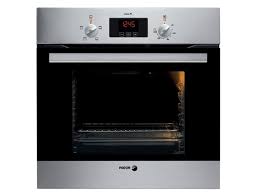
6H210AX, 6H210AB, 6H210N, 6H210X - Multicooker FAGOR - Free user manual and instructions
Find the device manual for free 6H210AX, 6H210AB, 6H210N, 6H210X FAGOR in PDF.



User questions about 6H210AX, 6H210AB, 6H210N, 6H210X FAGOR
0 question about this device. Answer the ones you know or ask your own.
Ask a new question about this device
Download the instructions for your Multicooker in PDF format for free! Find your manual 6H210AX, 6H210AB, 6H210N, 6H210X - FAGOR and take your electronic device back in hand. On this page are published all the documents necessary for the use of your device. 6H210AX, 6H210AB, 6H210N, 6H210X by FAGOR.
USER MANUAL 6H210AX, 6H210AB, 6H210N, 6H210X FAGOR
Fagor Electrodomesticos, S. Coop.
B° San Andres, 18
20500 Mondragon (SPAIN)
info@fagor.com
www.fagor.com
CZ5701692
008649600
12-12

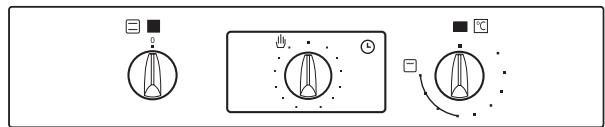
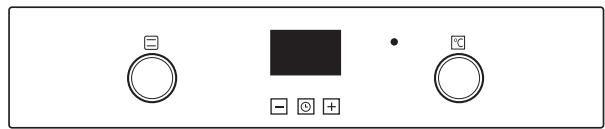
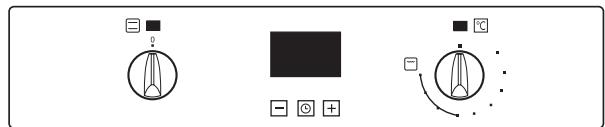
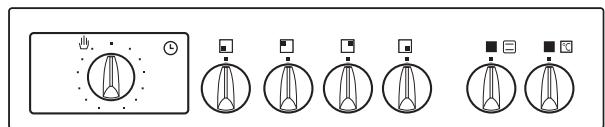
1.2
1.2.2
1.2.3
1.2.6
1.2.6
ef
1.2.9
一
1.2.11
1.2.12
1.2.13

Seguridad

Important
Important! Read the entire manual before using the oven. The documentation and accessories are inside the oven.
The texts in the manual correspond to the numbered diagrams.
Safety

Important
Keep this manual with the appliance. If you sell or give the appliance to another person, make sure you also pass on the user manual. Read these instructions carefully when using and installing the appliance. They are designed to protect your own and others' safety.
- The electrical installation that feeds the oven must have circuit breakers installed in accordance with current local installation regulations.
- The oven must be installed by an authorised installer in accordance with the manufacturer's instructions and diagrams.
- The electrical installation must be dimensioned for the maximum power indicated on the reference plate and the electrical socket must have a regulatory earth connection.
- If the power cord is damaged, it must be replaced by the after-sales technical service or by similarly qualified staff, to avoid hazard.
- Ensure the appliance is unplugged from the mains before replacing the oven lamp, to avoid electric shock.
- Do not use abrasive cleaning products or metal scouring pads to clean the oven door, as they could scratch the surface and cause the glass to shatter.
- During operation, some accessible parts may become hot.
Children under the age of 8 must not go near the appliance unless under permanent supervision.
- Do not touch the heating elements inside the oven.
- This appliance can be used by children aged from 8 years and above and persons with reduced physical, sensory or mental capabilities or lack of experience and knowledge if they have been given supervision or instruction concerning use of the appliance in a safe way and understand the hazards involved. Children shall not play with the appliance. Cleaning and user maintenance shall not be made by children without supervision.
- This appliance is designed for normal household use only. Do not use it for commercial or industrial purposes. Use exclusively for cooking food products.
- Do not try to modify the characteristics of the appliance. It could be dangerous.
- During cleaning by pyrolysis, surfaces become hotter than during normal use. Keep out of reach of children.
- Before cleaning with pyrolysis, remove all cooking items and significant overflows.
- Do not put heavy weights on the oven door and make sure that children do not climb or sit on it.
- Always make sure that the oven is switched off before cleaning.
- After using the oven, make sure that all the controls are in the off position.
- Do not use the oven as a larder or to store accessories after use.
- Do not use steam or high pressure devices to clean the device (electrical device safety reasons)
- The oven door should always be kept closed when working, for all programmes, including the grill.

Identification

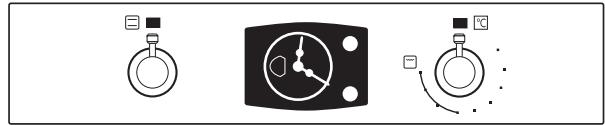
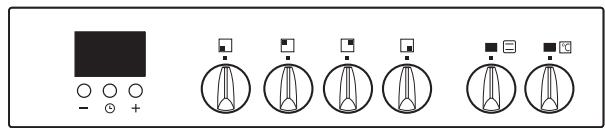
To find out which model your oven is ("a", "b", "c", "d", "e", "f") compare its control panel with the control panels shown in the illustrations.

Installation

1.1 Unpacking. Remove all the protective packaging elements.
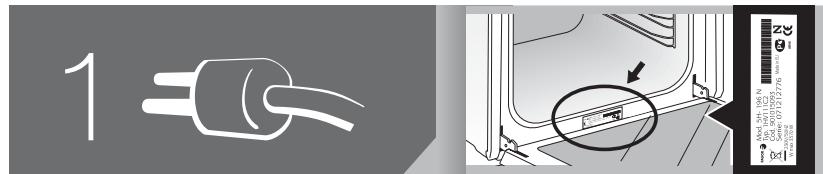
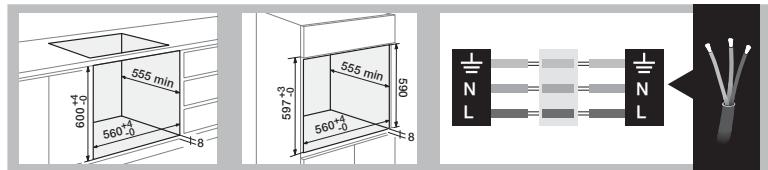
1.2 Mains connection. Always take into account the data on the reference plate (1.2.1) and the measurements of the cabinet the oven will be housed in (1.2.2, 1.2.3).
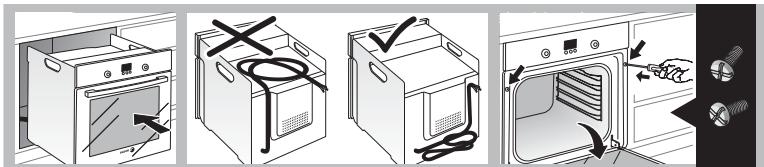
Freestanding ovens: the appliance must be connected to the mains with a fixed single-phase connection with the neutral (blue) connection guaranteed (1.2.4). Fit the oven into the space, ensuring there is no excess cable in the upper part (1.2.5, 1.2.6). Screw it to the fitting using the two screws supplied (1.2.7). The fitted furniture or its surface must be heat-resistant. The time must be set in order to finish the installation (a, c, d, f). After a period of inactivity, the machine will turn to standby and its brightness will diminish or the screen will switch off, depending on the model.
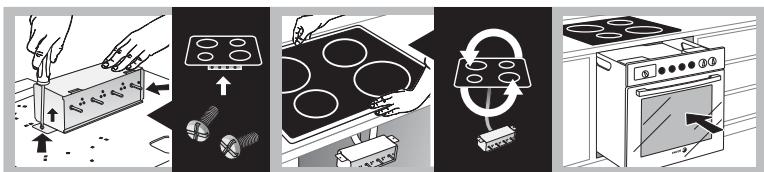
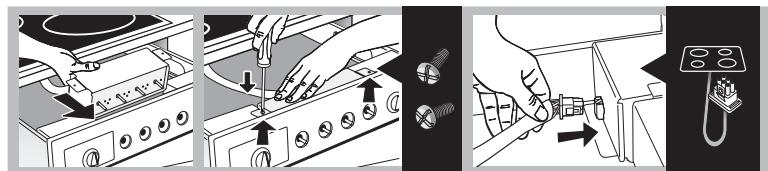
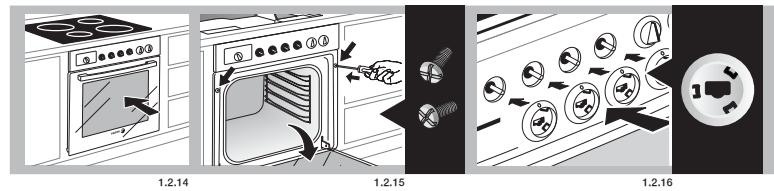
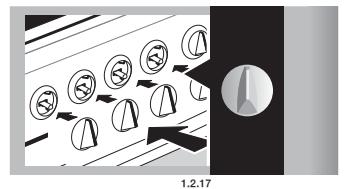
Multi-purpose ovens for vitro-ceramic hobs: to avoid hazard, the oven may only be installed with the vitro-ceramic hobs recommended by the manufacturer. Fit the cooking hob into the worktop and remove the switch box (1.2.8). Insert the hob in the worktop space according to the installation requirements (see the hob manual) (1.2.9). Insert the oven into the cabinet space, leaving enough room for handling (1.2.10). Screw the switch box onto the oven (1.2.11, 1.2.12). Connect the hob to the oven (1.2.13). Fully insert the oven and fix it in place with the two screws supplied (1.2.14, 1.2.15). Firmly push in the control accessories, according to the cooking ring type (1.2.16), and the controls (1.2.17).

Using the oven

Before using your new oven for the first time, heat it up while empty (with no food in it and with the control turned to , at for 30 minutes at 250^ ). It may produce some smoke or a bad smell (this is normal and is caused by the oven heating up grease residue etc.). When it has cooled down, pre-clean it by wiping the inside with a damp cloth.
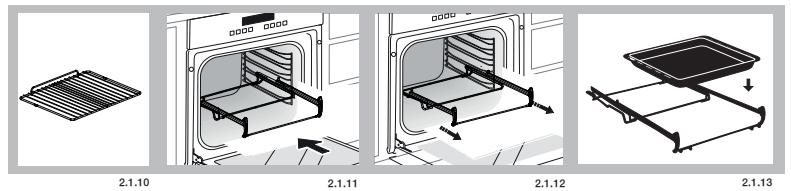
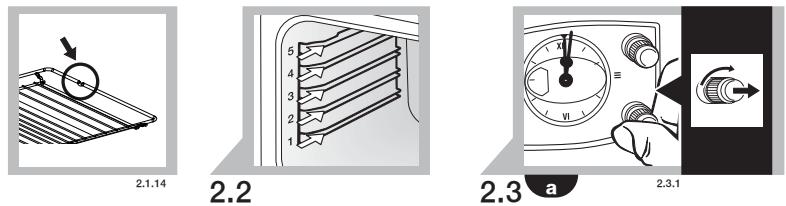
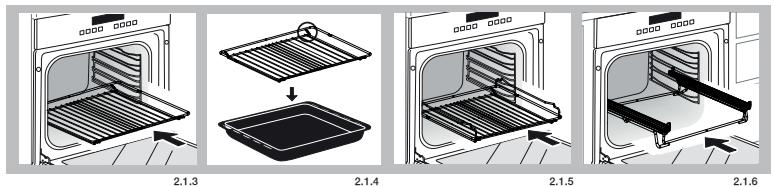
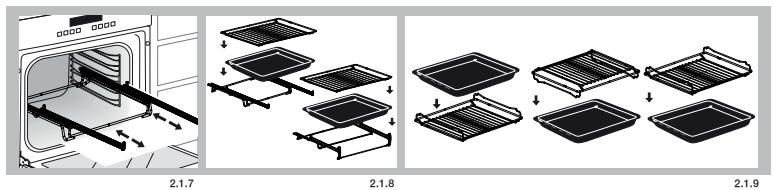
2.1 Accessories. Depending on the model there is a Deep Tray (2.1.1), Flat Tray (2.1.2) and Multifunctional Grill (2.1.3) that work separately. If it also possible to combine either tray with the Multifunctional Grill (2.1.4) to make a set. All the accessories or sets can be used directly or mounted on the Partial Extraction Grill (2.1.5) or the Total Extraction Grill (2.1.6, 2.1.7), (2.1.8). If you have the partial extraction tray, it can be used separately or together with trays (3 types) (2.1.9). The Simple Grill is used separately (2.1.10). If you have telescopic rails, remove the tray before installing them in the oven (2.1.11). The telescopic rails extend automatically due to the weight of the tray when the oven is opened (2.1.12). Food must always be placed on a tray on the telescopic rails (2.1.13). Bear in mind the position of the grills when installing them. There are anti-tipping stops at the sides (2.1.14).
2.2 Accessory positions. The accessories can be fitted in 5 different positions, _1 , _2 , _3 , _4 , _5 .
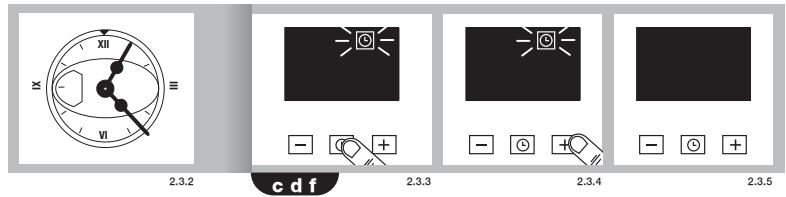
2.3 Setting the time. Ordinary clock: Pull on the lower dial and turn it to the right (2.3.1). Set the time (2.3.2). Digital clock: press the button. (2.3.3). Set the time using the and buttons (2.3.4). After a few seconds will stop flashing (2.3.5). Note: the time will need to be set again after an electricity cut or when the hour changes.
2.4 Cooking the food. Place the food in the oven. Consult the cooking table to choose the accessory or accessories to be used and their position. Close the oven door.
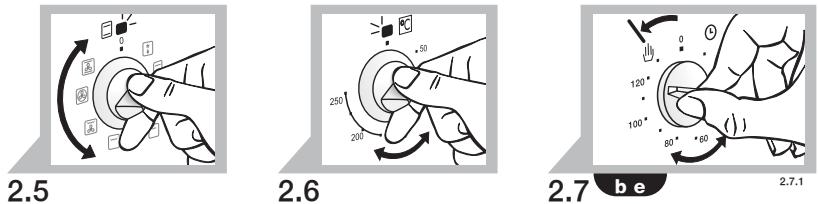
2.5 Selecting the cooking function. Select the cooking function according to the model
Traditional fanned heat. For any kind of dish. Several dishes may be cooked at once without their flavours or smells mixing.
Turbo plus. The heat is produced by the central element.
Fanned high grill. This browns the food, distributing the heat evenly. Ideal for large-sized roasts.
High grill. For browning pasta, souffles and bechamel sauce.
Low grill. For hamburgers, toast and food with a small surface area.
High base heat. The heat from the oven base is evenly distributed. Ideal for paellas or pizzas.
Fanned base heat. The fan distributes the base heat evenly. Suitable for paellas.
Traditional heat. For bread, cakes, cakes with filling and lean meat.
Defrost. Rapidly thaws any kind of food.
Celeris. For pre-heating the oven.
2.6 Selecting the temperature ^ C . Select the temperature by turning the selector dial. The pilot light will switch off when the selected temperature is reached.
TIME FUNCTIONS
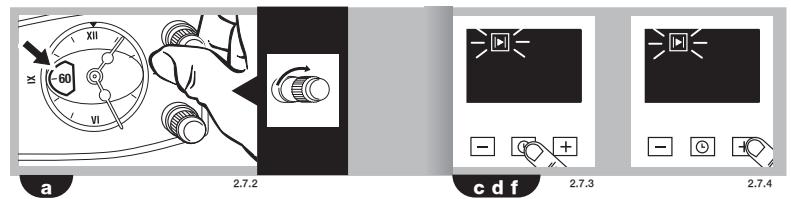
2.7 Selecting the cooking time. Timer: select the minutes by turning the selector dial. (2.7.1). If you prefer the oven to function without a time limit, turn it to hand position. Ordinary clock: Turn the upper dial to the right and select the minutes (2.7.2). If you prefer the oven to function without a time limit, turn it to hand position and line up the red arrow with the time shown by the hands of the clock.
Digital clock: press the 1 button. 2 will start to flash (2.7.3). Adjust the duration using the + and - buttons (2.7.4). 2 will stop flashing after a few seconds.
2.8 Selecting the start time.
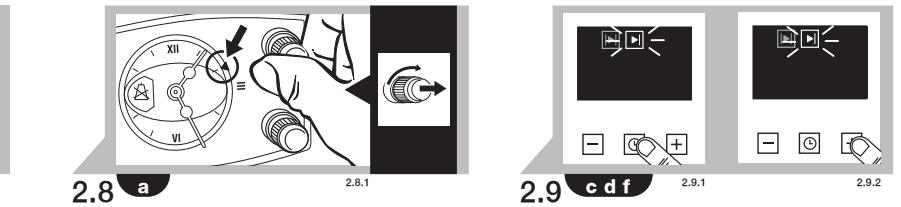
Ordinary clock: When you have selected the programme and the temperature, turn the upper dial to 空 . Then pull on the upper dial and turn it until the red arrow shows the start time (2.8.1). Select the duration by turning the upper dial to the right.
2.9 Selecting the end time.
Digital clock: after selecting the programme, temperature and cooking time, press the button. will start to flash (2.9.1). Set the desired end of cooking time by pressing the + and - buttons (2.9.2). will stop flashing after a few seconds.
2.10 Beeper function.
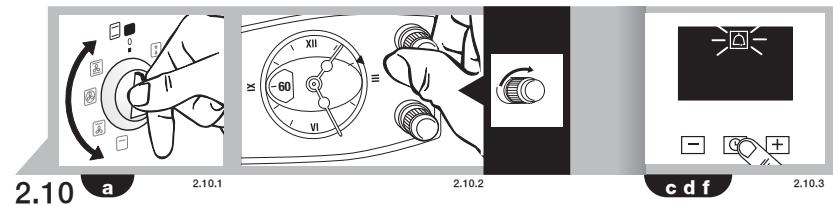
Ordinary clock: Select the position 0 on the programme dial (2.10.1). Turn the upper dial to the right and select the minutes (2.10.2). This only works if the oven is switched off.
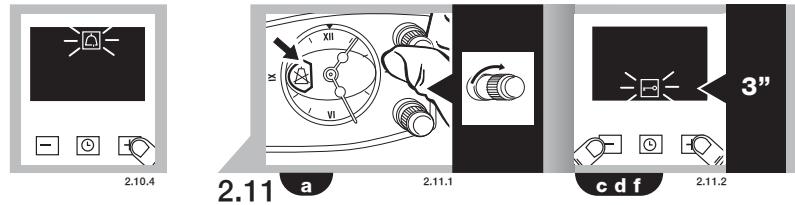
Digital clock: press the l button several times. l will start to flash (2.10.3). Adjust the duration using the + and - buttons (2.10.4). l will stop flashing after a few seconds. This works with the oven switched off and switched on.
2.11 Child lock. To prevent children from playing with the oven.
Ordinary clock: Turn the upper dial to select (2.11.1)
Digital clock: press the + and - buttons
at the same time and hold them down for 3 seconds. will appear on the display (2.11.2). To remove the child lock, repeat the process.
Warnings: when the cooking time has elapsed, turn the function and temperature dials to 0 and the time dial to hand position. Open the oven door, taking care as hot steam may come out.

Maintenance and cleaning

3.1 Cleaning the accessories. The accessories are dishwasher-safe. To wash them up by hand, use normal detergent. Leave them to soak for easier cleaning.
Cleaning the inside of the oven.
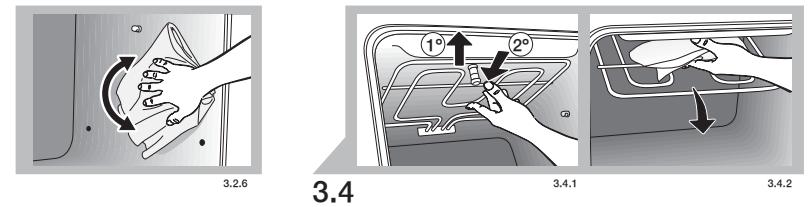
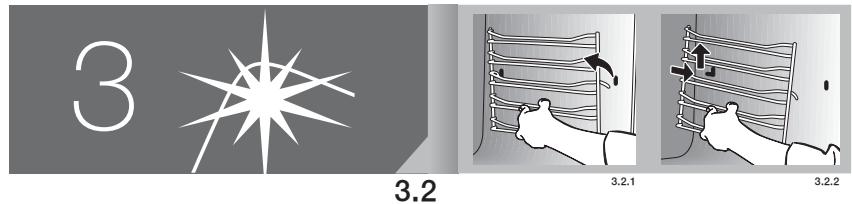
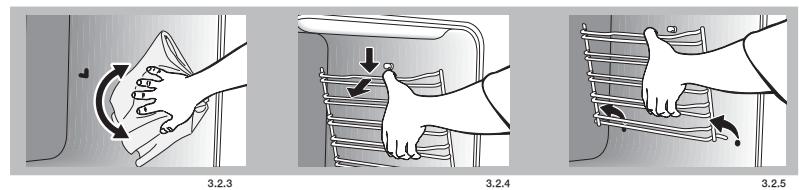
3.2 Smooth-walled models. ake out the side runners. Depending on the models, the side runners are fixed in two ways, either without a support (3.2.1, 3.2.2) or with a support (3.2.4, 3.2.5). Clean the oven while it is warm, wiping the walls with a cloth soaked in hot soapy water (3.2.3, 3.2.6). When you have cleaned the oven walls, replace the runners.
3.3 Self-cleaning rough-walled models. On these models, the rear plate and side panels are covered with a self-cleaning enamel that removes the grease while the oven is functioning. The side panels are reversible, doubling the lifetime of the coating. To remove the self-cleaning panels, firstly remove the side rails.
If the panels are not performing the self-cleaning process sufficiently, they will need regenerating. To do this, remove all the accessories and utensils from the inside of the oven. Thoroughly clean the oven surfaces that are not self-cleaning. Select the function.
Set the temperature to 250^ and set the time between 30 and 60 minutes, depending on how dirty the oven is.
When the cleaning programme ends and the oven has cooled down, wipe the self-cleaning elements with a damp sponge. They will then be totally functional again.
Note: Do not use specific oven cleaning products to clean the catalytic walls.
Do not scrape the surface with metal scouring pads or sharp or pointed instruments.
3.4 Cleaning the oven ceiling. If your oven has a fold-down grill, pull upwards and press to fold it down (3.4.1) and clean the top wall with a damp cloth (3.4.2).
3.5 Cleaning the outside of the oven. Use
neutral cleaning products and dry the oven well with a soft cloth.
3.6 The Aquasliding Function system makes it easier to clean the oven with steam. It takes 35 minutes and is done as follows:
- Start with a lukewarm oven.
- Remove all accessories and side guides from the model.
Spray 200 ml of water onto the inside walls of the oven. Using too much water could cause overflow.
Depending on the model,
a) Aquaslading wait until the oven indicates the end of the cleaning cycle.
b) traditional t 150^ for 10 minutes. After this time has elapsed, reduce the temperature to minimum (35°C - 75°C according to the model) and maintain for 20 minutes. Failure to follow these instructions may cause condensation on the front.
- Switch the oven off.
- Carefully open the oven door, avoiding contact with the steam.
-
At the end of the cycle, remove the water from inside and wipe away any remaining dirt with a dishcloth. This cycle is used to assist cleaning but loses its effectiveness if the recommended times are not followed.
-
Depending on the model, it can assist the Warning function.
Warnings: 1. Make sure the oven is switched off.
2. Never use steam cleaning machines.

Troubleshooting

You can solve the following problems yourself:
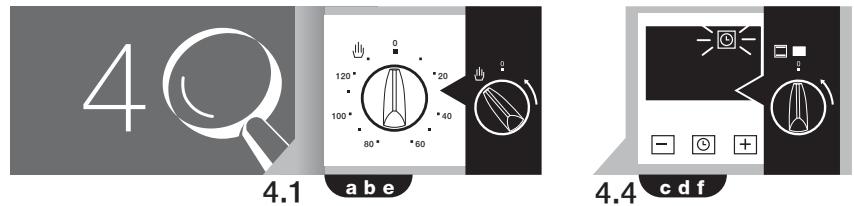
4.1 The oven does not switch on. Check it is plugged in and that the time selector dial is not turned to 0.
4.2 Smoke comes out during cooking. Turn the temperature down and/or clean the oven (point 3.3).
4.3 The oven makes a noise after cooking. This is normal, as the fan keeps running until the temperature inside and outside the oven is reduced.
Digital display models have a diagnosis system which detects any problems and warns the user. You can see this on the display:
4.4 Oven not working. l is flashing. Turn the function selector dial to 0 and set the time (point 2.3).
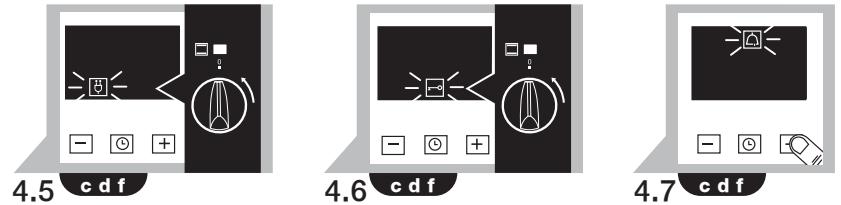
4.5 Oven not working. is flashing. The oven has been working for several hours and for safety reasons it has switched off
automatically. Turn the function selector dial to 0 and set the time (point 2.3).
4.6 Oven not working. is flashing. Turn the function selector dial to 0 and remove the child lock (point 2.11).
4.7 Oven not working. is flashing. Press any button.

- Do not try to repair the oven yourself.
Call the technical assistance service.

The Environment

This oven has been designed with environmental protection in mind.
Respect the environment. Only preheat the oven when necessary (see table). Use dark coloured cake tins whenever possible. For long cooking times, switch off the oven 5 or 10 minutes before the end of cooking time.
Management of waste electrical and electronic equipment.
The symbol indicates that the appliance must not be disposed of in traditional bins for domestic waste.
Take your oven to the a special collection centre. Recycling domestic appliances will prevent negative consequences for health and the environment and will allow savings on energy and resources.
For further information, contact the local authorities or the shop where you bought the oven.
Cooking Table
| Food | Programme and temperature | Time | Position | Preheat | Accessories | ||
| meat and poultry | beef 1,5 Kg | 190°C | 210°C | 50 - 60 min | 1 | no | |
| pork 1,5 Kg | 150°C | 180°C | 85 - 95 min | 2 | no | ||
| lamb 1,2 Kg | 200°C | 220°C | 40 - 50 min | 2 | no | ||
| turkey 4 Kg | 170°C | 190°C | 115 - 125 min | 1 | no | ||
| chicken 1,25 Kg | 210°C | 230°C | 50 - 60 min | 1 | no | ||
| vegetables | roasted red peppers 1,25 Kg | 190°C | 210°C | 30 - 40 min | 2 | no | |
| stuffed tomat-oes 4 servings | 200°C | 220°C | 15 - 19 min | 2 | no | ||
| fish and seafood | baked hake/ baked cod 1,5 Kg | 210°C | 230°C | 7 - 9 min | 2 | yes | |
| roasted lobster 1 Kg | 220°C | 240°C | 4 - 5 min | 4 | yes | ||
| sundry | pizza | 200°C | 220°C | 18 - 22 min | 1 | yes | |
| defrosting, all types of food | 75°C | 2 | no | ||||
| Fermenting dough for bread/cakes | 40°C - 50°C | 40°C - 50°C | 25 - 30 min | 0 | no | ||
| PERFORMANCE TESTING ACCORDING TO STANDARD IEC/EN60350 | 8.4.1 Butter cookies | 175°C | 22 min | 3 | yes | Deep Tray | |
| 8.4.2 Fairy cakes | 185°C | 23 min | 2 | yes | Deep Tray | ||
| *160°C | 45 min | 3 1 | no | Deep Tray/standard | |||
| 8.5.1 Fat-free sponge cake | 180°C | 25 min | 1 | no | Mould on grill | ||
| *180°C | 40 min | 3 1 | no | 2 moulds on 1 grills and deep | |||
| 8.5.2 Apple tart | 185°C | 40-45 min | 2 | no | Grill | ||
| *180°C | 50-55 min | 3 1 | no | 2 moulds on 1 grills and deep | |||
| 9.1 Surface browning | *250°C | 2-3 min | 4 | Pre-heat for 5 min | Cook 2-3 min. on grill | ||
- Depending on the model.
Bedienungsanleitung
- He npo3bOuTe C dYxOBKO HnKaKnx MaHnPyAun, CBXKITEcB COTJeIOM TEX6CnyKuBaHnA.

Okpyxhaoua cneda

KoHCTpykunnyDyXOBKnOCHOBaHa Na pInHcunpax 3aunTbOkpykaioe cpebl.
Co6nIOaIte npHnCInbI 3aunTbI OKpykaHOse
cpeBtI. IpnO3BOuITe npDeBaPHTeLHOe HAPReBAHne
dyXOBKn, TOnbKO eCNI 3TO Heo6xOJIMo (CM. Ta6NIcu).
PpI nnTbHbO PAoBe dyXOBKn BbIKIOuAHTe ee 3a 5-10
MnHyT Do yCTaHOBLeHNHO BpEMHeN.
Ipo6JIema OTPa6OtaHHbIX 3JIeKTPuYeCKnX I 3JIeKTPoHHbIX annapaTOB.
O603naueHne yka3bIbaet Ha To, YTO daHHbI npB6Op HJIb3a BbIbpaBt B 06bHbIe KOHTeHepbl dA b6ITobbIX OTXODB. PeredaiTe bauy dyxOBKY CcneuaJIbHbI CEHTP nPiEIMKn. YTuIN3aIIaN 6bITobbIX 3NeKTPoPnIP6OBpO N03BOJAIET N36ExaTb HeratINbIXn OocJeCTBm IAN 3dOPOBBy, OKpyXaIOeI cpebl IN NOMORAET 3KOHOOMTb 3NeKTPo3HePrrIO n pecypcbl. DnI pONUYEHN DOnONHNTelbHOH INFOPMaIuM 6OBATInTeCb K MECHbIM BLaCTAM IN B oPrHaN3aCIIO, rDe Bbl PnIObEpNI Bauy dyXOBKY.
Ta6nua npnroTOBJeHna
| MREО M ITUVA | Пишевий прочьт | Прогамma и temператуа | В装配 | Пложени | Пробarbeitung нарbeiten | Дорочьные псincocobеня |
| Телега 1.5 кг | 190°C | 210°C | 50-60 MIN | 1 | Нет | |
| Свинна 1.5 кг | 150°C | 180°C | 85-95 MIN | 2 | Нет | |
| Баранна 1.2 кг | 200°C | 220°C | 40-50 MIN | 2 | Нет | |
| Индзewska 4 кг | 170°C | 190°C | 115-125 MIN | 1 | Нет | |
| цыл徵нок 1.25 кг | 210°C | 230°C | 50-60 MIN | 1 | Нет | |
| Овоши | Тушенький Красский пereц 1.25 кг | 190°C | 210°C | 30-40 MIN | 2 | Нет |
| фаршированные Tomаты 4ш. | 200°C | 220°C | 15-19 MIN | 2 | Нет | |
| рьба и морец- Дуktы | Жарень морлан/ Залчeyная тrecа 1,5 кг | 210°C | 230°C | 7-9 MIN | 2 | да |
| Залчeyнские кравETки 1 кг | 220°C | 240°C | 4-5 MIN | 4 | да | |
| разимьhoe | піца | 200°C | 220°C | 18-22 MIN | 1 | да |
| Разморжаванie Любх пожков 75°C | 2 | Нет | ||||
| Боженnes/Pлобем сеса Ддя Влескii/Xлесь міп Дригин Издель | 40°C -50°C | 40°C -50°C | 25-30 MIN | 0 | Нет | |
| Сбдөгөнөнөнөнөнөнөнөнөнөнөнөнөнөнөнөнөнөнөнөнөнөнөнөнөнөнөнөнөнөнөнөнөнөнөнөнөнөнөнөнөнөнөнөнөнөнөнөнөнөнөn В Качеве STANДAPHTHOTO IEC/EM60350 | 8.4.1 Сдобhoe | 175°C | 22 MIN | 3 | да | |
| 8.4.2 Кексы | 185°C | 23 MIN | 2 | да | ||
| 8.5.1 ОБezзширунный БисBVIT | *160°C | 45 MIN | 3 1 | Нет | ||
| 8.5.2 Пбочь пирor | 180°C | 25 MIN | 1 | Нет | ||
| 9.1 Гейь поверхносту | *180°C | 40 MIN | 3 1 | Нет | ||
| 9.2 Гейь пирor | 185°C | 40-45 MIN | 2 | Нет | ||
| 9.3.1 | Гайдзewska | *180°C | 50-55 MIN | 3 1 | Нет | |
| 9.4.1 Гейь поверхносту | *250°C | 2-3 MIN | 4 | поста в�ем В ТЕЧЕМЕ 5 MIN | ||
^* B 3aBcNMOCTN OT MOdEIN.
Návod k použití
Velmi dulezite: Prectete se peclive tuto pfruacku pred tim, nez zacnete pouzivat troubu. Dokumentaci a doplky majdete uvnitr trouby.
