
H-2606 - Shredder Uline - Free user manual and instructions
Find the device manual for free H-2606 Uline in PDF.


User questions about H-2606 Uline
0 question about this device. Answer the ones you know or ask your own.
Ask a new question about this device
Download the instructions for your Shredder in PDF format for free! Find your manual H-2606 - Uline and take your electronic device back in hand. On this page are published all the documents necessary for the use of your device. H-2606 by Uline.
USER MANUAL H-2606 Uline
natural_image
Line drawing of a portable electronic device with buttons and ventilation slots (no text or symbols)
NOTE: Read these instructions before use.
Do not discard. Keep for future reference.
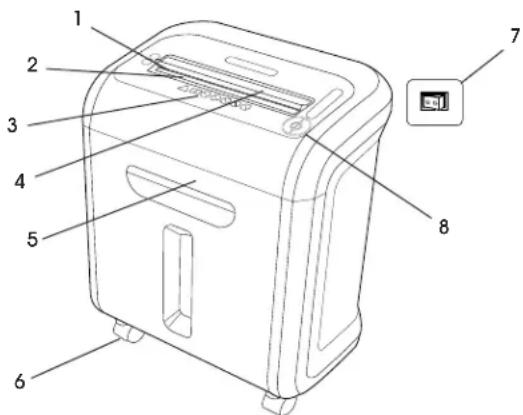
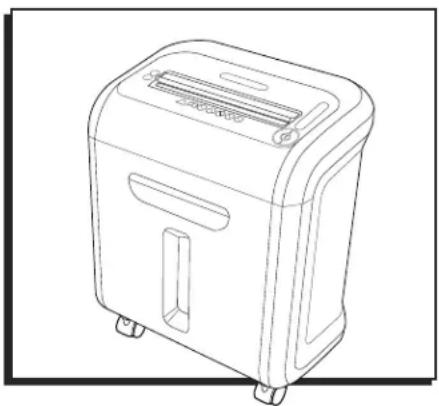
PARTS
text_image
Technical diagram of a device with numbered parts labeled 1 through 8, including a close-up inset showing a printer icon.| REF. | DESCRIPTION |
| 1 | SafeSense ^® Technology |
| 2 Paper entry | |
| 3 See safety instructions | |
| 4 CD/Card safety flap | |
| 5 Pullout bin | |
| 6 Casters | |
| 7 Disconnect power switch | |
| 8 Control Panel and LEDs | |
CAPABILITIES
Will shred paper, plastic credit cards, CD/DVDs, staples and small paper clips.
Will not shred adhesive labels, continuous form paper, transparencies, newspaper, cardboard, large paper clips, laminates, file folders, X-rays or plastic other than noted above.
Paper Shred Size
Cross-Cut - 5/32 x 1 1/2"
Maximum
- Sheets per pass – 16*
• CDs/Cards per pass – 1* - Paper entry width – 9"
*8½ x 11", 20 lb. paper at 120V, 60 Hz, 4 amps; heavier paper, humidity or other than rated voltage may reduce capacity.
Maximum recommended daily usage rates: 500 sheets, 25 credit cards, 10 CDs, 16 sheets per pass.
Fellowes SafeSense ^® shredders are designed to operate in home and office environments ranging between 50-80°F and at 40-80% relative humidity.
SAFETY
- Operation, maintenance and service requirements are covered in these instructions. Read completely before operating shredder.
- Keep away from children and pets. Keep hands away from paper entry. Always set to OFF (O) or unplug when not in use.
- Keep foreign objects – gloves, jewelry, clothing, hair, etc. – away from shredder openings. If object enters top opening, switch to Reverse ( ) back out object.
- Do not use aerosol products, petroleum-based or aerosol lubricants on or near shredder. Do not use canned air or air dusters on shredder. Vapors from propellants and petroleum-based lubricants may combust, causing serious injury.
-
Do not use if damaged or defective. Do not disassemble shredder. Do not place near or over heat source or water.
-
This shredder has a disconnect power switch that must be in the ON (I) position to operate the shredder. In case of emergency, move switch to OFF (O) position. This action will stop shredder immediately.
- Avoid touching exposed cutting blades under shredder head.
- Shredder must be plugged into a properly grounded wall outlet of the voltage and amperage designated on the label. The grounded outlet or socket must be installed near the equipment and easily accessible. Energy converters, transformers or extension cords should not be used with this product.
- Fire hazard – do not shred greeting cards with sound chips or batteries.
- For indoor use only.
- Unplug shredder before cleaning or servicing.
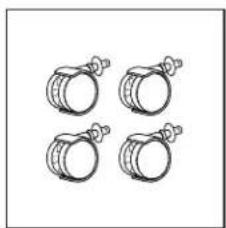
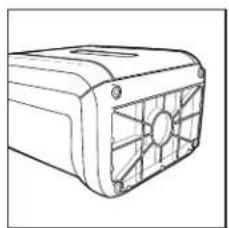
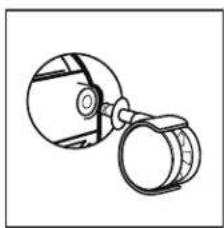
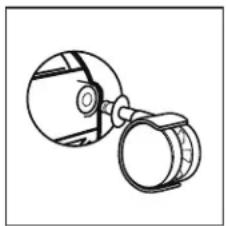
CASTER INSTALLATION
natural_image
Four identical cylindrical objects with handles, arranged in a 2x2 grid (no text or symbols)- Locate casters.
natural_image
Line drawing of a rectangular electronic device with a fan-like internal structure (no text or symbols)- Lay shredder on its back.
natural_image
Simple line drawing of a mechanical component with circular and cylindrical parts (no text or symbols)- Insert casters into housing.
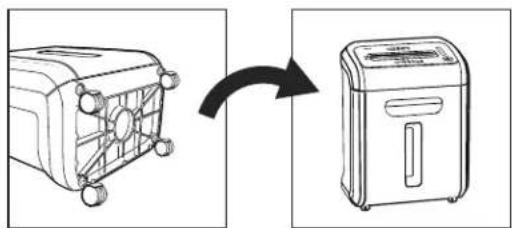
natural_image
Diagram showing a device transitioning from a fan-shaped box to a portable air conditioner via a directional arrow (no text or symbols present)- Flip upright.
OPERATING INSTRUCTIONS
Continuous operation up to 20-minute maximum.

NOTE: Shredder runs briefly after each pass to clear entry. Continuous operation beyond 20 minutes will trigger 30-minute cool down period.
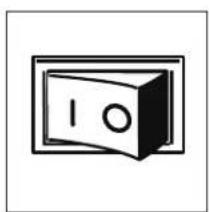
natural_image
Simple line drawing of a safe with no text or symbols- Plug in and put disconnect power switch in ON (I) position.
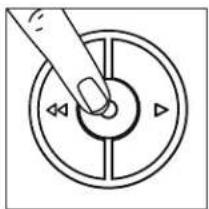
natural_image
Simple line drawing of a hand pressing a button on a circular dial (no text or symbols)- Press ON ( ) to activate (blue).
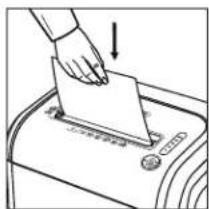
text_image
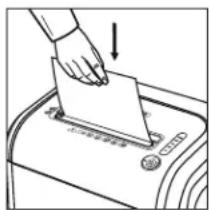
Diagram showing a hand inserting a card into a ballot box with an arrow indicating the process.- Feed paper straight into paper entry and release.
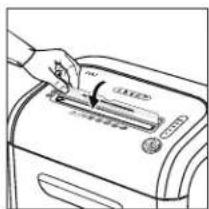
natural_image
Hand inserting a card into a printer (no text or symbols visible)- To shred CDs or credit cards, rotate safety flap into place.
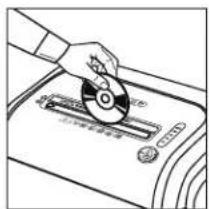
natural_image
Line drawing of a hand using a CD to press a device on a tray (no text or symbols visible)- Hold card/CD at edge. Feed into center of entry and release.
natural_image
Simple line drawing of a hand pressing down on a circular dial with directional arrows (no text or symbols)- When finished shredding, set to OFF ( position.
PRODUCT FEATURES
JAM-PROOF SYSTEM
Jam-proof system eliminates paper jams and powers through tough jobs.
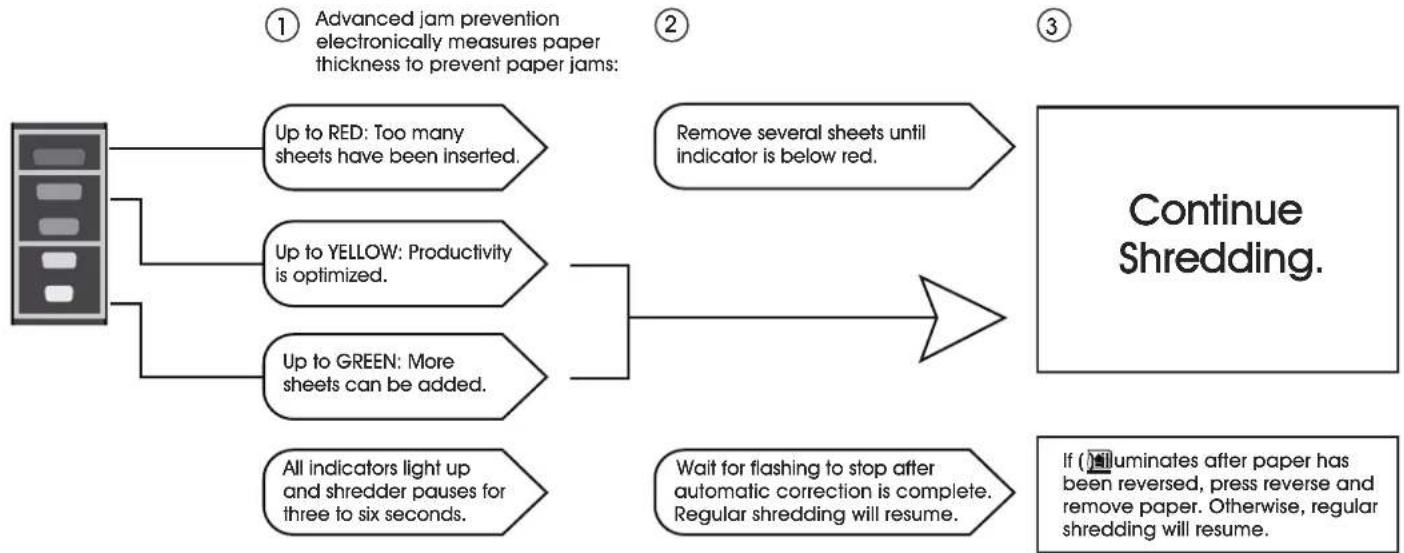
flowchart
graph TD
    A["Advanced jam prevention electronically measures paper thickness to prevent paper jams:"] --> B["Up to RED: Too many sheets have been inserted."]
    A --> C["Up to YELLOW: Productivity is optimized."]
    A --> D["Up to GREEN: More sheets can be added."]
    A --> E["All indicators light up and shredder pauses for three to six seconds."]
    B --> F["Remove several sheets until indicator is below red."]
    C --> F
    D --> G["Wait for flashing to stop after automatic correction is complete. Regular shredding will resume."]
    E --> H["If (luminates after paper has been reversed, press reverse and remove paper. Otherwise, regular shredding will resume.)"]
    F --> I["Continue Shredding."]
    G --> I
    H --> I
SAFESENSE® TECHNOLOGY
Stops shredding immediately when hands touch the paper opening.
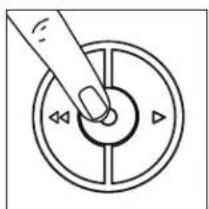
natural_image
Simple line drawing of a hand pressing a button on a circular dial (no text or symbols)- Turn the shredder ON ( to activate SafeSense ^® ).
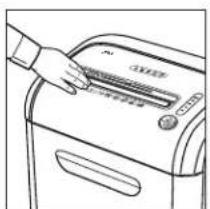
natural_image
Line drawing of a hand using a tool to press or adjust a device on a machine (no text or symbols visible)- Touch test area and look for the SafeSense® indicator to illuminate.
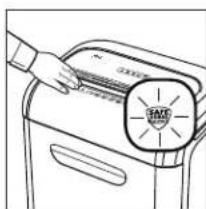
text_image
Diagram showing a hand pressing a labeled component with 'EWE' and 'SMT' text, likely illustrating a process or manufacturing procedure.- SafeSense ^® is active and working properly.
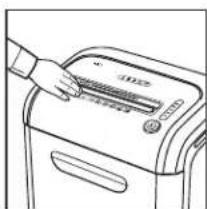
natural_image
Line drawing of a hand using a handheld device to press or clean a machine (no text or symbols visible)- If hand is held on SafeSense® area more than 3 seconds, shredder will shut off.
ENERGY SAVING SYSTEM
Energy saving system creates optimal energy efficiency.
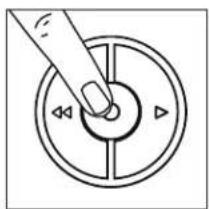
natural_image
Simple line drawing of a hand pressing down on a circular dial with directional arrows (no text or symbols)- To get out of sleep mode, touch control panel.
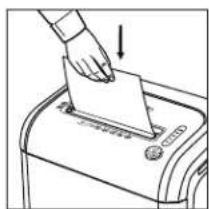
natural_image
Line drawing of a hand inserting a document into a machine (no text or symbols)- Insert paper.
NOTE: Sleep mode shuts down after 2 minutes of inactivity.
MAINTENANCE
OILING SHREDDER
All cross-cut shredders require oil for peak performance. If not oiled, a machine may experience diminished sheet capacity, intrusive noise when shredding and could ultimately stop running. To avoid these problems, we recommend oiling shredder each time user empties waste bin.

CAUTION! Use only a non-aerosol vegetable oil in long nozzle container, such as S-16094.
Follow oiling procedures below and repeat twice.
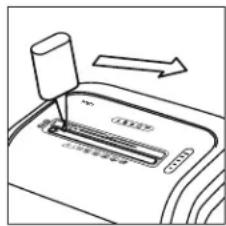
natural_image
Diagram of a device with an arrow indicating direction, showing a button labeled '100%' (no text or symbols on the device itself)- Apply oil across entry.
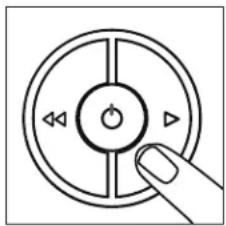
natural_image
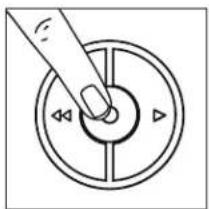
Simple line drawing of a circular control knob with directional arrows and a finger pointing to the center (no text or symbols)- Press and hold forward ( )▶ for 2-3 seconds.
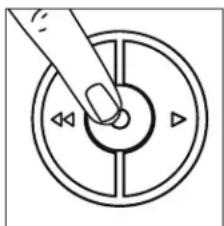
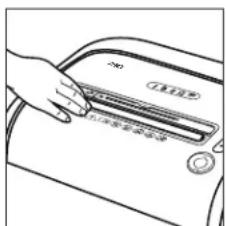
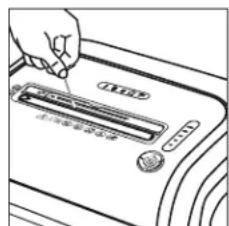
CLEANING AUTO-START INFRARED SENSORS
Paper detection sensors are for maintenance-free operation. However, on rare occasions the sensors may become blocked by paper dust, causing the motor to run even when there is no paper present.

NOTE: Two paper detection sensors are located in the center of the paper entry.
natural_image
Simple line drawing of a hand pressing a button on a circular dial with directional arrows (no text or symbols)- Turn off and unplug shredder.
text_image
Diagram showing a hand pressing down a car's door panel with Chinese text labels- Locate auto-start infrared sensor.
natural_image
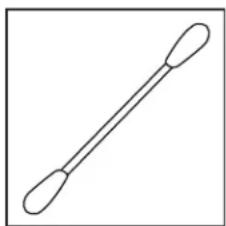
Simple line drawing of a pair of cotton bolls (no text or symbols)- Dip cotton swab in rubbing alcohol.
natural_image
Hand inserting a card into a printer (no text or symbols visible)- Using cotton swab, wipe away any contamination from the paper sensors.
TROUBLESHOOTING
| OPERATING ISSUE RECOMMENDATIONS | |
| Overheat Indicator | When the Overheat Indicator is illuminated:1. Allow the shredder to cool down.2. Resume shredding once the Overheat Indicator is no longer illuminated. |
| Bin Open | When Bin Open is illuminated:1. Close the bin.2. Resume shredding. |
| Bin Full | When Bin Full is illuminated:1. Empty the bin.2. Resume shredding. |
TROUBLESHOOTING CONTINUED
| OPERATING ISSUE RECOMMENDATIONS | |
| Remove Paper | When Remove Paper is illuminated:1. Press the 'reverse' button (◀◀) and remove the paper.2. Reduce paper quantity to an acceptable amount and refeed into paper entry. |
| SafeSense® Indicator | When SafeSense® Indicator is illuminated:1. Remove hands from proximity of the paper entry. NOTE: If illuminated for more than three seconds, the shredder will automatically turn off. In this case, press the power button on the control panel to resume shredding. NOTE: If illuminated for more than three seconds, the shredder will automatically turn off. In this case, press the power button on the control panel to resume shredding. |
natural_image
Line drawing of a portable toaster with front panel and side buttons (no text or symbols)
text_image
Technical diagram of a portable air conditioner unit with numbered parts and labeled componentsnatural_image
Four identical hand grenades arranged in a 2x2 grid (no text or symbols)natural_image
Line drawing of a mechanical component with fan-like structure (no text or symbols)- Coloque la trituradora sobre su parte posterior.
natural_image
Simple line drawing of a mechanical device with two circular components (no text or symbols)natural_image
Diagram showing a device transitioning from a fan-shaped box to a portable air conditioner unit (no text or symbols present)- Voltéela.
natural_image
Simple line drawing of a safe with open door and circular vent (no text or symbols)natural_image
Simple line drawing of a hand pressing a button on a circular dial with directional arrows (no text or symbols)- Presione ENCENDIDO (para activar (azul).
text_image
Diagram showing a hand inserting a card into a maillet, with an arrow indicating the process.text_image
Diagram showing a hand using a power transfer device to a printer, with Chinese text labels indicating 'Power Transfer' and 'Device 1'.text_image
Diagram showing a hand using a CD to press a device, with Chinese text labels indicating components and functions.natural_image
Simple line drawing of a hand pressing a button on a circular dial (no text or symbols)TECNOLOGÍA SAFESENSE®
natural_image
Simple line drawing of a hand pressing down on a circular dial with directional arrows (no text or symbols)natural_image
Line drawing of a hand pressing down on a kitchen appliance (no text or symbols visible)text_image
Diagram showing a hand pressing a label labeled 'SMT' on a device cover, likely illustrating a machine or scanner operation.natural_image
Line drawing of a hand pressing down on a device with a control panel (no text or symbols visible)natural_image
Simple line drawing of a hand pressing down on a circular control dial with playback buttons (no text or symbols)text_image
Diagram showing a hand inserting a document into a ballot box with an arrow indicating the process.- Inserte papel.
text_image
Diagram showing a printer's internal structure with an arrow indicating direction, labeled in Chinese.natural_image
Simple line drawing of a hand pressing a button on a circular dial (no text or symbols)natural_image
Simple line drawing of a hand pressing a button on a circular dial (no text or symbols)text_image
Hand-drawn diagram showing a hand pressing down on a car air vent with Chinese text labelsnatural_image
Simple line drawing of a pair of cotton bolls (no text or symbols)text_image
Diagram showing a hand inserting a card into a device, with Chinese text indicating the card's usage or application.natural_image
Line drawing of a portable toaster with front panel and side buttons (no text or symbols)
text_image
Technical diagram of a portable device with numbered parts and a close-up inset showing a CD or printer.natural_image
Four identical hand grenades arranged in a 2x2 grid (no text or symbols)natural_image
Line drawing of a rectangular electronic device with a fan-like grille (no text or symbols)natural_image
Simple line drawing of a mechanical clamp or dial (no text or symbols)natural_image
Diagram showing a device transitioning from a fan-shaped box to a portable air conditioner unit (no text or symbols present)- Remettez debout.
MODE D'EMPLOI
natural_image
Simple line drawing of a door with a handle and label '10' (no text or symbols beyond the numeral)natural_image
Hand pressing a button on a circular dial with directional arrows (no text or symbols)natural_image
Illustration of a hand inserting a card into a machine, with no visible text or symbolstext_image
Diagram showing a hand using a grater to press or adjust a device, with Chinese text labels indicating 'Close-up' and 'Close-Down'.natural_image
Illustration of a hand using a CD to press a CD into a slot (no text or symbols visible)natural_image
Simple line drawing of a circular dial with directional arrows, no text or symbols presentnatural_image
Simple line drawing of a hand pressing down on a circular dial with directional arrows (no text or symbols)natural_image
Line drawing of a hand pressing down on a machine (no text or symbols visible)natural_image
Line drawing of a hand pressing down on a machine component labeled 'SMT' (no text or symbols beyond label)natural_image
Line drawing of a hand pressing down on a device with a control panel (no text or symbols visible)natural_image
Simple line drawing of a hand pressing a button on a circular dial (no text or symbols)natural_image
Illustration of a hand inserting a document into a machine (no text or symbols visible)- Insérez le papier.


