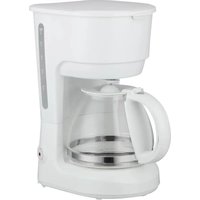
CFL7w - Coffee machine LISTO - Free user manual and instructions
Find the device manual for free CFL7w LISTO in PDF.


| Product type | Drip coffee maker |
| Brand | LISTO |
| Model | CFL7w |
| Power supply | 220-240 V ~ 50-60 Hz, 600 W |
| Maximum capacity | 6 cups (0.75 L) |
| Anti-drip system | Yes |
| Filter holder | Removable |
| Permanent filter | Yes (compatible with paper filter #2) |
| Keep warm | 40 minutes |
| Automatic shut-off | Yes (after 40 min) |
| Body material | Plastic |
| Carafe | Glass with handle |
| Water level indicator | Yes |
| On/off button with indicator light | Yes |
| Power consumption in off mode | 0 W |
| Time to reach low power mode | 34 min 56 s |
| Use | Household use only |
| Safety | Do not immerse, hot surfaces |
| Cleaning | Removable parts washable with soapy water |
| Descaling | Recommended once a month |
| Warranty | According to purchase invoice |
Frequently Asked Questions - CFL7w LISTO
User questions about CFL7w LISTO
0 question about this device. Answer the ones you know or ask your own.
Ask a new question about this device
Download the instructions for your Coffee machine in PDF format for free! Find your manual CFL7w - LISTO and take your electronic device back in hand. On this page are published all the documents necessary for the use of your device. CFL7w by LISTO.
USER MANUAL CFL7w LISTO
Filter coff ee machine
Bedienungsanleitung
Filterkaff eemaschine
Gebruiksaanwijzing
PLEASE READ THE INSTRUCTIONS CAREFULLY BEFORE USING THE APPLIANCE AND KEEP THEM IN A SAFE PLACE FOR FUTURE REFERENCE.
General instructions
- This appliance is intended for home use only. It has not been designed for use in domestic or similar applications such as:
- Staff dining areas in stores, offices or other work environments;
- Farm houses;
- By clients in hotels, motels and other residential type environments;
- Bed-and-breakfast type bedroom environments.
- Do not use the appliance outdoors.
- The coff eemaker shall not be placed in a cabinet when in use.
- Before plugging in your appliance, ensure that the electrical voltage in your
home is suitable for that indicated on the appliance's sign plate.
- Always plug in your appliance to an earthed socket.
- This appliance can be used by children aged from 8 years and above if they have been given supervision or instruction concerning use of the appliance in a safe way and if they understand the hazards involved. Keep the appliance and its cord out of reach of children aged less than 8 years.
- Cleaning and user maintenance shall not be made by children without supervision.
- Appliances can be used by persons with reduced physical, sensory or mental capabilities or lack of experience and knowledge if they have been given supervision or instruction concerning use of the appliance in a safe way and understand the hazards involved.
- Children shall not play with the appliance.
-
Never leave the appliance unattended when in operation.
-
Always unplug your appliance after every use and let it cool down before cleaning it, storing it or moving it.
-
Do not use this appliance:
-
if the power cord is damaged,
- in the event of a malfunction,
- if it has fallen into water,
- if the appliance has been damaged in any way.
Please take it to a customer service department centre, where it will be inspected and repaired. The user may not perform any repairs.
- If the supply cord is damaged, it must be replaced by the manufacturer, its service agent or similarly qualified persons in order to avoid a hazard.
- Never immerse the appliance, power cord or plug in water or any other liquid (e.g. when cleaning it).
- Always place the coffee maker on a flat, stable surface.
-
Do not handle the appliance or the plug with wet hands.
-
Do not let the power cord hang over the edge of a table or worktop, and do not allow it to come into contact with hot surfaces.
- Do not open the cover when the coffee is brewing. Steam and scalding water may be ejected: Burn risk!
- When unplugging the power cord, always pull it out at the plug, do not pull on the cord itself.
- Only use the accessories recommended and provided by your dealer.
- Keep the appliance away from sources of heat such as microwave ovens and the like. Never place this appliance on a gas or electric hob or in a hot oven.
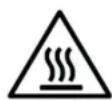
IMPORTANT NOTE: Some surfaces may become hot when in use (jug, hotplate, etc.). Do not touch the hot surfaces when the coffee maker is in operation. Use the jug handle and buttons.
Special precautions
- Never switch on the coffee maker without the jug in place on the hotplate.
- Do not use the glass jug if it is cracked or the handle is loose or in a weakened state.
- Never put a hot jug down on a cold surface.
- Do not move the coffee maker with water inside.
- Only put ground coffee in the coffee filter.
- Do not operate your coffee machine without water.
- Under no circumstances should the jug be placed in a microwave oven to heat up the coffee.
- Please turn off and unplug the appliance before leaving it unattended and before assembly, disassembly and cleaning.
-
In order to clean surfaces that come into contact with food, please refer to the “Cleaning and maintenance” section of the user guide.
-
IMPORTANT NOTE: Avoid spilling liquids onto the connector.
- WARNING : There is a risk of potential injury from misuse.
- The heating element surface is subject to residual heat after use.
- For guidance on cleaning the appliance, please refer to the below section of the instructions for use.
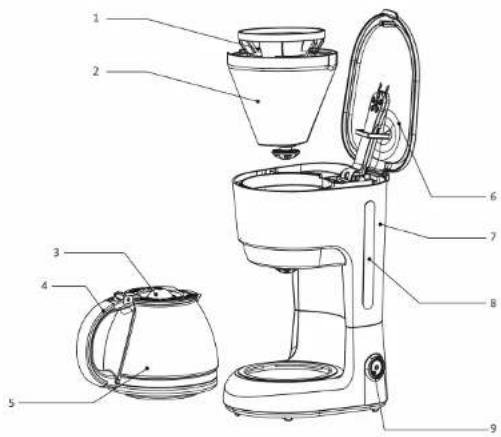
APPLIANCE DESCRIPTION
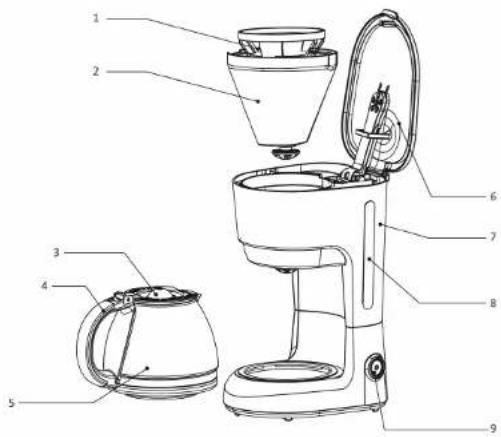
- Permanent filter
- Detachable fi lter holder
- Jug lid
- Jug handle
-
Glass jug
-
Coff ee machine lid with water diff user
- Water tank
- Water level indicator
- On/Off button with on indicator light
TECHNICAL FEATURES
• Supply voltage: 220-240 V\~50-60 Hz
• Electricity consumption: 600 W
• Maximum tank capacity: 6 cups (0.75 L)
- Anti-drip system
- Detachable fi Iter holder
- Permanent filter
• Compatible with paper filter size 2
- Keeps the coffee hot for 40 minutes
| Product Information for power consumption and maximum time to reach applicable low power mode | |
| Power consumption in off mode | 0 W |
| Power consumption in standby | NA |
| The maximum time needed to automatically reach the applicable low power mode or condition | 34'56" |
| Power consumption in network standby if all wired network ports are connected and all wireless network ports are activated | NA |
BEFORE FIRST USE
- Rinse all the removable parts of the coffee machine carefully with hot water.
- Fill the container with cold water up to the maximum level indicated.
- Run the coff ee machine for two cycles using only water (no coff ee) to thoroughly rinse it through. Pour away the hot water collected.
USING THE APPLIANCE
- Place the coffee maker on a flat, stable surface.
- Plug the power cord into an earthed mains outlet.
- Fill the jug with cold water.
- Open the water tank lid and pour in the water until the level indicator shows the number of cups you want. Close the lid.
WARNING!
- Make sure that the water level is not lower than the minimum mark (2 cups) and not higher than the maximum mark (6 cups) of the water tank.
- The jug gets very hot when the appliance is in use. Only pick it up by the handle. Do not touch the hot surfaces of the appliance. Risk of burns!
- Add the required amount of ground coffee to the permanent filter or into a paper filter size 2. Distribute the coffee evenly.
- Place the jug on the hot plate.
- Press the On/Off button. The indicator light comes on and the coffee begins to percolate into the jug after a few seconds.
IMPORTANT: Do not open the cover when the coffee is brewing. Steam and hot water may be ejected. Burn risk!
- After brewing, the coffee will be kept hot for 40 minutes if the jug remains on the hot plate. The coffee machine switches off automatically after this period.
- To switch off the device manually, press the On/Off button. The indicator light goes off. Unplug the appliance.
Note: Your coff ee machine is fitted with an anti-drip system. You can remove the jug for a short time while the coff ee is brewing so that you can serve yourself a cup. When you take the drug off the hot plate, the flow of coff ee is temporarily interrupted. The jug should be replaced on the hot plate within 30 seconds to prevent spillage.
CLEANING AND MAINTENANCE
CLEANING
- Unplug the coffee machine and let it cool down before cleaning it.
- Never immerse the appliance, power cord or plug in water or any other liquid.
- Open the lid of the coffee maker and remove the filter holder by gently pulling it upwards.
- The coffee machine's filter holder can be removed for easier cleaning and to avoid handling the used filter.
- Clean the detachable parts of the coffee machine (fi liter holder, jug, and permanent fi liter if needed) with hot soapy water. Rinse with clean water and dry carefully.
- You can wipe down the outer surfaces (including the hotplate) with a damp sponge.
- Do not use abrasive or aggressive cleaning solutions.
- Store the appliance in a clean, dry place.
DESCALING
- We recommend that you descale your appliance regularly to keep it in good condition.
- How often descaling is required depends on how hard the water is and how often the appliance is used. If used daily, we recommend descaling your coffee machine once every months.
- You can use a special 'coff ee machine' descaling liquid or powder sold in shops. When you do so, make sure you follow the descaler manufacturer's instructions.
- Afterwards, run the coffee machine 2 or 3 times without coffee to thoroughly rinse it through.
SICHERHEITSHINWEISE
BESCHRIJVING VAN HET APPARAAT
All the information, drawings, sketches and images contained in this document remain the exclusive property of SOURCING & CREATION. SOURCING & CREATION reserves all rights to its brands, designs and information. Any copy and reproduction through any means shall be deemed and considered as counterfeiting.
natural_image
Symbol of a trash bin crossed with no visible text or labelsATTENTION:
This symbol attached to the product means that it is an appliance whose disposal is subject to the directive on waste from electrical and electronic equipment (WEEE). This appliance may not in any way be treated as household waste and must be subject to a specific type of removal for this type of waste. Recycling and recovery systems are available in your area (waste removal) and by distributors. By taking your appliance at its end of life to a recycling facility, you will contribute to environmental conservation and prevent any harm to your health.
Warranty conditions:
This product is under warranty against any failure resulting from any manufacturing or material defects. This warranty does not cover defects or damage caused by improper set up, incorrect use, or normal wear and tear of this product. The warranty period is specified on the receipt of the purchase.
ACHTUNG:

Brand : LISTO
Model : CFL7w
Category : Coffee machine