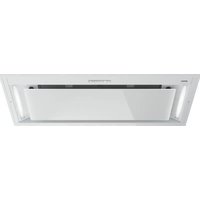
WU9054MG - Basket Atag - Free user manual and instructions
Find the device manual for free WU9054MG Atag in PDF.


User questions about WU9054MG Atag
0 question about this device. Answer the ones you know or ask your own.
Ask a new question about this device
Download the instructions for your Basket in PDF format for free! Find your manual WU9054MG - Atag and take your electronic device back in hand. On this page are published all the documents necessary for the use of your device. WU9054MG by Atag.
USER MANUAL WU9054MG Atag
natural_image
Exterior view of a modern air conditioner unit with recessed ventilation grilles (no text or symbols visible)GEBRUIKSHANDLEIDING
Afzuigkap
WU7095MX
WU9095MX
WU9054MG
text_image
User interface toolbar with icons for weather, navigation, and Wi-Fi settingstext_image
User interface toolbar with icons for weather, navigation, and basic function buttonstext_image
User interface toolbar with icons for grid, refresh, minus sign, plus, download, and Wi-Fi signaltext_image
User interface toolbar with icons for date, refresh, minus sign, plus, download, and Wi-Fi signaltext_image
User interface toolbar with navigation and function icons, including a zoom icon and plus/minus signstext_image
QR code image with a central logo, likely linking to a digital resource or website.text_image
User interface toolbar with icons for weather, navigation, refresh, plus sign, clock, and Wi-Fitext_image
Toolbar with function icons including grid, sun, minus sign, plus, clock, and Wi-Fi symboltext_image
User interface toolbar with icons for function, signal, minus, plus, refresh, and Wi-Fitext_image
Toolbar with function icons including grid, sun, minus sign, plus, refresh, and Wi-Fi symboltext_image
User interface toolbar with icons for weather, navigation, and connectivity functionstext_image
User interface toolbar with icons for weather, solar, minus sign, plus, refresh, and Wi-Fitext_image
Toolbar with icons for navigation, weather, minus sign, plus, clock, and Wi-Fi symbolstext_image
Toolbar with icons for weather, solar, alarm, plus, refresh, and Wi-Fi functionstext_image
User interface toolbar with icons for grid, refresh, minus sign, plus, download, and Wi-Fi signaltext_image
Toolbar with function icons including grid, sun, minus sign, plus, refresh, and Wi-Fi symbolWifi-menu
text_image
Toolbar with icons including grid, sun, minus sign, plus, Wi-Fi, and Wi-Fi symbolWifiinschakelen:
text_image
Toolbar with weather and signal icons including grid, sun, minus sign, plus, clock, and Wi-Fi symboltext_image
User interface toolbar with icons for grid, sun, minus sign, plus, refresh, and Wi-FiWificonnectiviteit
Wifiuitschakelen:
text_image
Toolbar with function icons including grid, sun, minus, plus, refresh, and Wi-Fitext_image
Toolbar with function icons including grid, sun, minus sign, plus, refresh, and Wi-Fi symbolnatural_image
Two circular icons with dashed outlines on a black background, no text or symbols present.natural_image
Black background with white circular icons and directional arrows (no text or symbols)natural_image
Two circular icons, one with a clock face and the other with a refresh symbol, on a dark background (no text or labels)natural_image
Black background with white directional arrows and a central circular symbol (no text or labels)text_image
Diagram of a refrigerator interior with labeled parts and directional arrows indicating movement, including warning labels and electrical outlet symbols.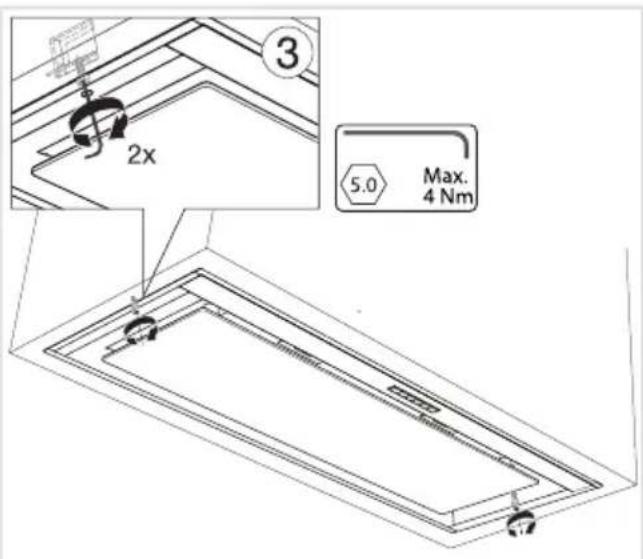
text_image
3 2x 5.0 Max. 4 Nmtext_image
Symbol of a trash bin with crossed-out lanes and a blank sign belownatural_image
Exterior view of a modern air conditioner unit with recessed ventilation grilles (no text or symbols visible)NOTICED'UTILISATION
Hotteaspirante
WU7095MX
WU9095MX
WU9054MG
Tablesdesmatières
text_image
User interface toolbar with icons for weather, navigation, and Wi-Fi settingsLahotteaspirantesemetenmarcheàlapositionderéglagelaplusbasse.
text_image
User interface toolbar with weather and navigation icons including grid, sun, minus sign, plus, download, and Wi-Fitext_image
User interface toolbar with icons for weather, navigation, refresh, and Wi-Fi settingstext_image
User interface toolbar with icons for zoom, refresh, minus sign, plus, download, and Wi-Fi signaltext_image
User interface toolbar with navigation and function icons, including a cursor hovering over a gear symboltext_image
QR code image with a central logo, likely linking to a digital resource or website.text_image
User interface toolbar with icons for weather, navigation, refresh, plus sign, clock, and Wi-Fitext_image
User interface toolbar with icons for navigation, weather, battery, plus sign, clock, and Wi-Fi- Après3secondes, il reviendraa umenu Wi-Fi.

text_image
Toolbar with function icons including grid, sun, minus sign, plus, refresh, and Wi-Fi symboltext_image
User interface toolbar with icons for grid, sun, minus sign, plus, refresh, and Wi-Fi signaltext_image
Toolbar with function icons including grid, sun, minus sign, plus, refresh, and Wi-Fi symboltext_image
Toolbar with function icons including grid, sun, minus sign, plus, refresh, and Wi-Fi symboltext_image
User interface toolbar with icons for weather, navigation, refresh, plus sign, clock, and Wi-Fitext_image
User interface toolbar with icons for weather, sun, minus sign, plus, refresh, and Wi-Fitext_image
Toolbar with weather and signal icons including grid, sun, minus sign, plus, clock, and Wi-Fi symboltext_image
User interface toolbar with icons for weather, navigation, and connectivity symbolsMenuWi-Fi
text_image
Toolbar with icons for weather, navigation, and connectivity functionsActiverleWi-Fi:
text_image
Toolbar with icons including grid, sun, minus sign, plus, clock, Wi-Fi, and power symboltext_image
User interface toolbar with icons for date, refresh, minus sign, plus, refresh, and Wi-FiDésactiverleWi-Fi:
text_image
Toolbar with function icons including grid, sun, minus, plus, refresh, and Wi-Fitext_image
Toolbar with function icons including grid, sun, minus sign, plus, clock, and Wi-Fi symbolsnatural_image
Two white circular icons with dashed outlines on a black background, no text or symbols present.text_image
Diagram with labeled geometric shapes including circles, triangles, and directional arrows on a black backgroundnatural_image
Two circular icons, one white with a pie and the other with a refresh symbol, on a dark background (no text or labels)natural_image
Black background with white directional arrows and a central circular symbol (no text or labels)text_image
Diagram of a kitchen ventilation system with labeled components and warning indicators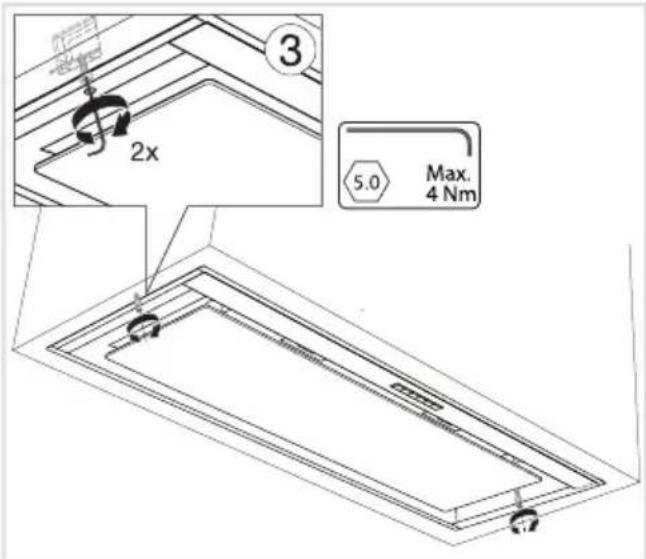
text_image
3 2x 5.0 Max. 4 Nmtext_image
Warning symbol for a trash bin with crossed lines indicating no waste or discharge, and a black rectangular block below.natural_image
Exterior view of a modern air conditioner unit with recessed ventilation grilles (no text or symbols visible)GEBRAUCHSANWEISUNG
Abzugshaube
WU7095MX
WU9095MX
WU9054MG
text_image
User interface toolbar with icons for weather, navigation, and Wi-Fi settingstext_image
User interface toolbar with icons for weather, navigation, and Wi-Fi settingstext_image
User interface toolbar with icons for grid, refresh, minus sign, plus, download, and Wi-Fi signaltext_image
User interface toolbar with icons for date, refresh, minus sign, plus, download, and Wi-Fi signaltext_image
User interface toolbar with icons for zoom, refresh, minus sign, plus, download, and Wi-Fitext_image
QR code image with a central logo, likely linking to a digital resource or website.text_image
User interface toolbar with icons for weather, navigation, refresh, plus sign, clock, and Wi-Fitext_image
User interface toolbar with icons for navigation, weather, battery, plus sign, clock, and Wi-Fitext_image
Toolbar with function icons including grid, sun, minus sign, plus, refresh, and Wi-Fi symboltext_image
User interface toolbar with icons for grid, sun, minus sign, plus, refresh, and Wi-Fi signaltext_image
Toolbar with function icons including grid, sun, minus sign, plus, refresh, and Wi-Fi symboltext_image
Toolbar with function icons including grid, sun, minus sign, plus, refresh, and Wi-Fi symboltext_image
User interface toolbar with icons for weather, navigation, refresh, plus sign, clock, and Wi-Fitext_image
Toolbar with icons for weather, solar, minus sign, plus, refresh, and Wi-Fi functionstext_image
Toolbar with weather and signal icons including grid, sun, minus sign, plus, clock, and Wi-Fi symboltext_image
User interface toolbar with icons for weather, navigation, and function buttonsWLAN-Menü
text_image
Toolbar with function icons including grid, sun, minus sign, plus, refresh, and Wi-Fi symbolWLANeinschalten:
text_image
Toolbar with icons for weather, navigation, and connectivity functionstext_image
Toolbar with function icons including grid, sun, minus sign, plus, refresh, and Wi-Fi symboltext_image
Toolbar with function icons including grid, sun, minus, plus, refresh, and Wi-Fitext_image
Toolbar with icons for navigation, weather, minus sign, plus sign, refresh, and Wi-Fi functionnatural_image
Two circular icons with dashed outlines on a black background, no text or symbols present.natural_image
Black background with white circular icons and directional arrows (no text or symbols)natural_image
Two circular icons, one with a clock face and the other with a refresh symbol, on a dark background (no text or symbols)natural_image
Black background with white directional arrows and a central circular symbol (no text or labels)text_image
Diagram of a microwave oven with labeled components and warning indicators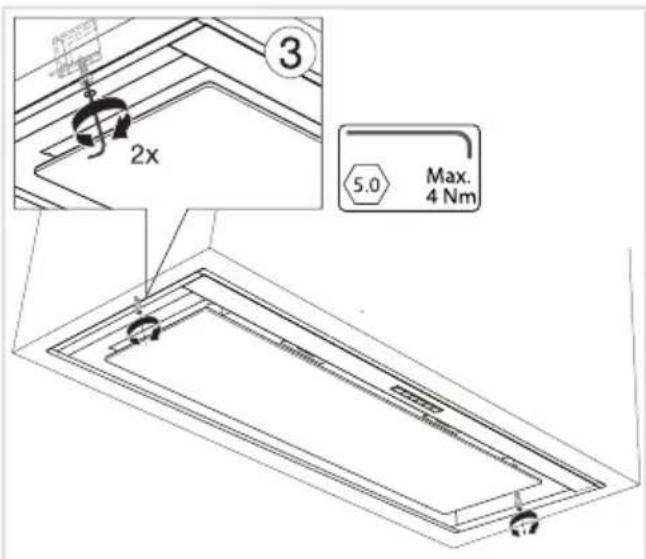
text_image
3 2x 5.0 Max. 4 Nmtext_image
Warning symbol for a trash bin with crossed lines indicating no waste, and a black rectangular block below.natural_image
Simple line drawing of a trash bin with crossed lines indicating no waste or discharge (no text or symbols)natural_image
Exterior view of a modern air conditioner unit with recessed ventilation grilles (no text or symbols visible)INSTRUCTIONSFORUSE
Cookerhood
WU7095MX
WU9095MX
WU9054MG
Contents
Making the connection between cookerhood and hob....
3Pictogramsused......
4Safety......
7Yourcookerhood......
7Dearcustomer!......
8Descriptionhood......
8Descriptionbuttoncontrol......
9Operation....
9Switchingextractiononandoff......
9Switchontheboostsetting......
9Switchingonthetimer......
10Switchingonrecirculationmode......
10Switchingoffrecirculationmode......
10CleanAirfunction......
11Switchingthelightonandoff......
11Changingthecolourtemperature......
11
12Wi-Ficonnectivity......
12ConnectLife-appendWi-Ficonnection.....
17Remotecontrol....
17DeTopisftioenergytefficitealtcookingwith.....
17Paihingtheremote 29
18Switchingextractiononandoff......
18Switchontheboostsetting......
18Switching
19Switching
19Switching
19CleanAirfi
20Switching
20Changing
21Maintena
21Cleaning.
22Filterindic
22Lighting..
23Batteryoft
24Technica
24EUProduc
25Compliant
26Installatio
26......
27Preparatic
28Appliance
28Built-in....
29Environn
29
29Disposal
The following symbols are used throughout the manual, and they have the following meanings:

INFORMATION!
Information, advice, tip, or recommendation

WARNING!
Warning-general danger

ELECTRICSHOCK!
Warning-dangerofelectricshock

HOTSURFACE!
Warning-dangerofhotsurface

DANGEROFFIRE!
Warning-dangeroffire
It is important that you carefully read the instructions.
WARNING!
READCAREFULLYANDKEEPITFORFUTUREREFERENCE!
Safeuse
- Themanufacturercannotbeheldliableforanydamageresulting fromfailuretofollowthesafetyinstructionsandwarnings.
- Damagecausedbyincorrectconnection,incorrectfitting,or incorrectuseisnotcoveredbythewarranty.
- Childrenshallnotplaywiththeappliance.Cleaningandusermaintenanceshallnotbemadebychildrenwithoutsupervision.
- This appliance is only designed for household use.
- Alwaysprovideadequateventilation!
- Thereshallbeadequateventilationoftheroomwhentherange hoodisusedatthesametimeasappliancesburninggasorother fuels.
- Whentherangehood and appliance supply with energy other than electricity aresimultaneously in operation, then negative pressure in the room must not exceed 4Pa (4×10 ^-5 bar).
- Localregulationsconcerningthedischargeofairhavetobe fulfilled.
- Neveruseasteamcleanerforcleaningtheappliance.
Onlycleantheappliancewhenswitchedoff. Thesteamofasteam cleanercouldreachtheconductingpartsandcauseanelectrical short.
WARNING!
- This appliance can be used by children aged from 8 years and above and persons with reduced physical, sensory or mental capabilities or lack of experience and knowledge if they have been given supervision or instruction concerning use of the appliance in asafeway and understand the hazards involved.
- This appliance and the accessible parts will become hot during use. Donottouchhotparts. Keep children younger than 8 away from the appliance unless they are under continuous supervision.
ELECTRICSHOCK!
Avoidtheriskofelectricshock;makesuretheapplianceis switchedoffbeforecleaningtheappliance.
- Onlyusetheapplianceinsidethehome.
- Donotusethecookerhoodifthegreasefilterhasnotbeenfitted properly!
- Donotleanagainstthecookerhood.
- Neverusethecookerhoodasaworkingsurfaceunlesssthisis indicatedexplicitly.
- Grease and oil are inflammable when overheated. Remain in the cooking area when preparing meals.
- Topreventhotfatfromcatchingfire,youshouldonlydeep-fry undercontinuoussupervision.
- Thecookerhoodshouldbecleanedregularlybothontheoutside aswellastheinside(atleast1xpermonth).Insufficientcleaning oradelayinthereplacementoffilterscancauseafirehazard.
- Cleanthefiltersontime.
- Thegreasefilterscanbecomehotduringuse. Aftercookingwait at least 30 minutes before cleaning.
- Plesenote!Intensiveusecanleadtocondensationonthe cookerhood.Condensationissimpletoremovewithadrycloth.
Safety
- Followtheinstructionsinthemanualforcleaningorreplacingthe greasefiltersand/orcarbonfilters!

DANGEROFFIRE!
- Thereisariskoffireiftheinstructionsforcleaningorreplacing greasefiltersand/orcarbonfiltersarenotfollowed.
- Throughgreasedepositsinthemetalgreasefilter.Neverwork withopenflameundertheappliance(eg.flambéing). Alwaysusetheappliancewiththemetalgreasefilter.Cleanthe greasefilterregularly.
- Throughoverheatedfatoroil.Neverextinguishafirewithwater; alwaysuseafireblanket,lidorplate.
- The appliance may have sharpedges; please be careful during cleaning.
- ThelightemittedbyLEDlightsisverydazzlingandcandamage theeyes.DonotlookdirectlyintotheswitchedonLEDlightsfor longerthan100seconds.
- When washing grease filters in the dish washeritis recommended to use a short, non-intensive programme. Check the grease filter after washing in the dish washer for wear (loose material). Wear can occur as a result of frequent washing. If loose material is visible, replace the filters in order to prevent this loose material from ending up in the food that is cooked.
- Donotusetheapplianceintemperaturesbelow5°C.
- Keepa20cmseparationdistancetotheappliance.
Dearcustomer!
Pleasereadtheoperatinginstructionsbeforeuse. Theyincludegeneraltips, informationaboutthe settingsandadjustmentsyoucanmake,andthebestwaytotakecareofyourappliance.
TIP!
You can find them most recent version of the instructions for use on our website.
Enjoy your cooking!
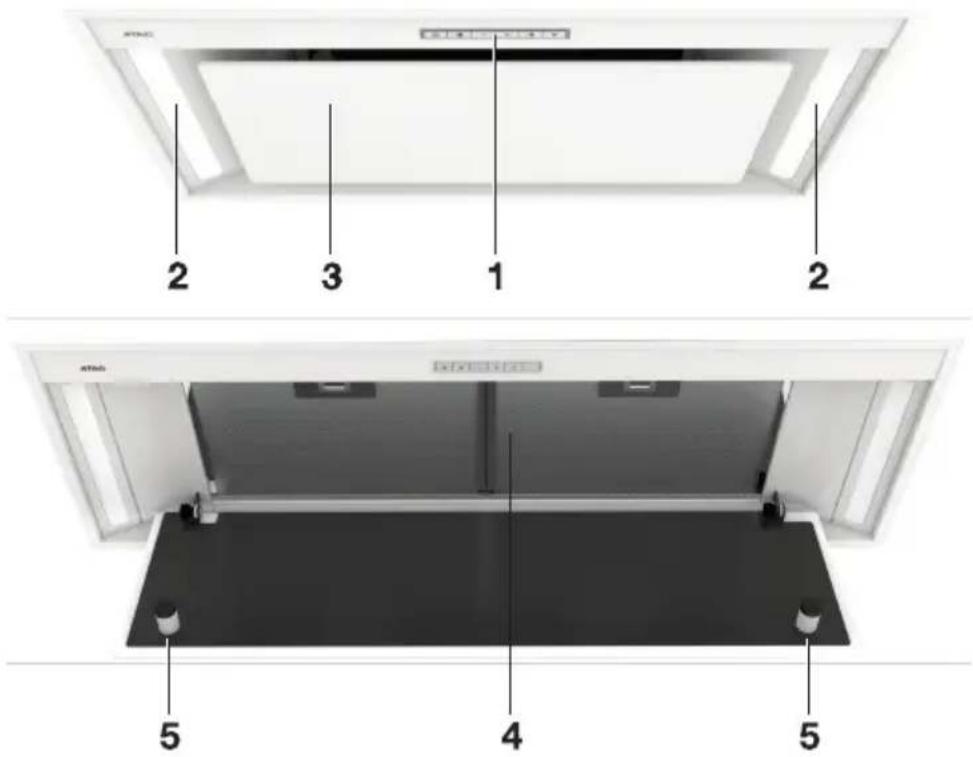
Descriptionhood
- ButtonControl
2.LEDbar - Edgeextraction panel
- Greasefilter
5.Magnet
text_image
2 3 1 2 5 4 5Descriptionbuttoncontrol
text_image
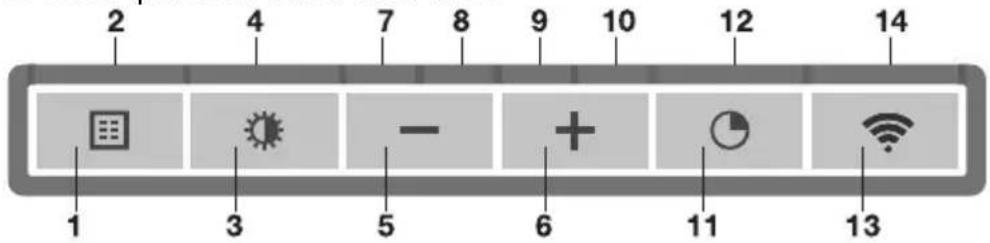
2 4 7 8 9 10 12 14 - + - 1 3 5 6 11 131.Filterresetbutton
2.Filterindicator, signals when filters require cleaning
3. Lightingbutton, switcheson/offanddimsthelighting
4. Lighting indicator
5.-(minus)push-button, reducesairextractioncapacityandswitchesoff
6. +(plus)push-button,switchesonandincreasesairextractioncapacity
7. Speedlevel1 indicator
8.Speedlevel2indicator
9. Speedlevel3indicator
10. Speedlevel4/boostindicator
11.Push-buttontimerfunction, turnsoffthehoodaftertime
12. Timerindicatorlight
13.Wi-Fipush-button
14.Wi-Fiindicatorlight
Switchingextractiononandoff
- Pressthe+(plus)button.

text_image
User interface toolbar with icons for weather, navigation, and Wi-Fi settingsThecookerhoodwillswitchonatthelowestsetting.
- Pressthe+(plus)buttonagainforahigherfansetting. Pressandholdthe+(plus)buttonfor 1secondtoselectthehighestsetting(boost).
- Pressthe-(minus)buttontoselectalowersetting.
The extraction setting is indicated in the speed level indicators.
Eachlightarearepresentsaspeedlevel.Speedlevelindicator4alsoservesasaboostindicator whenitblinks.
- If the extraction capacity is set top position 1, switch off the cooker hood by briefly pressing the -(minus) button.
- Toswitchoffthecookerhood, pressandholdthe-(minus)buttonforatleast1second.
Switchontheboostsetting
- Pressandholdthe+(plus)buttonforatleast1second.

text_image
User interface toolbar with icons for weather, navigation, and Wi-Fi settingsTheboostsettingisswitchedonfor10minutes. Thespeedlevel4indicatorwillflashduringthis period. Theoriginalextractionsettingwillbereactivatedafterthisperiod.
- Pressandreleasethe-(minus)buttontoswitchchofftheboostsetting.
NOTE!
If the boost setting has been selected, the timer function cannot be activated.
Switchingonthetimer
- Pressthetimerbutton.

text_image
User interface toolbar with icons for grid, refresh, minus sign, plus, download, and Wi-Fi signalThetimerindicatorwillstarttoblink.
Thecookerhoodwillswitchoffautomaticallyafter10minutes.
- Switchoffthetimerfunctionbypressingarandombutton(excepttheoneforlighting).
TIP!
Thishoodissetasanextractorhoodondelivery(theairisexhaustedtotheoutside).Thehoodcanalsobesettorecirculationuse(theairisblownbackintotheroomafterfiltrationthroughgreasefiltersandacombi-filter).
WithanRMSkit(recirculationmodificationset), the air will first be cleaned by the grease filters, and then odours will be filtered by the combi-filter. The cleanedair is recirculated back into the kitchen.
Switchingonrecirculationmode
Simultaneouslypressandholdthetimerbuttonandthelightbuttonuntilthefilterindicatorflashes 3times.
Thecarbonfilterindicatorisactivated.
Switchingoffrecirculationmode
Simultaneouslypressandholdthetimerbuttonandthelightbuttonuntilthefilterindicatorlightsup for3secondsandthenturnsoff.
CleanAirfunction
TheCleanAirfunctionallowsyoutofreshentheairinyourkitchenforashortperiodeveryhour,foramaximumof24hoursatlevel1.
- Switchoffthecookerhood.
- Pressandholdthetimerbuttonforapproximately3seconds.

text_image
User interface toolbar with icons for date, refresh, minus sign, plus, download, and Wi-Fi signalThecookerhoodwillswitchonautmaticallyfor10minuteseveryhouratthelowestspeed setting.Duringextraction,theindicatorlightsshowafast-runninglight.Whenthehoodswitchesoffafter10minutes,theindicatorlightsshowaslowrunninglightuntilthehoodswitchesonagainafter50minutes.
3.SwitchofftheCleanAirfunctioninthemeantimebypassingarandombutton(anybuttonother thanthelightbutton).
Switchingthelightonandoff
- Shortlypressandreleasethelightbutton.

text_image
User interface toolbar with navigation and function icons, including a cursor hovering over a gear symbolThelightswitchesonatmaximumstrength.
- Pressandholdthelightingbuttontosetthelightingstrength.
Thelightingchangesfrommaximumtominimumstrengthandviceversa.
- Toturnoffthelight, shortlypressthelightbuttonwhilethelightison.
Changingthecolourtemperature
Youcanadjustthelightingcolortemperature.
- Press and hold the light button. Press the – (minus) button to make the light 'colder' or press the +(plus)buttontomakethelight'warmer'.
Making the connection between cooker hood and hob
Tooperatethecookerhoodwiththehob,youmustmakeaconnectionbetweenthehobandthe hood.
Tomaketheconnection, theConnectionsetupmodeofthecookerhoodandthehobmustbe activated.
Seealsothemanualforthehob.Checkourwebsiteforthefullrangeofhobsthatcanbeconnected toyourcookerhood.
-
The hood and lights must be switched off.
-
Pressandholdsimultaneouslythe-(minus)andthe+(plus)buttonfor3seconds. All the indicatorswillblinksimultaneouslyforamaximumof3minutes.
-
On your hob, activatethepairingmodeintheusermenu(seethehobmanual). The connection to the hob is established.
-
If the connection is successful, the cooker hood will return to standby.
NOTE!
Whenoperatingisoverruled(bymanuallyoperatingthecookerhood)inconnectionmode,the pairingwillbelostandmustbepairedagain.

ConnectLife-appendWi-Ficonnection
This appliance is equipped with a Wi-Fi module that allows the appliance to connect to the internet via your home network and to use it with the ConnectLife-app, installed on a mobile device like a smartphone or tablet.
TheappisavailableontheAppleAppStoreandGooglePlayStore.Youwillneedtheapptoconnect theappliancetoyournetwork.Afteryouruseraccountispairedwiththeappliance,theappcanbe usedtomonitorthestatusoftheapplianceandenablestoupdateitsfirmware.
You can find direct links for the different store to the ConnectLife-app under www.connectlife.io/getstartedandmoreinformationaboutthesystem,support,available functionalities,and additional options under www.connectlife.io.
Preparation
- Make sure you know the name/SSID of your router's Wi-Fi network and its password ^1) .
- Make sure you have the label with the QR code of the appliance unique ID ('AUID') accessible –youneedtoscanitwithyourmobiledevicewhentheAppromptstodoso.
- Yoursmartdevice'sBluetoothisturnedon.

text_image
QR code image with a central logo, likely linking to a digital resource or website.• InstalltheConnectLife-apponamobiledevice-scantheQR codetofindit.
- LaunchtheApp.Pleaseregisterifyoudon'thaveanaccountyet.
- Loginwithyouraccount.
- TheAppwillneedaccessthemobile'slocationtosearchforWi-Fi networksandtothecameratoscanQRcodes.
Wi-FiConnectionsetup
YouwillfirstconnectyourmobiledevicedirectlytotheapplianceviaWi-Fi,andthenusethis connectiontosharethedataofyourWi-Fihomenetwork.Thecookerhoodcanthenconnecttothe homenetwork.
- LaunchtheConnectLife-app.
- IntheConnectLifeapplication, gotothe "Adddevice" menu and select the appropriate type of device. ThenscantheQRcode(it can be found on therating plate of the appliance; you can also enter the AUID/SNcodemanually).
FollowtheinstructionsintheConnectLife-app.
TheuseraccountsignedinonthemobiledeviceusedfortheConnectionsetupwillautomatically be paired with the cloud. If you'd like to pair another account, e.g. on a second user's mobile device see "Pairingadditionaluser".
Forsafetyreasons,onlypaireduserscancommunicatewiththecookerhood.
1) NOTE: only2,4Ghznetworksaresupported
FirststepstosetuptheWi-Ficonnectivity:
-
Checkthe "Requirements" as described above.
-
The hood and lights must be switched off.
3.PresstheWi-Fibuttonforthreeseconds.TheWi-Fiindicatorwillblink3times.

text_image
User interface toolbar with icons for weather, navigation, and Wi-Fi settings4.PresstheWi-Fibuttonfor3secondstoturnonWi-Fi.Speedlevel2and3indicatorswillblink3 times.TheWi-Fiindicatorflashes.

text_image
Toolbar with function icons including grid, sun, minus, plus, clock, and Wi-Fi symbols- After 3 seconds it will return to the Wi-Fi-menu.

text_image
User interface toolbar with icons for function, signal, minus, plus, refresh, and Wi-Fi- Simultaneously press the + (plus) and timer button for 3 seconds to access 'Connection settings'. Speedlevel2indicatorandtheWi-Fiindicatorflashwhileconnecting.Thismodewillturnoff automaticallyafter5minutes.

text_image
Toolbar with function icons including grid, sun, minus sign, plus, refresh, and Wi-Fi symbol7.StarttheConnectLife-appendfollowtheinstructionsintheapp.
- If the ConnectLife-app does not connect to the device, wait 10 minutes and repeat the steps described or press the -(minus) button for 3 second stole the Wi-Fimenu.

INFORMATION!
TroubleshootquicklybyturningtheWi-Fimoduleoffandonagain.Youcanfindmorehelpinthe "Wi-Fitroubleshooting"section.
DependingontheWi-Fistate,thereare1to3optionsavailableinthemenu:
•TheConnectionSetupMode
•ThePairingMode
- Remotecontrolmode
If more than 1 option is available then us the + (plus) and - (minus) button to toggle between the options.
Wi-Ficonnectivity
ConnectionSetupMode
- The appliance must be connected to the Cloud for the application to monitor and control the appliance remotely.
- Speedlevel2indicatorandWi-Fiindicatorwilllightup.

text_image
Toolbar with function icons including grid, sun, minus sign, plus, clock, and Wi-Fi symbol- Touch the timer key to enable 'Connection Setup Mode'. Speed level 2 indicator will flash.
- Thismodewillbedisabledautomaticallyafter5minutes.
- FollowtheinstructionsoftheConnectLife-app.
PairingMode
When the process was successful and you want to pair another user, you can use the "Pairing mode" of the Wi-Fi menu and the "Pairing" or "Discovery" option of the ConnectLife-app. In the ConnectLife-app, selection 'AddAppliance' and follow the instructions.

text_image
Toolbar with icons including grid, sun, minus sign, plus, refresh, and Wi-Fi symbol- Touch the timer key to enable 'Pairing mode'. The speed level 3 indicator will flash.

text_image
User interface toolbar with icons for calendar, weather, minus sign, plus, refresh, and Wi-Fi- Thismodewillbedisabledautomaticallyafter3minutes.
- On the ConnectLife-app, use the 'Pairing' or 'Discovery' option of the ConnectLife app to pair anotheruser.
Remotecontrolmodeswitchonandoff
Tobeabletochangefunctionsettingsremotely, theappliancemustbeswitchedonandthe ConnectLife-appmustbeenabled.Speedlevel4indicatorandWi-Fiindicatorwilllitstatic.

text_image
User interface toolbar with icons for weather, sun, minus sign, plus, refresh, and Wi-Fi symbolsRemotecontrolmodeisonlyavailableiftheWi-Ficonnectivitysetuphasbeenperformed.Touch thetimerkeytoenable'Remotecontrol'.
- Speedlevel4indicatorisblinking:Remotecontrolisenabled.

text_image
Toolbar with icons including grid, sun, minus sign, plus, clock, and Wi-Fi symbol- Speedlevel4indicatorlitstatic:Remotecontrolisdisabled.

text_image
User interface toolbar with icons for grid, sun, minus sign, plus, refresh, and Wi-Fi functionWi-Fimenu
ToaccesstheWi-Fimenuthehoodmustbeonstandby(thehoodandlightsmustbeswitchedoff). PresstheWi-Fibuttonfor3seconds.TheWi-Fiindicatorwillflash.

text_image
Toolbar with icons for weather, navigation, minus sign, plus sign, refresh, and Wi-Fi signalSwitchingonWi-Fi:
•Thehoodandlightsmustbeswitchedoff.
- PresstheWi-Fibuttonforthreeseconds. TheWi-Fiindicatorwillblink3times.

text_image
User interface toolbar with icons for weather, navigation, refresh, plus sign, clock, and Wi-Fi- Press the Wi-Fi button to turn on Wi-Fi. Speed levels 2 and 3 indicators will blink 3 times. The Wi-Fiindicatorwillflash.After3secondsitwillreturntotheWi-Fimenu.

text_image
Toolbar with icons including grid, sun, minus sign, plus, clock, and Wi-Fi symbolSwitchingoffWi-Fi:
•Thehoodandlightsmustbeswitchedoff.
- PresstheWi-Fibuttonfor3seconds.TheWi-Fiindicatorison.
Wi-Ficonnectivity

text_image
Toolbar with icons for weather, solar, navigation, and Wi-Fi functions- Press the Wi-Fi button to turn off Wi-Fi. The Wi-Fi indicator will turn off. After 3 seconds it will returntotheWi-Fimenu.
- Pressthe'-(minus)buttonfor3secondstoexittheWiFimenu.
DisplayingtheWi-Fistatus:
•Wi-Fimoduledisabled:Wi-Fiindicatorisoff.
- Configurationinprogress:Wi-Fiindicatorflashes.
- Connectedtohomenetworkrouter:Wi-Fiindicatorflashes.
- Connectedtohomenetworkrouterandcloud:Wi-Fiindicatorcontinuouslylit.
Wi-Fitroubleshooting
| SolutionPossiblecauseSymptom | ||
| Wi-Fiturnedoff.Wi-Fiiconnotsh | SwitchonWi-Fi(see'Switchingon Wi-Fi'). | |
| Homenetworkissues.Wi-Fisetup | Pheledhatyourhomenetworksignal isstrongandinternetconnectionis working. | |
| Homenetworkisnot displayedduringconnection setup. | Thehomenetworkisnoton 2.4GHz,thenetworkis hidden,orthesignalstrength istooweak. | Pleasecheckthenetworksettings.Ensurea2.4GHzandvisiblenetwork.Ifthesignalistooweak,trytomovethe networkrouterclosertotheappliance. |
| Applianceisshown disconnectedonthemobile app. | Wi-Fiisdisabledorhome networkissues. | EnsurethatWi-Fiisenabled,andthe internetconnectionofyourhome networkisworking.Repeatthe connectionsetupifnecessary. |
| Differentcauses.OtherWi-Fipro | FiletdisabletheWi-Fiandenableit again.Checkthattheinternet connectioninyourhomenetworkis working.Repeattheconnectionsetup ifnecessary.Furthertroubleshootingavailableon www.connectlife.ioorcontactthe servicedepartment. |
NOTE!
Unpair: When the appliance needs to be connected to another network, use the setting 'unpair' intheapp. The appliance will be deleted from the app and will not be linked to the current user account.
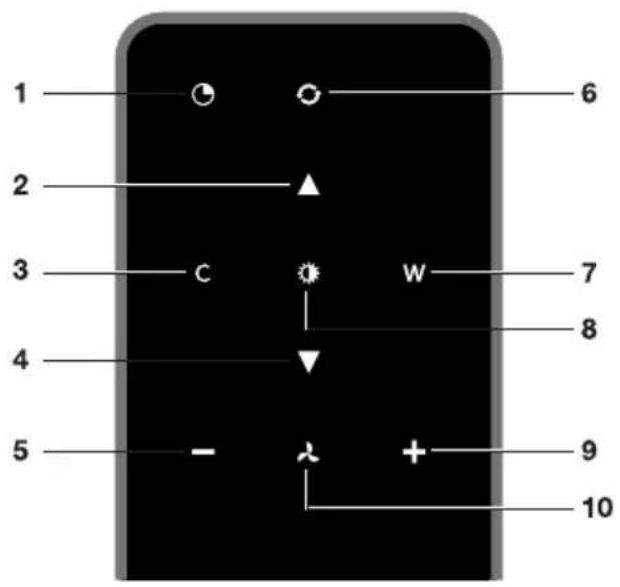
Descriptionremotecontrol
NOTE!
Theremote control is available as an accessory for this cooker hood and is not included with this appliance.
text_image
1 2 3 4 5 - 6 7 8 9 10- Timerfunction
2.Increaselightintensity
3.Colderlighttemperature - Decreaselightintensity
- Decreaseairextractioncapacity
- CleanAirfunction
- Warmerlighttemperature
8.Switchon/offlighting - Increaseairextractioncapacity
10.Fanon/off
Pairingtheremote
Thisremotecontrolmustbepairedtothecookerhoodbeforefirstuse.
- Switch on the appliance. Press and hold the – (minus) button and + (plus) button for 3 seconds. The hood will start 'pairing mode' for 5 minutes
2.

text_image
User interface toolbar with icons for zoom, refresh, minus sign, plus, download, and Wi-Fi- Activate the 'Remote pairing mode' by holding 'c' and 'w' for 3 sec.
- During pairing all the indicators on the hood and remotewill blink. All indicators will turn off when the connection is established.
If the pairing cannot be established, first de-energise the appliance (unplug it f mains), wait a few minutes and then reconnect it. Try the pairing again.

text_image
C WNOTE!
- Remotecontrolwillgointostandbyafter30seconds. Theremotewillwakeupwhenitis pickedupordetectsmovement.
- Avoidtostoretheremotecontrolinadrawer. Themovementofthedrawermayinadvertently activatetheremotecontrolandsignificantlyshortenbatterylife.
Switchingextractiononandoff
- Pressandholdthe'Fan'keyontheremotefor1second.

text_image
- x +Thecookerhoodwillswitchonatthelowestsetting.
- Press the '+' key again for a higher fan setting. Press and hold the '+' key for 1 second to select the highest setting (boost).
- Pressthe'-keytoselectalowersetting.
The extraction setting is indicated by the speed level indicator on the hood.
- To switch off the cooker hood, press and hold the 'Fan' key for 1 second.
NOTE!
Lighting and motor key must be pressed for at least 1 second. This is to prevent the functions from being accidentally switched on or off.
Switchontheboostsetting
- Pressandholdthe'+'buttonforatleast1second.

text_image
- × (+)Theboostsettingisswitchedonfor10minutes. Thespeedlevel4indicatorwillflashduringthis period. Theoriginalextractionsettingwillbereactivatedafterthisperiod.
- Pressandreleasethe'-'keytoswitchchofftheboostsetting.
NOTE!
If the boost setting has been selected, the timer function cannot be activated.
Switchingonthetimer
- Pressthetimerkey.

natural_image
Two circular icons with dashed outlines on a black background, no text or symbols presentThetimerindicatorwillstarttoblink.
Thecookerhoodwillswitchoffautomaticallyafter10minutes.
- Switchoffthetimerfunctionbypressingarandombutton(excepttheoneforlighting).
TIP!
Thecookerhoodcanbeusedinextractionmodeorrecirculationmode.Theairextractioncapacity isadaptedtotheselectedmode.Thehoodwillstart-upinthedefaultextractionmode.Ithasto beresetforrecirculationmode.
WithanRMSkit(Recirculationmodificationset)theairwillfirstbecleanedbythegreasefilters andthenodourswillbefilteredbythecharcoalfilter.Thecleanedairisrecirculatedbackintothe kitchen.
Switchingonrecirculationmode
natural_image
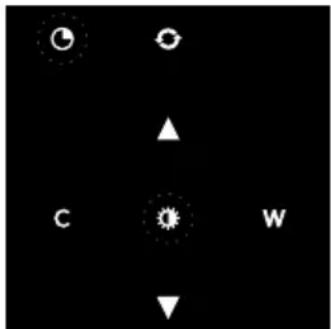
Black background with white circular and triangular icons (no text or symbols)Whenthelightandfanareoff, simultaneouslyholdthetimerkey and thelightkeyuntilthefilterindicatorflashes3times.
Thecarbonfilterindicatorisactivated.
Switchingoffrecirculationmode
Whenthelightandfanareoff, simultaneouslyholdthetimerkeyandthelightkeyuntilthefilter indicatorlightsupfor3secondsandthenturnsoff.
CleanAirfunction
TheCleanAirfunctionallowsyoutofreshentheairinyourkitchenforamaximumof24hoursat level1.
- Switchoffthecookerhood.
- Pressandholdthe'CleanAir'keyforapproximately3seconds.

natural_image
Two circular icons, one with a pie and the other with a refresh symbol, on a dark background (no text or labels)The cooker hood will switch on automatically for 10 minutes every hour at the lowest speed setting. During extraction, the display will show a fast-moving 'snake'. When the hood switches off after 10 minutes, the display will show a slow-moving 'snake' until the hood switches on again after 50 minutes.
- Switch off the Clean Air function by pressing the timer, clean air, '-' or '+' keys (any key other thanthelightkey).
Switchingthelightonandoff
- Pressandholdthelightkeyfor1second.
Thelightswitchesonatmaximumstrength.
- Press and hold the 'increase light' or 'decrease light' key to set the lighting intensity.
- Toturnoffthelight, pressandholdthelightkeyfor1second.
NOTE!
Lighting and motor key must be pressed for at least 1 second. This is to prevent the functions from being accidentally switched on or off.
Changing the colour lighting temperature
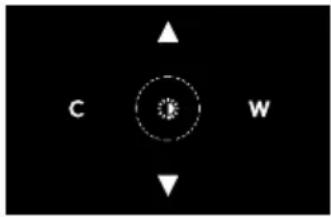
natural_image
Black background with white directional arrows and a central circular symbol (no text or labels)Youcanadjustthelightingcolortemperature.
- Pressandholdthelightkeyfor1second.
Thelightswitchesonatmaximumstrength.
- Press the 'C' key to make the light 'colder' or press the 'W' key to makethelight'warmer'.
Cleaning
WARNING!
Important!Forallmaintenance,first,switchoffthemainspowertothecookerhoodbypulling theplugoutofthesocketorbyturningoffthehome'smasterswitch.Thehoodneedstobe cleanedregularly,bothinsideaswellasoutside(atleastasoftenasthegreasefilter).
Donotuseabrasivecleaningproducts.Donotusealcohol!
If the instructions regarding cleaning the appliance or replacing the filters are not followed, this can cause a fire. These instructions must be followed! The manufacturer is not liable for damage to the hood or fired damage resulting from incompetent maintenance or from non-adherence to the safety instruction above.
Cookerhood
Cleanthecookerhoodwithsoapywaterandasoftcloth.
Thenrinsewithcleanwater.Donotuseaggressivecleaningagentssuchascausticsoda.Thecooker hoodfinishstaysingoodconditionifitisbuffedperiodicallyfollowingtheapplicationofwax.
NOTE!
Stainlesssteelcookerhoods
Donotusescouringpadsorotherabrasivecleanersonstainlesssteelcookerhoods. Finishwith anon-abrasive, non-polishingagentandbuffthestainlesssteelinthedirectionofthegrain.
Metalgreasefilters
Metalgreasefiltersshouldbecleanedonceamonth(orwhenindicatedbythefiltercleaningindicator – if present on the model) using a neutral cleaning agent, either by hand or in the dishwasher on a short,low-temperatureprogram.Placethegreasefilterswiththeopeningsfacingdownwardsinthe dishwashersothewatercandrainoutofthefilter.Aluminiumgreasefiltersbecomedullasaresult ofdishwashercleaningagents.Thisisnormalanddoesnoteffecttheworking.
Cleaning
Thefilterscanbecleanedinthedishwasher.Allowthefilterstodrainwellbeforereplacing.
Thefilterscanalsobecleanedbyhand.
Cleanthefiltersinsoapywaterwithwashingupliquidandrinse.Allowthefilterstodrainwell.The undersideofthecookerhoodcanbecleanedwithamildcleaningagentandadampcloth.Dryoff withapapertowel.
Replacingcassettefilter
Thefilters should be placed with the locking mechanism on the front. Open the filter access latch. Then the front of the filter will then slot in. Hold the access latch in this position when placing the filters.
1.Slotthenotchesatthebackofthefilterinthespeciallydesignedopeningofthecookerhood.
2. Tiltthefilterupwards.
3. Releasethefilteraccesshatch. Thenotchesatthebackofthefilterwillextendoutwardsand slotintothespeciallydesignedopeningsofthecookerhood.
Thefilterisnowinpositionagain.
- Presstheedgeextractionpanelfirmlyinthemagneticsealagain(youwillhearaclick).
TIP!
The edge extraction panel can be removed for cleaning.
Activecarbonfilters
Theregenerableactivecarbonfiltermustbewashedbyhandwithneutralcleaningproducts,orin thedishwasheratamaximumtemperatureof65°C(thewashingshouldbedonewithoutanyplates, dishes,cups,etc.inthemachine).Donotusewashingdetergent.
Removetheexcesswaterwithoutdamagingthefilter,removetheholderandletthefilterdryinthe ovenforatleast40minutesatamaximumtemperatureof70°C.
Tokeeptheregenerablecarbonfilterefficient, this actions should be repeated every 2 months or when indicated by the filter indicator. The filter must be replaced after non more than 3 years, or if it has been damaged.
CAUTION!
It is important that the grease filters and there are a reliable active carbon filter are thoroughly dry before repositioning.
Replacingthecarbonfilter
Toreplacethecarbonfilter,consultthemanualfortherecirculationkit.
Filterindication
Saturationofgreaseandcarbonfilters
Thefiltersshouldbereplacedorcleanedwhenthefilterindicatorislit.
Greasefilter
The filter indicator will lightup after 30 operating hours.
- Thegreasefiltersshouldthenbecleaned.
- Reset the memory by pressing and holding '-' (minus) button on the remote control until the filter indicator goes off.
Carbonfilter
The filter indicator will flash after 120 operating hours.
- Thecarbonfiltershouldthenbecleanedorreplaced.
- Reset the memory by pressing and holding '-' (minus) button on the remote control until the filter indicator goes off.
Lighting
WARNING!
ThehoodisfittedwithLEDlights.Anauthorizedtechnicianmustreplacethese.Donotattempt toreplacetheLEDlightsyourself.
Batteryoftheremote
NOTE!
- Whenthebatteriesarereplacedthepairingconnectionwillremain.
- Replace the batteries in time, as the receiving distance will be shortened if the voltage of the batteryistoolow.
- Don't forget to remove the batteries if you don't use the remote for a long time.
- Don'tleavetheremotelyingupsidedownonaconductivesurface.
- Thewarrantydoesnotcoverthebatteries.
- The battery may drain more quickly in connection with the liticons.
- Avoidtostoretheremotecontrolinadrawer. Themovementofthedrawermayinadvertently activatetheremotecontrolandsignificantlyshortenbatterylife.
- Batteryspecifications: TwoAAAbatteries.
EUProductSheet
Datadeterminedaccordingto:
StandardEN61591andCommissionRegulations(EU)no.65/2014and(EU)no.66/2014.
| WU9054MGWU9095MXWU | |||
| [ kWh/a]hood) | 20.720.720.7AnnualEnergyC | ||
| 0.60.60.6Timeincreasefactor | |||
| hoods) | 37.637.637.6FluidDynamicEI | ||
| hood) | 33.233.233.2EnergyEfficiency | ||
| point(Q_BEP) [m3/h] | 337337337Measuredairflowr | ||
| point(P_BEP)[Pa] | 328328328Measuredairpres | ||
| max) [m3/h] | 420420420Maximumairflow( | ||
| efficiencypoint(W_BEP)[W] | 81.781.781.7Measuredelectr | ||
| [W]L) | 3.93.93.9Nominalpowerofthe | ||
| onthecookingsurface(E_middle)[lux] | 218218218Averageilluminati | ||
| mode(P_s)[W] | 0.380.380.38Measuredpowe | ||
| Measured power consumption off mode (Po)[W] | - | - | - |
| Soundpowerlevel(L_WA)[dB] | 58 | 58 | 58 |
EUProductFiche
| WU9054MGWU9095MXWU | |||
| hood)[lux/W] | 55.955.955.9LightingEfficien | ||
| [%) hood) | 92.492.492.4GreaseFiltering | ||
| speedinnormaluse[m 3/h] | 290-420290-420290-420Airfl | ||
| [m3/h] | 640640640Airflowatintensive | ||
| poweremissionsatminimumandmaximumspeedinnormaluse[dB(A)] | 50-5850-5850-58Airborneac | ||
| poweremissionsatintensiveorboostsetting[dB(A)] | 676767AirborneacousticalA- |
Compliance information
| Radioequipmenttype | RFmodule |
| Operatingfrequencyrange | 2402-2477MHz(16channels) |
| Maximumoutputpower | -5.2dBmEIRPaverage(calculated) |
| Maximumantennagain | -7dBi |
| Radioequipmenttype | Wi-Fimodule |
| Operatingfrequencyrange | 2412-2472MHz |
| Maximumoutputpower | 16.8dBmEIRPaverage(calculated) |
| Maximumantennagain | 0dBi |
| Radioequipmenttype | BLEmodule |
| Operatingfrequencyrange | 2402-2480MHz |
| Maximumoutputpower | 7.63dBmEIRPaverage(calculated) |
| Maximumantennagain | 0dBi |
Hereby, ATAGdeclaresthattheradioequipmenttypeCookerhoodisincompliancewithDirective 2014/53/EU.
Safetyregulations
Faultypartsmayonlybereplacedbyoriginalparts.Themanufacturer canonlyguaranteethatoriginalpartsmeetsafetyrequirements.
If the supply cord is damaged, it must bere placed by the manufacturer, its service agent or similarly qualified persons in order to avoid a hazard.

WARNING!
Thisapplianceshouldonlybeconnectedbyaregisteredinstaller.
- Checktheappliancefortransportdamage.Donotconnectadamagedappliance.
•AlwaysusetheoriginalSupplycordtoconnecttheappliance. - Theelectrical connection must comply with national and local regulations.
- Thewallplugsocketandplugshouldalwaysbeaccessible.
- If a stationary appliance is not fitted with a supply cord and a plug, or with other means for disconnectionfromthesupplymainshavingacontactseparationinallpolesthatprovidefull disconnectionunderovervoltagecategoryllconditions,themeansfordisconnectionmustbe incorporatedinthefixedwiringinaccordancewiththewiringrules.Thisisalsoapplicablefor applianceswithasupplycordandplugwhentheplugisnotaccessibleafterinstallingthe appliance.Usinganomnipolarswitchwithacontactseparationofatleast3mmfittedinthe fixedwiringwillfulfilthisrequirement.
- The appliance should not be connected to the mains via a multi-plug adapter or extension cable, asthesafeuseoftheequipmentcannotbeguaranteed.
- Disconnecttheappliancefromthemainssupplybeforestartinganyrepairwork.
- Weadviseyoutowearprotectivegloveswhenassemblingthecookerhoodbecauseofthe possiblesharpedges.
- Thedistancebetweenthelowestpointofthecookerhoodandthesupportingsurfaceforthe cookingvesselsgashobshouldbeatleast65cm.
- If the instructions of the gas hob specify a greater distance, this has to be taken into account.

WARNING!
Extractionhoodsandotherappliancesthatextractcookingvapourscanaffectthesafeoperation ofappliancesthatburngasorotherfuel(includingthoseinotherrooms)bybackflowing combustiongases.Thesegasescanpotentiallyleadtocarbonmonoxidepoisoning.Afterinstalling anextractionhoodorothervapourextractor,theoperationofapplianceswithfluegasextraction mustbetestedbycompetentpersontoensurethatthecombustiongasesdonotflowback.
Neveropenthecasingoftheappliance.

WARNING!
Failuretoinstallscrewsorfixingdevicesinaccordancewiththeseinstructionsmayresultinan electricalhazard.
If the safety instructions and warnings are not followed, the manufacturer cannot be held responsible for any resulting damage.
If you decide to discontinue using the appliance because of a fault, were recommend you cutoff the cable after removing the plug from the plug socket. Take the appliance to your municipality's waste disposalsite.
Placetheapplianceinanenvironmentthatmeetsthefollowingconditions:
- Ambianttemperaturerange: +5....+40°C;
•Humidity:30....70%RH;
•Maximum altitude:2000metersabovesealevel.
Preparationsforinstallation
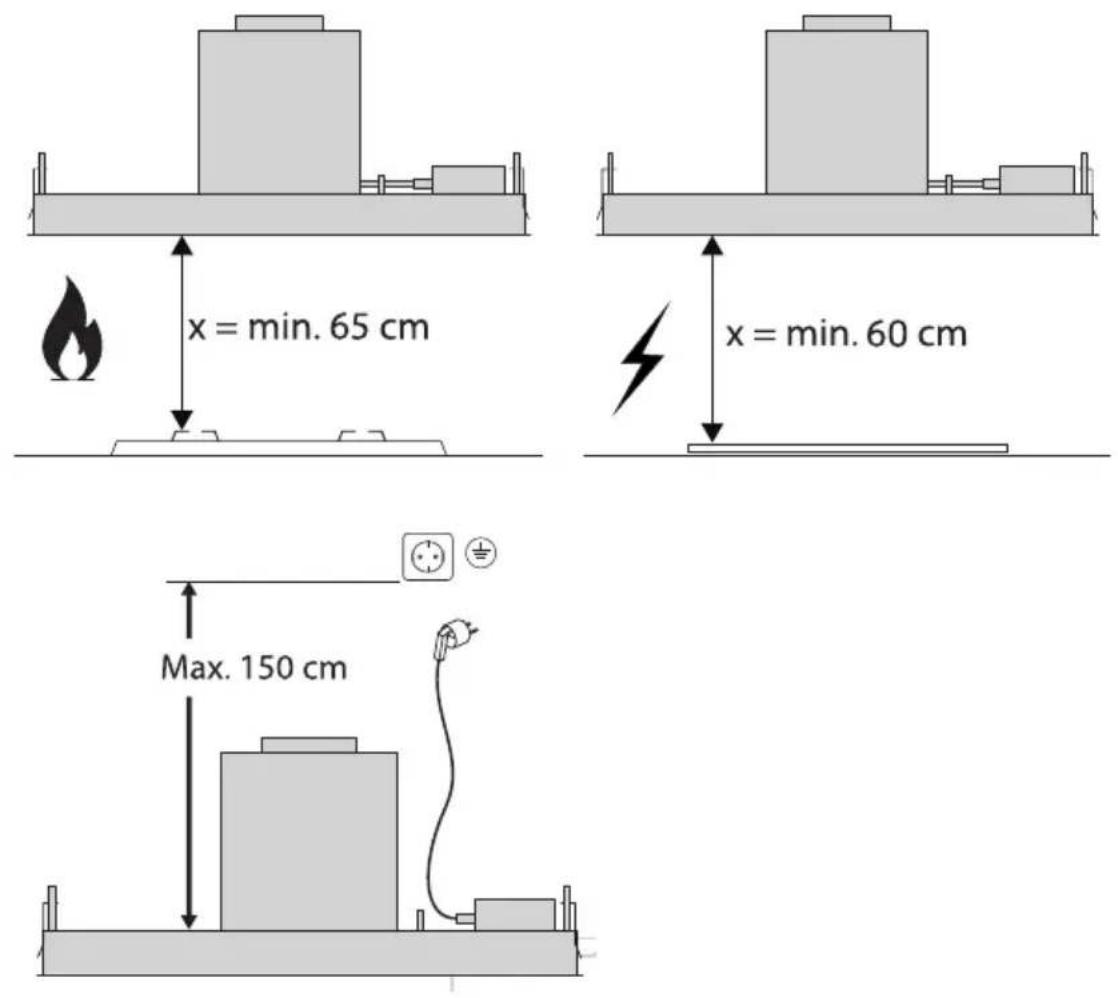
Installation
Appliancedimensions
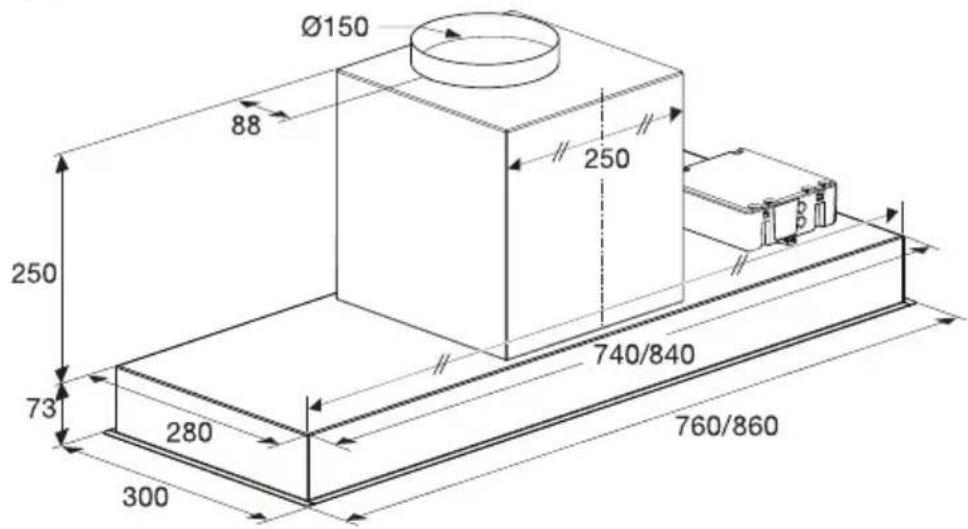
text_image
Ø150 88 250 250 740/840 73 280 300 760/860Built-in
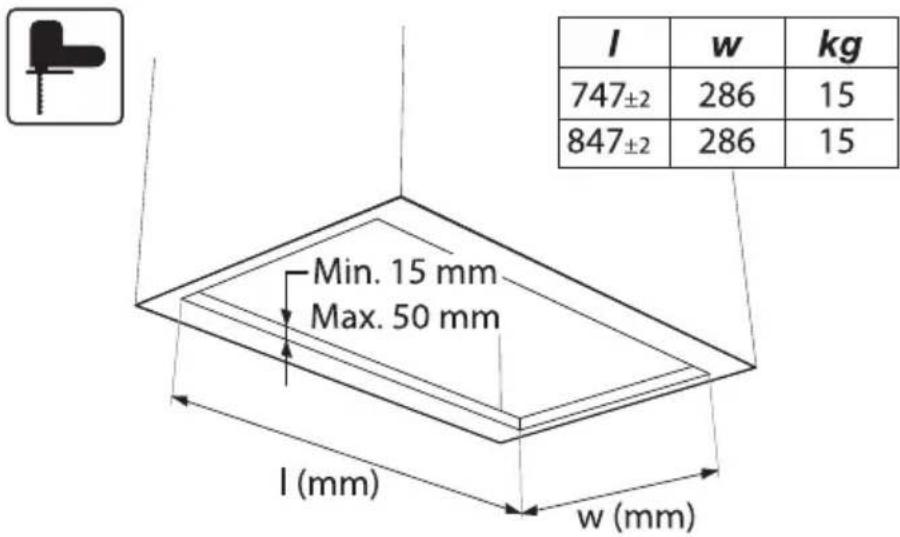
text_image
l w kg 747±2 286 15 847±2 286 15 Min. 15 mm Max. 50 mm l (mm) w (mm)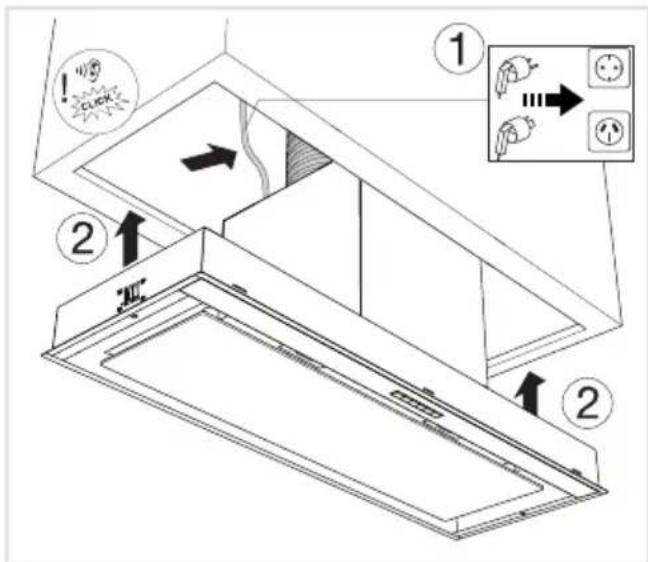
text_image
Diagram of a refrigerator interior with labeled parts and directional arrows indicating motion, including warning labels and electrical outlet symbols.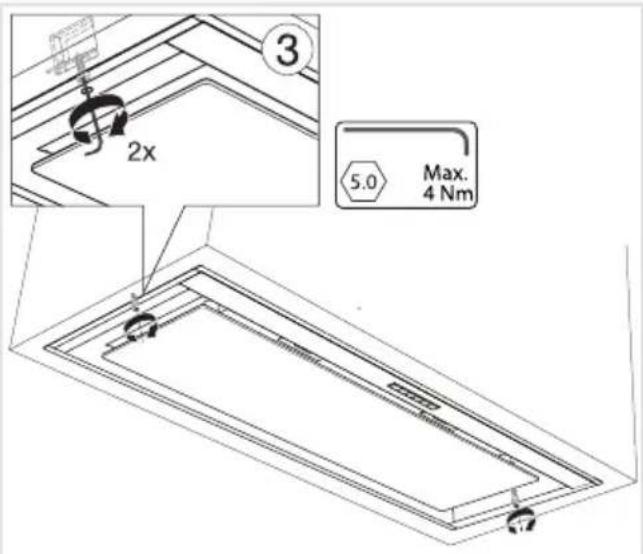
text_image
3 2x 5.0 Max. 4 NmTipsforenergy-efficient cookingwithhoods
- Usealowextractorsettingandusethehighestsetting(boost)onlyifnecessary.
- Awell-ventilated kitchen make estherange hood more efficient.
- Clean filters regularly and replace filters when needed to keep the filter efficiency high, as a saturatedfiltercannotperformandstolongerusagetimes.
Disposal of the appliance and packaging
Sustainable material have been used during the manufacture of this appliance. This appliance must be disposed of responsibly at the end of its service life. Ask your local authorities for more information about how to do this.
The appliance packaging is recyclable. The following may have been used:
- cardboard;
•polyethylenefilm(PE);
•CFC-freepolystyrene(PSrigidfoam).
Disposeofthesematerialsinaresponsiblemannerandinaccordancewithgovernmentregulations.
text_image
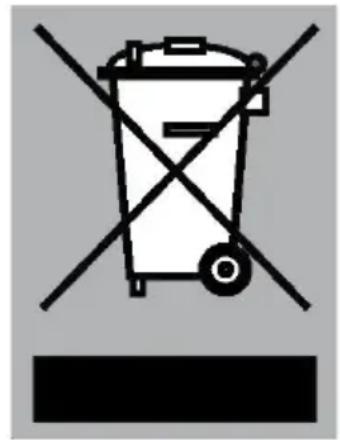
Warning symbol for a trash bin with crossed and unshaded lines indicating no waste or dischargeThe product has been marked with across-dust bins symbol to remind you of the obligation to dispose of electrical household appliances separately. This means that the appliance may not be included with normal domestic refuse at the end of its service life. The appliance must be a special municipal centre for separated waste collection to a dealer providing this service.
Aseparate collection of household appliances help stop prevent any potential negative impact on the environment and human health caused by improper disposal. It ensures that them also of which the appliance is composed can be recovered to obtain significant savings in energy and raw materials.
CE
Declarationofconformity
WeherebydeclarethatourproductssatisfytheapplicableEuropean directives, ordersandregulations, aswellastherequirementsstated inthereferencedstandards.
Yournotes
ATAG
www.atag.nl
www.atag.be
