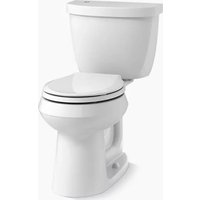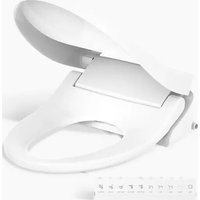
PureWash K-28119 - Toilet KOHLER - Free user manual and instructions
Find the device manual for free PureWash K-28119 KOHLER in PDF.


User questions about PureWash K-28119 KOHLER
0 question about this device. Answer the ones you know or ask your own.
Ask a new question about this device
Download the instructions for your Toilet in PDF format for free! Find your manual PureWash K-28119 - KOHLER and take your electronic device back in hand. On this page are published all the documents necessary for the use of your device. PureWash K-28119 by KOHLER.
USER MANUAL PureWash K-28119 KOHLER
Installation Instructions
Bidet Seat
Record your model number:
Need help? Contact our Customer Care Center.
- USA/Canada: 1-800-4KOHLER (1-800-456-4537) Mexico: 001-800-456-4537
Hours of Operation: Monday-Friday 8:00 AM -5:00 PM (CT)
Languages Spoken: English, Spanish, and translation services are available.
• Service parts: kohler.com/serviceparts
• Care and cleaning: kohler.com/clean
• Patents: kohlercompany.com/patents
Important Information
WARNING: Risk of electric shock. Connect only to a properly grounded dedicated circuit protected by a Class A Ground-Fault Circuit-Interrupter (GFCI)*. Use 120 V, 60 Hz, 15 A service. Do not remove the grounding pin or use a grounding adapter.
WARNING: Risk of electric shock. Do not immerse or flush the product with water.
WARNING: Risk of fresh water contamination. If connection is made to a potable water system, the potable water system needs to be protected from backflow. Install an approved backflow prevention device.
CAUTION: Risk of product damage. Do not install this product in a location exposed to excessive moisture where condensation might form on the product surface. Provide adequate ventilation when bathing to avoid damage to the electronic components due to high humidity levels.
CAUTION: Risk of product damage. To reduce the risk of product malfunction, do not supply electrical power to the unit until the plumbing installation work has been completed.
CAUTION: Risk of property or product damage. Pushing or pulling on the water connection may cause water leakage.
NOTE: If the supply cord is damaged, the supply cord must be replaced by the manufacturer, its service agent, or similarly qualified agent to avoid a hazard.
NOTE: This product contains thermal protectors that may trip during storage or transportation in warm conditions, causing the unit to not operate. Allow the unit to cool to room temperature before installation or operation.
Follow all local plumbing and electrical codes.
Connect the seat to a cold water supply of drinking quality with a pressure of 20 psi (139 kPa) - 80 psi (551 kPa).
*Outside North America, this may be known as a Residual Current Device (RCD).
READ AND FOLLOW ALL INSTRUCTIONS
SAVE THESE INSTRUCTIONS
This product should be grounded. In the event of an electrical short circuit, grounding reduces the risk of electric shock by providing an escape wire for the electric current. This product is equipped with a cord having a grounding wire with a grounding plug. The plug must be plugged into an electrical outlet that is properly installed and grounded.

DANGER: Risk of electric shock. Improper use of the grounding plug can result in a risk of electric shock.
If repair or replacement of the cord or plug is necessary, do not connect the grounding wire to either flat blade terminal. The wire with insulation having an outer surface that is green with or without yellow stripes is the grounding wire.
Check with a qualified electrician or service personnel if the grounding instructions are not completely understood, or if in doubt whether the product is properly grounded.
This product is factory equipped with a specific electric cord and plug to permit connection to a proper electric circuit. Verify that the product is connected to an outlet having the same configuration as the plug. No adapter should be used with this product. Do not modify the plug provided. If the plug does not fit the outlet, have the proper outlet installed by a qualified electrician. If the product must be reconnected for use on a different type of electric circuit, the connection should be made by qualified service personnel.

CAUTION: Risk of property damage. If use of an extension cord is necessary, a single cord may be used provided that the "Type" begins with "SJ", the cord is a 12 gauge, grounded (12/3), is no longer than 25 feet (7.6 meters), and is plugged into a GFCI* electrical outlet. Promptly replace an extension cord that exhibits any sign of damage.
*Outside North America, this may be known as a Residual Current Device (RCD).
Tools and Materials

natural_image
Illustration of seven different types of electrical tools including a pencil, switch, bracket, wrench, screwdriver, screwdriver, and rolled sheet (no text or labels)7/8" Supply Hose Plastic Wrap
1. Prepare the Site
text_image
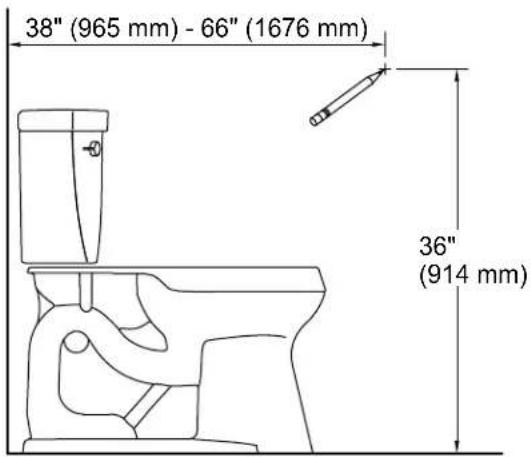
38" (965 mm) - 66" (1676 mm) 36" (914 mm)
WARNING: Risk of electric shock. Connect only to a properly grounded dedicated circuit protected by a Class A Ground-Fault Circuit-Interrupter (GFCI)*. Use 120 V, 60 Hz, 15 A service. Do not remove the grounding pin or use a grounding adapter.
*Outside North America, this may be known as a Residual Current Device (RCD).
NOTE: Follow local codes when determining the electrical outlet location.
☐ If applicable, remove the existing toilet seat.
□ Turn OFF the water supply to the toilet.
☐ Flush the toilet to relieve any pressure from the supply hose.
☐ Disconnect the water supply hose from the toilet fill valve.
□ Determine the installation location for the remote control docking station on the wall.
☐ Install a dedicated 120 V GFCI-protected electrical outlet within 32" (813 mm) of the toilet to accommodate the length of the power cord.
☐ Do not plug the seat into the electrical outlet at this time.
2. Install the Mounting Plate
text_image
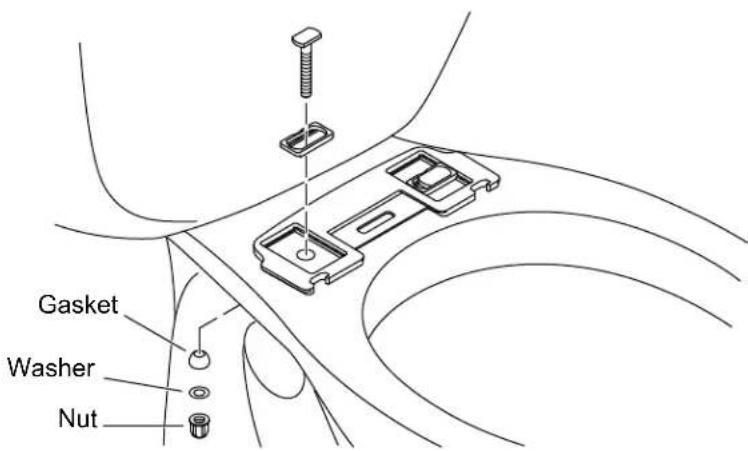
Gasket Washer Nut☐ Position the mounting plate over the mounting holes on the bowl.
☐ Position the inserts in the grooves on the mounting plate as shown.
☐ Insert the bolts through the inserts and thread into the mounting holes.
☐ Assemble a gasket, washer, and nut onto each bolt.
□ Do not fully tighten at this time.
3. Install the Seat
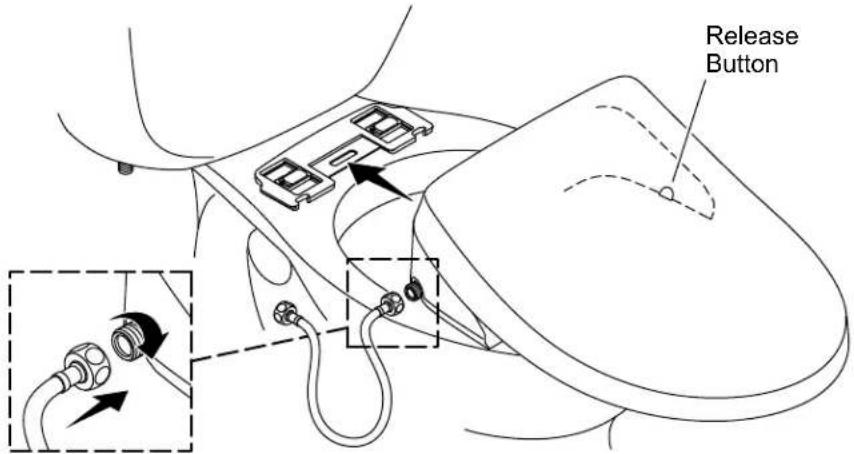
text_image
Release ButtonPosition the Seat
☐ Slide the seat onto the mounting plate until you feel the seat snap into place.
☐ Check the seat position. Adjust the position if needed.
Adjust the Seat
☐ Remove the seat by pressing the release button and sliding the seat forward.
□ Reposition the mounting plate as needed.
Secure the Seat
☐ Securely tighten the mounting plate bolts and nuts.
☐ Slide the seat onto the mounting plate until you feel the seat snap into place.
Attach the Water Supply Hose
IMPORTANT! Use only the water supply hose included with the seat. Using a different hose may damage the seat components.
NOTICE: Use care to avoid cross-threading or overtightening the connections. Use an adjustable wrench to tighten one-quarter turn past hand-tight.
□ Connect the water supply hose to the seat. Do not overtighten.
4. Install the Remote Control
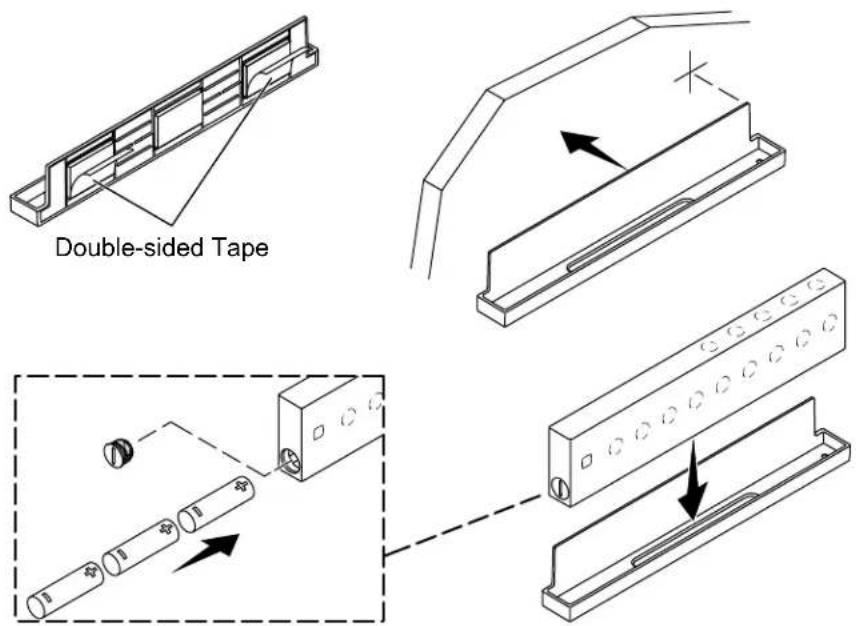
text_image
Double-sided Tape□ Attach the double-sided tape to the back of the docking station.
☐ Peel the backing from the double-sided tape.
☐ Align the docking station with the marked location on the wall. Verify that the docking station is level and then press the docking station onto the wall.
□ Remove and retain the cap to the battery compartment.
□ Install three AAA batteries in the orientation shown.
□ Reinstall the cap to the battery compartment.
□ Place the remote control on the docking station.
5. Connect the Water Supply
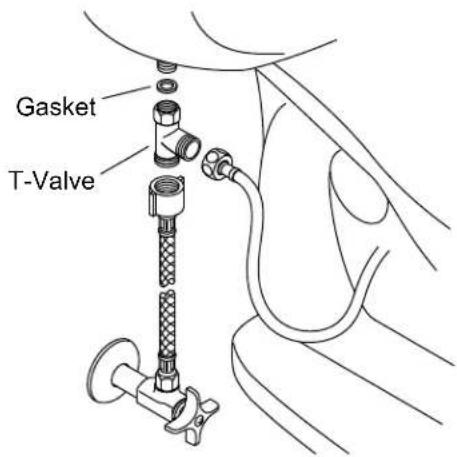
text_image
Gasket T-Valve
CAUTION: Risk of property or product damage. Pushing or pulling on the water connection may cause water leakage.
NOTICE: Use care to avoid cross-threading or overtightening the connections. Use an adjustable wrench to tighten one-quarter turn past hand-tight.
□ Verify that the gasket is installed inside the T-valve.
□ Connect the T-valve to the water inlet on the toilet tank.
□ Connect the seat water supply hose to the T-valve.
□ Connect the supply hose (not provided) to the T-valve.
□ Connect the supply hose to the supply stop.
□ Turn ON the water supply.
□ Check all connections for leaks, and make adjustments as needed.
natural_image
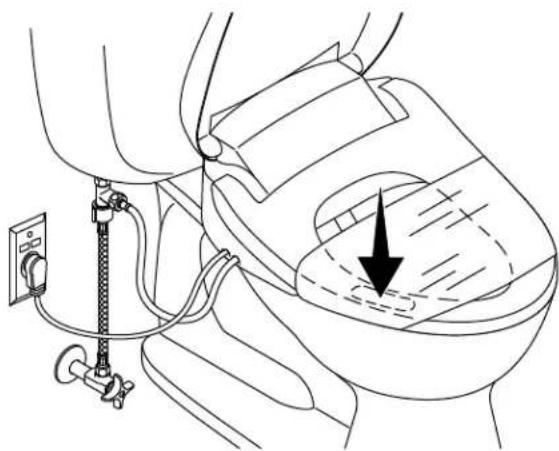
Medical illustration showing a catheter inserted into a car seat with an arrow indicating the catheter's direction (no text or symbols present)NOTE: The seat cleansing features will not activate unless the sensor detects an occupant. To test cleansing features, place your hand or a wet cloth on the occupancy sensor on the left side of the seat (facing the toilet).
NOTE: Covering the seat with plastic wrap is optional. The features can be tested while sitting on the seat or covering the wand with your hand.
☐ Optional: Wrap the seat with plastic wrap to prevent water from spraying beyond the toilet while testing.
☐ Plug the power cord into the electrical outlet. The seat will go through a power-up sequence. The seat will go silent when the power-up is complete.
☐ Refer to the Homeowners Guide to test the seat features.
natural_image
Six technical tools and components including a pencil, bracket, measuring tool, wrench, screwdriver, and screw (no text or labels)Tuyau d'alimentation de 7/8 po