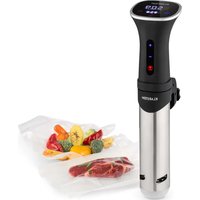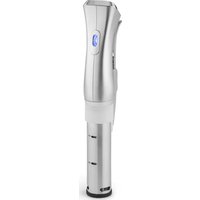
Quickstick - Vacuum machine Klarstein - Free user manual and instructions
Find the device manual for free Quickstick Klarstein in PDF.


| Product type | Sous-vide machine |
| Brand | Klarstein |
| Model | Quickstick |
| Article numbers | 10032670, 10032671, 10030584 |
| Power supply | 220-240 V ~ 50/60 Hz |
| Power | 1000 W (estimated) |
| Temperature range | 0 °C to 95 °C (32 °F to 203 °F) |
| Timer | 00:00 to 59:59 minutes |
| Display | Digital screen with temperature and time |
| Functions | Sous-vide cooking, temperature and time adjustment, low water level alarm, end of cooking alarm |
| Material | Stainless steel and plastic |
| Dimensions (approx.) | 35 cm x 5 cm x 5 cm |
| Weight (approx.) | 0.8 kg |
| Safety | Low water level shut-off, overheat protection |
| Maintenance | Monthly descaling recommended with citric acid |
| Cleaning | Rinse with cold water, dry before storage |
| Supplied accessories | Power cord, fixing clip |
Frequently Asked Questions - Quickstick Klarstein
User questions about Quickstick Klarstein
0 question about this device. Answer the ones you know or ask your own.
Ask a new question about this device
Download the instructions for your Vacuum machine in PDF format for free! Find your manual Quickstick - Klarstein and take your electronic device back in hand. On this page are published all the documents necessary for the use of your device. Quickstick by Klarstein.
USER MANUAL Quickstick Klarstein
text_image
QR code image containing encoded data, no visible human-readable textINHALTSVERZEICHNIS
natural_image
Simple line drawing of a pipette in a beaker with liquid, no text or symbols presentBedienfeld
text_image
Diagram of a device control panel with power, set, and minus/positive buttons labeled in EnglishGerät einschalten
natural_image
Symbol of a trash bin crossed with a diagonal line, no text or numbers presentBerlin Brands Group UK Ltd
PO Box 1145
Oxford, OX1 9UW
United Kingdom
Member of Berlin Brands Group
Handwerkerstr. 11
15366 Dahlwitz-Hoppegarten
Deutschland
Congratulations on the purchase of your appliance. Please read the following instructions carefully and follow them to prevent potential damage. We accept no liability for damage caused by disregarding the instructions or improper use. Please scan the QR code to access the latest operating instructions and for further information about the product.
text_image
QR code image containing encoded data, no visible human-readable textCONTENTS
Safety Instructions 12
Operation 13
Cooking times 15
Troubleshooting 15
Decalcification 16
Disposal Considerations 16
Manufacturer & Importer (UK) 16
TECHNICAL INFORMATION
| Product code 10032670, 10032671, 10030584 |
| Power supply 220-240 V ~ 50/60 Hz |
SAFETYINSTRUCTIONS
- Children over 8 years as well as mentally, sensory and physically impaired persons may only use the device if they have been informed in detail about the functions and safety precautions by a supervisor responsible for them beforehand and understand the associated risks.
- Only use the device under supervision. Keep children away from the device. Make sure that children do not play with the appliance.
- We accept no liability for damage caused by disregarding the instructions or improper use. Only use the appliance as specified in the instructions.
- The appliance is intended for use in the home and similar environments only. It is not intended for commercial use.
- Remove all packaging material inside and out before use.
- Check the unit for visible damage before use.
- Only use the parts supplied.
- Place the appliance so that it cannot fall down and do not let the mains cable hang from the work surface.
- Switch off the device and pull the plug out before cleaning or not using the device for a longer period of time.
- Do not pull the plug out of the socket by the cable. Instead, hold it securely with your hand while unplugging it.
- Keep the appliance away from other heat sources, hot objects and open fire.
• Always unwind the cable completely. - Do not wrap the power cord around the device.
- Servicing is required when the device has been damaged in any way, such as when the power supply cord or plug is damaged, liquid has been spilled or objects have fallen into the device, the device has been exposed to rain or moisture, or does not operate normally.
- Check the voltage on the product label before use. Ensure that you only connect the appliance to sockets with the appropriate voltage.
- Do not modify the unit.
- Only cook vacuumed food in the appliance. Do not cook unpackaged food.

CAUTION
Risk of burns! Parts of the unit can become very hot during operation. So that you do not burn yourself, do not touch them.
OPERATION
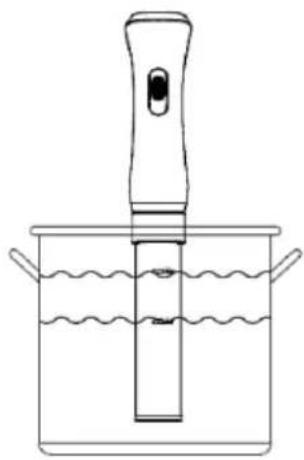
Fill the container with water. Note the water level indicator. The water level should be between the "MIN" and "MAX" marks. Note that the water level rises when you put food in the top. Do not fill the pot too high when putting food in. Attach the rod to the rim of the pot with the clamp.
Note: When the water temperature rises, the water starts to evaporate. The unit is equipped with an alarm that signals low water level. When the water level drops below the "MIN" mark, the heating element switches off.
natural_image
Line drawing of a laboratory pipette in a beaker with wavy liquid (no text or symbols)Control panel
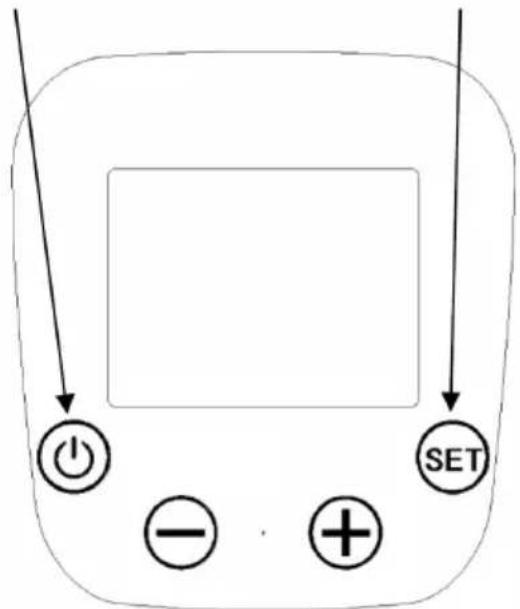
POWER button (Start) SET Button (Settings)
text_image
SET + -Switching on the appliance
Press and hold the POWER button for 3 seconds. The first line of the display shows the set water temperature. The second line of the display shows the current water temperature. The third line of the display shows the set time and the operating time. Press the (+) and (-) buttons simultaneously to switch between °C and °F.
Setting the time and temperature
Press the SET button and then use the (+) and (-) buttons to increase or decrease the hour value. Press the SET button a second time and then use the (+) and (-) buttons to increase or decrease the minute value. Press the SET button a third time and then use the (+) and (-) buttons to increase or decrease the temperature. The time can be set between 00:00 and 59:59 minutes. The temperature can be set between 0 °C (32 °F) and 95 °C (203 °F).
Start cooking process
After all settings have been made, press the POWER button to start the cooking process. Put the food in the container when the water temperature has reached the set temperature.
When the water temperature reaches the set temperature, the appliance beeps every 5 seconds. It informs you that you should put in the food. Press and hold the SET button for two seconds to turn off the sound. If you have previously set the time, the unit starts measuring the time at that moment and displays it after one minute.
When the set time has elapsed, the unit beeps every 5 seconds. It informs you that you should remove the food.
Switching off the appliance
When all the food has been prepared and removed, switch off the appliance. To do this, press and hold the POWER key for 5 seconds. When you are not using the device for a longer period of time, pull the plug out of the socket.
COOKING TIMES
Meat
| Food & Thickness 10 mm | 20 mm 30 | mm 40 mm | 50 mm 60 mm | |||
| Meat 58-62 °C 30 min | 45 min 95 min | 120 min 1 | 80 min 250 min | |||
| Fish 55-58 °C 10 min | 20 min 30 min | 40 min 50 min | 60 min | |||
| Poultry 63-65 °C 20 min | 40 min 75 min | 90 min |
Vegetables
| Potatoes 70 min | |
| Asparagus 40 min | |
| Carrots etc. 90 min |
TROUBLESHOOTING
| Problem Possible cause and solution | |
| The unit does not turn on. | Check whether the plug is plugged into the socket. |
| Check if the mains cable is damaged. | |
| Check that the unit has been switched on and that the display is on. | |
| The display shows the error code E02. | The digital thermostat is defective. Please contact customer service. |
| The display shows the error code E05. | Make sure that the water level is between the specified MIN and MAX values. The unit sounds an alarm and switches off when the water level falls below the MIN water level required for operation. Switch off the appliance, make sure the water level is correct and restart the appliance. |
DECALCIFICATION
If you use the machine frequently, we recommend descaling it monthly or more often, especially in regions with hard water.
- Fix the appliance in a pot. Fill the pot with water up to the max mark.
- Set the temperature to 70 °C.
- Add 5 g of citric acid powder (food grade) per litre of water.
- Let the water circulate for 20 minutes after the water temperature has reached 70 °C .
- Switch off the device immediately and pull the power plug out.
- When the unit has cooled down, rinse the base with cold water and dry the stick before storing it.
DISPOSAL CONSIDERATIONS
natural_image
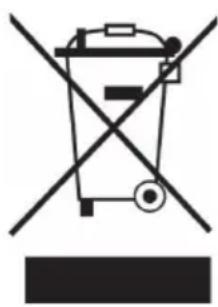
Symbol of a trash bin crossed with a diagonal line, no text or labels presentIf there is a legal regulation in your country regarding the disposal of electrical and electronic equipment, this symbol on the product or on the packaging indicates that this product must not be disposed of with household waste. Instead, it must be taken to a collection point for the recycling of electrical and electronic equipment. By disposing of this product in accordance with the regulations, you protect the environment and the health of those around you from negative consequences. For information on recycling and disposal of this product, contact your local government or household waste disposal service.
MANUFACTURER & IMPORTER (UK)
Manufacturer:
Chal-Tec GmbH, Wallstraße 16, 10179 Berlin, Germany.
Importer for Great Britain:
Berlin Brands Group UK Ltd
PO Box 1145
Oxford, OX1 9UW
United Kingdom
Estimado cliente:
text_image
QR code image containing encoded data, no visible human-readable textÍNDICE
natural_image
Simple line drawing of a pipette in a beaker with liquid, no text or symbols presentPanel de control
text_image
Diagram of a device control panel with power, set, and minus/positive buttons labeled in EnglishEncender el aparato
natural_image
Symbol of a trash bin crossed with a diagonal line, no text or numbers presentBerlin Brands Group UK Ltd
PO Box 1145
Oxford, OX1 9UW
United Kingdom
Cher client, chère cliente,
text_image
QR code image containing encoded data, no visible human-readable textSOMMAIRE
natural_image
Line drawing of a pipette in a beaker with liquid, no text or symbols presentPanneau de commande
natural_image
Symbol of a trash bin crossed with a diagonal line, no text or numbers presentBerlin Brands Group UK Ltd
PO Box 1145
Oxford, OX1 9UW
United Kingdom
Gentile cliente,
text_image
QR code image containing encoded data, no visible human-readable textINDICE
natural_image
Line drawing of a pipette in a beaker with liquid, no text or symbols presentnatural_image
Symbol of a trash bin crossed with a diagonal line, no text or numbers presentPRODUTTORE E IMPORTATORE (UK)
Produttore:
Chal-Tec GmbH, Wallstraße 16, 10179 Berlino, Germania.
Berlin Brands Group UK Ltd
PO Box 1145
Oxford, OX1 9UW
United Kingdom

area
| Category | Value | |---|---| | 1 | 100 | | 2 | 100 | | 3 | 100 | | 4 | 100 | | 5 | 100 | | 6 | 100 | | 7 | 100 | | 8 | 100 | | 9 | 100 | | 10 | 100 | | 11 | 100 | | 12 | 100 | | 13 | 100 | | 14 | 100 | | 15 | 100 | | 16 | 100 | | 17 | 100 | | 18 | 100 | | 19 | 100 | | 20 | 100 | | 21 | 100 | | 22 | 100 | | 23 | 100 | | 24 | 100 | | 25 | 100 | | 26 | 100 | | 27 | 100 | | 28 | 100 | | 29 | 100 | | 30 | 100 | | 31 | 100 | | 32 | 100 | | 33 | 100 | | 34 | 100 | | 35 | 100 | | 36 | 100 | | 37 | 100 | | 38 | 100 | | 39 | 100 | | 40 | 100 | | 41 | 100 | | 42 | 100 | | 43 | 100 | | 44 | 100 | | 45 | 100 | | 46 | 100 | | 47 | 100 | | 48 | 100 | | 49 | 100 | | 50 | 100 | | 51 | 100 | | 52 | 100 | | 53 | 100 | | 54 | 100 | | 55 | 100 | | 56 | 100 | | 57 | 100 | | 58 | 100 | | 59 | 100 | | 60 | 100 | | 61 | 100 | | 62 | 100 | | 63 | 100 | | 64 | 100 | | 65 | 100 | | 66 | 100 | | 67 | 100 | | 68 | 100 | | 69 | 100 | | 70 | 100 | | 71 | 100 | | 72 | 100 | | 73 | 100 | | 74 | 100 | | 75 | 100 | | 76 | 100 | | 77 | 100 | | 78 | 100 | | 79 | 100 | | 80 | 100 | | 81 | 100 | | 82 | 100 | | 83 | 100 | | 84 | 100 | | 85 | 100 | | 86 | 100 | | 87 | 100 | | 88 | 100 | | 89 | 100 | | 90 | 100 | | 91 | 100 | | 92 | 100 | | 93 | 100 | | 94 | 100 | | 95 | 100 | | 96 | 100 | | 97 | 100 | | 98 | 100 | | 99 | 100 | | Note: The actual values in the 'Value' column are not provided in the code. I have used the label 'The Region' to represent the 'Region'. The values are estimated based on the provided code.