
EH2B - Projector Klarstein - Free user manual and instructions
Find the device manual for free EH2B Klarstein in PDF.


| Product Type | Video Projector |
| Brand | Klarstein |
| Model | EH2B |
| Display Technology | LCD |
| Native Resolution | 1920 x 1080 (Full HD) |
| Brightness | 3500 ANSI Lumens |
| Contrast Ratio | 5000:1 |
| Lamp Life | Up to 50,000 hours |
| Projection Size | 50 - 300 inches |
| Throw Ratio | 1.2:1 |
| Keystone Correction | ±15° (Vertical) |
| Inputs | 2x HDMI, 1x USB 2.0, 1x VGA, 1x AV, 1x Audio Out |
| Wireless Connectivity | Wi-Fi (2.4/5 GHz), Bluetooth 5.0 |
| Speaker | Built-in 2 x 5W Stereo |
| Dimensions (W x D x H) | 285 x 235 x 110 mm |
| Weight | 2.8 kg |
| Power Consumption | 120W (Standby: <1W) |
| Power Supply | AC 100-240V, 50/60Hz |
| Main Functions | Video projection, media playback, screen mirroring |
| Care & Cleaning | Clean lens with soft, dry cloth; avoid water |
| Safety | Do not look directly at lens; ensure ventilation |
| Spare Parts | Replacement lamp, remote control, power cable |
| Repairability | User-replaceable lamp; other repairs by qualified technician |
| General Information | 2-year warranty; suitable for home cinema and presentations |
Frequently Asked Questions - EH2B Klarstein
User questions about EH2B Klarstein
0 question about this device. Answer the ones you know or ask your own.
Ask a new question about this device
Download the instructions for your Projector in PDF format for free! Find your manual EH2B - Klarstein and take your electronic device back in hand. On this page are published all the documents necessary for the use of your device. EH2B by Klarstein.
USER MANUAL EH2B Klarstein
natural_image
Line drawing of a projector with a circular lens and grid-patterned front panel (no text or symbols)
electronic.star
www.elektronik-star.de



natural_image
Illustration of a hand holding a projector with a circular button, showing no text or symbols.1

natural_image
Line drawing of a projector with a hand holding the screen (no text or symbols)2


Trapezkorrektur (Keystone)

Bild 1
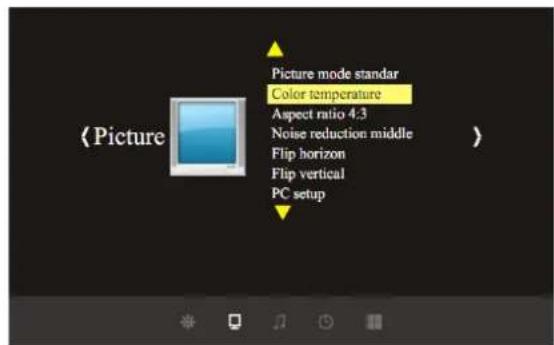
Bild 2
Farbmenü

natural_image
Simple line drawing of a trash bin with a 'X' symbol crossed out by a black X (no text or labels)Do not stare directly into the light of the lens.
It is very bright lamp. It can cause damage to your eyes
Warning:
To avoid electrical shock, please do not place the projector under moist conditions.
Warning:
When turning of the projector, the fans will continue to run for 90 seconds. Before unplugging the power cable, please be sure the fans have stopped in order to avoid damage to the projector lamp.
Installation

flowchart
graph TD
    A["Speaker L"] --> B["Speaker C"]
    C["Speaker R"] --> D["Speaker C"]
    E["Subwoofer"] --> F["Speaker L"]
    G["Projector"] --> H["DVD Amplifier"]
    I["Speaker Rs"] --> J["Speaker Ls"]
    K["Appreciate seats"] --> L["Door"]
    style A fill:#f9f,stroke:#333
    style C fill:#f9f,stroke:#333
    style G fill:#f9f,stroke:#333
    style I fill:#f9f,stroke:#333
    style K fill:#f9f,stroke:#333
    style B fill:#ccf,stroke:#333
    style D fill:#ccf,stroke:#333
    style H fill:#ccf,stroke:#333
    style J fill:#ccf,stroke:#333
    style L fill:#ccf,stroke:#333
    style N fill:#ccf,stroke:#333
Standard setting (Front projection)
Please refer to the following sheet, adjust your picture size and distance (from the lens to screen):
| Screen size | 4:3 | 16:9 |
| 60" | 2.3 m | 2.5 m |
| 72" | 2.68 m | 2.88 m |
| 100" | 3.6 m | 3.9 m |
The data maybe have 3% error, due to the image size according to the distance between projector and screen if the distance is less than 2 meters or over 5 meters, the image may be distorted.
Please check the following picture to show the trapezoid adjustment:
 |  |  |
| Incorrect installation, the images left-right small. | Installed correctly, the image is rectangular. | Incorrect installation, the images right-left small. |
Installation method:
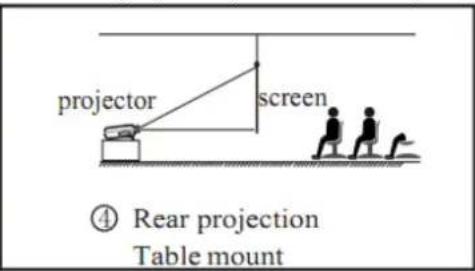
Contact a professional service technician to mount this projector to a ceiling. Follow the instructions below for the correct projector positions:

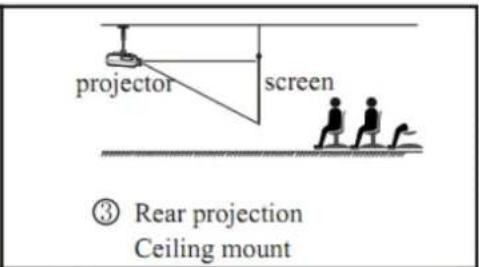


Warning:
- To avoid damage beyond repair or bodily injury, secure projector mounts firmly to the ceiling or a stable surface.
- This projector can only be used in an environment with a temperature not exceeding the range of 0\~35°C. The projector may malfunction if temperatures vary outside the normal operating range.
- The sharpness of the screen might be interrupted when the projector is being used in a dusty, wet, moist or smoke filled environment. The projector might malfunction in a moist or wet environment.
- Proper ventilation avoids overheating the projector.
Machine instruction


- Focus lens
- IR receiver
- High-feet adjustment
- Cool winds input ventilation
- Input terminals
- Power switch
-
Keystone
-
Hot winds output ventilation
- Speaker
- High-feet adjustment
- Projector mount hole
- Label
- Hot winds output ventilation
Input terminals

| Name | Instruction |
| Y/Pb/Pr | Component video input |
| Video | AV input |
| L out, R out | Audio output |
| L in, R in | Audio input |
| VGA IN | VGA inout |
| Svideo | Svideo input |
| TV | Analog TV input |
| HDMI | HDMI Signal input |
| USB | Connect USB flash drive |
USB support format:
- video: MPG, MPG-1, MPG-2, MPG-4, AVI, MP4, DIV, TS, TRP, MKV, MOV, WMV, RM, RMVB
- picture: JPEG, BMP
- audio: MPG, MPG-1, MPG-2, MPG-4, AVI, MP4, DIV, TS, TRP, MKV, MOV, WMV, RM, RMV
Caution: Please connect the input signal cable well, then turn on the projector. Otherwise, it is easy to damage the projector.
Remote control instruction
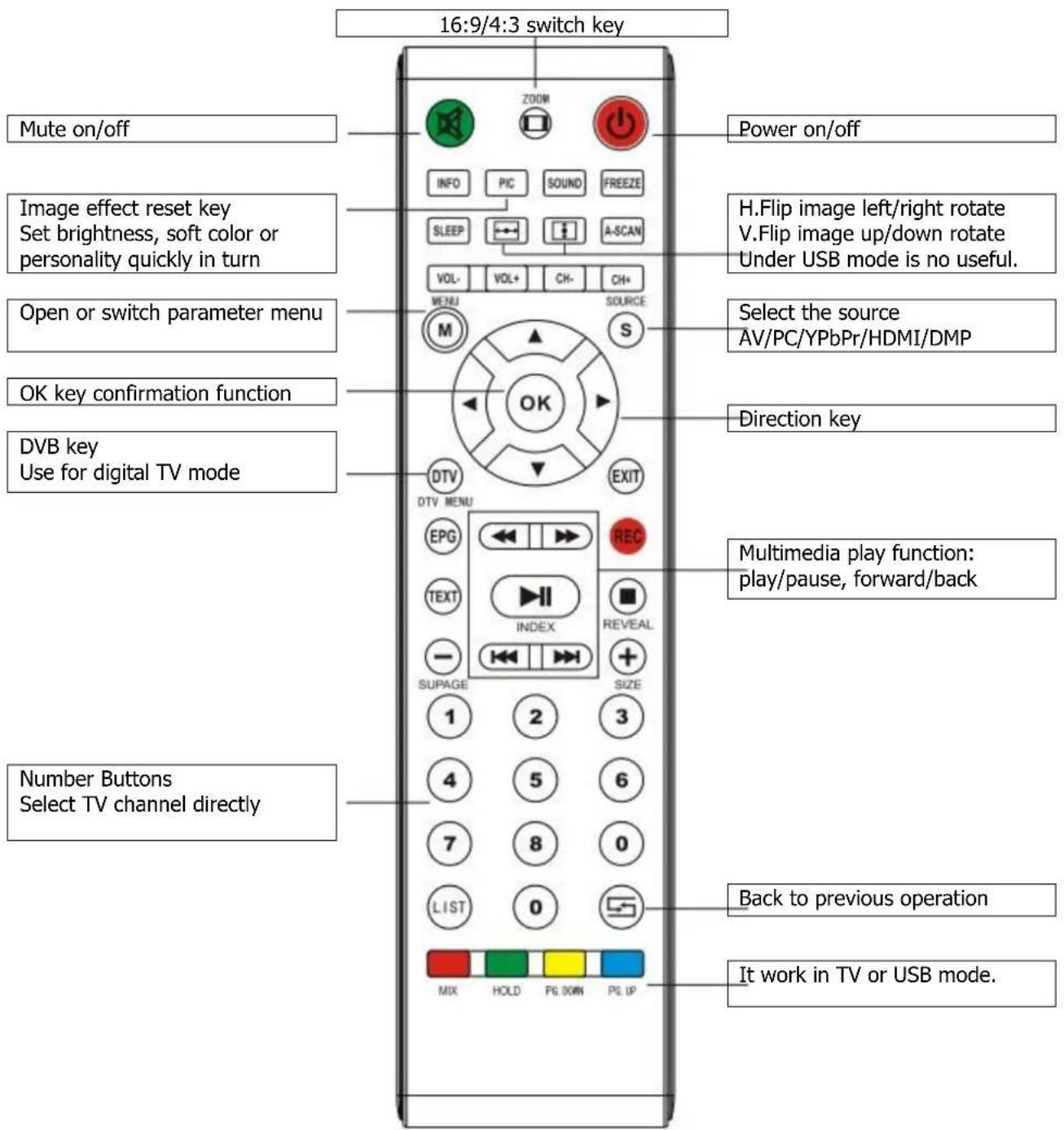
Panel keystoke sketch map

- Power key
- Sources
- Menu
- Indicator light: Red - Standby Green - workin
- Direction operation key
Open/close
If the projector is the new one, please read "projector install" chapter, placed the projector, connect the powerwire and the signalwire, he operation as follow:
Open operation
- Before use the remoter. Put in two 2 AAA batteries. →
- Open the power switch on the backboard, the power light begin to flash. →
- Press the power key on the remote control or panel, the indicator light turn light.
- After 2 second, the projector lamp begin work, began appear unclear white light on the screen, after 2 minute the projector begin work.
- For the new projector. When the first time to use, maybe will appear image unclear or trapezoid distortion, please read "image adjustment" chapter.
- After the image is clear, then you can watch program. During watching, you also can setup the sytem parameter, please read „menu setting“ chapter.



Close operation
- During use, the projector, press „power“ key, can let the projector switch to stay situation.
- After inter into stay situation, the projector under auto protect, auto release hot, the indicator light is flase situation, but here, the projector is under auto protect situation, not appear any order. If need to startup again, must wait for finished the release hot.
Image adjustment
When using the projector first time, it will commonly appeared with image faintness and the image is trapezoid. Following suggestions below to adjust focus.
Focus adjustment
Turn the lens into the projector (1), then turn it out slowly (2), at the same time looking at the resolution point care when the image is very clearly (take the middle area of the image), it is the best situation of the lens.

natural_image
Line drawing of a projector with a hand holding the lens (no text or symbols)1

natural_image
Line drawing of a projector with a hand holding the lens (no text or symbols)2
Keystone correction
If a projected picture has keystone distortion, correct image with Keystone adjustment. The image becomes trapezoid shape when the screen or project is not level. Please reposition the projector to improve its angle to the screen. However, the circumference of the image may not be focused.

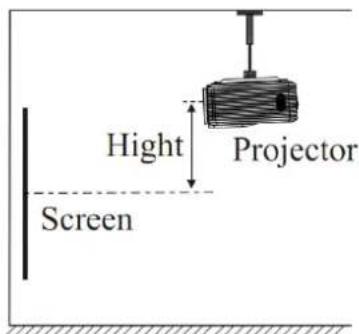

If not able to use keystone correction function to correct the trapezoid distortion, please reduce oft he projector of the projector to centre the screen vertically.
Menu setting
Menu setting method
- When projector are working press menu key the menu will show on the screen (picture 1).
- Press direction key let/right, the menu change: picture > sound > time -> option
- After confirm the menu press direction key up/down to choose sub-title (picture 2).
- Press direction key left/right to adjust the sub-title.
- After all action press the menu key exit the menu setting.
- Repeat step 2.\~5., set up all parameters.

picture 1
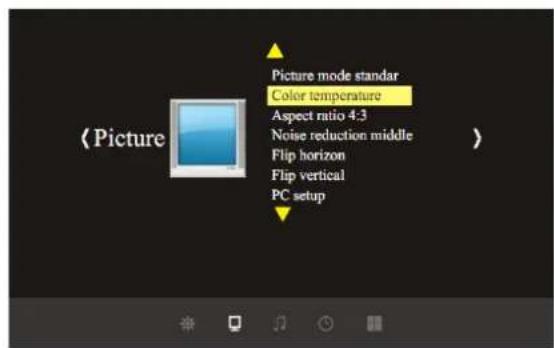
picture 2
Color menu

| User mode of picture | ||
| Contrast | 0-100 | Adjust contrast |
| Brightness | 0-100 | Adjust brightness |
| Color | 0-100 | Adjust color |
| Sharpness | 0-100 | Adjust sharpness |
Picture menu
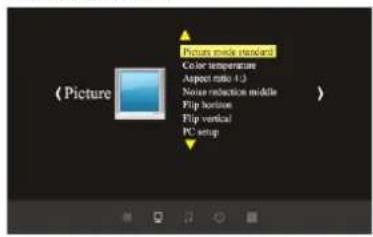
| Picture menu | |
| Picture mode | Standard/soft/user/Dynamic |
| Color temperature | Standard/warm/cool |
| Aspect ratio | 4:3 or 16:9/zoom1/zoom2 |
| Noise reduction | Off/low/middle/high |
| Flip horizon | On/off |
| Flip vertical | On/off |
Sound menu

| Sound menu | |
| Sound mode | Music/movie/sport/user/standard |
| Balance | -50~50 |
| Auto volume | On/off |
| Surround sound | On/off |
| EQ | (120/500/1.5K/5K/10K) Hz 50 |
Time menu

| Time menu | |
| Clock | Date--/month--/year--/hour--/mins-- |
| Off time | Off/one time/everyday/monday~friday |
| On time | Off/one time/everyday/monday~friday |
| Sleep timer | Off/10 Mins/ 20 Mins/ 30 Mins/ 60 Mins/ 90 Mins |
setting

| Menu setting | |
| OSD language | English/germany/chinese/... |
| Restore factory default | Yes or No |
| Blending | Off/low/middle/high |
| OSD Duration | Off/ 5 Sek./ 10 Sek./ 15 Sek. |
| Software-Update (USB) | Software update |
Trouble shooting
| Problem: | Possible Solution(s): |
| No power | 1. Check the power cable.2. Broken fuse. |
| Remote ControlDoes not function | 1. The power switch turn on or off?2. Check for defective batteries. Replace if needed.3. Aim directly towards the IR receiver. |
| No image | 1. The input source choice is correct?2. Check input cable.3. Check input signal.4. Under PC mode:The PC output frequency is 50-60Hz?You have output your PC signal to projector? |
| Projector turns offAutomatically | 1. The projector ventilation is block?2. The voltage is not stable?3. The projector is so hot? Maybe the fan is broken. |
Specification
| LCD | modelnative resolutionsupport resolution | 5" TFT800 x 600720p. 1080p |
| Input signal | videoaudio | Component Video (YPbPr), S-Video, HDMI, VGA Stereo |
| Output signal | speaker | 5W x 2 |
| Lens | aperturefocus | 3.8185mm |
| Lamp | modelpowerLife | LED100W20000 Std. |
| Image | sizeBrightnessTrapezoid correction | 60-100"2000 Lumen± 15° |
| Input Power | VoltagePower consumption | 1 AC 110~240V/50-60Hz140W |
| Working condition | TemperatureHumidity | 0°C ~ +70°C10% ~ 65% |
| Store condition | TemperatureHumidity | -20°C ~ +70°C10% ~ 90% |
| Infrared remote control | Frequency | 38KHz |
| Whole products | SizeWeight | 330 x 246 x 116 mm3 kg |
(If all parameter changed, donot note again.)
Accessories Parts
| projector | 1 unit |
| remote control | 1 pc |
| power cable | 1 pc |
| VGA cabe | 1 pc |
| AV cable | 1 pc |
| Manual | 1 pc |
| spare fuse | 1 pc |
| lens tissue wipes | 1 pc |
- Trapezkorrektur (Keystone)
- Farbmenü
- Warning:
- Installation
- Standard setting (Front projection)
- Installation method:
- Machine instruction
- Input terminals
- USB support format:
- Open/close
- Open operation
- Close operation
- Image adjustment
- Focus adjustment
- Keystone correction
- Menu setting
- Menu setting method
- Color menu
Brand : Klarstein
Model : EH2B
Category : Projector