USER MANUAL SFT 81 SILVERCREST
MULTIFUNKTIONSTHERMOMETER / MULTIFUNCTIONAL THERMOMETER / THERMOMÈTRE MULTIFONCTION
DE AT CH
MULTIFUNKTIONS- THERMOMETER
Instructions for use and safety notes
NL BE
MULTIFUNCTIONELE THERMOMETER
Before reading, unfold the page containing the illustrations and familiarise yourself with all functions of the device.
FR BE
Modus: 34,0 °C–43,0 °C
(93,2 °F-109,4 °F)
< 30,0 °C (86,0 °F); ±5%
www.healthforyou.lidl/privacy.html

service-de@sanitas-online.de
AT
Intended use....Page 46
Parts description......Page 48
Scope of delivery Page 49
Technical data......Page 49
Safety notes Page 52
Safety instructions for batteries ...... Page 55
Initial use Page 56
Inserting / Replacing batteries....Page 57
Changing basic settings......Page 58
Activating / deactivating the key tone......Page 60
What you should know before taking a measurement....Page 61
Taking a measurement ...... Page 62
Measuring body temperature from the forehead....Page 63
Measuring body temperature from the ear....Page 65
Measuring object temperatures....Page 68
Displaying saved measured values ...... Page 70
Transferring measured values ...... Page 71
Transferring via Bluetooth ® low energy technology....Page 71
Restoring the device to its factory settings ...... Page 73
Cleaning and care....Page 74
Storage Page 74
Troubleshooting Page 75
Disposal Page 76
Warranty / Service......Page 78
| List of pictograms used |
  | Warning of risks of injury or health hazards |
 | Safety note related to possible damage to the device/components |
 | Safety notes |
 | Instructions |
 | Observe instructions for use |
Storage & Transport  | Permissible storage and transport temperature and humidity |
Operating  | Permissible operating temperature and humidity |
 | Permissible storage, transport and operating air pressure |
 | Manufacturer |
 | Authorised EU representative for manufacturers of medical devices |
 | Applied part, type BF |
 | Serial number |
 0598 0598 | This product fulfils the requirements of the applicable European and national directives.Direct current/voltage |
 Pb Cd Hg Pb Cd Hg | Improper disposal of batteries can harm the environment! |
| IP22 | Protected against solid foreign objects, 12.5 mm in diameter and larger and against dripping water if the housing is inclined by up to 15 °. |
  | Dispose of the packaging and the multi-function thermometer in an environmentally friendly manner! |
 | Data transfer via Bluetooth® low energy technology |
 | Measuring body temperature from the ear |
 | Measuring body temperature from the forehead |
 | Measuring object temperatures |
 | Memory: 30 measurements |
 | Batteries included |
Multifunctional thermometer
- Introduction

Please make yourself familiar with the multi-function thermometer before preparing it for use or using it for the first time. Please
carefully read the following instructions for use and the important safety notes. Failure to observe the notes may result in personal injury or property damage. The product must only be used as described in these instructions for use and for the specified fields of application. Keep these instructions for use in a safe place. If you pass the multi-function thermometer on to anyone else, please ensure that you also pass on all the documentation.
Intendeduse
This multi-function thermometer is exclusively intended for measuring the temperature of the forehead, ear and objects. You can quickly and easily determine body temperature or the temperature of an object by using it. Values are saved automatically. The multi-function thermometer is suitable for taking measurements at home. Only use the device for the purpose it was intended for and in the manner described in these instructions for use. Any improper use could prove to be dangerous! The manufacturer is not liable for damage caused by improper or incorrect use.
The device meets the requirements of the Medical Devices Directive 93/42/EEC, the Medical Devices Act, ASTM E 1965 - 98, the European standard EN 12470-5: Clinical Thermometers - Part 5: Performance of infrared ear thermometers (with maximum device) and the European standard EN 60601-1-2 (in accordance with CISPR 11, IEC 61000-4-2, IEC 61000-4-3) and is subject to special precautions with respect to electromagnetic compatibility.
Please note that portable and mobile RF communication devices may interfere with this device.
The accuracy of this multi-function thermometer has been thoroughly tested and was developed with regard to a long utilizable service life. If the device is used in medicine, technical inspections using the suitable equipment are to be carried out. Precise information on how to test the accuracy of the device can be requested from our service address.
We hereby affirm this product complies with the European RED Directive 2014/53/EU. The CE declaration of conformity for this product is available at:
www.sanitas-online.de/web/de/landingpages/ cedeclarationofconformity.php
Partsdescription
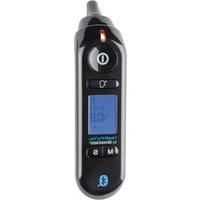
1 Sensor tip
2 Forehead/cover cap
3 Battery compartment cover
4 Lens
5 MEASURE button (forehead measurement)
6 S button (settings)
7 M button (memory)
8 ON/OFF/MEASURE button ⏻ (ear and object measurement)
9 LED status indicator (temperature indicator)
Display indicators
10 Measurement unit Celsius/Fahrenheit
11 Date/time display
12 Hour mode (AM/PM)
13 Temperature value
14 Key tone symbol
15 Battery level
16 Memory display M
17 Bluetooth®
18 Mode ear temperature?
19 Mode forehead temperature
20 Measurement is being carried out
21 Mode object temperature
- Scope of delivery
1 Multi-function thermometer
2 Batteries 1.5 V type AAA, LR03
1 Forehead / cover cap
1 Set of instructions for use
1 Quick start guide
- Technicaldata
REF-No.: SFT 81
Model: TS 47
Measurement range: Ear/forehead thermometer
mode: 34.0 °C-43.0 °C
(93.2 °F-109.4 °F) object
temperature mode: 0.0 °C-
100.0 °C (32.0 °F-212.0 °F)
Laboratory
measurement
accuracy: Ear thermometer mode:
±0.2 °C (±0.4 °F) from
35.0°C-42.0°C
(95.0 °F-107.6 °F)
out of this measuring range
± 0.3 °C (± 0.5 °F),
outside of this measurement
range ±0.3 °C (±0.5 °F),
forehead thermometer mode:
±0.2 °C (±0.4 °F) from
35.0°C-42.0°C
(95.0 °F-107.6 °F), out
of this measuring range
± 0. 3 ^ ° C (± 0. 5 ^ ° F), object temperature mode: ± 2. 0 ^ ° C (± 4. 0 ^ ° F) at lt; 3 0, 0 ^ ° C (86.0 °F); ± 5 % ( in 3 cm ) at ≥ 3 0. 0 ^ ° C (8 6. 0 ^ ° F)
Time interval between
two measurements: At least 5 seconds
Clinical repeatability: Ear: Children, 1 - 5 years:
± 0. 0 8 ^ ° C (± 0. 1 4 ^ ° F),
Adults: ± 0. 0 7 ^ ° C (± 0. 1 3 ^ ° F),
Forehead: Children, 1 - 5
years: ± 0. 0 7 ^ ° C (± 0. 1 3 ^ ° F),
Adults: ± 0. 0 8 ^ ° C (± 0. 1 4 ^ ° F)
Measurement units: °Celsius (°C) or
^ ° Fahrenheit (^ ° F)
Operating conditions: 15.0 °C to 40.0 °C (59.0 °F
to 1 0 4. 0 ^ ° F) at a relative
humidity of 15 % to 85 %
( non - condensing )
7 0 0 - 1 0 6 0 hPa ambient
pressure
Storage environment: -25.0 °C to 55.0 °C (-13.0 °F
to 1 3 1. 0 ^ ° F) at a relative
humidity of 15 % to 95 %
( non - condensing )
7 0 0 - 1 0 6 0 hPa ambient
pressure
Dimensions: 141 x 42 x 36 mm
Weight: 62 g (without batteries)
Battery: 2 x 1.5 V AAA (LRO3)
Battery life span: approx. 3000 measurements
Memory: 30 measurements
Expected operating life: 3 years
System requirements
for "HealthForYou"
web version: - MS Internet Explorer
- MS Edge
- Mozilla Firefox
- Google Chrome
- Apple Safari
(in the respective updated version)
System requirements for
"HealthForYou" App: iOS version 12.0 and above, Android™ Version 8.0 and above, Bluetooth® 4.0 and above
The multi-purpose thermometer uses Bluetooth ® low energy technology, frequency band 2.402–2.480 GHz, maximum transmission power radiated in the frequency band <20 dBm.
The "HealthForYou" privacy policy can be viewed via the following link: www.healthforyou.lidl/privacy.html
For a list of compatible smart-
phones, information about the HealthForYou app and software, as well as further details about the devices, please visit: www.healthforyou.lidl
Technical specifications subject to change without notice due to updates.

Safetynotes
WARNING! This device is not intended to be used by persons (including children) with limited physical, sensory or mental abilities or lacking experience and/or knowledge unless supervised or instructed on its use by an person responsible for their safety. Children should be supervised to ensure they do not play with the device.
■ Be careful when inserting the sensor tip into the ear while carrying out a temperature measurement.
■ Using the multi-function thermometer on different people who have certain acute, infectious diseases may be unsuitable due to potential bacterial contamination, even when the thermometer has been cleaned and wiped with antiseptic. Contact your physician on a case-by-case basis.
- Keep the device out of the reach of children. It poses a choking hazard! Children can choke on the packaging material or the forehead / cover ap.
■ Children may not use the device. Medical devices are not toys.
- Check before each use that the lens is intact. If it is damaged, contact your specialist dealer or the service address.
■ The device is designed for practical use. However, it cannot replace a visit to the doctor.
This thermometer is a sensitive electronic device. Handle it carefully and do not subject it to mechanical impacts.
■ Do not expose the device to direct sunlight.
The thermometer is NOT watertight. For this reason you should never allow the product to come into contact with water or other liquids.
■ The SFT 81 multi-function thermometer is only designed for use in the measuring point stated in the instructions for use.
■ The measuring tip must be cleaned after every use using a soft cloth dampened with antiseptic.
■ Before making a complaint, firstly check the batteries and replace them if necessary.
■ Repairs may only be undertaken by authorised service centres. Unauthorised repairs will void the warranty.
■ Contact your specialist dealer if you have any questions.
Do not subject the device to extreme storage temperatures (under -25 °C (-13 °F) or over 55 °C (131 °F)) or excessive humidity (over 95 % relative humidity).
The device is suitable for use in all environments that are listed in these instructions for use, including in the home.
In the presence of electromagnetic disturbances, the device may under some circumstances only be useable to a limited extent. This can result in error messages or the breakdown of the display / device, for example.
The use of the device immediately next to other devices or stacked with other devices is to be avoided, as this can result in faulty operation. If it is necessary to use the device in such a way in spite of this, this device and the other devices should be monitored to make sure that they are working correctly.
The use of equipment other than that which has been specified or made available by the manufacturer of this device can lead to increased electromagnetic interference or the reduced electromagnetic stability of the device and can lead to faulty functioning.
- Keep portable RF communication devices (including peripheral equipment such as antenna cables
or external antennae) at least 30 cm away from all device parts, including all cables supplied.
- Failure to observe these instructions may lead to a reduction in the performance features of the device.

Safetyinstructions for batteries
■ DANGER TO LIFE! Keep batteries out of reach of children. If accidentally swallowed seek immediate medical attention.
- Ingestion may cause burns, perforation of soft tissue and death. Severe burns may occur within 2 hours of swallowing batteries.
DANGER OF EXPLOSION! Never

recharge non-rechargeable batteries.
Do not short-circuit batteries and / or
open them. Overheating, fire or bursting can be the result.
■ Never throw batteries into fire or water.
Do not exert mechanical loads to batteries.
Risk of leakage of batteries
- Avoid extreme environmental conditions and temperatures, which could affect batteries, e.g. radiators / direct sunlight.
If batteries have leaked, avoid contact with skin, eyes and mucous membranes with the chemicals!
Flush immediately the affected areas with fresh water and seek medical attention!


WEAR PROTECTIVE GLOVES!
Leaked or damaged batteries can cause burns on contact with the skin.
Wear suitable protective gloves at all times if such an event occurs.
In the event of a leakage of batteries, immediately remove them from the product to prevent damage.
Only use the same type of batteries. Do not mix used and new batteries.
■ Remove batteries if the product will not be used for a longer period.
Risk of damage of the product
■ Only use the specified type of battery!
- Insert batteries according to polarity marks (+) and (-) on the battery and the product.
- Clean the contacts on the battery and in the battery compartment with a dry, lint-free cloth or cotton bud before inserting the batteries!
■ Remove exhausted batteries from the product immediately.

Initial use
☐ The batteries have been installed when you first purchase the product. Before first use, remove the
protective battery strips sticking out from the battery compartment. The multi-function thermometer will then switch on automatically.
- Inserting / Replacing batteries
Before replacing the battery, ensure that the device has been switched off.
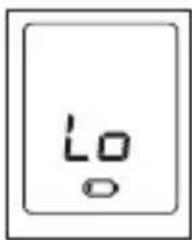
When the batteries become weak, the battery warning symbol will appear on the display 🔒. Temperature measurements will still be possible but the batteries will have to be replaced as soon as possible.
If the battery warning symbol 📄 and "Lo" flash on the display, the batteries must be replaced immediately. If the batteries are too weak, the thermometer will switch off automatically.
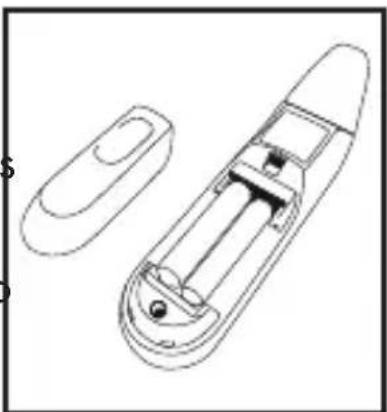
Replace the batteries as follows:
Remove the battery cover 3.
Remove the empty batteries from the battery compartment.
Insert the new batteries into the battery compartment until they audibly and noticeably click in. Ensure the correct policy the batteries.
Reattach the battery cover to the battery compartment.
- Changing basic settings
You can configure the following basic settings for the multi-function thermometer: temperature unit (Celsius / Fahrenheit), date, time and Bluetooth ® .
☐ To switch on the device press the ON/OFF/MEASURE button 8.
Press the S button for five seconds.
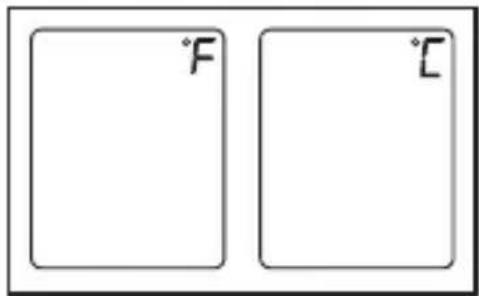
The current set temperature unit appears on the display. Using the S button 6 select the temperature unit (°F or °C). Confirm by pressing the M button 7.
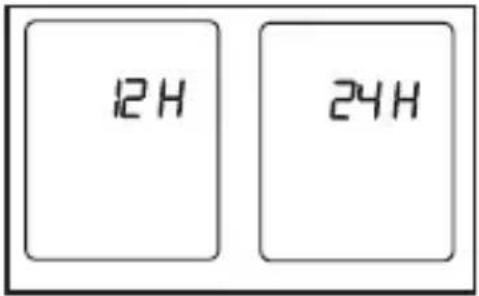
The time format will appear on the display. Select the time format (12 hour or 24 hour) using the S button 6. Confirm by pressing the M button 7.
The year display will flash on the display. Using the S button 6 select the current year. Confirm by pressing the M button 7.
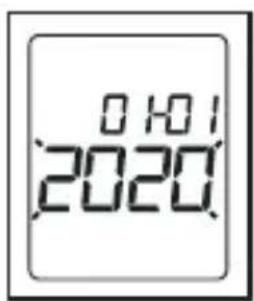
The month display will flash on the display. Using the S button 6 select the current month. Confirm by pressing the M button 7.
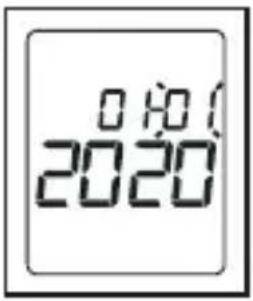
The day display will flash on the display. Using the S button 6 select the current day. Confirm by pressing the M button 7.
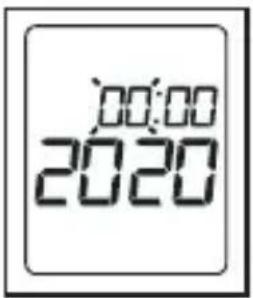
Note: If the 12-hour time format has been configured, the positions for the month and day will be reversed.
The hour display will flash on the display. Using the S button 6 select the current hour. Confirm by pressing the M button 7.
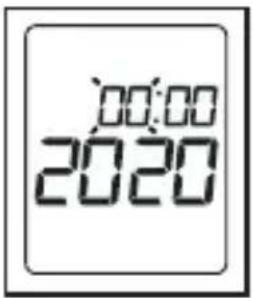
The minute display will flash on the display. Using the S button 6 select the current minute. Confirm by pressing the M button 7.
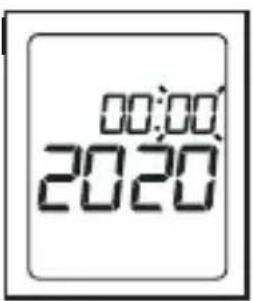
☐ If no button is pressed within 30 seconds, the basic settings menu will automatically close.
Bluetooth® will flash on the display. Activate or deactivate Bluetooth® using the S button 6 (ON will appear on the
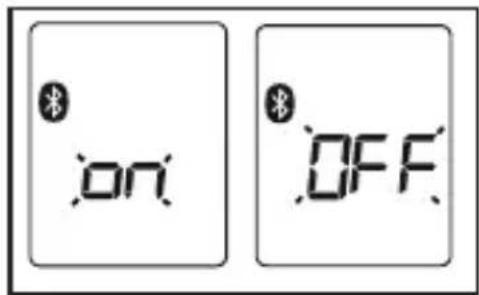
display for activation, OFF will appear on the display for deactivation). Confirm by pressing the M button 7.
☐ The device will save the basic settings and switch off automatically.
● Activating / deactivating the key tone
You can activate / deactivate a key tone on the device. When the key tone has been activated, a beep will sound each time a button is pressed and after every measurement.
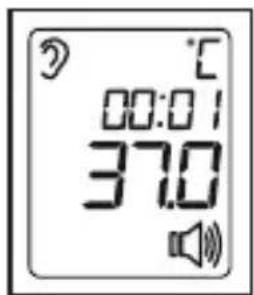
To activate the key tone, briefly press the S button 6 when the device is switched on. A loudspeaker symbol will appear on the display.
To deactivate the key tone once more, press the S button 6 again. The loudspeaker symbol 📌 will disappear once more.
What you should know before taking a measurement
There are different thermometers to measure different parts of the body:
- Ear/forehead thermometer (this thermometer is for measuring in the ear or on the forehead area)
- Rod thermometer (for rectal [in the anus], axial [under the armpit] or oral measurement [in the mouth])
Note: The temperature measurement yields a measurement value which provides information on an individual's current body temperature.
If you are unsure how to interpret the results or abnormal values appear, you should consult your physician. This also applies for lower temperature changes if other symptoms are present i.e. restlessness, excessive sweating, skin redness, high pulse rate, tendency to collapse, etc.
Temperatures measured using different thermometers cannot be compared with each other. Therefore, you should tell your doctor (or consider, for self-diagnosis) which thermometer you used to measure your body temperature and in which part of the body.
The temperature of a healthy person is influenced by many different factors: their individual metabolism which varies from person to person, age (body temperature is higher for infants and toddlers and decreases with age. For children, higher temperature fluctuations
occur more readily and more frequently due to growth spurts, for example), clothing, external temperature, time of day (body temperature is lower in the morning and increases throughout the day and in the evening), physical, and to a limited extent, mental activity.
The temperature value varies depending on the part of the body it is being measured from. For healthy people, this deviation can lie between 0.2° C ( 0.4° F) - 1°C ( 1.8° F).
The normal temperature range for
- forehead measurement: 35.8° C ( 96.4° F)– 37.6° C ( 99.7° F) using a forehead thermometer,
- ear measurement: 36.0°C (96.8°F)–37.8°C (100°F) using an ear thermometer,
- rectally measured temperature: 36.3° C ( 97.3° F) - 37.8° C ( 100° F) using a conventional thermometer,
- orally measured temperature: 36.0° C ( 96.8° F) - 37.4° C ( 99.3° F) using a conventional thermometer.
To be able to measure a temperature progression you must always measure from the same part of the body.
● Taking a measurement
Note: Check before each use to see if the lens has been damaged. If it is damaged, contact your specialist dealer or the service address. Please note that the multi-function thermometer must be placed in the room at least 30 minutes before the measurement is carried out.
☐ Ensure before every measurement that the device is in the mode which you want to use to take a measurement.
| Mode | Ear Forehead | Object Key tone | tone | activated |
| Display |  |  |  |  |
● Measuring body temperature from the forehead
Note: Please note that the forehead / temples must be free from sweat and cosmetics, and that taking vasoconstrictive medication and skin irritation can falsify the measurement result for the forehead measurement.
To switch on the multi-function thermometer, press the ON/OFF/MEASURE button 8 for one second.
Place the measuring head directly against your temple with the forehead/cover cap attached.
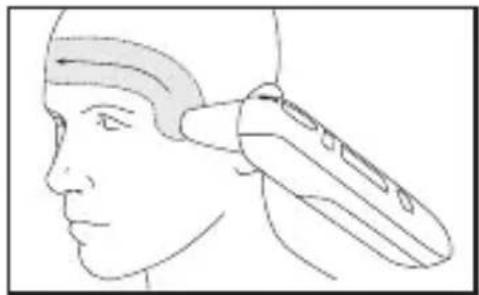
Press and hold the MEASURE button and guide the multi-purpose thermometer steadily across the forehead to the other temple.
Then release the MEASURE button 5. The measured value appears on the display and the end of the
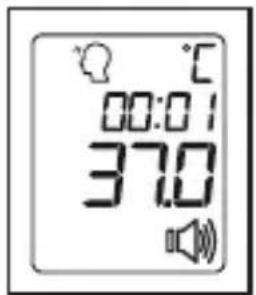
measuring process is indicated by a short beep (when the key tone is activated). When the measurement type symbol stops flashing, the next measurement can be taken. This takes approx. 5 seconds.
If the measured value lies within the normal range (< 38 °C (100.4 °F)), the LED above the display lights up green for 3 seconds. If the measured value is higher than this (≥ 38 °C (100.4°F = fever)), the LED will light up red.
If you have activated Bluetooth® data transfer, the data will be transferred after the measurement. The thermometer displays the symbol for Bluetooth® during transfer.
Note: The "HealthForYou" app must be activated for transfer to occur. If the current data is not displayed on your smartphone, repeat the transfer process as described in the chapter "transferring measured values".
The device will switch off automatically after 60 seconds (if no Bluetooth® connection is available) or press the ON/OFF/MEASURE button 8 for 5 seconds to switch it off.
Clean the device after every use as described in the chapter "Cleaning and care".
●Measuringbody temperature from the ear
WARNING!
There are people who present different measured values in their left and right ear. To factor in temperature changes, always measure the same ear for the same person.
The integrated ear thermometer may only be used by children under adult supervision. Measurement is usually only possible from the age of 6 months and up. For infants under 6 months old, the ear canal is often still too small for the temperature to be measured and this may lead to measurement results which are too low being displayed.
■ Measurement may not be carried out on an ear suffering from an inflammatory disease (i.e. inflamed with pus, secretions), after potential injuries to the ear (i.e. eardrum damage) or during the healing phase after a surgical operation. Please speak to your physician if you find yourself in any of these situations.
■ Using the multi-function thermometer on different people who have certain acute, infectious diseases may be unsuitable due to potential bacterial contamination, even when the thermometer has been cleaned and wiped with antiseptic. Contact your physician on a case-by-case basis.
If you have been lying on your ear for an extended period of time, your temperature will increase slightly. Wait for a few minutes or measure the other ear.
Earwax can have an effect on the measurement. Therefore, clean the ear before measuring if necessary.
To switch on the multi-function thermometer, press the ON/OFF/MEASURE button 8 for one second.
Remove the forehead / cover cap by using two fingers to gently squeeze the sides together and then pulling the cover cap off.
Make sure that the sensor tip 1 as well as the ear canal are clean. As the ear canal is slightly curved, pull the ear gently up and back
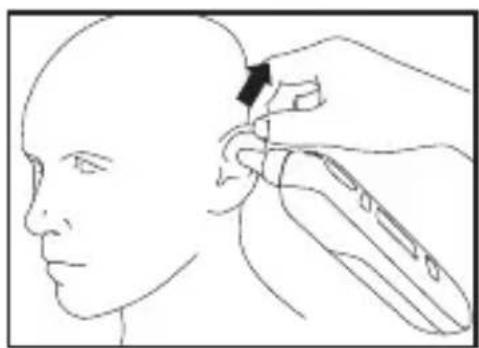
before inserting the sensor tip 1 so that the sensor tip 1 can be orientated directly towards the eardrum.
Positioning infants under twelve months of age:
Place the infant on their side so that one ear faces upwards.
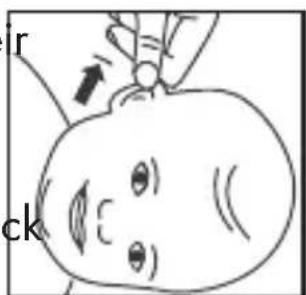
Gently pull the ear back before carefully inserting the sensor tip 1 into the e
Positioning infants over twelve months of age:
□ Stand slightly to the side behind the infant.
Gently pull the ear bar and up, before carefully inserting the sensor tip into the ear.
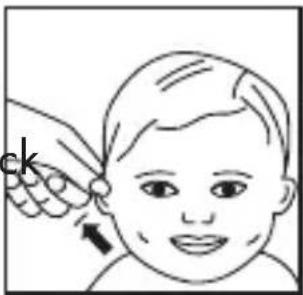
Carefully insert the sensor tip and press the ON/OFF/MEASURE button 8 for one second.
☐ The measured value appears on the display and the end of the measuring process is indicated by a short beep
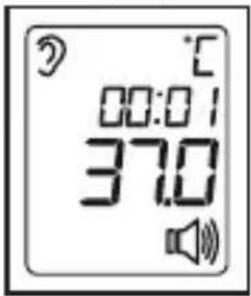
(when the key tone is activated). When the measurement type symbol stops flashing, the next measurement can be taken. This takes approx. 5 seconds.
☐ If the measured value lies within the normal range (< 38 °C (100.4 °F)), the LED above the display will light up green for 3 seconds. If the measured value is higher than this (≥ 38 °C (100.4 °F = fever)), the LED will light up red.
If you have activated Bluetooth® data transfer, the data will be transferred after the measurement. The thermometer displays the symbol for Bluetooth® during transfer.
Note: The "HealthForYou" app must be activated for transfer to occur. If the current data is not displayed on your smartphone, repeat the transfer
process as described in the chapter "transferring measured values".
The device will switch off automatically after 30 seconds (if no Bluetooth® connection is available) or press the ON/OFF/MEASURE button 8 for 5 seconds to switch it off.
☐ Clean the device after every use as described in the chapter "Cleaning and care".
● Measuring object temperatures
To switch on the multi-function thermometer, press the ON/OFF/MEASURE button 8 for one second.
Then press the M button and the S button 6 at the same time for 3 seconds to change to the object temperature mode. appears on the LC display.
Point the sensor tip towards the object or the liquid to be measured (never immerse in liquids!) at a distance of
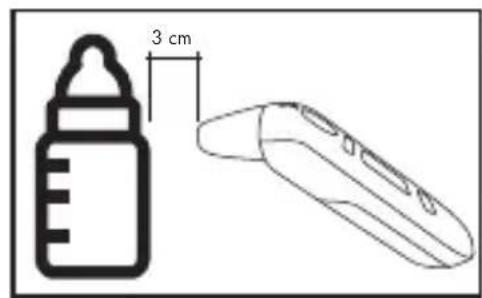
3 cm and press the ON/OFF/ MEASURE button 8 or the MEASURE button (forehead measurement) 5 for 1 second.
☐ Release the selected button. The measured value appears
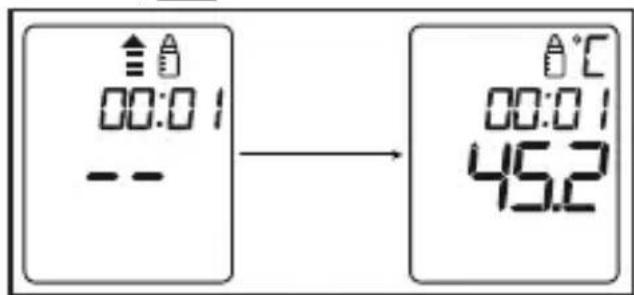
on the display and the end of measurement is indicated with a short beep (when the key tone is activated). When the measurement type symbol stops flashing, the next measurement can be taken. This takes approx. 5 seconds.
☐ To leave object temperature mode, hold down the M button 7 and the S button 6 at the same time for 3 seconds or switch the device off using the ON/OFF/MEASURE button 8.
If you have activated Bluetooth® data transfer, the data will be transferred after the measurement. The thermometer displays the symbol for Bluetooth® during transfer.
Note: The "HealthForYou" app must be activated for the transfer to occur. If the current data is not displayed on your smartphone, repeat the transfer process as described in the chapter "Transferring measured values".
The device will switch off automatically after 60 seconds (if no Bluetooth® connection is available) or press the ON/OFF/MEASURE button 8 for 5 seconds to switch it off. By switching off the device, you also leave "Measuring object temperatures" mode.
Please note that the displayed temperature is the temperature which has been determined and is not the adjusted surface temperature. It cannot be compared with the forehead / ear temperature.
●Di splaying saved measured values
The device saves the measured values of the last 30 measurements automatically. If the 30 memory spaces have been exceeded, the respective oldest measured value will be deleted.
The saved measured values can be requested as follows:
To switch on the multi-function thermometer, press the ON/OFF/MEASURE button 8 for one second.
Press the M button. The last measured value will appear on the display.
If you have activated Bluetooth® data transfer, the data will be transferred after the measurement. The thermometer displays the symbol for Bluetooth® during transfer.
Note: The "HealthForYou" app must be activated for transfer to occur. If the current data is not displayed on your smartphone, repeat the transfer process as described in the chapter "Transferring measured values".
☐ To change between individual saved measured values, press the M button 7.
The device will switch off automatically after 60 seconds (if no Bluetooth® connection is available) or press the ON/OFF/MEASURE button 8 for 5 seconds to switch it off.
● Transferring measured values
• Transferring via Bluetooth low energy technology
You have the option of transferring the measured values and values saved on your device to your smartphone using Bluetooth ® low energy technology.
You will need to download the free app "HealthForYou" from the Apple App Store and Google Play to do so.
To transfer the values, proceed as follows:
If you have activated Bluetooth ® data transfer in the settings menu, the data will be transferred after each measurement or when you change to the memory.
The symbol ⚙ will appear on the display.
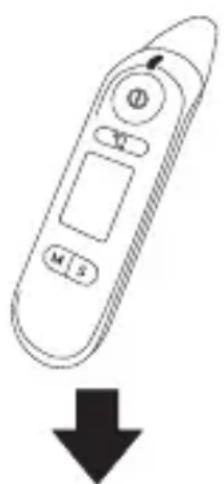
Step 1: SFT 81
Activate Bluetooth ® on your device (see the chapter "Changing basic settings").
 | Step 2: "HealthForYou" AppStart the "HealthForYou" app and follow the instructions. Select the SFT 81 in the settings menu of the app and connect the device. A randomly generated six digit PIN code will be displayed on the thermometer when connecting for the first time. At the same time, an entry field will appear on your smartphone where you should enter this six digit code. If it is entered correctly, the thermometer will be connected to your smartphone. |
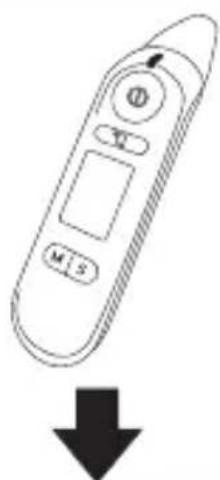 | Step 3: SFT 81Carry out a measurement. |
| Step 4: SFT 81Automatic transfer of data directly after a measurement:The app must be opened and Bluetooth® must be activated on the device and smart-phone to do so. | Step 4: SFT 81Transferring the data at a later point in time: Go to memory recall mode ("Display saved measured values"). Bluetooth® transfer begins automatically. |
The "HealthForYou" app must be activated for transfer. We wish to expressly indicate that the software at hand is not a medical product in accordance with the EU directive 93/42/EEC.
The displayed values are intended merely as a visualisation and may not be used as the basis for therapeutic measures.
- Restoring the device to its factory settings
You can delete all of the data saved on the device, e.g. settings or saved measurements, by restoring the device to its factory settings.
Proceed as follows:
Remove the batteries from the device.
☐ To do this, open the battery compartment cover 3.
Press the ON/OFF/MEASURE button.
Keep it pressed down for 10 seconds whilst you insert the batteries back into the device.
☐ Release the ON/OFF/MEASURE button 8 again once DEL appears in the display.
Remove the batteries again.
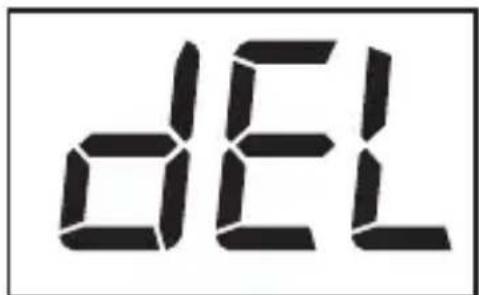
Now all of the saved data on the device has been deleted and the device is restored to its factory settings.
- Cleaning and care
ATTENTION! Possible property damage! Never hold the product under water as liquid could enter the product and damage it.
□ Clean the sensor tip 1 and forehead/ cover cap 2 after each use.
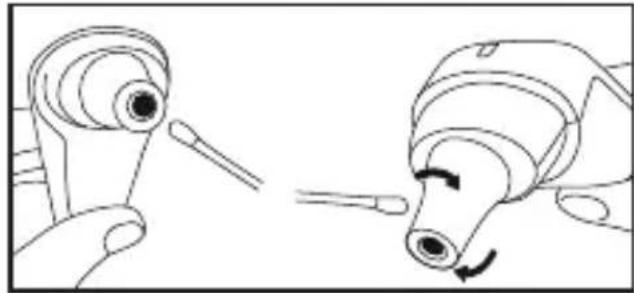
Use a soft cloth or a cotton bud which can be dampened with antiseptic, alcohol or warm water to do so.
To clean the entire device, use a soft cloth which has been dampened slightly with a soap solution.
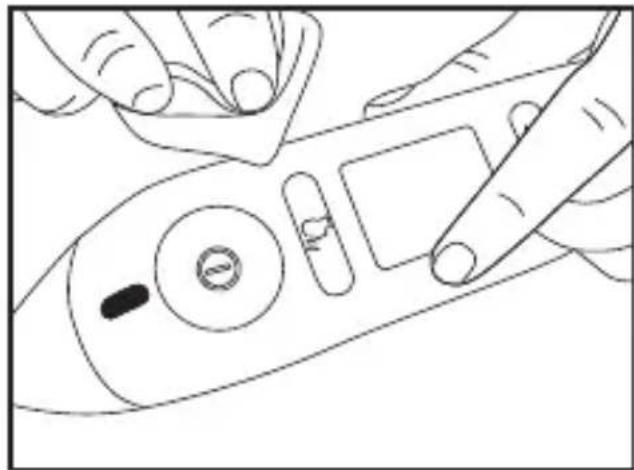
■ Do not use harsh cleaning agents
Storage
□ Always store the thermometer with the forehead / cover cap 2 attached.
☐ If you intend to store the device for an extended period, please remove the batteries.
The device must not be stored or used at temperatures which are too high or too low, at a humidity which is too high or too low (see "Technical data"), in sunlight, connected to an electrical current, or in a dusty location. Otherwise, there could be measurement inaccuracies.
- Troubleshooting
| Error message Cause Solution | |
 | The temperature determined is higher than1) Ear/forehead thermometer mode:43 °C (109.4 °F),2) Object temperature mode: 100 °C(212 °F). | Only use the thermometer within the temperature ranges stated. If necessary, clean the sensor tip. If the same error message pops up again, please get in contact with the specialist dealer or customer service. |
 | The temperature determined is lower than1) Ear/forehead thermometer mode:34 °C (93.2 °F),2) Object temperature mode: 0 °C (32 °F). |
 | A measurement was carried out during the device's self-check. | Wait until the self-check has finished and the measurement type symbol has stopped flashing. |
| Error message | Cause Solution | |
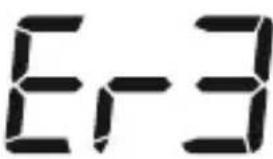 | The operating temperature does not lie within the range between 15 °C and 40 °C (<59 °F, >104 °F). | Only use the multi-purpose thermometer within the temperature ranges stated. |
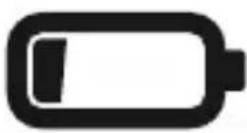 | The batteries are almost empty. | Insert new batteries into the thermometer. |
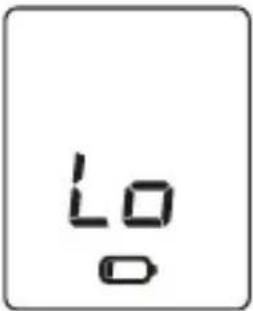 | The thermometer could not carry out the measurement as the batteries are almost empty. | Insert new batteries into the thermometer. |
- Disposal
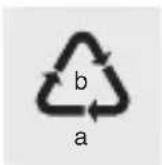
Observe the marking of the packaging materials for waste separation, which are marked with abbreviations (a) and numbers (b) with following meaning: 1–7: plastics / 20–22: paper and fibreboard / 80–98: composite materials.

The product and packaging materials are recyclable, dispose of it separately for better waste treatment. The Triman logo is valid in France only.

Contact your local refuse disposal authority for more details of how to dispose of your worn-out product.
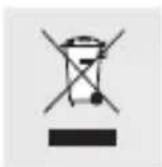
To help protect the environment, please dispose of the product properly when it has reached the end of its useful life and not in the household waste. Information on collection points and their opening hours can be obtained from your local authority.
Per Directive 2006/66/EC and its amendments, defective or used batteries must be recycled. Return the batteries and / or the product to a collection site.
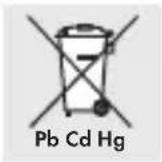
Improper disposal of batteries can harm the environment!
Never dispose of batteries in your household bin. They may contain toxic heavy metals and are subject to hazardous waste regulations. The chemical symbols of the heavy metals are: Cd = cadmium, Hg = mercury, Pb = lead. Therefore dispose of used batteries through your local collection facilities.
- Warranty / Service
We provide a 3-year warranty covering faults in materials or manufacture of the multi-function thermometer from the purchase date.
The warranty does not cover:
- Damage due to improper use.
·Wearparts.
- Damage caused by the customer.
- If the device has been opened by an unauthorised repair shop.
This warranty does not affect the customer's legal rights. The customer must provide proof of purchase in order for any warranty claims within the warranty period to be honoured. The warranty claim must be filed with Hans Dinslage GmbH, Uttenweiler, Germany, within 3 years from the date of purchase.
In the event of a complaint, please contact our Service Department listed below:
Service Hotline (free of charge):
GB

0800 93 10 319 (Mon-Fri: 8 am-6 pm)

service-uk@sanitas-online.de
IE
1800 93 92 35 (Mon-Fri: 8 am-6 pm)
service-ie@sanitas-online.de
If we ask you to return the defective multi-function thermometer, please send the product to the following address:
NU Service GmbH
Lessingstraße 10b
89231 Neu-Ulm
GERMANY
IAN 360012_2101
- Transmission via Bluetooth® low energy technology
Étape 1 : SFT 81
service-f@sanitas-online.de
BE
∅ 0800 70 611 (lu. - ve.: 8 - 18 horloge)
service-be@mgg-elektro.de
meter: 34,0 °C-43,0 °C
(93,2 °F-109,4 °F)
www.healthforyou.lidl/privacy.html
Stap 1: SFT 81
Service hotline (gratis)
NL

0800 54 30 543 (ma. - fr.: 8-18 klok)

service-nl@sanitas-online.de
BE
∅ 0800 70 611 (ma. - fr.: 8-18 klok)
service-be@sanitas-online.de
Warunki robocze: 15,0 °C do 40,0 °C (59,0 °F
Krok 1: SFT 81
service-pl@sanitas-online.de
www.healthforyou.lidl/privacy.html
www.healthforyou.lidl
NOSIT OCHRANNÉ RUKAVICE!

• Skladování
www.healthforyou.lidl/privacy.html
NOSTE OCHRANNÉ RUKAVICE!

ucho mierne dozadu hore, aby sa špička senzora
1 mohla nasmerovať priamo na ušný bubienok.
Jemne potiahnite ucho dozadu hore predtým, ako špičku senzora 1
opatrne zavediete do ucha.
Krok 1: SFT 81
frente: 34,0 °C-43,0 °C
(93,2 °F-109,4 °F)
Modo temperatura de obje-
tos: 0,0 °C - 100,0 °C
(32,0°F-212,0°F)
35,0 °C-42,0 °C (95,0 °F-
35,0 °C-42,0 °C (95,0 °F-
< 30,0 °C (86,0 °F); ±5%
www.healthforyou.lidl/privacy.html
lt; 30,0 °C (86,0 °F);± 5 %
(in 3 cm) bei ≥ 3 0, 0 ^ ° C
(8 6, 0 ^ ° F)
Tidsafstand mellem
to målinger: mindst 5 sekunder
Klinisk
Listen af de kompatilble
smartphones, informationer
„HealthForYou“ App og
www.healthforyou.lidl
● Grundindstillinger foretages
Bemærk: Hvis
Service-hotline (gratis):
DK
∅ 80 70 57 89 (man-fre: 8–18 Ur)
service-dk@sanitas-online.de
manufacturer: AViTA (WuJiang) Co. LTD
Factory address: No. 858, Jiao Tong Rd., Wujiang Economic
Development Zone, Suzhou City,
Jiangsu Province, P.R.C.
Phone number: 0512-82078288
Product name: Infrared Thermometer
REF-Nr.: SFT 81
Model: TS 47
ISO standard: ISO 80601-2-56:2017
China medical
production
Licence No: SSYJXSCX20040018
Manufactured in China
Bluetooth ® and the related logo are registered trademarks of Bluetooth SIG, Inc. Use of these brands by Hans Dinslage GmbH is under license. All other brands and trade names are the property of the respective owners.
Apple and the Apple logo are trademarks of Apple Inc., registered in the U.S. and other countries. App Store is a service mark of Apple Inc., registered in the U.S. and other countries. Google Play and the Google Play logo are trademarks of Google LLC. Android is a trademark of Google LLC.
Distributed by Hans Dinslage GmbH
Riedlinger Str. 28
88524 Uttenweiler
GERMANY

Manufacturer:
AViTA Corporation, 9F, No.78, Sec. 1
Kwang-Fu Rd., San-Chung District
24158 New Taipei City, Taiwan

MDSS GmbH
Schiffgraben 41
30175 Hannover
GERMANY
Contracted Manufacturer: AViTA (WuJiang) Co. LTD
Factory address: No. 858, Jiao Tong Rd., Wujiang Economic
Development Zone, Suzhou City, Jiangsu Province, P.R.C.
Phone number: 0512-82078288
Product name: Infrared Thermometer
REF-Nr.: SFT 81
Model: TS 47
ISO standard: ISO 80601-2-56:2017
China medical production Licence No: SSYJXSCX20040018
Manufactured in China