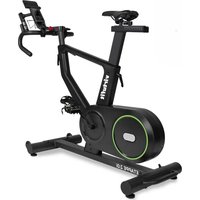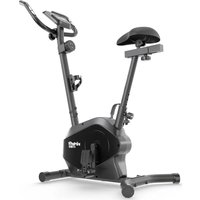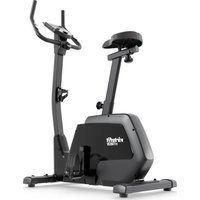
HTR200i - Indoor bike trainer VirtuFit - Free user manual and instructions
Find the device manual for free HTR200i VirtuFit in PDF.


| Product Type | Indoor Cycle Trainer |
| Brand | VirtuFit |
| Model | HTR200i |
| Dimensions (L x W x H) | 97.5 x 53 x 135 cm |
| Weight | 24.5 kg |
| Maximum User Weight | 150 kg |
| Power Supply | Mains adapter (included, original only) |
| Training Modes | Manual, Heart Rate Control (55%, 75%, 90%, TA), Watt, User Program, Body Fat, Recovery |
| Connectivity | Bluetooth (receiver for wireless heart rate chest strap and fitness apps) |
| Display | RPM, speed, time, distance, calories, watt, pulse |
| Heart Rate Sensors | Manual sensors on handlebars + Bluetooth receiver for chest strap |
| Tablet Holder | Yes, adjustable (removable clip) |
| Adjustments | Seat (height and horizontal), handlebar (angle), foot straps |
| Resistance | Adjustable via rotary knob on console |
| Use | Domestic use only |
| Operating Temperature | 0°C to 40°C |
| Storage Temperature | -10°C to 60°C |
| Maintenance | Clean after each use, semi-annual inspection, lubrication of moving parts |
| Standards | EN ISO 20957, CE |
| Spare Parts | Available on request (model reference and serial number) |
Frequently Asked Questions - HTR200i VirtuFit
User questions about HTR200i VirtuFit
0 question about this device. Answer the ones you know or ask your own.
Ask a new question about this device
Download the instructions for your Indoor bike trainer in PDF format for free! Find your manual HTR200i - VirtuFit and take your electronic device back in hand. On this page are published all the documents necessary for the use of your device. HTR200i by VirtuFit.
USER MANUAL HTR200i VirtuFit
@virtufit_fitness
VirtuFit
www.virtufit.com
USER MANUAL
INDEX
English 10
Nederlands 15
Deutsch 21
Français 27
Italiano 33
Español 39
Polski 45
Czech 51
R o m â n ă
M a g y a r
TOOLKIT

STEP 1
STEP 2

STEP 3
STEP 4
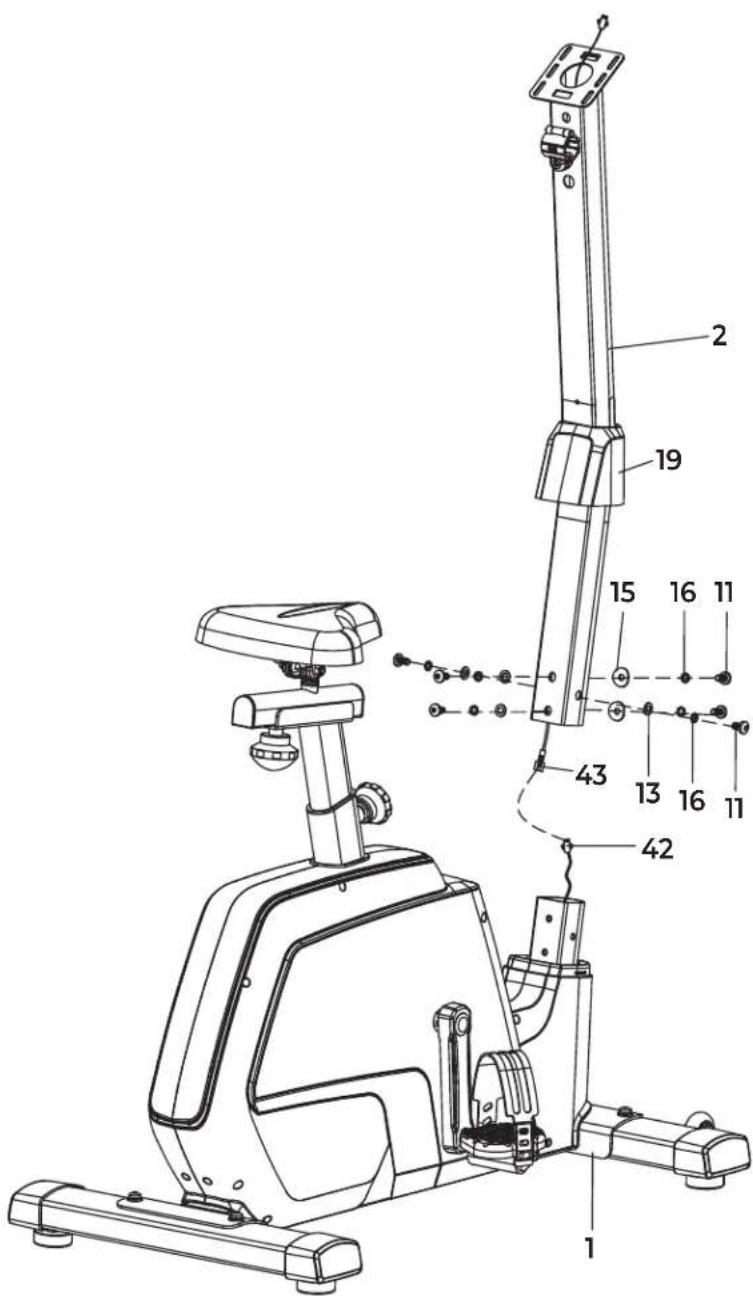
STEP 5
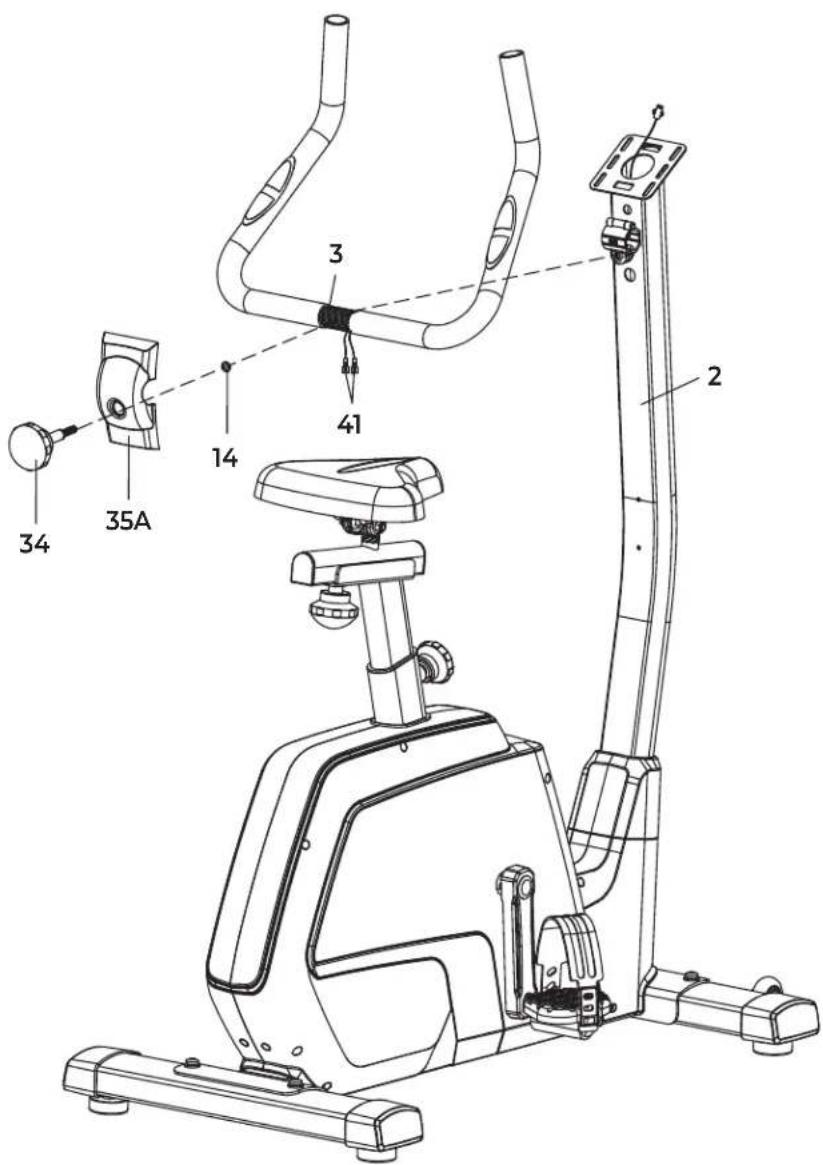
STEP 6
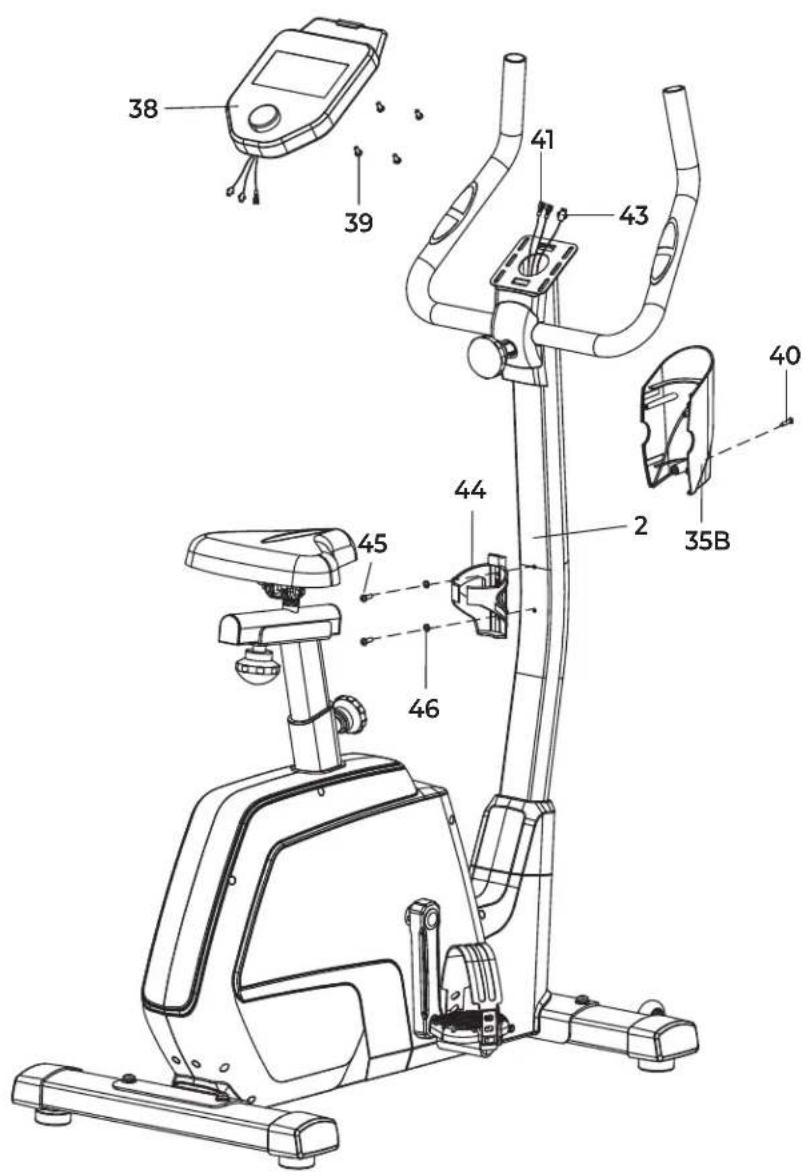
FIG. A
INDEX
| Safety instructions | 10 | ||
| Guarantee | 10 | ||
| Assembly instructions 10 | |||
| Adjusting | 10 | ||
| Training with heart rate 11 | |||
| Training with fitness applications 11 | |||
| Maintenance | 12 | ||
| Cleaning | 12 | ||
| Power supply | 12 | ||
| Troubleshooting | 12 | ||
| Console overview | 13 | ||
| Training guidelines | 14 | ||
| Replacement parts | 14 | ||
| Additional information 14 | |||
| Declaration of the manufacturer 14 | |||
SAFETY INSTRUCTIONS
WARNING!
Consult your doctor before you start exercising. This is particularly important for people with health problems. Please read all instructions before using the equipment. VirtuFit assumes no responsibility for injury or property damage resulting from the use of this equipment. Please read this manual carefully before assembling and/or using the equipment.
- Ensure the equipment is fully assembled and that all nuts and bolts are securely tightened before use.
• Lubricate all moving parts once a year using silicone spray. - Avoid wearing loose clothing to prevent it from getting caught in moving parts.
- Place and use the equipment on a stable, level surface.
• Always wear clean sport shoes while using the equipment. - Keep children and pets at a safe distance during use.
- Maintain proper balance at all times while operating this equipment.
- Do not insert fingers or other objects into any moving parts.
- Consult your physician before beginning any exercise program to determine the appropriate frequency, duration, and intensity based on your age and physical condition. Discontinue use immediately if you experience nausea, dizziness, fainting, headache, chest pain, tightness, or any other discomfort.
• Do not move the equipment by holding it by the seat.
• The equipment is intended for use by one person at a time only.
- This equipment is designed for home use only and supports a maximum user weight of 150 kg.
- Allow 1–2 meters of clearance behind the equipment to prevent accidents.
- Place the equipment on a clean, flat surface. Do not use it on thick carpets, as this can obstruct proper ventilation. Avoid placing this equipment outdoors or near water.
- Keep the storage area clean, dry, and level to prevent damage to the equipment.
• Use this equipment exclusively for its intended purpose.
- Operate the equipment only in environments with an ambient temperature between 0^ and 40^ . Store the equipment in environments with a temperature between -10^ and 60^ .
GUARANTEE
Warranty claims are excluded if the cause of the defect is the result of:
- Maintenance and repair work not carried out by an official dealer.
- Improper use, negligence and/or poor maintenance.
- Failure to maintain the appliance in accordance with the manufacturer's instructions.
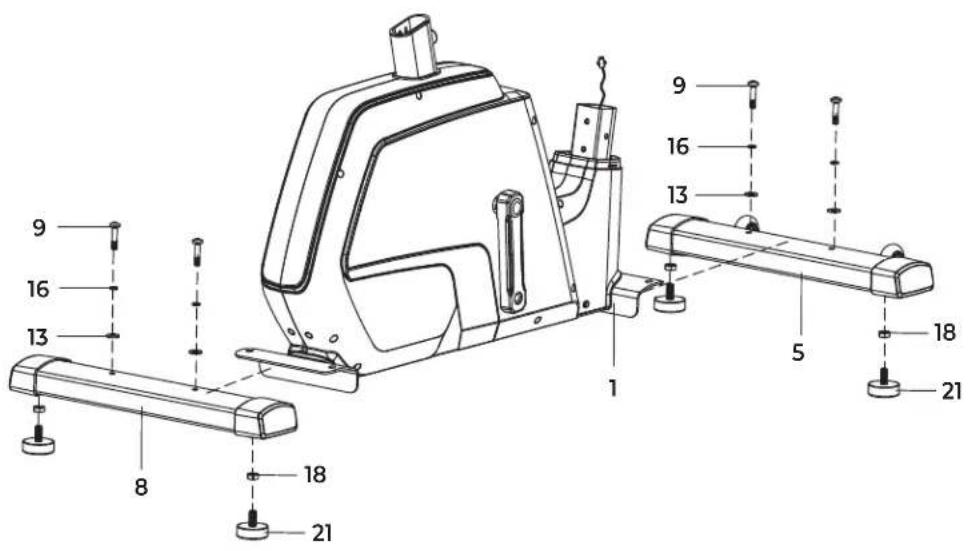
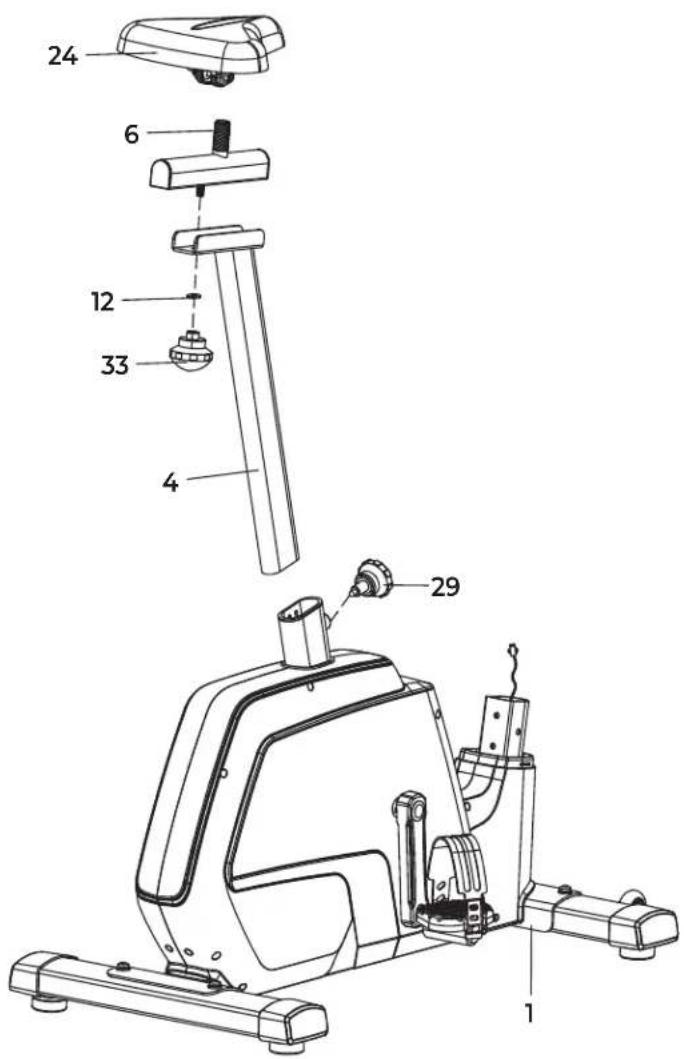
ASSEMBLY INSTRUCTIONS (STEP 1-6)
Missing parts: If any parts are missing from the packaging, carefully check the polystyrene foam and the appliance itself. Some parts (bolts, screws, etc.) are already attached to the unit.
Error message: Make sure that all cables are carefully attached. The brackets of the console are very sensitive and must be kept straight. If the console gives an error message after the equipment has been mounted, the brackets of the console may be bent. Straightening this aluminum part may make the error message disappear.
Hex head bolts: Make sure that the hex head spanner is pushed into the bolt before applying force. This will prevent the head of the socket bolt from turning.
ADJUSTING
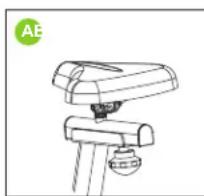
Adjusting the saddle (A)
In order to train effectively, it is advisable to adjust the saddle to the correct height. When pedaling, your knees should be slightly bent when the pedals are in the down position.
To adjust the saddle to the vertical position, follow the steps below:
- Loosen the knob on the seat post and pull the knob towards you.
- Move the seat post up or down until the saddle is in the desired position and release the knob.
- Move the seat post slightly up or down to ensure that the pin is in one of the adjustment holes.
- Tighten the knob on the seat post.
To adjust the saddle to the horizontal position, follow the steps below:
- Loosen the saddle knob a few turns.
- Slide the saddle forward or backward until it is in the desired position.
- Tighten the saddle knob.
Adjusting the handlebars (B)
To adjust the handlebar angle, follow the steps below:
- Loosen the knob.
- Tilt the handles to the desired position.
- Tighten the knob to secure the handles.
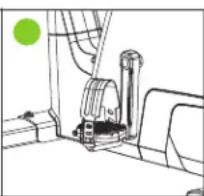
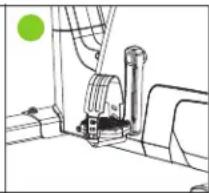
Adjusting the foot straps (C)
To adjust the foot straps, follow the steps below:
- Remove the end of the foot strap from the tabs of the pedal.
- Adjust the footrest to the desired position.
- Attach the end of the foot strap to the tabs on the pedal.
natural_image
Line drawing of a mechanical device with a green circular label 'AE' in the top-left corner (no other text or symbols)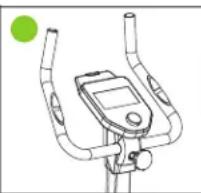
natural_image
Pure mechanical assembly diagram without any text, numbers, or symbolsTRAINING WITH HEART RATE
Hand sensors
This VirtuFit fitness equipment is equipped with hand sensors located on the handles for heart rate monitoring. The sensors function only when both are held simultaneously and continuously for an extended period. For accurate readings, your hands should be slightly moist and apply consistent pressure to the sensors. Excessively dry or sweaty hands may result in inaccurate or irregular measurements.
Bluetooth
This VirtuFit fitness device is equipped with a wireless heart rate receiver. To measure your heart rate with a wireless heart rate monitor, use a heart rate monitor that works on Bluetooth. With a wireless heart rate monitor, it is important that the electrodes are slightly moist and the heart rate monitor fits well to your body. Refer to your heart rate monitor's user manual for proper instructions. Incorrect use of the heart rate monitor may result in abnormal readings.
NOTE!
· A wireless heart rate monitor is not included as standard. Contact your dealer to purchase a wireless heart rate monitor.
- To avoid interference, never use the wireless heart rate monitor in combination with the hand sensors.
WARNING!
· If you have a pacemaker, we recommend that you consult your physician before using a wireless heart rate monitor.
- In rooms with multiple heart rate monitors, it is recommended that you keep enough distance to avoid interference between different devices.
· Always try to keep the wireless heart rate monitor within a range of 1 meter from the console for optimal reception.
· Always wear a wireless heart rate monitor directly on the body, under clothing.
TRAINING WITH FITNESS APPLICATIONS
VirtuFit does not provide service for third party fitness applications such as Kinomap, iConsole, FitShow etc. If you encounter problems with a third party fitness application, please contact the developer of the application in question.
Instruction
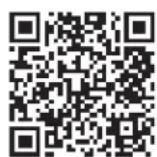
- Scan the QR code with an Android or iOS phone or tablet, to go directly to the App Store or Google Play Store page where the fitness app can be downloaded.
- Scan the QR code on the right to access the fitness app manual. The manual describes step by step how to connect the fitness app to the device, how the fitness app works and what its capabilities are.
iConsole+


APP STORE GOOGLE PLAY SUPPORT
Kinomap


APP STORE GOOGLE PLAY SUPPORT
Zwift

APP STORE GOOGLE PLAY SUPPORT
MAINTENANCE
Safe and effective use of this appliance is only possible when it is correctly installed and properly maintained. It is your responsibility to ensure the appliance is serviced regularly. Any worn or damaged parts must be replaced before resuming use. This equipment is intended for indoor use and storage only. Prolonged exposure to outdoor conditions or fluctuations in temperature and humidity may severely affect the electrical components and moving parts. Always disconnect the power cord before cleaning or performing any maintenance.
Daily maintenance
- Wipe down the unit after each use to remove sweat and moisture.
- Ensure the equipment is free from dust and dirt.
- Avoid using harsh cleaning agents and keep the equipment away from excessive moisture.
Semi-annual maintenance
- Inspect all bolts and nuts connected to moving parts. Tighten them if necessary.
- Check the movement of all mobile parts and components. Apply silicone spray if needed.
General cleaning recommendations
- Clean the unit after each training session.
- Use a dry cloth to clean the control panel.
- Use a soft, clean cloth with mild detergent to remove persistent stains and dirt.
- Store the equipment in a clean, dry environment, away from direct heat and water sources.
CAUTION! Repairs must be performed by a qualified technician, unless otherwise instructed by the supplier or manufacturer.
CLEANING
Regular cleaning significantly extends the lifespan of your equipment. Keep the appliance free from dust by cleaning it frequently.
Preventative maintenance not only prolongs the life of the equipment but also helps avoid potential injuries.
For more detailed information, visit: virtufit.com/faq
POWER SUPPLY
Mains Power
Connect the supplied adapter to the adapter port at the back of the device. Plug the adapter into a wall socket. The device is now ready for use.
NOTE!
- Use only the original adapter.
· Always pull the plug, not the cord. - For indoor use only.
TROUBLESHOOTING
| PROBLEM SOLUTION | |
| The display does not show any values | Check that all sensor and console cables are securely connected and undamaged. |
| If the problem persists, gently adjust the position of the sensor. | |
| Squeaking noise | Ensure that all bolts and nuts are properly tightened. |
| Lubricate moving parts if necessary. | |
| Ticking noise | This may be caused by incorrectly mounted pedals. |
| Firmly tighten the pedal(s). | |
| If the noise continues, remove and remount the pedals correctly:- The R (right) pedal must be mounted clockwise.- The L (left) pedal must be mounted counter-clockwise. | |
| If the problem persists, contact your supplier. | |
| Hand sensors are not functioning properly | Wash and dry your hands thoroughly, then try again. |
| Check the handlebar cables for damage and ensure they are properly connected to the connector. | |
| If the problem persists, contact your supplier. | |
PROBLEM SOLUTION
Console is not responding
If no signal appears while pedaling, verify that the cable is correctly connected.
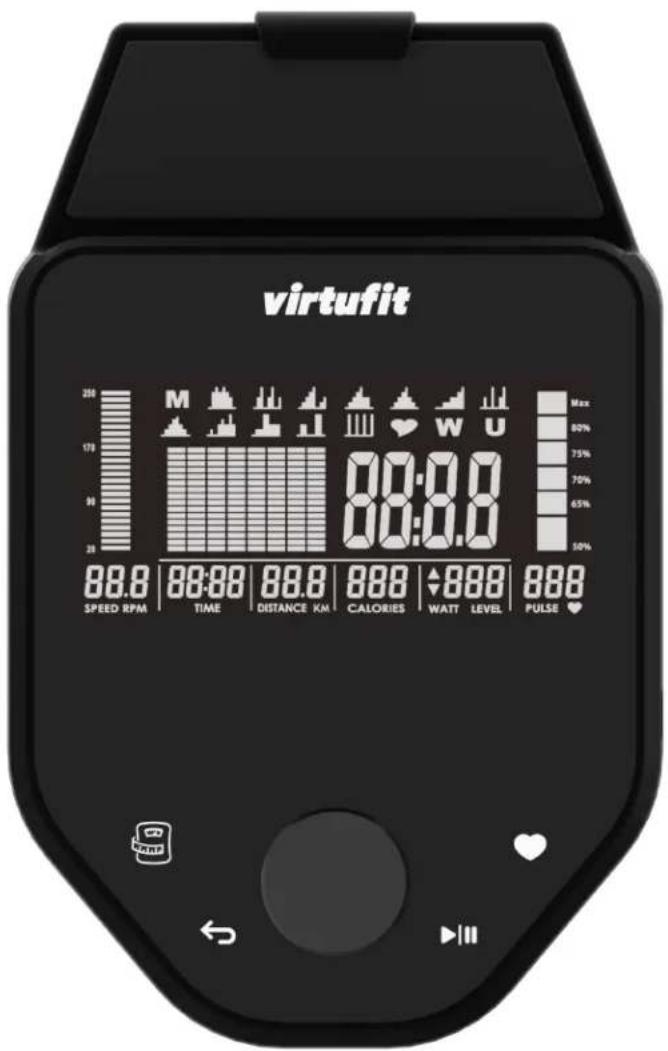
CONSOLE OVERVIEW (FIG. A)
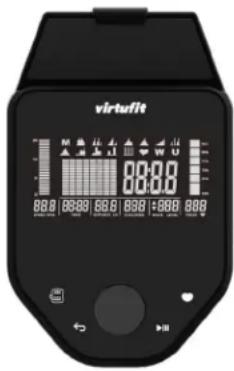
Console buttons

BODYFAT
- Test your body fat percentage and Body Mass Index (BMI).

BACK
- Press and hold this button for 3 seconds to reset all values and restart the console.
- During setup or training, press "BACK" to return to the main menu.

RECOVERY
- This mode measures how quickly your body recovers after a workout. Make sure your heart rate is monitored during the training.

START/PAUSE
- Start or stop the workout.
Modes
User mode
Rotate the round control knob to select a user profile (U1-U4). Press the control knob to confirm your selection. The gender can be set by rotating the control knob. Press the control knob to confirm your selection. Age, height, and weight can be entered in the same way. Rotate the control knob to browse through the available programs. This is indicated by the flashing icon at the top of the screen.
Quick start
You can choose a quick start by pressing "directly after activating the console, which will launch the manual program. Adjust the resistance by rotating the control knob, then press to begin your workout.
Manual mode (M)
The console starts in manual mode, which is being indicated by the flashing 'M' in the top left. Press the control knob to set targets for the
desired level, time, distance, calories or pulse. The flashing value can then be increased or decreased by rotating the control knob, press the control knob to confirm. Press “▶” begins the program.
Heart rate control mode (♥)
Rotate the control knob until the HEART (con flashes on the start screen. Press the control knob to select it. Rotate the control knob to choose the desired heart rate. The user can select 55%, 75%, 90%, or a target heart (TA) rate by rotating the control knob. Press the control knob to confirm the selected value. The TARGET option (TA) allows you to set a maximum heart rate. For example, if the limit is set to 80 beats per minute and your heart rate exceeds this value, the console will emit a warning beep. Set the workout duration by rotating the control knob. Press the control knob to confirm the selected time. Press “▶” to begin the workout.
NOTE! Heart rate measurement is not intended for medical purposes and serves only as an estimate. During this workout, make sure to hold the heart rate sensors or wear a compatible chest strap.
WATT mode (W)
Rotate the control knob until "W" starts flashing. Press the control knob to confirm. Set the desired value by rotating the control knob. Press the control knob to confirm. A maximum WATT value can be set, the console will emit a warning beep if this value is exceeded during the workout. Set the workout duration by rotating the control knob. Press the control knob to confirm the selected time. If no time is being selected, the console will display the duration time. Press "▶III" to begin the workout.
User program mode
This mode allows you to create a custom workout program. Rotate the control knob until "U" flashes. Press the control knob to confirm. Rotate the control knob to set the resistance level for each segment. Press the control knob to confirm each value. Press "▶" begins the workout. The resistance will automatically adjust according to your programmed settings. Press "▶" again to set the workout duration. Set the time by rotating the control knob. Press "▶" resume the workout
Body fat Mode
Press "select a user profile (U1–U4), which can be changed during startup or reset. Place your hands on the heart rate sensors on the handlebars. After a few seconds, an estimate of your BMI (B) and body fat percentage (F) will appear on the display.
Recovery mode
This mode measures how quickly your body recovers after a workout. Make sure your heart rate is being monitored during the training. Press "during the workout to start the heart rate test. You do not need to move. Time and heart rate will be displayed. The timer counts down from 60 seconds while your current heart rate is shown. The faster your heart rate drops, the better your fitness level.
NOTE! This is an estimate. The results are not intended for medical use.
ENGLISH
virtufit
Adjustable tablet holder
The adjustable tablet holder lets you easily position your phone or tablet for optimal viewing. Simply pull out the top clip of the console and place your device in the holder. Enjoy your favorite training apps or watch a series while exercising.
Console specifications
| Function | RPM/Speed 0-999 / 99,99 | |
| Time 00:00 - 99:00 | ||
| Distance 0.00 - 99.00 km | ||
| Calories 0 - 990 Kcal | ||
| Watt 0 - 999 | ||
| Pulse 30 - 230 BPM | ||
| Operating temperature | 0°C - 40°C | |
| Storage temperature | -10°C - 60°C | |
Technical data
| Length 97,5 cm | |
| Width 53 cm | |
| Height 135 cm | |
| Weight | 24,5 kg |
| Max. user weight | 150 kg |
TRAINING GUIDELINES
A successful training program includes a warm-up, the actual training and a cool-down. Perform the complete training program at least twice, but preferably three times a week and keep a rest day between training sessions. After a few months, the intensity of the training can be increased, for example to four or five times a week.
The warm-up
The purpose of a warm-up is to prepare the body for training and to reduce the risk of injury. Warm up your body for two to five minutes before starting a cardio or strength training session. Do exercises that increase the heart rate and warm up the working muscles. Examples of this type of activity are running, jogging, jumping jacks, skipping and running in place.
Stretching
Stretching while the muscles are warm is very important after a good warm-up and cool-down. It reduces the risk of injury. Stretching exercises should be held for 15-30 seconds.
Cooling down
The purpose of the cool-down is to return the body to its (near) normal resting position at the end of the workout. A good cool-down slowly reduces your heart rate and promotes recovery.
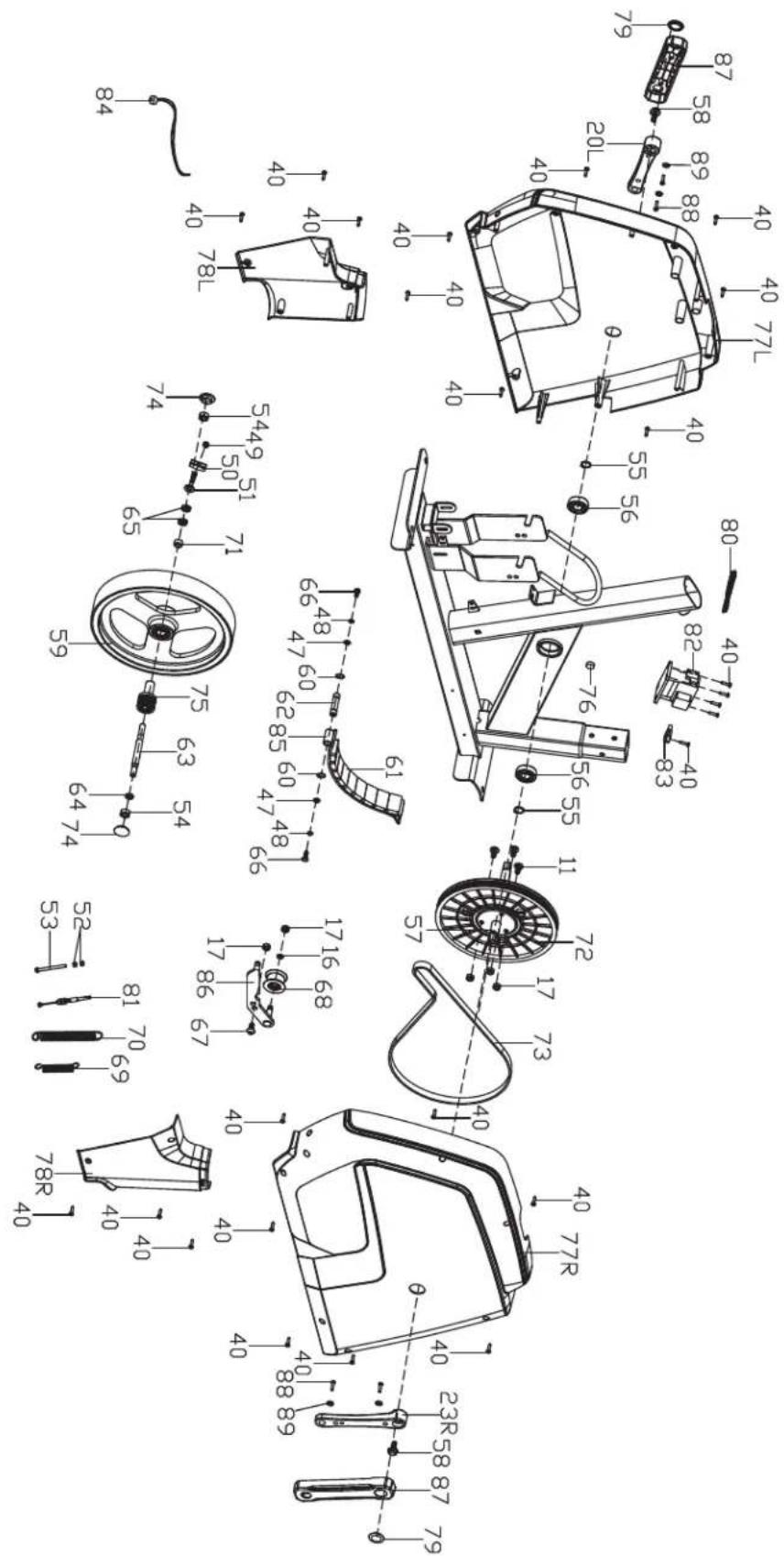
REPLACEMENT PARTS
To request replacement parts for your VirtuFit equipment, please refer to the information on the front cover of this manual. In order to assist you efficiently, we kindly ask that you provide the following details when contacting our support team:
• The model number and serial number of the product
• The product name
- The part number and a clear description of the required part(s) (as listed in the parts list and shown in the exploded view section of this manual)
Providing accurate information will help us process your request quickly and effectively.
ADDITIONAL INFORMATION
Responsible disposal of packaging
At VirtuFit, we are committed to reducing environmental impact. We kindly ask that you recycle all packaging materials through designated recycling facilities, in line with national waste reduction initiatives.
Product disposal
Your VirtuFit equipment is built to deliver long-term performance and reliability. When the time eventually comes to retire the product, please ensure it is disposed of in accordance with the European WEEE Directive. This means taking the product to an authorized collection point for safe and environmentally responsible recycling.
DECLARATION OF THE MANUFACTURER
VirtuFit hereby declares that this product complies with the following standards and directives:
• EN ISO 20957
• EMC (2014/30/EU)
• LVD (2014/35/EU)
• Radio Equipment Directive (2014/53/EU)
• RoHS (2011/65/EU + 2015/863)
As a result, the product is CE-certified.
VirtuFit
- Start of pauzeer de training.
Modi
Gebruikersmodus
Console Specifications
natural_image
Line drawing of a mechanical device with a green circular label 'AE' in the top-left corner (no other text or symbols)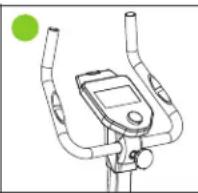
natural_image
Pure mechanical assembly diagram without any text, numbers, or symbolsnatural_image
Three-panel line drawing showing a stationary exercise machine with green circular markers (no text or symbols)ENTRAÎNEMENT AVECLA FRÉQUENCE CARDIAQUE
Capteurs de main
▶ III DÉMARRAGE/PAUSE
natural_image
Three-panel line drawing showing a stationary exercise machine with green circular markers, no text or symbols present.natural_image
Three-panel line drawing showing a stationary exercise machine with labeled components (no text or symbols)ENTRENAMIENTO CON FRECUENCIA CARDÍACA
Sensores de mano
natural_image
Line drawing of a mechanical device with a green circular label 'AE' in the top-left corner (no other text or symbols)
natural_image
Technical line drawing of a mechanical assembly with a green circular marker (no text or symbols)TRENING Z TETNEM
Czujniki ręczne
TRENING Z APLIKACJAMI FITNESS
DODATKOWE INFORMACJE
natural_image
Line drawing of a mechanical device with a labeled green 'AE' (no other text or symbols)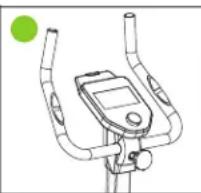
natural_image
Technical line drawing of a mechanical assembly with a green circular marker (no text or symbols)TRÉNINK SE SRDEČNÍ FREKVENCÍ
Ruční senzory
natural_image
Line drawing of a mechanical device with a green circular label 'AE' in the top-left corner (no other text or symbols)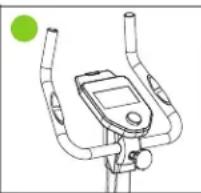
natural_image
Line drawing of a stationary exercise machine with green circular indicator (no text or symbols)
natural_image
Line drawing of a mechanical assembly or device with no visible text or symbolsANTRENAMENTUL CU RITMUL CARDIAC
Senzori de mână
natural_image
Line drawing of a mechanical device with a green circular label 'AE' in the top-left corner (no other text or symbols)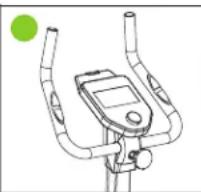
natural_image
Line drawing of a stationary bike with green circular marker (no text or symbols)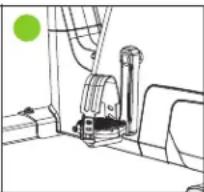
natural_image
Pure mechanical assembly diagram without any text, numbers, or symbolsEDZÉS A PULZUSSZÁMMAL
Kézi érzékelők
| # SKU DESCRIPTION QTY. | |||
| 1 VFSP000505 Main frame 1 | |||
| 2 VFSP000506 Handlebar post 1 | |||
| 3 VFSP000474 Handlebar 1 | |||
| 3+25+26+31+37+40+41 VFSP000473 Handlebar set 1 | |||
| 4 VFSP000415 Saddle post | 1 | ||
| 5 VFSP000476 Front stabilizer | 1 | ||
| 5+10+13+17+18+20+21+32 | VFSP000474 Front stabilizer set | 1 | |
| 6 VFSP000477 Horizontal saddle post | 1 | ||
| 6+7+27+30 | VFSP000475 | Horizontal saddle post | 1 |
| 7 VFSP000478 U-shaped slider | 1 | ||
| 8 VFSP000479 Rear stabilizer | 1 | ||
| 8+18+20+21 | VFSP000476 Rear stabilizer set | 1 | |
| 9 VFSP000477 Allen screw M8x60 | 4 | ||
| 10 | VFSP000478 Allen screw M8x38 | 2 | |
| 11 | VFSP000479 Allen screw M8x16 | 9 | |
| 12 | VFSP000420 Flat washer D10xD25x2 | 1 | |
| 13 | VFSP000421 Flat washer D8xD19x1.5 | 10 | |
| 14 | VFSP000422 Flat washer D8xD13x1.5 | 1 | |
| 15 | VFSP000480 | Arc washer D8xD20x2 | 2 |
| 16 | VFSP000481 Spring washer D8 | 11 | |
| 17 | VFSP000482 | Nylon nut M8 | 8 |
| 18 | VFSP000483 | Hex nut M10 | 4 |
| 19 | VFSP000507 Protective guard | 1 | |
| 20 | VFSP000484 | End cap | 4 |
| 21 | VFSP000485 Adjusting pad | 4 | |
| 22L | VFSP000423 Pedal (L) | 1 | |
| 22R | VFSP000424 Pedal (R) | 1 | |
| 23L | VFSP000426 Crank (L) | 1 | |
| 23R | VFSP000425 Crank (R) | 1 | |
| 24 | VFSP000427 | Saddle | 1 |
| 25 | VFSP000428 | Foam grip 2 | |
| 26 | VFSP000429 | Round end cap 2 | |
| 27 | VFSP000430 | D shape end cap | 2 |
| 28 VFSP000431 Bushing 1 | |||
| 29 VFSP000432 Pop-pin Knob 1 | |||
| 30 VFSP000433 Round end cap 1 | |||
| 31 VFSP000434 Plug 1 | |||
| 32 VFSP000486 Roller | 2 | ||
| 33 | VFSP000435 Knob nut | 1 | |
| 34 VFSP000436 Knob | 1 | ||
| 35a/b | VFSP000437 Protective guard | 1 | |
| 36 VFSP000438 Adapter | 1 | ||
| 37 VFSP000439 Pulse | 2 | ||
| 38 | VFSP000440 | Console | 1 |
| 39 VFSP000487 Phillips screw M5x10 | 4 | ||
| 40 | VFSP000488 | Cross tapping screw ST4.2x18 | 26 |
| 41 | VFSP000441 Pulse wire | 2 | |
| 42 | VFSP000442 | Sensor wire | 1 |
| 43 | VFSP000443 | Extension wire | 1 |
| 44 | VFSP000489 | Bottle holder | 1 |
| 45 | VFSP000490 | Cross screw M5x16 | 2 |
| 46 VFSP000491 Flat washer D5 | 2 | ||
| 47 | VFSP000444 | Flat washer D6*D12*1 | 2 |
| 48 | VFSP000492 Spring washer D6 | 2 | |
| 49 | VFSP000493 Hex nut M6 | 1 | |
| 50 | VFSP000494 | U-shape washer | 1 |
| 51 VFSP000495 Bolt M6*50 | 1 | ||
| 52 VFSP000496 Hex nut M5 | 2 | ||
| 53 VFSP000497 Hex bolt M5*60 | 1 | ||
| 54 | VFSP000445 | Hex nut M10*1*H8 | 2 |
| 55 | VFSP000446 | Spring washer D17 | 2 |
| 56 | VFSP000447 Bearing 6203RS | 2 | |
| 57 | VFSP000448 | Middle axle | 1 |
| 58 | VFSP000449 | Flange bolt | 2 |
| 59 | VFSP000450 | Flywheel | 1 |
| 60 | VFSP000498 | Spring washer D12 | 2 |
| 61 | VFSP000451 Magnet | 9 | |
| # SKU DESCRIPTION QTY. | |||
| 61 VFSP000451 Magnet board axle 1 | |||
| 63 VFSP000452 Flywheel axle 1 | |||
| 64 VFSP000500 Conical thin nut M10*1*H5 1 | |||
| 65 VFSP000453 Thin nut M10*1*H5 2 | |||
| 66 | VFSP000501 Hex bolt M6*15 | 2 | |
| 67 | VFSP000454 Split bolt | 1 | |
| 68 | VFSP000455 Idler | 1 | |
| 69 | VFSP000456 | Spring 01.6*015*L47.2 | 1 |
| 70 | VFSP000457 | Spring 02*018*L81 | 1 |
| 71 | VFSP000458 | Spacer 016*010.5*6 | 1 |
| 72 VFSP000459 Pulley | 1 | ||
| 73 | VFSP000460 Belt | 1 | |
| 74 | VFSP000461 Nut cap | 2 | |
| 75 VFSP000462 Small pulley | 1 | ||
| 76 VFSP000502 Round magnet | 1 | ||
| 77L | VFSP000508 Chain cover (L) | 1 | |
| 77R | VFSP000509 Chain cover (R) | 1 | |
| 78L | VFSP000510 Front cover (L) | 1 | |
| 78R VFSP000511 | Front cover (R) | 1 | |
| 79 | VFSP000463 Seal | 2 | |
| 80 | VFSP000464 Ring | 1 | |
| 81 | VFSP000465 Tension cable | 1 | |
| 82 | VFSP000466 Motor | 1 | |
| 83 | VFSP000467 Sensor | 1 | |
| 84 | VFSP000468 Power line | 1 | |
| 85 | VFSP000469 Magnet board | 1 | |
| 86 VFSP000470 Idler plate | 1 | ||
| 87 | VFSP000471 Crank cover | 2 | |
| 88 | VFSP000503 Cross tapping screw ST4.2x13 | 4 | |
| 89 | VFSP000472 | Flat washer D5*D13*1 | 4 |
| 90 VFSP000504 Flywheel set | 1 | ||
| 91 | VFSP000512 | Hardware kit | 1 |