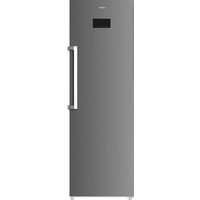
ACVH2601ENF - Freezer ASPES - Free user manual and instructions
Find the device manual for free ACVH2601ENF ASPES in PDF.


| Product type | Upright glass door freezer |
| Brand | Aspes |
| Model | ACVH2601ENF |
| Category | Freezer |
| Power supply | Single-phase, 187-254 V (stabilizer recommended outside range) |
| Frequency | 50/60 Hz |
| Climate class | Suitable for classes 0 to 7 (up to 40 °C) |
| Operating temperature | Adjustable, digital display (typically -18 °C) |
| Noise level | Lower than 70 dB(A) |
| Main functions | Digital display, temperature adjustment, automatic defrost, open door alarm, high/low temperature alarm |
| Lighting | LED |
| Door | Glass door with lock |
| Handle | Yes |
| Casters | Yes (universal wheels) |
| Adjustable feet | Yes |
| Cleaning and maintenance | Mild detergent and warm water; unplug before cleaning |
| Safety | Grounding required; do not damage refrigerant circuit; do not use electrical appliances inside |
| Spare parts and repairability | List of components in the manual; repair by authorized technician |
| Installation | Minimum distance 10 cm from wall; spirit level; 2° tilt for door closure |
| General information | Free user manual available in PDF format |
Frequently Asked Questions - ACVH2601ENF ASPES
User questions about ACVH2601ENF ASPES
0 question about this device. Answer the ones you know or ask your own.
Ask a new question about this device
Download the instructions for your Freezer in PDF format for free! Find your manual ACVH2601ENF - ASPES and take your electronic device back in hand. On this page are published all the documents necessary for the use of your device. ACVH2601ENF by ASPES.
USER MANUAL ACVH2601ENF ASPES
Read this manual carefully and keep it for future reference
www.aspes.es
Important safety instruction .... 1
Transportation and Placement 2
Installation Instructions .... 3
Main components....5
Operation Instructions....6
Product troubleshooting....6
Product Cleaning....9
Caution for Safety 9
Correct Disposal of this product 9
Dear Customer:
Dear users (customer), this manual contains the product's basic knowledge, use instruction, fault diagnosis and basic trouble shooting methods. In order to better understand and use this product, please take good care of this manual and read it carefully.
Important safety instruction
- The range of operating voltage: 187V\~254V. In order to avoid damaging the electrical performance of the compressor, please equip with a voltage stabilizer appliance of power not less than 500W, to protect the cooler when the voltage is lower than 187V or higher than 254V.
- Individual single-phase socket must be used. It should be reliably connected to a grounding wire. Caution: The grounding wire is not allowed to connect to a water pipe or a gas pipe.
- Strong base, strong acid, organic solvent and corrosive goods or those are easy to pollute to food are prohibited storing in the cooler; otherwise, it can cause corrosiveness or accident.
- Don't raise the cooler or the shell of the electric parts, or it will cause the decline in insulation and cause corrosion.
- When the cooler will not be used for a long time, disconnect the power and clean it. Please examine the circuit whether it is ok before reuse.
- If the supply cord is damaged, it must be replaced by a special cord or assembly available from the manufacturer or its service agent.
- The appliance shall be disconnected from its power source during cleaning or maintenance and when replacing parts.
- The A-weighted emission sound pressure level is below 70Db(A).
- Do not store explosive substances such as aerosol cans with a flammable propellant inside the appliance.
- Flammable blowing gas of the cooler should be handled according to local regulations. Before you scrap the appliance, please take off the doors to prevent children trapped.
Caution:
- Risk of fire / flammable materials, taking care to avoid causing a fire by igniting flammable material.
- Keep clear of obstruction all ventilation openings in the appliance enclosure or in the structure for building-in.
- Do not use mechanical devices or other means to accelerate the defrosting process, other than those recommended by the manufacturer.
-
Do not damage the refrigerant circuit.
-
Do not use electrical appliances inside the food storage compartments of the appliance, unless they are of the type recommended by the manufacturer.
- The ambient temperature and humidity conditions of the cooler climate class following the tab below:
| Test room climate class | Dry bulb temperature (°C) | Relative Humidity (%) | Dew point (°C) | Water vapor mass in dry air (g/kg) |
| 0 | 20 | 50 | 9.3 | 7.3 |
| 1 | 16 | 80 | 12.6 | 9.1 |
| 8 | 23.9 | 55 | 14.3 | 10.2 |
| 2 | 22 | 65 | 15.2 | 10.8 |
| 3 | 25 | 60 | 16.7 | 12.0 |
| 4 | 30 | 55 | 20.0 | 14.8 |
| 6 | 27 | 70 | 21.1 | 15.8 |
| 5 | 40 | 40 | 23.9 | 18.8 |
| 7 | 35 | 75 | 30.0 | 27.3 |
| NOTE: the water vapor mass in dry air is one of the main points influencing the performance and the energy consumption of the coolers. Therefore, the order of the climate class in the table is based on the water vapor mass column. | ||||
NOTE: the water vapor mass in dry air is one of the main points influencing the performance and the energy consumption of the coolers. Therefore, the order of the climate class in the table is based on the water vapor mass column.
Note: The illustration is a reference image, your device may differ.
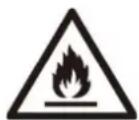
Warning: Risk of fire / flammable materials
Transportation and Placement
Transportation
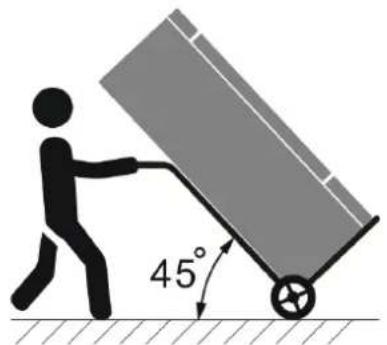
- Don't slant it over more than 45^ , while moving it.
- The cooler needs to stand upright for 4 hours before it is powered on, while the product is transported upside down.
natural_image
Illustration of a person pushing a cart with a 45-degree angle indicator (no text or symbols beyond the angle)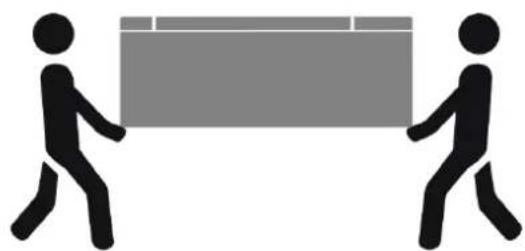
natural_image
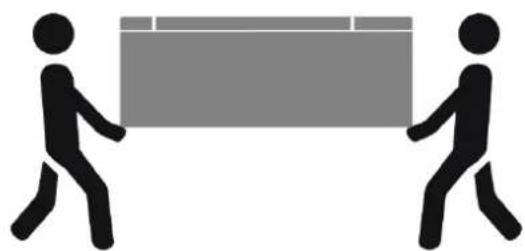
Two stick figures pulling a large rectangular block (no text or symbols)Choosing the installation location
- The unit is for indoor application only.
- Due to the fact that the unit has a glass door, its performance is highly influenced by environmental conditions. To minimize the environmental effects on the unit's performance, the following are recommended:
● The unit is not to be placed near any kind of heat source
● The unit is not to be placed near or inside air streams produced by ventilation fans, open doors and/or windows
● The unit is not to be situated under a roof-mounted ventilation system.
- The unit should have sufficient space to 'breathe' (always use the rear space to ensure minimum clearance).
● The unit should not be placed under direct sunlight.
- Keep all ventilation openings in the appliance enclosure or in the structure clear of obstruction.
- In order to reduce fire hazard, the installation of this appliance must be carried out only by a suitably qualified person.
Installation Instructions
- Unpack all the packages and clean all the cabinet using warm water together with 5 % of neutral soap then dry it with a soft-cloth; for the glass parts only use specific products, avoiding the use of water which can leave on the glass limestone residues.
- Keep a distance from the wall of 10 cm at least. Please level the unit settling the adjustable feet.
- Cabinet must be installed on a perfectly even surface, far away from any heat source included sun rays.
- Do not install the unit in open places and do not expose it to rain.
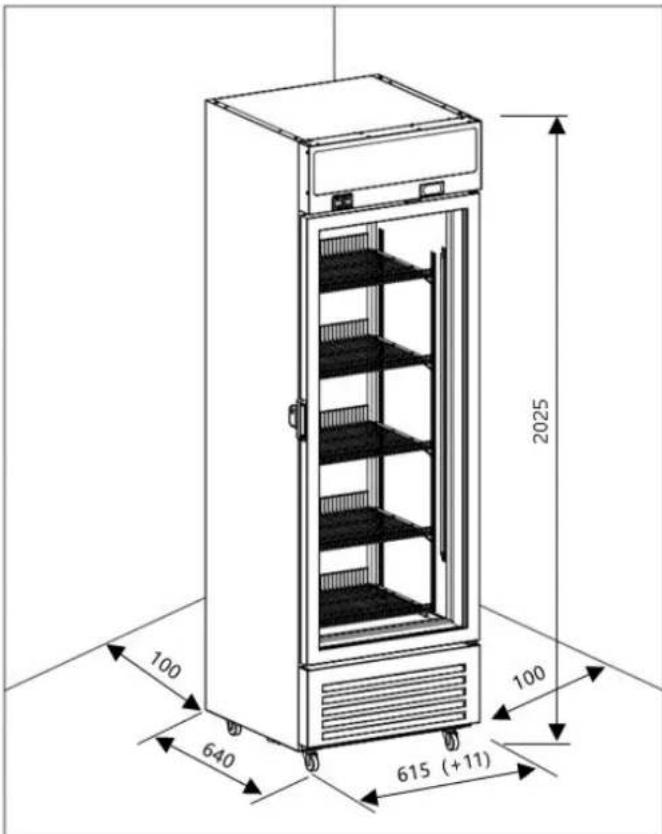
Note: product space demand size schematic diagram
Leveling the unit
Place the unit at the chosen location. Using a spirit level, check whether the unit is leveled in both directions.
The spirit level can be placed on one of the shelves.
It is essential that the unit is leveled during operation so as to avoid possible ice formation on the evaporator's fins due to insufficient drainage of the condensates.
Tilt unit by 2° angle for easy closing of door and drain.
- Do not insert cream or spray bottles inside the cooler.
- Do not store explosive substances such as aerosol cans with flammable propellant in the cooler.
Main components
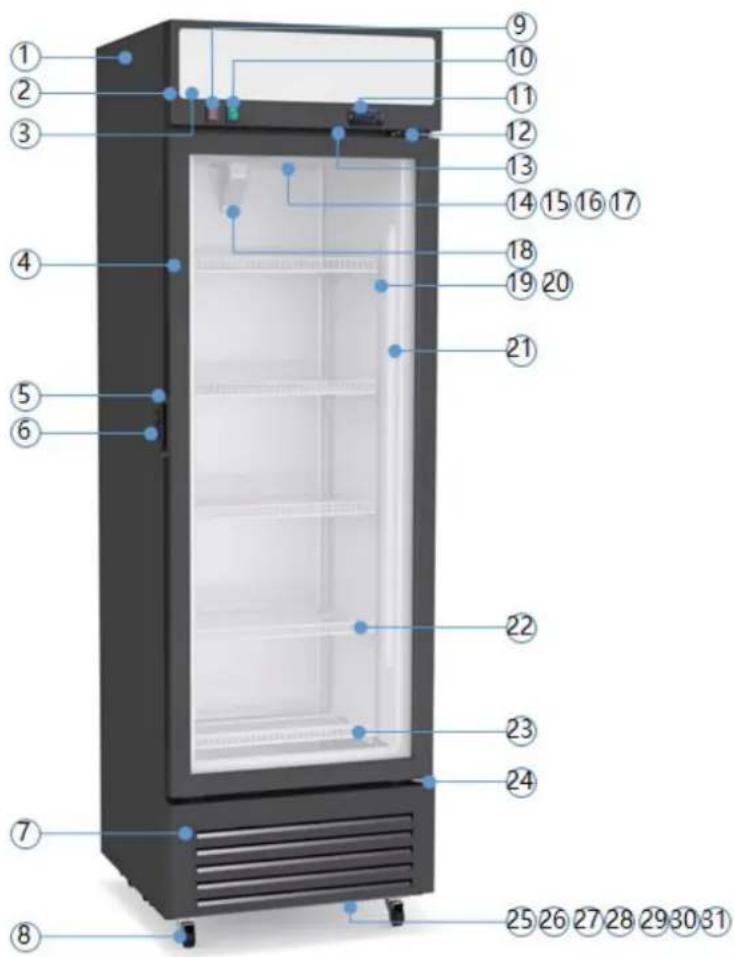
| No. | Description | No. | Description | No. | Description |
| 1 | Cabinet | 12 | Top hinge | 23 | Bottom wire rack |
| 2 | Canopy | 13 | Fan Switch | 24 | Lower hinge |
| 3 | Canopy panel | 14 | Evaporator | 25 | Power cord |
| 4 | Glass door | 15 | Evaporation fan | 26 | Compressor |
| 5 | Handle | 16 | Defrost heater | 27 | Cooling Fan |
| 6 | Lock | 17 | Wind deflector | 28 | Condenser |
| 7 | Decoration panel | 18 | Drain pipe cover | 29 | Dry filter |
| 8 | Universal wheel | 19 | Shelf | 30 | Water tray |
| 9 | Power switch | 20 | Shelf foot | 31 | Hose clamp |
| 10 | Light switch | 21 | LED light | ||
| 11 | Electronic controller | 22 | Wire rack |
Note: The illustration is a reference image, your device may differ.
Operation Instructions
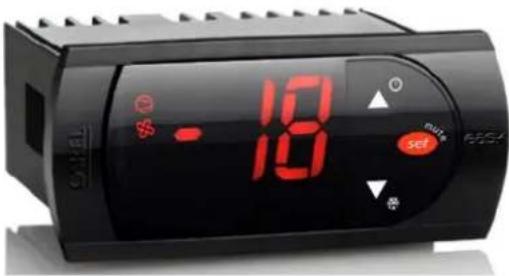
Display and functions
During normal operation, the controller displays the inner temperature. In addition, the display has LEDs that indicate the activation of the control functions (see Table 1), while the 3 buttons can be used to activate/deactivate some of the functions (see Table 2).
LEDs and associated functions

| Index | Function | Normal operation | Start up | ||
| ON | OFF | Blink | |||
| 1 | Compressor | ON | OFF | Request | ON |
| 2 | Fan | ON | OFF | Request | ON |
| 3 | Defrost | ON | OFF | Request | ON |
| 4 | Digit | 2 digit LED display with sign (-99 to 99) and decimal point | |||
Table.1
Table of functions activated by the buttons
| Index | Button | Normal operation | Start up | |
| pressing the button alone | pressed together | |||
| 1 |  | more than 3 s: toggle ON/OFF | pressed togetherdisplay defrostprobe temp. | --- |
| 2 |  | more than 3 s: start/stopdefrost | Pressed together startparameter resetprocedure | |
| 3 |  | 1 s: display/set the set point | --- | |
Product troubleshooting
1. Display area alarm code
When the product component fails, the corresponding fault code will be displayed in the control panel. The general error codes and corresponding faults are as below.
| NO | Error Code | Error description | Handling method | Remarks |
| 1 E1 | Abnormal sensor in the cabinet | Contact our professional after-sales service technician | ||
| 2 E2 | Abnormal defrosting sensor | Contact our professional after-sales service technician | ||
| 3 DR | Open the door alarm | Check the door if securely closed | ||
| 4 HI | high temperature warning | Contact our professional after-sales service technician | ||
| 5 LO | low temperature warning | Contact our professional after-sales service technician |
2. Routine troubleshooting
Notice: The following are not trouble but common phenomenon:
| Trouble | Reason | Check | Solution | Remark | |
| No display on the display panel | The power plug is not properly plugged in | Plug in the power socket | Reconnect the power | ||
| Outage | Check the socket has electricity or not | Reconnect the power | |||
| key invalid / / | Contact our professional after-sales service technician | ||||
| Lamp is not lighting on | No voltage | Fuse breaking off | Check fuse | Change fuse | Contact our professional after-sales service technician |
| Poor connection between the plug and socket | The connection lease or not | Repair or change socket | |||
| Have voltage | lamp has poor contact or worn down | Check the circuit and lamp | Tighten the connection or change a new lamp | ||
| Lamp switch has poor contact | Check the switch | Tighten the connection or change a new switch | |||
| Condenser fan not running | Condenser fan is broken down | check condenser fan resistance | Change condenser fan | Contact our professional after-sales service technician | |
| Condenser fan is blocked | clear the blocked | clear the blocked | |||
| Temperature is too high | Open the door too frequently | / | / | Contact professional | |
| Condenser fan operates continuously | inside of the cabinet | Too much storage | Air outlet is blocked | Take out part of the storage | after-sales personnel |
| Leakage of refrigerant. / | Contact professional after-sales personnel | ||||
| Noise | Cooler isn't placed levelly | Check if the four wheels adjusted to the same level and touching the ground | Adjust the wheels | Contact professional after-sales personnel | |
| Fixing screws of compressor or condenser fan are loose | Screws fixed tightly or not | Tighten the screws | |||
| Compressor or fan defective | Check the Compressor or fan | Contact professional after-sales personnel | |||
| Condenser fan is working, but the compressor doesn't operate | The terminal of starter or OLP is loose | Check the starter and OLP | Install the starter or OLP | Contact professional after-sales personnel | |
| Compressor defective | Check the resistance of compressor CSM terminal | Change new compressor | |||
| Voltage is lower than 97V or higher than 130V | Check the input Voltage | Use a voltage stabilizer | |||
| Evaporator fan not running | Fan switch defective | Check the resistance of switch | Change the switch | Contact professional after-sales personnel | |
| Fan switch terminal is not connected properly | Check the circuit of the fan switch | Connect the switch terminal | |||
| Power cord broken down | Not placed in correct position and broken during transportation | N/A | Change the power cord | Contact professional after-sales personnel | |
- Sound, the refrigerant flows inside the cooler.
- Compressor and condenser become hot.
- If the ambient humidity is high, there may be dew drop on the surface, please use soft and dry cloth to clean in time.
- Note: The illustration is a reference image, your device may differ.
Product Cleaning
1.1. External cleaning
Doors and freezing room should be cleaned with a mild detergent and warm water solution, such as a mixture of 30g detergent to 7.5 liters of hot water, clean with a soft sponge, and then clean again with water. To prevent water residue, wipe again with a soft dry towel.
Warning
- Make sure the machine is disconnected from the power supply before performing cleaning and maintenance operations.
- Do not use corrosive cleaning agents to clean the interior of the freezing room and the wire rack
Caution for Safety
Warning! Do not damage the cooling fluid circuit.
Warning! Do not damage walls of the machine: the cooling fluid circuit may damage.
Warning! Do not use electrical appliances inside the food storage compartments of the appliance, unless they are of the type recommended by the manufacturer.
Warning! The equipment must not be used by persons (including children) whose physical, sensorial, or mental capacities are reduced, or who lack experience and know-how, unless they have been provided, by means of a person responsible for their safety, with suitable monitoring or instructions about the use of the equipment. Children must be monitored to ensure they do not play with the equipment.
Correct Disposal of this product
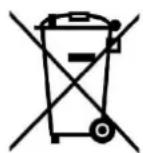
Dispose of packaging in an environmentally-friendly manner.
This appliance is labelled in accordance with European Directive 2012/19/EU concerning used electrical and electronic appliances (waste electrical and electronic equipment - WEEE). The guideline determines the frame work for the return and recycling of used appliances as applicable throughout to the EU.
PACKAGE INFORMATION: Packaging materials of the product are manufactured from recyclable materials in accordance with our National Environment Regulations. Do not dispose of the packaging materials together with the domestic or other wastes. Take them to the packaging material collection points designated by the local authorities.
Q. aspes
VITRINA VERTICAL
natural_image
Illustration of a person pushing a cart with a 45-degree angle indicator (no text or symbols)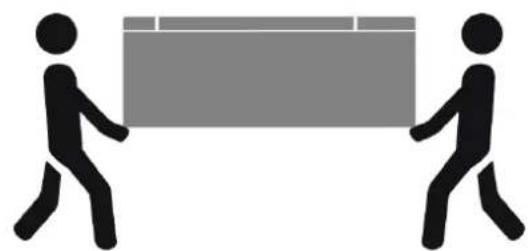
natural_image
Two stick figures carrying a large rectangular block (no text or symbols)| äpf leg | Dqv.p | Qr gtcek.p"pqto cn | Gpegpf gt | |
| Rtgukqpcpf q"grldqv.p'uqm | Rtgukqpcf q'lwpvqu< | |||
| 3 |  | O“ u'f g"5"ugi wpf qu<cngtpct"GPEGPF GT CRCI CT | Rtgukqpcf q'lwpvqu=o quvtct"f gueqpi grcek.p | Ä |
| 4 |  | O“ u'f g"5"ugi wpf qu<kplekt f gvpggt"f gueqpi grcek.p | Rtgukqpcf q'lwpvqu'Oquvtct"f gueqpi grcek.p."o quvtct"\go rgtcwtc"f g"rc"uqpf c0 | Rtgukqpcf q'lwpvqu<kplekt"r tqegf lo kgpvq"f g"tguvcdryelo kgpvq"f g"r ct" o gvtqu0 |
| 5 |  | 3"ugi wpf q<o quvtct 1clwunct"gn'r wpvq"f g"clwug | Ä | |
Tabla. 2
MANUEL D'INSTRUCTIONS
Transport et installation
Transport
natural_image
Illustration of a person pushing a cart with a 45-degree angle indicator (no text or symbols)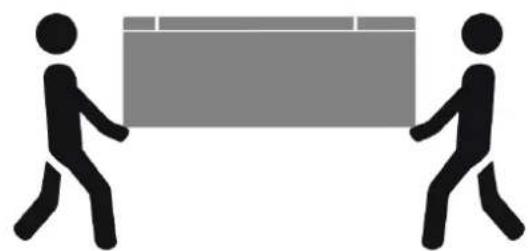
natural_image
Two stick figures carrying a large rectangular block (no text or symbols)natural_image
Illustration of a person pushing a cart with a 45-degree angle indicator (no text or symbols beyond the angle)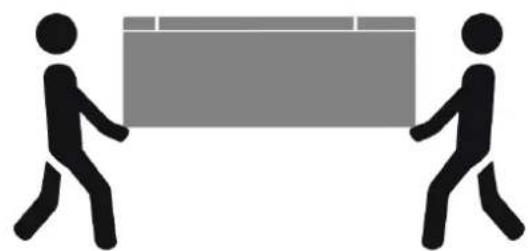
natural_image
Two stick figures carrying a large rectangular block (no text or symbols)Display e funzioni
| Trouble | Reason | Check | Solution | Remark | |
| No display on the display panel | The power plug is not properly plugged in | Plug in the power socket | Reconnect the power | ||
| Outage | Check the socket has electricity or not | Reconnect the power | |||
| key invalid / | / | Contact our professional after-sales servicetechnician | |||
| No voltage | Fuse breaking off | Check fuse | Change fuse | ||
| Lamp is not lighting on | Poor connection between the plug and socket | The connection lease or not | Repair or change socket | Contact our professional after-sales service technician | |
| Have voltage | lamp has poor contact or worn down | Check the circuit and lamp | Tighten the connection or change a new lamp | ||
| Lamp switch has poor contact | Check the switch | Tighten the connection or change a new switch | |||
| Condenser fan not running | Condenser fan is broken down | check condenser fan resistance | Change condenser fan | Contact our professional after-sales service technician | |
| Condenser fan is blocked | clear the blocked | clear the blocked | |||
| Condenser fan operates continuously | Temperature is too high inside of the cabinet | Open the door too frequently | / / | Contact professional after-sales personnel | |
| Too much storage | Air outlet is blocked | Take out part of the storage | |||
| Leakage of refrigerant. / | Contact professional after-sales personnel | ||||
| Noise | Cooler isn't placed levelly | Check if the four wheels adjusted to the same level and touching the ground | Adjust the wheels | Contact professional after-sales personnel | |
| Fixing screws of compressor or condenser fan are loose | Screws fixed tightly or not | Tighten the screws | |||
| Compressor or fan defective | Check the Compressor or fan | Contact professional after-sales personnel | |||
| Condenser fan is working, but the compressor doesn't operate | The terminal of starter or OLP is loose | Check the starter and OLP | Install the starter or OLP | Contact professional after-sales personnel | |
| Compressor defective | Check the resistance of compressor CSM terminal | Change new compressor | |||
| Voltage is lower than 97V or higher than 130V | Check the input Voltage | Use a voltage stabilizer | |||
| Evaporator fan not running | Fan switch defective | Check the resistance of switch | Change the switch | Contact professional after-sales personnel | |
| Fan switch terminal is not connected properly | Check the circuit of the fan switch | Connect the switch terminal | |||
| Power cord broken down | Not placed in correct position and broken during transportation | N/A | Change the power cord | Contact professional after-sales personnel | |
natural_image
Illustration of a person pushing a cart with a 45-degree angle indicator (no text or symbols)