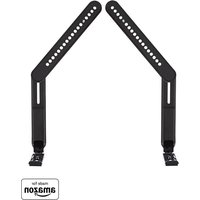
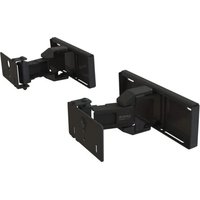
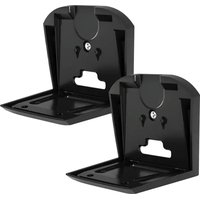
WSBSBTV1-B2 - Speaker stands SANUS - Free user manual and instructions
Find the device manual for free WSBSBTV1-B2 SANUS in PDF.


User questions about WSBSBTV1-B2 SANUS
0 question about this device. Answer the ones you know or ask your own.
Ask a new question about this device
Download the instructions for your Speaker stands in PDF format for free! Find your manual WSBSBTV1-B2 - SANUS and take your electronic device back in hand. On this page are published all the documents necessary for the use of your device. WSBSBTV1-B2 by SANUS.
USER MANUAL WSBSBTV1-B2 SANUS
Designed for Sony BRAVIA
Theater Bar 8 ^™ & Bar 9 ^™
INSTRUCTION MANUAL
natural_image
Technical line drawing of a mechanical assembly with two vertical supports and a central vertical component (no text or symbols)WE'RE HERE TO HELP
natural_image
Person holding a video player with a play button, standing beside a black object (no visible text or symbols)Want to watch a video that shows how easy this is?

Watch it now at: SANUS.com/3272

natural_image
Black-and-white photo of a customer service agent wearing headset, seated in an office environment (no visible text or symbols)Connect with our Customer Care Team 7 days a week.

Call us at: US: +1 (800) 359-5520 EMEA: +31 (0) 495 580 852 UK: +44 (0) 800 056 2853

IMPORTANT SAFETY INSTRUCTIONS
READ ENTIRE MANUAL PRIOR TO USE
SAVE THESE INSTRUCTIONS
CAUTION: To avoid potential personal injuries and property damage:
- This soundbar mount is only designed for use with TV wall mounts that meet third party safety certifications.
- The COMBINED weight of this soundbar mount, your soundbar, any accessories AND your TV, MUST BE LOWER than the maximum weight rating of your TV mount/stand (See your TV mount's manual for maximum weight allowed).
- This soundbar mount is ONLY designed to mount BELOW the television.
- Please read through these instructions completely to be sure you're comfortable with this easy install process.
- Do not use this product for any purpose not explicitly specified by manufacturer.
○● Manufacturer is not responsible for damage or injury caused by incorrect assembly or use. - If you do not understand these instructions or have doubts about the safety of the installation, assembly or use of this product, contact Customer Service.
Tools Needed

Screwdriver
TV Mount Manual
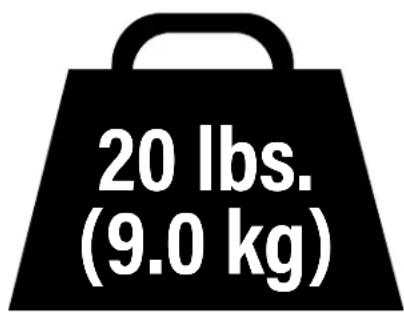
Soundbar Weight Limit DO NOT EXCEED
text_image
20 lbs. (9.0 kg)SUPPLIED PARTS AND HARDWARE

WARNING: This product contains small items that could be a choking hazard if swallowed. Before starting assembly, verify all parts included and undamaged. If any parts are missing or damaged, DO NOT return the damaged item to your dealer; contact Sanus back page). Never use damaged parts! 📋 NOTE: Not all hardware included in this kit will be used.
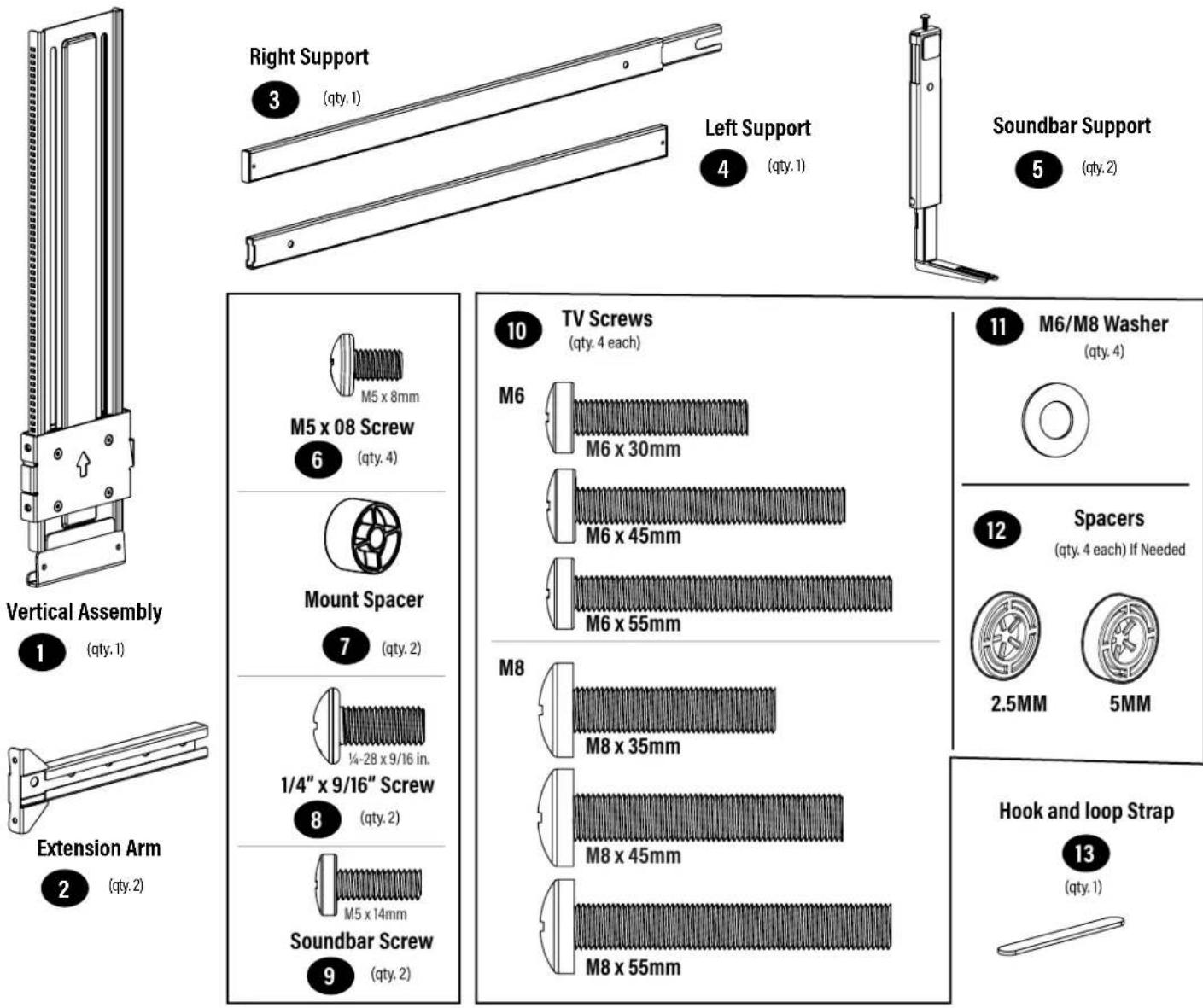
(qty.1)
(qty.2)
(qty. 4 each)
(qty. 2)
(qty. 4)
(qty. 4 each) If Needed
(qty.1)
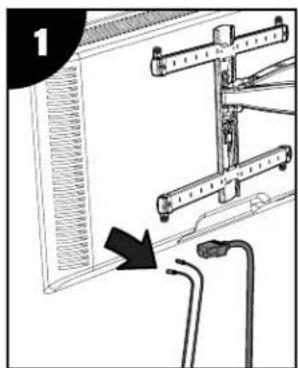
PREPARE YOUR TV (IF MOUNTED)

CAUTION: Follow your TV mount's manual for instructions on how to safely remove your TV and TV bracket.

NOTE: Your TV wall mount may vary from the illustrations throughout this manual — the procedure to install the soundbar is the same.
natural_image
Diagram showing a device with attached wires and connectors, no visible text or symbols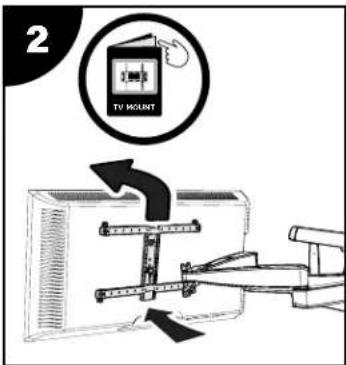
text_image
2 TV MOUNT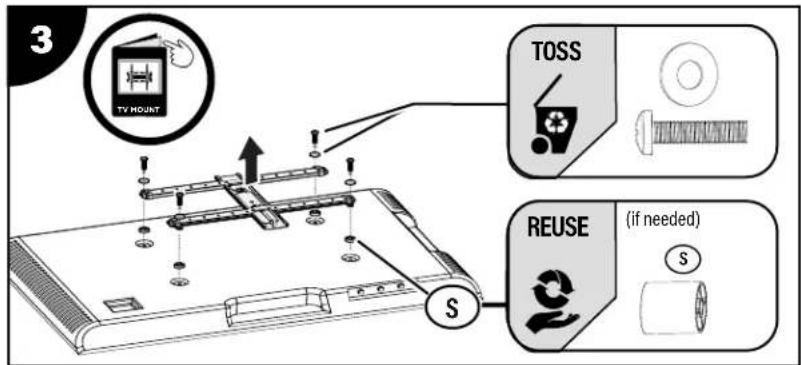
text_image
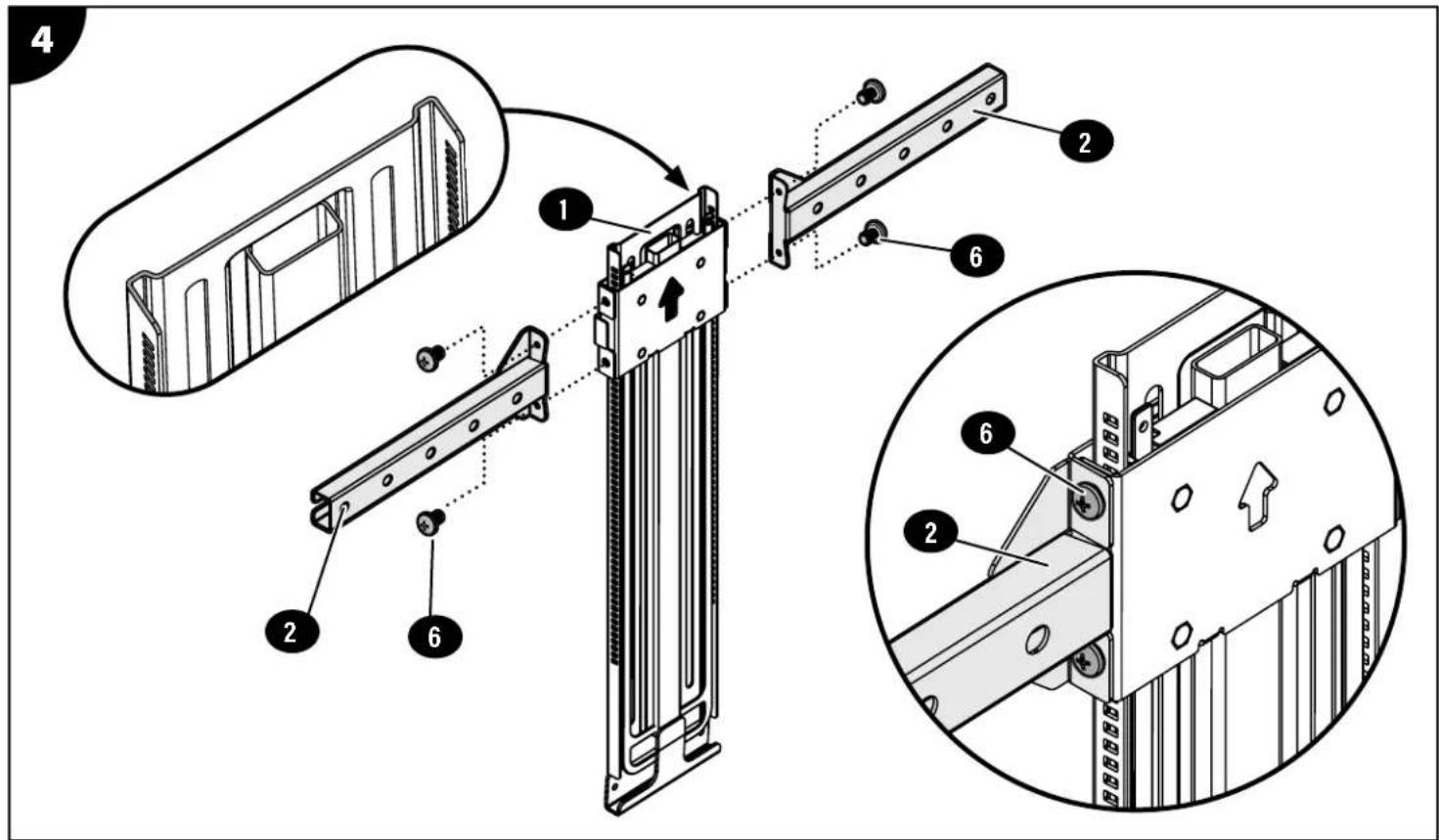
3 TV MOUNT TOSS REUSE (if needed) SASSEMBLE AND ATTACH SOUNDBAR MOUNT
text_image
Technical diagram illustrating the assembly of a mechanical component with numbered parts and exploded views.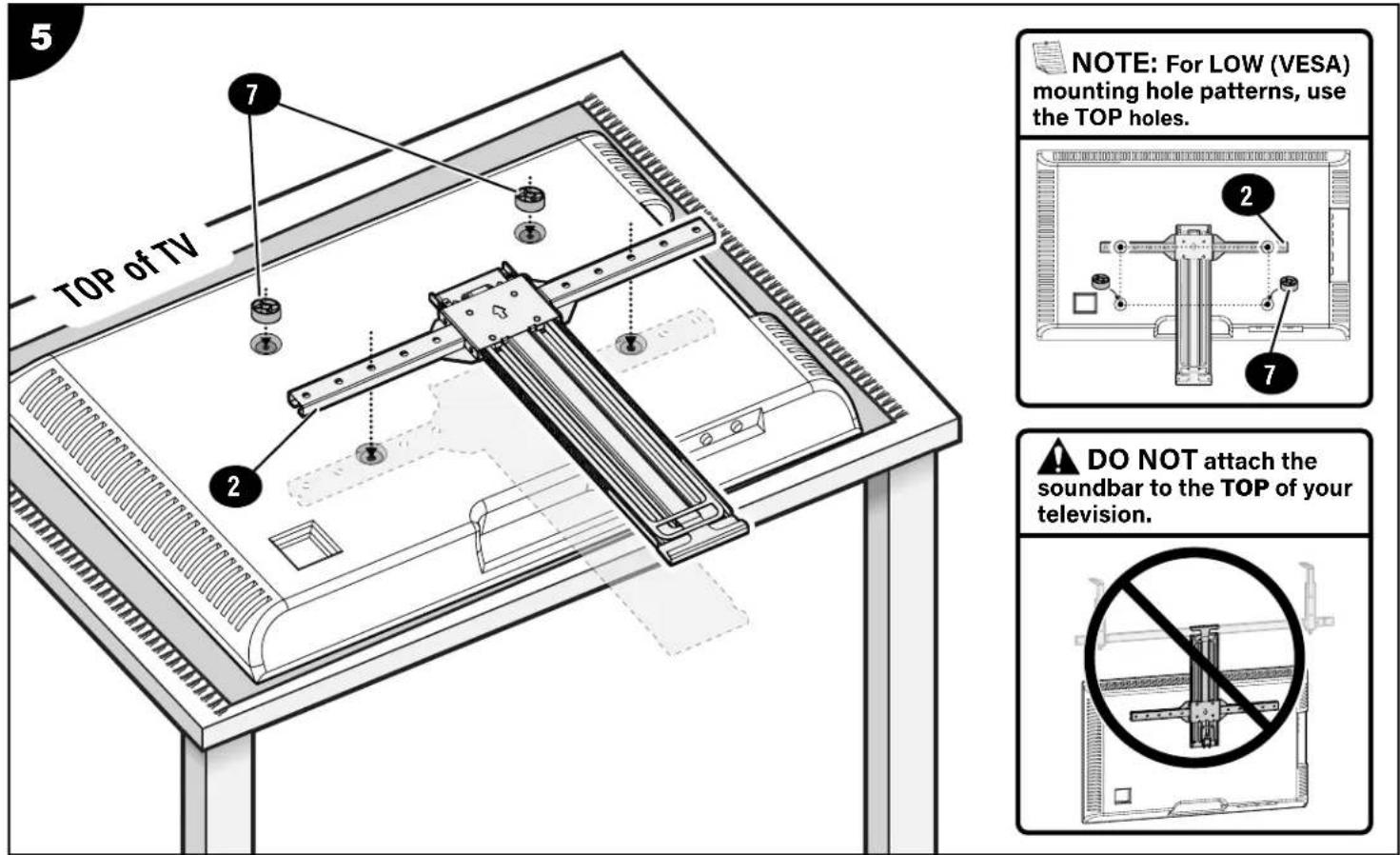
text_image
5 TOP of TV 7 2 NOTE: For LOW (VESA) mounting hole patterns, use the TOP holes. 2 7 ▲ DO NOT attach the soundbar to the TOP of your television.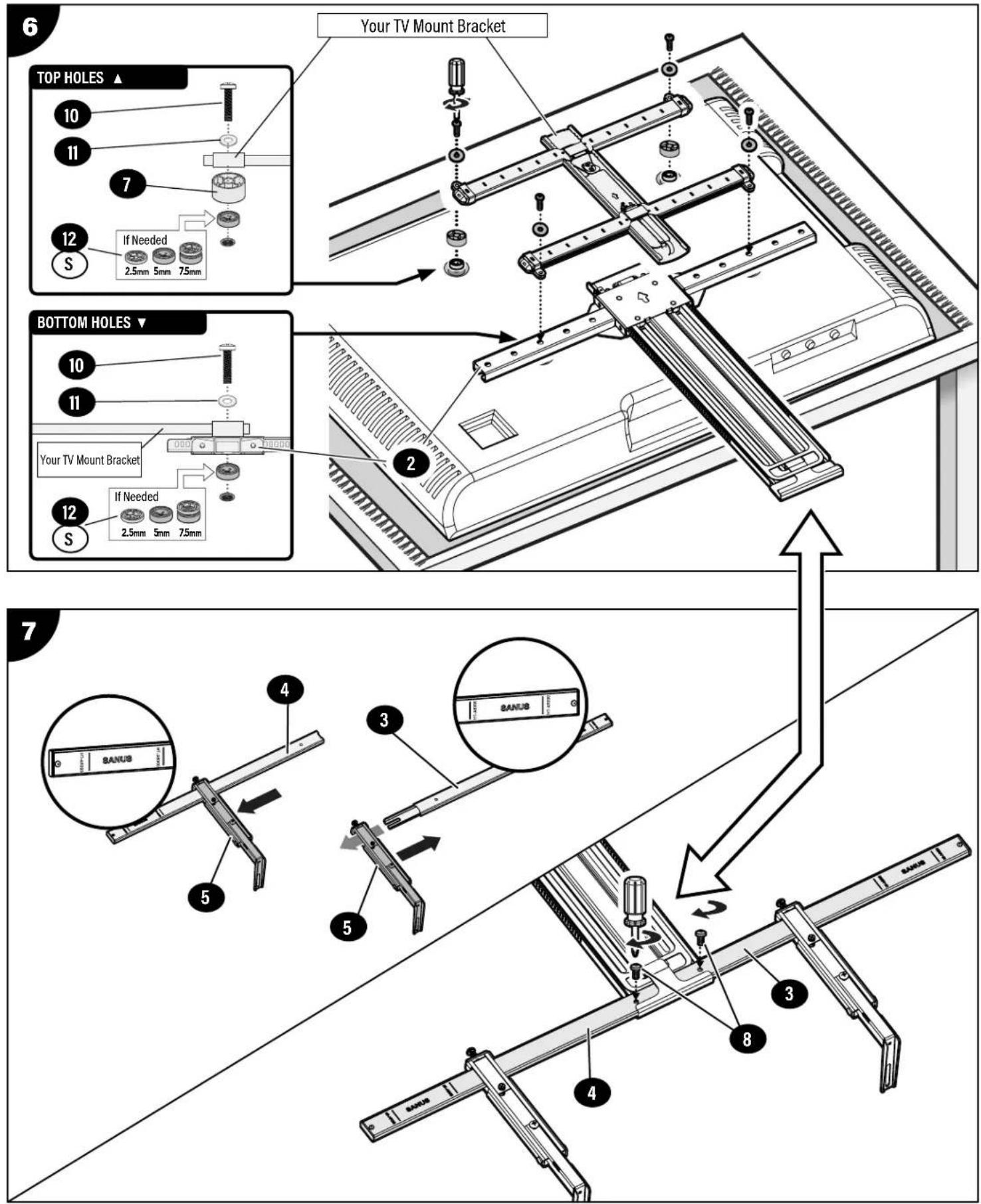
text_image
Your TV Mount Bracket TOP HOLES ▲ 10 11 7 12 S If Needed 2.5mm 5mm 7.5mm BOTTOM HOLES ▼ 10 11 Your TV Mount Bracket 12 S If Needed 2.5mm 5mm 7.5mm 7 4 BANUS 3 BANUS 5 8 4HANG YOUR TV
8
text_image
TV MOUNT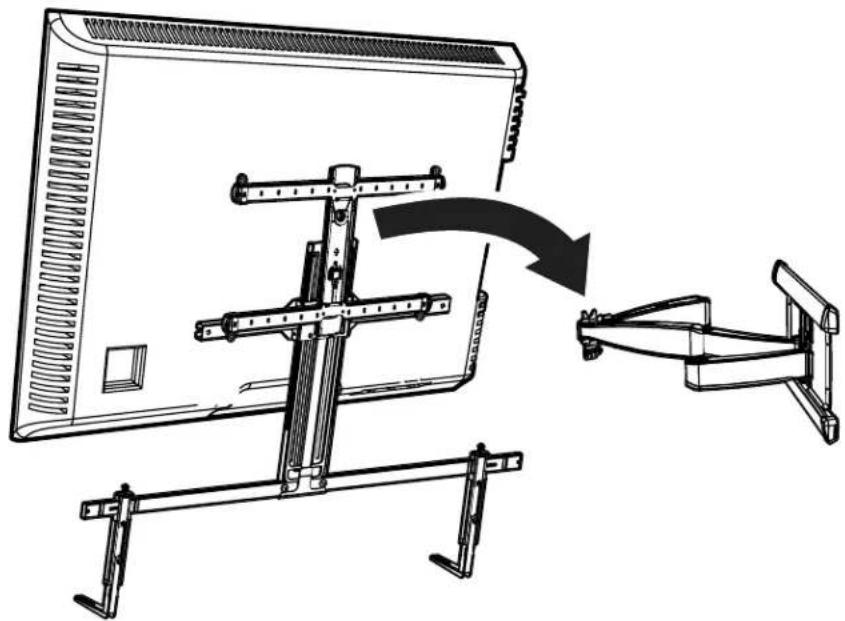
natural_image
Technical line drawing of a mechanical clamp assembly with a computer monitor mounted on a stand, showing a curved arrow indicating motion (no text or symbols present)ATTACH YOUR SOUNDBAR TO THE MOUNT
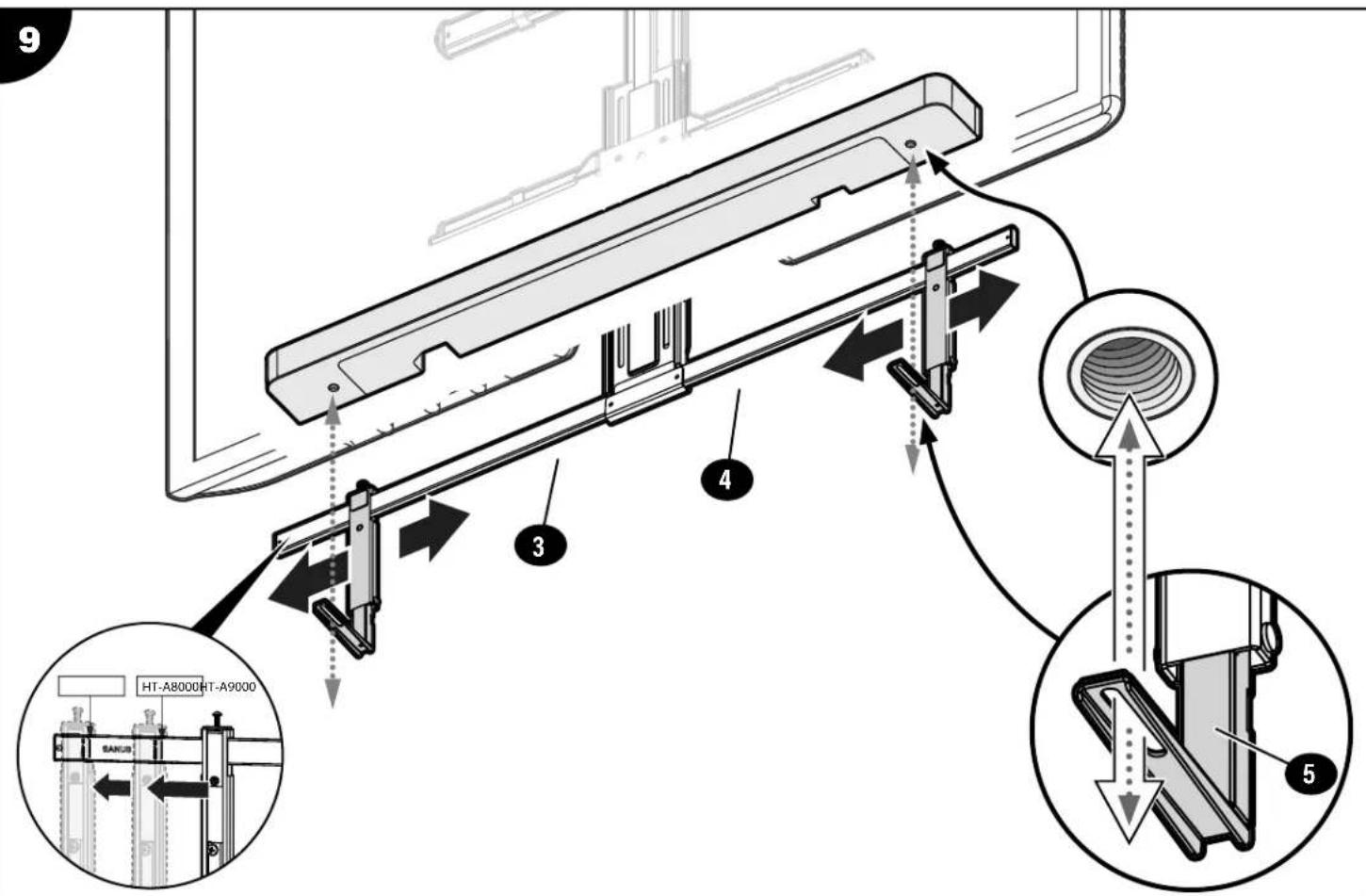
text_image
9 HT-A8000HT-A9000 SANS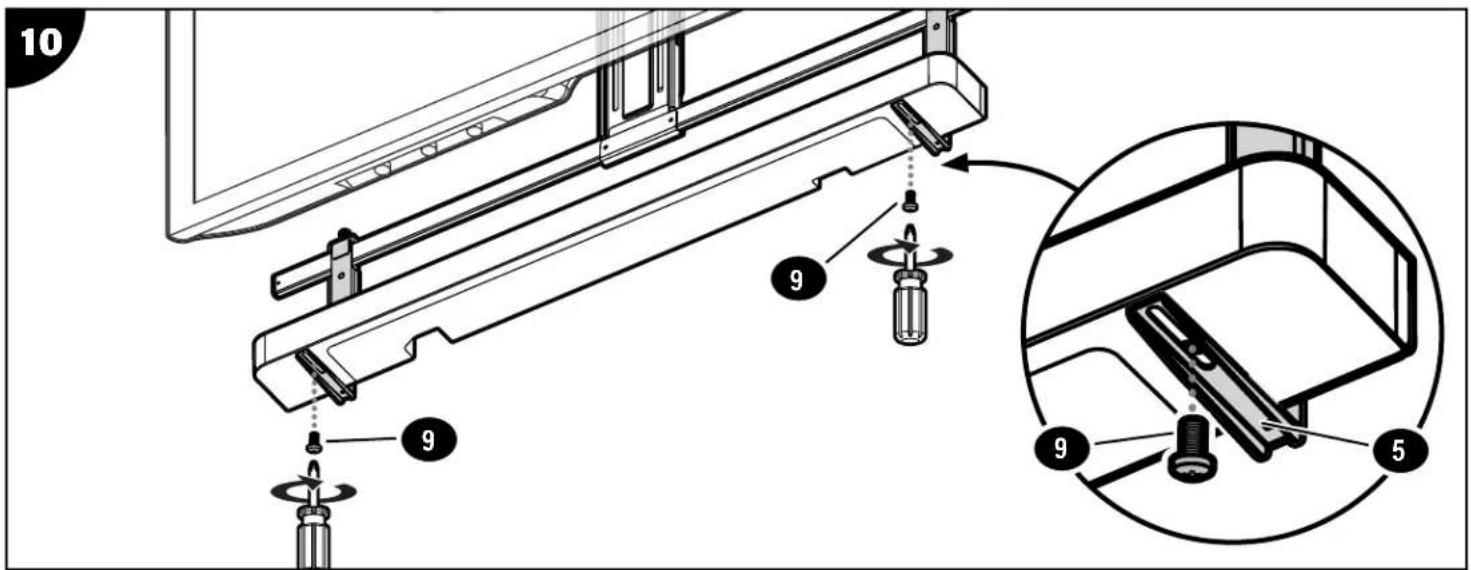
text_image
10 9 9 9 5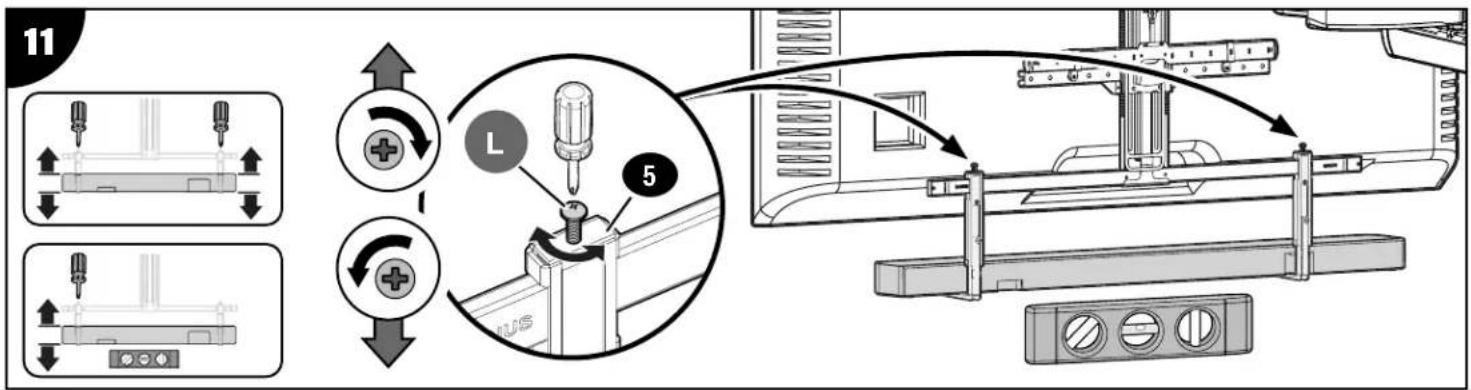
text_image
Technical diagram illustrating a mechanical assembly process with labeled components and directional arrows indicating motion or movement.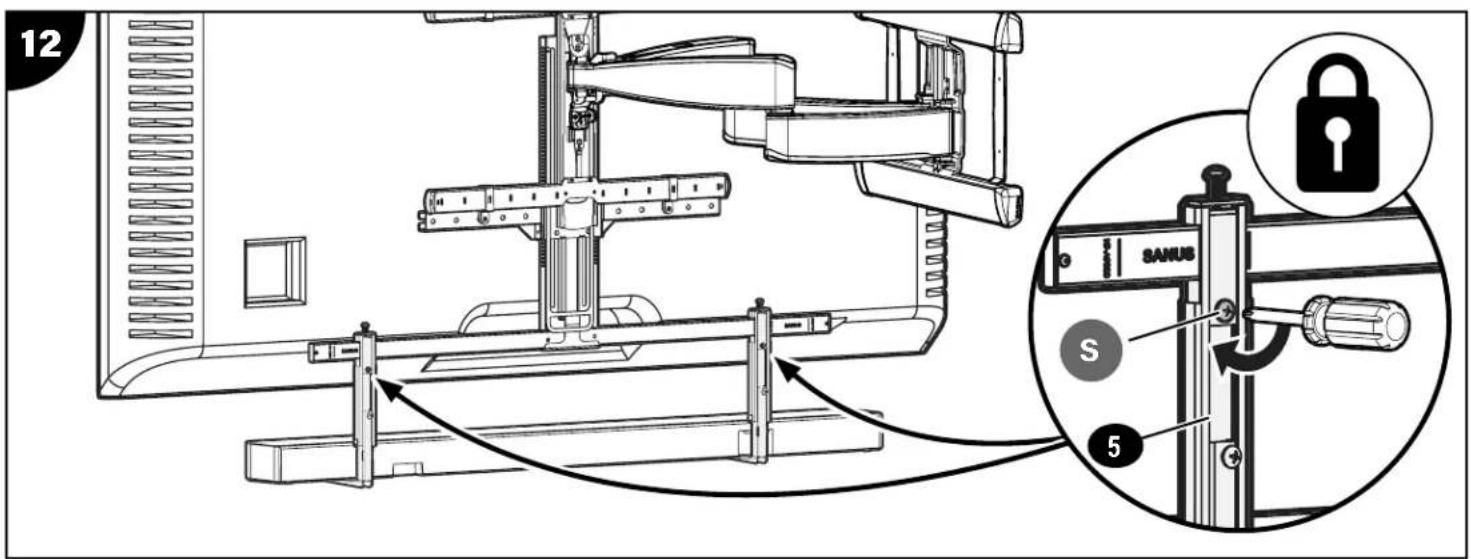
text_image
12 SANUS S 5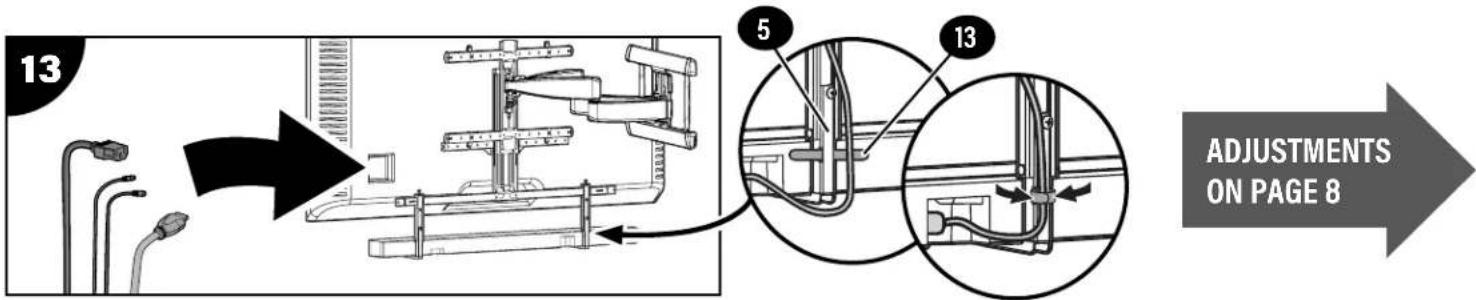
text_image
13 5 13 ADJUSTMENTS ON PAGE 8ADJUSTMENTS
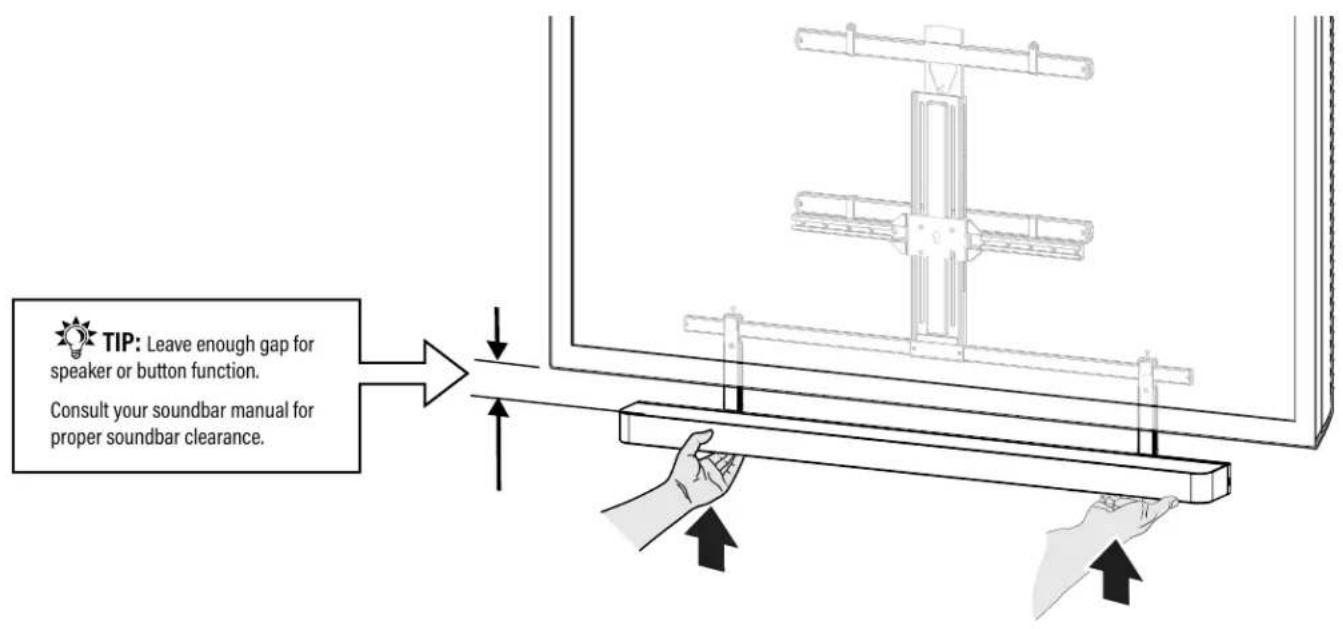
RAISE THE SOUNDBAR
flowchart
graph TD
    A["TIP: Leave enough gap for speaker or button function.\nConsult your soundbar manual for proper soundbar clearance."] --> B["Process Step"]
    B --> C["Output: Screen with vertical bar and hand gesture"]
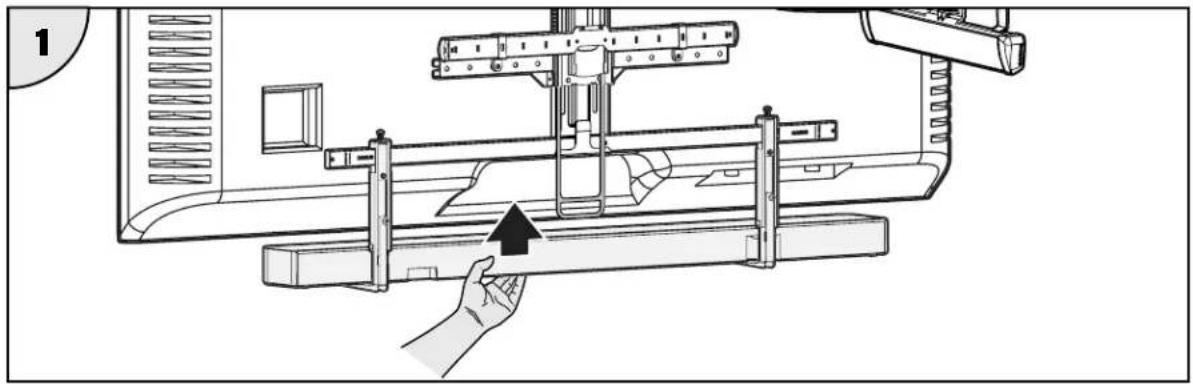
LOWER THE SOUNDBAR

IMPORTANT:
FIRST PUSH UP slightly on the bottom of soundbar BEFORE unlocking the mount.
natural_image
Technical line drawing of a mechanical assembly with a hand operating a lever (no text or symbols present)
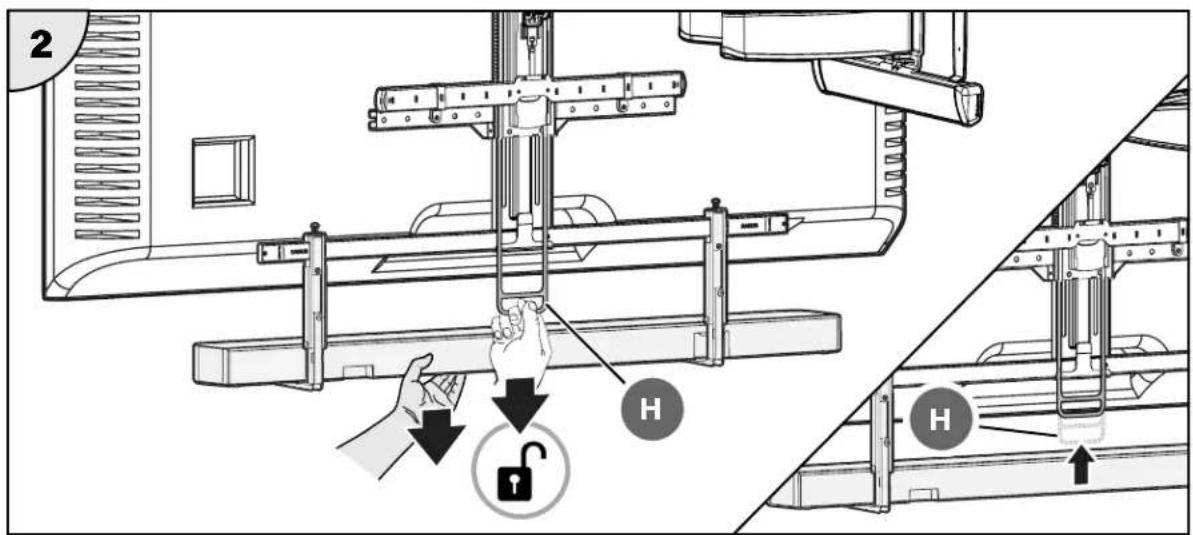
CAUTION!
While supporting the weight of the soundbar, pull down on the release handle H and lower the soundbar bracket.
text_image
2 H HLEVEL ADJUSTMENT
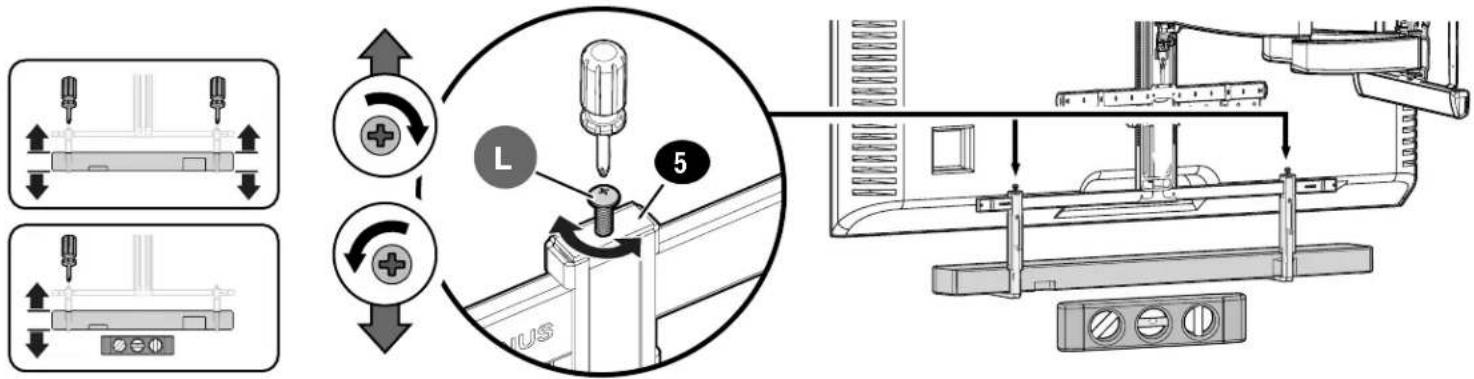
text_image
Technical diagram illustrating a mechanical assembly process with labeled components and directional arrows indicating motion or assembly steps.EXTENSION ADJUSTMENT
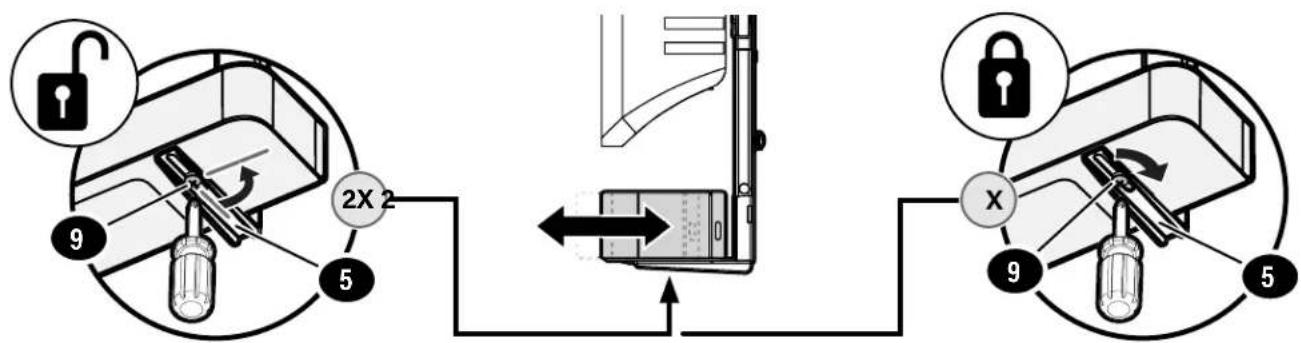
text_image
2X 2 9 5 XTILT ADJUSTMENT
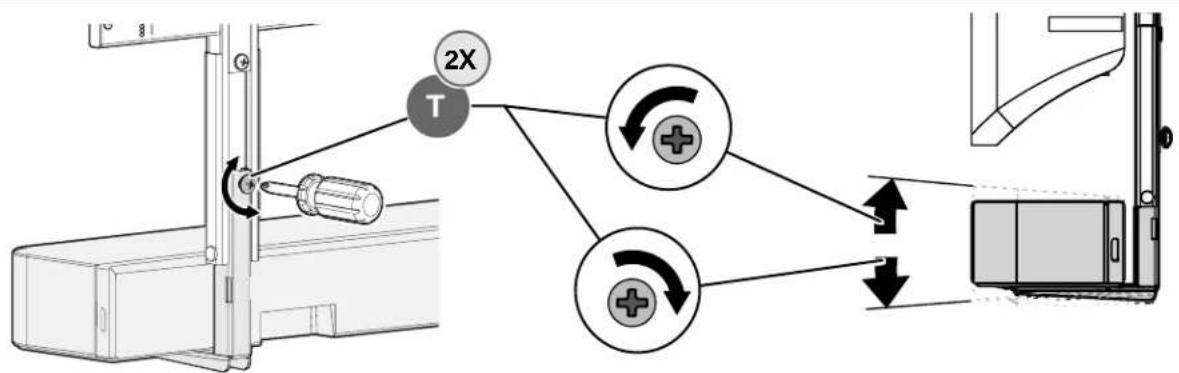
flowchart
graph TD
    A["2X"] --> B["T"]
    B --> C["+"]
    B --> D["+"]
    C --> E["↓"]
    D --> F["↓"]
    style A fill:#f9f,stroke:#333
    style B fill:#ccf,stroke:#333
    style C fill:#cfc,stroke:#333
    style D fill:#cfc,stroke:#333
    style E fill:#fff,stroke:#333
    style F fill:#fff,stroke:#333
SIDE-TO-SIDE ADJUSTMENT
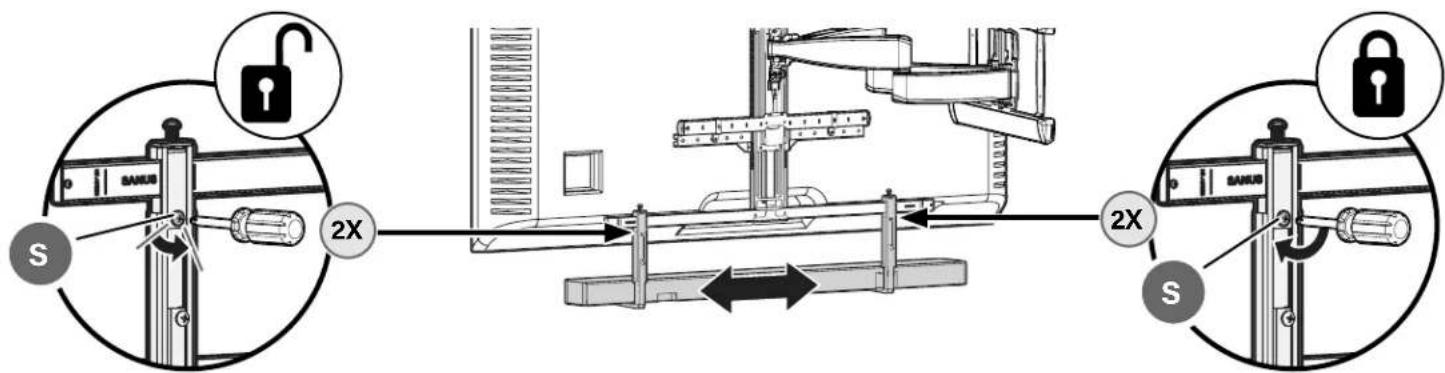
text_image
S SARUS 2X 2X S SARUSES
natural_image
Technical line drawing of a mechanical support structure with two vertical supports and a central vertical component (no text or symbols)
text_image
SANUS® A brand of LegendTV INTERFACE
text_image
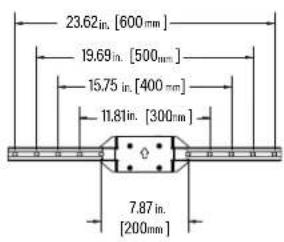
23.62 in. [600 mm] 19.69 in. [500 mm] 15.75 in. [400 mm] 11.81 in. [300 mm] 7.87 in. [200 mm]LOWEST POSITION
text_image
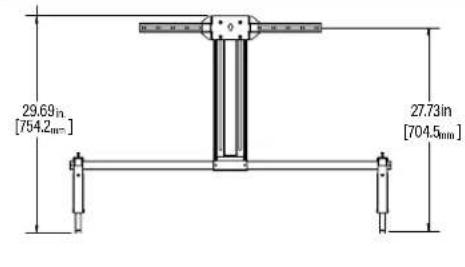
29.69in [754.2mm] 27.73in [704.5mm]TOP VIEW - SOUNDBAR MOUNTED
text_image
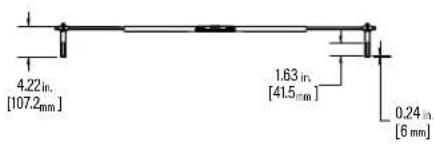
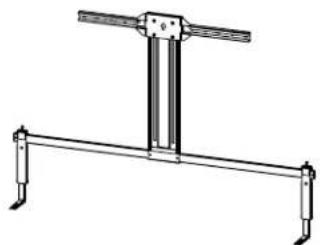
4.22 in. [107.2 mm] 1.63 in. [41.5 mm] 0.24 in. [6 mm]3-D
natural_image
Technical line drawing of a mechanical support structure with two vertical supports and a central vertical component (no text or symbols)HIGHEST POSITION
text_image
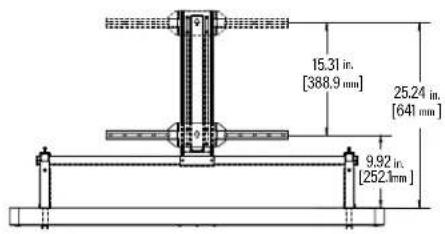
15.31 in. [388,9 mm] 25.24 in. [641 mm] 9.92 in. [252,1mm]TOP VIEW
text_image
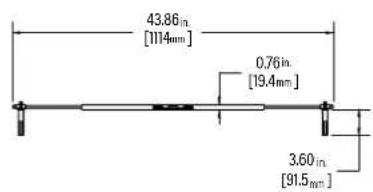
43.86in [1114mm] 0,76in [19.4mm] 3.60in [91.5mm]SIDE VIEW

Legrand AV Inc.
10900 Red Circle Drive
Minnetonka, MN 55343 USA
US: +1 (800) 359-5520
SANUS.com
Legrand AV Netherlands B.V.
Franklinstraat 14
6003 DK Weert Netherlands
UK: +44 (0) 800 056 2853
EMEA: +31 (0) 495 580 852
SANUS.com
Authorized Representative for the UK
Starline Holding Technology Ltd.
Unit C Island Road
Reading RG2 ORP UK
Legrand AV Inc. and its affiliated corporations and subsidiaries (collectively, "Legrand"), intend to make this manual accurate and complete. However, Legrand AV makes no claim that the information contained herein covers all details, conditions, or variations. Nor does it provide for every possible contingency in connection with the installation or use of this product. The information contained in this document is subject to change without notice or obligation of any kind. Legrand AV makes no representation of warranty, expressed or implied, regarding the information contained herein. Legrand AV assumes no responsibility for accuracy, completeness or sufficiency of the information contained in this document.
©2025 Legrand AV Inc. All rights reserved. SANUS is a brand of Legrand. SANUS and the SANUS logo are registered trademarks of Legrand.
Sony and Sony product names are trademarks or registered trademarks of Sony Electronics Inc.