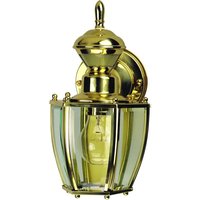
4170 - Motion detector Heath Zenith - Free user manual and instructions
Find the device manual for free 4170 Heath Zenith in PDF.


User questions about 4170 Heath Zenith
0 question about this device. Answer the ones you know or ask your own.
Ask a new question about this device
Download the instructions for your Motion detector in PDF format for free! Find your manual 4170 - Heath Zenith and take your electronic device back in hand. On this page are published all the documents necessary for the use of your device. 4170 by Heath Zenith.
USER MANUAL 4170 Heath Zenith
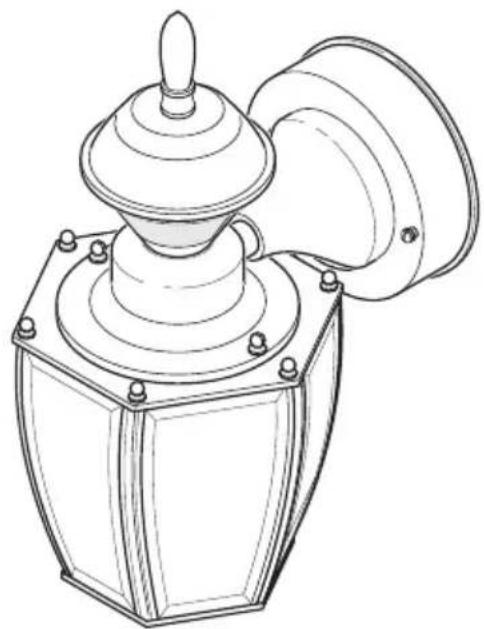
Motion-Activated Coach Light
Model
4170
natural_image
Technical line drawing of a mechanical device with a conical top and flanged base (no text or symbols)Motion Decorative Light
INSTALLATION AND OPERATING INSTRUCTIONS
SAFETY INFORMATION....2
PREPARATION....2
HARDWARE CONTENTS....2
FINIAL INSTALLATION 2
LIGHT FIXTURE INSTALLATION....3
WIRING THE LIGHT FIXTURE 4
OPTIONAL WIRING 5
MOUNTING THE LIGHT FIXTURE 6
TESTING AND ADJUSTMENTS....6
CARE AND MAINTENANCE....7
BULB REPLACEMENT 8
TROUBLESHOOTING GUIDE....8
SPECIFICATIONS....8
TECHNICAL SERVICE....9
TWO YEAR LIMITED WARRANTY 9

Questions?
Please refer to the troubleshooting guide in this manual or call our technical service department (English speaking only) at 1-800-858-8501, 8:00 a.m. - 5:00 p.m., CST, Monday - Friday before returning to your retailer.
Keep this manual for future reference.
ATTACH YOUR RECEIPT HERE
Receipt is required for all warranty requests.
Purchase Date

SAFETY INFORMATION
Please read and understand this entire manual before attempting to assemble, operate, or install the product. This light fixture requires 120-volts AC. All wiring must be in accordance with the National Electrical Code (Canadian Electrical Code in Canada). Some local electrical codes require installation by a qualified electrician.
WARNING
- Turn power off at circuit breaker or fuse when wiring fixture or replacing bulbs. Place tape over circuit breaker switch and verify power is off at the fixture.
CAUTION
- Do not cut any wires that have factory installed wire connectors or remove the wire connectors.
This device complies with Part 15 of the FCC Rules. Operation is subject to the following two conditions: (1) this device may not cause harmful interference, and (2) this device must accept any interference received, including interference that may cause undesired operation.
CAN ICES-3 (B)/NMB-3(B)
PREPARATION
Before beginning installation of product, make sure all parts are present. Compare parts with hardware contents list. If any part is missing or damaged, do not attempt to assemble, install, or operate the product.
Tools Required for Assembly (not included): Phillips and flathead screwdrivers, pliers, wire strippers/cutters, multi-meter, electrical tape, silicone sealant, safety glasses, work gloves, and ladder
- For easy installation and to operate the light using Manual mode, replace an existing light fixture operated by a wall switch.
- Do not connect to dimmers or timers.
- For best performance, mount fixture about 6 feet (1.8 m) above the ground.
Estimated Installation Time: 30 minutes
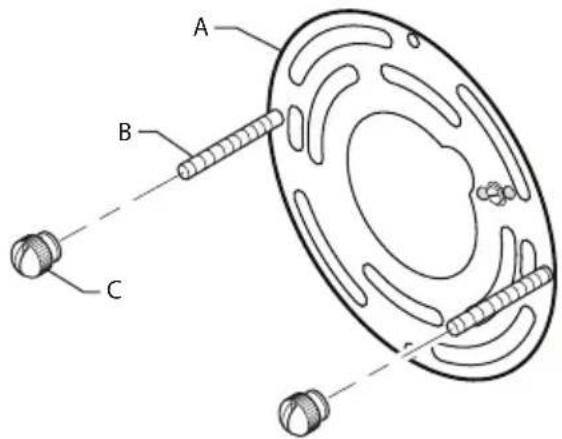
HARDWARE CONTENTS
Note: Illustrations may vary from actual unit.
text_image
Technical diagram of a mechanical component with labeled parts A, B, and C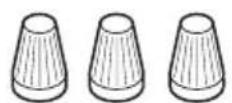
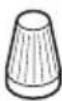
3x - Wire Connectors
A - (1x) Mounting Bracket
B - (2x) Fixture Mounting Screws
C - (2x) Decorative Nut (This assembly is attached to the rear of the lantern canopy.)
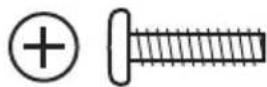
2x - Mounting Bracket Screw
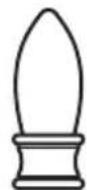
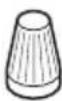
1x - Finial
FINIAL INSTALLATION
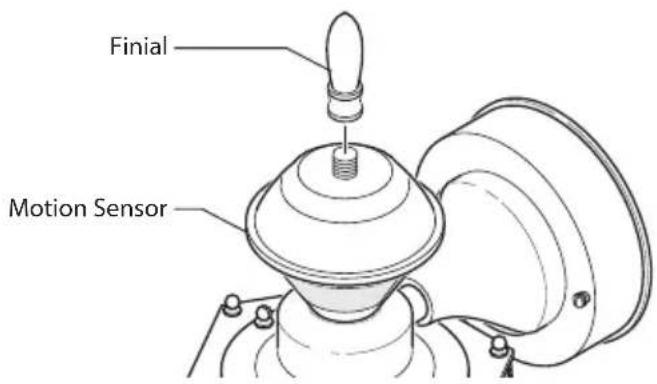
- Remove the finial from the hardware pack.
- Securely tighten the finial to the top of the motion sensor.
text_image
Finial Motion SensorLIGHT FIXTURE INSTALLATION
For best performance, mount the fixture about 6 feet (1.8 m) above the ground.
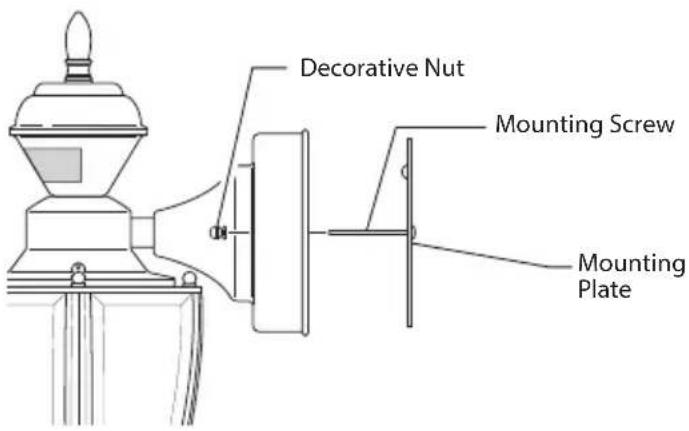
- Remove two decorative nuts.
- Remove mounting plate.
- Tighten mounting screws finger tight.
- Attach mounting plate to junction box.
text_image
Decorative Nut Mounting Screw Mounting Plate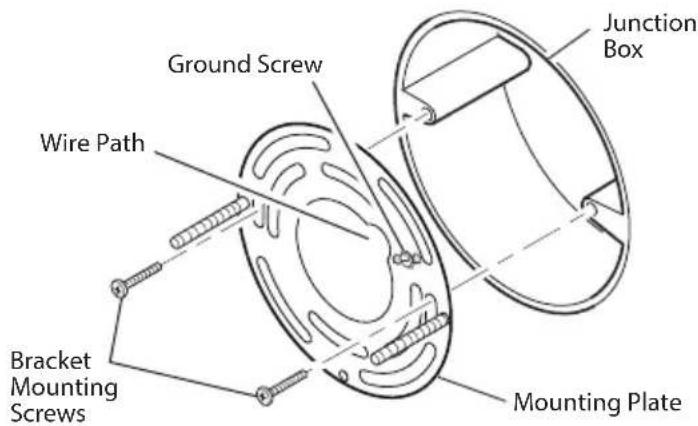
text_image
Ground Screw Junction Box Wire Path Bracket Mounting Screws Mounting PlateNote: We recommend having an assistant help hold the lantern assembly during the wiring process.
This fixture comes with a universal mounting bracket. It is pre-assembled on the fixture to fit the majority of junction box applications.
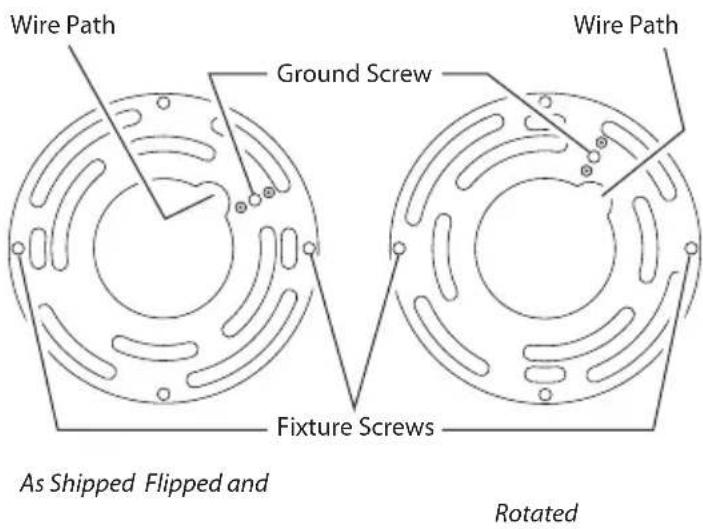
If the slots on the mounting plate do not line up with the junction box screw holes, follow these steps:
- Remove the fixture mounting screws from the mounting plate. Note: Do not remove the ground screw.
- Attach ground wire "pigtail" to ground screw on mounting plate (See Recommended Grounding Method for additional information).
- Flip the mounting plate over.
- Rotate the mounting plate so the wire path is on the upper right. Note: The wire path on the mounting plate must be located as shown below to allow the wires on the back of the fixture to pass through.
- Reinstall the fixture mounting screws and attach the mounting plate to the junction box as shown.
text_image
Wire Path Ground Screw Wire Path Fixture Screws As Shipped Flipped and RotatedWIRING THE LIGHT FIXTURE

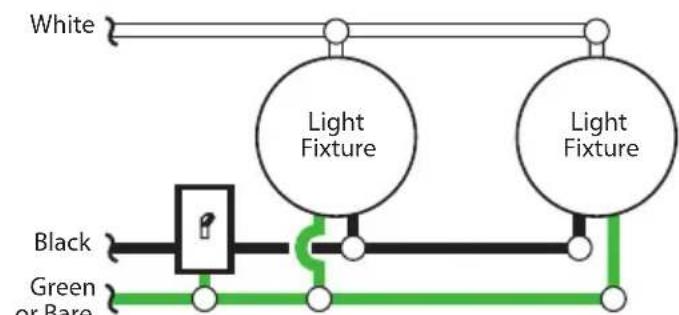
WARNING: Turn power off at circuit breaker se.
Note: All wiring must be run in accordance with the National Electrical Code through conduit or another acceptable means. Contact a qualified electrician if there is any question as to the suitability of the system.

CAUTION: DO NOT connect the RED wire ss you want to control other lights from the on sensor (see Optional Wiring).
text_image
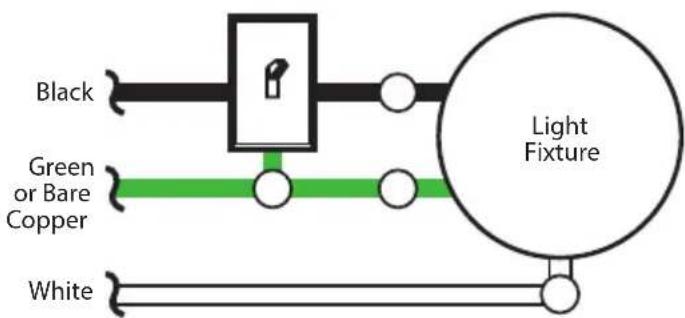
Black Green or Bare Copper White Light FixtureOne Motion Light
flowchart
graph TD
    A["White"] --> B["Light Fixture"]
    C["Black"] --> D["Logic Gate"]
    E["Green or Bare"] --> D
    D --> F["Light Fixture"]
    G["Light Fixture"] --> H["Green or Bare"]
    H --> I["Light Fixture"]
Copper
Two Motion Lights
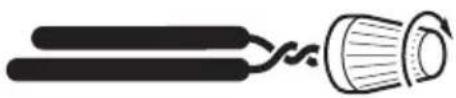
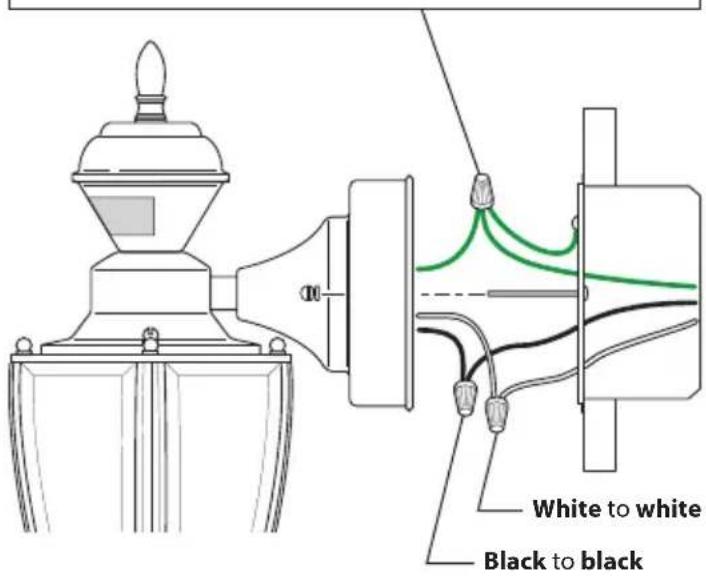
Connect the fixture wires to the wires in the junction box. Twist the wires together and secure with wire connectors.
natural_image
Simple line drawing of a tool with two parallel bars and a curved handle (no text or symbols)Recommended Grounding Method
Use a green ground "pigtail" (not provided) and twist one end together with the bare fixture wire and the box ground wire. Secure with a wire connector. Secure the other end of the "pigtail" with the GND screw on the mounting plate.
text_image
White to white Black to blackIf you have a metal junction box, you may not need the green "pigtail". If you are unsure about the grounding method, consult your local building code.
OPTIONAL WIRING
This fixture is provided with a sensor rated for 500 Watts. Since the fixture is only rated 100 Watts, 400 Watts of additional lighting may be controlled by this sensor.
When determining what a fixture is rated for, do not simply look at the rating on the light bulb in the fixture. Look at the marking which specifies the maximum bulb wattage for which the fixture is suitable.
Once you have selected the fixtures to be connected and determined their maximum ratings, add these ratings up. For instance, if you have 3 fixtures rated 100 Watts, 150 Watts, and 75 Watts respectively, you have a total load of 325 Watts.
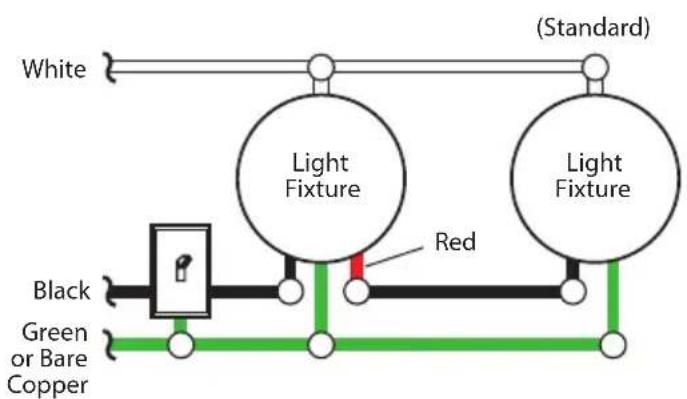
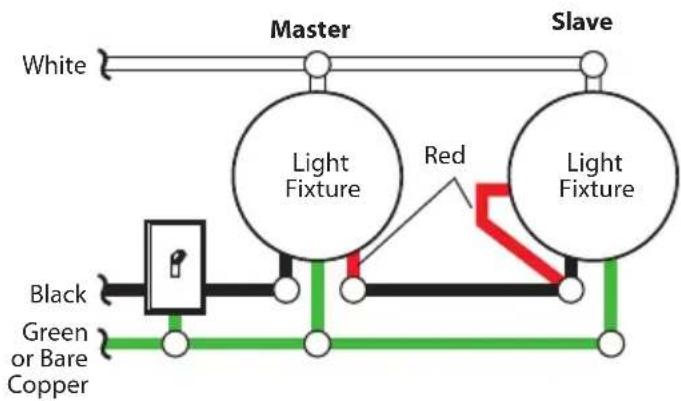
Wiring Diagram 1 – When wiring to control a standard light fixture: Strip the motion sensor's red wire and connect to the standard light's black wire. Connect all white wires together. Total fixture ratings must not exceed 500 Watts (3.0 A).
Wiring Diagram 2 – When wiring to control another motion sensing light fixture (Master / Slave): Strip the red wire in both light fixtures. Connect the red wire of the controlling (master) fixture to the red and black wires of the controlled (slave) fixture. Connect all white wires together. Total fixture ratings must not exceed 500 Watts (3.0 A).
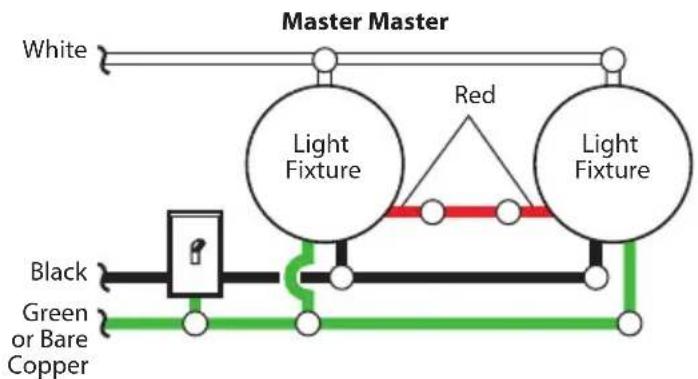
Wiring Diagram 3 – When wiring so either motion light turns on the both motion lights (Master / Master): Strip the red wire in both light fixtures. Connect the red wire of one fixture to the red wire of the second fixture. Note: In most installations, an additional wire (same gauge as existing house wire) will have to be installed in the house to connect the two fixtures as master / master. Connect all white wires together and all black wires together. Total fixture ratings must not exceed 500 Watts (3.0 A).
text_image
White Light Fixture (Standard) Light Fixture Red Black Green or Bare CopperWiring Diagram 1 Wiring Diagram 2
flowchart
graph TD
    A["White"] --> B["Master"]
    B --> C["Slave"]
    D["Black"] --> E["Light Fixture"]
    F["Green or Bare Copper"] --> G["Red Switch"]
    H["Light Fixture"] --> I["Red Switch"]
    style D fill:#f9f,stroke:#333
    style F fill:#f9f,stroke:#333
    style H fill:#f9f,stroke:#333
    style I fill:#f9f,stroke:#333
flowchart
graph TD
    A["White"] --> B["Light Fixture"]
    B --> C["Red"]
    C --> D["Light Fixture"]
    E["Black"] --> F["Switch"]
    G["Green or Bare Copper"] --> H["Switch"]
    I["Switch"] --> J["Red"]
    K["Switch"] --> L["Red"]
    M["Switch"] --> N["Red"]
Wiring Diagram 3
MOUNTING THE LIGHT FIXTURE
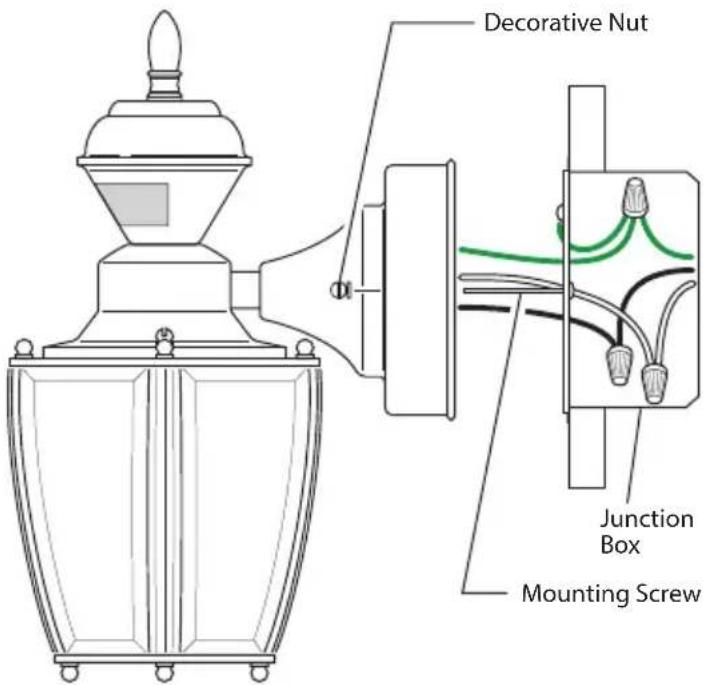
- Make sure wire connectors and wires are inside the junction box.
- Slide the fixture assembly onto the mounting screws. Tighten decorative nuts removed in step 1 of Light Fixture Installation section securely against fixture base.
text_image
Decorative Nut Junction Box Mounting Screw- Install one medium base light bulb (100 Watt maximum, tungsten incandescent).
TESTING AND ADJUSTMENTS
Initial Setup
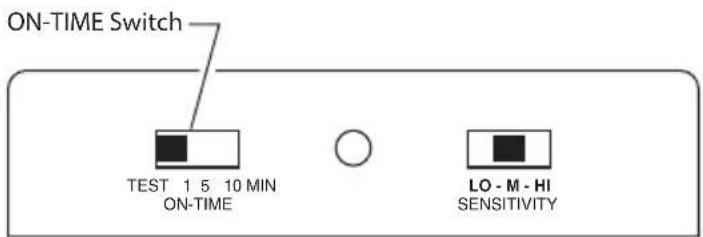
The TEST mode overrides the photocell (daylight shutoff feature) and allows the light fixture to be tested day or night when the ON-TIME switch is in the TEST position. The light will stay on for 5 seconds after all motion has stopped.
text_image
ON-TIME Switch TEST 1 5 10 MIN ON-TIME LO - M - HI SENSITIVITYSensor Controls
- Set SENSITIVITY switch to "M".
- Set the ON-TIME control to TEST.
- Turn on the circuit breaker or fuse and the light switch.
- Allow the sensor to completely warm up (90 seconds) before beginning the setup process.
- Perform a walk test. Walk in an arc across the front of the sensor.
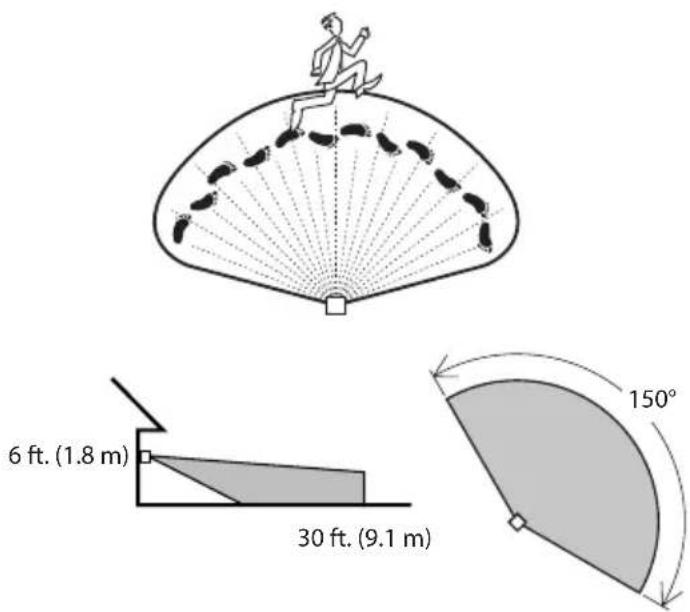
text_image
6 ft. (1.8 m) 30 ft. (9.1 m) 150°Maximum Range Maximum
Coverage Angle
(Top View)
- Move the sensor head left or right to change the coverage area. Note: Grasp the sensor only as shown and turn the entire sensor. Any other method may damage the sensor. Do not force it past the stops.
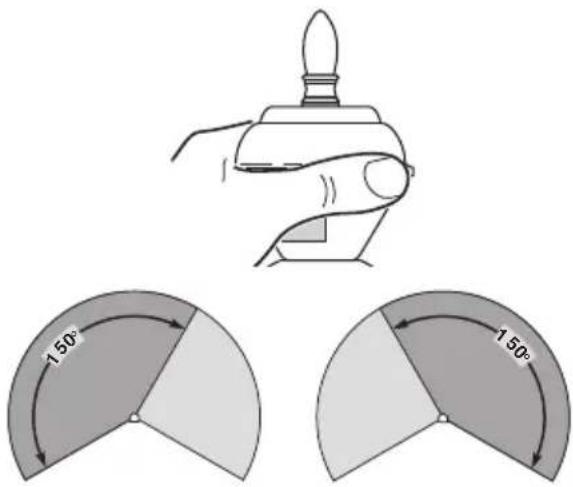
text_image
1.50° 1.50°Rotating Sensor Head to Change Coverage Area
Final Setup
-
Adjust the sensitivity (SENS) to increase or decrease the range as needed. Too much sensitivity may cause false triggering due to heat sources in the coverage area (see Testing and Adjustments or Troubleshooting section).
-
Set the amount of ON-TIME you want the light to stay on after motion is detected (1, 5, or 10 minutes).
-
Caulk around fixture base with silicone weather sealant after all Testing and Adjustments are complete.
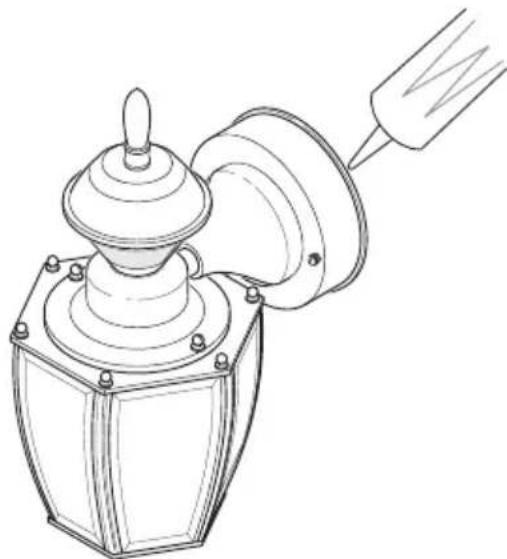
natural_image
Line drawing of a mechanical device with a funnel and base plate (no text or symbols)Caulking Around Fixture Base
Operating Modes
| Mode: On-Time Works: Day Night | ||
| Test | 5 Seconds x x | |
| Auto | 1, 5, or 10 Minutes x | |
| Manual | To Dawn* x | |
* resets to Auto Mode at dawn.
Note: When first turned on wait about 1 12 minutes for the circuitry to calibrate.
- Motion Sensor (AUTO) – This light fixture is designed to automatically turn on when the sensor detects a temperature difference moving across the front of the motion sensor. The light will turn off automatically after a set amount of time. The ON-TIME control should be set to 1, 5, or 10 minute setting and the wall switch should be left in the ON position at all times.
- Manual Mode – This light can be activated to stay on full bright after dusk (sunset) for only one night at a time. It automatically resets to motion sensing at dawn (sunrise). Manual mode must be re-activated each night. Note: If power to the light fixture is off for more than 5 seconds, allow the electronic circuitry in the sensor to calibrate (90 seconds) prior to switching to manual mode.
-
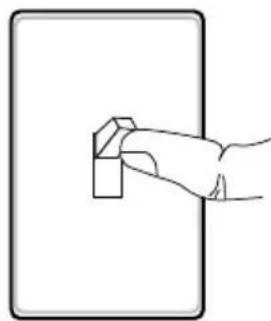
To turn on MANUAL mode, switch the light off at the wall switch for 1 to 2 seconds and then back on.
-
To return to AUTO mode, switch the light off at the wall switch for 1 to 2 seconds and then back on. Note: The sensor will also reset to AUTO mode at sunrise.
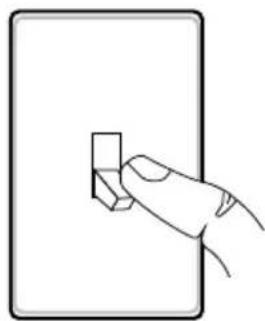
natural_image
Line drawing of a hand holding a small rectangular object against a plain background (no text or symbols)Turn Switch OFF for 1 to 2 seconds
natural_image
Simple line drawing of a hand pressing a small block on a rectangular surface (no text or symbols)Turn Switch Back ON
CARE AND MAINTENANCE
• To prolong the original appearance, clean with clear water and a soft damp cloth only.
- Do not use paints, solvents, or other chemicals on this light fixture. They could cause a premature deterioration of the finish. This is not a defect in the finish and will not be covered by the warranty.
- Do not spray with hose or power washer.
BULB REPLACEMENT
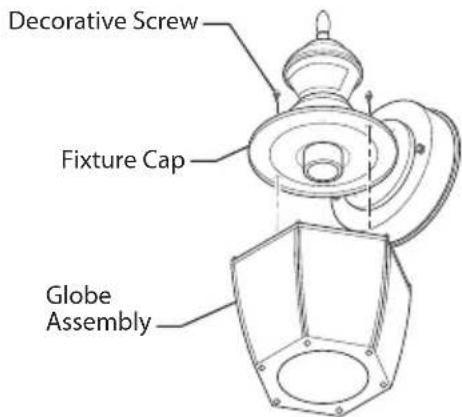
- While holding the globe assembly with one hand, remove the two decorative screws on top of fixture cap with the other.
- Replace bulb (tungsten incandescent, medium base, type "A", 100 watt maximum).
- Replace globe assembly onto fixture.
- Secure with decorative screws.
text_image
Decorative Screw Fixture Cap Globe AssemblyTROUBLESHOOTING GUIDE
| SYMPTOM POSSIBLE | CAUSE SOLUTION | |
| Lights will not come on. | 1. Light switch is turned off.2. Light bulb is loose or burned out.3. Fuse is blown or circuit breaker is turned off.4. Daylight turn-off is in effect.5. Sensor not detecting movement.6. Incorrect circuit wiring, if this is a new installation. | 1. Turn light switch on.2. Check bulb and replace if burned out.3. Replace fuse or turn circuit breaker on.4. Recheck after dark.5. Re-aim the sensor to cover desired area.6. Verify wiring is correct. |
| Lights come on in daylight. | 1. Light control may be installed in a relatively dark location.2. Light control is in TEST. | 1. The fixture is operating normally under these conditions.2. Set control switch to 1, 5, or 10 minutes. |
| Lights come on for no apparent reason. | 1. Light control may be sensing small animals or automobile traffic.2. Sensitivity is set too high. | 1. Re-aim sensor. Reduce sensitivity.2. Reduce sensitivity. |
| Lights stay on continuously. | 1. The sensor may be picking up a heat source like an air vent, dryer vent, or brightly painted, heat-reflective surface.2. Light control is in Manual Mode.3. Sensitivity is set too high. | 1. Re-aim sensor. Reduce sensitivity.2. Switch to Auto.3. Reduce sensitivity. |
| Lights flash on and off. | 1. Light control is in the TEST mode and warming up.2. Heat being reflected from other objects may be affecting the sensor. | 1. Flashing is normal under these conditions.2. Re-aim sensor. Reduce sensitivity. |
| Seasonal Temperature Changes – The closer the surrounding temperature is to a person's body heat, the less sensitive the sensor will appear. The greater the temperature difference, the more sensitive the sensor will appear. The SENS control might need to be readjusted toward MIN or MAX as the outside temperature changes for the different seasons. This is a normal part of the light sensor's operation. | ||
SPECIFICATIONS
Range ......Up to 30 ft. (9.1 m) [varies with surrounding temperature]
Sensing Angle....Up to 150°
Sensor Aiming Adjustment Angle ....90°
Electrical Load.....Up to 100 Watt Maximum Incandescent
Bulb Type ....Medium Base, Type "A", 100 Watt Maximum
Sensor Capacity....Up to 500 Watt (3.0 A) Maximum Tungsten
Power Requirements....120 VAC, 60 Hz
Operating Modes......TEST, AUTO, and MANUAL MODE
ON-Timer....1,5,10 minutes
Test Timer....5 Seconds
Manual Mode Timer....Dusk-to-Dawn
TECHNICAL SERVICE
Please call 1-800-858-8501 (English speaking only) for assistance
before returning product to store.
If you experience a problem, follow this guide. You may also want to visit our Web site at: www.hzsupport.com. If the problem persists, call* for assistance at 1-800-858-8501 (English speaking only), 8:00 AM to 5:00 PM CST (M-F).
You may also write* to:
HeathCo LLC
P.O. Box 90045
Bowling Green, KY 42102-9045
ATTN: Technical Service
* If contacting Technical Service, please have the following information available: Model Number, Date of Purchase, and Place of Purchase.
No Service Parts Available for this Product
Please keep your dated sales receipt, it is required for all warranty requests.
TWO YEAR LIMITED WARRANTY
This is a “Limited Warranty” which gives you specific legal rights. You may also have other rights which vary from state to state or province to province.
For a period of two years from the date of purchase, any malfunction caused by factory defective parts or workmanship will be corrected at no charge to you.
Not Covered - Repair service, adjustment and calibration due to misuse, abuse or negligence, light bulbs, batteries, and other expendable items are not covered by this warranty. Unauthorized service or modification of the product or of any furnished component will void this warranty in its entirety. This warranty does not include reimbursement for inconvenience, installation, setup time, loss of use, unauthorized service, or return shipping charges.
Finish Warranty Exclusions - Finishes for fixtures installed outdoors are subject to change due to prolonged exposure to sunlight, pollutants, and other environmental conditions. Metal finishes will naturally mature over time, changing in appearance and creating a living finish. Painted finishes on outdoor fixtures may naturally fade over time, depending on the fixture's exposure to the outdoor elements. Thus, any claim for fading, discoloration, or "patina" of a finish on an outdoor fixture is not applicable to the above warranty. See "Care and Maintenance", page 7, for proper cleaning of the fixture.
This warranty covers only HeathCo LLC assembled products and is not extended to other equipment and components that a customer uses in conjunction with our products.
THIS WARRANTY IS EXPRESSLY IN LIEU OF ALL OTHER WARRANTIES, EXPRESS OR IMPLIED, INCLUDING ANY WARRANTY, REPRESENTATION OR CONDITION OF MERCHANTABILITY OR THAT THE PRODUCTS ARE FIT FOR ANY PARTICULAR PURPOSE OR USE, AND SPECIFICALLY IN LIEU OF ALL SPECIAL, INDIRECT, INCIDENTAL, OR CONSEQUENTIAL DAMAGES.
REPAIR OR REPLACEMENT SHALL BE THE SOLE REMEDY OF THE CUSTOMER AND THERE SHALL BE NO LIABILITY ON THE PART OF HEATHCO LLC FOR ANY SPECIAL, INDIRECT, INCIDENTAL, OR CONSEQUENTIAL DAMAGES, INCLUDING BUT NOT LIMITED TO ANY LOSS OF BUSINESS OR PROFITS, WHETHER OR NOT FORESEEABLE. Some states or provinces do not allow the exclusion or limitation of incidental or consequential damages, so the above limitation or exclusion may not apply to you.
Please keep your dated sales receipt, it is required for all warranty requests.
HeathCo LLC reserves the right to discontinue products and to change specifications at any time without incurring any obligation to incorporate new features in products previously sold.
Heath Zenith
natural_image
Line drawing of a mechanical device with a conical top and flanged base (no text or symbols)ADJUNTE SU RECIBO AQUÍ
text_image
Technical diagram of a mechanical component with labeled parts A, B, and C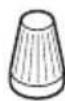
3x - Conectores de alambre
natural_image
Simple line drawing of a tool emitting wires, no text or symbols presentnatural_image
Line drawing of a mechanical device with a handle and base plate (no text or symbols)natural_image
Hand holding a small rectangular object against a plain background (no text or symbols)natural_image
Simple line drawing of a hand holding a small object against a plain background (no text or symbols)Bowling Green, KY 42102-9045
ATTN: Technical Service (Servicio Técnico)
natural_image
Technical line drawing of a mechanical device with a conical top and flanged base (no text or symbols)text_image
Technical diagram of a mechanical component with labeled parts A, B, and Cnatural_image
Simple line drawing of a cable being twisted with a circular component (no text or symbols)natural_image
Line drawing of a mechanical device with a handle and base plate (no text or symbols)natural_image
Simple line drawing of a hand pressing a small rectangular object on a rectangular surface (no text or symbols)natural_image
Simple line drawing of a hand holding a small object against a plain background (no text or symbols)Bowling Green, KY 42102-9045
ATTN: Technical Service (Service technique)