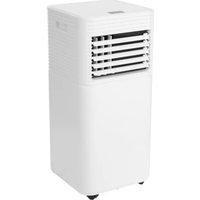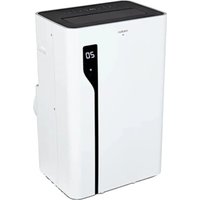
LIFE P1200 (MD 37734) - Air Conditioning MEDION - Free user manual and instructions
Find the device manual for free LIFE P1200 (MD 37734) MEDION in PDF.


| Product type | Monoblock mobile air conditioner (cooling, dehumidification, ventilation) |
| Brand | MEDION |
| Model | LIFE P1200 (MD 37734) |
| Dimensions (L x H x P) | 35 x 70 x 43 cm |
| Weight | Approximately 28.2 kg |
| Power supply | 220-240 V ~ 50 Hz, 5.8 A |
| Cooling power | 12,000 BTU (3.5 kW) |
| Power consumption (cooling) | 1,330 W |
| Refrigerant | R290 (propane), 195 g |
| Maximum room area | Approximately 36 m² |
| Airflow | 390 m³/h |
| Dehumidification capacity | Approximately 1.2 l/h |
| Condensate tank | 750 ml |
| Noise level | ≤ 65 dB(A) |
| Operating modes | Cooling, dehumidification, ventilation, sleep |
| Special features | Timer (1-24 h), remote control, medion Life+ app, voice control Alexa/Google Assistant, automatic defrost, overload protection |
| Maintenance | Clean filters every 2 weeks (daily use) |
| Safety | Overload protection, automatic shut-off, refrigerant safety (R290) |
| Spare parts | Filters, remote control with batteries, air exhaust hose (1.8 m), condensate hose, window kit, adapters, castors |
| Connectivity | Wi-Fi 2.4 GHz, Bluetooth (for initial pairing), mobile app (Android 9+ / iOS 14+) |
| Warranty | See warranty conditions on the after-sales service portal |
Frequently Asked Questions - LIFE P1200 (MD 37734) MEDION
User questions about LIFE P1200 (MD 37734) MEDION
0 question about this device. Answer the ones you know or ask your own.
Ask a new question about this device
Download the instructions for your Air Conditioning in PDF format for free! Find your manual LIFE P1200 (MD 37734) - MEDION and take your electronic device back in hand. On this page are published all the documents necessary for the use of your device. LIFE P1200 (MD 37734) by MEDION.
USER MANUAL LIFE P1200 (MD 37734) MEDION
9.2. Beveiling against overbelasting
www.medion.com/conformity.
18. Service-informatie
El modo de funciona bajo el meadow.
El meadow is a good place to grow plants.
El meadow is a good place to grow plants.
El meadow is a good place to grow plants.
1. Information about this user manual 196
1.1.Explanation of symbols 196
2. Proper use
3. Safety instructions
3.1. Power supply 198
3.2. Information on refrigerant 200
3.3. Product-specific hazards
3.4. Noise emissions 202
4. Package contents
5. Appliance overview 204
6. Preparing/setting up the appliance 208
6.1. Mounting the condensate drain hose 209
6.2. Mounting the exhaust air hose 209
6.3. Mounting the window kit 211
6.4. Inserting batteries in the remote control 213
7. Operation 2
7.1. Switch the appliance on/off 215
7.2. Setting operating mode 215
7.3. Setting the timer 216
7.4. Changing the temperature unit 216
8. Emptying the condensate tank manually 217
9. Safety functions 217
9.1. Automatic defrosting 217
9.2. Overload protection 218
10. App control 218
10.1. System requirements 218
10.2. Setting up the app/connecting to the air conditioner 218
10.3. Voice control via Amazon Alexa or Google Assistant 219
11. Troubleshooting 219
12. Cleaning 222
13. Prolonged non-use, transport and storage 224
14. Disposal 225
15. Technical specifications 226
16. Product data sheet 227
17. EU declaration of conformity 228
18. Service information 228
12.1. Cleaning the filter screens 223
1. Information about this user manual

Thank you for choosing our product. We hope you enjoy using this appliance.
Please read the safety instructions and the user manual carefully before using the appliance for the first time. Note the warnings on the appli
ance and in the user manual.
Always keep the user manual close to hand. If you sell the appliance or give it away, please ensure that you also pass on this user manual. It is an essential component of the product.
1.1. Explanation of symbols
If a block of text is marked with one of the warning symbols listed below, the hazard described in that text must be avoided to prevent the potential consequences described there from occurring.

DANGER!
Warning: risk of fatal injury!

NOTICE!
Follow these instructions to prevent damage to the appliance!

WARNING!
Warning: risk of possible fatal injury and/or serious irreversible injuries!

More detailed information about using the appliance!
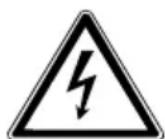
WARNING!
Warning: risk of electric shock!

Read the user manual before using the appliance!
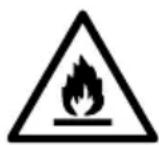
WARNING!
Warning: danger due to combustible and/or highly flammable substances!
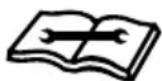
Follow repair instructions!

CAUTION!
Warning: risk of minor and/or moderate injuries!

CE labelling
Products that feature this symbol meet the requirements of the EU directives.
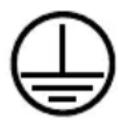
Protective earthing symbol (for protection class I)
Electrical appliances in protection class I are electrical appliances that permanently have at least basic insulation and either have a plug with earth contact or a fixed power cable with protective earth.
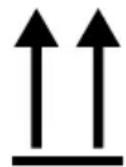
Indicates the correct upright position of the transport packaging.
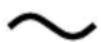
Symbol for alternating current (AC)
DE
FR
NL
ES
IT
EN
2. Proper use
This appliance is used for air cooling, air circulation and dehumidification in enclosed indoor spaces.
The appliance is only intended for private use and not for industrial/commercial use.
Please note that we shall not be liable in cases of improper use:
-
Do not modify the appliance without our prior consent. Use only auxiliary appliances approved or supplied by us.
Only use replacement parts or accessories that we have supplied or approved. -
Comply with all the information in this user manual, especially the safety instructions. Any other use is considered improper and can cause personal injury or property damage.
3. Safety instructions
- Keep the appliance and its accessories out of the reach of children.
This appliance can be used by children of 8 years and older, and by people with reduced physical, sensory or mental capacity, or with a lack of experience and/or knowledge, but only with proper supervision, or if they have been told how to use the appliance safely, and have understood the risks involved if they use it improperly.
Children must not be allowed to play with the appliance.
- Cleaning and user maintenance must not be carried out by children.
Children do not recognise the dangers that can arise when handling electrical appliances. Be particularly careful while using the appliance if there are children nearby.
Children younger than 8 must be kept away from the appliance and the mains cable.
3.1. Power supply
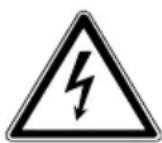
WARNING!
Risk of electric shock/short circuit!
There is a risk of electric shock/short circuit from live parts.
- Only connect the appliance to a properly installed and easily accessible socket that is close to where you are using the appliance. The local mains voltage must correspond to the technical specifications for the appliance.
The socket must be easily accessible so that you can unplug the appliance from the mains quickly if necessary.
Always hold the plug to pull it out and never pull the mains cable. - Do not allow the mains cable to come into contact with hot objects or surfaces (e.g. cooker hob).
Check the appliance and the mains cable for damage before using the appliance for the first time and after each use.
■ Do not use if the appliance or the mains cable is visibly damaged or if the appliance has been dropped.
■ Contact our Service team without delay if the appliance has been damaged during transport. ES
■ Do not, under any circumstances, make any unauthorised modifications to the appliance or try to open a component and/or repair it yourself. IT EN
If there is damage to the mains connection cable on this appliance, it must be replaced by the manufacturer, its customer service department, or another suitably qualified person. This is necessary to avoid hazards.
-
Never open the housing or slide objects into the ventilation slots.
-
Completely unwind the mains cable.
Do not kink or crush the mains cable.
Unplug the appliance from the socket: -
when you are cleaning or maintaining the appliance
- when you are assembling or disassembling the appliance
- if the appliance is damp or wet
- if you are no longer using the appliance
- when the appliance is unattended
- during thunderstorms.
The appliance must not be immersed in water or other liquids, or held under running water, because this could cause an electric shock.
- Do not let the appliance come into contact with water or other liquids. Keep the appliance, the mains cable and the mains plug away from wash basins, sinks or similar.
- Do not place any objects filled with liquid (e.g. vases or drinks) on or near the appliance.
-
Do not operate the appliance on wet surfaces.
-
Never touch the appliance or the mains cable/mains plug with damp or wet hands.
Use the appliance indoors only.
Do not expose the appliance to extreme conditions. Avoid: -
high humidity or wet conditions
- extremely high or low temperatures
direct sunlight - naked flames
- mechanical vibrations or shocks
- excessive dust
- lack of ventilation, e.g. in a cupboard or bookshelf.
Make sure that the appliance is switched off before plugging in the mains plug.
- Never unplug the mains plug from the socket while the appliance is running.
Do not use multi-plugs.
Ensure that the mains cable does not become a tripping hazard and do not use an extension cord. -
Immediately turn off the appliance and remove the mains plug if you notice an unpleasant smell (smell of burning).
-
Place the appliance in an upright position on a stable, level surface.
Place the appliance only on the floor.
- Do not operate the appliance without the filter strainers in place.
3.2. Information on refrigerant
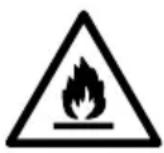
WARNING!
Risk of fire!
The refrigeration system of the appliance contains the natural refrigerant propane (R290).
Do not damage the refrigerant circuit.
During operation, storage and installation, the room should have an area of at least 10m^2 in order to ensure an adequate amount of air in case of damage to the refrigeration system.
If the refrigeration system has nevertheless become damaged, ventilate the room. Evacuate the room. Avoid naked flames and ignition sources. Have the appliance repaired by a qualified technician before using it again.
Tampering with the refrigerant circuit is prohibited and invalidates the warranty.
- Do not use agents other than those recommended by the manufacturer to speed up the thawing process or for cleaning.
- Extremely flammable gas: Avoid naked flames, sparks and ignition sources when using, maintaining and disposing of the appliance.
Contains pressurised gas; can explode when heated.
In the event of a fire, do not extinguish any leaking gas until the leak can be safely eliminated.
- Store the appliance in a well-ventilated place away from sunlight.
- Do not remove safety signs, stickers or labels from the appliance and ensure they are legible.
Ensure that national gas regulations are complied with.
Use the appliance only with the intended refrigerant R290.
3.3. Product-specific hazards
- Do not place your fingers or other objects into the openings for the air outlet.
- Do not use the appliance in a room where flammable gases may leak.
- Do not use the appliance in the bathroom or in other damp environments.
Caution with long hair: It can be sucked in by the air flow!
Always place and transport the appliance in an upright position. Never use the appliance in an inclined position.
Do not use spray cans near the appliance.
Never cover the air inlets and air outlets.
Make sure that no fabrics such as curtains or similar are hanging or lying near the appliance which could get caught in the appliance.
- Do not operate the appliance on uneven surfaces or near steps. Avoid tipping the appliance (e.g. due to edges on the floor) during use.
- Do not operate the appliance in the immediate vicinity of heat sources such as radiators, heat accumulators, ovens or other appliances that generate heat.
Check all screw and plug connections at regular intervals!
- Tighten up loose screws and correct the hold of the plug connections.
Do not carry the appliance while it is in use.
- Do not place or put any objects on the appliance.
Do not climb or sit on the appliance.
3.4. Noise emissions
The sound pressure level of the appliance is less than 65 dB(A).
4. Package contents
DE

DANGER!
Risk of choking and suffocation!
Packaging film can be swallowed or used improperly, creating a risk of choking and suffocation.
FR
NL
ES
- Keep all packaging materials used (film, plastic bags, pieces of polystyrene, etc.) out of the reach of children.
EN
- Do not allow children to play with the packaging material.
Remove the product from the packaging and remove all packaging material.
- Check whether all the items in the delivery are present. Contact us within 14 days after purchase if any items are missing.
The mobile air conditioner must be checked for damage before each use.
The following items are supplied with your product:
- Mobile air conditioner MD 37734
- Castors (4 pieces, pre-assembled)
- Exhaust air hose approx. 1.8m
- Exhaust air hose adapter
- Condensate drain hose
Window kit - Window kit adapter
- Remote control incl. 2 × micro batteries, type AAA LR03 1.5 V
Short manual
5. Appliance overview
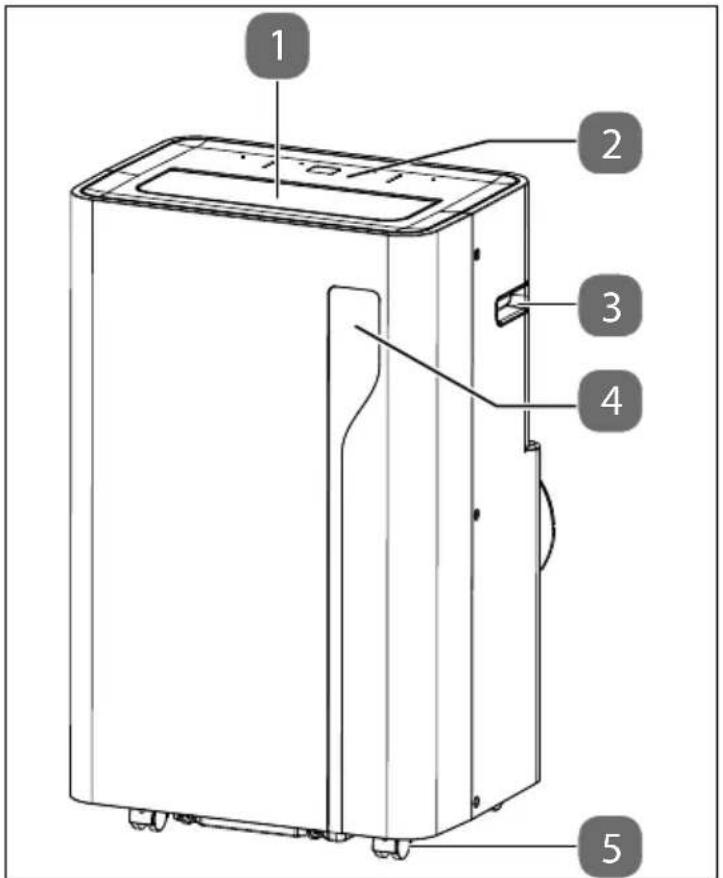
Fig.1-Front
- Automatic exhaust air flap
- Control panel
- Handle
- Display panel for temperature/timer time
- Castors
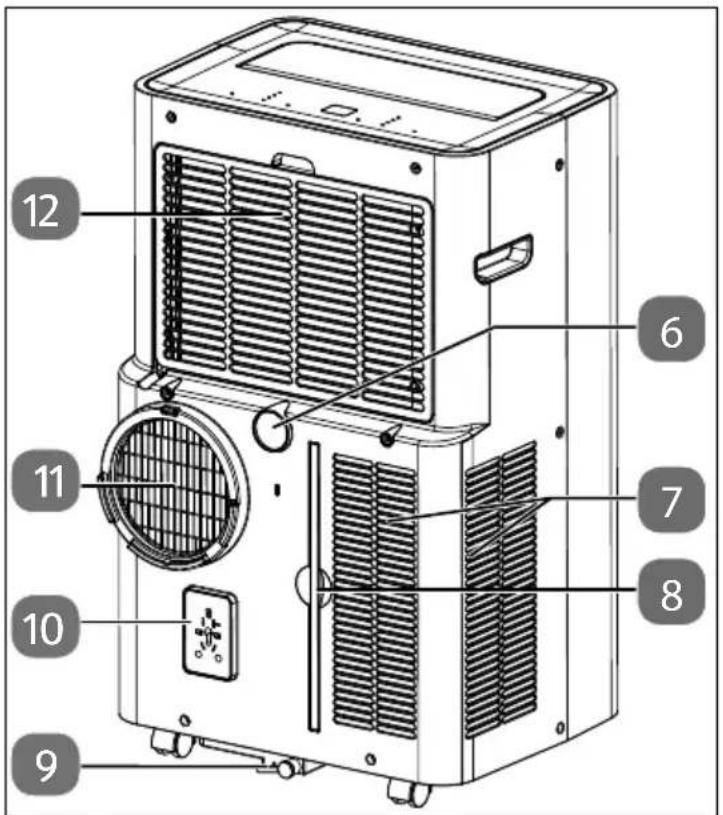
Fig.2 - Rear
- Connection for condensate drain hose (for continuous operation)
- Lower intake opening
- Filter strainer
- Condensate drain opening (manual drain)
- Mains plug holder
- Exhaust air hose connection
- Upper suction opening with filter strainer
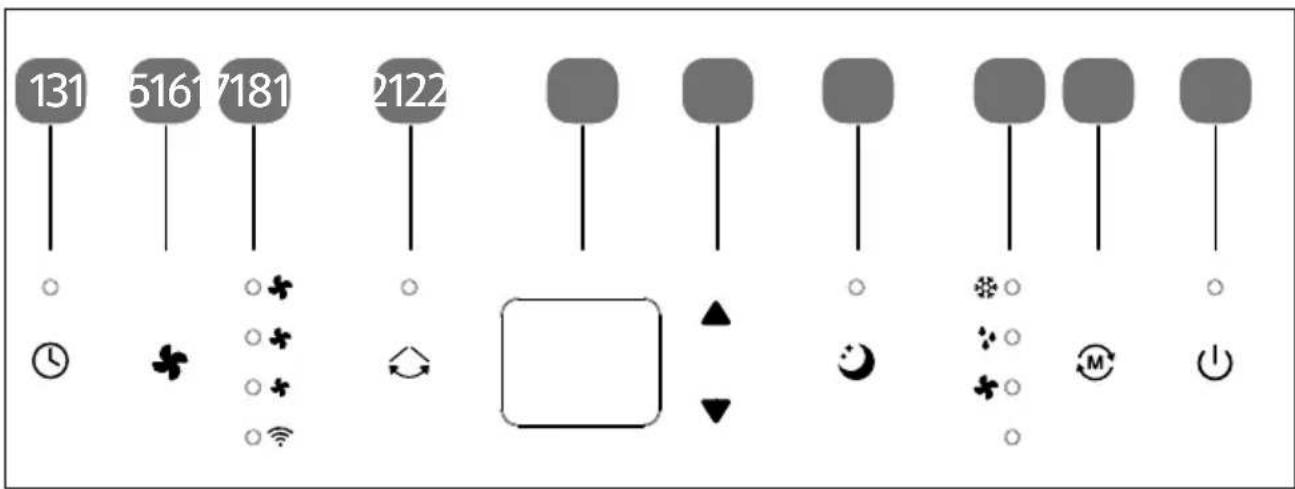
Fig. 3 - Control panel
- Set timer (automatic start/stop), press and hold: Enable pairing mode
- fan speed
- Operating lights for fan speed and WLAN
- Set the vertical ventilation direction
-
Display panel for temperature and timer time
-
Increase temperature/timer/ Reduce temperature/timer
- Switch sleep mode on/off
- Operating lights for cooling mode, dehumidification, fan mode
- Net operating mode (cooling mode, dehumidification, fan mode)
- switch the appliance on/off
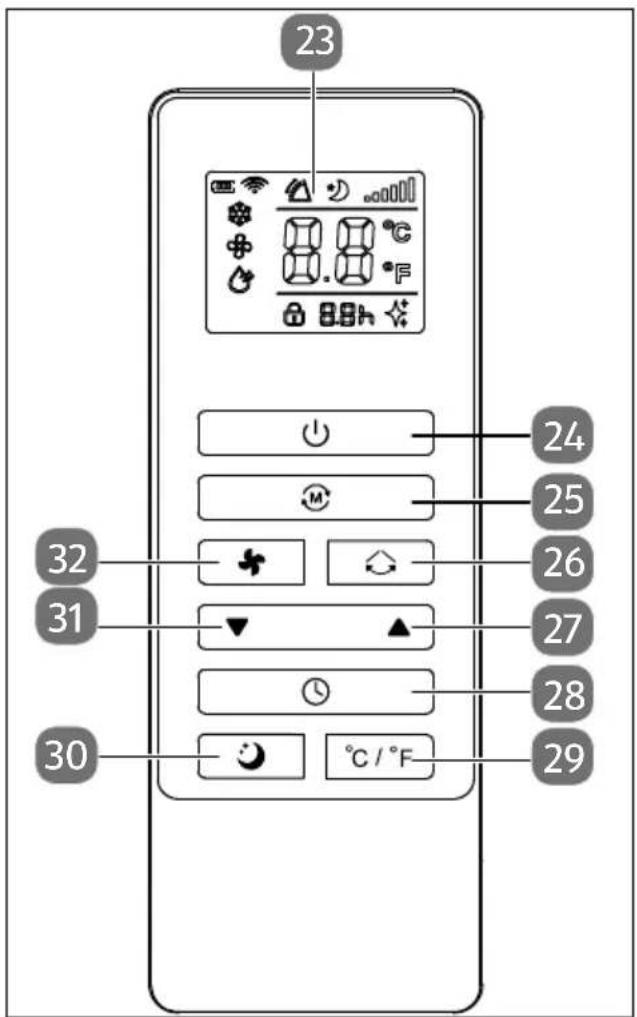
Fig. 5 - Remote control
- Display panel
- Switch appliance on/off
- M: Set operating mode (cooling mode, dehumidification, fan mode)
- Set the vertical ventilation direction
- :crease temperature/timer
- Set timer (automatic start/stop)
- Change temperature unit (°C or °F)
- Switch sleep mode on/off
- :reduce temperature/timer
- Set fan speed
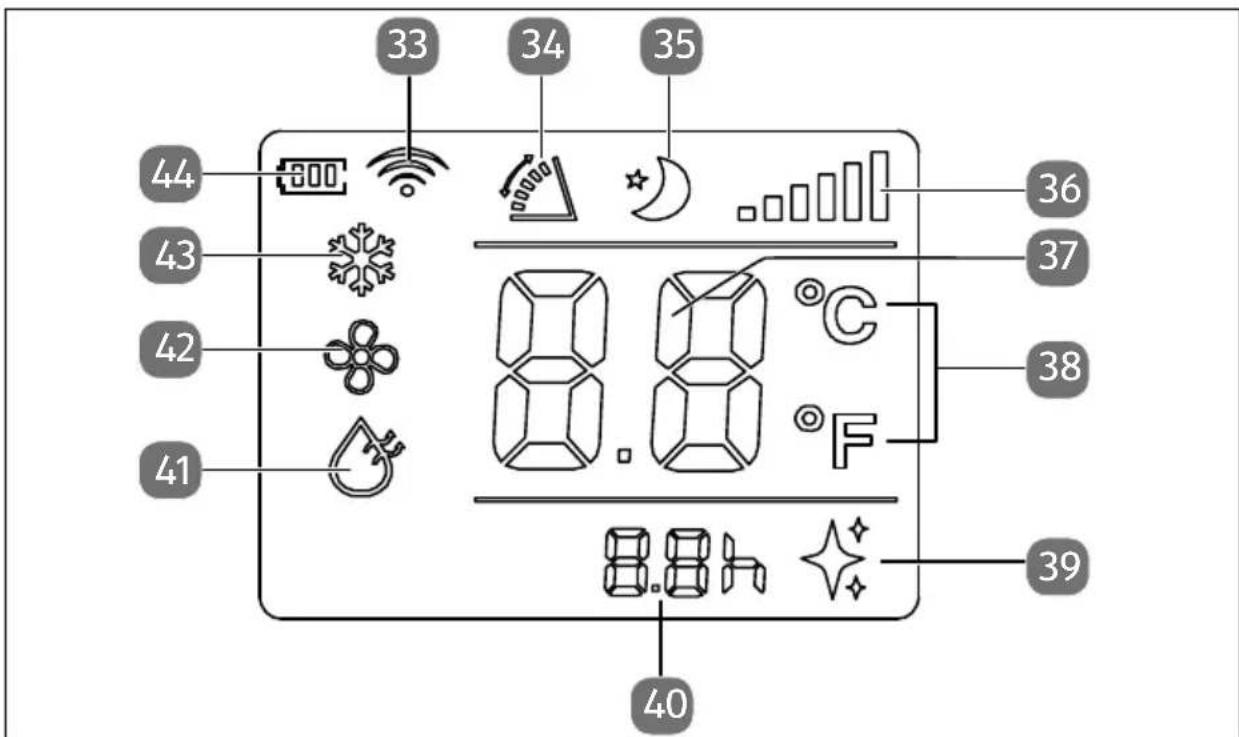
Fig. 4 - Remote control displays
- Wireless network enabled
- Vertical ventilation direction
- Sleep mode enabled
- Radio signal strength
- Temperature display
- Temperature unit
-
Battery inserted
-
Timer time display
- Dehumidification mode enabled
- Fan mode enabled
- Cooling mode enabled
- Battery status
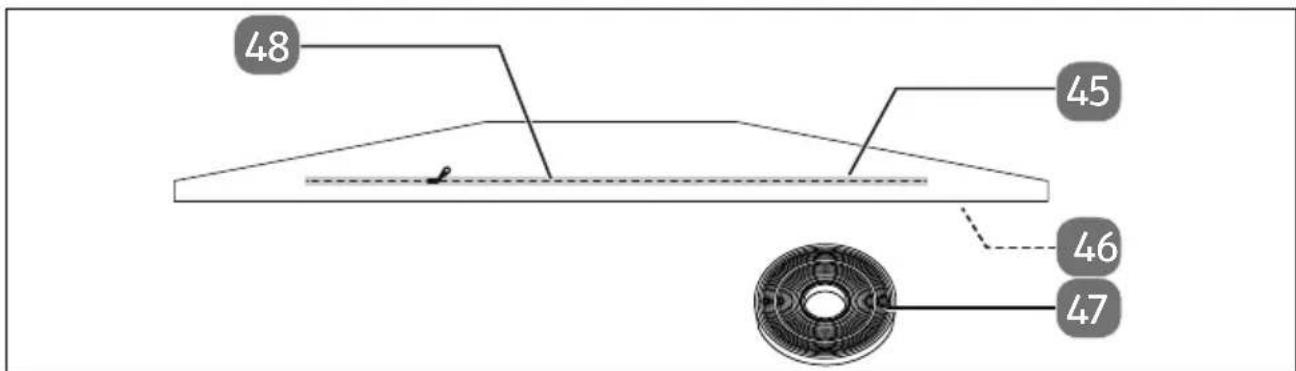
Fig.6-Window kit
- Zip
-
Textile seal
-
Hook and loop strip (not shown, at the edge of the textile seal)
- Hook and loop fastener
6. Preparing/setting up the appliance
Check the appliance for any damage before putting it into operation.
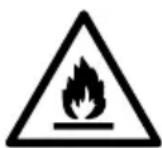
WARNING!
Risk of fire!
The refrigeration system of the appliance contains the natural refrigerant propane (R290).
During operation, storage and installation, the room should have an area of at least 10m^2 in order to ensure an adequate amount of air in case of damage to the refrigeration system.
Please refer to the safety instructions under "Information on refrigerant".
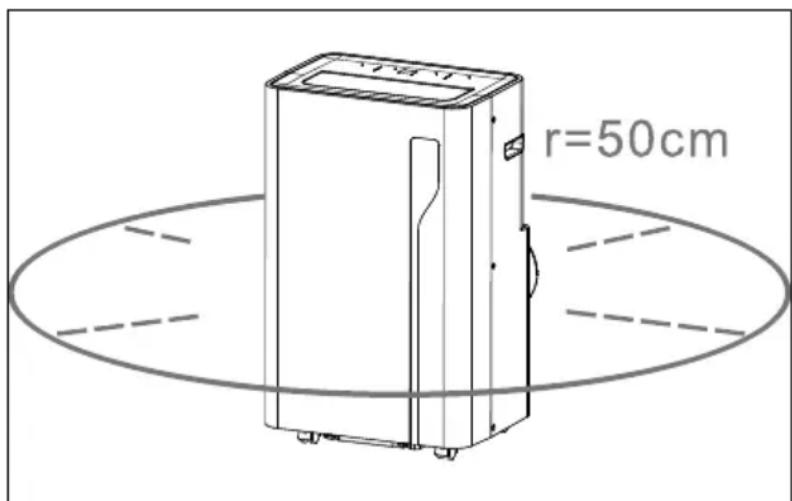
Fig.7 - Appliance clearance
- Place the appliance on a stable, level surface with an area of at least 50~cm clearance around the appliance to ensure good air circulation.
- Leave the appliance in a vertical position for at least 24 hours before switching on.
Operate the appliance at an ambient temperature between 5^ and 35^ .
Follow the instructions in "3.3. Product-specific hazards" on page 201.
6.1. Mounting the condensate drain hose
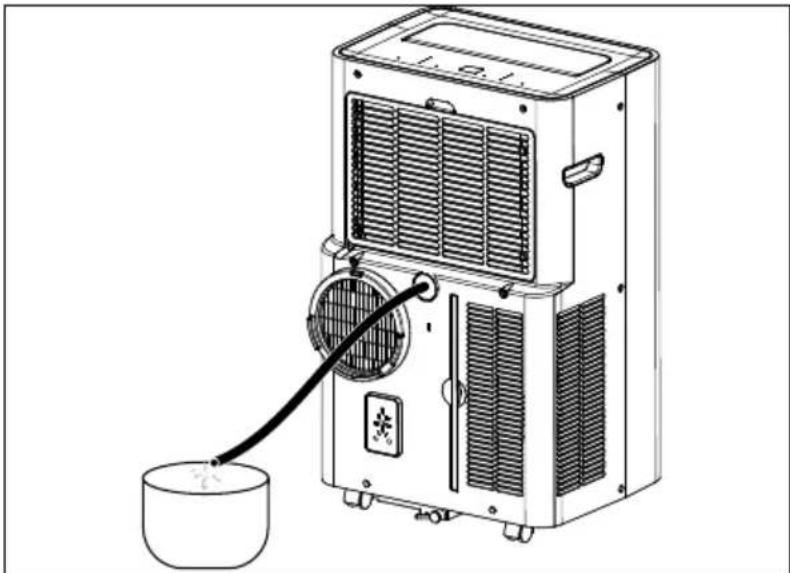
Fig. 8 - Using the condensate drain hose
During continuous operation and unsupervised operation of the air conditioner, the condensate drainage hose supplied must be connected in dehumidification mode and during cooling to drain the condensate.
Remove the closure from the connection (6) for the condensate drain hose.
- Connect the condensate drainage hose securely and properly and make sure it is not kinked and free of obstacles.
- Place the outlet of the condensate drainage hose over a drain or container and ensure that the water can flow out of the appliance unhindered.
- Secure the hose on the drain or container to prevent uncontrolled water outflow, as the water pressure is very strong and can move the hose.
- Do not submerge the end of the hose in water; otherwise there may be an 'airlock' in the hose.
To prevent water from leaking, please note that the hose must have a gradient of at least 20% .
6.2. Mounting the exhaust air hose
The exhaust air coming from the mobile air conditioner must be directed outside so that the exhaust air can escape from the room.
Do not replace or extend the exhaust air hose, as this will result in reduced efficiency or the appliance being shut down due to low counterpressure.
Mount the exhaust air hose adapter with the end of the exhaust air hose.
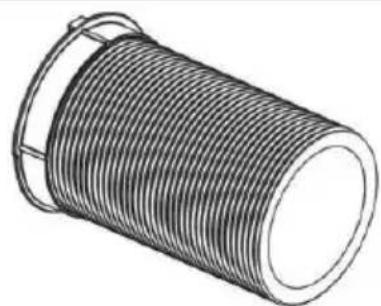
Fig. 8 - Mounting of exhaust air adapter
Mount the window kit adapter to the other end of the exhaust air hose.
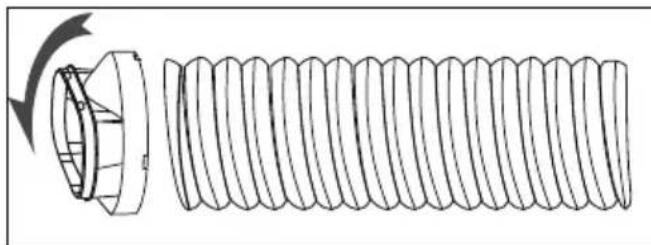
Fig. 9 - Mounting of window kit adapter
Adjust the window kit to the size of your window. You can mount the window kit on a bottom-hung window or a roof window. Further information is available at "6.3. Mounting the window kit" on page 211.
- Place the appliance near a window or door. If necessary, carefully pull out the exhaust air hose. We recommend keeping the length of the hose as short as possible.
- Guide the exhaust air hose including the window kit adapter through the zip opening in the window kit.
Then close the zip as far as possible.
- Close your window to attach the window kit to the window.
If necessary, secure the window kit with adhesive tape. We recommend sealing the gap between the adapter and the sides of the window for maximum efficiency.
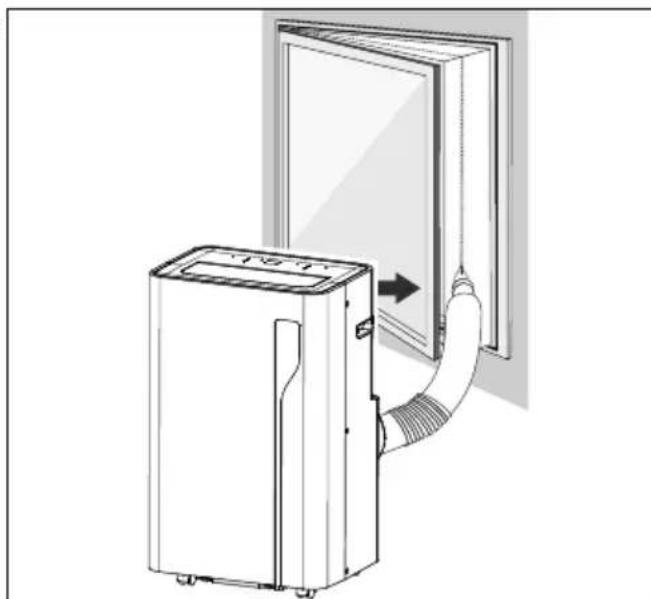
Fig. 10 - Installation at the window
Slide the exhaust air hose over the exhaust air opening of the air conditioner.
Adjust the length of the flexible exhaust air hose. Avoid bends in the hose.
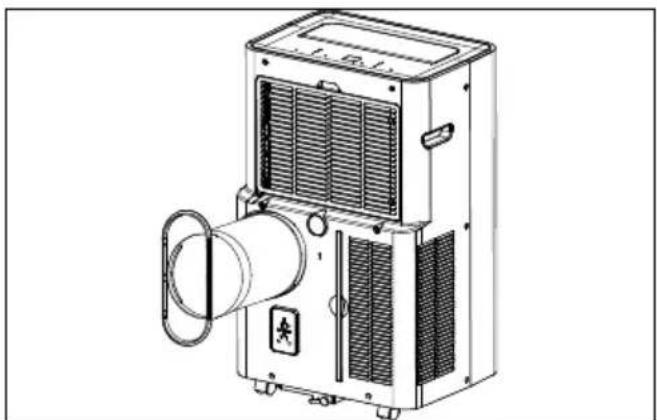
Fig. 11 - Position of exhaust air hose
6.3. Mounting the window kit

You can also use the appliance without the window kit. Then hang the exhaust air hose out of the window and close it as far as possible so that no warm air can flow back.
Attach the window kit to the window to prevent outside air from entering and to prevent exhaust air from the air conditioner.
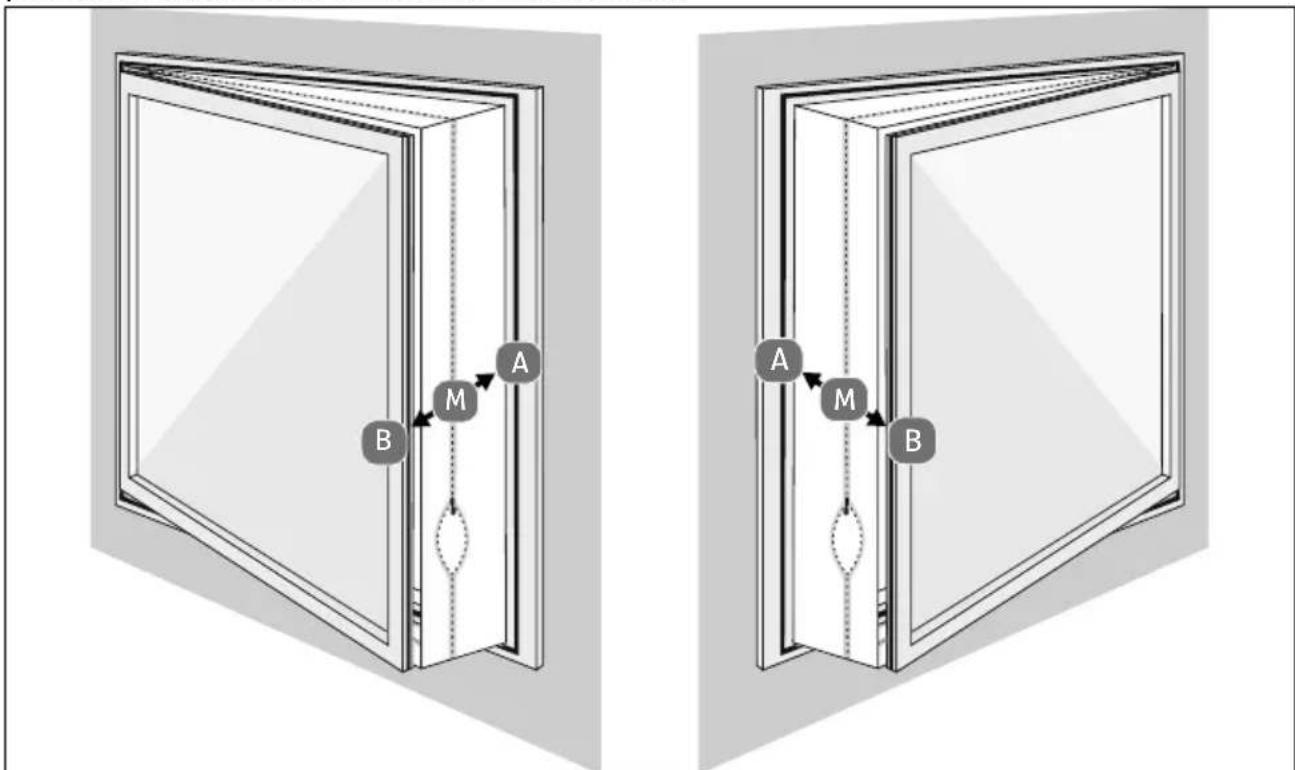
Fig. 12 - Mounting on bottom-hung window
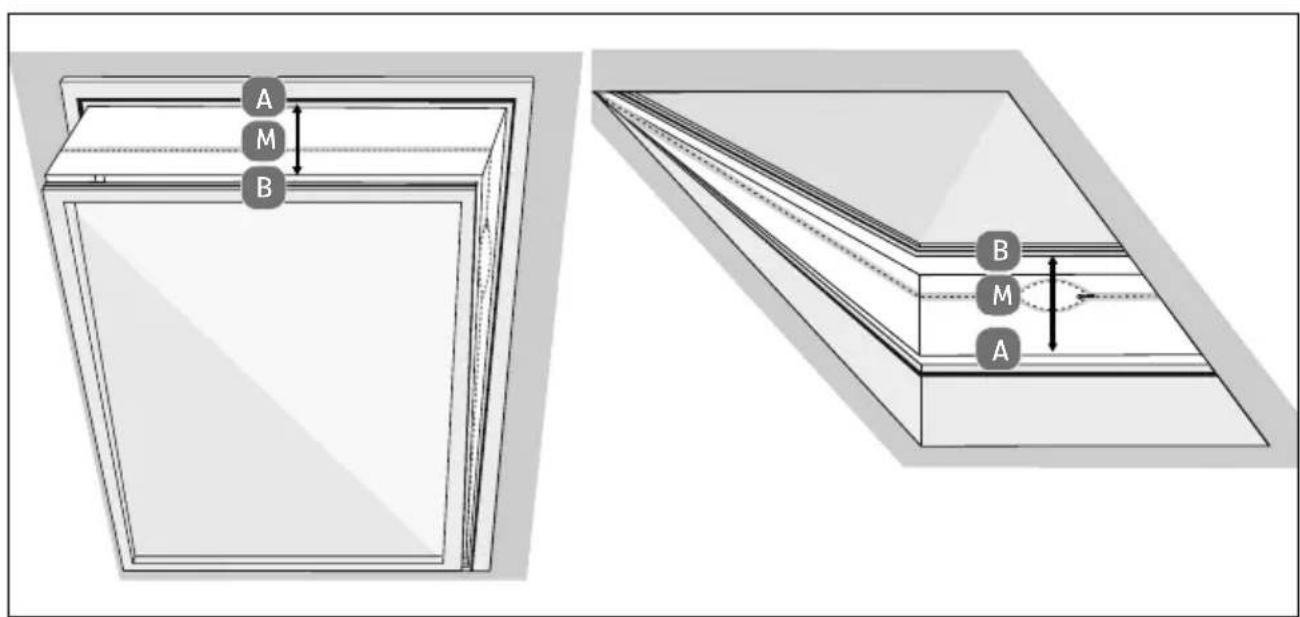
Fig.13 - Mounting on roof window
Open the window.
Mark the centre (M) of the textile window seal.
Mark the centre of the window frame.
Adhere the hook and loop fastener to the window frame of the bottom-hung window (inside, on the side where the window handle is located), about 1 cm from the edge.
- First, attach the hook and loop fastener completely on side (A) and then on side (B), starting in the centre. When mounting, point (A) must be exactly opposite point (B).
- When closing the window, care must be taken to ensure that the textile seal between the sash and the window frame is not jammed.
Preferably open the zip at the places marked "S" and attach the exhaust air hose there.
- Route the exhaust air hose as straight as possible.
Do not bend the exhaust air hose.
6.4. Inserting batteries in the remote control
DE

WARNING!
Risk of injury!
There is a risk to health due to leaking battery acid.
- Avoid contact with battery acid. If battery acid comes into contact with skin, eyes or mucous membranes, rinse the affected areas with plenty of clean water and consult a doctor as soon as possible.
FR
NL
ES
IT
EN
- Keep new and used batteries out of the reach of children.
- Stop using the remote control if you cannot close the battery compartment securely, and keep it well away from children.
WARNING!
Risk of explosion!
There is a risk of explosion if batteries are replaced incorrectly!
- Only replace batteries with those of the same or an equivalent type.
- Never try to recharge non-rechargeable batteries. Risk of explosion!
Store batteries in a cool, dry place. Strong direct heat can damage batteries. Do not expose the appliance to sources of intense heat.
Never short-circuit batteries.
Never throw batteries into a fire. - Remove leaking batteries from the appliance immediately. Clean the contacts before inserting new batteries. Battery acid can cause chemical burns!
Always remove flat batteries from the appliance.
If the appliance is not going to be used for long periods, remove the batteries.
Before inserting the batteries, check that the contacts in the appliance and on the batteries are clean and, if necessary, clean them.
Always use new batteries of the same type. Never use old and new batteries together.
Pay attention to the polarity (+ / -) when inserting the batteries.
Two micro batteries, type AAA LR03 1.5 V, are inserted in the remote control.
Replace the batteries if the appliance fails to react to commands from the remote control properly. Then follow these steps:
▶ Slide the battery compartment flap open by applying a little pressure to the ribbing.
Remove the two batteries from the battery compartment.
Dispose of the old battery in accordance with legal requirements.
Insert two new micro batteries, type AAA LR03 1.5 V, into the battery compartment.
Slide the flap fully back into the remote control.
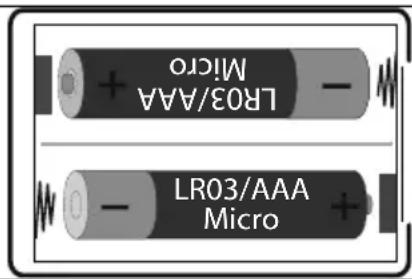
Fig. 14 - Battery compartment
7. Operation
Plug the mains plug into a suitable socket.
An acoustic signal will sound. The appliance is then in standby mode.

The function buttons on the appliance correspond to the function buttons on the remote control, so they are only named once each.
You can also change the temperature unit using the remote control.
7.1. Switch the appliance on/off
Press the button to switch on the appliance.
Press the button again during operation to switch the appliance off.
Wait approx. 3 minutes after switching off the appliance before switching it on again.
7.2. Setting operating mode
Press the button once or several times to set the operating mode.
The set operating mode is indicated by the operating lights (20) on the appliance and by the display of the operating mode symbol (42-44) on the remote control:
| Operating mode/function | Making setting |
| Cooling mode - Cooling indoor air | Press the button to increase the temperature. Press the button to reduce the temperature. Temperatures of between 16°C and 32°C can be set. Press the button to set a high or low fan speed. The fan speed is indicated by the operating lights (15). |
| Fan operation - Circulating the indoor air | Press the button once or several times to set the fan speed. - At a high fan speed, the operating light iumi-nates. - At a low fan speed, the operating light iumi-nates. |
| Dehumidification mode - Reducing the humidity in the room | When dehumidification mode is switched on, the settings are made automatically and cannot be changed. Connect the condensate drain hose to the connection (6) and insert the other end into a container/drain. |
| Sleep mode - Reduced fan speed - Operating lights switched off - Automatic temperature reduction (1℃/hour) | Sleep mode can only be selected in cooling mode and only via the remote control. When sleep mode is switched on, the settings are made automatically and cannot be changed. |
7.3. Setting the timer
Automatic switch-on
You can set the time until the appliance switches on automatically in standby mode (the appliance is switched off).
Press the button to set the desired length of time (1 to 24 hours) until the air conditioner automatically switches on.
The operating light (13) lights up and the hour display 00 flashes.
Press the or button, to increase or decrease the timer.
As soon as the hour display stops flashing, your setting is confirmed.
The appliance switches on automatically after the set time has elapsed.
To switch off the timer, set the hour display to 00 or press the button.
Automatic switch-off
When the appliance is switched on, you can set the period of time to automatic switch-off.
Press the button to set the desired length of time (1 to 24 hours) until the air conditioner automatically switches on.
The operating light (13) lights up and the hour display 00 flashes.
Press the or button, to increase or decrease the timer.
As soon as the hour display stops flashing, your setting is confirmed.
The appliance switches off automatically after the set time has elapsed.
To switch off the timer, set the hour display to 00 or press the button.
7.4. Changing the temperature unit
Press the C^0 F^0 button to switch between temperature units Celsius and Fahrenheit.
8. Emptying the condensate tank manually

NOTICE!
Material damage!
There is a possibility of material damage due to accidental overflow of condensate.
- Do not leave the appliance unattended when emptying the condensate tank.
If condensate has accumulated in the appliance, operation is interrupted.

Move the appliance carefully so that the water in the condensate tank at the bottom of the housing does not spill.
Switch off the appliance.
- Place a suitable, flat container under the condensate drain opening (9) or place the appliance on a drain (e.g. in a shower tray) or fit the condensate drain hose to the condensate drain opening.
- Remove the closure from the lower condensate drainage opening and drain the condensate.
- Carefully close the condensate drainage opening to prevent unintentional water leakage during operation.
The appliance is ready for use again.
9. Safety functions
9.1. Automatic defrosting
At low room temperatures, frost may form on the evaporator during operation. The appliance starts defrosting automatically and the operating light flashes.
- When the appliance is operated in cooling or dehumidifying mode, the ambient temperature sensor detects that the temperature of the evaporator coil is below -1^ . Once the compressor stops operating for 10 minutes or the coil temperature has risen to 7^ , the appliance starts back in cooling mode.
- If the appliance is operated in dehumidification mode and the temperature sensor detects that the temperature of the evaporator is below 40^ and the difference between the appliance internal temperature and the room temperature is below 19^ , the appliance starts defrosting for 5 minutes after 20 minutes and the operating light flashes.
9.2. Overload protection
In the event of a power failure, there is a 3-minute delay until compressor restart to protect the compressor.
10. App control
To make full use of your air conditioner, download the medion Life+ app free of charge from the Google Play Store® or Apple® App Store onto your smartphone.
- Simply scan the following QR code or visit the Play Store (Android™) or App Store (iOS®) and search for "MEDION Life+".



A customer account is required to use the app. For this, you need a valid email address. Follow the instructions in the app.
10.1. System requirements
- Smartphone with WLAN 802.11 b/g/n
2.4 GHz WLAN network - Android™ platform 9 or higher
iOS 14 or higher - medion Life+ app

The medion Life+ app can only be used to control the appliance using a 2.4 GHz WLAN network. A 5 GHz WLAN network cannot be used for operation.
10.2. Setting up the app/connecting to the air conditioner
Connect the air conditioner to the mains and turn it on.
Open the medion Life+ app.
- Switch the appliance on by pressing the button. The operating light flashes. If no connection is established, the operating light goes out. If the appliance is already switched on, press and hold the button until the operating light flashes and the appliance is in pairing mode.
- If you have not yet registered an appliance in the medion Life+ app, tap the Add appliance button.
If you have already connected an appliance in the app, click the button.

If the Bluetooth® function on your smartphone is switched on, the app automatically finds the appliance during the initial setup and is displayed. Without Bluetooth, select the appliance as described below.
Select Air conditioner from the list.
Select the model MEDION air conditioner P1200 (MD37734) from the overview list.
Enter your network connection and now follow the instructions in the app to connect.
10.3. Voice control via Amazon Alexa or Google Assistant
You can operate your appliance via voice control using Amazon Alexa or Google Assistant.
- Open your Alexa app or Google Assistant and add the medion Life+ app as a skill.
Follow the instructions in the relevant app, sign in with your medion customer account and confirm the connection between the Life+ app and the Alexa app or Google Assistant.
After authorisation, you can operate your appliance via voice control.
11. Troubleshooting
If the appliance stops working properly, please refer to the troubleshooting table shown below to see if you can resolve the problem yourself.
Only allow maintenance and repair work to be carried out on the refrigerant circuit by a qualified technician according to the manufacturer's specifications.
- Never attempt to repair the appliance yourself. If a repair is required and for appropriate repair instructions, please contact our Service Centre or another suitable specialist workshop. Components may only be replaced with identical repair parts.
During repair and maintenance work (or when working with heat on the appliance): Have a powder or CO^2 fire extinguisher nearby for emergencies.
| Problem Possible cause Troubleshooting | ||
| The appliance is not working. | The mains plug is not properly inserted. | Disconnect the mains plug and then plug it in again. |
| The earthed mains socket is faulty. | Check the earthed mains socket by connecting another appliance. | |
| The room temperature is too low / too high. | The room temperature should be between 5°C and 35°C. | |
| The remote control is not working. | The batteries are not inserted properly. | Insert the batteries correctly. |
| You are more than 5 metres away from the appliance. | Reduce the distance to the appliance. | |
| The path between the remote control and the infrared sensor is not clear. | Remove any obstacles. | |
| The remote control is not directed at the sensor. | Point the remote control correctly. | |
| The batteries are flat. | Replace the batteries. | |
| The appliance does not cool down properly. | Windows or doors are open so that warm air can enter the room. | Close the windows and doors. |
| The filters are very dirty. | Clean the filters as described under the section on cleaning the filters. | |
| The air outlet is blocked. | Leave at least 50 cm of space around the appliance in all directions to ensure adequate ventilation. | |
| The appliance does not cool down properly. | The operating mode and temperature are not set correctly. | Set the cooling operating mode and the temperature to the correct value. |
| The exhaust air hose is not mounted correctly. | Mount the exhaust air hose properly. | |
| Water leaks out of the appliance. | Overflow when moving the appliance. | Empty the water tank before transportation. |
| Condensate drain hose kinked. | Straighten the condensate drain hose. | |
| The appliance is very noisy. | The appliance is on an uneven surface. | Place the appliance on a hard, smooth surface. |
| There are loose, vibrating parts. | Secure and fasten the parts. | |
| The noise sounds like running water. | Noise is caused by flowing refrigerant. That is normal. | |
| The compressor is not working. | Cooling mode protection is active. | Turn off the appliance and wait 3 minutes before turning it on again. |
| The overheating protection is active. | ||
| Error indicator 00/EO | Communication error between main PCB and display PCB | Check the cables for damage |
| Error indicator E1 | Failure of the ambient temperature sensor | Check the connection. Clean or replace temperature sensor. Contact Service Centre if necessary. |
| Error indicator E2 | Failure of the coil temperature sensor | Contact Service Centre. |
| Error indicator F1 | Condensate level too high | Empty the integrated condensate tank (see “8. Emp-tying the condensate tank manually” on page 217). |
12. Cleaning
WARNING!
Risk of electric shock!
There is a risk of electric shock due to live parts.
The appliance must not be immersed in water or other liquids, or held under running water, because this could cause an electric shock.
Unplug the mains plug from the socket before you start cleaning the appliance.
Make sure that no liquids enter the appliance.

WARNING!
Risk of injury!
There is a risk of cuts due to contact with sharp-edged rotor blades inside the housing.
- Do not disassemble the appliance to clean the rotor blades.

NOTICE!
Damage to the appliance!
The improper use of cleaning agents on the appliance may damage the surfaces.
- Do not use chemical solutions or cleaning agents because these may damage the surface or the labels on it.
- Do not use aggressive, chemical or abrasive cleaning agents and do not use hard sponges.
- Do not use flammable cleaning agents.
- Do not use agents other than those recommended by the manufacturer to speed up the thawing process or for cleaning.
Press the button to switch off the appliance.
Pull the mains plug out of the socket.
Clean the housing only with a soft, dampened cloth.
Moisten the cloth with mild soapy water to remove stubborn dirt.
Dry the housing carefully before switching on the appliance.
12.1. Cleaning the fi Iter screens

NOTICE!
Damage to the appliance!
Dust collects on the filter screens and restricts the airflow. The restricted air flow reduces the efficiency of the appliance. In case of excessive accumulation of dust, the filter can be blocked and material damage to the appliance can occur.
Clean the filter strainers regularly (at least every 2 weeks if used daily).
- Never operate the appliance without the filter screens in place; otherwise the evaporator inside may become contaminated.
Press the button to switch off the appliance.
Pull the mains plug out of the socket.
- Remove the upper filter strainer by reaching into the recess, folding it open and removing it completely.
Pull the lower filter strainer out of the appliance.
Use a vacuum cleaner to vacuum dust from the filter screens.
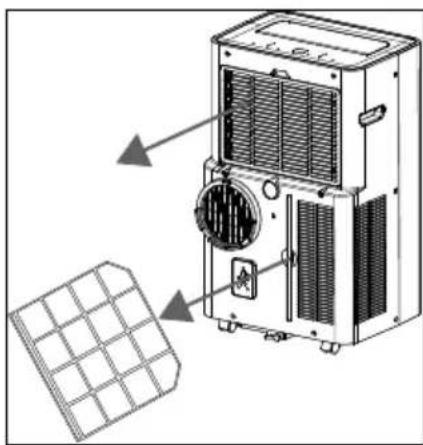
Fig. 14 - Filter strainers
- Turn the filter screens around and rinse the filter screens under running water. Run the water in the opposite direction of the air flow through the filter strainer.
- Set the filter screens aside and allow them to air dry completely.
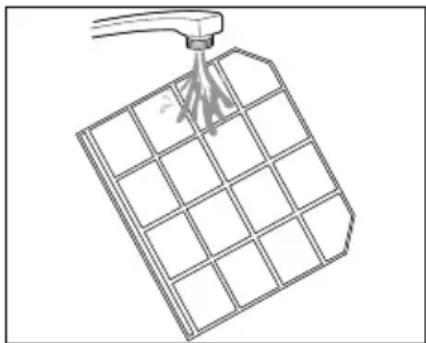
Fig. 15 - Cleaning the filter strainers

WARNING!
Risk of injury!
There is a risk of cuts due to contact with the sharp-edged evaporator surface when installing the upper filter strainer.
- Do not touch the sharp-edged evaporator surface with your bare hands.
Insert the dried filter screens back into the appliance.
13. Prolonged non-use, transport and storage
If the appliance is not used for a prolonged period, the appliance must be cleaned and fully dried.

NOTICE!
Damage to the appliance!
The evaporator inside the appliance must be dried before storage to prevent damage to components or mould formation.
- Switch off the appliance, remove the mains plug from the socket.
Empty the condensate tank, clean the appliance as described under "Cleaning". - Place the appliance in a dry, well-ventilated place for several days to dry, or use the ventilation operating mode to dry for a few hours until the condensate discharge is dry.
Note during transport that:
Where possible, always transport the appliance upright. After transportation, only connect to the mains and turn on after 24 hours so that the refrigerant circuit can settle after transportation.
Always empty the condensate tank and the condensate drain hose before storage and transportation.
Press the button to switch on the appliance.
- Select the fan mode on the air conditioner or using the remote control. The operating light is illuminated.
- Keep the appliance running in fan mode for a few hours so that it dries completely from the inside.
Press the button to switch off the appliance.
Pull the mains plug out of the socket.
Remove the exhaust air hose and window kit.
Remove and clean the filter strainers and allow them to dry out completely.
Insert the filter strainers back into the frames provided for this in the housing.
Remove the batteries from the remote control.
If possible, store the appliance and accessories in the original packaging in a dark, ventilated, dry and frost-free interior.
- Store the appliance in a room without continuously operating heat sources (for example naked flames, gas appliance or electric heating).
14. Disposal


PACKAGING
Your appliance has been packaged to protect it from damage in transit. The packaging is made of materials that can be recycled in an environmentally friendly manner.

Observe the following labels on the packaging materials regarding waste separation with the abbreviations (a) and numbers (b): 1-7: plastics/20-22: paper and cardboard/80-98: composite materials

(France only)
The "Triman" symbol tells the consumer that the product can be recycled, is covered by an extended system of manufacturer's responsibility and must be sorted by material type in France.
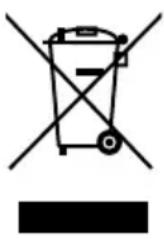
APPLIANCE
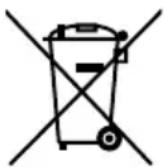
All old appliances marked with the symbol shown must not be disposed of in normal household waste.
In accordance with Directive 2012/19/EU, the appliance must be properly disposed of at the end of its service life.
This involves separating the materials in the appliance for the purpose of recycling as well as minimising the environmental impact and negative effects on human health.
Take old appliances to an electrical scrap collection point or a recycling centre.
Contact your local waste disposal company or your local authority for more information on this subject.
The refrigerant R290 must not enter the environment.
BATTERIES
Do not dispose of used batteries with normal household rubbish. Batteries must be disposed of correctly. For this purpose, retailers that sell batteries and local collection points provide containers in which you can dispose of them. Contact your local waste disposal company or your local authority for more information.
In connection with the sale of batteries or the supply of appliances containing batteries, we are obliged to draw your attention to the following: As the end user, you are legally required to return used batteries.
The crossed-out wheelie bin symbol means that the battery must not be disposed of with household rubbish.
15. Technical specifications
| Air conditioner | |
| Model P1200 (MD 37734) | |
| Distributor MEDION AG | Am Zehnhof 77 45307 Essen Germany |
| Commercial register number HRB 13274 | |
| Power supply 220-240 V 50 Hz | ~ |
| Nominal power consumption (cool-ing) | 1330 watts |
| Fuse 5.8 A | |
| Cooling capacity 12000 BTU | |
| Refrigerant R290 (propane) | |
| Refrigerant quantity 195 g | |
| Power levels 3 | |
| Maximum room size Approx. 36 m² | |
| Air throughput 390 m³/h | |
| Dehumidification performance Approx. 1.2 l/h | |
| Tank capacity 750 ml | |
| Dimensions (W x H x D) 35 x 70 x 43 cm | |
| Weight Approx. 28.2 kg | |
| Operating volume ≤ 65 dB(A) | |
| Remote control 2 x micro batteries, type | AAA LR03 1.5 V (included in package contents) Range: approximately 6 m |
16. Product data sheet
| Symbol | Value | Unit | |
| Manufacturer designation | MD 37734 | ||
| Rated power in cooling mode | P rated | 3.5 | kW |
| Rated output in heating mode | P rated | -- | |
| Rated power consumption in cooling mode | PEER | 1.33 | kW |
| Rated power consumption in heating mode | PCOP | -- | |
| Rated coefficient of performance in cooling mode | EERd | 2.63 | |
| Rated coefficient of performance in heating mode | COPd | -- | |
| Symbol Value Unit | |||
| Power consumption in operating state Temperature controller off | PTO | -- | |
| Power consumption in standby mode P | SB | 1 | W |
| Power consumption of single-duct/double-duct air conditioners | QDD | 1.329 kW | n/a |
| Sound power level L | WA | 65 dB(A) | |
| Global Warming Potential GWP 3 | |||
| Contact address for further information: MEDION | AG, Am Zehnhof 77, 45307 Essen, Germany | ||
17. EU declaration of conformity

MEDION AG hereby declares that the radio equipment type MD 37734 complies with Directive 2014/53/EU as well as Directive 2009/125/EC and Directive 2011/65/EU.
The complete EU declaration of conformity is available at:
www.medion.com/conformity.
18. Service information
Please contact our Customer Service team if your device ever stops working the way you want or expect it to. There are several ways for you to contact us:
- In our Service-Community, you can meet other users, as well as our staff, and you can exchange your experiences and pass on your knowledge there.
You will find our Service-Community at community.medion.com. - Alternatively, use our contact form at www.medion.com/contact.
- You can also contact our Service team via our hotline or by post.
| Opening times Hotline number UK | |
| Mon – Fri: 08.00 – 20.00Sat – Sun: 10.00 – 16.00 | ① 0333 3213106 |
| Service address | |
| MEDION Electronics Ltd. 120 Faraday Park, Faraday Road, Dorcan Swindon SN3 5JF, Wiltshire United Kingdom | |

You can download this and many other sets of operating instructions from our service portal at www.medionservice.com.
We have stopped providing printed copies of our warranty terms and conditions as part of our commitment to sustainability, but you can access the warranty terms and conditions on our service portal.
You can also scan the QR code on the side of the screen, to download the operating instructions onto your mobile device from the service portal.
Legal Notice
Copyright © 2024
Date: 21. February 2024
All rights reserved.
These operating instructions are protected by copyright.
Mechanical, electronic and any other forms of reproduction are prohibited without the written permission of the manufacturer.
Copyright is owned by the company:
MEDION AG
Am Zehnhof 77
45307 Essen
Germany
Please note that you cannot use the address above for returns. Please always contact our Customer Service team first.