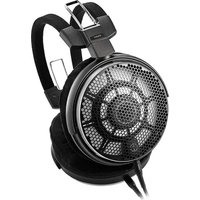
ATH-ADX7000 - Earphones Audio-Technica - Free user manual and instructions
Find the device manual for free ATH-ADX7000 Audio-Technica in PDF.


| Product Type | Open-back dynamic headphone |
| Transducer Type | Dynamic |
| Transducer Diameter | 58 mm |
| Sensitivity | 100 dB/mW |
| Frequency Response | 5 to 50 000 Hz |
| Impedance | 490 ohms |
| Input Connector | A2DC connector |
| Weight (without cable) | Approximately 275 g (velour earpads) / 270 g (alcantara earpads) |
| Supplied Accessories | Cable (3,0 m, gold-plated stereo jack 6,3 mm), balanced cable (3,0 m, XLR-M 4-pin), earpads (HP-ADX5000), hard carrying case, cable pouch |
| Detachable cable | Yes, replaceable |
| Power supply | Passive (no battery) |
| Maintenance | Clean with a dry cloth; do not use alcohol or solvent; wipe dirty plugs |
| Safety instructions | Do not use in hazardous environments; lower volume before connection; avoid excessive volume to protect hearing |
| Spare parts and repairability | Replaceable earpads (HP-ADX7000, HP-ADX5000); contact Audio-Technica dealer |
| General information | Brand: Audio-Technica; Model: ATH-ADX7000; Made in Japan (subject to change) |
Frequently Asked Questions - ATH-ADX7000 Audio-Technica
User questions about ATH-ADX7000 Audio-Technica
0 question about this device. Answer the ones you know or ask your own.
Ask a new question about this device
Download the instructions for your Earphones in PDF format for free! Find your manual ATH-ADX7000 - Audio-Technica and take your electronic device back in hand. On this page are published all the documents necessary for the use of your device. ATH-ADX7000 by Audio-Technica.
USER MANUAL ATH-ADX7000 Audio-Technica
natural_image
Simple geometric diagram of a triangle inscribed in a circle (no text or symbols)audio-technica
ATH-ADX7000
User Manual
Air Dynamic Headphones
natural_image
Line drawing of a pair of outdoor headphones (no text or symbols)取扱説明書
User Manual
Thank you for purchasing this Audio-Technica product.
Before using the product, read through this user manual to ensure that you will use the product correctly. Please keep this manual for future reference.
Safety precautions
Although this product was designed to be used safely, failing to use it correctly may result in an accident. To ensure safety, observe all warnings and cautions while using the product.
- Follow applicable laws regarding headphone use if using the product while driving.
- Do not use the product in places where the inability to hear ambient sound presents a serious risk (such as at railroad crossings, train stations, and construction sites).
- To prevent damage to your hearing, do not raise the volume too high. Listening to loud sound for an extended period may cause temporary or permanent hearing loss.
- Discontinue use if skin irritation results from direct contact with the product.
- Do not disassemble, modify or attempt to repair the product.
- Be careful to avoid pinching yourself between the housing and the arm of product.
Caution
- To ensure compatibility and correct usage, always consult the user manual of any device before connecting the product to it.
- Audio-Technica will not be liable in any way for any loss of data in the unlikely event that such losses should occur while using the product.
- The product is designed to easily dissipate noise to the outside. On public transport systems or in other public places, keep the volume low so as not to disturb other people.
- Minimize the volume on your audio device before connecting the product in order to avoid hearing damage from sudden exposure to excessive volume.
- When using the product in a dry environment, you may feel a tingling sensation in your ears. This is caused by static electricity accumulated on your body, not by product malfunction.
- Because of its metal components, this product may become cold.
- Do not subject the product to strong impact to avoid electric shock, malfunction or fire.
- Do not store the product under direct sunlight, near heating devices or in a hot, humid or dusty place. Do not allow the headphones to get wet.
• Over a long period of use, the product may become discolored due to ultraviolet light (especially direct sunlight) or wear.
- Do not expose the product to excessive stress or pressure, which could result in damage or deformation.
- Make sure to connect/disconnect the included cable by holding the plug. Pulling directly on the included cable can result in a broken wire and the risk of electric shock.
- The cable may become caught or severed if the product is placed in a bag without adequate protection.
- Do not wrap the included cable around a rack, furniture or other object. Do not allow the cable to be pinched. This may damage or sever the cable.
- Use only the included cable. Using a different cable may result in product malfunction.
- Lengthening the headphone cable requires a separate extension cable available from your dealer.
- Use this high-performance product with premium audio equipment to enjoy higher sound quality.
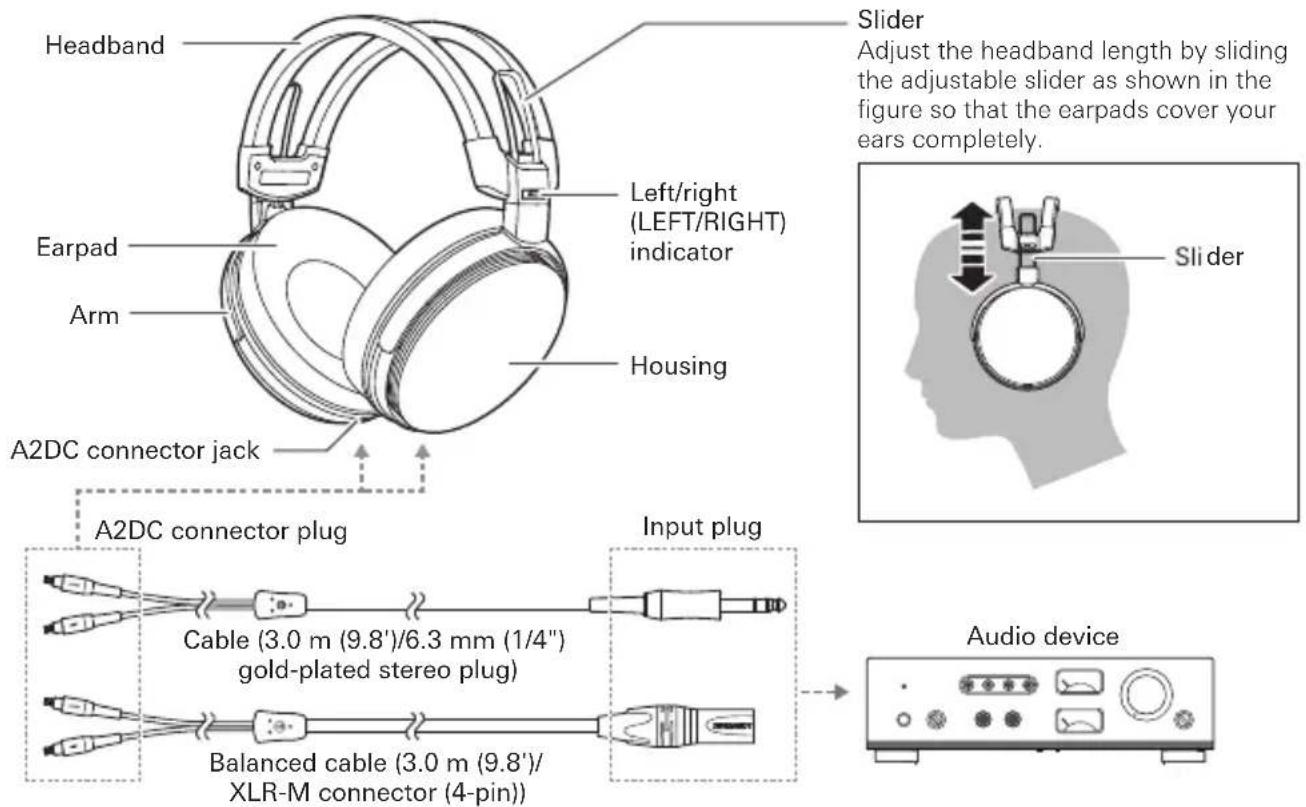
Part names
Become familiar with each part before using the product.
How to use
1 Connect the connector plug of the included cable to the connector jack of the headphones.
- Refer to "About the detachable cable" for detailed information.
- Use only the included detachable cable in order to prevent malfunction.
2 Minimize the volume of each audio device, then connect the product's input plug to the device's headphone jack.
3 Fit the earpads over your ears with the side marked "LEFT" over your left ear and the side marked "RIGHT" over your right ear.
4 Turn on your audio device, and adjust volume as necessary.
- Also read the user manual for the audio device.
About the detachable cable
The cable on this product is detachable. If there are signs of deterioration, replace the cable.

- Do not detach the cable except when replacing it with a new cable.
How to replace the detachable cable
The detachable connector is very delicate. Only pull or attach in a straight motion to prevent malfunction.
• How to detach the cable:
Hold the connector and pull straight out in the direction shown by the arrow.
• How to attach the cable:
Plug the left (LEFT) connector or right (RIGHT) connector of the cable in as shown in the figure until it clicks.
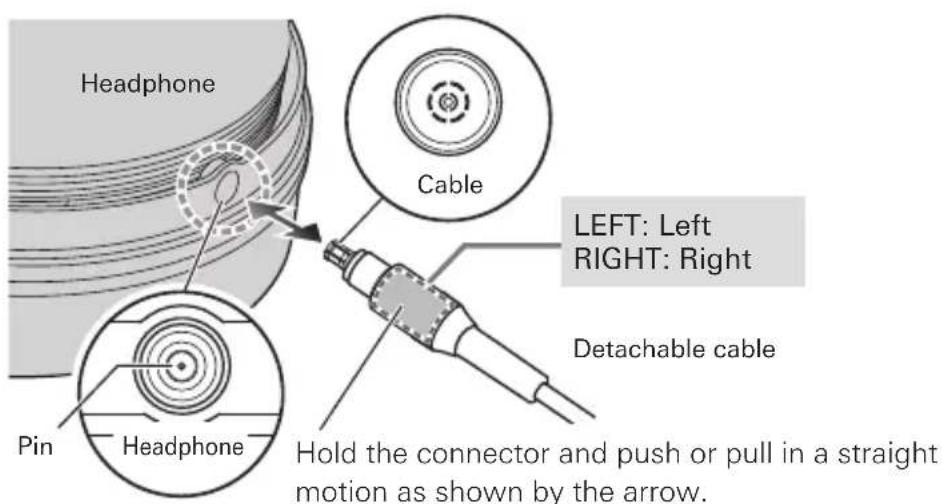

• Take care not to damage the pin in the headphone.
Care
Get into the habit of regularly cleaning the product to ensure that it will last for a long time. Do not use alcohol, paint thinners or other solvents for cleaning purposes.
- Use a dry cloth to clean the headphones.
- Use a dry cloth to clean the detachable cable of any sweat or dirt. Failure to clean the cable may cause it to deteriorate and harden over time, resulting in malfunction.
- Wipe the plugs on included detachable cable with a dry cloth if dirty. Using the plugs without cleaning them can cause sound interruption or distortion.
- To clean the earpads and headband, wipe with a dry cloth. Earpads and headband may fade if sweat or water dries on them. If the earpads and headband get wet, we recommend wiping them with a dry cloth and allowing them to dry in the shade.

- For long-time storage, put the product in the included hard shell carry case and keep it in a well-ventilated place free from high temperatures and humidity.
- Earpads will deteriorate over time. Replace when necessary. For information about replacing earpads or other parts, or for information about other serviceable parts, contact your local Audio-Technica dealer.
Specifications
| Type | Open air dynamic |
| Driver | 58 mm |
| Sensitivity | 100 dB/mW |
| Frequency response | 5 to 50,000Hz |
| Impedance | 490 ohms |
| Input jack | A2DC connector jack |
| Weight (without cable) | Approx. 275 g (9.7 oz) (HP-ADX7000: Velvet earpads) Approx. 270 g (9.5 oz) (HP-ADX5000: Alcantara earpads) |
| Included accessories | Cable (3.0 m (9.8')/6.3 mm (1/4") gold-plated stereo plug)Balanced cable (3.0 m (9.8')/XLR-M connector (4-pin))Earpads (HP-ADX5000)Hard shell carry caseCable pouch |
| Sold separately | Cable, Balanced cable, Earpads (HP-ADX7000, HP-ADX5000) |
For product improvement, the product is subject to modification without notice.
Introduction
©2025 Audio-Technica Corporation
Global Support Contact / Contact de support global:
www.at-globalsupport.com
中国大陆客户联系资料
制造商:铁三角有限公司
natural_image
Simple geometric diagram of a triangle inscribed in a circle (no text or symbols)audio-technica
Brand : Audio-Technica
Model : ATH-ADX7000
Category : Earphones