EcoTrek M300 - Robot vacuum Juskys - Free user manual and instructions
Find the device manual for free EcoTrek M300 Juskys in PDF.


User questions about EcoTrek M300 Juskys
0 question about this device. Answer the ones you know or ask your own.
Ask a new question about this device
Download the instructions for your Robot vacuum in PDF format for free! Find your manual EcoTrek M300 - Juskys and take your electronic device back in hand. On this page are published all the documents necessary for the use of your device. EcoTrek M300 by Juskys.
USER MANUAL EcoTrek M300 Juskys
natural_image
Line drawing of a vacuum cleaner with a circular base and top unit (no text or symbols)Robot vacuum cleaner EcoTrek M300
DE Gebrauchs- und Montageanleitung EN Operating and assembly instructions FR Instructions d'utilisation et de montage IT Istruzioni per l'uso e il montaggio ES Instrucciones de montaje y de uso
Ar 301
Thank you for your trust. We are glad that you have chosen our product and wish you much pleasure with it.
FRANÇAIS Bienvenue à Juskys Gruppe GmbH
text_image
QR code image containing encoded data, no visible human-readable texthttps://juskys.de/products/saugroboter-eco-trek-m300-zubehoerset
text_image
Technical diagram of a circular device with labeled components: power switch, house, and housing.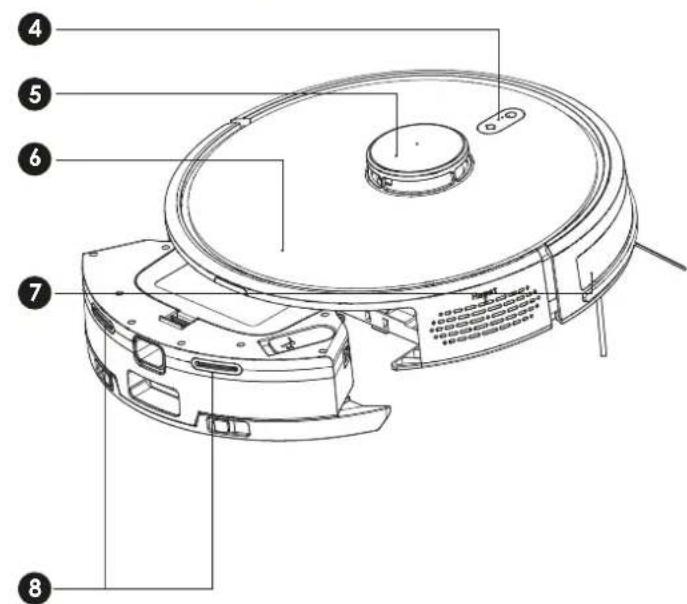
text_image
Technical diagram of a robotic vacuum cleaner with numbered parts for identification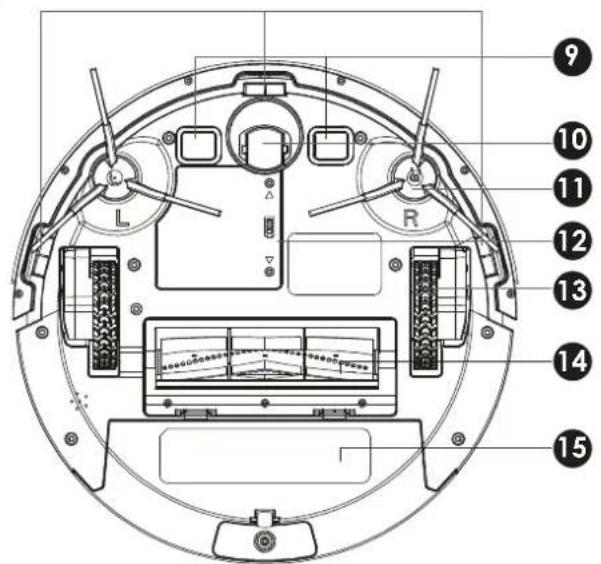
text_image
Technical diagram of a circular device with numbered components and labeled parts, including L, R, and control elements.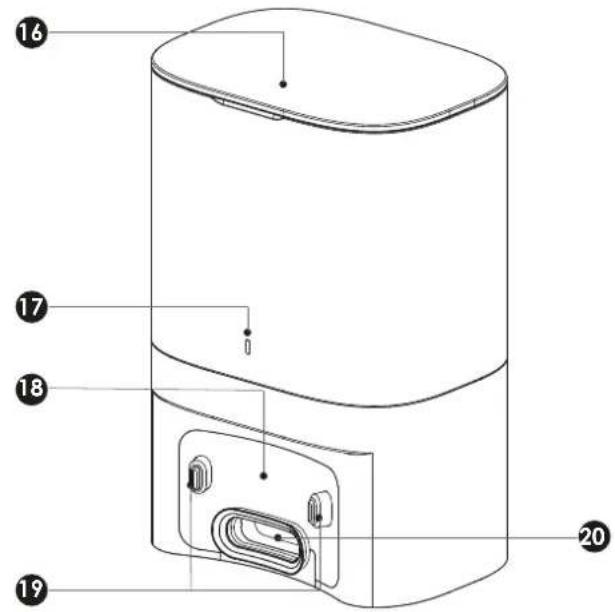
text_image
Technical diagram of a cylindrical device with numbered parts labeled 16, 17, 18, 19, and 20Nr. Beschreibung
text_image
0.5m 1.5m 0.5m1.1 For your safety.... 13
1.2 Use as intended 13
1.3 Improper use 13
1.4 Target group.... 13
1.5 Warning levels 13
1.6 Symbols 14
1.7 Safety instructions 14
2. Description and function ...... 14
2.1 Robot vacuum cleaner and base station 15
3. Unpack and check 16
4. Set up and install 16
4.1 Selecting the installation location 16
5. Initial commissioning....16
6. Use....17
6.1 Automatic cleaning 17
6.2 Setting the suction power 17
6.3 Setting the water level 17
6.4 Time-controlled cleaning 17
6.5 Using the water tank 18
6.6 Switching the hoover on and off 18
7. Troubleshooting 18
8. Store 18
9. Maintenance and schedule.... 19
9.1 Cleaning....19
9.2 Maintenance plan....19
10. Repairing 19
11. Technical data.... 19
12. Disposing 20
12.1 Packaging 20
12.2 Electronics.... 20
12.3 Batteries 20
13. Parts list 48
14. Connect app.... 49
15. Maintenance .... 51
16. Declaration of Conformity 54
1. For your safety
1.1 For your safety
▶Read this document carefully and completely
▶ Follow the instructions and safety information in this document and on the product.
▶ Only use the product in perfect technical condition and in a safety-conscious and risk-aware manner.
▶ Keep this document for future reference and forwarding, as well as available near the product.
1.2 Use as intended
The product has been developed exclusively for private use.
This product is only suitable for indoor use.
▶ Only use the product as a hoover to remove loose and dry dirt from floor coverings or upholstery in the home or car.
▶ Only use the product in its original condition, with the original parts supplied and/or spare parts approved by the producer.
▶ Only have repairs carried out by qualified personnel.
Any other use is considered improper use and can result in severe personal injury and damage to property.
We accept no liability for non-compliance with instructions, safety instructions and improper use or any resulting damage to persons or property.
1.3 Improper use
The product is not suitable for commercial purposes.
The product is not a toy.
▶ Do not use the product in damp rooms such as bathrooms or saunas.
▶ Do not alter or modify the product.
▶ Do not use the product with defective parts.
▶ Never drop the hoover.
▶Keep small children and animals away from the product.
▶Do not operate the product with wet hands.
▶ Never use the hoover for the following:
- Harmful, sharp-edged, pointed, hot or glowing materials and substances
- damp or liquid substances
- ash, soot from ovens and heating systems
- Toner dust from printers and photocopiers
- Highly flammable or explosive substances and gases
1.4 Target group
Users are adults and children over 8 years under adult supervision, who have read and understood these instructions and the markings on the product or have received comparable instruction with regard to use and safety instructions.
Only they are allowed to use the product.
Persons with physical or mental disabilities/children/pregnant women may only use the product under the supervision of an adult.
Assembly work, maintenance work and cleaning may not be carried out by the aforementioned persons.
Users may only use the product when they are in full physical, mental and sensoric abilities, i.e. when they are awake and sober.
Skilled personnel are people who have received specialist mechanical training, such as trained craftsmen, metalworkers etc.
1.5 Warning levels

DANGER
Warning of dangers that will lead directly to death or serious injuries if the measures are ignored.

WARNING
Warning of dangers that can result in death or serious injury if the measures are ignored.

CAUTION
Warning of dangers that can lead to injuries if the measures are ignored.
NOTICE
Warning of dangers that can lead to material damage if the measures are ignored.
1.6 Symbols
Symbol Description
 | This symbol indicates that the user should have read and understood the instructions before use. |
| CE | Products marked with the CE mark meet the fundamental applicable regulations of the European Union. |
 | Indoor use only means that the product can only be used indoors dry in-door use. |
 | The crossed-out waste bin with a bar indicates waste electrical and electronic equipment that must not be disposed of with household waste.. |
 | The crossed-out garbage can without a bar indicates old batteries or accumulators that must not be disposed of with household waste. |
 | Protection class II devices have reinforced or double insulation. Even if devices have electrically conductive housing parts, these are protected against contact with live parts. |
 | The international recycling symbol indicates recyclable material. |
1.7 Safety instructions
| WARNING | |
| [R/A7D5] | Risk of strangulation due to charging cable. ▶Lay the base station cables safely. ▶Keep small parts out of the reach of children. |
| CAUTION | |
 | Injuries and property damage.Modification of the product may result in personal injury and property damage and will void the warranty. ▶Only use the product with the original po supplied and in the original condition. ▶Only use spare parts approved by the manufacturer. ▶Do not vacuum people or animals with the hoover. ▶Do not block the ventilation openings ▶Protect the product from direct sun-light, excessive external dust and mo-isture. |
| CAUTION | |
| Battery/rechargeable battery hazard!The rechargeable batteries included can-not be removed.Only replace the battery with a bat-ry of the same type.Leave leaking, deformed or corroded cells in the product.Dispose of them together with the pro-duct using suitable protective devices. | |
2. Description and function
The EcoTrek M300 is a powerful, battery-powered robot hoover with mopping function, ideal for cleaning homes. With its practical base station and mobile app, you can have your home cleaned efficiently via a timer, even when you are not there.
It recognises obstacles and steps and sweeps dirt into the suction channel via the two outer brushes, which can be set to different suction strengths. The modern LDS navigation allows precise mapping and room orientation.
Also check out our accessory kit. Scan the QR code or visit the following website:
text_image
QR code image containing encoded data, no visible human-readable texthttps://juskys.de/products/saugroboter-eco-trek-m300-zubehoerset
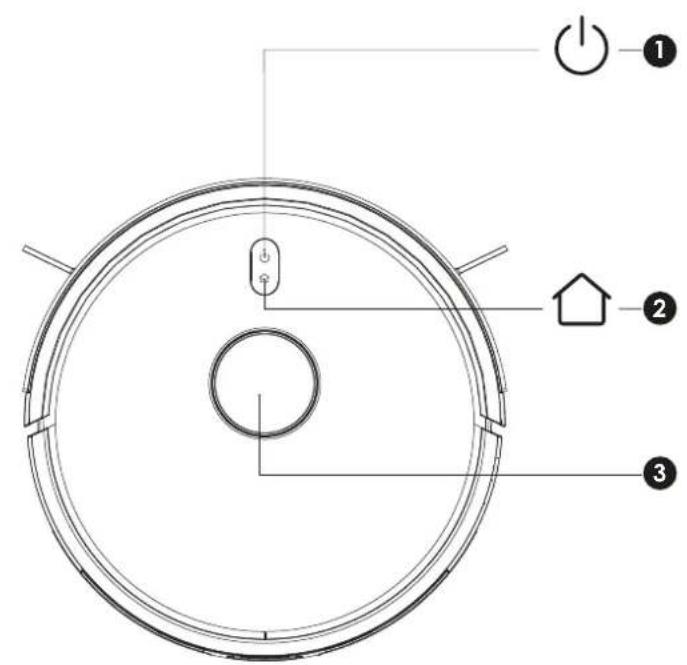
2.1 Robot vacuum cleaner and base station
text_image
Technical diagram of a circular device with labeled components: power switch, house, and housing.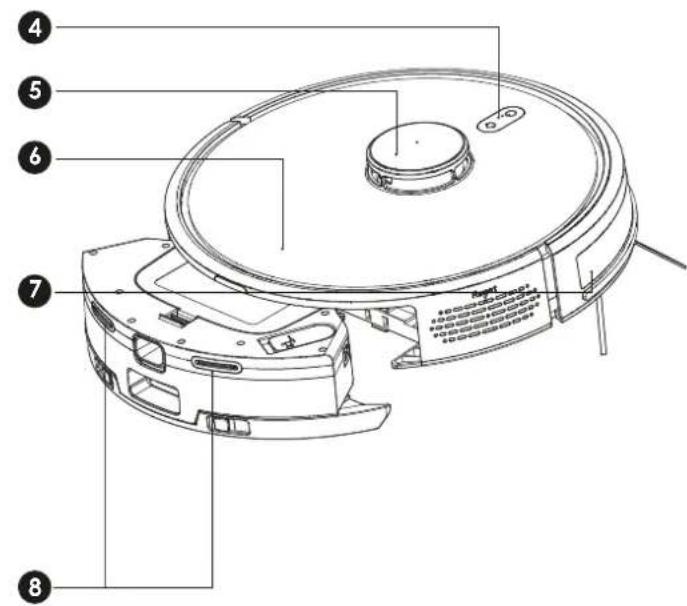
text_image
Technical diagram of a robotic vacuum cleaner with numbered parts for identification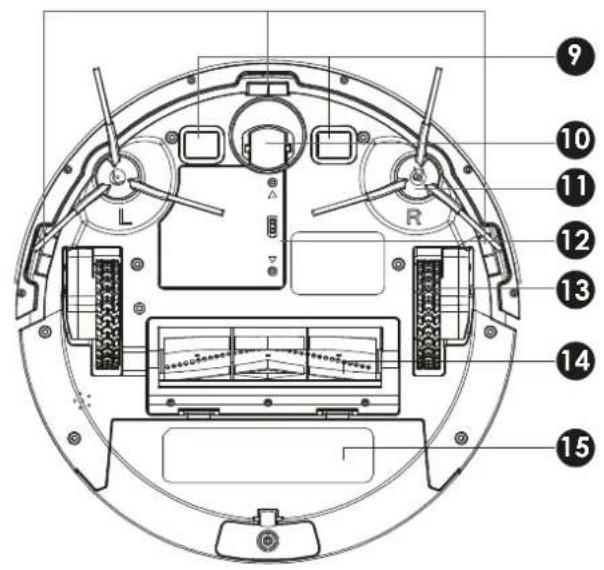
text_image
Technical diagram of a circular device with numbered components and labeled parts, including L, R, and measurement indicators.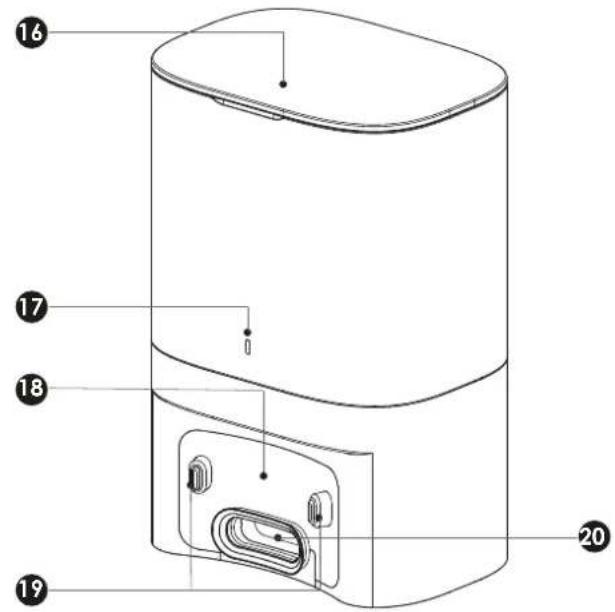
text_image
Technical diagram of a device with numbered parts labeled 16, 17, 18, 19, and 20 pointing to internal components.No. Description
1 On/off switch / Cleaning / Pause / Restart
short press:
starts cleaning / Pause
long press:
switches the suction unit on or off
2 Recharge / Pause / Back to charging
3 LDS laser head impact sensor
Laser distance sensor
4 Indicator light
Blue: Normal operation
Red: Faulty operation / low battery
Blue flashing: Device is charging
5 LDS cover
6 Housing
7 Bumper
8 Charging contacts
9 Ground contact sensors
10 Universal wheel
11 Side brushes L/R
12 Battery cover
13 Drive wheel
14 Main brush
15 Dust container with water tank
16 Cover flap
17 Indicator light
White: Normal operation, fully charged
Red: Faulty operation
18 Suction opening
19 Charging contacts
20 Suction connection channel

3. Unpack and check
text_image
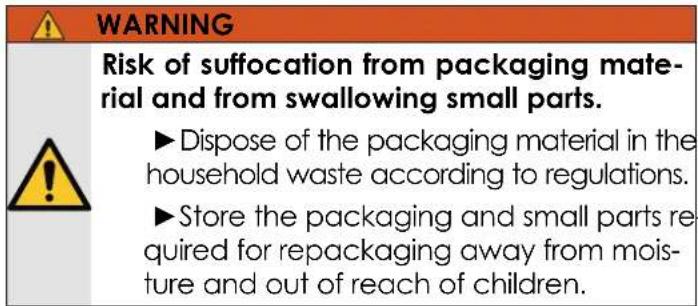
WARNING Risk of suffocation from packaging material and from swallowing small parts. ►Dispose of the packaging material in the household waste according to regulations. ►Store the packaging and small parts required for repackaging away from moisture and out of reach of children.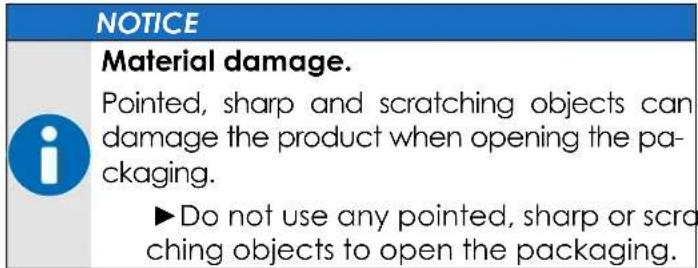
text_image
NOTICE Material damage. Pointed, sharp and scratching objects can damage the product when opening the pa- ckaging. ►Do not use any pointed, sharp or scra ching objects to open the packaging.- Pull off tape and tie-down straps by hand or use scissors.
- Set the box up with the directional arrows pointing up.
- Open the packing carton.
- Remove all parts from the box.
- Lay the pieces side by side on a clear, soft, and level surface.
- Check the scope of delivery for completeness and intactness, see chapter „13. Parts list“ on page 48.
4. Set up and install
4.1 Selecting the installation location
▶Select a suitable installation location that meets the following requirements:
- The installation location is dry and can be ventilated regularly.
- The installation site is not permanently exposed to the sun and strong temperature fluctuations.
- The installation location must ensure a good and stable WLAN connection.
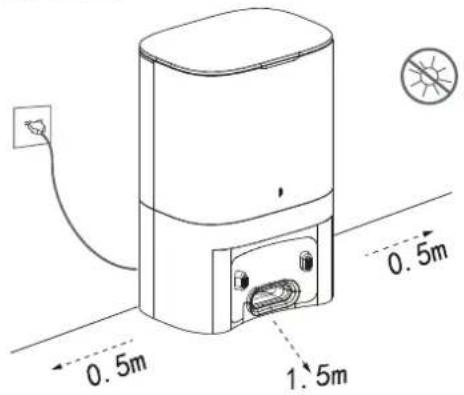
▶ Place the base station on the wall and ensure that there are no obstacles within a radius of 0.5 metres on either side and 1.5 metres in front of the station.
text_image
0.5m 0.5m 1.5m5. Initial commissioning
text_image
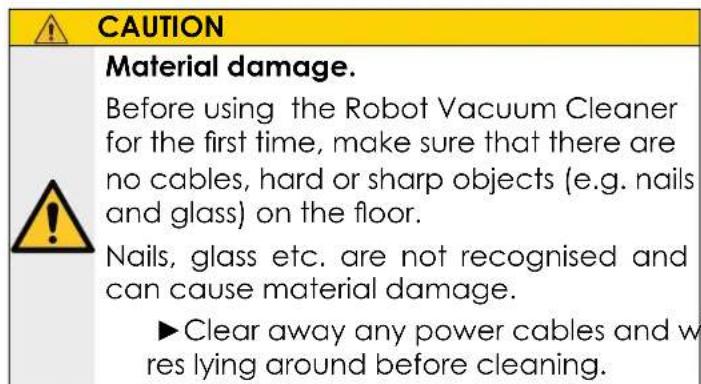
CAUTION Material damage. Before using the Robot Vacuum Cleaner for the first time, make sure that there are no cables, hard or sharp objects (e.g. nails and glass) on the floor. Nails, glass etc. are not recognised and can cause material damage. ►Clear away any power cables and w res lying around before cleaning.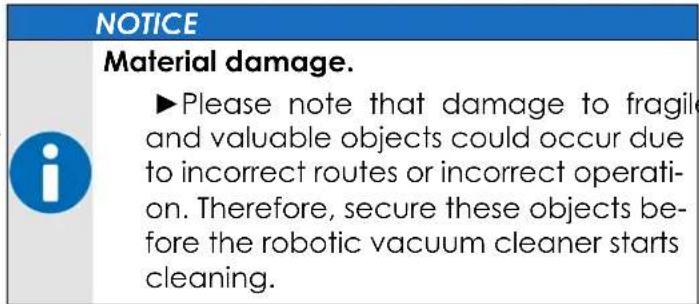
text_image
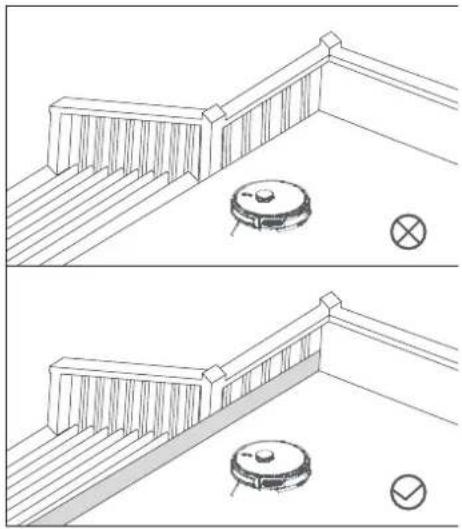
NOTICE Material damage. ►Please note that damage to fragile and valuable objects could occur due to incorrect routes or incorrect operation. Therefore, secure these objects before the robotic vacuum cleaner starts cleaning.Note: You can define critical areas (stair edges, etc.) that should not be travelled over later in the app as a restricted area. The robot hoover will then avoid these areas.
natural_image
Two technical line drawings of a balcony with a vacuum cleaner and a circular device, no text or symbols present.Connecting
- Check whether the grid connection data of the product matches that of the utility grid.
- Insert the plug into a free and accessible socket.
- If necessary, tie up the remaining cable so that it does not interfere with the cleaning process.
Mounting
- Fit the side brushes L and R. Observe the R/L markings on the device and insert the side brush L / R from above onto the holder accordingly. The side brushes click into place.
- Insert a dust bag into the base station.
Charging
- Before using the Robot Vacuum Cleaner for the first time, place it in the base station and allow it to charge fully. You can set up the WLAN during this time.
Switching on and off
- Press and hold the button (1) to switch on the Robot Vacuum Cleaner. Wait until the indicator lamp lights up constantly
Note: The Robot Vacuum Cleaner cannot be started if the battery capacity is insufficient. Place the Robot Vacuum Cleaner on the base station and fully charge the Robot Vacuum Cleaner.
Connecting with the Tuya app
- Download the TUYA app to one of your mobile devices to control and set up the robot.
- Download the appropriate language pack in the app to allow the robot to communicate in the desired language. Connect the Robot Vacuum Cleaner to the mobile app, see chapter "14. Connect app" on page 49.
Note: During initial operation, it is advisable to accompany the robot hoover throughout the entire process in order to rectify possible problems or prevent possible damage to property.
Controlling the robot
- Press the button (1) to start the cleaning process or control the cleaning via the mobile app.
The robot starts cleaning and creates a map of the home or room. This is saved in the app and can be edited and named there.
Automatic mode: After cleaning, the robot vacuum automatically returns to the base station to recharge and blow the dirt into the large dust bag.
Manual mode: When paused, press the buttons (1) or the corresponding button in the mobile app.
Note: If the robot hoover cannot find the base station, it automatically returns to the starting position or calls for help.
▶To recharge the Robot Vacuum Cleaner, place it back in the base station manually.
This process is also necessary if you are cleaning other floors of the home.
▶To do this, place the robot in a free space in the new room or on the new floor. It will then create an additional new map.
▶ After cleaning, place it back in the charging station.
6. Use

CAUTION
Risk of injury due to improper use.
▶ Use the product in accordance with its intended use, see chapter „1.2 Use as intended“ on page 13.
▶ Fully charge the hoover battery once every 6 to 12 weeks to avoid deep discharge and thus the destruction of the battery pack.


CAUTION

Risk of injury due to negative pressure!
▶ Do not allow children to play with the appliance.

CAUTION

Risk of mould growth when vacuuming up damp or wet dirt.
▶ Empty the dust container regularly
▶The robot hoover is not suitable for long-pile carpets and corners. These must still be cleaned by the user with another hoover, just like very inaccessible areas.
▶If the robot hoover is also supposed to clean carpets, the mopping attachment will hinder movement, which can lead to errors. To do this, remove the mopping attachment and set Cleaning without mopping.
▶ If the battery is below 15%, the cleaning process cannot be carried out.
▶ If the battery is below 15% during the cleaning process, the appliance automatically returns to the base station dust collector to recharge.
If cleaning has not yet been completed, cleaning will continue once it has been fully charged.
6.1 Automatic cleaning
After switching on, the appliance first plans the cleaning path in order to clean the entire surface properly and efficiently. After cleaning, the appliance automatically returns to the base station to recharge (standard cleaning mode of the appliance).
6.2 Setting the suction power
You can choose between Quiet, Standard, Powerful and MAX via the mobile app.
6.3 Setting the water level
You can choose between high, medium and low gear (the default mode is medium gear).
6.4 Time-controlled cleaning
You can set the planned cleaning time via the mobile phone app using „Create scene“.
The robot hoover starts cleaning automatically at the specified time
6.5 Using the water tank
Note: Empty the water tank at the end of the day and rinse the water tank and the mop with clean water. Then allow the water tank and mop to air dry.
The robot hoover can also clean the floor covering with water by installing the water tank and a mop, see chapter „15. Maintenance“ on page 51.
6.6 Switching the hoover on and off
▶Press and hold the button (1) to switch on the Robot Vacuum Cleaner. Wait until the indicator lamp lights up constantly.
▶Press and hold the button (1) again to switch off the Robot Vacuum Cleaner. Wait until the indicator light goes out.
Emptying the dust container and dust bag
The robot's dust container is automatically emptied into the base station after each cleaning.
▶ Empty the dust bag in the base station as soon as it is full of dirt, see chapter „15. Maintenance“ on page 51.
7. Troubleshooting
The robot vacuum cleaner freezes / cannot be switched on
If the battery is low, place the appliance correctly in the base station and check that the charging contacts are connected to the base station.
If the ambient temperature is below 0 °C , use the robot vacuum cleaner in an environment between 0 °C and 40 °C .
Check that the power plug of the base station is connected correctly and that the power supply to the socket is normal.
Robot vacuum cleaner does not charge
Poor contact, remove dirt and dust from the charging contacts of the robot vacuum cleaner and the base station.
Switch off the appliance and restart it.
Abnormal behaviour
Foreign objects may have become trapped in the main brush, the side brushes or on the wheels.
Switch off the robot vacuum cleaner and clean the main brush, the side brushes and the wheels of the robot vacuum cleaner, then switch the robot vacuum cleaner back on.
Unusual noises/dust accumulation during cleaning
The dust container is full, please clean the dust
container.
The cleaning performance is reduced or ash is falling down
The filter screen is clogged, clean or replace it.
The main brush has become entangled with foreign objects, please clean the main brush.
No connection to WIFI possible
The WIFI signal is not good, make sure that the device has good WIFI reception in the region (2.4G band, SG is not supported).
Switch off the 5G band of the WIFI network on the router.
Please reset the WIFI and download the latest mobile APP to try to connect again.
Check if you have entered the wrong password.
Scheduled cleaning is not carried out
If the battery capacity is insufficient, the cleaning schedule will not start until the remaining battery capacity is greater than 15%.
8. Store
NOTICE
Damage to the product due to incorrect storage.
The hoover can remain switched on in the base station when not in use.
To switch it off, remove it from the charging contacts of the base station. This saves energy but causes the appliance to go offline. Spontaneous cleaning via the app is then not possible without manual intervention.
▶ Store the product in a dark, cool, dry and well-ventilated place.
▶ Protect the product from dust and moisture.
9. Maintenance and schedule
9.1 Cleaning

CAUTION
Risk of short circuit

▶ Use a dry or slightly damp cloth for cleaning.
▶ Do not rinse the appliance with water.
▶ Do not wipe the electrical contacts.
NOTICE
Damage caused by incorrect cleaning agents.

▶Check the compatibility of the cleaning agent with the surface on an inconspicuous area.
▶ Do not use any organic solvents, boiling water, strong acids or alkaline cleaning agents for cleaning.
▶ Never wash the filter unit in the washing machine or dishwasher!
▶ Do not use a hairdryer or similar hot air appliances for drying.
▶ Only operate the hoover when it is completely dry and correctly installed.
9.2 Maintenance plan
Before each use
Condition
▶ Visually check the overall condition of the product for damage.
▶ Check the hoover for dirt and damage.
▶ Remove accumulated dust from the hoover.
▶ Check the power supply unit for damage.
▶ Remove accumulated dust from the hoover, the sensors and the base station, see chapter
„15. Maintenance“ on page 51.
▶ Check the power supply unit for damage.
▶ Empty the dust bag.
▶ Clean the filter, see chapter „15. Maintenance“ on page 51.
▶ Clean the main and side brushes, see chapter „15. Maintenance“ on page 51.
Attachment parts
▶ Check whether attachment parts have become loose or distorted.
if required
▶Replace the full dust bag, see chapter, see chapter „15. Maintenance“ on page 51.
every 6 months
▶Replace the filter.
▶ Fully recharge the battery in the base station if it will not be used for a longer period of time
10. Repairing
NOTICE
Damage due to improper repair

▶ Only use spare parts approved by the manufacturer or original ones.
▶ Only have repairs carried out by qualified personnel.
11. Technical data
Description Value
| Item number: 300409 | |
| Materials robot / base station: | tempered glass, ABS |
| Materials Power supply/electronics: | Copper, steel, PVC |
| Rechargeable battery: | Lithium-ion |
| Robot vacuum cleaner capacity: | 0,3 l |
| Dust bag capacity: | 3 l |
| Water tank capacity: | 0,2 l |
| Suction power: | max. 3000 Pa |
| Working speed: | 0.3 m/s |
| Volume in vacuum mode: | ≤ 65 dB |
| Volume emptying in the base station: | ≤ 85 dB |
| Obstacle height: | max 18 mm |
| Power supply: | 100-240 V~, 50/60 Hz, 0.5 A |
| Output voltage to robot: | 19 V~, 0.6 A |
| Power: | 45 W |
| Charging power: | 14 W |
| Charging time: | 5 - 6 h |
| Working time: | 100 - 120 minutes |
| Power cord length: | 1,3 m |
| Robot dimensions: | ∅330 x 75 mm |
| Radio/WLAN data: | 2.4 GHz only (2412 ~ 2472 MHz) * 5G networks must be deactivated on the router. |
| WLAN standards: | 802.11b/g/n (HT20) 13 CH |
| Antenna gain: | 3.84 dBi |
| Drop sensor: | 3x mechanical |
| Obstacle sensor: | 2x mechanical, 1xLDS |
| Weight: | 2.7 kg |
Battery
| Type: | 18650 |
| Technology: | Li-ion |
| Voltage: | 14,4 V= |
| Capacity | 2600 mAh (36 Wh) |
| Weight: | 198.4 g (4 cells) |

12. Disposing
12.1 Packaging
The packaging material is recyclable.
▶ Dispose of the packaging in an environmentally friendly manner and take it to the regional collection of recyclables.
12.2 Electronics
As the owner of an old electrical or electronic device to be disposed of, you are legally obliged to dispose of it separately from unsorted municipal waste due to the European WEEE Directive and the German ElektroG, because improperly disposed of products or their toxic and dangerous components have a lasting effect on the health of people, animals and plants can damage. In doing so, you are making a significant contribution to reuse, recovery and recycling. The manner of shipment or collection are subject to regional and contractual conditions and can be requested from the public waste management authority and the distributor. The latter are in principle obliged to take back old devices free of charge, regardless of whether they were purchased new. Illegal disposal is punishable by law. Before handing it in at a regional disposal point, carry out the following tasks:
WEEE No.: 29073343
This product does not belong in household waste. At the end of its service life, return it free of charge to the manufacturer, the point of sale or to public collection points set up for this purpose. Details on disposal are regulated by the respective national law. Recyclable materials are fed into the recycling cycle in order to obtain new raw materials from them. The following recyclable materials are collected at municipal collection points:
• Used glass, plastics, used metals, sheet metal, etc.
12.3 Batteries
Batteries and accumulators must not be disposed of with household waste. Their components must be recycled or disposed of separately because toxic and dangerous components can cause lasting damage to the environment if disposed of improperly. As a consumer, you are obliged to return them free of charge to the manufacturer, the point of sale or to public collection points set up for this purpose at the end of their lifespan. Details are regulated by the respective state law. The symbol on the product, the operating instructions and/or the packaging indicates these regulations. With this type of material separation, recycling and disposal of used batteries and accumulators, you make an important contribution to protecting our environment.
Batt. Reg. No. DE 70738431
Table des matières
text_image
QR code image containing encoded data, no visible human-readable texthttps://juskys.de/products/saugroboter-eco-trek-m300-zubehoerset

text_image
Technical diagram of a circular device with labeled components: power switch, house, and housing.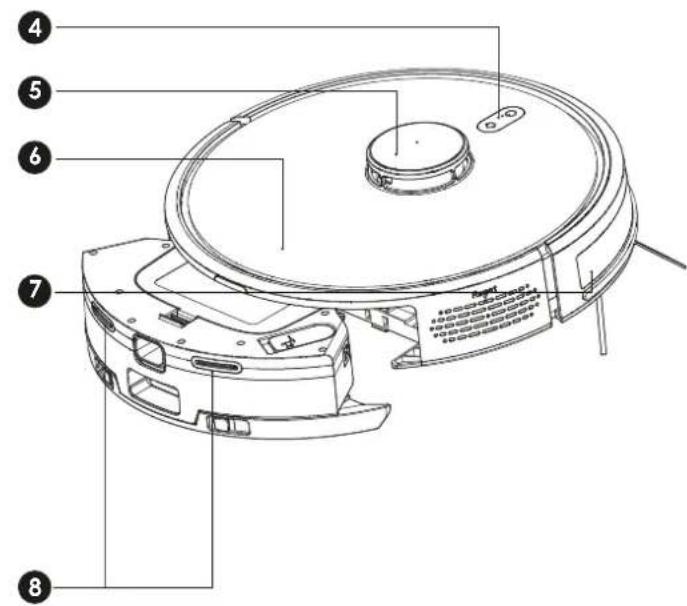
text_image
Technical diagram of a robotic vacuum cleaner with numbered parts for identification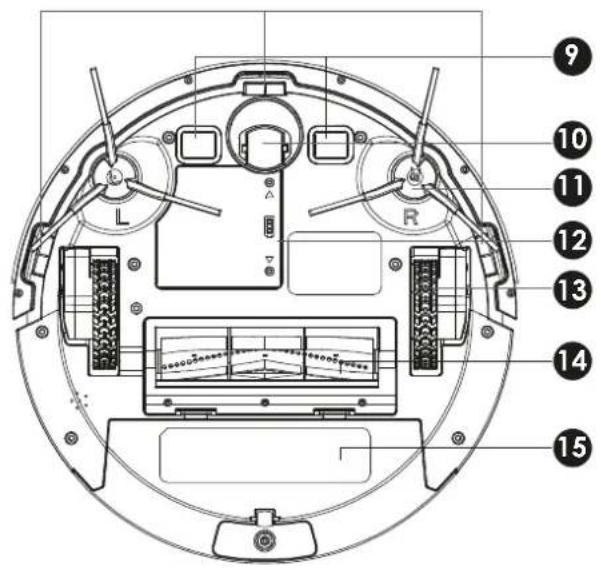
text_image
Technical diagram of a circular device with numbered components and labeled parts, including L, R, and measurement indicators.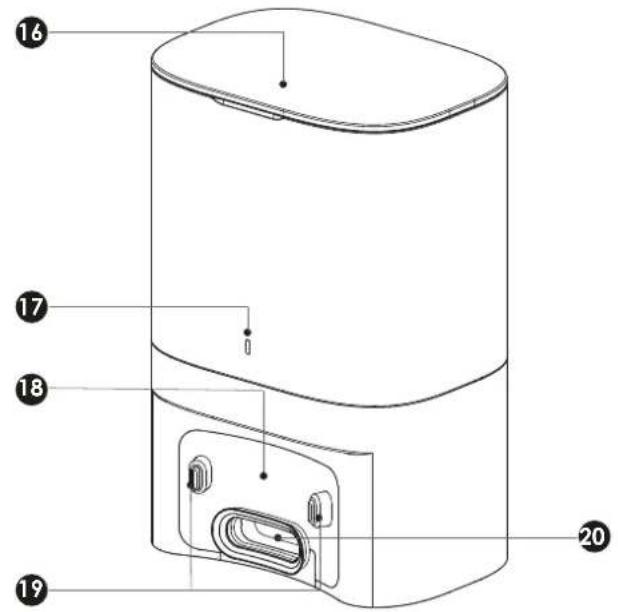
text_image
Technical diagram of a cylindrical device with numbered parts labeled 16, 17, 18, 19, and 20No. Description
text_image
0.5m 1.5mnatural_image
Two technical line drawings of a balcony with a circular object and a vacuum cleaner, no text or symbols present.Connector
text_image
QR code image containing encoded data, no visible human-readable texthttps://juskys.de/products/saugroboter-eco-trek-m300-zubehoerset
text_image
Technical diagram of a circular device with labeled components: power switch, house, and housing.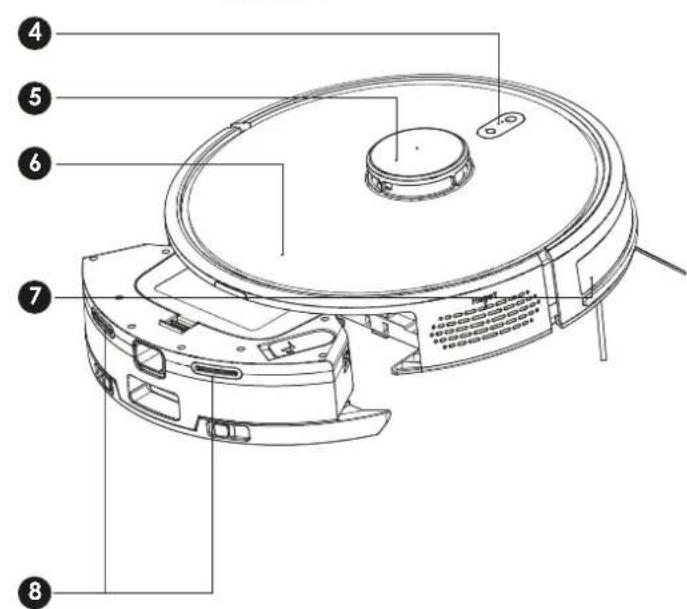
text_image
Technical diagram of a robotic vacuum cleaner with numbered parts for identification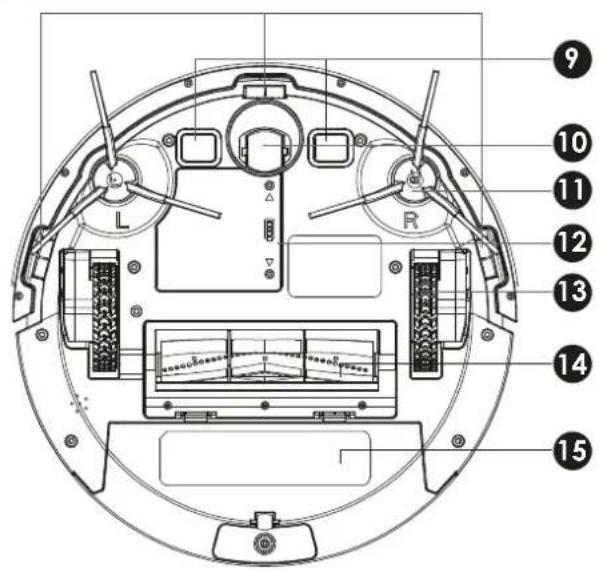
text_image
Technical diagram of a circular device with numbered components and labeled parts, including L, R, and measurement indicators.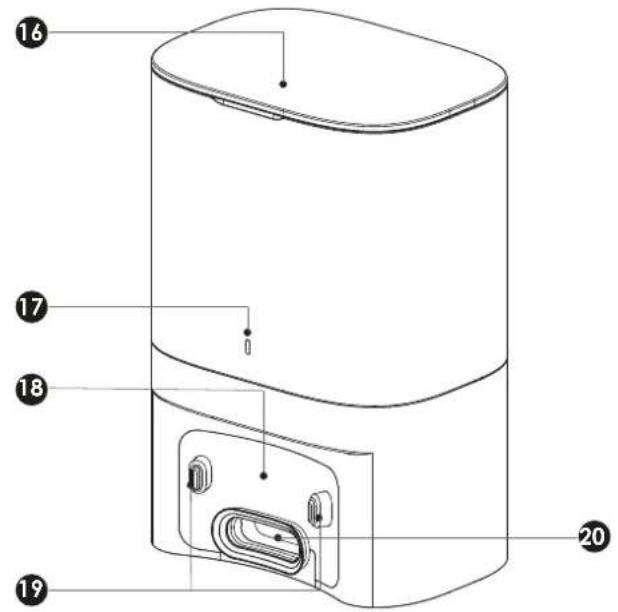
text_image
Technical diagram of a device with numbered parts labeled 16, 17, 18, 19, and 20 pointing to internal components.No. Descrizione
text_image
0.5m 1.5m 0.5mnatural_image
Two technical line drawings of a balcony with a circular object and a cross symbol, no text or labels present.Collegamento
text_image
QR code image containing encoded data, no visible human-readable texthttps://juskys.de/products/saugroboter-eco-trek-m300-zubehoerset

text_image
Technical diagram of a circular device with labeled components: power switch, house, and housing.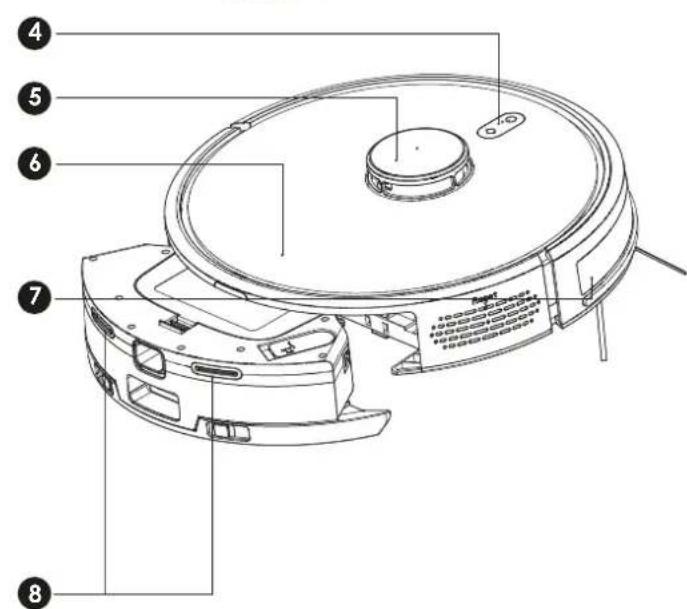
text_image
Technical diagram of a robotic vacuum cleaner with numbered parts for identification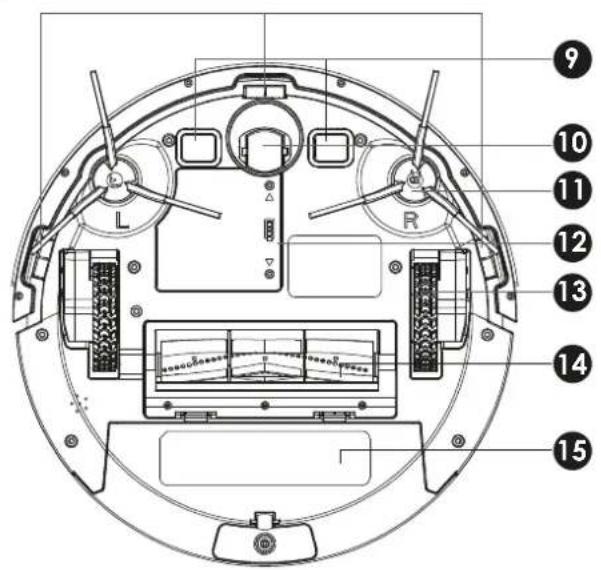
text_image
Technical diagram of a circular device with numbered components and labeled parts, including L, R, and measurement indicators.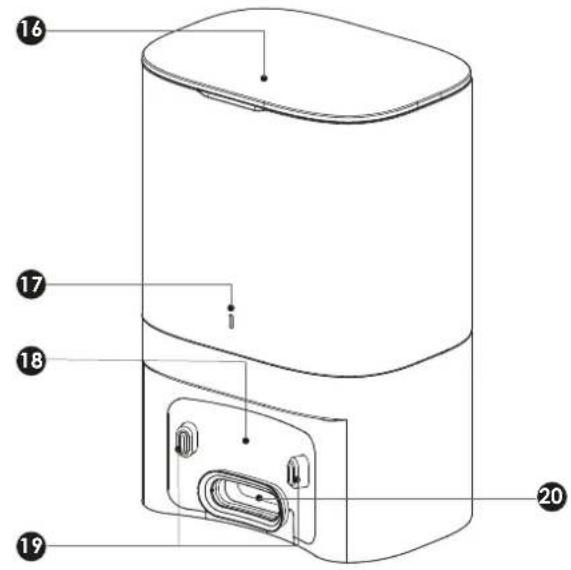
text_image
Technical diagram of a cylindrical device with numbered parts labeled 16, 17, 18, 19, and 20No. Descripción
text_image
0.5m 1.5mES
text_image
0937 M3COL 3 In trout 5% The map is loading, please wait Plan cleaning -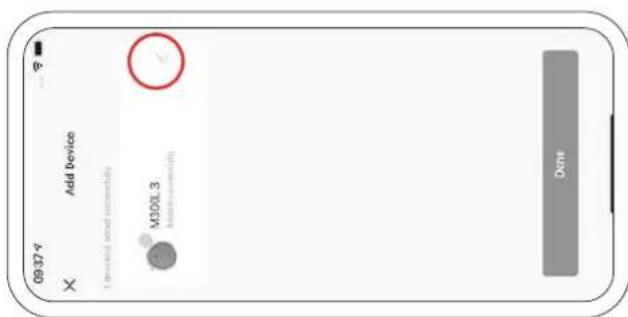
text_image
09:37 Add Device IDevice installed somewhat M300L 3 Intact somewhat Done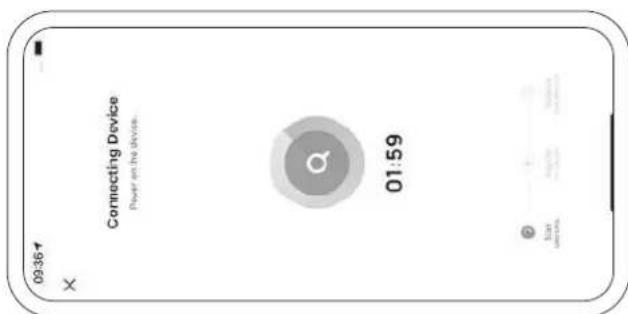
text_image
09:36 Connecting Device Power on the device. 01:59 Star Google Google Facebook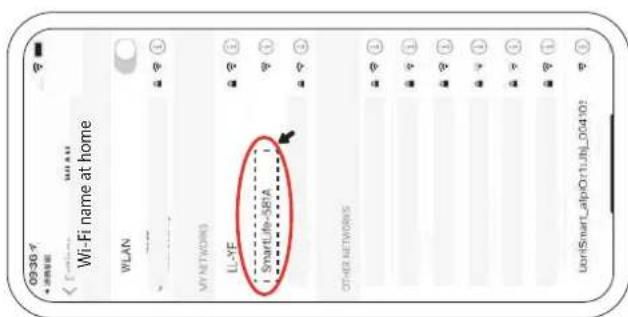
text_image
09:36 Wi-Fi name at home WLAN MY NETWORKS LL-YF SmartLife-581A OTHER NETWORKS UoriSmart_alpiOr1UJN_004101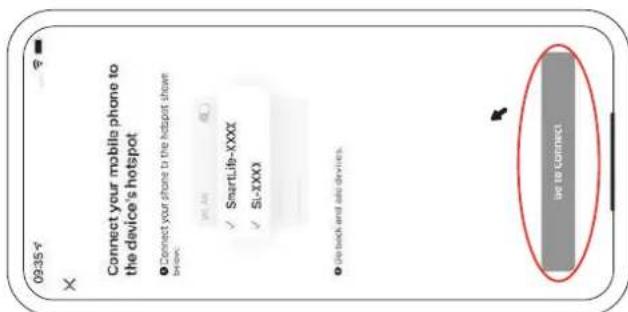
text_image
09:35 Connect your mobile phone to the device's hotspot ● Connect your phone to the hotspot shown below: ✓ SmartLife-XXX ✓ SI-XXX ● Use back and add devices. Go to Connect
DE Der Roboter verbindet sich binnen 2 Minuten mit dem WLAN-Helmnetzwerk und schließt den Vorgang ab, indem die Roboter-LEDs dauerhaft leuchten und ein akustisches Signal die Verbindung bestätigt. Im App-Display erscheint das verbundene Gerät. Sollte die Verbindung fehlschlagen, wiederholen Sie die Kopplung, ggt. unter Nutzung des „AP Modes“, Bestätigen Sie die Verbindung mit „Done”. EN The robot connects to the home Wi-Fi network within 2 minutes and completes the process by the robot LEDs lighting up continuously and an acoustic signal confirming the connection. The connected device appears on the app display. If the connection fails, repeat the pairing process, using the "AP mode" if necessary. Confirm the connection with “Done”. FR Le robot se connecte au réseau WLAN domestique en l'espace de 2 minutes et termine le processus en allumant en permanence les LED du robot et en émettant un signal sonore pour confirmer la connexion. L'appareil connecté apparaît sur l'écran de l'application. Si la connexion échoue, répétez le couplage, le cas échéant en utilisant le "mode AP". Confirmez U-connexion en cliquant sur "Done". IT Il robot si connette alla rete Wi-Fi domestica entro 2 minuti e completa il processo con l'accensione continua del LED del robot e un segnale acustico di conferma della connessione. Il dispositivo connesso appare sul display dell'app. Se la connessione non riesce, ripetere il processo di accoppiamento, se necessario utilizzando la "modalità AP". Confer-Esire la connessione con "Fatto". ES El robot se conecta a la red Wi-Fi doméstica en 2 minutos y completa el proceso mediante el encendido continuo de los LED del robot y una señal acústica que confirma la conexión. El dispositivo conectado aparece en la pantalla de la app. Si la conexión falla, repila el proceso de emparejamiento, utilizando el "modo AP" si es necesario. Confirme la conexión con "Hecho".
DF Wählen Sie in den Wi-Fi Einstellungen den Hotspot "SmartLife-XXXX" aus und verbinden Sie sich mit dem Gerät. Wechseln Sie wieder in die App und drücken Sie "Go to Connect". EN Select the "SmartLife-XXXX" hotspot in the Wi-Fi settings and connect to the device. Switch back to the app and press "Go to Connect". FR Dans les paramètres Wi-Fi, sélectionnez le hotspot "SmartLife-XXXX" et connectez-vous à l'appareil. Revenez à l'application et appuyez sur "Go to Connect". IT Selezionare l'hotspot "SmartLife-XXXX" nelle impostazioni Wi-Fi e collegarsi al dispositivo. Tornare all'app e premere "Vai alla connessione". ES Seleccione el punto de acceso "SmartLife-XXXX" en los ajustes de Wi-Fi y conéclese al dispositivo. Vuelve a la aplicación y pulsa "ir a conexión".
natural_image
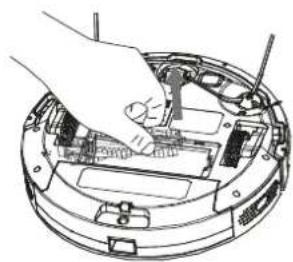
Technical line drawing of a mechanical assembly with hands holding parts (no visible text or symbols)DE Entfernen Sie die Hauptbürste. EN Remove the main brush. FR Retirez la brosse centrale. IT Rimuovere la spazzola principale. ES Retire el cepillo principal.
natural_image
Hand inserting a component into a circular electronic device (no text or symbols visible)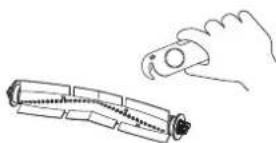
natural_image
Line drawing of a hand holding a cylindrical object next to a segmented cylindrical object (no text or symbols)Seitenbürsten / Side brushes / Brosses latérales / Spazzole laterali / Cepillos laterales
natural_image
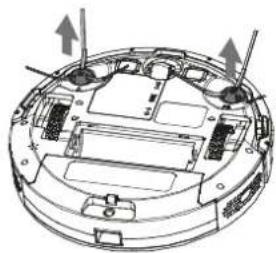
Technical diagram of a circular device with internal components and directional arrows indicating movement (no text or symbols)EN Carefully pull the side brushes upwards from the appliance. Remove dirt and hair. Carefully press the side brushes back onto the holders from above. Observe the side labels on the brushes.
Cleaning the filter and dust container (after each cleaning)
Press the release button on the filter box to remove it.
Open the dust protection flap and empty the dust container.
Remove the filter housing and the dust filter.
Clean the parts under clean water. Note: The hepa filter cannot be cleaned with water.
Allow all parts to dry completely.
Put the filters back into the filter box and the filter box back into the dust container.
text_image
Diagram illustrating a mechanical or fluid system with arrows indicating flow and particles falling into a container labeled '鱼'.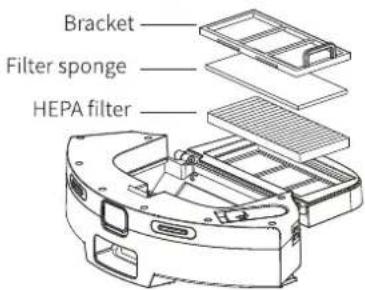
text_image
Bracket Filter sponge HEPA filterWartung / Maintenance / Maintenance / Manutenzione / Mantenimiento
natural_image
Line drawing of hands installing or adjusting a device component (no text or symbols present)DE Wischmop installieren. EN Install mop. FR Installer une serpillière. IT Installare il mop. ES Instalar mopa
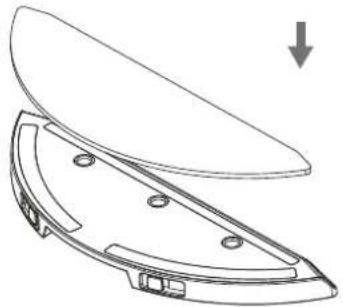
natural_image
Technical line drawing of a mechanical component with a downward arrow indicating force or direction (no text or symbols present)DE Wassertank installieren. EN Installing water tank. FR Installation du réservoir d'eau. IT Installazione del serbatoio dell'acqua. ES Instalar el depósito de agua
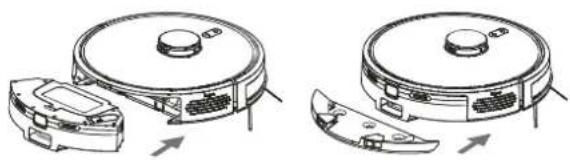
natural_image
Technical line drawings of a robotic vacuum cleaner with open lid and internal components (no text or symbols)DE Mit dem Wischen beginnen. EN Start mopping. FR Commencer à nettoyer. IT Avviare la pulizia. ES Empezar a fregar
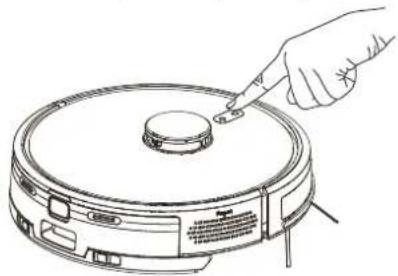
natural_image
Line drawing of a hand inserting a small component into a circular device (no text or symbols)Sensorreinigung / Sensor cleaning / Nettoyage des capteurs / Pulizia del sensore / Limpieza del sensor
DE Reinigen Sie den Lasererkennungssensor. EN Clean the laser detection sensor. FR Nettoyer le capteur de détection laser. IT Pulire il sensore di rilevamento laser. ES Limpiar el sensor de detección láser
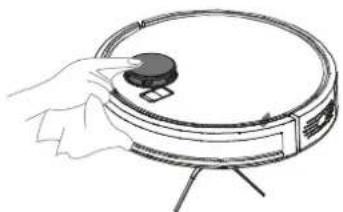
natural_image
Line drawing of a hand placing a circular object on top of a circular device (no text or symbols)DE Klippensensor reinigen. EN Clean cliff sensor. FR Nettoyer le capteur de falaise. IT Pulire il sensore di scogliera. ES Limpiar el sensor de acantilado
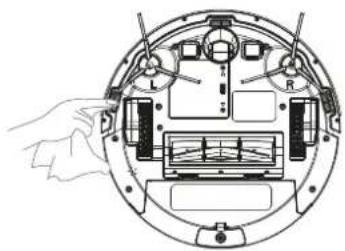
natural_image
Diagram of a mechanical device with labeled components and a hand interacting with it (no text or symbols present)DE Reinigen Sie den Ladekonkat. EN Clean the charging contact. FR Nettoyer le concat de charge. IT Pulire il concat di carica. ES Limpiar el concato de carga
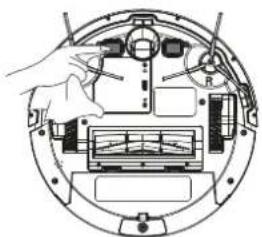
natural_image
Diagram of a mechanical assembly with a hand operating a component, showing internal components and no text or symbols.DE Reinigen Sie den Signalbereich der Staubsammlung und den Kontakt. EN Clean the dust collection signal area and contact. FR Nettoyer la zone du signal de dépoussiérage et le contact. IT Pulire l'area del segnale di raccolta della polvere e il contatto. ES Limpiar el área de señal de recogida de polvo y el contacto
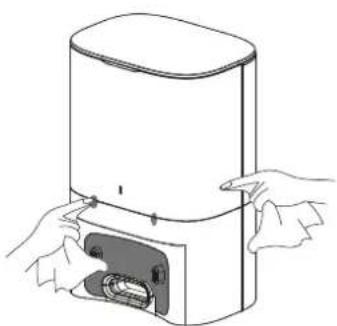
natural_image
Line drawing of hands operating a portable water heater with a button (no text or symbols)Wartung / Maintenance / Maintenance / Manutenzione / Mantenimiento
natural_image
Line drawing of a cylindrical device with an open lid and internal grid structure (no text or symbols)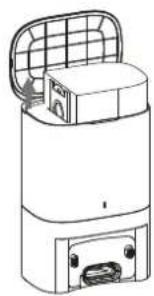
natural_image
Line drawing of a cylindrical device with a grid-patterned top panel and internal components (no text or symbols)
natural_image
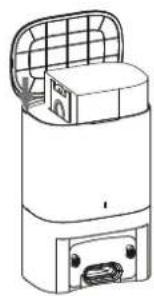
Line drawing of a cylindrical device with a grid top and internal components, no text or symbols present.Remove the 5 screws on the underside of the base station. Clean the dust filter.
Reattach the dust filter to the base station.
text_image
Position of screw×5 Transparent cover of dust pathClean the inner dust filter after removing the dust bag.
EU Declaration of Conformity
App-controlled vacuum robot with base station and wiping function
Modell/Model/Modèle/Modello/Modelo:
XXXXXX
Dimensions: ∅330 x 75 mm
Battery: Li-Ion 18650, 2600 mAh, 14.4 V
Station:
Input: 100 - 240 V\~, 50-60 Hz, 0,5 A
Output: 19 V DC, 0.6 A
Power: 45 W
Wifi:
Antenna: PCB, 3.84 dBi, 2412\~2472 MHz
Handelmarke/Trademark/Marque déposée/Marchio/Marca comercial:
Juskys (XLE - M300L)
Place and date of issue/
declares under its sole responsibility that the said product conforms to the following directives and standards. This declaration loses its validity if the product is modified without prior agreement.
1907/2006/EC REACH Regulation; Article 33
2011/65/EU RoHS Regulation; (EU) 2015/863
2014/53/EU RED Radio Regulation
Angewandte Normen/Applied standards/Normes appliquées/Standard applicati/Normas aplicadas:
EN 60335-1: 2012+A11: 2014+A13: 2017+A1: 2019+A14: 2019+A2: 2019+A15: 2021
• EN 60335-2-2: 2010+A11: 2012+A1: 2013
• EN IEC 62368-1: 2020+A11: 2020
• DIN VDE 0620-2-1: 2017-09
• EN IEC 55014-1: 2021
• EN IEC 55014-2: 2021
• EN IEC 61000-3-2: 2019/A1: 2021
• EN IEC 61000-3-3: 2013/A2: 2021
EN 301 489-1: 2019-11 V2.2.3
EN 301 489-17: 2020-09 V3.2.4
EN: Technical changes, misprints and errors excepted.