
4219 - Cooker Sommertal - Free user manual and instructions
Find the device manual for free 4219 Sommertal in PDF.


| Product Type | Portable Induction Hob |
| Brand | Sommertal |
| Model | 4219 |
| Power Supply | 220-240 V ~ 50/60 Hz |
| Nominal Power | 2000 W |
| Number of Burners | 1 |
| Dimensions (approx.) | 30 x 30 x 5 cm |
| Weight (approx.) | 2 kg |
| Power Levels | 10 levels (200 W to 2000 W) |
| Temperature Levels | 10 levels (60 °C to 240 °C) |
| Timer | From 1 minute to 4 hours |
| Child Lock | Yes |
| Display | LED Display |
| Pan Detection | Yes (error code E1 if incompatible) |
| Overheat Protection | Yes (automatic shutdown) |
| Overvoltage/Undervoltage Protection | Yes (codes E2/E3) |
| Automatic Shutdown Without Pan | Yes (with code E1) |
| Cooking Surface | Ceramic Glass |
| Maintenance and Cleaning | Clean with a damp cloth after cooling |
| Ventilation | Do not block air inlets/outlets |
| Compatible Utensils | Magnetic base (steel, cast iron, etc.), Ø 12-26 cm |
| After-Sales Service | Albatros International GmbH (Germany) |
| Warranty | 24 months |
| Country of Origin | Not specified (estimated: China) |
Frequently Asked Questions - 4219 Sommertal
User questions about 4219 Sommertal
0 question about this device. Answer the ones you know or ask your own.
Ask a new question about this device
Download the instructions for your Cooker in PDF format for free! Find your manual 4219 - Sommertal and take your electronic device back in hand. On this page are published all the documents necessary for the use of your device. 4219 by Sommertal.
USER MANUAL 4219 Sommertal
natural_image
Abstract logo design with stylized letter 'S' surrounded by curved lines (no text or symbols)Sommertal
Induktionskochfeld
1 Platte

Bedienungsanleitung
WEEE Reg No.DE43021155
1、Power Modus:
natural_image
Three identical cooking pots with crossed X marks, no text or symbols presentnatural_image
Four identical cooking pots with crossed-out X marks, arranged horizontally (no text or symbols)Fehler Codes
natural_image
Symbol of a trash bin crossed with two crossed lines and a solid black rectangle below (no text or labels)D-54552 Nerdlen (Germany)
Tel: +49 (0)6592-1730200
Fax: +49 (0)6592-1730209
www.albatros-international.de
info@albatros-international.eu
natural_image
Abstract logo design with stylized letter 'S' surrounded by curved lines (no text or symbols)Sommertal
WEEE Reg No.DE43021155
natural_image
Three identical cooking pots with crossed X marks, no text or symbols presentnatural_image
Four identical cooking pots with crossed-out handles, shown in a row (no text or symbols)Codes d'erreur
natural_image
Symbol of a trash bin crossed with two crossed lines, no text or labels presentnatural_image
Abstract logo design with stylized letter 'S' surrounded by curved lines (no text or symbols)Sommertal
WEEE Reg No.DE43021155
Istruzioni generali
natural_image
Three identical cooking pots with crossed-out X marks, no text or symbols presentnatural_image
Four identical cooking pots with crossed X marks, shown in sequence from left to right (no text or symbols)Codici di errore
natural_image
Symbol of a trash bin crossed with no text or labels, accompanied by a black rectangular block below (no readable text or symbols)D-54552 Nerdlen (Germania)
Tel: +49 (0) 6592-1730200
Fax: +49 (0) 6592-1730209
www.albatros-international.de
info@albatros-international.eu
natural_image
Abstract logo design with stylized letter 'S' surrounded by curved lines (no text or symbols)Sommertal
Placa de inducción
1 placa

Operación manual
WEEE Reg No.DE43021155
natural_image
Three identical cooking pots with crossed-out X marks, no text or symbols presentnatural_image
Four identical cooking pots with crossed-out X marks, shown in a row (no text or symbols)Códigos de error
natural_image
Symbol of a trash bin with crossed lines indicating no waste or discharge, and a solid black rectangle below (no text or labels)natural_image
Abstract logo design with stylized letter 'S' surrounded by curved lines (no text or symbols)Sommertal
Induction Cooker
1 Plate
User Manual

VAR.ID.: 4219


Read and understand this manual!
Take care of the safety instructions!
Keep this manual in a safe place for future reference.
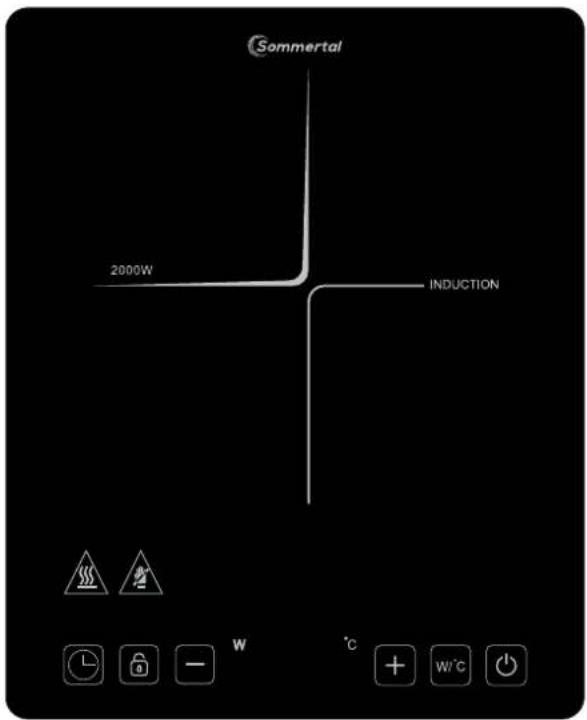
220-240VAC, 50 / 60Hz, 2000W

www.tuv.com ID 1111290370




WEEE Reg No.DE43021155
General Instructions
- Do not plug into a socket where several other appliances are plugged in.
- Do not use if the plug cord is damaged or when the power plug does not fit the socket.
- Do not modify the parts, or repair this unit, as the supply cord must be replaced by qualified technicians.
- Do not use this unit near an open flame or any wet place.
- Operation with an external timer or remote control system is prohibited.
- Keep out of reach of children.
- Place on a stable, and flat surface.
- Do not heat empty pot or overheat the pot.
-
Do not place metallic objects such as knives, forks, spoons, lids, cans and aluminum foils on the top surface or under the bottom of the cooker.
-
Allow sufficient space around the cooking area (keep a minimum distance more than 5 cm from the unit to walls or other items).
-
Never use the unit on low-heat-resistant materials (carpet, vinyl).
-
Do not place paper between the pot or the pan and the unit. The paper may get burnt.
-
Do not block air intake or exhaust vent.
-
Caution! The surface will remain hot for a period after using from the heating area. To avoid injuries (burning) do not touch the heating area.
-
Unit can affect the items having or attracting magnetic fields, such as Radios, televisions, automatic, banking cards and cassette tapes.
-
Do not use the unit on the metallic surface.
-
Do not disconnect the power cord immediately after cooking, at least 15 seconds is necessary to cool down the unit.
-
WARNING: If the surface is cracked, switch off the appliance to avoid the possibility of electric shock hazard.
-
This appliance is intended to be used in household and similar applications such as:
– staff kitchen areas in shops, offices and other working environments;
– farm houses;
– by clients in hotels, motels and other residential type environments;
– bed and breakfast type environments.
-
This appliance can be used by children aged from 8 years and above and persons with reduced physical, sensory or mental capabilities or lack of experience and knowledge if they have been given supervision or instruction concerning use of the appliance in a safe way and understand the hazards involved.
-
Children shall not play with the appliance.
Cleaning and user maintenance shall not be made by children without supervision
Features Highlight
- Induction cooker will not produce any flame, heat or smoke to keep the kitchen clean.
- Cooking can be performed anywhere with power supply, thanks to the light weight.
- The elegant design allows the cooker as a decoration for the kitchen.
- Induction cooking allows you to adjust the cooking heat instantly and with great precision much like a gas stove, but with even more accuracy.
- There are no open flames or hot elements. Induction cooker will start only once the appropriate cookware has been placed on the surface and stops immediately when the cookware is removed. No more burned fingers or hands and safer around young children.
Precautions Before Use
- Make sure that the induction cooker is properly connected to the power supply and enters the power-on mode.
- When entering the standby mode, if a pot with improper material is placed on the induction cooker, the error code "E1" will be displayed, please use the pot with the correct material.
Specifications
| Model | VAR.ID 4219 |
| Rated Voltage | 220-240V~50/60Hz |
| Power | 2000W |
Temperature/Power Settings
The levels by power setting mode:
| Power (W) | 200 | 400 | 600 | 800 | 1000 | 1200 | 1400 | 1600 | 1800 | 2000 |
The levels by temperature setting mode:
| Temperature (°C) | 60 | 80 | 100 | 120 | 140 | 160 | 180 | 200 | 220 | 240 |
Control Panel


W
°C


1、Power mode :
Plug in AC cord, the buzzer alerts, all LED and displayer flash for 1 second. Displayer shows "L", the cooker turn to the power mode.
2、ON/OFF button :

1) While power is ready, press "ON/OFF" button, the displayer will turn on and show "ON". The cooker will be in the standby mode.
2) In the standby mode, the cooker will stop if no function is selected within 60 seconds.
3、Power/Temp button:

1) Press "Power/Temp" button, you can select power or temperature mode to cooking.
2) When you select the power mode, the "W" indicator will light up and the displayer will show "1600", which means the default power is 1600W. After select the temperature mode, the "°C" indicator will light up and the displayer will show "180", which means the default temperature is 180°C.
4、Increase (+) / Decrease (-) button :
The two buttons are for adjusting heating levels and also for setting time in timer function.
5、Timer button:

1) Press "Timer" button to enter select the timer set up. (from 1 minute to 4 hours)
2) Press "Increase" button or "Decrease" button to set cooking time. Short touch "Decrease" or "lecrease" button to control of time decrease or increase by 1 minute and hold "Decrease" or "lecrease" button to control of time decrease or increase by 10 minutes.
3) Long press the "Timer" button can cancel the time setting.
6、Lock button:

1) Under any working state, press the "Lock" button for 3 second, the cooker will enter the locking mode. In the locking mode, no operation will be responded except the "ON/OFF" button. If you long press the "Lock" button, the cooker will be unlocked
Choosing the Right Cookware for Induction
- Only use cookware with a base suitable for induction cooking. Look for the induction symbol on the packaging or on the bottom of the pan.
Induction
- You can check whether your cookware is suitable by carrying out a magnet test. Move a magnet towards the base of the pan. If it is attracted, the pan is suitable for induction.
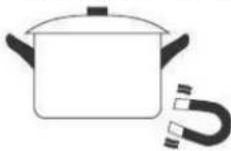
• If you do not have a magnet:
-
Put some water in the pan you want to check.
-
Turn on and wait for 3 minutes to check if water gets hot.
- Cookware made from the following materials is not suitable: pure stainless steel, aluminum or copper without a magnetic base, glass, wood, porcelain, ceramic, and earthenware.
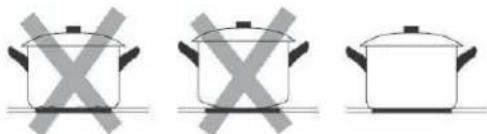
Do not use cookware with jagged edges or a curved base.
natural_image
Three identical cooking pots with crossed X marks, no text or symbols presentMake sure that the base of your pan is smooth, sits flat against the glass, and is the same size as the cooking zone. Always center your pan on the cooking zone. The diameter may not be less than 12 ~cm to ensure that the energy field has an effect. Do not use pans with a diameter in excess of 26 ~cm .

natural_image
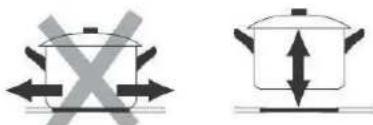
Four identical cooking pots with crossed-out X marks, no text or symbols presentAlways lift pans off the induction cooker – do not slide, or they may scratch the glass.
Error Codes
When the cooker experiences unsuitable operations from you or by other means, the cooker stops functioning exhibiting error codes on the displayer screen; this is means only for the protection of the cooker and guidance to you.
| Error Codes | Solution |
| E0: IGBT overheatE1: Without cookware or Incompatible cookware usedE2:Under-voltageE3 Over-voltageE4: Top plate sensor doesn't workE6: Without water in the cookwareE7: IGBT sensor open circuitE8: IGBT sensor short circuitE9: Top plate sensor open circuitEE: Top plate sensor short circuitH: Top plate overheat | 1. When showing error code E0, please switch on the appliance again after it is cooled down.2. When showing error code E1, please check whether the cookware is not suitable.3. When showing error code E2/E3, please check and ensure that the appliance is connected to a properly installed mains power socket with 220-240V~50/60Hz.4. Except E6/H, others please contact service centre for checking and repairing. |
Maintenance
- Disconnect plug and wait the induction has cooled down before cleaning.
- If the surface plate gets dirty, clean it with wet cloth.
- Maintain the induction clean, avoid the insects go inside to keep the induction performance well.
- For ventilated areas, clean with a toothbrush or cotton swab to make sure the air outlet is clear.
Correct Disposal of this product

natural_image
Symbol of a trash bin crossed with no text or labels, accompanied by a black rectangular block below (no readable text or symbols)This marking indicates that this product should not be disposed with other household wastes throughout the EU. To prevent possible harm to the environment or human health from uncontrolled waste disposal, recycle it responsibly to promote the sustainable reuse of material resources. To return your used device, please use the return and collection systems or contact the retailer where the product was purchased. They can take this product for environmental safe recycling.
The components are quality products. They were designed taking into consideration the latest technical knowledge, and carefully constructed using a standard, good quality material.
The warranty period is 24 months from the time of handover, which must be confirmed through a sales receipt, invoice or delivery note. Within the warranty period, any functional defects in the components will be fixed by our customer service team if these can be shown to be the result of a material defect that has arisen despite prudent handling in accordance with our operating instructions.
The warranty will include repairing defective parts or providing properly functioning replacements free of charge and at our discretion. Any parts that are replaced will become our property. The repair or replacement of individual parts does not result in an extension to the warranty period, nor is there a new warranty period for the specific components affected. There is no separate warranty period for built-in spare parts. We offer no warranty for damage or defects affecting components or their parts if these are caused by excessive use, or incorrect handling or maintenance. The same applies for failure to follow the operating instructions and for the installation of spare parts or accessories not listed in our range. Warranty claims shall be void in the event of interference or modifications to components by unauthorised individuals.
The warranty does not cover parts that are subject to natural wear and tear. In the event of a warranty claim, fault, need for a spare part or accessory, please contact the customer support centre specified here:
Customer support centre:
Albatros International GmbH
Konrad-Zuse-Str. 3
D-54552 Nerdlen (Germany)
Tel: +49 (0)6592-1730200
Fax: +49 (0)6592-1730209
www.albatros-international.de
info@albatros-international.eu
Subject to modification.
Model:
Purchased at:
In (town/city, street):
Buyer's name:
Street, building number:
Postcode, town/city:
Telephone:
Date, signature:
Fault description:
EC-DECLARATION OF CONFORMITY
We herewith declare in our sole responsibility that this product complies with the following standards (1) in accordance with the regulations of the undermentioned Directives (2) test report (3) issuing test office (4)
FR Français
CE-DÉCLARATION DE CONFORMITÉ
GB Importer and technical documents responsible
FR Manufacture Conservation des documents techniques
Dokumentationsbevollmä chtigter:
Authorized person for the compilation of the technical documentation:
R.Bunze2
Nerdlen, 20.08.2024 Ralf Bunzel, Head of Purchasing
Albatros International GmbH, Konrad-Zuse-Straße 3, 54552 Nerdlen, Germany


- Sommertal
- Induktionskochfeld
- Platte
- 1、Power Modus:
- Fehler Codes
- Codes d'erreur
- Istruzioni generali
- Codici di errore
- Placa de inducción
- placa
- Códigos de error
- Induction Cooker
- Plate
- General Instructions
- Features Highlight
- Precautions Before Use
- Temperature/Power Settings
- Control Panel
- 1、Power mode :
- 2、ON/OFF button :
- 3、Power/Temp button:
- 4、Increase (+) / Decrease (-) button :
- 5、Timer button:
- 6、Lock button:
- Choosing the Right Cookware for Induction
- Error Codes
- Maintenance
- Correct Disposal of this product
- Customer support centre:
- Model:
- FR Français
Brand : Sommertal
Model : 4219
Category : Cooker