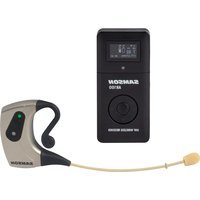
AirLine Micro Pro - Microphone SAMSON - Free user manual and instructions
Find the device manual for free AirLine Micro Pro SAMSON in PDF.


| Product type | UHF wireless headset microphone |
| Brand | Samson |
| Model | AirLine Micro Pro |
| AH100 transmitter | Lightweight, water-resistant headset microphone, no belt pack or cables |
| AR100 receiver | Compact receiver with display, RF/AF indicators, and 3.5mm headphone output |
| Microphone type | Omnidirectional |
| Number of channels | 80 UHF channels |
| Main features | Automatic frequency scanning, infrared (IR) sync, volume and brightness adjustment, mute mode |
| Operating range | Up to 30 m (100 ft) line of sight |
| Audio frequency response | 50 Hz - 15 kHz |
| Signal-to-noise ratio | >95 dB |
| Total harmonic distortion (THD) | <1% |
| AH100 transmitter power supply | 3.7V 350mAh Li-ion battery, rechargeable via USB-C, 6-hour battery life |
| AR100 receiver power supply | 3.7V 900mAh Li-ion battery, rechargeable via USB-C |
| Transmitter dimensions (L x W x H) | 177 x 16 x 62.5 mm |
| Transmitter weight | 28 g |
| Receiver dimensions (L x W x H) | 45 x 95 x 19 mm |
| Receiver weight | 108 g |
| Connectivity | USB-C port (charging), 3.5mm unbalanced headphone output (+9 dBu), shoe-mount compatible clip |
| Frequency bands | Ka (470-494 MHz), Ca (500-524 MHz), G (863-865 MHz EU license-free) |
| Maintenance and cleaning | Clean with a dry cloth; do not use near water |
| Safety | Do not expose to heat sources, liquids, or impacts; unplug during thunderstorms; repair by qualified personnel |
| Spare parts and repairability | Contact technical support (samsontech.com) for parts and repairs |
| General information | Complies with FCC Part 15 Class B and RSS-210; directive 2014/53/EU; household or office use |
Frequently Asked Questions - AirLine Micro Pro SAMSON
User questions about AirLine Micro Pro SAMSON
0 question about this device. Answer the ones you know or ask your own.
Ask a new question about this device
Download the instructions for your Microphone in PDF format for free! Find your manual AirLine Micro Pro - SAMSON and take your electronic device back in hand. On this page are published all the documents necessary for the use of your device. AirLine Micro Pro by SAMSON.
USER MANUAL AirLine Micro Pro SAMSON
If you want to dispose this product, do not mix it with general household waste. There is a separate collection system for used electronic products in accordance with legislation that requires proper treatment, recovery and recycling.
Private household in the 27 member states of the EU, in Switzerland and Norway may return their used electronic products free of charge to designated collection facilities or to a retailer (if you purchase a similar new one).
For Countries not mentioned above, please contact your local authorities for a correct method of disposal.
By doing so you will ensure that your disposed product undergoes the necessary treatment, recovery and recycling and thus prevent potential negative effects on the environment and human health.
©2025 Samson. All product descriptions and specs subject to change.
Important Safety Information
- Read these instructions.
- Keep these instructions.
- Heed all warnings.
- Follow all instructions.
- Do not use this apparatus near water.
- Clean only with a dry cloth.
- Do not block any ventilation openings. Install in accordance with the manufacturer's instructions.
- Do not install near any heat sources such as radiators, heat registers, stoves, or other apparatus (including amplifiers) that produce heat.
- Do not defeat the safety purpose of the polarized or grounding-type plug. A polarized plug has two blades with one wider than the other. A grounding-type plug has two blades and a third grounding prong. The wide blade or the third prong are provided for your safety. If the provided plug does not fit into your outlet, consult an electrician for replacement.

- Protect the power cord from being walked on or pinched, particularly at plugs, convenience receptacles, and where they exit from the apparatus.
- Only use attachments/accessories specified by the manufacturer.
- Use only with the cart, stand, tripod, bracket, or table specified by the manufacturer, or sold with the apparatus. When using a cart, use caution when moving the cart/ apparatus combination to avoid injury from tip-over
- Unplug the apparatus during lightning storms or when unused for long periods
- Refer all servicing to qualified personnel. Servicing is required if the apparatus is damaged in any way, such as if the power supply cord or plug is damaged, liquid is spilled, objects fall into the apparatus, it's exposed to rain or moisture, does not operate normally, or is dropped.
- Do not expose the apparatus to dripping or splashing. Do not place objects filled with liquid, such as vases, on the apparatus.
- To prevent electric shock, match the wide blade of the plug to the wide slot, fully insert.
- Maintain proper ventilation around the entire unit.
- The mains plug or appliance coupler must remain easily accessible.
- Do not expose batteries to excessive heat such as sunshine or fire.

Welcome to Samson AirLine
The AirLine Micro Pro builds on the original micro-wireless system design, offering high-quality, hands-free audio with total freedom of movement.
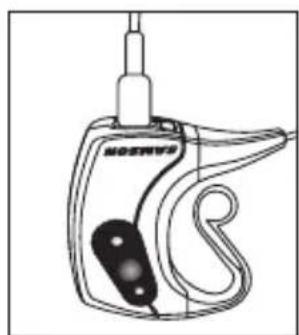
The AH100 transmitter fits comfortably behind the ear and features an omnidirectional microphone and USB-C rechargeable battery. The compact AR100 receiver features 80 UHF channels, auto-scan, IR sync, RF/AF meters, and is also USB-C rechargeable.
For support, visit samsontech.com or email support@samsontech.com.
Please record your serial numbers:
- Receiver Serial Number:
- Transmitter Serial Number:
- Date of Purchase:
ENFR ESIT
FCC Compliance and Usage Information
Samson wireless receivers are certified under FCC Rules part 15 and transmitters are certified under FCC Rules part 74. Licensing of Samson equipment is the user's responsibility and licensability depends on the user's classification, application and frequency selected.
This device complies with Part 15 of the FCC rules Class B and RSS-210 of Industry & Science Canada.
Operation is subject to the following two conditions:
(1) This device must not cause harmful interference, and
(2) This device must accept any interference received including interference that may cause undesired operation. Suitable for home or office use.
NOTE: This equipment has been tested and found to comply with the limits for a Class B digital device, pursuant to Part 15 of the FCC Rules. These limits are designed to provide reasonable protection against harmful interference in a residential installation. This equipment generates, uses and can radiate radio frequency energy and, if not installed and used in accordance with the instructions, may cause harmful interference to radio communications. However, there is no guarantee that interference will not occur in a particular installation. If this equipment does cause harmful interference to radio or television reception, which can be determined by turning the equipment off and on, the user is encouraged to try to correct
FCC Compliance and Usage Information
the interference by one or more of the following measures:
- Reorient or relocate the receiving antenna.
- Increase the separation between the equipment and receiver.
- Connect the equipment into an outlet on a circuit different from that to which the receiver is connected.
- Consult the dealer or an experienced Radio/TV technician for help.
WARNING: Changes or modifications not expressly approved by the party responsible for compliance could void the user's authority to operate the equipment.
This equipment is intended for use in wireless microphone applications.
Equipment is intended for sale in: AT, BE, CH, CY, CZ, DK, EE, FI, FR, DE, GR, HU, IE, IS, IT, LV, LT, LU, MT, NL, NO, PL* PT, RO, SK, SI, ES, SE, UK
*Subject to license. Please contact your national frequency authority for information on available legal use in your area. Any changes or modifications not expressly approved by Samson Distribution LLC could void your authority to operate the equipment.
Hereby, Samson Distribution LLC, declares that this AR100 and AH100 is in compliance with the essential requirements and other relevant provisions of Directive 2014/53/EU. The declaration of conformity may be consulted at:
https://storage.googleapis.com/samson-production/uploads/documents/AirLine_Micro_Pro_Doc.pdf
Features
- Lightweight, water-resistant AH100 earset transmitter (no beltpack or cables)
- Omnidirectional mic captures speech and vocals with clarity
- USB-C rechargeable battery with up to 6 hours of use
80 UHF channels with automatic scan and IR sync
AR100 receiver with screen display, RF/AF meters, and 3.5mm headphone output - Up to 100^ (30 m) operating range
Quick Start
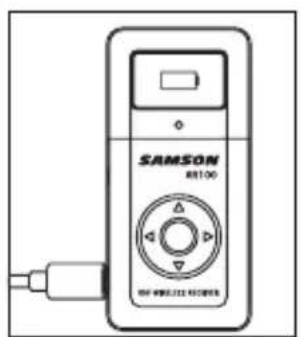
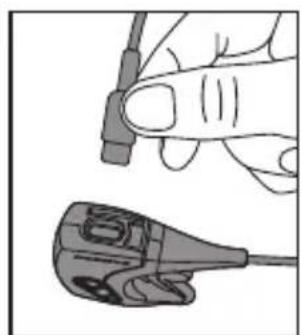
- Charge both the AH100 transmitter and AR100 receiver using their USB-C ports.
-
After charging, place the AR100 receiver in its intended location, maintaining line of sight with the transmitter.
-
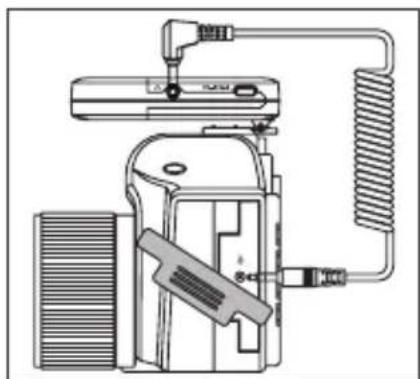
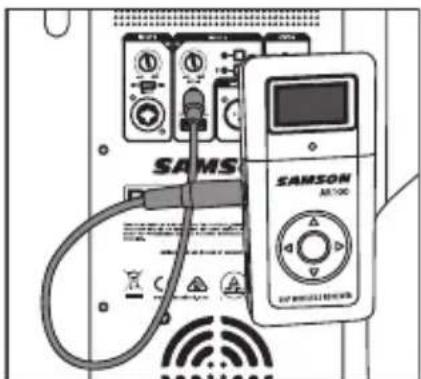
With the AR100 powered off, connect your speaker/ amplifier, DSLR camera, or mixer to the 3.5mm output.

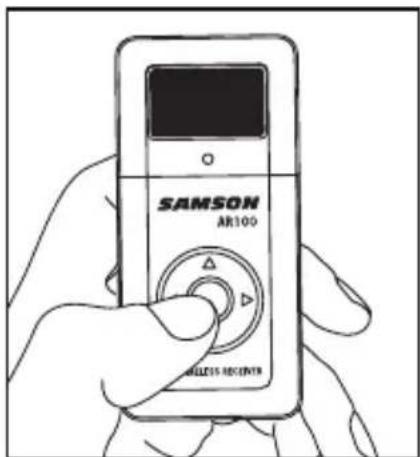
- Press and hold the middle button on the AR100 for 3 seconds to power it on.
Depress and hold SW for 2 sec

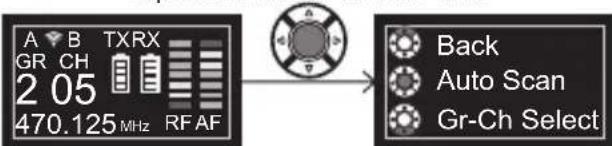
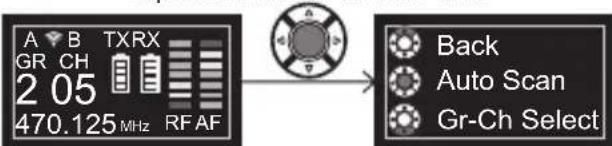
- After powering on, doublepress or press and hold the middle button for 2 seconds to access the main menu.
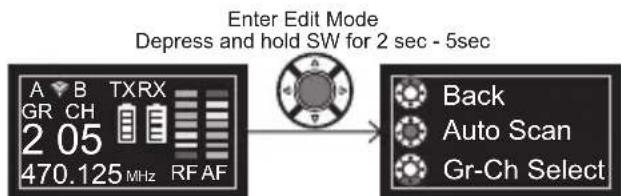
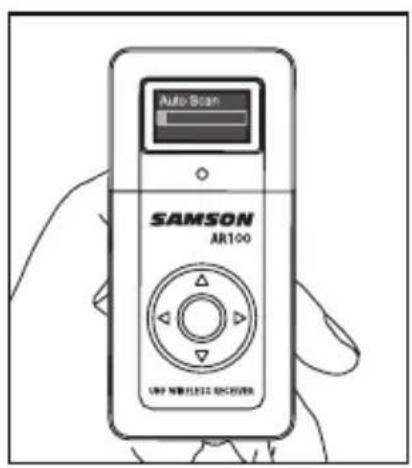
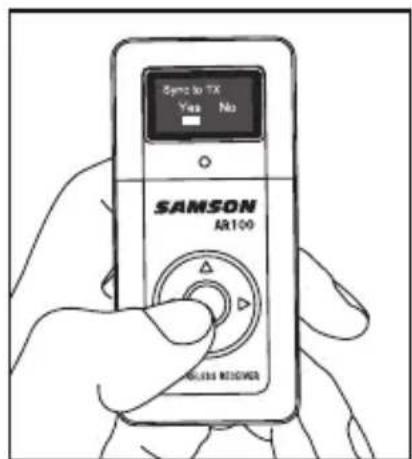
- From the menu, select Auto Scan to automatically choose a frequency, group, and channel. Then select Sync to TX to initiate IR pairing.
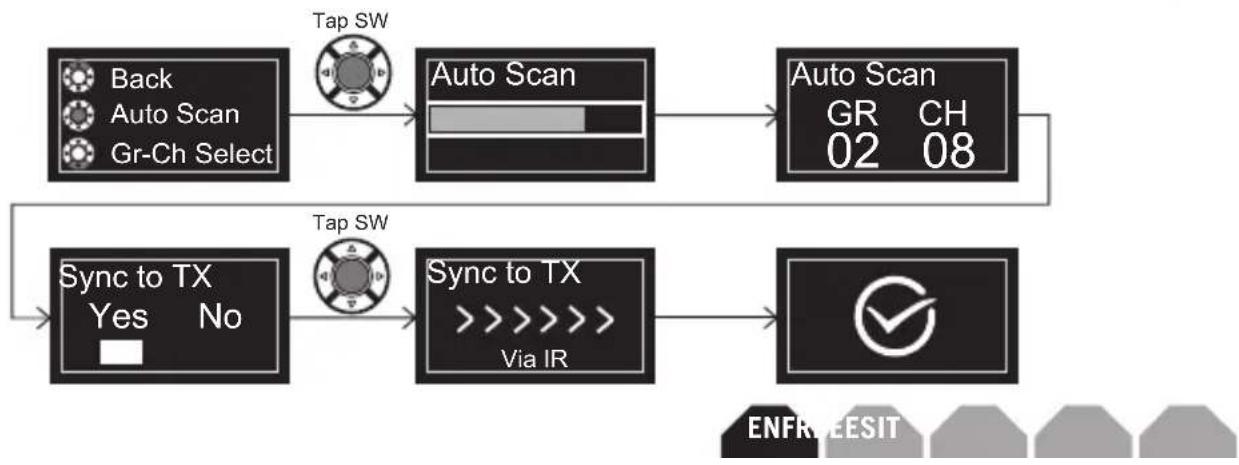
- Power on the AH100 transmitter by holding the multifunction button for 2 seconds.
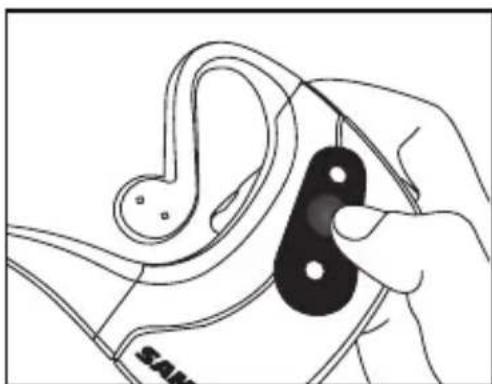
- Immediately place the AH100 near the receiver's IR window. Pairing must occur within 10 seconds of powering on.
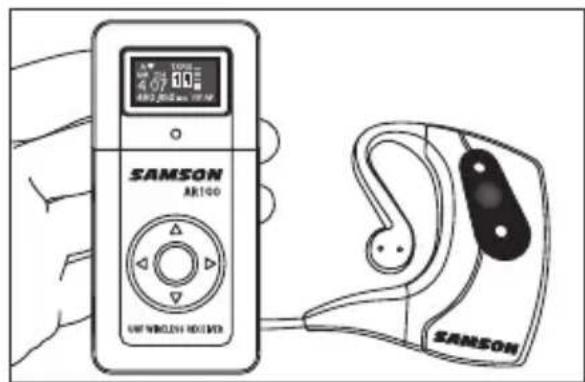
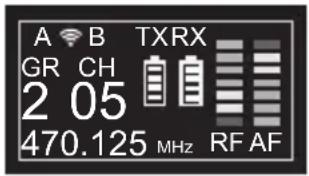
- Once pairing is successful, a check mark will appear on the AR100 display to confirm pairing. The unit will then return to the default home screen, where signal and battery indicators will be visible.
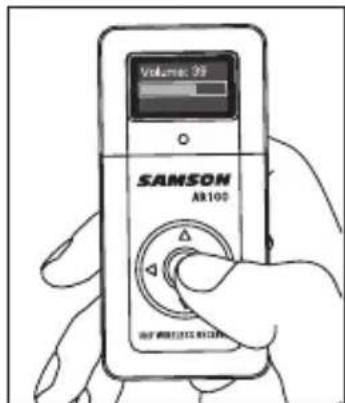
- Adjusting Volume on the AR100 Receiver: From the home screen, press the Up or Down arrow to enter volume adjustment mode. Press or hold the arrows to increase or decrease the receiver volume. For adjusting the volume from the transmitter, please see under the "AH100 Earset Transmitter Callouts" on page 17 for more details.
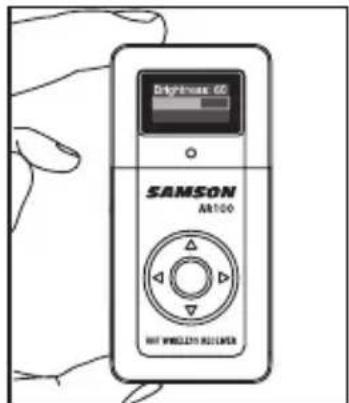
- Adjusting Brightness on the AR100 Receiver: From the home screen, press the Left or Right arrow to enter brightness adjustment mode. Press or hold the arrows to raise or lower screen brightness.
- Once the desired levels are set on both the receiver and transmitter, gradually raise the volume on your mixer or amplifier as needed.
- If using multiple systems, repeat the steps above for each unit.

Charging
- Use a USB-C cable to charge the AH100 and AR100.
- Connect to 5V USB power source.
- AH100: LED flashes RED while charging, solid RED when fully charged.
- AR100: On-screen battery icon shows charging status. The unit will power off after 10 minutes, displaying a battery charging icon on the screen. To turn it back on, press and hold the middle button for 3 seconds.
Using the AR100 Receiver
- Default screen displays Group (GR), Channel (CH), TX/RX battery life, and RF/AF meters.
- RF = signal strength received;
AF = input audio level.
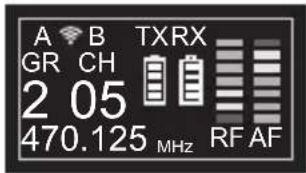
Volume Control:
- Use UP/DOWN arrows to adjust volume (click for steps, hold for continuous).
- Press the middle button to return to the home screen or wait for auto-return.
Brightness Control:
- Use LEFT/RIGHT arrows to adjust screen brightness (click or hold).

Power & Menu Access:
- Hold middle button 3 sec to power on; 5 sec to power off.
- Double-click middle button or press and hold for 2 seconds to access menu:
Auto Scan
GR-CH Select (use LEFT/RIGHT for GR/CH, UP/DOWN to select number)
Sync to TX (IR pairing)
- Back (returns to default home screen)
Connectivity:
- USB-C charging port (side panel)
- 3.5mm headphone output
- Clip (hot shoe mount compatible) and serial number located on rear panel
Power Savings Mode:
- Screen turns off after 10 minutes of inactivity to save power; press any button to wake.
AH100 Earset Transmitter Callouts
1. LED Status
GREEN: Normal
FLASHING GREEN: Volume adjustment
AMBER: Mute
© RED: Low battery
FLASHING RED:Charging
SOLID RED: Fully charged
2. Multifunction Button
Hold 2 sec to power on
Hold 3 sec to power off
Quick press: mute/unmute
Volume control: Press for 5 seconds while powered off to enter volume adjustment mode. Press the button repeatedly to cycle through 9 volume levels, from 1 (lowest volume, slowest green LED blink) to 9 (highest volume, fastest blink). The LED blink rate indicates the current setting. The transmitter will save the selected level when powered on.

3. IR Lens
Align with AR100 for IR syncing (active for 10 sec after power-on)
Wearing the AH100:
- Designed for left-ear fit
Memory wire allows secure, adjustable comfort without damage

Operating Bands and Frequencies
| Band Frequency Range Region | Notes |
| Ka 470 – 494 MHz | Subject to license in some countries |
| Ca 500 – 524 MHz | Subject to license in some countries |
| G* Licensee3 free n MHz(not for U.S./Canada) | |
Consult your national authority for approved wireless frequencies.
Technical Specifications
System
Operating Range 100'(30m) line-of-sight
Audio Frequency Response 50 Hz - 15 kHz
Signal to Noise >95 dB
THD
<1%
AH100 Transmitter
Gain -40 dBu to +31 dBr (9 steps)
Max Input
Battery
Battery Life
Dimensions 6.9" x 0.62" x 2.46" / 177mm x 16mm x 62.5mm
Weight 0.06 lb / 28g
+6 dBu
3.7V 350mAh
6 hours
Li-ion
AR100 Receiver
Output 3.5mm unbalanced (+9dBu)
Output Impedance 32 Ohms
Max Output
Sensitivity -100 dBm
Operating Voltage: Battery 3.7V 900mAh Li-ion
Dimensions 1.77"x3.74"x0.74" 45mm x 95mmx19mm
Weight 0.238lb/108g
ENFR ESIT
Operation is subject to the following two conditions:
https://storage.googleapis.com/samson-production/uploads/documents/AirLine_Micro_Pro_Doc.pdf
a r c t e r i s t i q u e s
Depress and hold SW for 2 sec

https://storage.googleapis.com/samson-production/uploads/documents/AirLine_Micro_Pro_Doc.pdf

Merkmale
https://storage.googleapis.com/samson-production/uploads/documents/AirLine_Micro_Pro_Doc.pdf

Characteristicas
Depress and hold SW for 2 sec

Depress and hold SW for 2 sec - 5sec
https://storage.googleapis.com/samson-production/uploads/documents/AirLine_Micro_Pro_Doc.pdf

Caratteristiche
Depress and hold SW for 2 sec

Depress and hold SW for 2 sec - 5sec
Samson Distribution LLC
278-B DuffyAve
Hicksville, New York 11801
Phone: 1-800-3-SAMSON (1-800-372-6766)
www.samsontech.com
- Important Safety Information
- Welcome to Samson AirLine
- FCC Compliance and Usage Information
- Features
- Quick Start
- Charging
- Using the AR100 Receiver
- Volume Control:
- Brightness Control:
- Power & Menu Access:
- Connectivity:
- Power Savings Mode:
- AH100 Earset Transmitter Callouts
- LED Status
- Multifunction Button
- IR Lens
- Wearing the AH100:
- Operating Bands and Frequencies
- Technical Specifications
- System
- AH100 Transmitter
- AR100 Receiver
- C a r c t e r i s t i q u e s
- Merkmale
- Characteristicas
- Caratteristiche
Brand : SAMSON
Model : AirLine Micro Pro
Category : Microphone