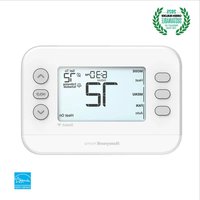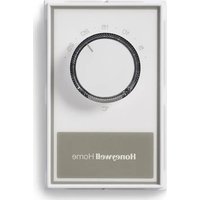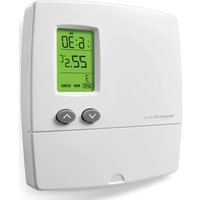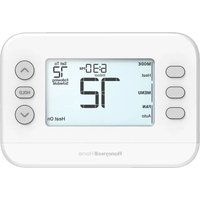
FocusPRO P200 TH2110U4004/U - Thermostat HONEYWELL - Free user manual and instructions
Find the device manual for free FocusPRO P200 TH2110U4004/U HONEYWELL in PDF.


User questions about FocusPRO P200 TH2110U4004/U HONEYWELL
0 question about this device. Answer the ones you know or ask your own.
Ask a new question about this device
Download the instructions for your Thermostat in PDF format for free! Find your manual FocusPRO P200 TH2110U4004/U - HONEYWELL and take your electronic device back in hand. On this page are published all the documents necessary for the use of your device. FocusPRO P200 TH2110U4004/U by HONEYWELL.
USER MANUAL FocusPRO P200 TH2110U4004/U HONEYWELL
text_image
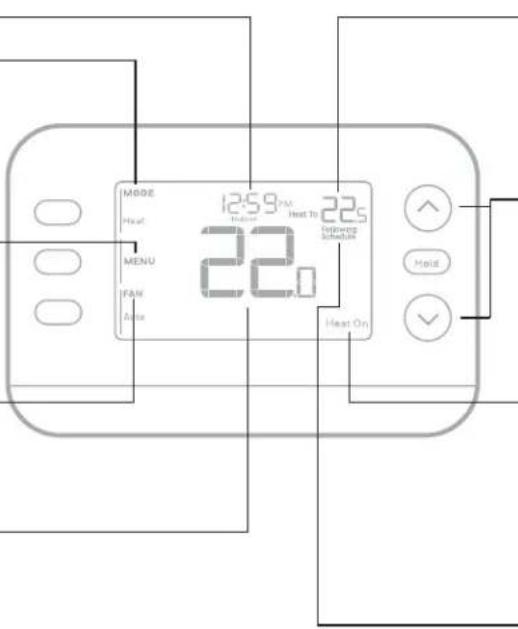
Time Mode -Heat -Off -Cool -Auto -EM Heat Menu Press to display options. Start here to set a program schedule Fan -Auto -On -Circulate Actual indoor temperature Indoor temperature setpoint Press or to change temperature setting Temperature / Navigation Increase or decrease temperature setpoint and navigate menus System Status -Cool on -Heat on -Aux Heat On Schedule information Following time based schedule and optionsM39567
Introduction
This document discusses the following topics (click to jump to those sections):
- Battery Replacement
- User Settings
• The Auto Changeover feature - Alerts
- Reminders
• Programming Your Thermostat
• The Adaptive Intelligent Recovery feature
• Built-In Compressor Protection - Troubleshooting
- Customer Assistance
Battery Replacement
The thermostat's display will let you know when the batteries are low and need to be replaced.
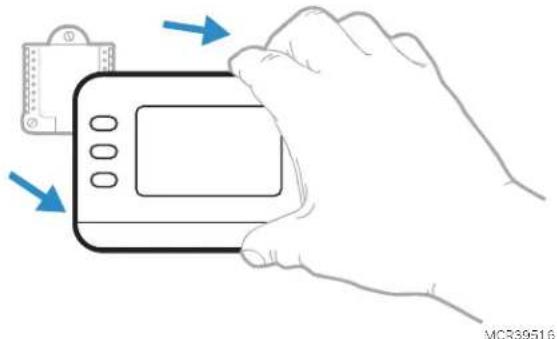
Remove the thermostat by pulling it away from its mount as seen below.
natural_image
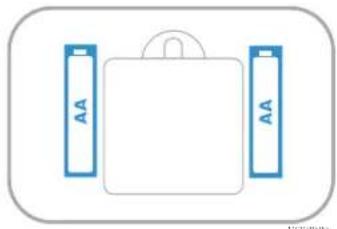
Illustration of a hand holding a handheld device with blue arrows indicating motion (no text or symbols)Be sure to use fresh AA batteries and insert them as shown in the diagram below.
natural_image
Simple diagram of a battery pack with two side batteries labeled 'AA' (no text or symbols on the battery itself)After inserting the new batteries, align the thermostat with the mounting plate and push gently until the thermostat snaps back into place.
User Settings
After initial setup is complete, you can enter the User menu.
1 Press Menu button.
2 Press ↑ or ↓ to cycle through User Menu options. When the menu option you want to use is displayed, press SELECT.
User menu options
- SCHEDULE: Turn schedule on or off or set/edit schedule settings
•TEMP: Display outdoor or indoor temperature * - DATE: Set Date
• TIME: Set Time - LOCK**: Change lockout status (OFF, FULL or PART). Partial lockout allows temporary setpoint change only.
3 To EXIT and return to the Home screen, press the EXIT button (upper left) or wait for the thermostat to time out.
*Outdoor option only shown if thermostat is set to use a wired outdoor sensor
** Lockout option only shown if enabled by the installer
Set Time and Date
Time
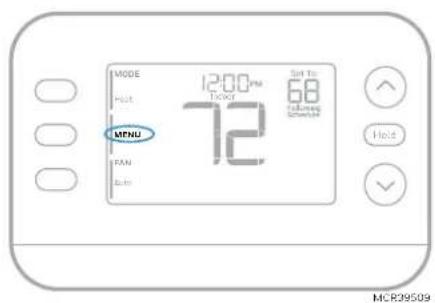
1 Press MENU on the thermostat
2 Press ↑ or ↓ to go to TIME and press SELECT.
3 Press ↑ or ↓ to choose 12- or 24-hour clock format and press NEXT.
4 Press ↑ or ↓ to adjust the hour and press NEXT.
5 Press ↑ or ↓ to adjust the minute and press SAVE & EXIT.
Date
1 Press MENU on the thermostat
2 Press ↑ or ↓ to go to DATE and press SELECT.
3 Press ↑ or ↓ to choose YEAR and press NEXT.
4 Press ↑ or ↓ to choose MONTH and press NEXT.
5 Press ↑ or ↓ to choose DATE and press SAVE & EXIT.
text_image
MODE HOT MFNU FAN Auto 12:00 PM TDOY 72 68 TOMATO ONION Set to Hold MCR39509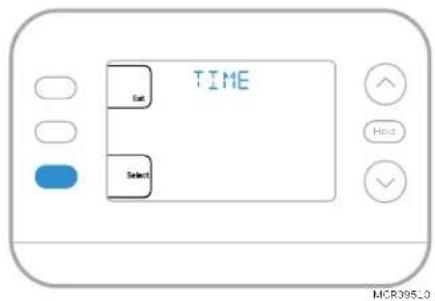
text_image
TIME Eat SelectSystem Operation Settings
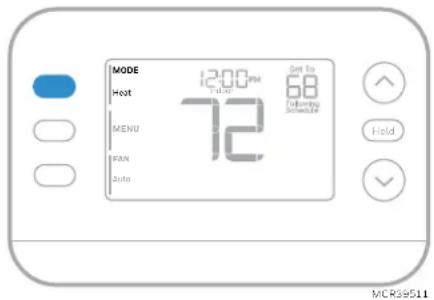
1 Press the MODE button to cycle to the next available System mode.
2 Cycle through the modes until the desired System mode is displayed.
Available System modes vary by model and system settings.
System modes:
• AUTO
- HEAT
• COOL
• EM HEAT
• OFF
text_image
MODE Hot 12:00 PM T 5:42 72 Set to 68 Following Schedule MENU PAN Auto Hold MCRSS511Fan Operation Settings
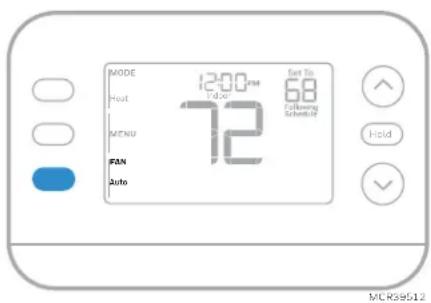
1 Press the FAN button to cycle to the next available Fan mode.
2 Cycle through the modes until the desired Fan mode is displayed.
Available Fan modes vary with system settings.
Fan modes:
- AUTO: Fan runs only when the heating or cooling system is on
• ON: Fan is always on
• CIRC: Fan runs about 33% of the time to circulate air
text_image
MODE 12:00 PM 72 Get To 68 Following Schematic FAN Auto MCR59512Auto Changeover
When a thermostat is set to Auto Changeover, the thermostat has a Heat setpoint and a Cool setpoint and can run either Heat or Cool as needed.
1 Verify the thermostat is set to Auto Changeover mode. Press the MODE button in the upper left until AUTO is selected. Press the SAVE button (Center left).
2 Press the ↑ or ↓ button. Upper right shows HEAT TO or COOL TO in flashing text, and the setpoint. Use the ↑ or ↓ button to adjust the setpoint. If the display shows HEAT TO flashing when you want to adjust the Cool setpoint, or vice versa, press the System button. While HEAT TO or COOL TO is flashing, the mode indication at upper left shows either HEAT or COOL flashing. Pressing the MODE button at this time changes the setpoint being adjusted from HEAT to COOL or vice-versa.
Heat and cool set to the same temperature
Most people are comfortable in a 2–3 degree temperature range. Therefore, the heat is usually set a few degrees below the Cool setpoint. When the indoor temperature is between the Heat and Cool setpoints, the system is off.
The Heat and Cool setpoints can be the same. To ensure that the system doesn't cycle back and forth between Heating and Cooling, the thermostat observes a differential setting, set by the installer. If the thermostat last ran in Heat mode, it cycles heat on and off to maintain the setpoint. The indoor temperature must rise to the differential setting before it switches to Cool.
Then cooling will run down to the Cool setpoint and cycle cooling on and off to maintain as needed. The thermostat would then need to drop to the differential setting before switching back to Heat. Typically, a thermostat using Auto Changeover would only need to switch over twice per day as outdoor temperature rises during the day and drops in the evening.
Alerts
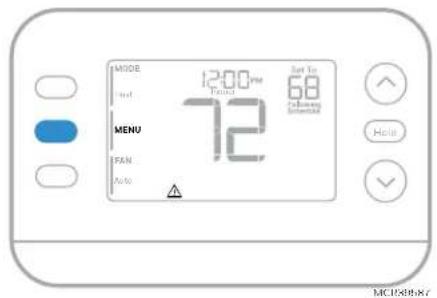
When an alert is active, an ⚠️ icon will appear in the lower part of the display.
1 Press MENU and use ↑ or ↓ until the alert is shown. Active alerts will be the first menu items shown.
2 Press SELECT to display the alert number.
3 An alert cannot be dismissed. If there is more than one active alert, pressing the NEXT button allows you to view any additional alert numbers. Press EXIT to return to the home screen.
Some alerts can be resolved by the homeowner, for example Replace Batteries. Other alerts may require a service call to the professional installer.
text_image
MISDE Ind. 12:00 pm Pilot 72 Sun To 68 Cathode Internal MENU IFAN Auto Help MC1958887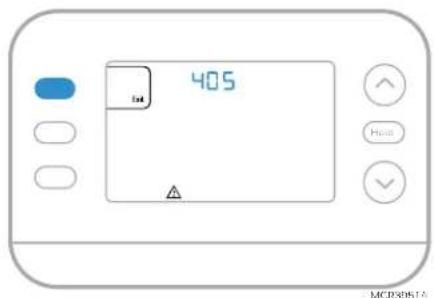
text_image
405 MCR8061A| Alert Number | Alert Meaning |
| 405 | Thermostat batteries are low. Replace batteries. |
| 407 | Thermostat batteries are critically low. Replace batteries. |
| 164 | Heat Pump Fault. Heat pump is energizing the L terminal to indicate a fault. |
| 170 | Thermostat Memory Failure. Internal problem with the thermostat memory. |
| 171 | Set Time and Date. To clear this alert, enter the Menu, and follow steps listed earlier in this manual to set the time and date. |
| 173 | Internal Sensor Error. Issue with the built-in temperature sensor. |
| 178 | Wired Outdoor Sensor Error. Check wires and connections to outdoor sensor |
Reminders
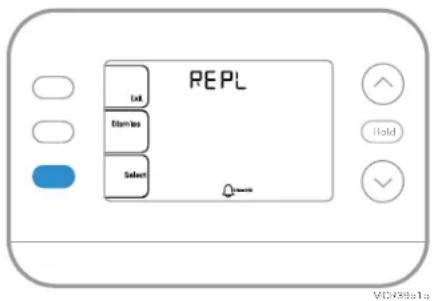
When a reminder is active, a 📄 icon will appear in the lower part of the display.
1 Press MENU and use ↑ or ↓ until the active reminder is shown. Active alerts and reminders will be the first menu items shown.
2 Press SELECT to display the reminder.
3 Once selected you will see the reminder message in scrolling text. Press DISMISS to reset the reminder or press EXIT to return to the home screen without resetting the reminder.
If there is more than one active reminder, press the NEXT button to view all reminders which have not been reset.
text_image
REPL Limit Estimates SelectProgramming Your Thermostat
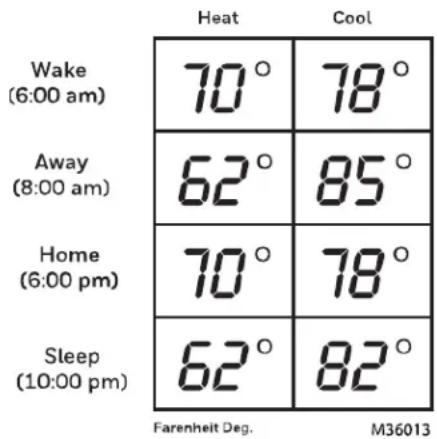
You can program four time periods each day, with different settings for weekdays and weekends. We recommend using the presets shown in the table at right; these presets are designed to reduce your heating/cooling expenses.
WAKE: Set to the time you wake up and your desired temperature during the morning until you leave for the day.
AWAY: Set to the time you leave home and your desired temperature while you are away (usually an energy-saving temperature).
HOME: Set to the time you return home and your desired evening temperature until bedtime.
SLEEP: Set to your bedtime and your desired overnight temperature (usually an energy-saving temperature).
heatmap
| Time | Heat (°) | Cool (°) | |---|---|---| | Wake (6:00 am) | 70 | 78 | | Away (8:00 am) | 62 | 85 | | Home (6:00 pm) | 70 | 78 | | Sleep (10:00 pm) | 62 | 82 | Farenheit Deg. M36013Adjusting Program Schedules
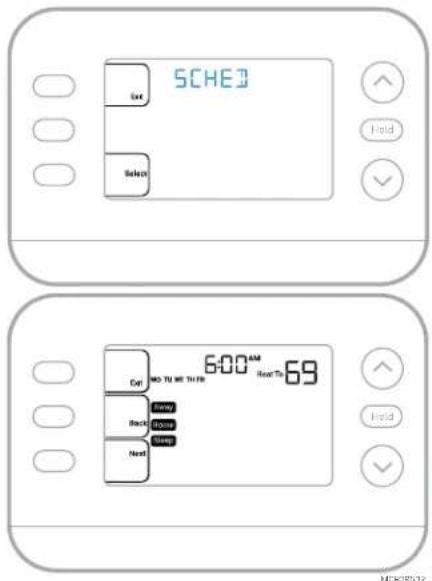
1 Press MENU. Then press ↑ or ↓ until SCHED is displayed.
2 A square appears around ON or OFF in the display. If you want to use a schedule, press ↑ or ↓ to select ON. Press SELECT to edit the schedule or press EXIT to exit the menu.
3 If editing the schedule, press SELECT to edit the day or days flashing in the display.
4 The word Wake should be flashing. Press NEXT.
Press ↑ or ↓ to turn this schedule period on or off.
Selecting OFF will disable this schedule period.
Press NEXT.
5 If the schedule period was set to ON, the time will be flashing. Press ↑ or ↓ to adjust the time for this period. Press NEXT.
6 The Heat setpoint will be flashing. Press ↑ or ↓ to adjust the Heat setpoint for this period. Press NEXT.
7 The Cool setpoint will be flashing. Press ↑ or ↓ to adjust the Cool setpoint for this period. Press NEXT.
8 The display will show the next schedule period flashing. Repeat steps 4 – 7 for the Away, Home and Sleep schedule settings. After completing all schedule settings for the day(s) selected, repeat these steps for the other days.
9 Press the SAVE & EXIT button at upper left.
When editing an existing schedule, you can advance to the setting you wish to change, edit that setting and press the SAVE & EXIT button to save changes.
Depending on what type of schedule the thermostat was set up for, days may be grouped or set individually.
text_image
SCHED Get Select 6:00 AM 9:00 AM Next To 6:00 Back to Next Hold Hold MCK38532Program schedule override (Temporary)
1 Press or to adjust the temperature.
2 Once at the desired setpoint temperature, no further action is needed. The new setpoint temperature will be held until the next scheduled period begins.
3 Press the SAVE button or wait for the display to time out and return to the Home screen.
To cancel the Temporary Hold, press and release the HOLD button to cycle through the settings until CANCEL HOLD is selected.
Program schedule override (Permanent)
1 Press or to adjust the temperature.
2 Once at the desired setpoint temperature, press and release the HOLD button to cycle through the settings until HOLD PERMANENTLY is selected.
3 Press the SAVE button or wait for the display to time out and return to the Home screen.
To cancel the Permanent Hold, press and release the HOLD button to cycle through the settings until CANCEL HOLD is selected.
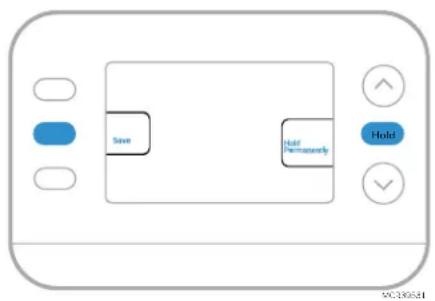
flowchart
graph TD
    A["Save"] --> B["Hold"]
    B --> C["Hold Permanently"]
Keypad Lockout
1 Press Menu on the thermostat.
2 Press ↑ or ↓ to go to LOCK. Press SELECT.
3 Press ↑ or ↓ to go to OFF, PART or ON and then press SELECT.
OFF: Unlocked, and full access allowed.
PART: Partial lockout, allowing only the temperature to be changed.
ON: No access allowed.
4 Press the SAVE & EXIT button.
Unlocking the Keypad
1 If the keypad is locked (partially or fully) the display will show UNLOCK next to the left center button.
2 To unlock the keypad, press the left center button until the display shows O and three dashes in the upper part of the display.
3 Enter the password "1234". To enter the password, press ↑ or ↓ to change the first digit of the Number.
4 Press SELECT.
5 Repeat this process to enter the second through fourth digits of the number. Once all four numbers have been entered, press SELECT again. This will unlock the keypad.
6 If entered incorrectly, press BACK to go back a step to enter the correct number and press SELECT.
The Keypad Lockout option is available in the user menu ONLY IF the installer has specifically configured the thermostat to allow this option.
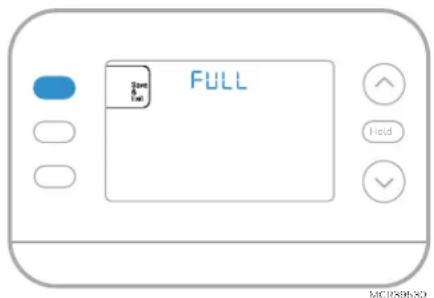
text_image
FULL Save Run Hold MCXXXX20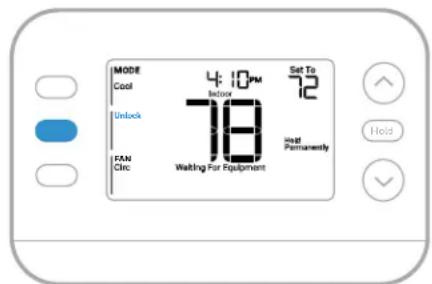
text_image
MODE Cool 4 10 PM Set To 72 Unlock 18 Heat Permanently FAN Circ Waiting For Equipment Hold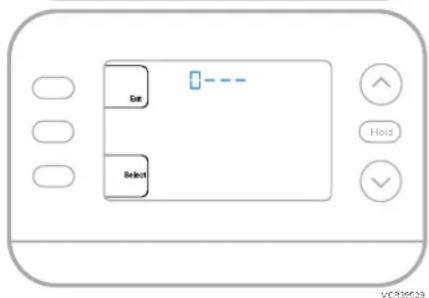
text_image
Ent Select Hold VOC35629Adaptive Intelligent Recovery
Over time, the FocusPRO P200 Thermostat "learns" how long it takes your system to reach your desired temperatures. The thermostat will activate the heating or cooling system as needed to make sure you're comfortable at the times you expect.
The words Active Recovery appear under the room temperature in the display when the thermostat is going from a setback temperature to a comfort temperature.
Built-in Compressor Protection
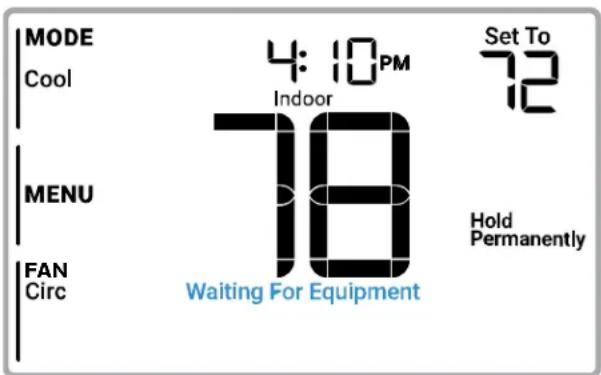
Damage can occur if your system's compressor is restarted too soon after shutdown. This feature forces the compressor to wait for a few minutes before restarting. During the wait time, the display will show the message Waiting For Equipment under the room temperature reading.
When the safe wait time has elapsed, the message disappears, and the thermostat will show "Heat on" or "Cool on".
text_image
MODE Cool 4:10 PM Indoor Set To 72 MENU 18 Hold Permanently FAN Circ Waiting For EquipmentMCR39528
Troubleshooting
| Display is blank | Check circuit breaker and reset if necessary.Make sure power switch for heating & cooling system is onMake sure furnace door is closed securely.Make sure fresh AA alkaline batteries are correctly installed (SeeBattery Replacement) |
| Heating or cooling does not run | When running heat, display will showHEAT ONin lower right of display.When running cool, display will showCOOL ONin lower right of display.If display showsWAITING FOR EQUIPMENTunder temperature reading, it isincompressor delay modeto protect the system. Wait 5 minutes to see if the thermostat makes a Heat or Cool call.If display doesn't indicate a call for Heat or Cool orWAITING FOR EQUIPMENT, verify the mode setting, temperature setpoint and room temperature.If you press the Up or Down arrowUpper left of display shows mode setting.Upper right shows setpointCenter of display shows room temperature.If issue persistsCheck circuit breaker and reset if necessary.Make sure power switch at heating & cooling system is onMake sure furnace door is closed securely |
| Cannot change setpoint to desired setting | If display indicatesUNLOCKnext to the left center button, see Keypad Lockout section.If not, verify the mode setting (Heat, Cool, Auto, or Em Heat in upper left of display)The default setting ranges for these modes areHeat or Em Heat: 40 °F to 90 °F (4.5 °C to 32.0 °C)-Cool: 50 °F to 99 °F (10.0 °C to 37.0 °C)If the setpoint can be adjusted, but not to the full range shown above, the installer may have configured the thermostat for a maximum heat or minimum cool setpoint to restrict settings that are energy inefficient. |
| WAITING FOR EQUIPMENTShown in display under room temperature | Thecompressor protectionfeature is engaged. Wait a few minutes for the system to safely restart to avoid damaging the compressor. See theBuilt-in Compressor Protectionsection for more information |
Customer Assistance
For assistance with this product, please visit customer.resideo.com Or call Resideo Customer Care toll-free at 1-800-633-3991
Safety and environmental notices

CAUTION: ELECTRICAL HAZARD
Can cause electrical shock or equipment damage. Disconnect power before beginning installation.

CAUTION: EQUIPMENT DAMAGE HAZARD
Compressor protection is bypassed during testing. To prevent equipment damage, avoid cycling the compressor quickly.

CAUTION: MERCURY NOTICE
If this product is replacing a control that contains mercury in a sealed tube, do not place the old control in the trash. Contact your local waste management authority for instructions regarding recycling and proper disposal.

CAUTION: ELECTRONIC WASTE NOTICE
The product and batteries should not be disposed of with other household waste. Check for the nearest authorized collection centers or authorized recyclers. The correct disposal of end-of-life equipment will help prevent negative consequences for the environment and human health.
Honeywell Home
Série FocusPRO P200
Thermostats programmables
text_image
MODE Heat MENU FAN Rule 12:59.0u 22.0 Heat On 22.5 Influena Schedlar ↑ Hold ✓ Figurenatural_image
Illustration of a hand holding a handheld device with arrows indicating motion (no text or symbols)natural_image
Simple diagram of a battery pack with two side batteries labeled 'AA' (no text or symbols beyond labels)text_image
TIME Set Selecttext_image
MODE Heat 12:00 PM Take Set To 20 MENU 22.5 Following Schedule FAN Pure Help MFCK39511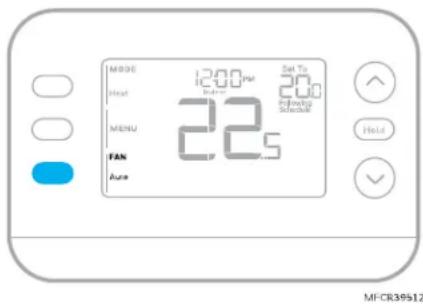
text_image
MODE Heat MENU FAN Auto 1200pur 20 Pulsing Selective Sat Ts Hold MF-CR39512text_image
REPL Eat Domino Select| Chauffage | Refroidissement | |
| Wake (réveil) (6:00 am) | 21.0° | 25.5° |
| Away (absent) (8:00 am) | 16.5° | 29.5° |
| Home (maison) (6:00 pm) | 21.0° | 25.5° |
| Sleep (nuit) (10:00 pm) | 16.5° | 28.0° |
text_image
SCHED Get Select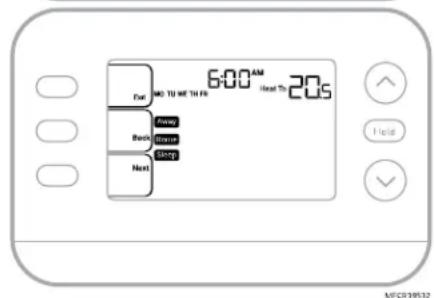
text_image
6:00 AM Next To 20s End Back Begin Begin Nexttext_image
FULL Save For East Hold MCR39530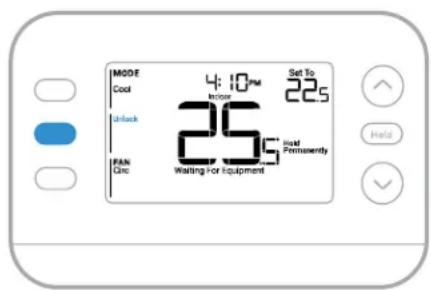
text_image
MODE Cool 4:10 PM Set To 22s In/Off 25s Wait Permanently FAN Glc Waiting for Equipment Help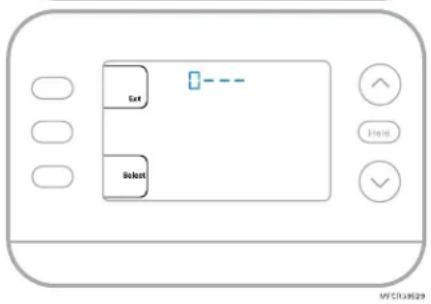
text_image
Set Resettext_image
MODE Cool 4:10PM Indoor Set To 22.5 MENU 26.5 Hold Permanently FAN Circ Waiting For EquipmentMFCR39528
Dépannage
text_image
M500 125.9 22.5 22.0 Max 50m Max 50m Max 50m Max 50m Max 50m Max 50m Max 50m Max 50m Max 50m Max 50m Max 50m Max 50m Max 50m Max 50m Max 50m Max 50m Max 50m Max 39/87Hora
Mode (Modo)
Circulate (Circular)
Temperatura interior real
text_image
MODE 12:59 PM Heat 30 22.5 Heat MENU FAN Air 22.0 Hot On HoldPunto de
natural_image
Illustration of a hand holding a handheld device with blue arrows indicating motion (no text or symbols)natural_image
Simple diagram of a document with two labeled blocks (AA) on either side, no text or symbols present.text_image
MODE Heat MENU FAN Ave 12:00 PM 22.5 Set To 28.0 Following Schedule Hold MSCR39512Cambio automático
text_image
REPL List Displays Selecttext_image
SHEJ Get Select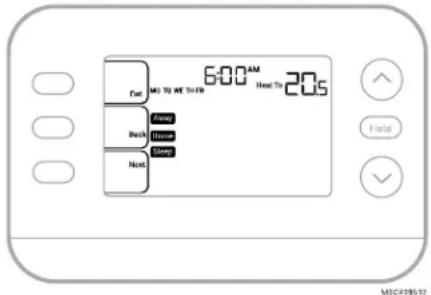
text_image
6:00 AM Fuel M3 TO WE YOU FM Back Next Help MSC439532text_image
Save Multi Permanently Hold MCR30531Bloqueo del teclado
text_image
FULL Save Task Hold MCR2953C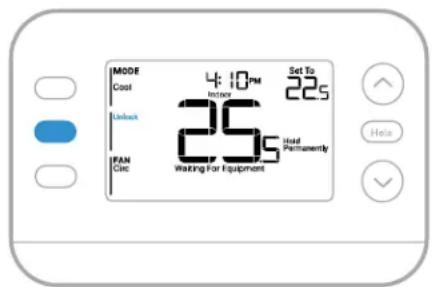
text_image
MODE Cost 4:10 PM Improve Set To 22s Unbox 25s Improve Permanently IFAN Circ Waiting for Equipment Help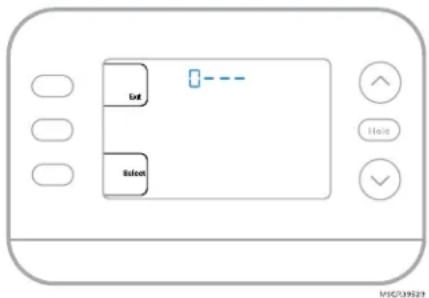
text_image
Load Resettext_image
MODE Cool 4:10PM Indoor Set To 22.5 MENU 26.5 Hold Permanently FAN Circ Waiting For EquipmentMSCR39528
Resideo Technologies Inc.
Scottsdale, AZ 85254
www.resideo.com
33-00691EFS-01 MB Rev. 12-24
© 2024 Resideo Technologies, Inc.
The Honeywell Home trademark is used under license from Honeywell International, Inc.
This product is manufactured by Resideo Technologies, Inc., and its affiliates.
text_image
Black and white barcode image with vertical lines and a small number '1' at the bottom right.33-00691EFS-01